
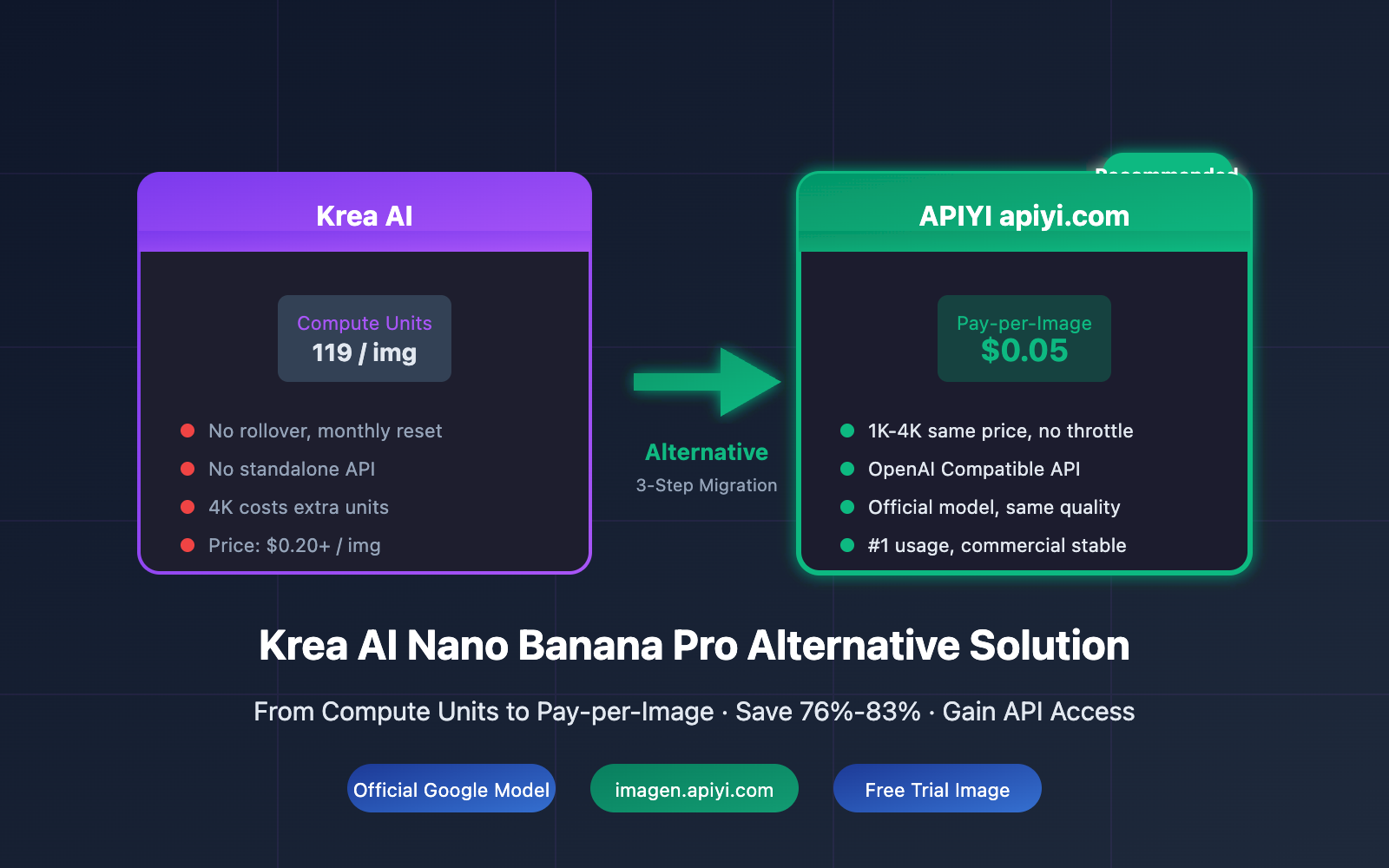
Krea AI's Nano Banana Pro is a blast to use, but the costs really sting
Krea AI is currently one of the most popular AI creative suites on the market, offering a powerful mix of image, video, and 3D generation tools. Among its lineup, Nano Banana Pro (Google's Gemini 3 Pro Image) has become the platform's hottest image model, thanks to its native 4K output and an impressive 94% accuracy in text rendering.
However, once you start using it seriously, you'll find that Krea's billing model has a few pain points that can be a real headache:
| Pain Point | The Specifics | The Impact |
|---|---|---|
| High unit consumption | Nano Banana Pro costs ~119 units per image | Your quota disappears incredibly fast |
| No quota rollover | Unused units are cleared at month-end | You end up wasting paid resources |
| Free tier limits | 50 uses/day, watermarks, low resolution | Not suitable for commercial work |
| No standalone API | Must be used via the Krea platform | You can't integrate it into your own products |
| 4K consumption doubles | High resolution requires even more units | Costs climb even higher for quality output |
🎯 The Core Issue: Krea AI is perfect for creative exploration within its own interface. However, for developers who need stable API access, batch generation, or are simply cost-conscious, the compute unit model just isn't the most economical choice.
Real Cost Analysis of Krea AI Nano Banana Pro
Let's talk numbers and calculate the real cost of using Nano Banana Pro on Krea:
2.1 Krea AI Plans vs. Computation Units
| Plan | Monthly Fee | Computation Units | Images generated with Nano Banana Pro |
|---|---|---|---|
| Free | $0 | Limited (approx. 500) | ~4 images/day |
| Basic | $10 | ~5,000 | ~42 images |
| Pro | $35 | ~20,000 | ~168 images |
| Max | $60 | ~35,000 | ~294 images |
Note: The above figures are estimates based on 119 computation units per image. Actual consumption may vary depending on resolution and parameters.
2.2 Unit Price Comparison
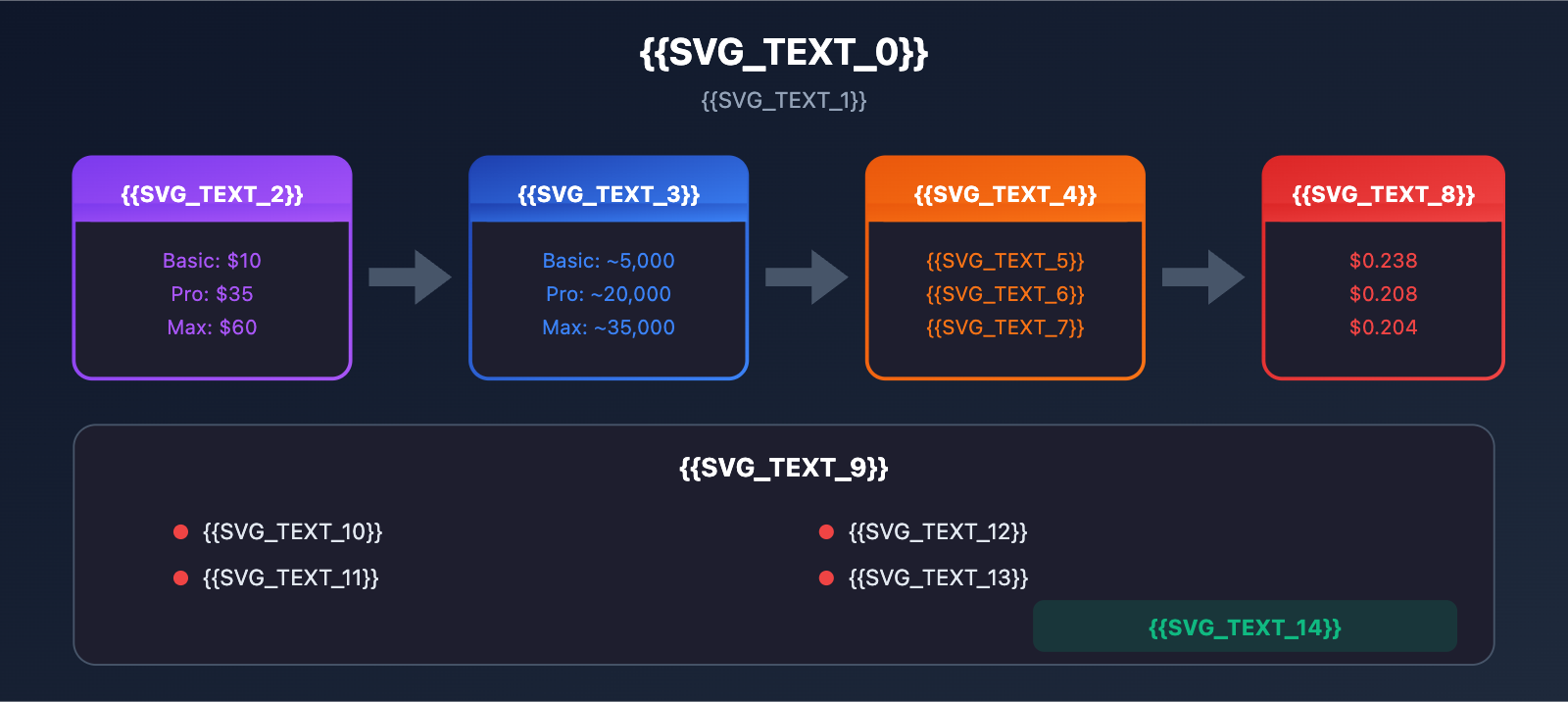
| Plan | Monthly Fee | Images Generated | Unit Price | vs Official $0.24 |
|---|---|---|---|---|
| Basic | $10 | ~42 images | $0.238/img | 99% |
| Pro | $35 | ~168 images | $0.208/img | 87% |
| Max | $60 | ~294 images | $0.204/img | 85% |
Key Findings:
- Not exactly cheap – Even with the Max plan, the unit price is $0.204, which is very close to official pricing.
- Quotas don't roll over – If you don't use them, you lose them. This can make the actual unit price even higher.
- No API access – You're restricted to manual operations on the Krea platform.
- Free version is unusable – Watermarks and low resolution make it unsuitable for commercial use.
💡 The Reality: Many users buy the Pro plan but only end up using half their quota each month. This effectively doubles their real unit price to $0.40+.
Why do you need an alternative to Krea AI Nano Banana Pro?
If you have the following needs, it's time to consider an alternative:
3.1 Developer Needs
- API Integration – You need to integrate image generation into your own applications.
- Batch Processing – You need to generate a large number of images at once.
- Stable Calls – You need reliable 24/7 service.
- Cost Control – Pay for what you actually use, with no waste.
3.2 Enterprise Needs
- Commercial Licensing – The generated images must be cleared for commercial use.
- SLA Guarantees – You need a Service Level Agreement.
- Transparent Billing – Clear reports on usage and costs are required.
- Technical Support – Professional technical assistance for implementation.
3.3 Ideal Features of an Alternative
| Feature | Krea AI | Ideal Alternative |
|---|---|---|
| Billing Method | Computation Units (no rollover) | Pay-as-you-go (pay for what you use) |
| API Support | No standalone API | Standard API interface |
| Price | $0.20+/image | < $0.10/image |
| 4K Support | Extra units consumed | Same price as standard |
| Rate Limiting | Concurrency limits apply | No rate limiting |
APIYI: The Best Alternative for Nano Banana Pro
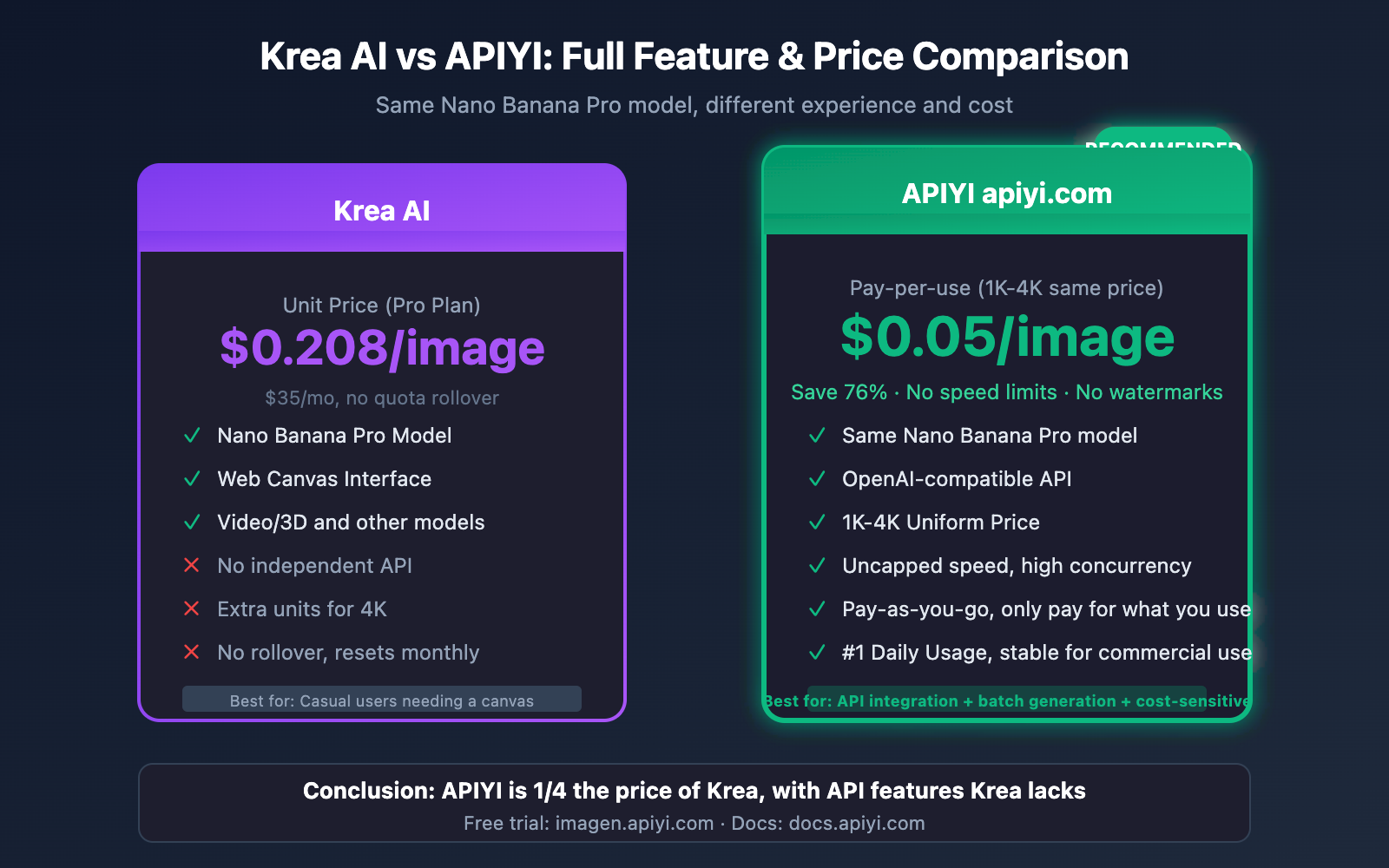
After a comprehensive comparison, APIYI (apiyi.com) stands out as the best alternative for Krea AI's Nano Banana Pro:
4.1 Core Advantages
| Advantage | Description |
|---|---|
| Rock-bottom Pricing | $0.05 per generation, just 1/4 the cost of Krea |
| Flat 1K-4K Pricing | No matter the resolution, it's a flat $0.05 |
| Guaranteed Official Relay | Direct access to official Google endpoints, not a third-party model |
| No Rate Limits | No quota restrictions; supports high-concurrency batch generation |
| Highest Daily Volume | The platform's most popular model, backed by massive maintenance resources |
| OpenAI Compatible | Use the SDKs you already know; zero learning curve |
4.2 Price Comparison at a Glance
Krea AI Pro:    $0.208/image ($35/mo subscription, no rollover)
Google Official 4K: $0.240/image (Regional and quota restrictions apply)
APIYI:         $0.050/image (Pay-as-you-go, 1K-4K same price!)

Savings:
vs Krea Pro: 76%
vs Google 4K: 79%
4.3 Free Trial
Want to see the results for yourself? We offer a free online testing tool:
🎨 AI Image Master: Visit
imagen.apiyi.comto try one generation for free. Experience the 4K output quality of Nano Banana Pro firsthand—it's identical to what you get on Krea.
3-Step Guide to Migrating from Krea AI to APIYI
5.1 Step 1: Get Your API Key
- Visit APIYI at
apiyi.comand register an account. - Create an API Key in the dashboard.
- Top up your account balance (supports Alipay and WeChat).
5.2 Step 2: Choose Your Integration Method
APIYI supports two invocation methods, making it a perfect fit for your existing code:
Option 1: Official Google Format (Recommended for those familiar with Google APIs)
import google.generativeai as genai

# Just replace the endpoint and key; everything else stays the same as the official docs
genai.configure(
    api_key="your-apiyi-key",
    transport="rest",
    client_options={"api_endpoint": "https://api.apiyi.com"}
)

model = genai.ImageGenerationModel("imagen-3.0-generate-002")

result = model.generate_images(
    prompt="A cyberpunk street scene at night, neon lights, 4K ultra detailed",
    number_of_images=1,
    aspect_ratio="16:9"
)

result.images[0].save("output.png")
📚 Official Format Reference: Check out the Google official documentation at
ai.google.dev/gemini-api/docs/image-generation. APIYI is fully compatible; you just need to swap the endpoint.
Option 2: OpenAI-Compatible Format (Recommended for most developers)
import openai

client = openai.OpenAI(
    api_key="your-apiyi-key",
    base_url="https://api.apiyi.com/v1"  # APIYI unified interface
)

response = client.images.generate(
    model="nano-banana-pro",
    prompt="Professional product photo, wireless earbuds on marble surface, studio lighting, 4K",
    size="1024x1024",
    quality="hd"
)

print(response.data[0].url)
5.3 Step 3: Migrate Your Workflow in Bulk
If you have a set creative process on Krea, here’s how to move it over:
| Krea Action | APIYI Equivalent |
|---|---|
| Entering prompts on the Krea canvas | Call the images.generate API endpoint |
| Using Krea style presets | Add style descriptions directly to your prompt |
| Downloading generated images | Download from the returned URL or decode the base64 string |
| Batch generating multiple images | Loop the API call or use the n parameter |
Node.js and cURL Code Examples
6.1 Node.js Example
import OpenAI from 'openai';

const client = new OpenAI({
  apiKey: 'your-apiyi-key',
  baseURL: 'https://api.apiyi.com/v1'  // APIYI Endpoint
});

async function generateImage(prompt, size = '1024x1024') {
  const response = await client.images.generate({
    model: 'nano-banana-pro',
    prompt: prompt,
    size: size,
    quality: 'hd'
  });

  return response.data[0].url;
}

// Usage Example
const imageUrl = await generateImage(
  'Minimalist logo design for a tech startup, clean lines, modern'
);
console.log('Generated:', imageUrl);
6.2 cURL Example
curl -X POST "https://api.apiyi.com/v1/images/generations" \
  -H "Authorization: Bearer your-apiyi-key" \
  -H "Content-Type: application/json" \
  -d '{
    "model": "nano-banana-pro",
    "prompt": "Architectural visualization, modern glass building, sunset lighting, 4K",
    "size": "1024x1024",
    "quality": "hd"
  }'
6.3 Batch Generation Example
import openai
import asyncio

client = openai.OpenAI(
    api_key="your-apiyi-key",
    base_url="https://api.apiyi.com/v1"
)

async def batch_generate(prompts: list) -> list:
    """Batch generate images - something Krea can't do"""
    results = []

    for prompt in prompts:
        response = client.images.generate(
            model="nano-banana-pro",
            prompt=prompt,
            size="1024x1024",
            quality="hd"
        )
        results.append(response.data[0].url)

    return results

# Batch generate 10 product photos
prompts = [
    f"Product photo of smartphone case color {color}, clean background, studio lighting"
    for color in ['red', 'blue', 'green', 'black', 'white', 'pink', 'purple', 'orange', 'yellow', 'gray']
]

# On Krea, this would require 10 manual operations
# With APIYI, a single loop handles it all
urls = asyncio.run(batch_generate(prompts))
print(f"Generated {len(urls)} images")
Cost Comparison: Savings Across Different Usage Levels
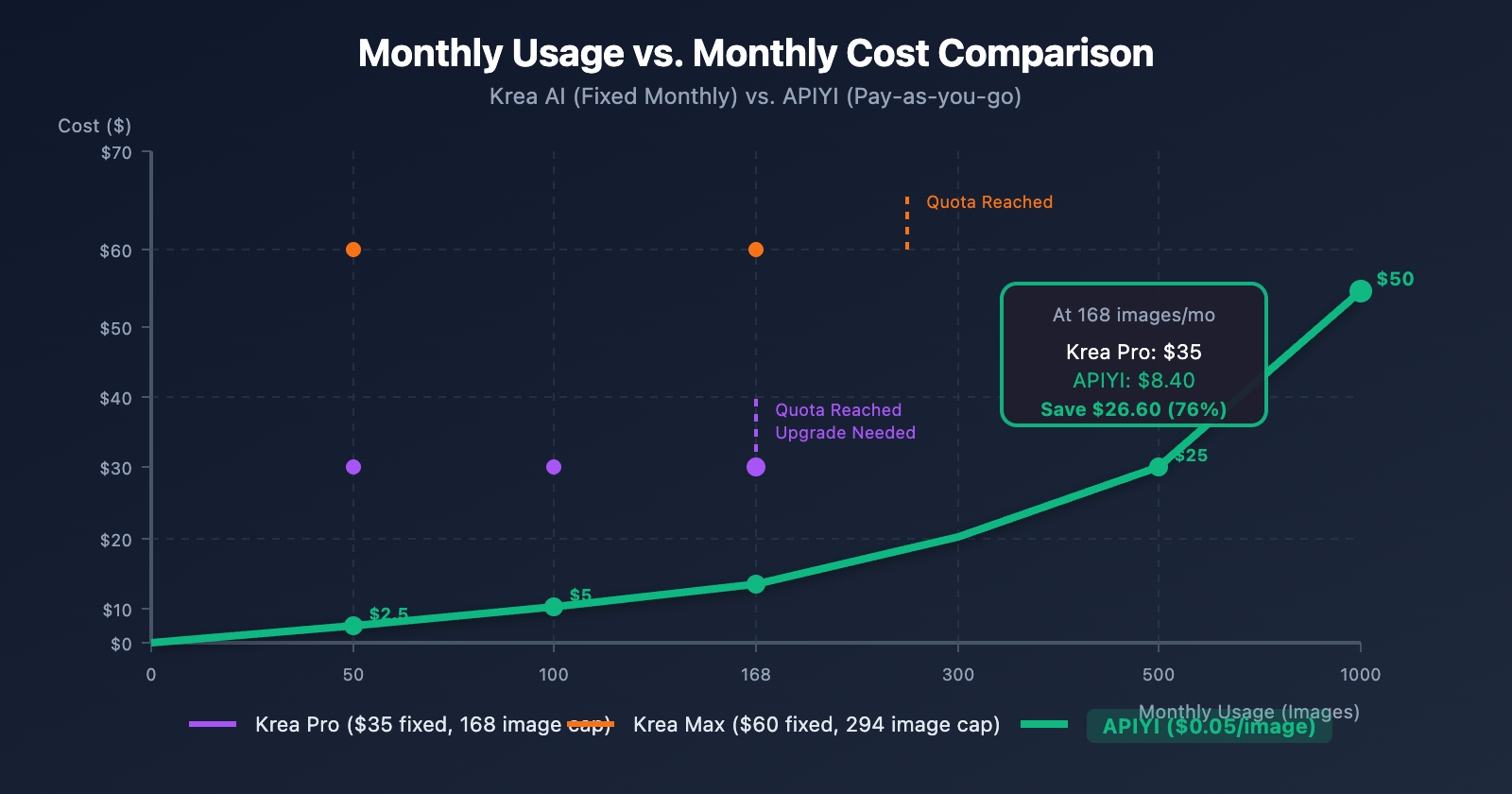
7.1 Monthly Cost Simulation
| Monthly Usage | Krea Pro ($35 Fixed) | Krea Max ($60 Fixed) | APIYI | Recommendation |
|---|---|---|---|---|
| 50 Images | $35 (Actual $0.70/img) | $60 (Actual $1.20/img) | $2.50 | APIYI |
| 100 Images | $35 ($0.35/img) | $60 ($0.60/img) | $5 | APIYI |
| 168 Images | $35 ($0.208/img) | $60 ($0.357/img) | $8.40 | APIYI |
| 300 Images | Must upgrade to Max | $60 ($0.20/img) | $15 | APIYI |
| 500 Images | Not supported | Not supported | $25 | APIYI |
| 1,000 Images | Not supported | Not supported | $50 | APIYI |
7.2 Key Insights
- Low Usage: If you're only generating 50 images a month, Krea Pro's effective price is a staggering $0.70/image. With APIYI, you'd only pay $2.50 total.
- Medium Usage: Even if you max out Krea Pro's 168-image quota, APIYI still saves you 76%.
- High Usage: Beyond 300 images, Krea simply can't keep up, while APIYI has no limits.
7.3 Annual Cost Comparison
Suppose you're a content team generating 200 images per month:
Krea Max Annual:  $60 × 12 = $720 (and you might still hit limits)
APIYI:           $0.05 × 200 × 12 = $120

Annual Savings: $600 (83%)
💰 Cost Optimization: Calling Nano Banana Pro via APIYI (apiyi.com) can save you 76%-83% in costs compared to Krea AI, while giving you unlimited scalability and full API integration.
Krea AI vs. APIYI Feature Comparison
| Feature | Krea AI | APIYI |
|---|---|---|
| Nano Banana Pro | ✅ | ✅ |
| Native 4K Output | ✅ (Extra cost) | ✅ (Same price) |
| Text Rendering Accuracy | 94% | 94% (Same model) |
| API Interface | ❌ | ✅ OpenAI Compatible |
| Batch Generation | ❌ Manual only | ✅ Supported |
| Billing Method | Computing Units (Non-rollover) | Pay-per-use |
| Unit Price (4K) | ~$0.20+ | $0.05 |
| Rate Limiting | Concurrency limits apply | No limits |
| Commercial License | Pro and above | Included for everyone |
| Watermark | Included in Free version | None |
Frequently Asked Questions (FAQ)
Q1: Is the Nano Banana Pro on APIYI the same model as the one on Krea?
A: Yes, they're identical. Both platforms call Google's official Gemini 3 Pro Image model (Nano Banana Pro is just a marketing name). APIYI connects directly to Google's official interface, ensuring it's an official model relay. The generation quality is exactly the same as what you'd get on Krea.
Q2: Why is APIYI able to offer such low prices?
A: There are a few main reasons:
- Highest Daily Usage – Nano Banana Pro is the most-used model on the APIYI platform, which gives us significant economies of scale.
- Technical Optimization – Our smart routing and resource scheduling help keep operational costs down.
- API Focus – We don't need to maintain a complex web canvas interface, allowing us to pass those savings on to you.
Q3: How long does it take to migrate from Krea to APIYI?
A: If you're comfortable with basic programming, you'll be done in 10 minutes:
- Register an account and get your API Key (2 mins).
- Copy the code example and swap in your Key (3 mins).
- Run a test to confirm the results (5 mins).
Check out the detailed documentation at docs.apiyi.com.
Q4: Do you support Krea's canvas editing features?
A: APIYI focuses specifically on image generation APIs and doesn't provide a web-based canvas interface. If you need to:
- Generate images → APIYI is a perfect fit.
- Online editing → We recommend using other dedicated image editing tools alongside our API.
Q5: Is there a free trial?
A: Yes! Visit AI Image Master at imagen.apiyi.com. You can try generating one image for free to see for yourself if the quality matches what you see on Krea.
Q6: Do you offer discounts for high-volume enterprise use?
A: Absolutely. For enterprise customers with over 10,000 requests per month, please contact us for a custom plan. Visit apiyi.com to learn more.
Recommended Scenarios
9.1 When to stick with Krea AI
- ✅ You need Krea's canvas editing and real-time preview features.
- ✅ You use Krea's other models like Video or 3D.
- ✅ You only use it occasionally (less than 30 images per month).
- ✅ You prefer a visual UI and don't want to write code.
9.2 When to migrate to APIYI
- ✅ You need to integrate the API into your own application.
- ✅ Your monthly usage exceeds 50 images.
- ✅ You need batch generation capabilities.
- ✅ You're looking for the best price-performance ratio and are budget-conscious.
- ✅ You need stable 4K output without paying extra for higher resolutions.
- ✅ You require commercial-grade stability and SLA guarantees.
9.3 Typical Migration Cases
| User Type | Before (Krea) | After (APIYI) | Monthly Savings |
|---|---|---|---|
| Indie Developer | Pro $35/mo | ~$5/mo (100 images) | $30 |
| Design Studio | Max $60/mo | ~$15/mo (300 images) | $45 |
| E-commerce Team | Not enough capacity | ~$50/mo (1000 images) | Unlimited |
| SaaS Product | No API available | ~$100/mo (2000 images) | Gained Capability |
Summary: 3 Steps to Switch to a Krea AI Nano Banana Pro Alternative
If you're frustrated by Krea AI's high costs and lack of an API, you can take action right now:
Step 1: Free Trial
Visit imagen.apiyi.com to try out one image for free and see if the results meet your expectations.
Step 2: Check the Docs
Visit docs.apiyi.com to get all the details on API endpoints and see code examples.
Step 3: Get Started
Register an account at apiyi.com, grab your API Key, and start saving money today.
💡 Core Value: APIYI's Nano Banana Pro service costs just $0.05 per request, with the same price for 1K-4K resolutions, no speed limits, and guaranteed official redistribution. As the top-consumed model on our platform daily, we've invested significant DevOps resources to ensure it's stable for commercial use. Compared to Krea AI, you'll save 76%-83% in costs while gaining true API capabilities.
References
- Krea AI Official Website: krea.ai
- Krea Pricing: krea.ai/pricing
- Google AI Image Generation Documentation: ai.google.dev/gemini-api/docs/image-generation
- APIYI Official Documentation: docs.apiyi.com
- AI Image Master (Free Trial): imagen.apiyi.com
This article was written by the APIYI Team. Nano Banana Pro is APIYI's top-performing flagship model by daily volume. If you'd like to learn more or are looking for custom enterprise solutions, feel free to visit apiyi.com and get in touch.


