
"Can AI actually operate my computer for me?" This has been one of the hottest topics in the developer community lately. The answer is yes—and more than one vendor offers this capability. In this article, we’ll dive deep into the technical principles of the Computer Use API, compare the integration methods for Claude, Gemini, and GPT-5.4, and help you get set up in just 3 steps.
Key Takeaways: After reading this, you’ll understand how Computer Use works, master the API invocation methods for these three major platforms, and learn how to flexibly apply these capabilities within Agent frameworks like OpenClaw.
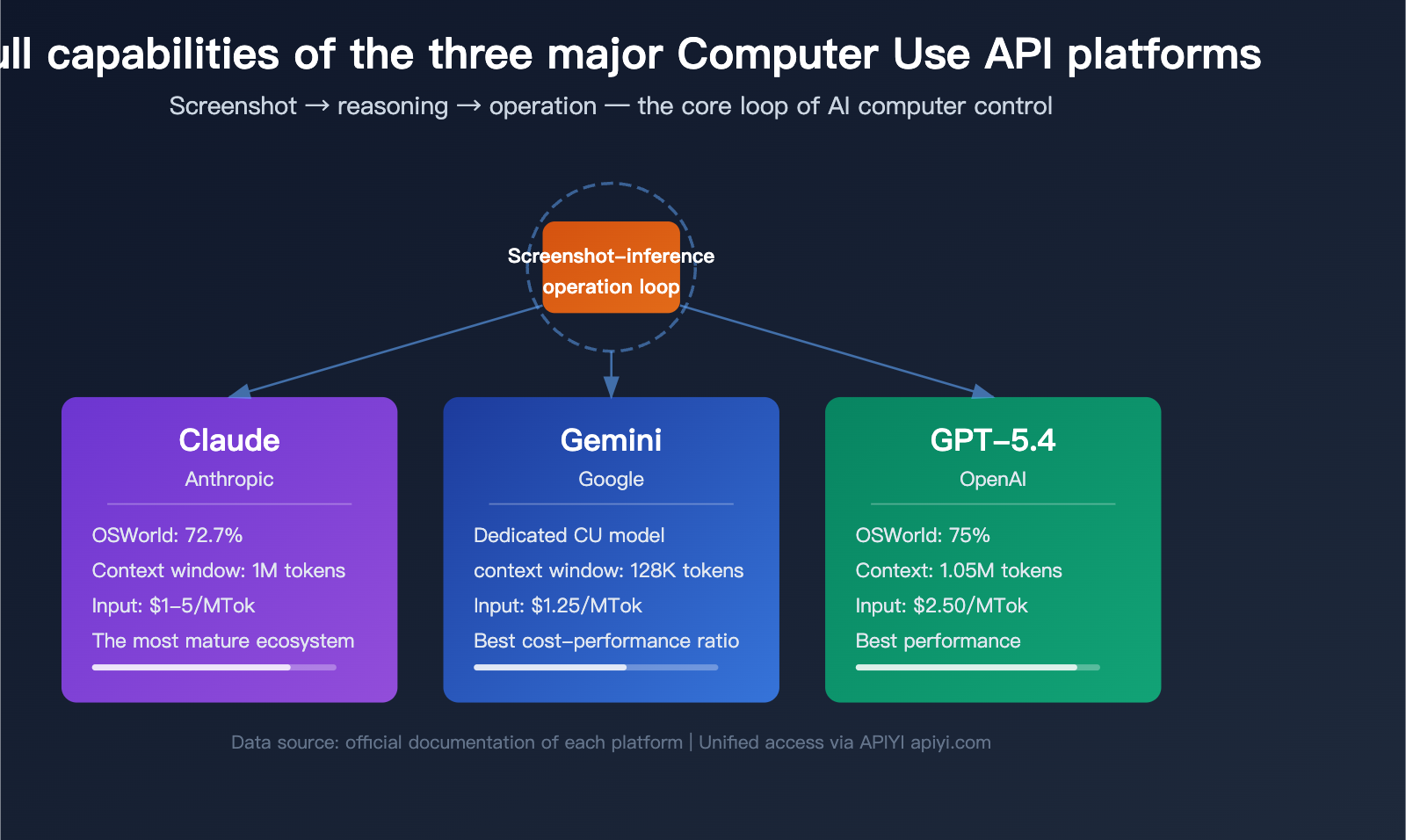
Computer Use API Core Concepts: Is it an API Capability or an Agent Feature?
Many developers often get confused by one question: Is "Computer Use" an API capability inherent to the model itself, or is it an add-on feature of an Agent framework?
The answer is: Computer Use is an API-level tool capability, not just an exclusive feature of any specific Agent framework. Agent products like Claude Code, OpenClaw, and Operator are all upper-layer applications built on top of this API capability.
How the Computer Use API Works
At its core, Computer Use follows a Screenshot-Reasoning-Action loop:
| Step | Executor | Action |
|---|---|---|
| Step 1: Screenshot | Your code | Captures the screen and sends it to the model |
| Step 2: Reasoning | AI model | Analyzes the screenshot and decides the next move |
| Step 3: Action | Your code | Executes the structured instructions returned by the model (click, type, scroll, etc.) |
| Step 4: Loop | Collaboration | Takes another screenshot and repeats until the task is done |
This means the model doesn't directly control your computer. It only "sees" and "thinks," while your application handles the "doing." This design ensures both security and maximum flexibility.
API Tools vs. Agent Frameworks: The Differences
| Dimension | API Tool (Computer Use) | Agent Framework (Upper-layer App) |
|---|---|---|
| Nature | Model capability, called via API parameters | A complete application built on the API |
| Examples | Claude computer_20251124, OpenAI computer_use_preview |
Claude Code, OpenClaw, Operator |
| Executor | Your code handles the execution | Framework has a built-in execution environment |
| Flexibility | Fully customizable, handles any scenario | Out-of-the-box, fixed scenarios |
| Best for | Developers needing custom solutions | Users looking for quick integration |
🎯 Technical Advice: If you need to integrate Computer Use into your own product, you should call the API directly rather than embedding an entire Agent framework. Through APIYI (apiyi.com), you can unify access to multiple Computer Use APIs, significantly reducing integration costs.
Comparing Three Major Computer Use API Platforms: Claude vs. Gemini vs. GPT-5.4
Currently, there are three major providers of Computer Use APIs: Anthropic (Claude), Google (Gemini), and OpenAI (GPT-5.4). All three use the same screenshot-action loop, but they differ in model capability, pricing, and integration methods.
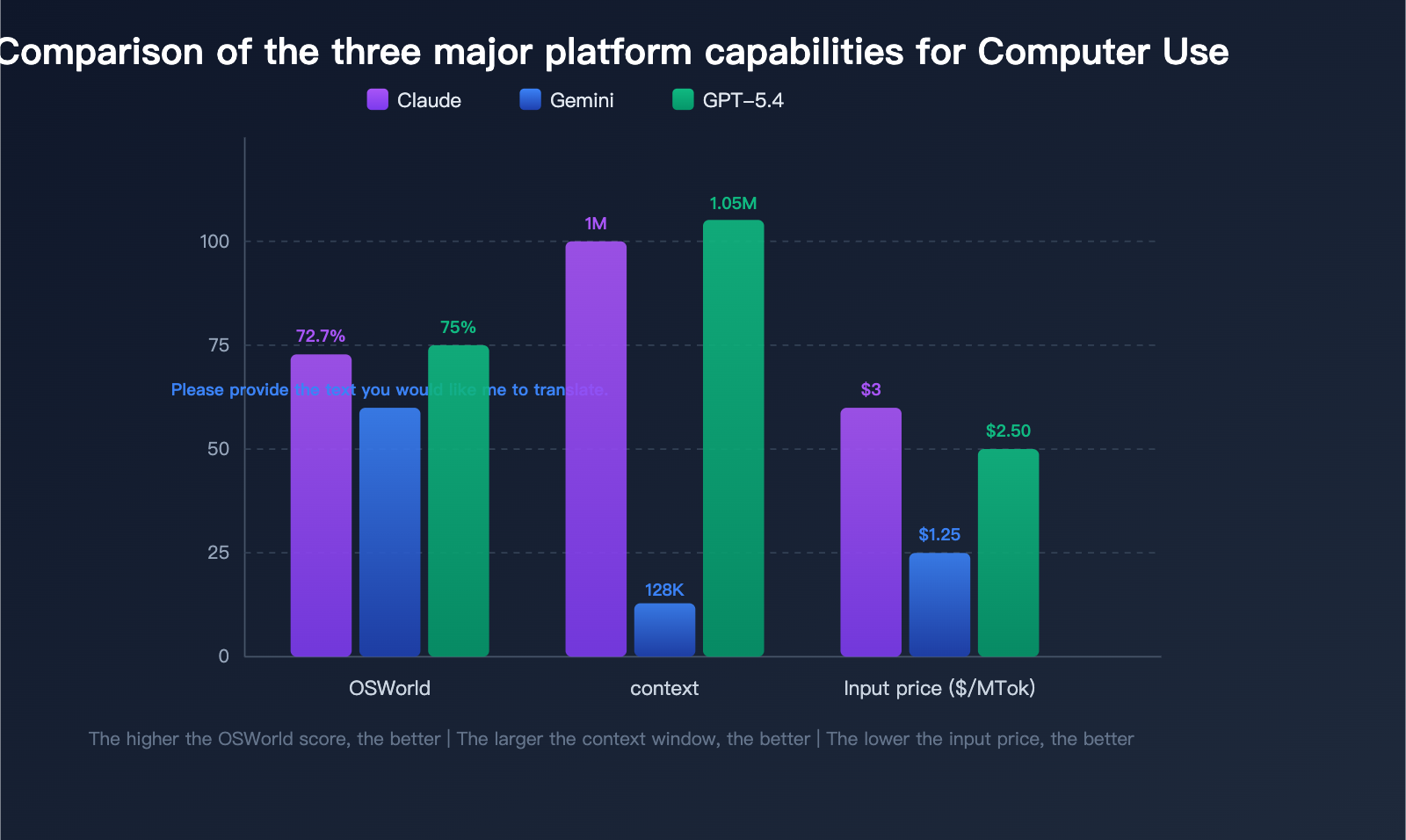
Core Capability Comparison
| Comparison Dimension | Claude (Anthropic) | Gemini (Google) | GPT-5.4 (OpenAI) |
|---|---|---|---|
| Recommended Model | Claude Opus 4.6 / Sonnet 4.6 | gemini-2.5-computer-use-preview-10-2025 | gpt-5.4 |
| Tool Version | computer_20251124 |
Computer Use Toolset | computer_use_preview |
| OSWorld Score | 72.7% | Not public | 75% (Surpasses human 72.4%) |
| Context Window | Up to 1M tokens | 128K tokens | 1.05M tokens |
| Input Price | $1-5/MTok | $1.25/MTok | $2.50/MTok |
| Output Price | $5-25/MTok | $10/MTok | $15/MTok |
| Maturity | Earliest launch, most iterations | Public preview | Generally available |
| APIYI Availability | ✅ Supported | ✅ Supported | ✅ Supported |
Platform Analysis
Claude Computer Use — Most Mature Ecosystem
Anthropic was the first to launch Computer Use (October 2024) and has gone through multiple iterations. The latest tool version, computer_20251124, supports scaling operations, making it ideal for high-resolution screens. Claude provides excellent reference implementations and a Docker development environment, offering the best developer experience.
Gemini Computer Use — Best Value
Google offers a dedicated Computer Use model, gemini-2.5-computer-use-preview-10-2025, with an input price of just $1.25/MTok, making it the most affordable option among the three. Additionally, the latest Gemini 3 Pro/Flash models have integrated Computer Use as a native capability, eliminating the need for a separate model. Google also provides a Computer Use Toolset within their Agent Development Kit (ADK) for quick integration.
GPT-5.4 Computer Use — Most Powerful Performance
OpenAI's GPT-5.4 achieved a 75% score on the OSWorld benchmark, surpassing the human expert baseline of 72.4%, making it the most powerful Computer Use model currently available. By calling the Responses API, it integrates seamlessly with the existing OpenAI ecosystem.
Getting Started with the Computer Use API: A 3-Step Integration Guide
Step 1: Get Your API Key
🚀 Quick Start: We recommend getting your API key via APIYI (apiyi.com). A single account allows you to invoke the Computer Use API for Claude, Gemini, and GPT-5.4 without needing to register for each service separately.
Step 2: Code Integration (Using Claude as an Example)
Minimalist Example
import anthropic

client = anthropic.Anthropic(
    api_key="YOUR_API_KEY",
    base_url="https://api.apiyi.com"  # APIYI unified interface
)

response = client.messages.create(
    model="claude-sonnet-4-6-20250514",
    max_tokens=1024,
    tools=[
        {
            "type": "computer_20251124",
            "name": "computer",
            "display_width_px": 1280,
            "display_height_px": 800,
            "display_number": 1,
        }
    ],
    messages=[
        {
            "role": "user",
            "content": "Please open the browser and search for 'Computer Use API tutorial'"
        }
    ],
    betas=["computer-use-2025-11-24"]
)

print(response.content)
View full loop code example
import anthropic
import base64
import subprocess

client = anthropic.Anthropic(
    api_key="YOUR_API_KEY",
    base_url="https://api.apiyi.com"  # APIYI unified interface
)

def take_screenshot():
    """Capture the screen and return base64 encoding"""
    subprocess.run(["screencapture", "-x", "/tmp/screenshot.png"])
    with open("/tmp/screenshot.png", "rb") as f:
        return base64.standard_b64encode(f.read()).decode()

def execute_action(action):
    """Execute action instructions returned by the model"""
    action_type = action.get("action")
    if action_type == "left_click":
        x, y = action["coordinate"]
        subprocess.run(["cliclick", f"c:{x},{y}"])
    elif action_type == "type":
        text = action["text"]
        subprocess.run(["cliclick", f"t:{text}"])
    elif action_type == "key":
        key = action["key"]
        subprocess.run(["cliclick", f"kp:{key}"])
    elif action_type == "screenshot":
        return take_screenshot()
    return None

# Main loop
messages = [
    {"role": "user", "content": "Open the browser and search for Python tutorials"}
]

tools = [
    {
        "type": "computer_20251124",
        "name": "computer",
        "display_width_px": 1280,
        "display_height_px": 800,
        "display_number": 1,
    }
]

while True:
    response = client.messages.create(
        model="claude-sonnet-4-6-20250514",
        max_tokens=1024,
        tools=tools,
        messages=messages,
        betas=["computer-use-2025-11-24"]
    )

    # Check if task is complete
    if response.stop_reason == "end_turn":
        print("Task complete!")
        break

    # Process tool calls
    for block in response.content:
        if block.type == "tool_use":
            result = execute_action(block.input)
            if result is None:
                result = take_screenshot()
            messages.append({"role": "assistant", "content": response.content})
            messages.append({
                "role": "user",
                "content": [
                    {
                        "type": "tool_result",
                        "tool_use_id": block.id,
                        "content": [
                            {
                                "type": "image",
                                "source": {
                                    "type": "base64",
                                    "media_type": "image/png",
                                    "data": result,
                                },
                            }
                        ],
                    }
                ],
            })
            break
Step 3: Invoking Computer Use for Gemini and GPT-5.4
Gemini Computer Use invocation example:
from google import genai

client = genai.Client(
    api_key="YOUR_API_KEY",
    http_options={"base_url": "https://api.apiyi.com"}
)

response = client.models.generate_content(
    model="gemini-2.5-computer-use-preview-10-2025",
    contents="Open the calculator and calculate 42 * 58",
    config={
        "tools": [{"computer_use": {}}],
        "temperature": 0,
    }
)
GPT-5.4 Computer Use invocation example:
from openai import OpenAI

client = OpenAI(
    api_key="YOUR_API_KEY",
    base_url="https://api.apiyi.com/v1"  # APIYI unified interface
)

response = client.responses.create(
    model="gpt-5.4",
    tools=[{"type": "computer_use"}],
    input="Open the file manager and find the Downloads folder"
)
Summary of the Three API Invocation Methods
| Platform | SDK | Tool Definition | Beta Header |
|---|---|---|---|
| Claude | anthropic Python SDK |
"type": "computer_20251124" |
computer-use-2025-11-24 |
| Gemini | google-genai SDK |
"tools": [{"computer_use": {}}] |
Not required |
| GPT-5.4 | openai Python SDK |
"type": "computer_use" |
Not required |
Computer Use API Practical Scenarios and OpenClaw Integration
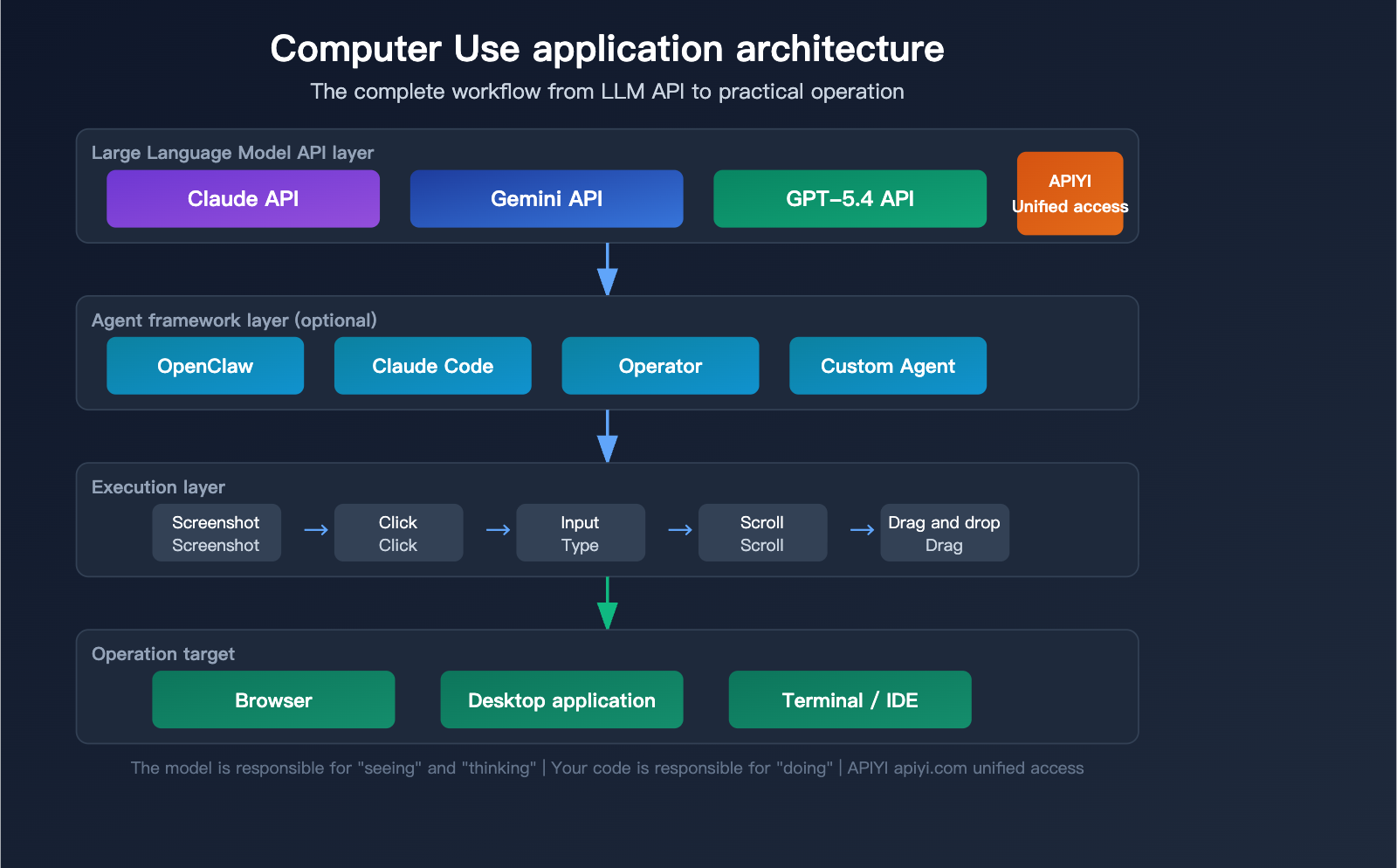
4 Core Application Scenarios
The Computer Use API isn't just about "remote-controlling a mouse"—it's changing how we work across several fields:
Scenario 1: Automated Testing
Traditional UI testing requires writing extensive Selenium/Playwright scripts. With the Computer Use API, you can simply describe test steps in natural language, and the model will automatically perform the operations and validations.
Scenario 2: RPA Process Automation
In enterprise RPA scenarios, traditional tools require custom adapters for every system. Computer Use can act like a human operator, interacting directly with any GUI, significantly reducing RPA development costs.
Scenario 3: Technical Support and Remote Assistance
Let AI "see" the user's screen, automatically diagnose issues, provide guidance, or even execute repair steps directly.
Scenario 4: AI Programming Assistants
One of the core capabilities of AI programming tools like Claude Code is Computer Use—it can operate IDEs, run terminal commands, and view browser rendering results.
OpenClaw: Open-Source AI Agent Platform and Computer Use
OpenClaw is one of the most popular open-source AI Agent platforms for 2025-2026 (247K+ GitHub stars), created by Austrian developer Peter Steinberger (formerly known as Clawdbot).
Core Advantages of OpenClaw:
- Runs locally; data never leaves your device.
- Controlled via instant messaging platforms like WhatsApp, Telegram, and Slack.
- 100+ built-in skills, extensible via ClawHub.
- Supports various LLMs as inference engines, including Claude, GPT-5.4, and DeepSeek.
- Built-in browser control (Chrome CDP) and desktop operation capabilities.
How OpenClaw + Computer Use Works:
User Instruction (Chat Message)
    ↓
OpenClaw Orchestration Layer (Selects appropriate Skill)
    ↓
Invoke LLM Computer Use API (Claude/GPT-5.4)
    ↓
Execute Screen Operations (Browser/Desktop)
    ↓
Return result screenshot to user
💡 Practical Advice: When using Computer Use in OpenClaw, we recommend configuring the LLM backend to the APIYI (apiyi.com) unified interface. This allows you to flexibly switch between Claude, Gemini, or GPT-5.4 based on task complexity for the best cost-performance ratio.
Security Considerations
The Computer Use API grants AI the ability to control your computer, so security cannot be ignored:
| Risk Type | Description | Recommended Measures |
|---|---|---|
| Prompt Injection | Malicious content on the screen may mislead the model | Use a sandbox environment and limit the operation scope |
| Excessive Permissions | The model might perform unintended actions | Set an allowlist for operations; avoid root access |
| Data Leakage | Screenshots may contain sensitive information | Mask password/key areas and maintain audit logs |
| Third-Party Risks | Third-party plugins for frameworks like OpenClaw may be insecure | Only use verified official skills |
Computer Use API Pricing and Cost Optimization
Choosing a platform isn't just about performance—it's about the bottom line. Here’s a cost breakdown based on real-world usage scenarios.
Single Computer Use Task Cost Estimation
Assuming a typical Computer Use task involves 10 screenshot-action cycles, with each cycle consuming approximately 2,000 input tokens (including images) and 500 output tokens:
| Platform/Model | Input Tokens per Task | Output Tokens per Task | Estimated Cost |
|---|---|---|---|
| Claude Sonnet 4.6 | ~20K | ~5K | ~$0.14 |
| Claude Haiku 4.5 | ~20K | ~5K | ~$0.05 |
| Gemini CU Preview | ~20K | ~5K | ~$0.08 |
| GPT-5.4 | ~20K | ~5K | ~$0.13 |
| GPT-5.4 Pro | ~20K | ~5K | ~$0.15 |
💰 Cost Optimization: For scenarios with high-volume Computer Use calls, the APIYI (apiyi.com) platform offers more flexible billing options. We recommend using Haiku 4.5 or Gemini for simple tasks to keep costs down, and reserving GPT-5.4 or Claude Opus for complex tasks to ensure high-quality results.
Cost Optimization Tips
- Choose the Right Model: Use Haiku for simple form filling and Opus/GPT-5.4 for complex, multi-step tasks.
- Optimize Screenshot Resolution: We recommend 1280×800 (XGA); higher resolutions significantly increase token consumption.
- Reduce Cycle Count: Clearer instructions can reduce model trial-and-error, lowering the number of model invocations.
- Cache Common Workflows: For repetitive tasks, cache intermediate screenshots and action sequences.
Frequently Asked Questions
Q1: Is Computer Use a feature exclusive to Claude?
No. Computer Use is a general AI capability supported by Claude, Gemini, and GPT-5.4. While Anthropic was the first to launch this feature (October 2024), Google and OpenAI have since followed suit. The technical principles are the same across all three (screenshot-reasoning-action loops), with differences primarily in performance and pricing. You can use the APIYI (apiyi.com) platform to unify your calls to all three Computer Use APIs for quick comparison and selection.
Q2: What is the difference between the Computer Use API and using tools like Claude Code / OpenClaw directly?
Claude Code and OpenClaw are Agent frameworks that call the Computer Use API under the hood. If you want to embed computer control capabilities into your own products, you should use the API directly. If you just want AI to help you with daily tasks, using an Agent framework is more convenient. APIYI (apiyi.com) supports both direct API calls and acting as a backend for Agent frameworks, making it adaptable to various use cases.
Q3: What is the model ID for Gemini’s Computer Use?
Google provides a dedicated Computer Use preview model with the ID gemini-2.5-computer-use-preview-10-2025, which can be called via Google AI Studio and Vertex AI. Additionally, the latest Gemini 3 Pro and Gemini 3 Flash have integrated Computer Use as a native capability, so no separate model is required.
Q4: How does GPT-5.4 perform in Computer Use?
GPT-5.4 achieved a 75% score on the OSWorld benchmark, surpassing the 72.4% baseline set by human experts, making it the strongest Computer Use model based on currently available data. It is called via OpenAI's Responses API and supports an ultra-long context window of 1.05M tokens.
Q5: Is OpenClaw safe?
The core framework of OpenClaw is open-source and auditable. However, be aware that its third-party skill marketplace (ClawHub) lacks robust security vetting. Security researchers have identified data leakage and prompt injection risks in some third-party skills. We recommend using only officially vetted skills and running them in a sandboxed environment.
Summary: Choosing the Right Computer Use Solution for You
The Computer Use API is one of the most significant breakthroughs in the AI field for 2025-2026. It upgrades AI from a simple "conversational assistant" to an "operational assistant," allowing it to interact directly with computer interfaces to complete a wide range of automated tasks.
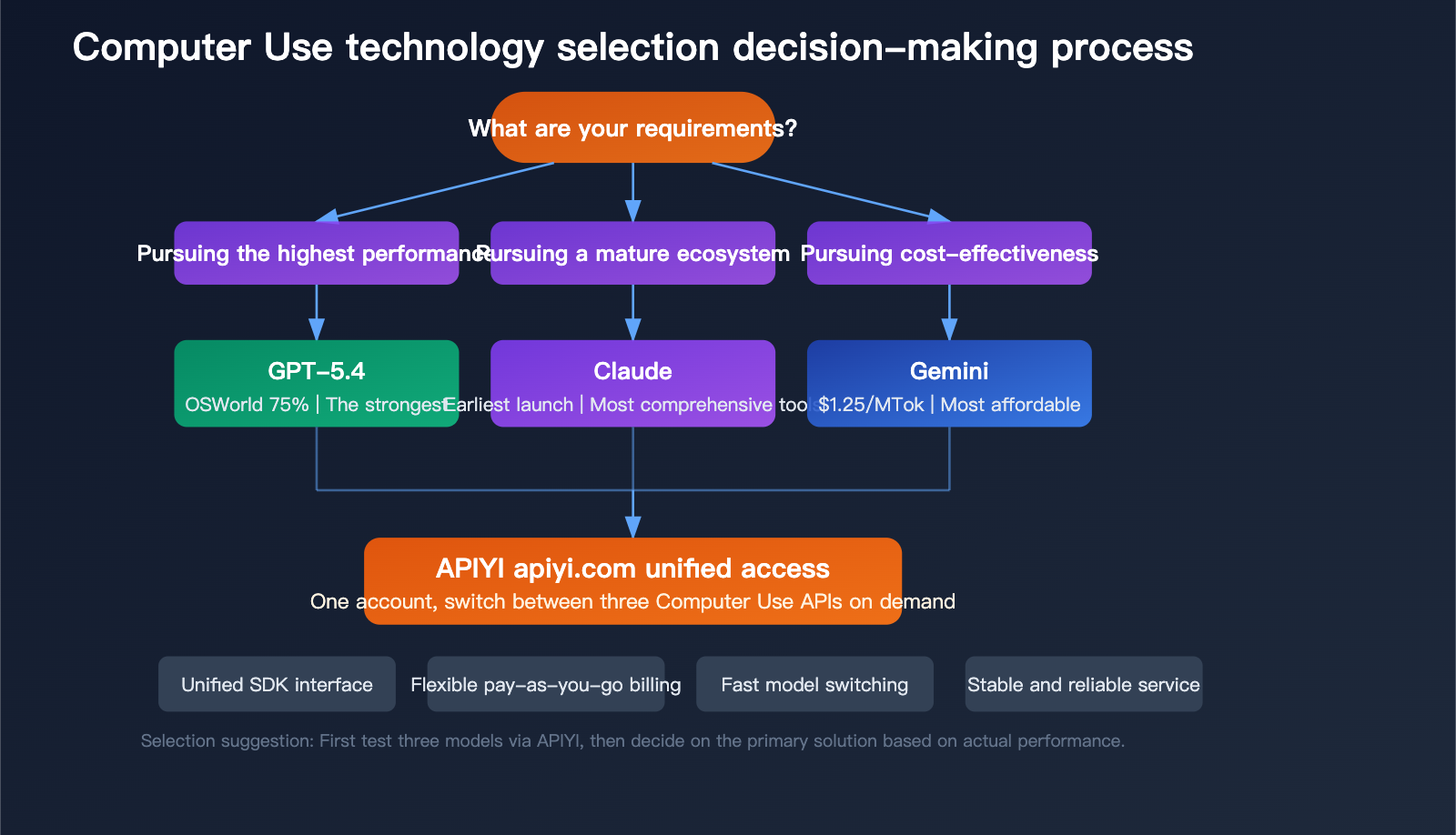
Quick Selection Guide:
- For Performance: Choose GPT-5.4 (OSWorld 75%)
- For Ecosystem: Choose Claude Computer Use (most mature tooling)
- For Cost-Effectiveness: Choose Gemini Computer Use (lowest price)
- For Flexibility: Use APIYI (apiyi.com) to integrate all three and switch as needed
Regardless of the platform you choose, the core principle remains the same: a loop of screenshot-reasoning-action. We recommend using APIYI (apiyi.com) to quickly test the Computer Use capabilities of different models and find the solution that best fits your specific scenario.
References
-
Anthropic Computer Use Documentation: Official guide for the Claude Computer Use tool.
- Link:
platform.claude.com/docs/en/agents-and-tools/tool-use/computer-use-tool
- Link:
-
Google Gemini Computer Use: Documentation for the Gemini 2.5 Computer Use model.
- Link:
ai.google.dev/gemini-api/docs/models/gemini-2.5-computer-use-preview-10-2025
- Link:
-
OpenAI GPT-5.4 Guide: GPT-5.4 Developer Guide.
- Link:
developers.openai.com/api/docs/guides/latest-model
- Link:
-
OpenClaw Project: An open-source AI Agent platform.
- Link:
github.com/openclaw/openclaw
- Link:
-
APIYI Computer Use Integration Guide: Unified API documentation.
- Link:
api.apiyi.com
- Link:
📝 Author: APIYI Team | The APIYI technical team stays at the forefront of AI capabilities like Computer Use, providing developers with unified and stable multi-model API access services via apiyi.com.


