
Author's Note: An in-depth comparison of the core differences between calling Nano Banana 2 (Gemini 3.1 Flash Image) via Vertex AI and AI Studio, covering authentication methods, endpoint configuration, rate limits, pricing differences, and best practices.
Nano Banana 2 is Google's latest image generation model, but many developers face a key question when integrating it: Should you use Vertex AI or AI Studio to call it? The two platforms have significant differences in authentication, endpoint configuration, rate limits, and enterprise features. This article will comprehensively analyze the two calling paths for the Nano Banana 2 API from a practical development perspective, helping you make the most suitable technical choice.
Core Value: After reading this article, you'll know when to choose Vertex AI versus AI Studio for different business scenarios, avoiding pitfalls in architectural decisions.
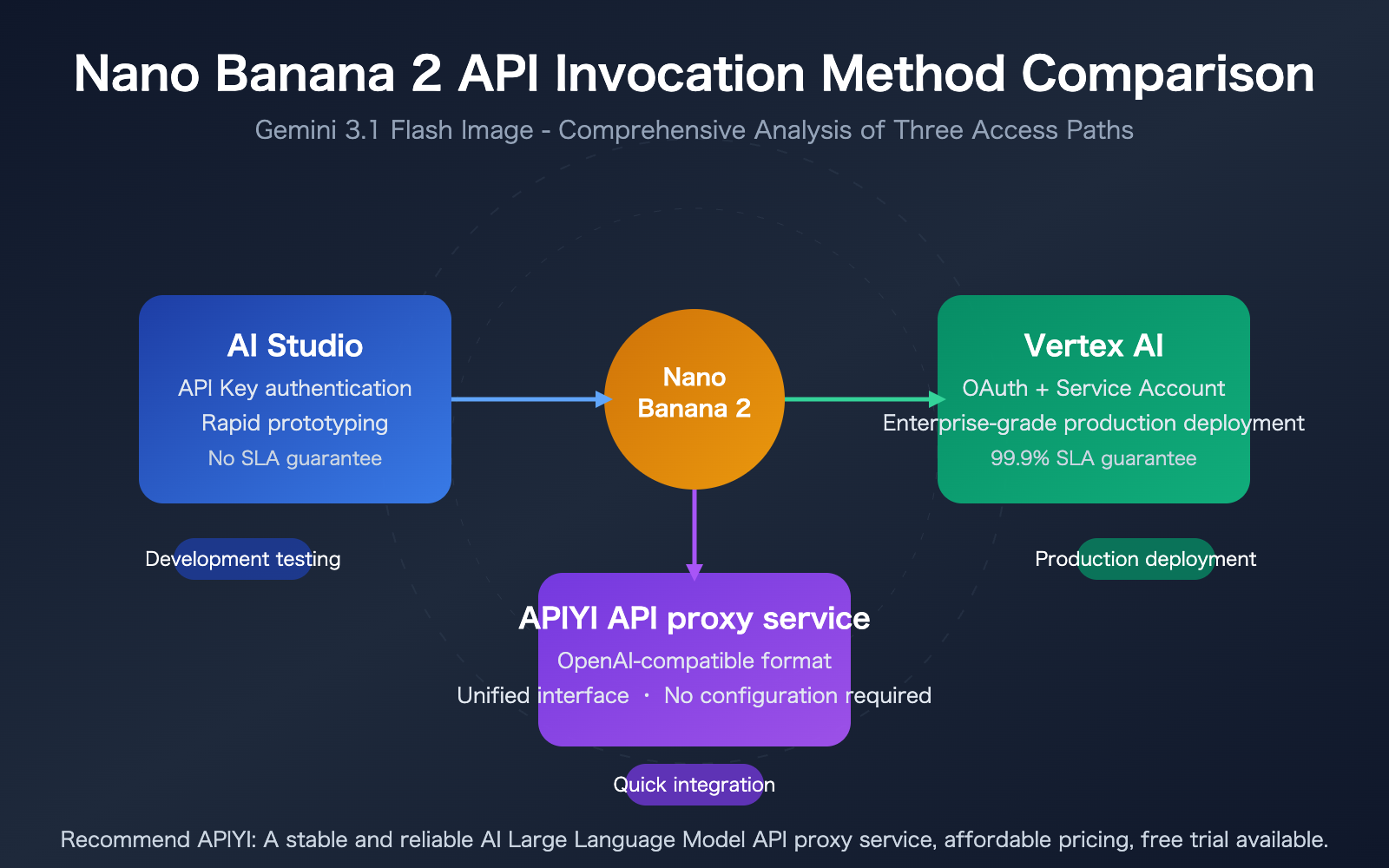
Nano Banana 2 API Core Points
Before diving into the comparison, let's understand the basic positioning and core capabilities of Nano Banana 2.
| Point | Description | Value |
|---|---|---|
| Model Positioning | Gemini 3.1 Flash Image, combining Pro-level quality with Flash-level speed | Balances quality and efficiency |
| Core Capabilities | Text-to-image, image editing, text rendering, character consistency | One model covers multiple image tasks |
| Output Resolution | 512px / 1K / 2K / 4K options available | Flexible to match different scenario needs |
| Calling Methods | AI Studio API / Vertex AI API / Third-party proxy | Multiple integration paths available |
Nano Banana 2 API Key Technical Parameters
Nano Banana 2 (Model ID: gemini-3.1-flash-image-preview) is the latest image generation model released by Google DeepMind in February 2026. It belongs to the Gemini model family, forming a complete product matrix alongside the previous Nano Banana (Gemini 2.5 Flash Image) and Nano Banana Pro (Gemini 3 Pro Image).
Unlike the standalone text-to-image model Imagen 4, Nano Banana 2 is a multimodal conversational model that supports generating and editing images within a conversational context. Its input token limit is 131,072, output token limit is 32,768, with a single image consuming approximately 2,520 tokens. It supports up to 14 reference images as input, and editing tasks typically have a latency under 20 seconds.
All generated images have SynthID watermarks embedded and support 14 aspect ratios including 1:1, 16:9, 9:16, 4:3, and 3:2.
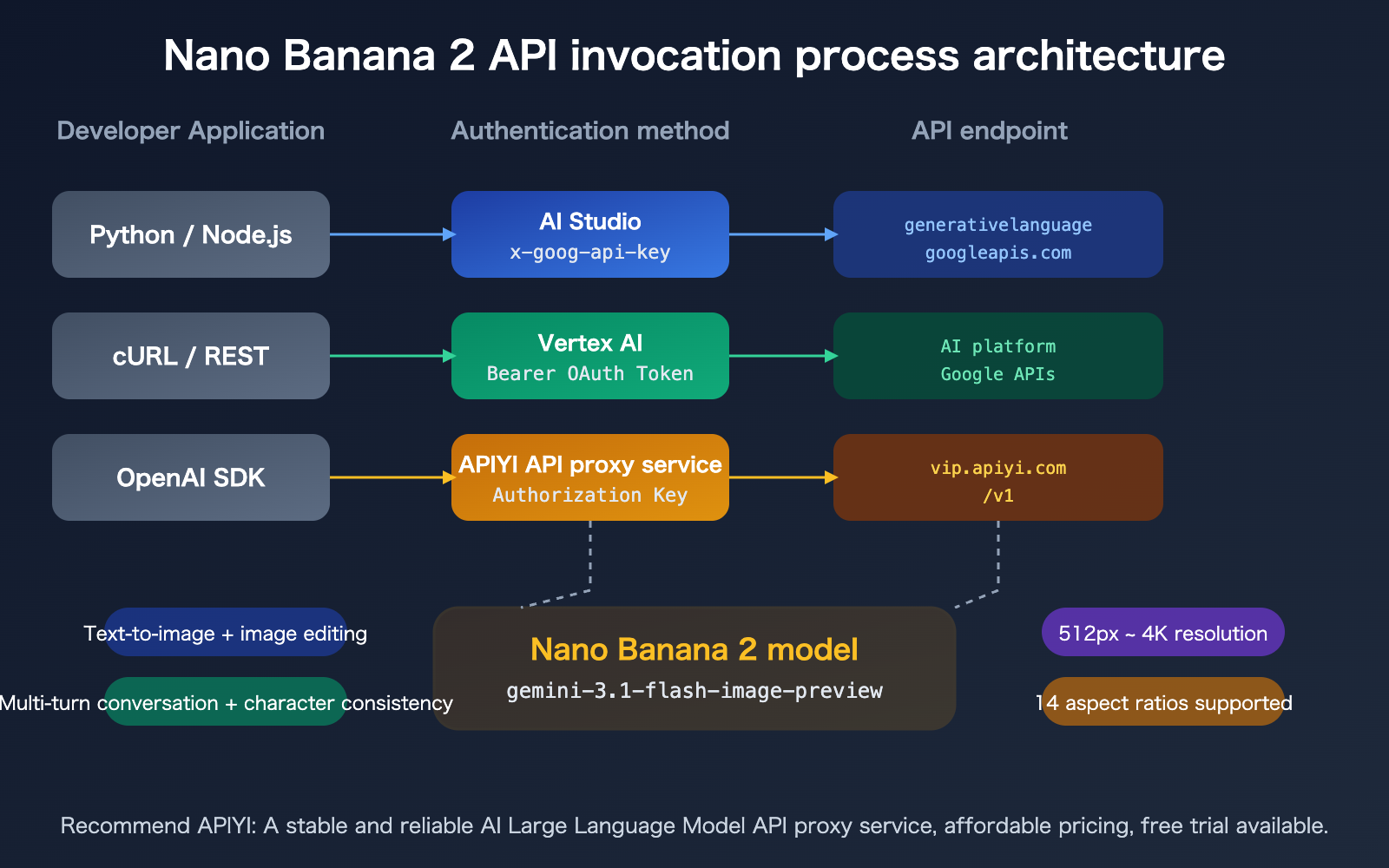
Nano Banana 2 API: Vertex AI vs. AI Studio Core Differences
This is what developers care about most: what's the actual difference between these two calling methods?
Nano Banana 2 API: Authentication & Endpoint Comparison
| Comparison Dimension | AI Studio | Vertex AI |
|---|---|---|
| Authentication Method | API Key (passed in request header) | Service Account + OAuth Bearer Token |
| API Endpoint | generativelanguage.googleapis.com |
aiplatform.googleapis.com |
| Configuration Complexity | Low (just one Key) | High (requires GCP project setup, IAM permissions) |
| SLA Guarantee | None | 99.9% Availability Guarantee |
| Compliance Certifications | Standard | SOC 2, ISO 27001, GDPR/HIPAA |
| IAM/VPC/CMEK | Not Supported | Supported |
| Private Endpoints | Not Supported | Supported |
| Fine-tuning Capability | Limited | Full Custom Fine-tuning |
| Enterprise Support | Self-service | Dedicated Enterprise Technical Support |
Nano Banana 2 API: Rate Limit Differences
Rate limits are an often-overlooked but hugely impactful factor when choosing a service.
AI Studio Rate Limits (increasing by tier):
| Tier | Request Rate | Daily Limit | Max Resolution | Batch Processing |
|---|---|---|---|---|
| Free Tier | ~15 RPM | ~20 images/day | 1K | Not Supported |
| Tier 1 (Billing Enabled) | 10 images/min | 1,000 requests/day | 4K | 1M Token |
| Tier 2 | Higher | Higher | 4K | 250M Token |
| Tier 3 | Highest | Highest | 4K | 750M Token |
Vertex AI Rate Limits:
- Custom quotas per project/region
- Can request limit increases via support ticket
- Supports Provisioned Throughput
- Flexible billing models: Standard On-Demand, Elastic On-Demand, Provisioned Throughput, Batch Processing
🎯 Selection Advice: If your business needs stable, high-concurrency image generation capabilities, Vertex AI's customizable quotas are better suited for production environments.
For rapid prototyping and personal projects, AI Studio's API Key method is simpler and more direct.
We recommend testing both through the APIYI apiyi.com platform, which offers a unified interface compatible with both calling methods, making it easy to compare and switch.
Nano Banana 2 API Quick Start
Minimal Example: Calling via AI Studio
Here's the simplest way to call Nano Banana 2 using an AI Studio API Key:
from google import genai
from google.genai import types

client = genai.Client(api_key="YOUR_GEMINI_API_KEY")

response = client.models.generate_content(
    model="gemini-3.1-flash-image-preview",
    contents=["Generate a cyberpunk-style city nightscape"],
    config=types.GenerateContentConfig(
        response_modalities=["TEXT", "IMAGE"],
        image_config=types.ImageConfig(
            aspect_ratio="16:9",
            image_size="2K"
        ),
    )
)

for part in response.parts:
    if part.text is not None:
        print(part.text)
    elif image := part.as_image():
        image.save("output.png")
View Vertex AI Calling Code
import os
from google import genai
from google.genai import types
from google.genai.types import HttpOptions

# Vertex AI requires GCP project configuration
os.environ["GOOGLE_CLOUD_PROJECT"] = "your-project-id"
os.environ["GOOGLE_CLOUD_LOCATION"] = "global"
os.environ["GOOGLE_GENAI_USE_VERTEXAI"] = "True"

client = genai.Client(http_options=HttpOptions(api_version="v1"))

response = client.models.generate_content(
    model="gemini-3.1-flash-image-preview",
    contents=["Generate a cyberpunk-style city nightscape"],
    config=types.GenerateContentConfig(
        response_modalities=["TEXT", "IMAGE"],
        image_config=types.ImageConfig(
            aspect_ratio="16:9",
            image_size="4K"
        ),
    )
)

for part in response.parts:
    if part.text is not None:
        print(part.text)
    elif image := part.as_image():
        image.save("output_vertex.png")
Additional Vertex AI Setup Steps:
- Create a GCP project and enable the Vertex AI API
- Configure a service account and download the credential JSON
- Set the
GOOGLE_APPLICATION_CREDENTIALSenvironment variable - Install the
gcloudCLI and complete authentication
Recommendation: Regardless of which calling method you choose, we suggest first getting free test credits through APIYI apiyi.com for verification. The platform provides a unified interface in OpenAI-compatible format, eliminating the need to configure Google's authentication systems separately.
Nano Banana 2 API Pricing Comparison
Understanding the cost structure is a crucial part of technical decision-making. Nano Banana 2's pricing is based on output tokens and resolution. Vertex AI and AI Studio share the same base price, but their billing models differ.
Nano Banana 2 API Pricing by Resolution
| Resolution | Standard API Price | Bulk API Price (50% off) | Use Case |
|---|---|---|---|
| 0.5K (512px) | $0.045/image | $0.022/image | Thumbnails, preview images |
| 1K (1024px) | $0.067/image | $0.034/image | Social media, blog images |
| 2K (2048px) | $0.101/image | $0.050/image | High-quality display, e-commerce materials |
| 4K (4096px) | $0.151/image | $0.076/image | Print materials, large-scale displays |
Underlying Token Pricing: Output tokens $60.00/million (standard), $30.00/million (bulk); Input tokens $0.25/million (standard), $0.125/million (bulk). A single 1K image consumes approximately 1,117 output tokens.
Nano Banana 2 API vs. Imagen 4 Pricing Comparison
Many developers struggle to choose between Nano Banana 2 and Imagen 4. They belong to completely different model families:
| Comparison Point | Nano Banana 2 | Imagen 4 Fast | Imagen 4 |
|---|---|---|---|
| Model Type | Multimodal conversational model | Standalone text-to-image model | Standalone text-to-image model |
| API Format | generateContent |
predict |
predict |
| Image Editing | Supported (conversational) | Not supported | Not supported |
| 1K Price | $0.067/image | $0.02/image | $0.04/image |
| Multi-turn Dialogue | Supported | Not supported | Not supported |
| Reference Image Input | Up to 14 images | Not supported | Limited support |
🎯 Cost Recommendation: If you only need simple text-to-image functionality and are cost-sensitive, Imagen 4 Fast is more economical.
If you need advanced features like image editing, multi-turn dialogue adjustments, or character consistency, Nano Banana 2 is the better choice.
You can access both models through APIYI apiyi.com for unified billing management.
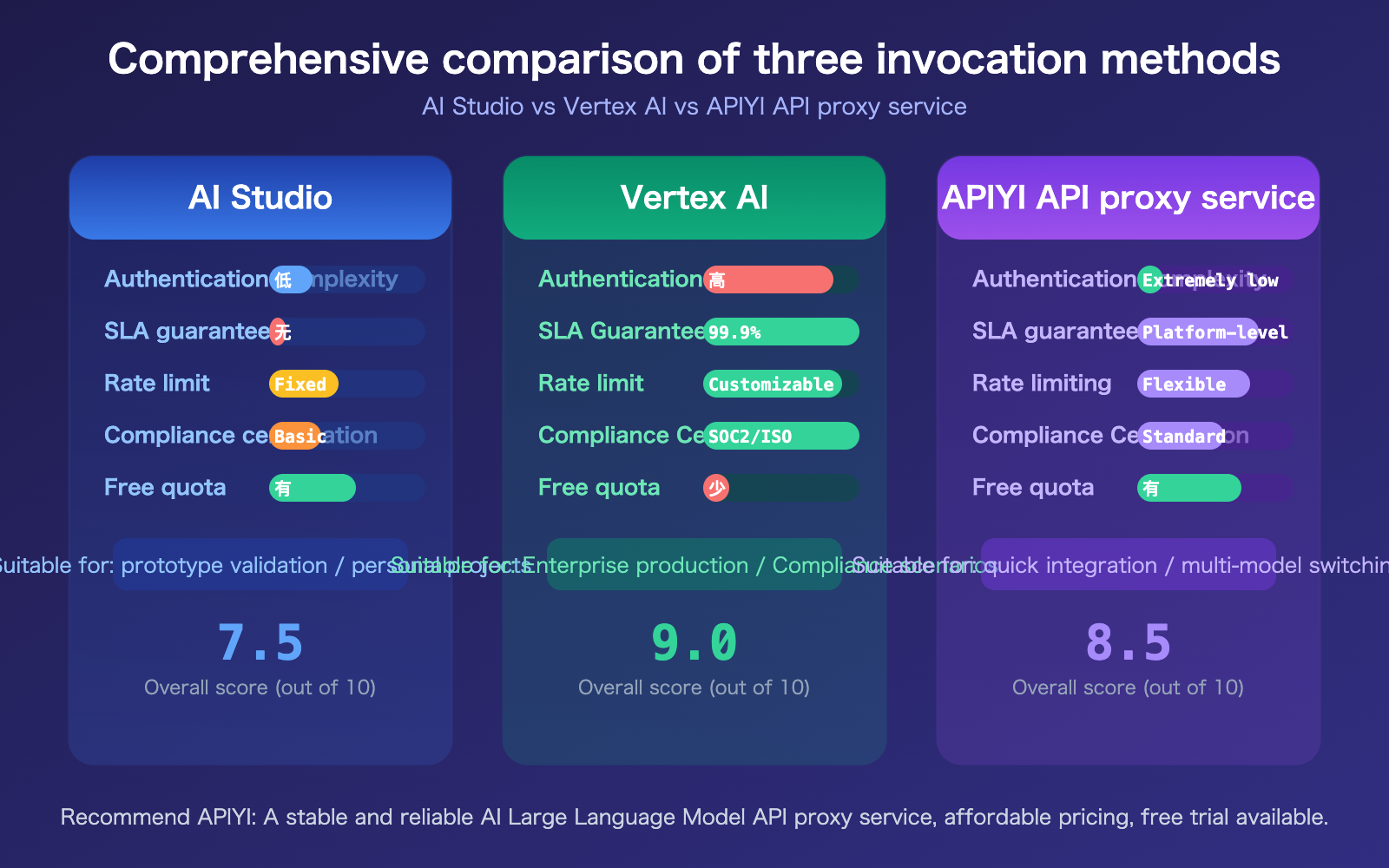
Nano Banana 2 API Solution Comparison
Three Access Options for Nano Banana 2 API
| Solution | Core Features | Best For | Difficulty |
|---|---|---|---|
| AI Studio Direct | API Key auth, simple setup, no SLA | Prototyping, personal projects, small-scale apps | Low |
| Vertex AI Direct | OAuth auth, enterprise features, 99.9% SLA | Production, enterprise apps, high compliance needs | High |
| APIYI Proxy | OpenAI-compatible format, unified interface, zero config | Fast integration, multi-model switching, China access | Very Low |
Calling Nano Banana 2 API via APIYI Example
If you already have code based on the OpenAI SDK, using the APIYI proxy is the lowest-cost way to integrate Nano Banana 2:
import openai

client = openai.OpenAI(
    api_key="YOUR_API_KEY",
    base_url="https://vip.apiyi.com/v1"
)

response = client.chat.completions.create(
    model="gemini-3.1-flash-image-preview",
    messages=[
        {"role": "user", "content": "Generate a watercolor painting of a Japanese garden"}
    ]
)
print(response.choices[0].message.content)
Comparison Note: All three solutions produce the same results. The core differences lie in authentication complexity, network accessibility, and enterprise feature support. You can quickly test the differences between solutions on the APIYI apiyi.com platform.
Frequently Asked Questions
Q1: Is there a difference in image quality between Vertex AI and AI Studio for Nano Banana 2?
The underlying model is identical, so there's no fundamental difference in generation quality. Vertex AI might preserve slightly more detail in image compression and transmission, but the visual difference is negligible. The core distinctions are in authentication, SLA guarantees, and enterprise features, not image quality.
Q2: Is migrating from AI Studio to Vertex AI complex if I already have code?
If you're using the official Google google-genai SDK, migration is very simple—just change the Client initialization and environment variable configuration; the core calling code remains fully compatible. If you're calling the REST API directly, you'll need to change the endpoint URL and authentication method. Using the unified APIYI apiyi.com interface is recommended to avoid migration costs.
Q3: Should I choose Nano Banana 2 or Imagen 4?
They serve different purposes: Nano Banana 2 is a multimodal conversational model, excelling at interactive image generation and editing with support for multi-turn dialogue and reference images. Imagen 4 is a pure text-to-image model, offering speed and lower cost. For simple text-to-image tasks, choose Imagen 4 Fast ($0.02/image). For complex image editing and creative workflows, choose Nano Banana 2. Both models are available for direct use on the APIYI apiyi.com platform.
Q4: What are the known limitations of Nano Banana 2?
The current version has the following limitations: small facial features may render inconsistently; complex text spelling accuracy needs improvement; rendering of long non-Latin text is generally poor; character consistency isn't fully reliable in complex scenes. Additionally, Vertex AI currently doesn't support code execution, function calling, or the OpenAI-compatible Chat Completions format.
Summary
The key points for choosing a Nano Banana 2 API invocation method are:
- AI Studio is ideal for rapid validation: Simple, direct API Key authentication with a free tier for prototyping, perfect for individual developers and small teams.
- Vertex AI is suited for production deployment: Offers 99.9% SLA, SOC 2 compliance, and customizable quotas, making it a great fit for enterprise applications and scenarios with compliance requirements.
- Third-party API proxy services lower the barrier to entry: Use a unified OpenAI-compatible interface for calls, bypassing the need to handle Google's authentication system. This is perfect for quickly migrating existing OpenAI SDK code.
The critical factors for choosing an invocation method are your business stage and compliance needs, not differences in image quality.
We recommend using APIYI (apiyi.com) for quick validation. The platform offers free credits and a unified interface for multiple models, supporting one-stop calls to mainstream image generation models like Nano Banana 2 and Imagen 4.
📚 References
-
Nano Banana 2 Official Announcement Blog: Google's detailed introduction to Nano Banana 2's core capabilities and technical architecture.
- Link:
blog.google/innovation-and-ai/technology/ai/nano-banana-2/ - Description: The go-to resource for understanding the model's positioning, new features, and technical details.
- Link:
-
Gemini Image Generation Developer Documentation: Complete API reference for the AI Studio invocation method.
- Link:
ai.google.dev/gemini-api/docs/image-generation - Description: Includes SDK usage, parameter configuration, and best practices.
- Link:
-
Vertex AI Gemini 3.1 Flash Image Documentation: Enterprise-level configuration guide for the Vertex AI invocation method.
- Link:
docs.cloud.google.com/vertex-ai/generative-ai/docs/models/gemini/3-1-flash-image - Description: Covers IAM configuration, quota management, and production deployment recommendations.
- Link:
-
APIYI Documentation Center: Configuration guide for invoking Nano Banana 2 via a unified interface.
- Link:
docs.apiyi.com - Description: Ideal for developers who need quick integration and the ability to switch between multiple models.
- Link:
Author: APIYI Technical Team
Technical Discussion: Feel free to discuss in the comments. For more resources, visit the APIYI Documentation Center at docs.apiyi.com.


