
Want an AI assistant that can actually get things done? MoltBot is exactly that—an open-source project that doesn't just chat; it operates your system, browses the web, and manages files. It's basically "Claude with hands." In this post, we'll walk you through everything from installation and deployment to daily use.
Core Value: By the end of this article, you'll know how to install and configure MoltBot and understand how to integrate it with over 50 platforms to build your own all-in-one AI assistant.
What is MoltBot: A Deep Dive into the Open-Source AI Assistant
MoltBot (formerly Clawdbot) is an open-source personal AI assistant project created by the well-known developer Peter Steinberger. In January 2026, it was renamed from "Clawdbot" to "MoltBot" due to trademark requirements from Anthropic—the name refers to the process of a lobster shedding its shell (molting).
The Evolution of MoltBot
| Milestone | Event | Impact |
|---|---|---|
| Late 2025 | Clawdbot project launch | Pioneered a new direction for local AI assistants |
| Jan 24, 2026 | 9,000 stars in 24 hours | Became a trending GitHub project |
| Jan 27, 2026 | Received Anthropic trademark letter | Forced to rename to MoltBot |
| Jan 2026 – Present | Surpassed 60,000+ stars | One of the fastest-growing projects in GitHub history |
Key Capabilities at a Glance
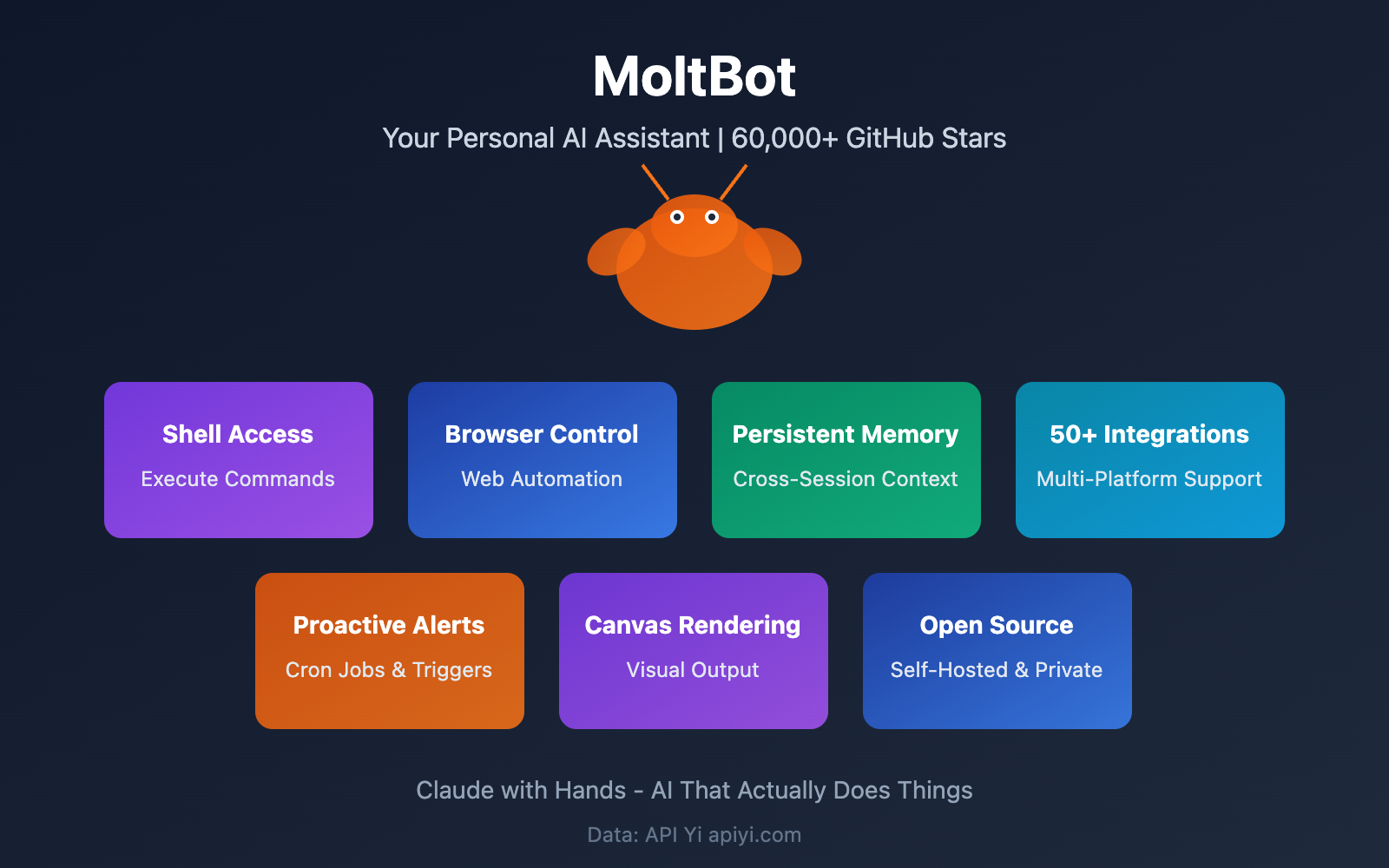
MoltBot exploded in popularity because it actually delivers on the vision of an "AI assistant that can get things done":
| Capability Type | Specific Features | Use Cases |
|---|---|---|
| System Access | Shell command execution, file management | Automated DevOps, batch processing |
| Browser Control | Web browsing, information scraping | Data collection, automated form filling |
| Persistent Memory | Cross-session context retention | Long-term task tracking, learning personal preferences |
| Proactive Alerts | Scheduled tasks, conditional triggers | Reminders, monitoring, and alerts |
| Multi-Platform Support | 50+ channel integrations | Manage all conversations through a unified entry point |
🎯 Technical Insight: MoltBot is essentially an AI Agent framework that gives Large Language Models like Claude "hands and eyes." If you're interested in the technical implementation of AI Agents, you can experiment by connecting to the Claude API via the APIYI (apiyi.com) platform.
MoltBot Platform Support: 50+ Channels Covered
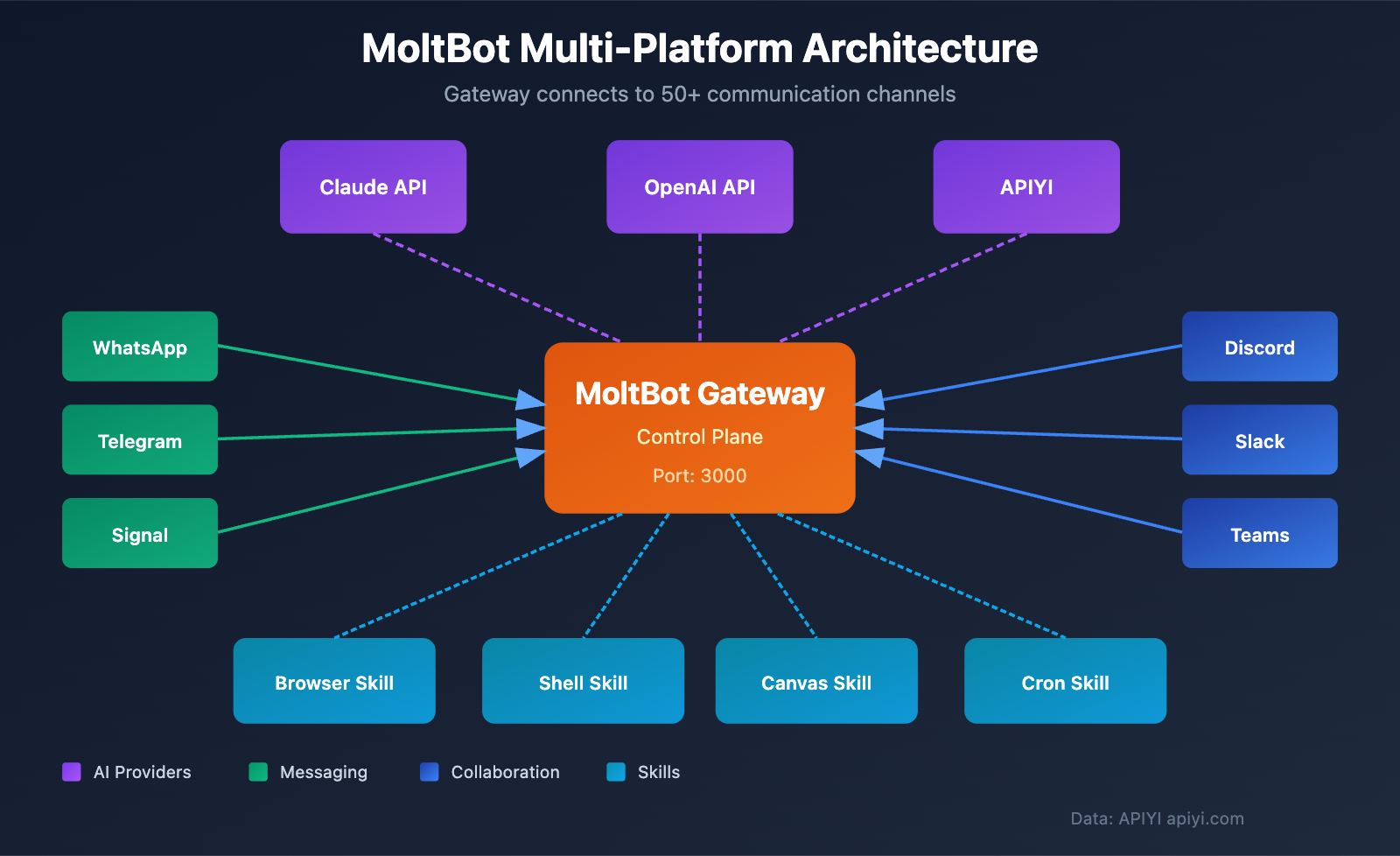
One of MoltBot's standout features is its support for nearly every mainstream messaging platform, so you can summon your AI assistant no matter where you are.
Core Supported Platforms
| Platform Category | Support List | Integration Method |
|---|---|---|
| Instant Messaging | WhatsApp, Telegram, Signal, iMessage | Native Support |
| Collaboration Tools | Slack, Discord, Microsoft Teams | Official Integration |
| Enterprise Communication | Google Chat, Zalo | API Access |
| Extended Channels | Matrix, BlueBubbles, WebChat | Plugin Extension |
Specialty Feature Channels
MoltBot goes beyond simple chat by offering more dynamic ways to interact:
- Voice Interaction: Native voice support for macOS, iOS, and Android.
- Canvas Rendering: A real-time visual canvas that supports chart drawing.
- Menu Bar App: A dedicated macOS status bar entry for quick access.
- Mobile Nodes: Companion applications for iOS and Android.
MoltBot Installation & Deployment: A Complete Beginner's Guide
System Requirements
Before you start the installation, please make sure your device meets the following requirements:
| Item | Minimum Requirements | Recommended |
|---|---|---|
| Memory | 2GB RAM | 4GB+ RAM |
| CPU | 2 Cores | 4 Cores |
| Storage | 20GB | 50GB+ |
| Node.js | ≥ 22 | Latest LTS |
| OS | macOS/Linux/Windows(WSL2) | macOS/Ubuntu |
Important Note: You don't need Apple Silicon! No unified memory architecture required! A regular Linux or Windows machine is more than enough.
Option 1: CLI Installation (Recommended)
# 使用 npm 全局安装
npm install -g moltbot@latest

# 或使用 pnpm
pnpm add -g moltbot@latest

# 运行安装向导
moltbot onboard --install-daemon
🚀 Quick Start: The installation wizard will guide you through the configuration of the Gateway, Workspace, Channels, and Skills. If you're planning to use the Claude API as MoltBot's brain, we recommend using the APIYI platform to get your API Key—it makes the setup much simpler.
Option 2: Docker Deployment
# 克隆仓库
git clone https://github.com/moltbot/moltbot.git
cd moltbot

# 运行 Docker 安装脚本
./docker-setup.sh
View full Docker Compose configuration
version: '3.8'

services:
  moltbot-gateway:
    image: moltbot/gateway:latest
    container_name: moltbot-gateway
    restart: unless-stopped
    ports:
      - "3000:3000"
    volumes:
      - ./config:/app/config
      - ./workspace:/app/workspace
      - ./data:/app/data
    environment:
      - NODE_ENV=production
      - ANTHROPIC_API_KEY=${ANTHROPIC_API_KEY}
      - OPENAI_API_KEY=${OPENAI_API_KEY}
      # 推荐使用 APIYI 统一接口
      - OPENAI_BASE_URL=https://api.apiyi.com/v1
    networks:
      - moltbot-network

  moltbot-worker:
    image: moltbot/worker:latest
    container_name: moltbot-worker
    restart: unless-stopped
    depends_on:
      - moltbot-gateway
    volumes:
      - ./workspace:/app/workspace
    environment:
      - GATEWAY_URL=http://moltbot-gateway:3000
    networks:
      - moltbot-network

networks:
  moltbot-network:
    driver: bridge
Option 3: One-Click Cloud Deployment
For those who'd rather not mess around with their own servers, MoltBot supports one-click deployment on several cloud platforms:
| Platform | Difficulty | Target Audience | Monthly Fee (Ref) |
|---|---|---|---|
| Railway | Dead Simple | Beginners | $5-20 |
| Render | Easy | Developers | $7-25 |
| Hetzner VPS | Intermediate | Pro Users | €4-20 |
| DigitalOcean | Intermediate | Teams | $12-48 |
MoltBot Configuration Guide: Deep Dive into Core Settings
Initial Setup
Once the installation is finished, run the following command to initialize your configuration:
# 基础初始化
moltbot setup

# 指定工作空间路径
moltbot setup --workspace ~/moltbot-workspace

# 启动配置向导
moltbot setup --wizard
Configuration File Structure
You'll find MoltBot's configuration file at ~/.moltbot/moltbot.json:
{
  "gateway": {
    "port": 3000,
    "host": "localhost"
  },
  "ai": {
    "provider": "anthropic",
    "model": "claude-sonnet-4-20250514",
    "apiKey": "YOUR_API_KEY",
    "baseUrl": "https://api.apiyi.com/v1"
  },
  "channels": {
    "discord": {
      "enabled": true,
      "token": "YOUR_DISCORD_BOT_TOKEN"
    },
    "telegram": {
      "enabled": true,
      "token": "YOUR_TELEGRAM_BOT_TOKEN"
    }
  },
  "skills": {
    "browser": true,
    "shell": true,
    "canvas": true,
    "cron": true
  },
  "memory": {
    "persistent": true,
    "maxTokens": 100000
  }
}
💡 Config Tip: Your choice of AI model directly impacts how "smart" MoltBot behaves. Claude Sonnet 4 is currently the best bang for your buck, but if you need even more advanced reasoning, Claude Opus 4 is the way to go. You can easily switch between different models via APIYI.
Setting up a Discord Bot
Discord is one of the most popular platforms for interacting with MoltBot:
Step 1: Head over to the Discord Developer Portal and create an application.
Step 2: Grab your Token from the Bot page.
Step 3: Configure permissions (Recommended settings):
| Permission | Purpose |
|---|---|
| Send Messages | Sending messages |
| Read Message History | Reading history |
| Add Reactions | Adding reactions |
| Attach Files | Sending files |
| Embed Links | Embedding links |
Step 4: Update your config file and restart the bot.
moltbot restart
MoltBot Price Analysis: Detailed Operating Costs
MoltBot itself is a completely free open-source project, but in practice, you'll encounter the following costs during use:
Cost Breakdown Analysis
| Cost Item | Description | Monthly Range | Optimization Tip |
|---|---|---|---|
| AI API Fees | Claude/GPT usage fees | $5 – $100 | Choose the right model |
| Server Hosting | VPS or cloud platform | $0 – $50 | Can be $0 if running locally |
| Storage | History & files | $0 – $10 | Clean up regularly |
| Bandwidth | Network transfer | $0 – $5 | Free tiers are usually enough |
AI API Fee Details
This is the main cost of running MoltBot:
| Model | Input Price (per 1M Tokens) | Output Price (per 1M Tokens) | Use Case |
|---|---|---|---|
| Claude 3.5 Haiku | $0.80 | $4.00 | Daily conversations |
| Claude 3.5 Sonnet | $3.00 | $15.00 | Complex tasks |
| Claude 3 Opus | $15.00 | $75.00 | Advanced reasoning |
| GPT-4o Mini | $0.15 | $0.60 | Simple tasks |
| GPT-4o | $2.50 | $10.00 | Multimodal tasks |
💰 Cost Optimization: For individual users, using Claude 3.5 Haiku for daily chats and switching to Sonnet only for complex tasks can keep your monthly bill under $10. Accessing these via APIYI (apiyi.com) offers more flexible billing options.
Cost Estimates for Typical Scenarios
| Usage Intensity | Daily Conversation Turns | Monthly API Fee | Total Monthly Cost |
|---|---|---|---|
| Light Use | 20-50 | $5-15 | $5-20 |
| Moderate Use | 100-200 | $20-50 | $25-70 |
| Heavy Use | 500+ | $80-200 | $100-250 |
MoltBot Practical Tips: 10 High-Efficiency Use Cases
Scenario 1: Automated Daily Report Generation
Let MoltBot automatically summarize your work progress every day:
You: @MoltBot Set a reminder for me to write my daily report every evening at 6 PM, and help me generate a draft based on today's Git commits.

MoltBot: Sure, I've set up the scheduled task. I will:
1. Trigger a reminder at 18:00 every day.
2. Read the Git logs for the day.
3. Generate a daily report draft for you to edit.
Scenario 2: Smart File Organization
You: Help me organize the files from last week in my Downloads folder into directories by file type.

MoltBot: Scanning ~/Downloads...
Found 47 files. Organizing them based on the following rules:
- 12 Images → ~/Pictures/2026-01
- 8 Documents → ~/Documents/2026-01
- 15 Archives → ~/Archives
- 12 Others → Staying in place
Confirm execution?
Scenario 3: Code Review Assistant
You: Review the PR #123 I just submitted.

MoltBot: Analyzing PR #123...

Found the following issues:
1. src/utils.js:45 - Possible memory leak.
2. src/api.js:78 - Missing error handling.
3. tests/ - New features are missing test cases.

Suggestions:
- Wrap async calls with try-catch.
- Add edge case tests.
More Use Cases
| Scenario | Example Command | Core Capability |
|---|---|---|
| Web Monitoring | Monitor price changes on [Site] and notify me | Browser + Cron |
| Auto Email Reply | Help me reply to emails marked as "Pending" | Email Integration |
| Meeting Minutes | Generate minutes from this recording | Speech Recognition |
| Data Reporting | Create a visualization for this week's sales data | Canvas |
| System O&M | Check server status and alert on issues | Shell + Cron |
| Study Notes | Summarize today's learning materials | Memory |
| Social Media | Schedule posts across multiple platforms | Multi-channel Integration |
MoltBot Safety Considerations
Known Security Risks
Since MoltBot is an AI assistant with system permissions, security is absolutely critical:
| Risk Type | Description | Protection Measures |
|---|---|---|
| Unauthorized Access | Gateway port exposure | Configure firewall, use a VPN |
| Credential Leakage | API Key theft | Use environment variables, rotate keys regularly |
| Command Injection | Malicious prompts | Restrict Shell permissions |
| Data Leakage | Chat log exposure | Encrypted storage, access control |
Security Configuration Recommendations
{
  "security": {
    "allowedCommands": ["ls", "cat", "grep", "find"],
    "blockedPaths": ["/etc", "/var", "~/.ssh"],
    "maxFileSize": "10MB",
    "requireConfirmation": true
  }
}
⚠️ Security Reminder: Don't expose the MoltBot Gateway directly to the public internet. If you need remote access, use a VPN or configure a reverse proxy with authentication.
FAQ
Q1: What’s the difference between MoltBot and ChatGPT/Claude?
ChatGPT and Claude are pure conversational Large Language Models—they're great at answering questions, but that's where it ends. MoltBot is an AI Agent. While it uses "brains" like Claude, it also has system-level capabilities: it can execute commands, browse the web, and manage files. Simply put, where ChatGPT "can only talk," MoltBot "can talk and act." If you want to experience the power of the Claude API, you can get quick access for testing via APIYI (apiyi.com).
Q2: Is MoltBot free?
MoltBot itself is completely free and open-source. However, running it requires an AI API (like the Claude API) and server resources, which are paid services. For individual users running it locally with an economical model, monthly costs can be kept around $10-20. APIYI (apiyi.com) offers flexible pay-as-you-go pricing, which is perfect for keeping costs under control.
Q3: Can I run MoltBot on Windows?
Yes, but we strongly recommend using WSL2 (Windows Subsystem for Linux). Running it directly in a native Windows environment might lead to compatibility headaches. Here's the recommended setup:
- Install WSL2 and Ubuntu.
- Install Node.js 22+ inside WSL2.
- Follow the Linux installation process to set up MoltBot.
Q4: How does MoltBot maintain conversation memory?
MoltBot uses local persistent storage, saving your chat history in the ~/.moltbot/memory/ directory. It supports memory across different sessions, so you won't lose context after a restart. You can configure the maximum number of memory tokens; we suggest setting it to 50,000–100,000.
Q5: Can I use multiple AI models at the same time?
Absolutely. MoltBot supports configuring multiple AI providers, allowing you to switch manually or let it choose automatically based on the task. For example:
- Use Claude 3.5 Haiku for daily chats (it's cheaper).
- Use Claude Sonnet 4 for coding tasks (it's more powerful).
- Use GPT-4o for image understanding (it's multimodal).
MoltBot Summary & Recommendations
MoltBot represents a new direction for personal AI assistants—evolving from "just chatting" to "actually getting things done." Its core strengths include:
- Fully Open Source: Transparent code that's freely customizable.
- Local Execution: Your data privacy is guaranteed.
- Multi-platform Support: 50+ channels so you can use it anywhere.
- System-level Capabilities: Complete control over your Shell, browser, and files.
Tips for Getting Started
| Stage | Suggestion | Expected Time |
|---|---|---|
| Step 1 | Local installation, get basic chat running | 30 minutes |
| Step 2 | Configure Discord/Telegram bots | 1-2 hours |
| Step 3 | Enable Browser and Shell skills | 30 minutes |
| Step 4 | Set up your first scheduled task | 15 minutes |
| Step 5 | Explore more Skills and integrations | Ongoing |
We recommend using APIYI (apiyi.com) to access the Claude API as MoltBot's intelligent core. The platform provides a unified interface and supports quick model switching, making it easy to find the configuration that best fits your workflow.
References
-
GitHub – MoltBot: Official open-source repository
- Link:
github.com/moltbot/moltbot - Description: Full source code, installation docs, and issue discussions.
- Link:
-
MoltBot Official Documentation: Detailed configuration and usage guides
- Link:
docs.molt.bot - Description: The latest documentation maintained by the official team.
- Link:
-
Hostinger VPS Installation Tutorial: Cloud server deployment guide
- Link:
hostinger.com/support/how-to-install-clawdbot-on-hostinger-vps - Description: Detailed steps for VPS deployment.
- Link:
-
MacStories Deep Dive: MoltBot user experience
- Link:
macstories.net/stories/clawdbot-showed-me-what-the-future-of-personal-ai-assistants-looks-like - Description: A detailed review from a professional tech media outlet.
- Link:
Author: APIYI Team | For more AI tech insights, visit APIYI at apiyi.com
Updated: January 2026


