
Author's Note: A comprehensive review of 8 mainstream comic video apps and AI comic websites, including professional tools like Manju Master, to help creators quickly choose the right comic production tool.
Comic videos (motion comics or comic videos) are becoming the next big thing in content creation. From short video platforms to long-form video sites, more and more creators are using comic video software to transform static comics into dynamic video content. This article provides an in-depth review of mainstream comic production tools and AI comic websites from a practical perspective.
Core Value: Through real testing data and user experience, we'll help you find the best comic video software, whether you're a beginner or a professional creator.
Current Market Status and Categories of Comic Video Software
The market for comic video software is growing fast, with the global market size expected to reach billions of dollars by 2025. Based on features and use cases, these tools can be divided into the following categories:
| Category | Features | Representative Tools | Ideal For |
|---|---|---|---|
| Professional Comic Video Software | Comprehensive features, professional results | Manju Master, Dashtoon | Professional creators, studios |
| AI Comic Websites | Online use, AI-assisted | LlamaGen, Neural Canvas | Beginners, rapid prototyping |
| Video Editing Apps | General editing + comic effects | FlexClip, Animaker | Video creators |
| AI Animation Generators | Automatic animation generation | ToonCrafter, Mootion | Efficiency-first users |
Core Functional Elements of Comic Video Software
When choosing comic video software, you'll want to focus on these core features:
- Character Consistency: Keeping the character's appearance uniform across different frames.
- Motion Generation: Support for lip-syncing, facial expressions, and action transitions.
- Storyboard Management: Efficiently managing comic panels and the timeline.
- Dubbing Integration: Support for AI voiceovers or importing external audio.
- Export Formats: Support for mainstream video formats and resolutions.
🎯 Selection Tip: If you need Large Language Models to help with your creation, APIYI (apiyi.com) provides a unified interface for various AI models. It supports text-to-image and image-to-video capabilities, making it a powerful supplement to your comic software.
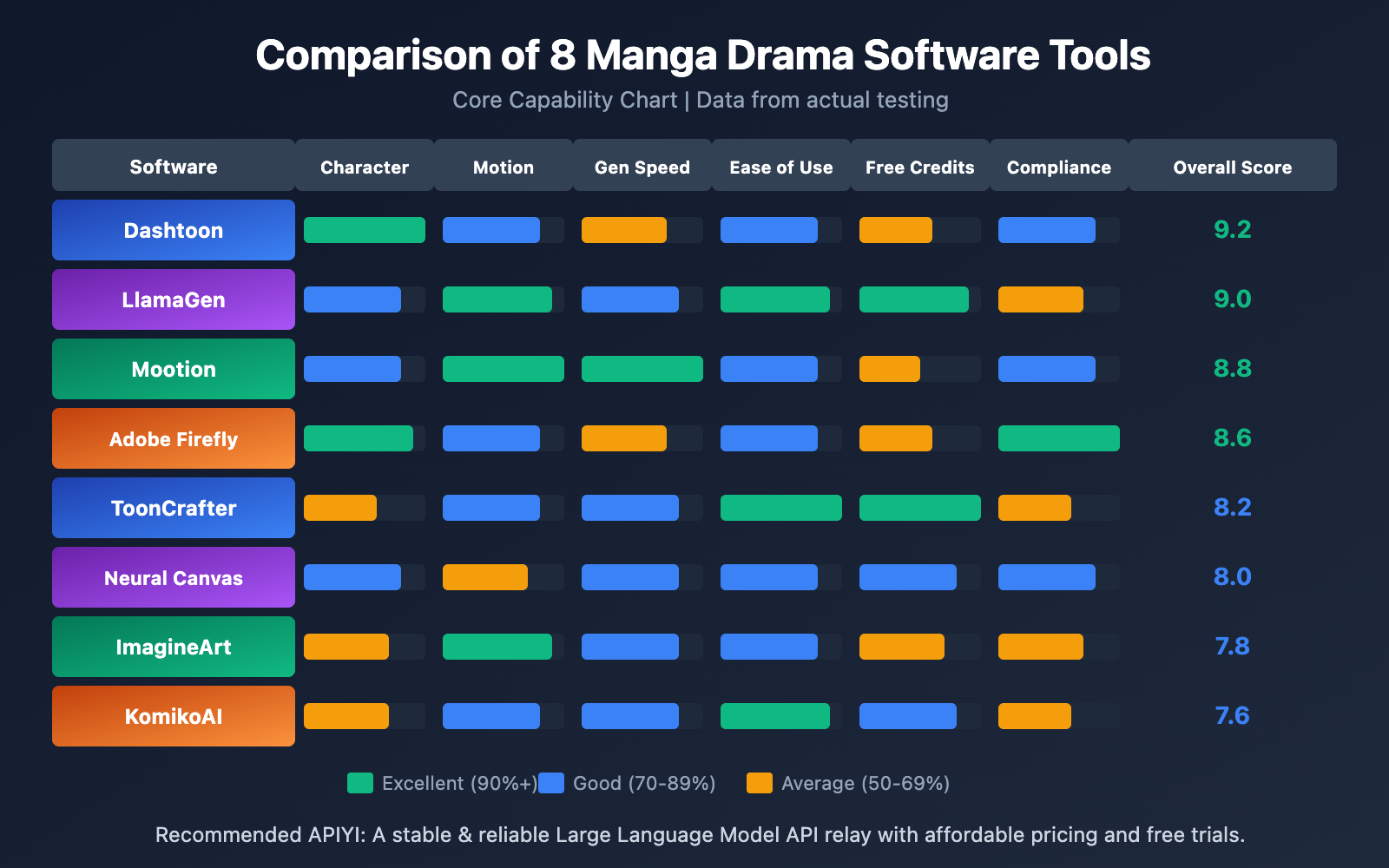
Detailed Review of 8 Popular Manga Drama Software Tools
This section provides an in-depth look at 8 of the most representative manga drama creation tools on the market, covering various types including free, paid, online, and local options.
Manga Drama Software Review 1: Dashtoon Studio
Dashtoon Studio is currently one of the most comprehensive AI manga websites, often dubbed the "AI Comic Factory."
Core Features:
- AI Comic Generation: Text-to-comic support with multiple styles.
- Character Consistency: AI ensures characters maintain visual continuity throughout the narrative.
- Style Switching: Supports various styles from superheroes and xianxia (fantasy) to realism.
- Scene Generation: Place characters into any scene you can imagine.
| Feature | Rating | Description |
|---|---|---|
| Character Consistency | ⭐⭐⭐⭐⭐ | Industry-leading character retention technology |
| Style Diversity | ⭐⭐⭐⭐⭐ | Supports everything from dark to fantasy styles |
| Learning Curve | ⭐⭐⭐⭐ | Intuitive interface, very beginner-friendly |
| Export Quality | ⭐⭐⭐⭐ | High-resolution output |
Best For: Webtoon creation, short drama content production, and brand storytelling visualization.
Official Website: dashtoon.com
Manga Drama Software Review 2: LlamaGen
LlamaGen is a powerhouse for AI comics and manga drama, supporting various styles like Manhwa, Manga, and classic comics.
Core Features:
- Multi-media Input: Use text, images, or even video as creative source material.
- High-Res Output: Generates high-definition comics and animations.
- Webtoon Support: Specifically optimized for vertical-scroll comic formats.
- Free to Use: Offers free creation credits for new users.
| Feature | Rating | Description |
|---|---|---|
| Input Flexibility | ⭐⭐⭐⭐⭐ | Works with text, images, or video |
| Output Quality | ⭐⭐⭐⭐⭐ | High-resolution animation |
| Free Credits | ⭐⭐⭐⭐ | Very newcomer-friendly |
| Chinese Support | ⭐⭐⭐ | Partial feature support |
Best For: Webtoon creation, turning comics into animations, and video content creation.
Official Website: llamagen.ai
Manga Drama Software Review 3: Neural Canvas
Neural Canvas focuses on AI comic creation and e-book exports, even allowing creators to sell their work directly on the platform.
Core Features:
- Virtual Character System: Generates consistent virtual characters to serve as protagonists.
- AI Comic Bubbles: Automatically generates dialogue bubbles and panel layouts.
- AI Story Continuation: Automatically expands your story based on your creative prompts.
- E-book Export: One-click export to e-book formats.
- Marketplace: Sell your work on the platform's marketplace to earn royalties.
| Feature | Rating | Description |
|---|---|---|
| Character System | ⭐⭐⭐⭐ | Consistent character generation |
| Commercialization | ⭐⭐⭐⭐⭐ | Supports direct sales of your work |
| Export Formats | ⭐⭐⭐⭐ | E-book friendly |
| AI Assistance | ⭐⭐⭐⭐ | Auto-continues the story for you |
Best For: Independent comic creation, e-book publishing, and content monetization.
Official Website: neuralcanvas.io
Manga Drama Software Review 4: Adobe Firefly
Adobe Firefly is Adobe's flagship AI creation tool, featuring robust support for comic-style image generation.
Core Features:
- Text-to-Comic: Create without needing any drawing skills.
- Diverse Styles: Classic comics, sci-fi, anime, pixel art, and more.
- Character Generator: An AI character generator designed to keep your characters consistent.
- Commercially Safe: Trained on licensed content, making it safe for commercial use.
| Feature | Rating | Description |
|---|---|---|
| Commercial Compliance | ⭐⭐⭐⭐⭐ | Worry-free copyright |
| Style Variety | ⭐⭐⭐⭐⭐ | Tons of preset styles |
| Adobe Ecosystem | ⭐⭐⭐⭐⭐ | Seamless integration with Photoshop and more |
| Price | ⭐⭐⭐ | Subscription can be a bit pricey |
Best For: Commercial comic creation, advertising illustrations, and educational content.
Official Website: adobe.com/products/firefly
Tech Tip: If you're developing your own manga drama apps, you can access various AI image generation models through APIYI (apiyi.com). It gives you way more flexibility than sticking to a single platform.
Manga Drama Software Review 5: Mootion
Mootion is a professional comic animation platform that claims to be 65% faster than its competitors.
Core Features:
- Automatic Storyboard Generation: AI automatically creates comic panels.
- Dialogue Bubble Styles: Customizable styles for speech bubbles.
- Comic Fonts: Authentic comic-style typography effects.
- Dynamic Effects: Professional-grade motion effects.
Performance Data:
- Time to generate a 3-minute comic animation: Less than 2 minutes.
- Industry average time: 6 minutes.
- Speed advantage: 65%+.
| Feature | Rating | Description |
|---|---|---|
| Generation Speed | ⭐⭐⭐⭐⭐ | Fastest in the industry |
| Motion Quality | ⭐⭐⭐⭐⭐ | Professional-grade results |
| Automation | ⭐⭐⭐⭐ | Highly automated workflow |
| Price | ⭐⭐⭐ | Pro version is relatively expensive |
Best For: Rapid content production, batch manga drama manufacturing, and commercial projects.
Official Website: mootion.com
Manga Drama Software Review 6: ToonCrafter
ToonCrafter focuses on turning cartoon keyframes into smooth animations without requiring any prior animation skills.
Core Features:
- Keyframe Interpolation: Upload images, and the AI generates the intermediate frames.
- Smooth Animation: Produces seamless animation effects.
- Zero Entry Barrier: No professional animation skills needed.
- Versatility: Great for both pros and beginners.
| Feature | Rating | Description |
|---|---|---|
| Ease of Use | ⭐⭐⭐⭐⭐ | Extremely simple operation |
| Animation Fluidity | ⭐⭐⭐⭐ | High-quality frame interpolation |
| Learning Cost | ⭐⭐⭐⭐⭐ | Almost zero |
| Customization | ⭐⭐⭐ | Options are somewhat limited |
Best For: Animating static comics, rapid prototyping, and learning animation.
Official Website: toon-crafter.com
Manga Drama Software Review 7: ImagineArt
ImagineArt’s AI comic video generator can transform comic scenes into short, engaging videos.
Core Features:
- Comic-to-Video: Turns static comics into dynamic videos.
- Multi-AI Model Integration: Integrates Kling, Hailuo, PixVerse, Google Veo, and more.
- 5-Second Clips: Generates high-quality 5-second snippets per run.
- Trailer Creation: Perfect for making trailers for your comics.
| Feature | Rating | Description |
|---|---|---|
| Model Richness | ⭐⭐⭐⭐⭐ | Wide choice of AI models |
| Output Quality | ⭐⭐⭐⭐ | Cinematic-level effects |
| Flexibility | ⭐⭐⭐⭐ | Can choose different models for different looks |
| Video Length | ⭐⭐⭐ | Only generates 5-second clips |
Best For: Comic trailers, social media short videos, and Webtoon promotion.
Official Website: imagine.art
Manga Drama Software Review 8: KomikoAI
KomikoAI is an AI anime generator and character creation tool that supports full animation.
Core Features:
- AI Animation Generation: Create dynamic character videos.
- Comic Panel Animation: Turn comic panels into story sequences.
- Multi-platform Support: Works across both web and mobile.
- Emotional Expression: Adds motion and emotion to your characters.
| Feature | Rating | Description |
|---|---|---|
| Cross-platform | ⭐⭐⭐⭐⭐ | Use it on mobile or desktop |
| Character Creation | ⭐⭐⭐⭐ | Support for original characters |
| Animation Quality | ⭐⭐⭐⭐ | Smooth and natural |
| Feature Depth | ⭐⭐⭐ | Relatively basic compared to pro tools |
Best For: Original character animation, cross-device creation, and quick animation tests.
Official Website: komiko.app
AI Comic Video Platform Overview
Besides professional software, online AI comic video websites are also essential tools for creators. Here's a comparison of the major platforms:
| Platform | Free Tier | Core Advantages | Limitations | Recommendation |
|---|---|---|---|---|
| LlamaGen | Available | Multi-input support, HD output | Average Chinese support | ⭐⭐⭐⭐⭐ |
| Dashtoon | Limited | Strong character consistency | Advanced features require payment | ⭐⭐⭐⭐⭐ |
| Neural Canvas | Available | Supports selling your work | Limited style choices | ⭐⭐⭐⭐ |
| Media.io | Available | Simple operation | Basic functionality | ⭐⭐⭐⭐ |
| QuillBot | Available | Multi-panel support | Image generation only | ⭐⭐⭐ |
| Anifusion | Available | Completely free | Average quality | ⭐⭐⭐ |
Selection Strategies for AI Comic Video Sites
Depending on your needs, here are our recommended strategies:
For Beginners:
- Start with Media.io or Anifusion. They're easy to use and offer free tiers.
- Once you're comfortable, try LlamaGen to access more advanced features.
For Professional Creators:
- Dashtoon Studio offers the best character consistency.
- Adobe Firefly is the safest bet for commercial use.
For Commercialization:
- Neural Canvas allows you to sell your creations.
- Dashtoon has an incentive program for creators.
🎯 API Integration Tip: If you're developing your own comic-related product and need to integrate AI capabilities, we recommend the APIYI (apiyi.com) platform. A single interface gives you access to various AI models, including image generation, video generation, and speech synthesis, significantly cutting down development costs.
Introduction to Professional "Comic Master" Tools
A "Comic Master" tool usually refers to software that is feature-rich and delivers professional-grade results. Here's a detailed look at several tools that fit the "Comic Master" criteria:
Characteristics of Comic Master-Level Tools
| Feature | Description | Example Tools |
|---|---|---|
| Character Management | Systematic character library management | Dashtoon, Mootion |
| Scene Editing | Visual scene editors | Adobe Firefly |
| Motion Systems | Rich library of preset animations | ToonCrafter, Mootion |
| Voiceover Integration | AI voiceovers or audio imports | Animaker, HeyGen |
| Batch Processing | Supports bulk generation and export | Mootion |
| Team Collaboration | Multi-user collaboration features | Dashtoon Studio |
Recommended "Comic Master" Workflow
Here's an efficient workflow for creating your AI comic videos:
- Story Planning: Use Large Language Models to help write your script.
- Character Design: Create consistent characters in Dashtoon or Neural Canvas.
- Storyboarding: Generate the comic panels and key frames.
- Animation: Use ToonCrafter or Mootion to add dynamic effects.
- Voiceover Synthesis: Integrate AI voiceovers or professional recordings.
- Post-Processing: Fine-tune the timeline and special effects.
- Export & Publish: Choose the right format and share your work.
Workflow Optimization: During story planning and voiceover synthesis, you can use APIYI (apiyi.com) to call models like GPT-4 or Claude for creative assistance, and services like ElevenLabs for speech synthesis, achieving a fully AI-assisted workflow.
Motion Comic Software Selection Guide
Depending on your user profile and specific needs, here are our top recommendations for choosing the right motion comic software:
Choosing by User Type
| User Type | Recommended Tools | Budget | Core Needs |
|---|---|---|---|
| Hobbyists | LlamaGen, Anifusion | Free | Simple, easy to use, quick results |
| Indie Creators | Dashtoon, Neural Canvas | $10-30/mo | Character consistency, monetization |
| Content Studios | Mootion, Adobe Firefly | $50-100/mo | Batch processing, commercial compliance |
| Developers | APIYI + Custom Systems | Pay-as-you-go | Flexible integration, customization |
Choosing by Content Type
Short-form Motion Comics (TikTok, Reels, Shorts):
- Recommended: ImagineArt, KomikoAI
- Key Features: Fast generation, vertical video optimization
Long-form Series (YouTube, Bilibili):
- Recommended: Dashtoon Studio, Mootion
- Key Features: Character consistency, batch processing capabilities
Commercial Ads:
- Recommended: Adobe Firefly, HeyGen
- Key Features: Copyright compliance, professional-grade quality
Educational Motion Comics:
- Recommended: Animaker, Renderforest
- Key Features: Rich template library, easy to edit/modify
Cost Comparison
| Tool | Free Version | Basic | Pro | Enterprise |
|---|---|---|---|---|
| Dashtoon | Limited | $12/mo | $29/mo | Custom |
| LlamaGen | Yes | $9/mo | $24/mo | – |
| Mootion | Trial | $15/mo | $49/mo | $99/mo |
| Adobe Firefly | Limited | $4.99/mo | $22.99/mo | Custom |
| ToonCrafter | Free | – | – | – |
| Neural Canvas | Yes | $8/mo | $19/mo | – |
Cost Optimization Tip: For creators who need various AI capabilities, using the APIYI (apiyi.com) pay-as-you-go model might be more economical than subscribing to multiple tools. They offer free trial credits, so you can test it out before committing.
FAQ
Q1: What’s the difference between motion comic software and regular video editing software?
Motion comic software is specifically designed for manga and anime content. It offers professional features like character consistency maintenance, panel management, speech bubble generation, and AI-driven motion interpolation. While general video editors can handle comic assets, they lack these specialized optimizations. Choosing dedicated motion comic software will significantly boost your creative efficiency.
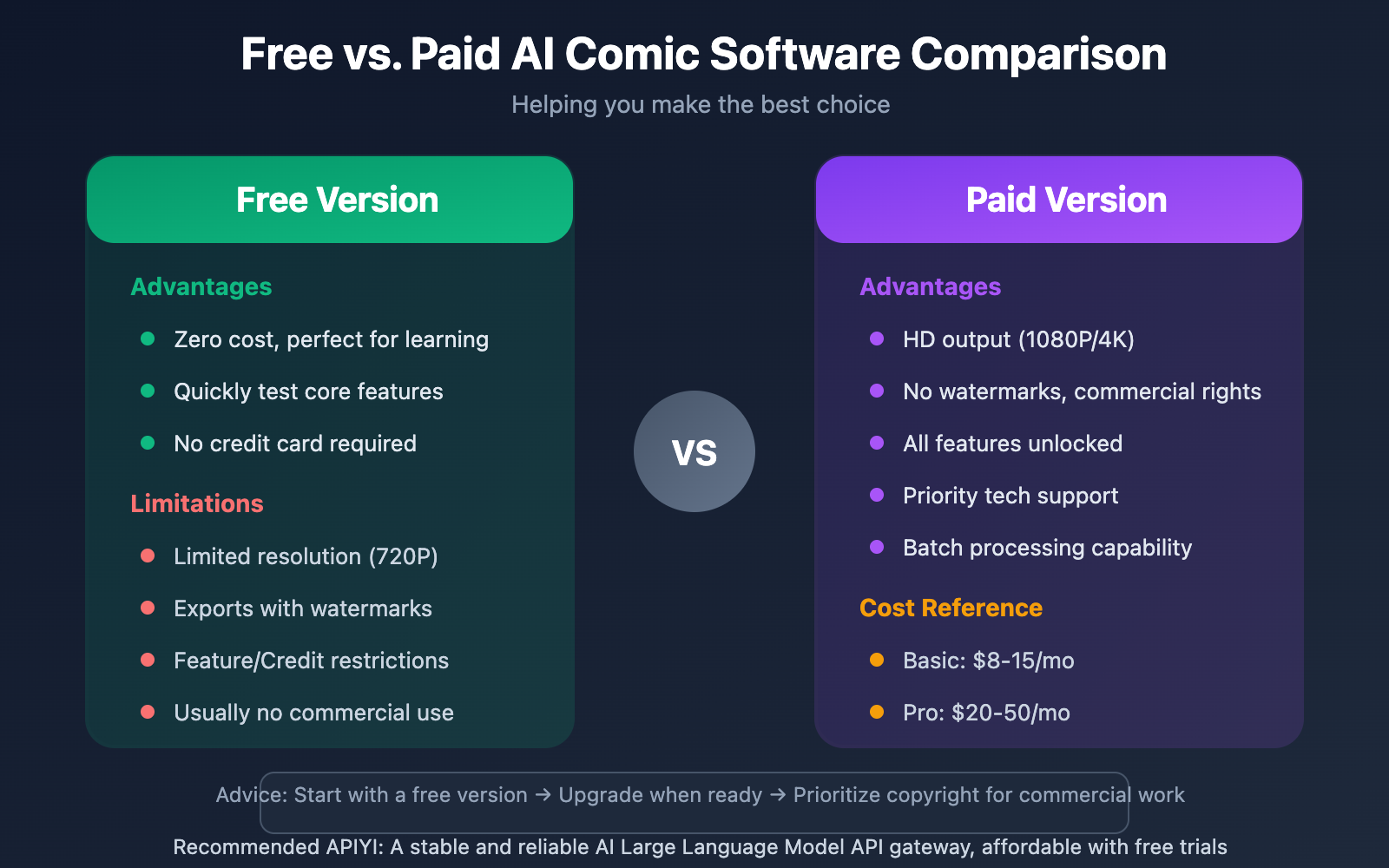
Q2: Can free motion comic software meet commercial needs?
Free versions usually come with limitations: lower resolution, watermarks, restricted feature sets, or lack of commercial usage rights. They're great for learning and personal projects, but for commercial work, we recommend the paid versions—especially for copyright peace of mind. Adobe Firefly is currently one of the most reliable options for commercial compliance.
Q3: How can I quickly start a motion comic test?
Here’s the fastest way to dive in:
- Visit LlamaGen (llamagen.ai) and sign up for a free account.
- Upload a comic image or input your story text.
- Choose your preferred style and generate a short clip.
- If you need more advanced AI capabilities, you can head over to APIYI (apiyi.com) to grab some free test credits.
Q4: What AI technologies are needed for motion comic production?
A complete motion comic workflow usually requires several AI capabilities: Image Generation (Text-to-Image, Image-to-Image), Video Generation (Image-to-Video), Voice Synthesis (Dubbing), and Text Generation (Scriptwriting). APIYI (apiyi.com) provides a unified interface for all these services, making it a one-stop shop for your motion comic AI needs.
Summary of AI Anime Video Software Recommendations
Key takeaways for anime video software:
- Best for Beginners: LlamaGen or Media.io—they're free, easy to use, and perfect for getting your feet wet.
- Professional Creation: Dashtoon Studio offers the best character consistency, while Mootion leads the pack in speed.
- Commercial Projects: Adobe Firefly is your go-to for copyright compliance, and Neural Canvas is great if you're looking to monetize.
- Dev Integration: Use APIYI (apiyi.com) to get flexible AI capability support for your projects.
When choosing software, the key is to be clear about what you actually need: Are you just exploring and learning, or is this for a commercial production? Do you value speed or high-end quality? Pick the right tool combo based on your specific workflow.
We recommend using APIYI (apiyi.com) for your AI capability support. The platform offers free credits and a unified interface for multiple Large Language Models, making it a powerful assistant for any anime video creator.
References
⚠️ Link Format Note: All external links use the
Resource Name: domain.comformat. They're easy to copy but aren't clickable, which helps prevent SEO authority loss.
-
Dashtoon Studio: Official website for the AI comic creation platform
- Link:
dashtoon.com/ai-comic-generator - Description: Explore their character consistency technology and creative workflows.
- Link:
-
LlamaGen: The ultimate AI tool for comics and anime videos
- Link:
llamagen.ai - Description: Free to use and supports a variety of input methods.
- Link:
-
Adobe Firefly: Adobe's official AI creative suite
- Link:
adobe.com/products/firefly - Description: An AI comic generator that's safe for commercial use.
- Link:
-
ToonCrafter: AI cartoon animation generator
- Link:
toon-crafter.com - Description: A keyframe animation tool with zero learning curve.
- Link:
-
Mootion: High-speed comic and animation platform
- Link:
mootion.com - Description: Features industry-leading generation speeds.
- Link:
Author: Technical Team
Tech Exchange: Feel free to share your anime video production tips in the comments! For more AI tool resources, visit the APIYI (apiyi.com) developer community.


