
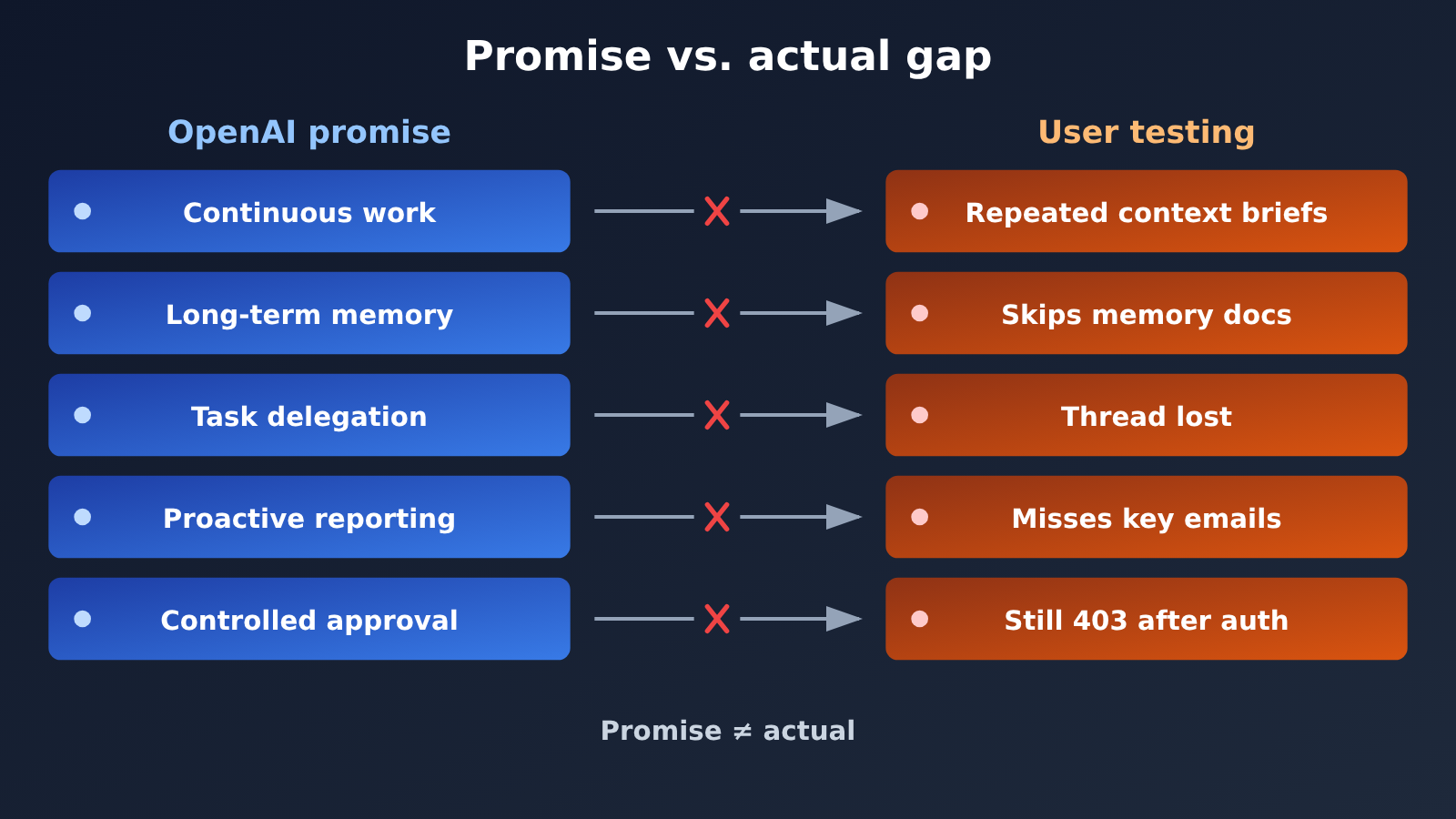
The real problem with ChatGPT Dot is unreliable execution — intelligence is a secondary concern. OpenAI markets it as a always-on Agent that can take long-term responsibility on your behalf. In practice, it can’t remember rules you’ve already settled, it gets stuck in approval loops even after being authorized, it can’t keep the Codex threads it spawns under control, and when it proactively reminds you, it fixates on a payment notification while missing the editor’s email calling off the draft. Users can’t see what it’s doing behind the scenes either. What people hand over is work; what comes back is chasing, double-checking, and cleanup. An AI billed as “continuously accountable” simply hands the supervision cost back to the human, untouched.
What you’ll learn from this article
- The capability boundaries, availability scope, and billing terms OpenAI officially promises for ChatGPT Dot.
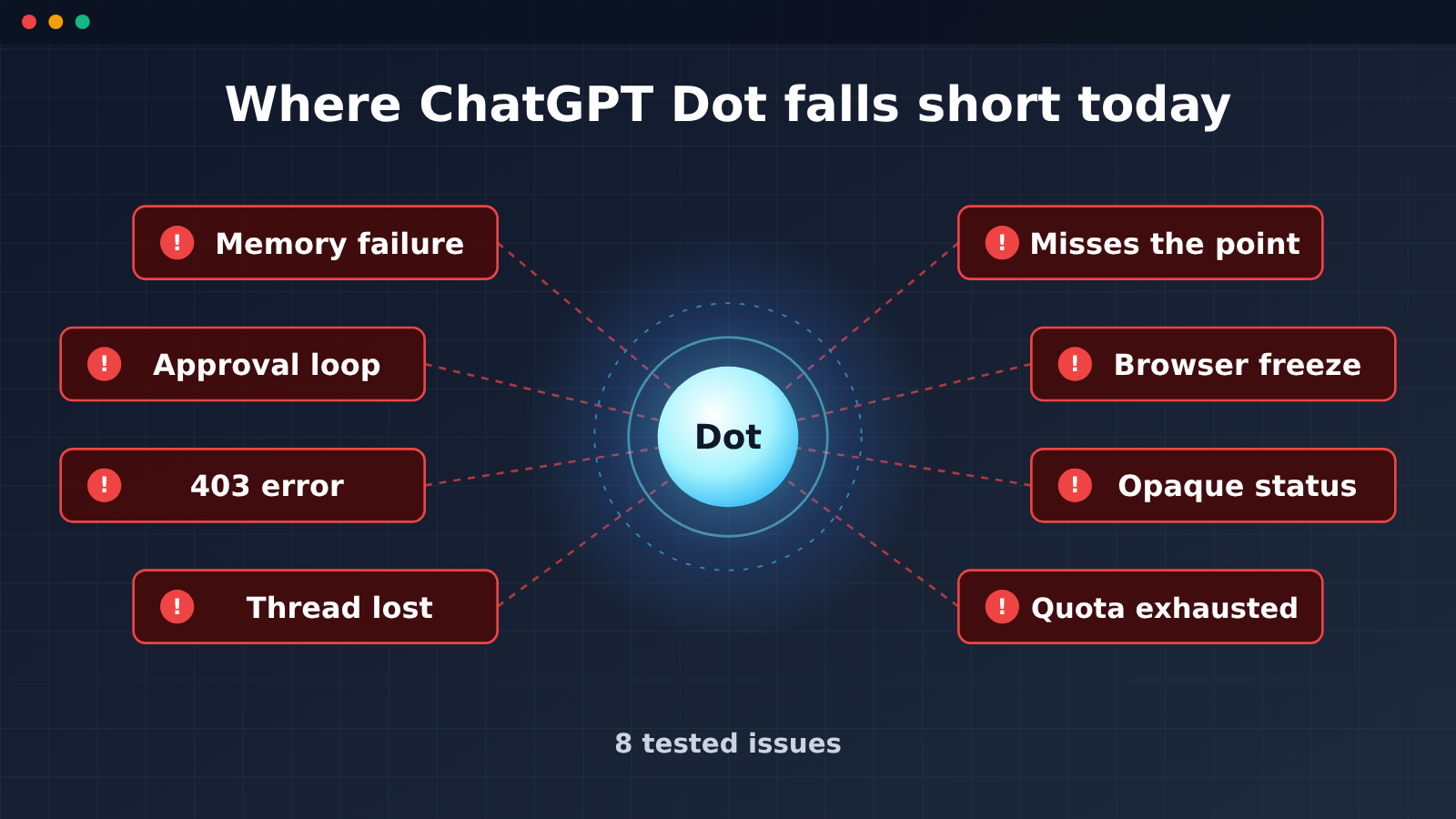
- As of November 23, 2026, the 8 categories of concrete failures users keep running into across community reports and media hands-on testing.
- How each failure unfolds, and the price users ultimately pay.
- How paying users, developers, and team admins should approach Dot right now.
Index: The “objective facts” section starts with Dot’s official positioning, availability, pricing, and how it splits work with ChatGPT Work, Codex, and Scheduled Tasks, then lists the 8 categories of tested problems one by one, ordered by time and source. The “analysis and judgment” section ranks them by how much damage they do to work value, explains why these issues shake Dot’s product foundation, and lays out how different groups should respond plus what to watch for next.
What You Need to Know Before Understanding ChatGPT Dot
| Concept | Brief explanation |
|---|---|
| Always-on personal AI agent | An agent that lives inside ChatGPT long-term and works continuously toward user goals. Even with no new messages, it proactively researches, follows up, and reports back. |
| ChatGPT Dots / Dot | The product name OpenAI launched on September 29, 2026. The personal edition currently centers on one primary Dot. |
| GPT-6 Astra / GPT-6.1 Terra | The models that power Dot. It was initially driven mainly by GPT-6 Astra; after the official update on November 3, GPT-6.1 Terra was added and selected based on the task. |
| ChatGPT Work | Handles specific work across apps, such as gathering information, creating reports, and editing documents. |
| Codex | OpenAI’s software engineering execution agent, responsible for changing code, running tests, fixing bugs, and handling PRs. |
| Scheduled Tasks | A recurring task mechanism triggered by time or events. |
| Custom rules | Rules users set for Dot to pre-authorize or restrict certain behaviors. |
| HTTP 403 | A status code indicating access is denied, meaning the request is forbidden. |
| CloudThreadNotFoundError | An error returned when Dot sends instructions to a cloud task thread, indicating that the target thread cannot be found. |
| Cloud browser takeover | The user temporarily takes over Dot’s cloud browser to complete login and similar operations, then hands it back to Dot. |
| LoRA / QLoRA / full fine-tuning | Three model training approaches with significant differences in compute and cost. |
Quick Look at the Impact of ChatGPT Dot Issues
- Paying individual users (Pro / Plus): Dot is included in the plan, but deep work is limited by quota. If Dot makes one mistake on a long-running task, it burns through a week’s worth of quota, and you don’t get back a usable result.
- AI Agent power users and researchers: They rely most on long-term memory and multi-step progress, and those are exactly the areas where Dot fails hardest. Many have gone back to regular ChatGPT or Claude to push projects forward.
- Developers: There are real failures in Dot’s pipeline for orchestrating Codex. When a thread goes missing, you have to manually move instructions around, and the “AI managing AI” workflow breaks completely.
- Team and enterprise administrators: The Enterprise free trial runs through January 13, 2027, with billing starting January 14. Figuring out approvals, status transparency, and quota consumption during the trial will determine whether it’s worth paying for.
The Objective Facts About ChatGPT Dot
What OpenAI Officially Promised for ChatGPT Dot
On September 29, 2026, OpenAI officially launched ChatGPT Dots. The official positioning is a persistent personal AI agent inside ChatGPT: it takes long-term responsibility for tasks the user hands over, proactively researches and tracks progress when no new messages arrive, calls tools, and reports back or requests approval when needed.
The core capabilities listed officially include:
- Continuous work: pushing multiple tasks forward around long-term goals, with support for background research, scheduled execution, and proactive updates.
- Independent compute environment: its own cloud computer, browser, files, and software environment.
- App connections: accessing email, calendars, documents, and other authorized apps through the ChatGPT plugin ecosystem.
- Long-term context: drawing on ChatGPT’s relevant memory and accumulating the Dot’s own working memory.
- Task delegation: handing specific work off to ChatGPT Work or Codex for execution.
- Cross-channel interaction: covering desktop, web, mobile apps, and messaging channels such as Slack and Teams.
- Control and approval: users can check work status, set operating rules, take over the computer, and pause execution.
On November 3, OpenAI updated the model description: the Dot was initially driven mainly by GPT-6 Astra, and GPT-6.1 Terra was added afterward, so different tasks can use different models.
ChatGPT Dot Availability and Pricing
| Item | Status as of 2026-11-23 |
|---|---|
| First release | September 29, 2026 |
| ChatGPT Pro | Available to users who meet the age requirements in supported regions |
| ChatGPT Plus | Rolling out to some accounts in supported regions |
| Business Premium | Available based on eligibility in supported regions |
| Business Standard | Rolling out to eligible accounts in the US |
| Enterprise / Edu | Available to eligible workspaces, subject to admin and regional settings |
| Regional restrictions | Not yet available in the EU and EEA, the UK, or Switzerland |
| Number of Dots | The personal edition centers on one primary Dot |
| Cost | For Pro and Business Premium, the first Dot is already included in the plan; deep work is limited by quota |
| Delegated tasks | Codex and ChatGPT Work tasks each draw on their own quotas |
| Enterprise billing | No Dot charges during the trial period through January 13, 2027; billing starts January 14 |
How ChatGPT Dot Divides Work with Work, Codex, and Scheduled Tasks
| Product | Role | Typical tasks |
|---|---|---|
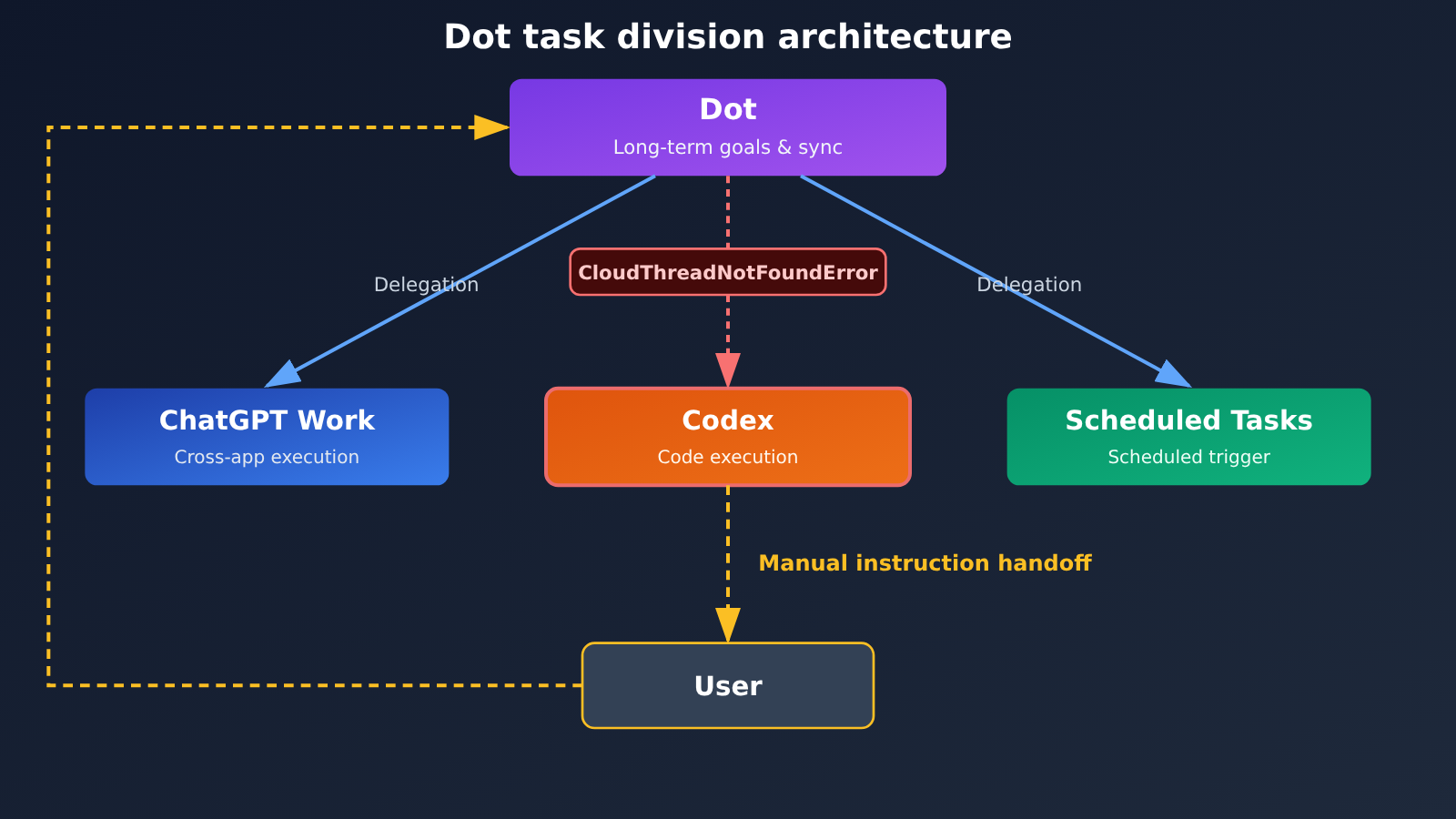
| Dot | Long-term accountability, coordination, proactive tracking | Watching project progress, following up on changing requirements, chasing pending decisions |
| ChatGPT Work | Executing concrete work across apps | Gathering information, producing reports, editing documents |
| Codex | Software engineering and code execution | Changing code, running tests, fixing bugs, handling PRs |
| Scheduled Tasks | Triggered by time or events | Daily summaries, weekly status checks, responding to specified events |
By official design, Dot is the “project manager,” responsible for sustaining long-term goals and task relationships. Work and Codex do the actual labor, and Scheduled Tasks provide a fixed rhythm. Every question below should be read within this division of labor: almost all of Dot’s value rests on “coordination and accountability.”
ChatGPT Dot Issue One: Memory and Long-Term Context Management Fail
On November 11, 2026, OpenAI Developer Community user SamChang submitted a systematic feedback report. He had long used Dot for research and multi-step projects, and the problem he ran into was this: Dot often missed requirements, project decisions, and research conclusions that had been clearly established earlier. Once the user reminded it, it could dig them back out of the history.
To compensate, he set up external notes, working manuals, and structured memory. Dot still skipped over those documents when executing new tasks. The further the project progressed, the more established constraints it dropped, resulting in repeated investigation and conflicting decisions.
ChatGPT Dot Issue Two: Shallow Reasoning, Repeating Background, Poor Absorption of Corrections
On October 20, a paying user posted in the community describing a degradation in Dot’s experience: its answers were just rewrites of the user’s latest sentence, without integrating the full project context; established decisions and past corrections were repeatedly lost; multi-step tasks were frequently interrupted and required re-explaining the background; tool calls were unstable and remained blocked even after authorization was completed. The user eventually took back the proactive checks and work follow-up responsibilities assigned to Dot.
On November 9, community user CICI1, after using Dot continuously for more than a month, switched to regular ChatGPT and Claude to move projects forward. Her examples were specific: when discussing Agent architecture, Dot incorrectly linked to a past conversation about football; after being corrected, it fixed things only within the current topic and reverted on the next one. When discussing experimental results, Dot again paraphrased at length a test design both sides already understood.
ChatGPT Dot Issue 3: Permissions and Approvals Keep Getting Stuck in Loops During Normal Work
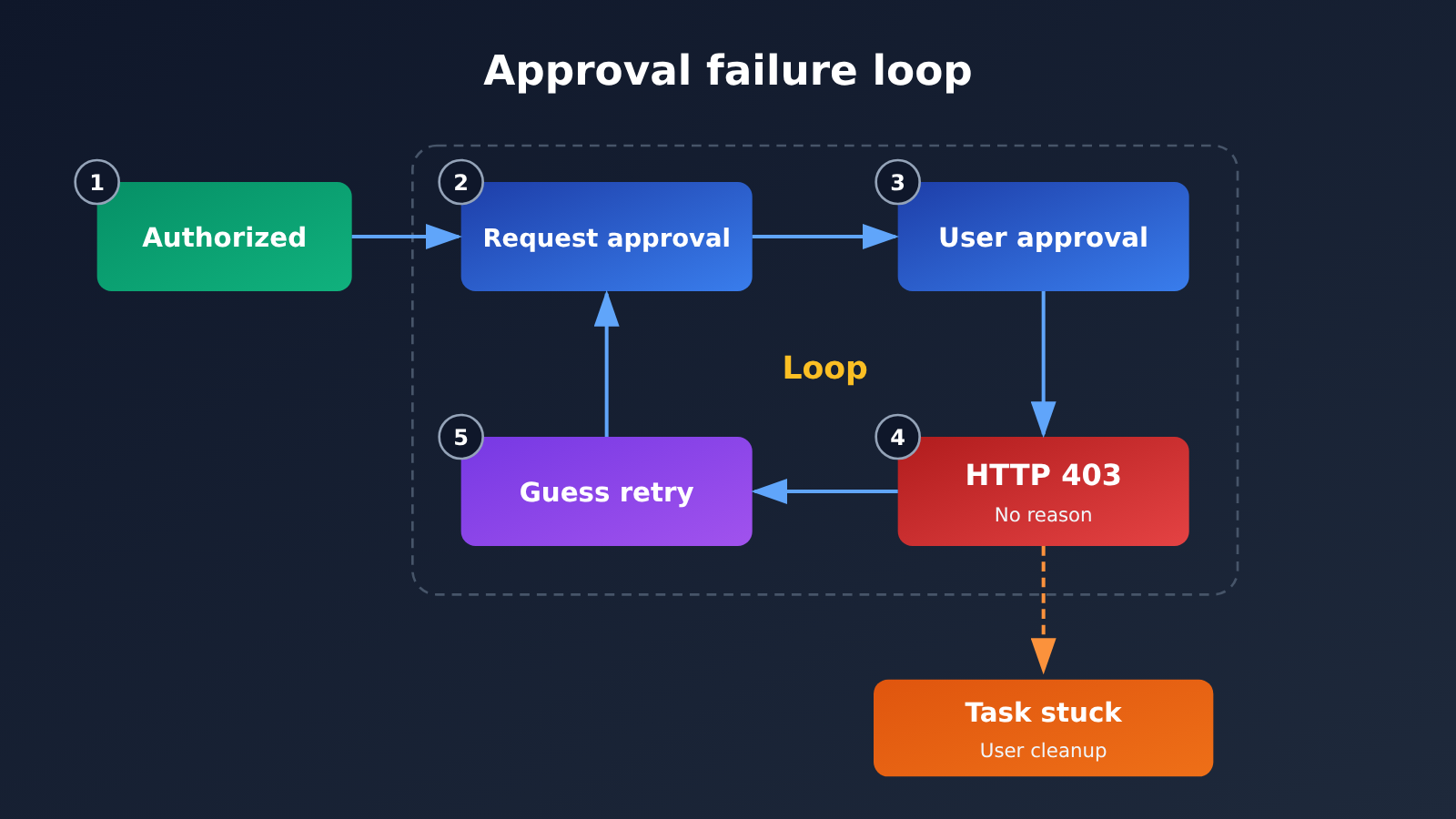
On November 4, user dyx reported an approval-failure loop in the developer community:
- The user had already explicitly granted authorization.
- Dot asked for approval again.
- After the user approved, the tool returned HTTP 403.
- Dot guessed at the cause, retried, and asked for authorization yet again.
- The task got stuck, leaving the user to pick up the pieces.
The 403 didn’t come with a clear reason for the rejection. The user had configured Custom rules, and the actions were still blocked over and over. On November 10, another user added that broad pre-authorization rules were practically useless — Dot would keep stopping and asking for a human to step in over the fine details of authorization scope.
ChatGPT Dot Issue 4: Project Coordination Breaks Down in Practice When Orchestrating Codex
Starting October 18, a chain of reports began appearing in the developer community. One user found that Dot could read the history of existing tasks but couldn’t send follow-up instructions to the target task — the task tool returned CloudThreadNotFoundError. After the failure, they had no choice but to open each worker thread themselves, copy instructions over, check results, and restart the tasks.
Follow-up replies show the problem persisted: on November 9, a user reported a similar task-management failure; on November 16, a user reported that Dot couldn’t continue communicating with other worker threads; on November 20, users were still saying the problem was affecting their work. That same day, another user ran their own tests and found that Dot’s delegation of local Work, cloud Work, and local Codex didn’t behave as expected — every task it successfully created carried a Cloud label.
ChatGPT Dot Issue Five: Proactive Reminders That Catch the Small Stuff and Miss the Big Stuff
On October 13, Zapier reporter Harry Guinness published his hands-on test. He had Dot connect to his Google account to see how well it handled emails and calendars on its own. Dot flagged several failed bank card payments, shipping notifications, and other events you could spot from an email subject line alone.
His editor had sent an email asking him to pause work on an article, and Dot never mentioned it. That email directly determined what he should do next: keeping on writing would have wasted time and gone against the editor’s instructions.
ChatGPT Dot Issue Six: Slow Operations, Clunky Cloud Browser and Computer Control
On September 30, the day after launch, a first-day tester on Reddit’s r/codex board recorded that even a simple task like adding a note took over five minutes; Dot often chose roundabout ways of operating the computer; permission and session problems in the cloud browser brought tasks to a halt; and voice responses were full of mechanical “check—wait for feedback” loops.
Another report from the developer community described a freeze after login: the user manually took over the cloud browser to finish logging in, then handed control back to Dot. Because of the credential protection state, Dot couldn’t read the page, the recovery steps failed, and the web task stopped right there. From October through early November, other users reported similar post-login blocks.
ChatGPT Dot Issue 7: Opaque Background Status Leaves Users Unable to Walk Away with Confidence
On November 6 and November 11, two community users took aim at Dot’s long-running task status. Is it working, waiting on permissions, erroring out, idle, or finished? The signals are ambiguous. Users have to keep asking follow-up questions just to find out which step it’s on. Tasks it picks up sometimes stall and don’t get reported as required. There’s a gap between the “completed” marker and an actually usable deliverable. And Dot’s animated persona doesn’t reflect what’s really happening in the background.
The official help docs themselves tell users to check the real artifacts and error logs after a task is marked complete.
ChatGPT Dot Issue 8: Faulty Execution Burns Through the Quota
On November 9, CICI1 shared a 20B model training experiment. Her requirements were fairly broad, and Dot just started running with them—no prior discussion of LoRA, QLoRA, full fine-tuning, or the cost differences between those approaches. When it finished, Dot told her the results were bad, that the weekly quota was already used up, and the execution details it provided weren’t enough to judge the training choices or decide what to adjust next.
She then asked Dot to audit the code. Dot reported that the module tests passed, but missed critical algorithm parameters and end-to-end path issues—problems that Claude ultimately caught during review.
An Assessment of ChatGPT Dot
ChatGPT Dot’s most fatal flaw: it promises accountability, but hands the work back to the user
Putting the eight categories of problems side by side, the conclusion is clear: Dot’s failures center on “accountability” itself. It can find the history but doesn’t use it when executing; it gets authorization but still stops to ask for approval; it can create tasks and then goes silent; it proactively reminds you, but only about the things that need reminding least.
An Agent that claims to take ongoing responsibility, yet users have to keep chasing it, double-checking it, and cleaning up after it—that’s the most disappointing thing about Dot right now. How much history the memory system stores is meaningless; the only real test is whether it uses the right context at execution time. SamChang built his own working manual, and Dot still skips it. At that point, the user is maintaining context for the Agent—the roles are completely reversed.
ChatGPT Dot Issues Ranked by Severity
| Priority | Issue | Core Loss to Users |
|---|---|---|
| 1 | Long-term memory and rule execution failures | Can’t build a stable working relationship; every collaboration starts with re-explaining everything |
| 2 | Project continuity and multi-thread coordination failures | Already-delegated work requires manual transport and restart |
| 3 | Proactive reminders lack judgment | Key signals that would change work arrangements get missed |
| 4 | Approval loops and computer operation failures | Routine operations repeatedly create manual intervention |
| 5 | Background tasks lack transparency | Users are forced to constantly monitor |
| 6 | Decision quality and resource consumption | Time, quota, and project quality all suffer together |
Memory takes first place because it’s the foundation for all long-term capabilities. The difference between Dot and a regular ChatGPT conversation comes down to “remembers you, remembers projects, remembers what’s already been decided.” When the foundation is shaky, everything built on top—proactive follow-ups, task delegation, continuous work—gets discounted. CICI1’s football conversation cross-talk case illustrates this best: corrections only take effect within the current topic, meaning the correction never entered long-term working memory.
Coordination failures rank second because they directly cut through Dot’s positioning within the product matrix. In the official division of labor, Dot is the only role responsible for “maintaining long-term goals and task relationships.” CloudThreadNotFoundError has been reported continuously from October 18 all the way to November 20—over a month without resolution, leaving users to copy-paste between Codex threads themselves. A project manager who can’t even reach their subordinates makes the position essentially void. All local tasks being created as Cloud tasks shows that the delegation behavior itself wasn’t executing as designed.
ChatGPT Dot’s “Proactiveness” Is Low-Grade Diligence
Harry Guinness’s test is the sharpest slap in the face a proactive assistant could get. A failed payment, a package arriving — you can catch those from email subject lines and keywords, and any rule-based filter can do it. An email from an editor killing a story requires understanding what the user is doing right now and how that email will change their plans. That’s the work an agent should actually be doing.
Missing a single email that could change your work schedule is far worse than sending ten fewer ordinary notifications. Dot spends its proactiveness on the easy stuff and hands in a blank sheet exactly where judgment matters. Diligence and judgment are two different things, and users want the latter.
ChatGPT Dot’s Approval Design Punishes Users Who’ve Already Authorized It
dyx’s five-step loop exposes a mechanical flaw: authorize, request again, approve again, 403, guess again. The user did everything right and got a refusal with no reason attached. Custom rules can’t stop repeated approvals, broad pre-authorizations get jammed up by details — it turns “controllable” into “someone’s needed at every turn.”
An approval mechanism is supposed to strike a balance between safety and efficiency. Right now Dot misses on both ends: users get interrupted constantly, and when something breaks they can’t even see what’s blocking it — recovery depends entirely on a human. An agent with a full cloud computer and a browser gets stuck on a single login handoff, and a Reddit tester takes five minutes to add one note. All of it points to the same thing: Dot’s computer-use ability still can’t back up the promise of “getting work done for you.”
ChatGPT Dot’s Backstage Black Box Shifts the Cost of Oversight onto Users
The only interaction selling point of a background Agent is “hand it off and you can go do something else.” Dot’s status reporting can’t tell working apart from waiting for permission, throwing an error, or sitting idle — users have no choice but to ask again and again. The official help docs tell users to check the outputs and error logs themselves once a task finishes, which is basically the official admission that the “completed” marker can’t be trusted.
The worst kind of background AI is one where the user neither knows what it finished nor when it stopped working. Dot is in exactly that state right now. CICI1’s 20B training experiment made the cost of the black box concrete: it started running without discussing the approach, and when it was done all it offered was a single line — “results aren’t good” — with a week’s quota wiped out and no way for the user to judge how to adjust. The code audit report said “tests passed,” and the critical issue was ultimately found by Claude. When one AI’s deliverable has to be re-reviewed by a second AI, the cost of the whole workflow is already higher than not using it at all.
How Different Users Should Use ChatGPT Dot Right Now
- Pro / Plus individual users: Keep Dot confined to low-risk, easy-to-verify tracking tasks — reminders, summaries, simple information roundups. For any long task that will burn through a lot of quota, first ask it to lay out a plan and an estimated cost, and only give the go-ahead once you’ve confirmed.
- Research and multi-step project users: Don’t leave critical constraints and decisions sitting only in Dot’s memory — write them directly into the task description every time you assign work. SamChang’s experience shows you can’t count on it to dig through the docs on its own.
- Developers: For now, don’t treat Dot as a scheduling layer for Codex. The thread-disconnection issue has dragged on for over a month, and managing tasks directly inside Codex is simply less hassle.
- Teams and enterprise admins: Enterprise is free to try until January 13, 2027 — a good window to stress-test approval rules, status transparency, and quota consumption. If none of those three shows meaningful improvement during the trial, it’ll be hard to justify paying after January 14.
- Users in the EU, EEA, UK, and Switzerland: You can’t use it for now, which also saves you the cost of being a guinea pig.
Signals Worth Watching for ChatGPT Dot Going Forward
The following are directions to watch based on currently known facts — these are predictive judgments:
- When CloudThreadNotFoundError gets fixed: This is the hard indicator of whether Dot’s coordination role can actually hold up. Until it’s fixed, its “project manager” positioning is essentially empty.
- Explainability of approvals and 403s: If later versions can give clear rejection reasons and make pre-authorization rules actually take effect, complaints about permissions will drop significantly.
- Whether the status panel gets reworked: Whether the five states — working, waiting, error, idle, done — can be told apart at a glance will determine whether users dare to walk away.
- The effect of multi-model routing: After GPT-6.1 Terra was added on November 3 to assign models by task, whether this adjustment improves the shallow-reasoning and repetition problems will depend on where community feedback goes afterward.
- Retention after Enterprise billing starts on January 14: The moment payment begins, enterprise users will vote with their feet.
What Dot looks like right now is a “project manager” fully equipped with a cloud computer, a browser, memory, and subordinates — yet in its first month on the job, it already needs the boss to remember things for it, run errands for it, and audit the books for it. The fuller the capability checklist, the more jarring the letdown when users keep getting called back to clean up the mess. What OpenAI needs to solve was never making Dot smarter — it’s making it actually carry through on the work it’s been handed.


