

Summary: This article explains whether a given AI coding tool expense belongs under the subscription, product balance, API bill, or runtime environment — and uses the same batch of 25 model invocations to calculate the cost for three models.
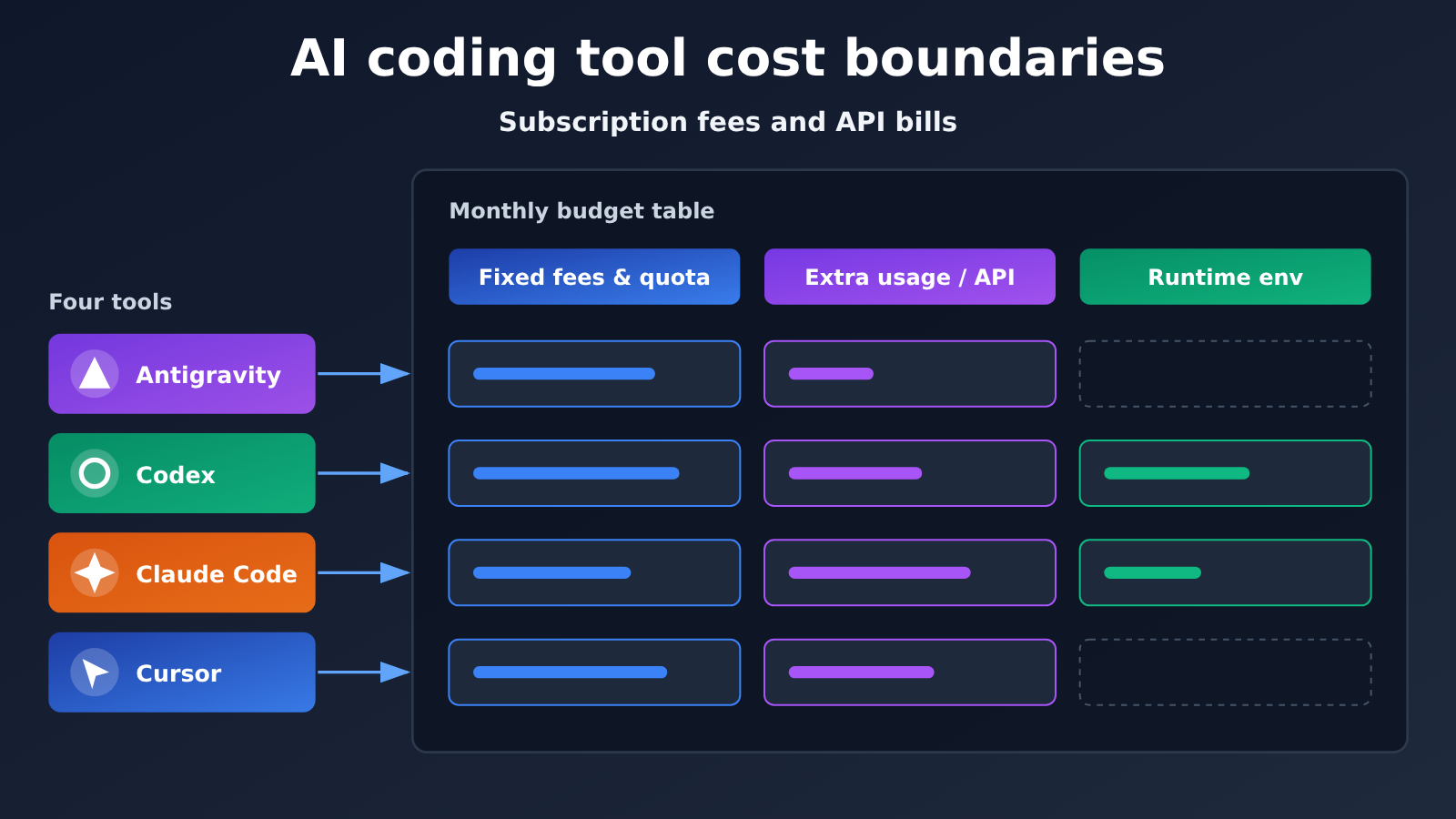
Bottom line first: book AI coding tool subscription fees and API bills separately, by invocation path
Routine completions go against the entitlements included in your plan. Model invocations with your own key show up on the API provider’s bill. For managed tasks, first check whether your account can start them, then check which kind of quota they consume. For example, Cursor’s Tab completions still use built-in models after you bring your own key, and on team plans some BYOK calls may incur a Cursor surcharge. Eligible Claude Code cloud sessions consume plan usage, and the officially hosted VM isn’t charged separately.
This assessment rests on three premises. First, the information in this article was verified on November 23, 2026 (Beijing time); the amounts are USD list-price examples from the cited pages, and individual plans are billed monthly. Second, region, taxes, account history, and organization terms are governed by each vendor’s billing page. Third, this article didn’t run paid hands-on tests of the four tools; the worked examples use assumed inputs and don’t represent anyone’s actual bill.
Knowledge Map and Reading Order for AI Coding Tool Cost Boundaries
The table below shows what each section does and how the sections relate to one another. I recommend reading them in order: first establish your accounting conventions, then apply them to specific products, and finally use worked examples and a checklist to map everything onto your own bill.
| Section | Question it answers | What it provides for the next section |
|---|---|---|
| 1 | Which column should a given expense go in? | Classification rules for the three-column budget table |
| 2 | Subscription, overage, and hosting rules for each of the four tools | Where each product belongs in the three columns |
| 3 | Where a compatible API (using APIYI as an example) belongs in the ledger, and how to verify it | Field checklist for verifying a single request |
| 4 | How much the same 25 calls cost across three models | A formula you can substitute your own data into |
| 5 | How to put your actual bill into a single table | A six-column reconciliation table you can use as-is |
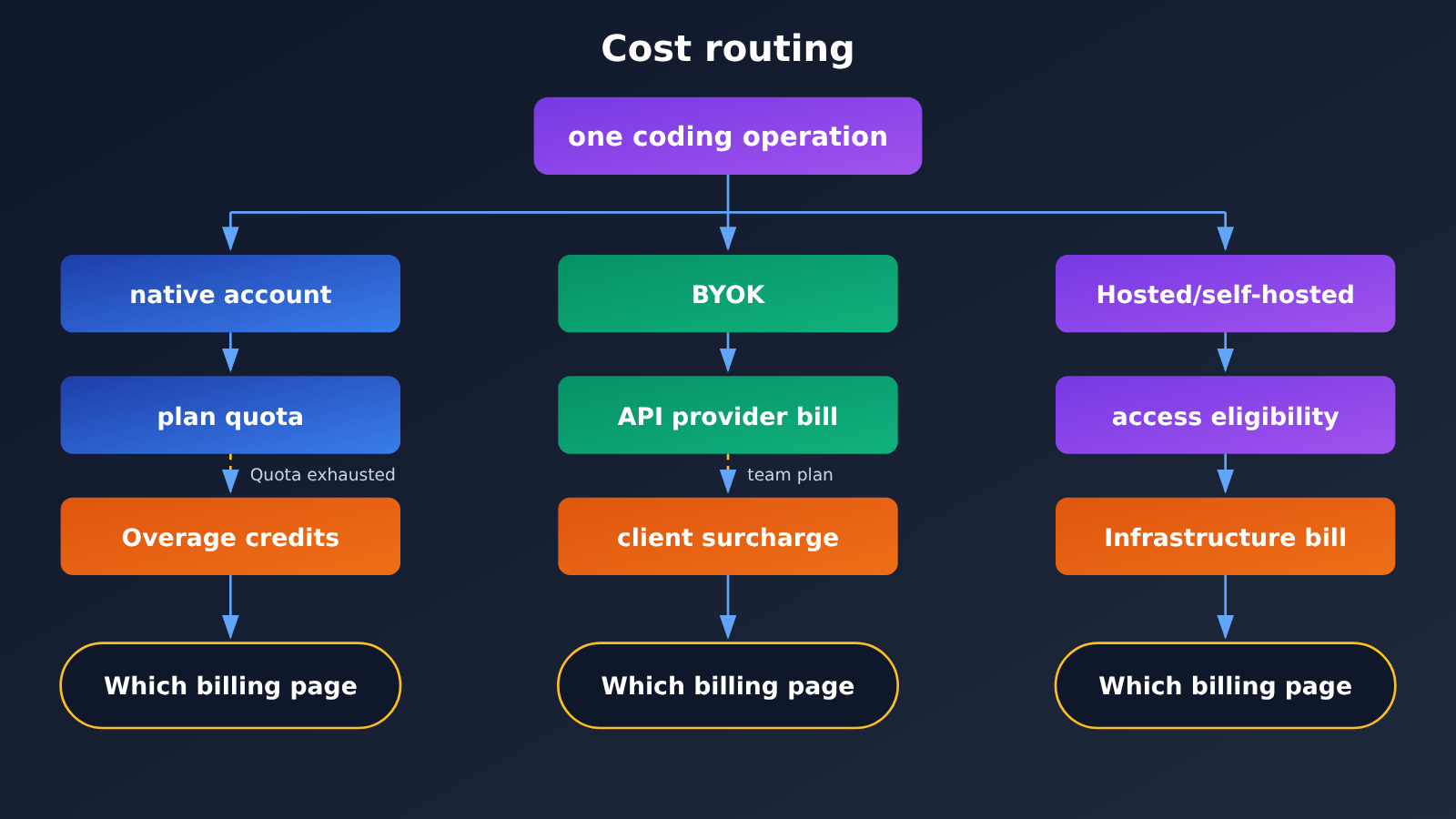
You can simplify the decision order for expenses into the following flow:
One AI coding operation
 ├─ Native product account + included models → consumes plan quota (Sections 1 and 2)
 │    └─ Quota exhausted and auto-renewal enabled → product-side overage credits or prepaid balance (Section 2)
 ├─ Bring-your-own key / compatible endpoint → billed by the API service provider that receives the request (Sections 3 and 4)
 │    └─ Team plan → also check client surcharges (Section 2.4)
 └─ Handed to a hosted or self-hosted environment → check access eligibility first, then check whether there's a separate infrastructure bill (Section 1.3)
10 Terms You Need to Know to Understand AI Coding Tool Bills
| Term | What It Means in This Article |
|---|---|
| Subscription fee / seat fee | A fixed fee paid periodically by an individual or organization to buy the product entitlements listed in the plan |
| Included usage | The usage allowance you can consume within a plan, refreshed according to the product’s time window and model rules |
| Overage credits | A product balance that can be deducted separately once the first-party product has used up its applicable allowance |
| Developer API credits | A balance that some plans additionally grant to a linked official developer organization account; coverage is subject to the credit terms |
| BYOK | Bring Your Own Key — the client sends requests using an API key supplied by the customer |
| Compatible endpoint | A service entry point for invoking models with a third-party account and key, such as the Responses or Messages protocol |
| Model ID | The identifier that precisely specifies a model in an API request; you also need to check the protocol and account permissions |
| Regular input, output, and cached tokens | Line items of API usage, each with its own unit price; pricing tiers and cache hits affect the total |
| Prepaid balance | Depositing funds into a balance first and then deducting based on usage; the payment date and the consumption date may differ |
| Cloud task | A task that runs in a hosted or self-built remote environment; you need to separately check access eligibility, usage attribution, and environment costs |
1. Use a three-column budget table to separate subscription fees from API bills
1.1 How the three-column budget table categorizes costs
The monthly cost of an AI coding tool can be split into three columns: “fixed fee and included quota,” “additional product usage / API,” and “runtime environment.” Every invocation gets recorded only in the column where consumption actually happened, and you should be able to trace it back to a corresponding billing record. The table below shows where the cost of each of the four invocation methods lands.
| Invocation method | Where the cost lands | Items to verify |
|---|---|---|
| Product’s native account + included model | The subscription fee is collected by the product vendor; model usage first draws down the quota included in the plan | Login method, selected model, usage pool, refresh cycle |
| Product-side overage credits, usage-based billing, or prepaid funds for third-party models | Deducted from the product vendor’s balance, or listed as separate additional usage on that product account | Whether overage is enabled, dates of top-up and deduction, behavior once the quota runs out |
| Key for the vendor’s developer API or a compatible endpoint | Billed by the API service provider that actually receives the request, based on endpoint and model | Base URL, protocol, model ID, account or group, call logs; organization plans may carry separate client surcharges |
| Hosted session or self-hosted environment | First check the cloud task’s access requirements and whose usage it counts as, then confirm whether there’s a separate infrastructure bill | Cloud model, sandbox, external CI, storage, or services that must be purchased separately |
1.2 The bookkeeping difference between one completion and one BYOK request
Take Cursor as an example. A Tab completion you trigger casually in the editor uses Cursor’s built-in model and goes in the “fixed fee and included quota” column. When the same person configures their own compatible API key in Chat and sends a request, the model fee is charged by that key’s provider and goes in the “additional product usage / API” column.
A single request can rack up two charges at once. Under Teams or Enterprise plans, qualifying BYOK requests may also come with a Cursor Token Rate — that charge needs its own line on the Cursor bill and shouldn’t be folded into the model fee.
1.3 Why a cloud task might show only model consumption and no VM bill
A cloud task is first a question of eligibility: can your account plan and seat launch it at all? Once that’s satisfied, look at what the task consumes while it runs. Claude Code’s official hosted cloud sessions count toward plan usage, and the cloud VM isn’t billed separately. If an enterprise switches to a self-hosted execution environment, the infrastructure cost moves onto the enterprise’s own cloud bill.
There’s another rule that’s easy to overlook: keep top-up records and consumption records separate. Buying a prepaid balance is a cash outflow; the balance actually decreasing is what counts as usage consumption. When you put together a monthly usage summary, count that same money only once.
2. Putting the Four AI Coding Tools into the Subscription Fee and API Bill Table
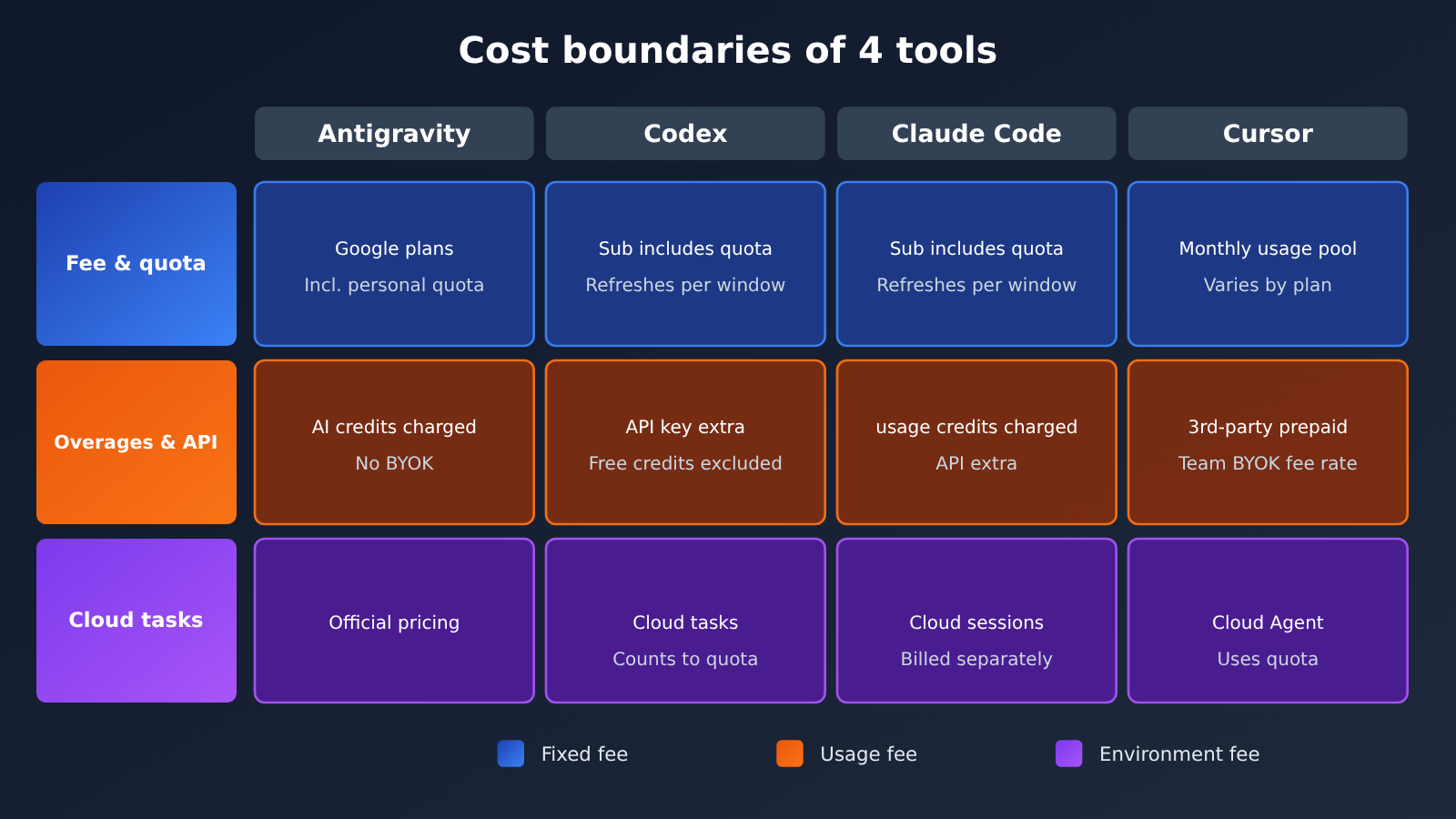
2.1 Antigravity: Personal Quota, AI Credits, and Organization Billing
The personal version is $0, and Google AI Pro and Ultra raise the limits. The personal documentation states that all plans include product capabilities like Tab completion and scheduled tasks. The base personal quota refreshes weekly, while the higher quotas for Pro and Ultra refresh every five hours and also carry a weekly cap. Task complexity affects how quickly the quota gets consumed. Ultra can use third-party models, and the specific models are listed on the Models page.
Once the quota runs out, eligible Pro and Ultra users can use AI credits purchased separately or granted through promotions, deducted at Gemini Enterprise consumption prices. When set to Never, it waits for the quota to refresh; when set to Always, it keeps deducting from credits. The official plan documentation explicitly does not support increasing quota through BYOK or custom endpoints. So calling a model of the same name through the Gemini API channel is a separate billing path.
Organizations use Google Cloud or Gemini Enterprise. The public page lists specific organization plans, Standard/Plus, starting at $30 per seat per month, plus a pay-as-you-go option with a $0 seat fee. Neither the starting price nor the $0 seat fee should be taken to mean the model is free to use. Organizations that already have a Google Workspace subscription also can’t simply apply the personal Google AI plans.
2.2 Codex: ChatGPT login and API key login are two separate accounts
When you log in with ChatGPT, Codex draws on the shared Work/Codex usage included with ChatGPT. Take the individual paid tiers as an example: Plus is $20 per month, and Pro comes in three tiers at $100, $200, and $500 per month. Eligible accounts can buy additional usage credits or turn on usage-based billing. You can view usage in the personal or workspace Usage Dashboard, and read it back in the CLI with /status.
When you log in with an OpenAI API key, billing is calculated separately at the corresponding API rates. Local and automation entry points like the CLI, SDK, and IDE plugins can use a key, but features such as Codex Cloud and GitHub-hosted code review depend on an applicable ChatGPT account and workspace permissions. When a company runs Codex in its own CI, there may also be Runner costs.
Some ChatGPT Pro and Business users who meet eligibility requirements and bind an official API organization can claim OpenAI API credits each cycle. The official documentation makes clear that these credits do not cover Codex API key usage, and the usage limits for logged-in Codex and ChatGPT are also independent.
2.3 Claude Code: Plan usage, usage credits, and API credits
Claude Pro is $20 per month in the US, Max is $100, and Ultra is $200. Under the same Claude account, Claude and Claude Code share the plan’s usage limits. When eligible, you can enable usage credits, and once the quota runs out, it keeps running at standard API rates; on the subscription path you manage this through /usage-credits. The official five-hour or weekly windows shouldn’t be converted into a fixed token count.
When you use an Anthropic API key directly, costs are billed to Claude Console. Max, Ultra, and Team subscriptions that meet eligibility requirements and bind a Console organization can separately claim monthly official API credits, which cover eligible API and Agent SDK calls but are not used for interactive Claude Code, usage credits within Claude, or external platform bills.
As for cloud sessions, Pro, Max, Ultra, Team, and eligible Enterprise seats can use them, subject to organization role settings. Officially hosted cloud sessions consume plan usage, and the cloud VM isn’t billed separately.
2.4 Cursor: First, figure out whether you’re on the new X plan or the old Cursor plan
New personal accounts map to The X Subscription, with public pricing of Free $0, Plus $8, Premium $30, Super $100, Ultra $200 (all per month). The Cursor model quota included in paid plans refreshes weekly and is shared with Grok. Starting at Premium, the new lineup unlocks Cloud Agents and third-party models that Cursor invokes on your behalf — those get deducted from your prepaid balance at the corresponding public API price from the very first request. Cloud Agents follow the same usage mechanics as the editor and CLI, based on the model you pick.
Older plans like Cursor Pro, Pro+, Ultra, and Start keep working under the old rules. The old docs describe two monthly usage pools — Cursor Models and Other Models — plus optional on-demand usage, and the legacy request-based billing version also has a request-equivalent metric for Cloud Agent Max Mode. So you can’t use old Pro features and quotas to explain a new Plus bill. The new plan’s monthly add-on usage cap is calculated on actual consumption, and that’s a separate setting from buying prepaid credit or turning on auto top-up.
BYOK covers supported Chat models only; Tab keeps using Cursor’s built-in models. Among the individual plans the official docs list as eligible, model fees for BYOK models are billed by the key provider, so the same model fee won’t be deducted again from Cursor usage pools or prepaid balance. On Teams and Enterprise, eligible models may still carry a Cursor Token Rate even when you use BYOK — the official rate is $0.25 per million input, output, and cached tokens each. If a third-party model’s cached-read price is strictly below $0.10 across every price tier, the exemption condition applies.
2.5 Three types of similarly named “credit” live in different pools
These three types of “credit” have similar names, but they’re charged against different pools:
- Native subscription usage: Included in the plan, refreshes on a time window, and covers in-product interactions and included models.
- Overage continuation credits: Once the allowance is exhausted, the product provider’s balance keeps getting charged—for example, Claude’s usage credits and Antigravity’s AI credits.
- API credits granted to the vendor’s developer organization: These go into a linked Console or API organization. For example, Claude’s monthly API credits cover the Agent SDK but not interactive Claude Code; OpenAI’s granted API credits don’t cover Codex’s API key usage.
When you read a bill, first confirm which pool is being charged, then determine whether that cost is already included in the subscription fee.
3. Where Compatible APIs Fit in AI Coding Tool Billing
3.1 Which column do compatible endpoints like APIYI land in?
Requests sent using an APIYI key and endpoint are recorded in the “additional product usage / API” column and billed by the APIYI account according to the interface and model. These keys and the tool vendor’s software subscription benefits are governed by their own separate terms; connecting a compatible endpoint won’t increase the vendor’s plan allowance. Antigravity is a typical example: Gemini 4 Argon in the APIYI model catalog can only be called from API clients that support the corresponding protocol—it can’t be credited into an Antigravity personal allowance pool.
3.2 Verify the protocol and model ID by request path
Different clients use different protocols, so the configuration entry point and billing entry point differ too:
| Client entry point | Required protocol | Who collects the fee | What to verify |
|---|---|---|---|
| Codex CLI or IDE extension | Responses (the official configuration currently supports only responses as the wire API) | The API service provider that receives the request | The gateway must preserve fields such as tool calls and usage |
| Claude Code terminal | Gateway interfaces such as Anthropic Messages | The API service provider that receives the request | Check organization identity and access method against the official LLM gateway documentation |
| Cursor native custom Chat | Compatible Base URL | The key provider; team plans may have a separate Cursor Token Rate | Go by the current client version and the plan’s BYOK support scope |
| Codex extension installed in Cursor | Responses | Determine it based on Codex’s API path | Don’t estimate it using Cursor Tab or Cloud Agents costs |
| Antigravity personal workbench | Adding allowance via BYOK is not supported | Google plans and AI credits | Standalone Gemini API clients are accounted for separately |
A model appearing in a CLI’s default catalog doesn’t mean a custom gateway or every account type already supports it. For example, Codex CLI 0.171.0 made GPT-6.2 Sol the default catalog choice on November 20, 2026, but whether a gateway can call it still has to be checked separately by protocol and account.
3.3 Read billing fields back from one successful request
Once configuration is complete, pick a successful request and read these fields back from the invocation log: model ID, endpoint protocol, the group the key belongs to, standard input and output tokens, cache reads and writes, and request ID. Only when these fields match the model shown in the client UI can you confirm that the request is being billed through the expected path. APIYI’s documentation includes integration references for Codex, Claude Code, and Cursor, along with notes on log-based billing. Paths you haven’t actually tested successfully should be treated only as conditions still to be verified.
4. A worked example of the API bill for the same 25 calls
4.1 Assumptions
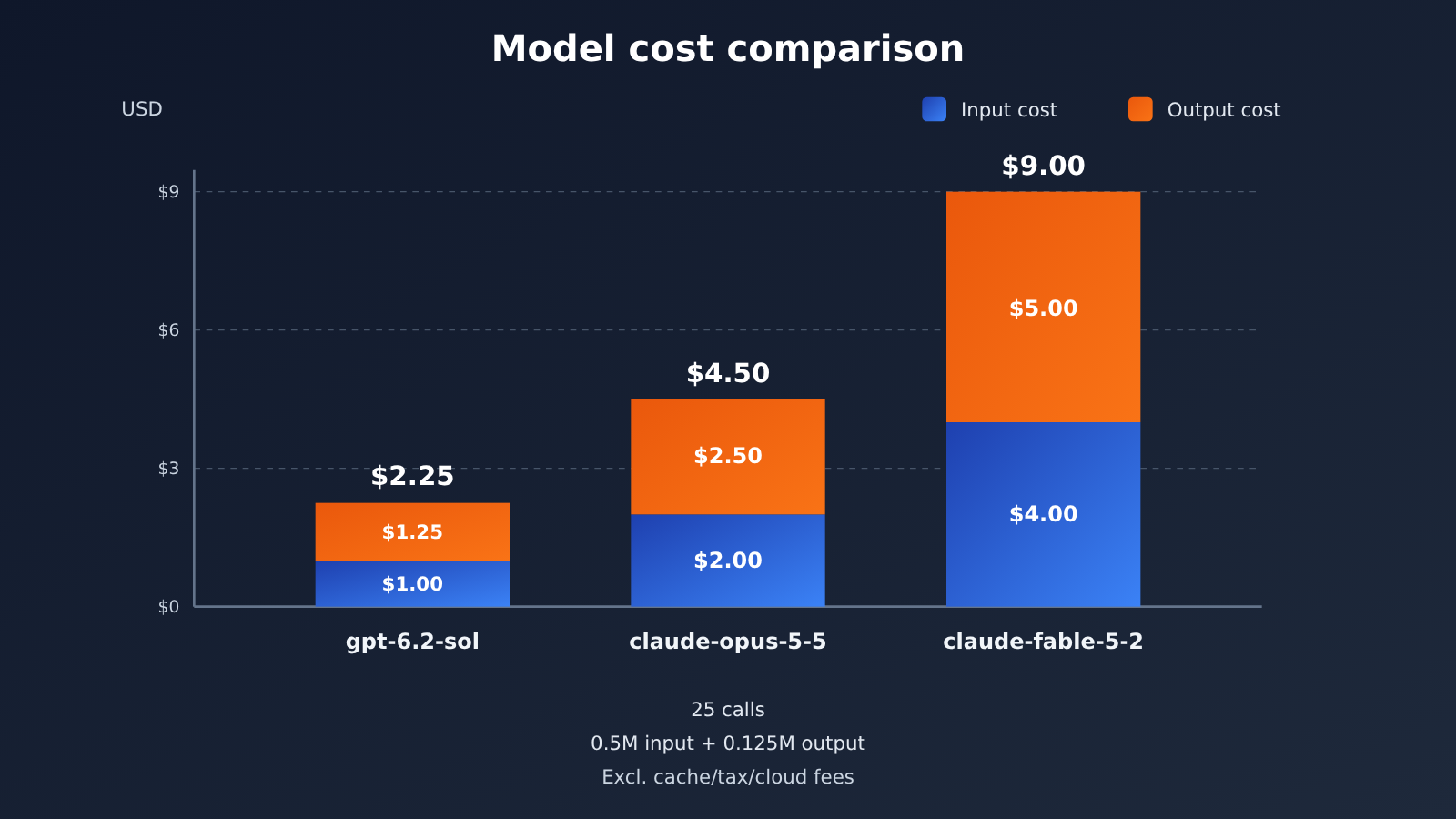
Suppose a developer already has a fixed tool subscription, keeps daily completion and applicable cloud tasks on their existing paths, and only wants to account separately for a batch of text calls made through APIYI. There are 25 calls, each with 20,000 tokens of regular input and 5,000 tokens of output. That comes to 0.5M regular input tokens and 0.125M output tokens, and every request falls within the applicable price tier.
Prices use APIYI’s public, unadjusted USD prices as of November 23, 2026. Caching, discounts or multipliers, extra tool fees, taxes, and external cloud costs are all excluded from this example.
4.2 Model fees for the three models
| Model ID | Input $/M | Output $/M | Calculation | Model fee |
|---|---|---|---|---|
gpt-6.2-sol |
2 | 10 | 0.5 × 2 + 0.125 × 10 | $2.25 |
claude-opus-5-5 |
4 | 20 | 0.5 × 4 + 0.125 × 20 | $4.50 |
claude-fable-5-2 |
8 | 40 | 0.5 × 8 + 0.125 × 40 | $9.00 |
gpt-6.2-sol‘s $2 input price is the tier listed in the official catalog for up to 272,000 tokens. If a single input exceeds that length, you need to use the long-context tier price instead.
4.3 What to watch when swapping in your own data
Twenty-five API calls are not the same as 25 agent tasks. One agent task often triggers multiple calls. Conversation history, multiple rounds of tool output, and reruns all add tokens. So this table can’t tell you how many tasks a plan can complete, can’t be used to judge model capability, and doesn’t show that every interface supports these models.
The substitution method is straightforward: pick a month’s real task sample, pull the regular input, output, and cache read/write token counts and applicable price tiers from the logs, plug them into the same formula, then reconcile the amount actually paid against the current grouping and request records.
5. An AI Coding Tool Cost Reconciliation Sheet Buyers Can Fill In Directly
5.1 Six-Column Reconciliation Table
| Task to do | Product & account plan | Actual execution entry point | Who charges the model fee | Is there an additional environment or platform fee | Where to check the bill for that row |
|---|---|---|---|---|---|
| In-editor completion | e.g. Cursor new Premium | Built-in Tab | Quota included in the plan | No | Cursor Spending page |
| Advanced model chat | e.g. Cursor Teams + bring your own key | Custom Chat | The key provider, record the model ID | Possibly a Cursor Token Rate | API call logs + Cursor bill |
| Terminal coding agent | e.g. Codex + API key | CLI, Responses path | The API service provider | Self-hosted CI may have Runner costs | API account usage page |
| Cloud session | e.g. Claude Pro seat | Official managed cloud session | Plan usage | Official VM has no extra charge; self-hosted environments are billed separately | Claude usage page |
5.2 How to Fill In the Sheet
- Native completion: Record the entitlement already included in the current subscription; don’t bill it separately.
- Advanced models: State the pay-as-you-go payer and the specific model ID.
- Managed tasks: Fill in the corresponding seat, plus the pricing method for the model used.
- Keep incremental and total budget separate: When evaluating the cost of a new piece of work on top of an existing subscription, only add the newly incurred costs for that work to the comparison; when putting together an overall financial budget, list the subscriptions already paid as fixed costs.
- Record the same time window: For plan rows, note the account, seat fee, usage pool, and whether overage is enabled; for API rows, note the endpoint protocol, model ID, group, input/output, cache, and request ID; for environment rows, note the run location, billing account, and separate fees.
When doing a procurement comparison, use the same kind of repository task, the same acceptance criteria, and the same measurement window, record the number of calls and reruns needed to finish the task, and report balance top-ups, actual consumption, and fixed fees separately. Once this sheet is filled in, every charge should map to exactly one row and exactly one bill. If some amount shows up in two rows, it means top-ups and consumption were double-counted, or a client-side surcharge got folded into the model fee — in that case, go back to the three-column framework in Section 1 and split it out again.
References
- Antigravity individual plans and quotas:
antigravity.google/docs/plans - Antigravity pricing and organization entry point:
antigravity.google/pricing - Codex pricing and features:
learn.chatgpt.com/docs/pricing - Codex sign-in and billing:
learn.chatgpt.com/docs/auth - API credits included with OpenAI subscriptions:
help.openai.com/en/articles/20001626-api-credits-benefit-for-eligible-chatgpt-subscriptions - About the Claude Pro plan:
support.claude.com/en/articles/8325606-what-is-the-pro-plan - Claude monthly API credits:
support.claude.com/en/articles/17154008-monthly-api-credits-for-max-ultra-and-team-plans - Claude Code cloud sessions:
code.claude.com/docs/en/claude-code-on-the-web - Cursor’s current models and plans:
cursor.com/docs/models-and-pricing - Cursor BYOK and team rates:
cursor.com/help/models-and-usage/api-keys - Cursor’s old and new usage rules:
cursor.com/help/models-and-usage/usage-limits - APIYI models and pricing:
docs.apiyi.com/models - APIYI log billing explained:
docs.apiyi.com/faq/log-billing-explained


