

Author’s note: Making a video means transcription, reviewing the visuals, generating a cover, and revising the copy — each of those can be handled by a different model, but it’s best to funnel the paid steps into a single base_url so the bills actually reconcile.
If you’ve ever put together a full-length video, you’ve probably noticed something: one vendor for transcription, another for reviewing frames, a third for the cover, then yet another window opened up to rewrite the title and copy. Every step looks reasonable on its own — until you’re at month-end reconciling four or five statements that don’t even use the same units. Some bill by token, some per request, some are tangled up with subscriptions. This article is about keeping the division of labor, consolidating the billing: first sort out which steps can stay local and which ones actually cost money, then move the paid steps into a single invocation entry point.
This isn’t a pitch for using just one model. Different stages genuinely suit different models. What actually needs unifying is the billing entry point and the reconciliation standard — not the models themselves.
What you’ll take away: by the end of this article you’ll have a local/paid breakdown table for a video pipeline, a model-and-price comparison verified as of 2026-11-20, and a practical method for pointing your paid steps at the same base_url.
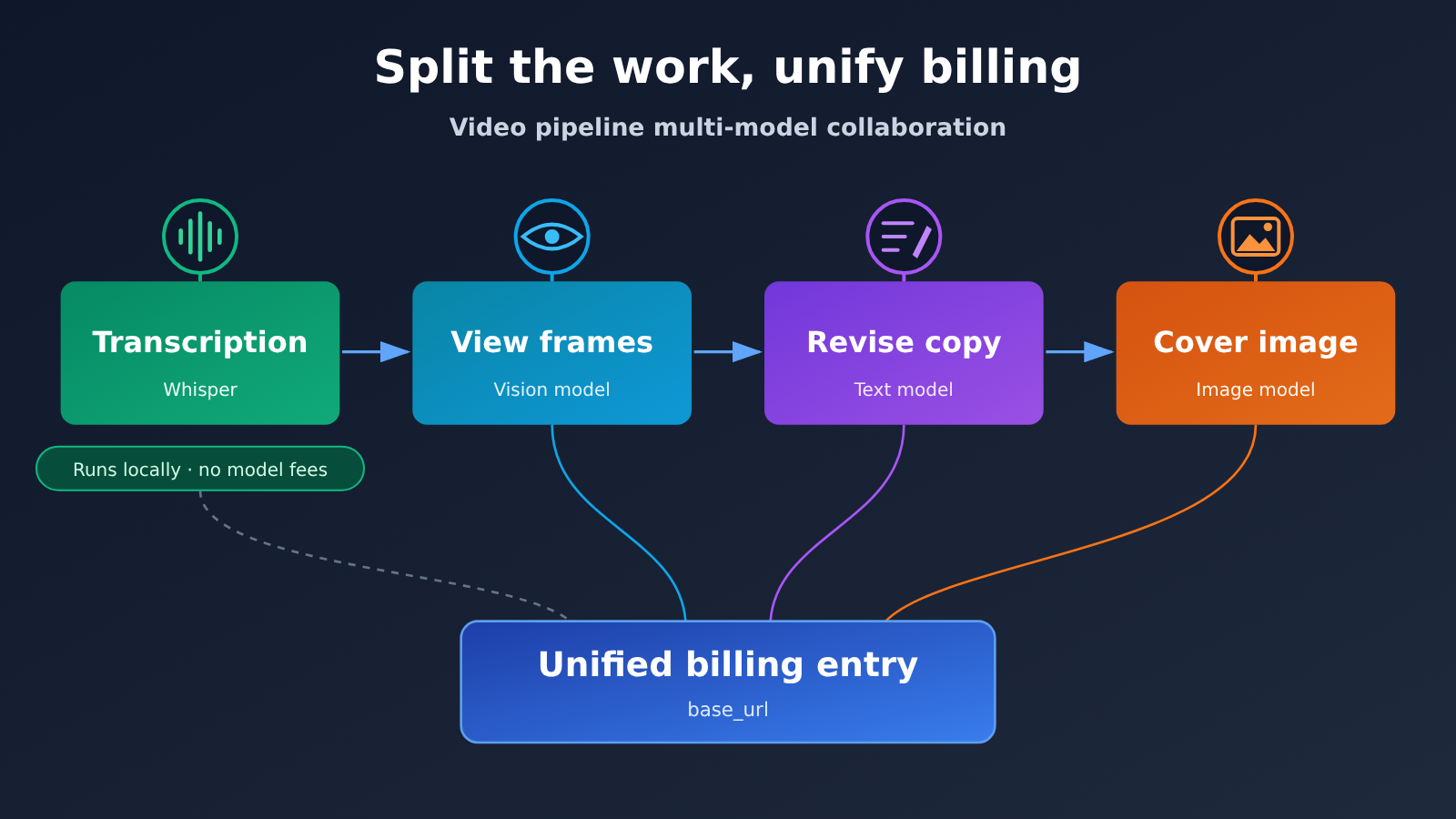
Key Points for Running Several Models on a Single Video
The occasion for this discussion was a video editing skill that MindStudio covered on 2026-11-19. The author says an advanced multimodal pipeline gets a long video done for about $2.71. To be clear, that figure is the author’s own account, run through OpenRouter — it’s not an APIYI bill, and it’s not something measured here. What makes it useful is the implication: the model cost of a single video can stay in a very low range, provided you know which steps the money went into.
| Point | What it means | Why it matters |
|---|---|---|
| Separate local from paid first | Transcription can run on local Whisper, no model fees | One less bill, and one less path for data to leave your machine |
| Consolidate the paid steps | Frame review, copy edits, and cover art all go through the same base_url | Every bit of consumption in one dashboard |
| Switching models means changing only the ID | The API is OpenAI-compatible, so you just change the model field |
You can reshuffle the division of labor anytime without rewriting code |
| Count per-call and per-token separately | Covers are billed per call; text and vision per token | Budget estimates stay unambiguous |
| Track off-the-shelf steps separately | Voice cloning isn’t on the APIYI shelf | No miscounting come reconciliation time |
A Closer Look at the Division of Labor in a Video Pipeline
The first point is the division of labor itself. Watching video frames and understanding what’s in a shot calls for a model with strong multimodal comprehension and long-context handling; cover art calls for an image generation model; copy edits are more sensitive to writing quality and to cost. Cram all of that into a single model and you usually end up with one link in the chain dropping in quality, or another running too expensive. So the division is sound — the trouble is simply that every vendor wants its own account, its own top-up, and its own invoice.
The second point is consolidation. APIYI (apiyi.com) is a Large Language Model API aggregation platform: one API key calls OpenAI, Claude, Gemini, and other mainstream models, the API is OpenAI-compatible, and billing is pay-as-you-go. For a video pipeline, that means the paid steps — frame review, copy edits, cover art — can share one key and one base_url, with consumption recorded in a single place. When you switch models, what changes is the model ID, not the vendor or the SDK.
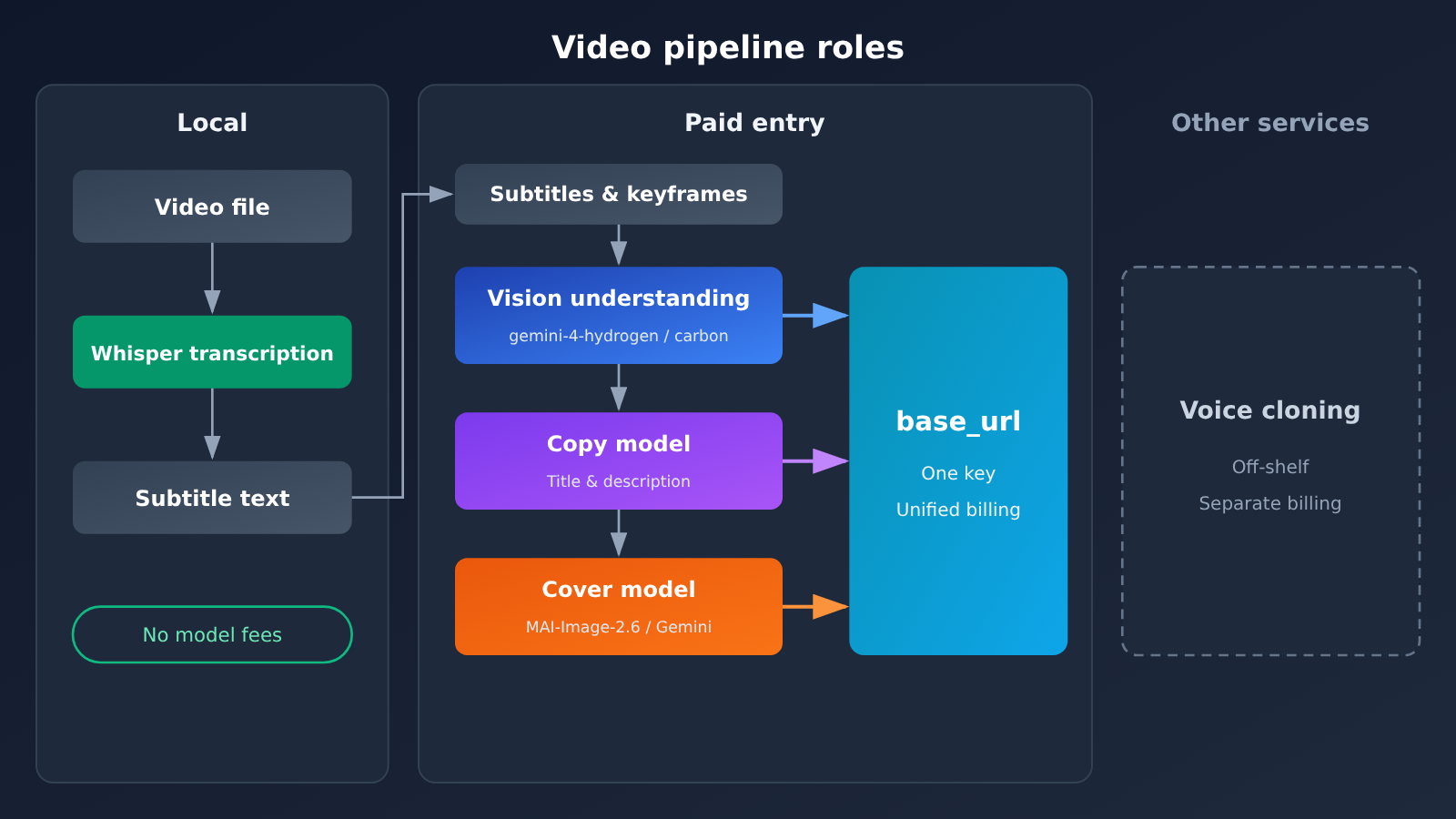
Quick Start: Orchestrating Multiple Models for a Single Video
Step 1: Split your video pipeline into local and paid halves
Before you start wiring up APIs, list the billing nature of each step. The table below shows how a typical long-video pipeline breaks down. You can add or remove rows to match your own workflow.
| Stage | Suggested run location | Does it incur model fees? | Billing basis |
|---|---|---|---|
| Audio transcription | Local Whisper | No | Uses only local compute |
| Editing, splicing, export | Local editing tools | No | None |
| Viewing frames, understanding shots | Unified API entry point | Yes | Per input / output token |
| Rewriting titles, writing descriptions | Unified API entry point | Yes | Per input / output token |
| Generating covers | Unified API entry point | Yes | Per request |
| Voice cloning | Other services | Yes | Not in the APIYI catalog; billed separately |
Once you break it down this way, only three paid stages actually need to be consolidated. Transcription stays local, so you don’t pay model fees, and you don’t have to upload the original audio. If you really need voice cloning, it’ll be a separate bill. Set aside budget for it separately and don’t count it under the unified entry point.
Step 2: Confirm Models and Pricing
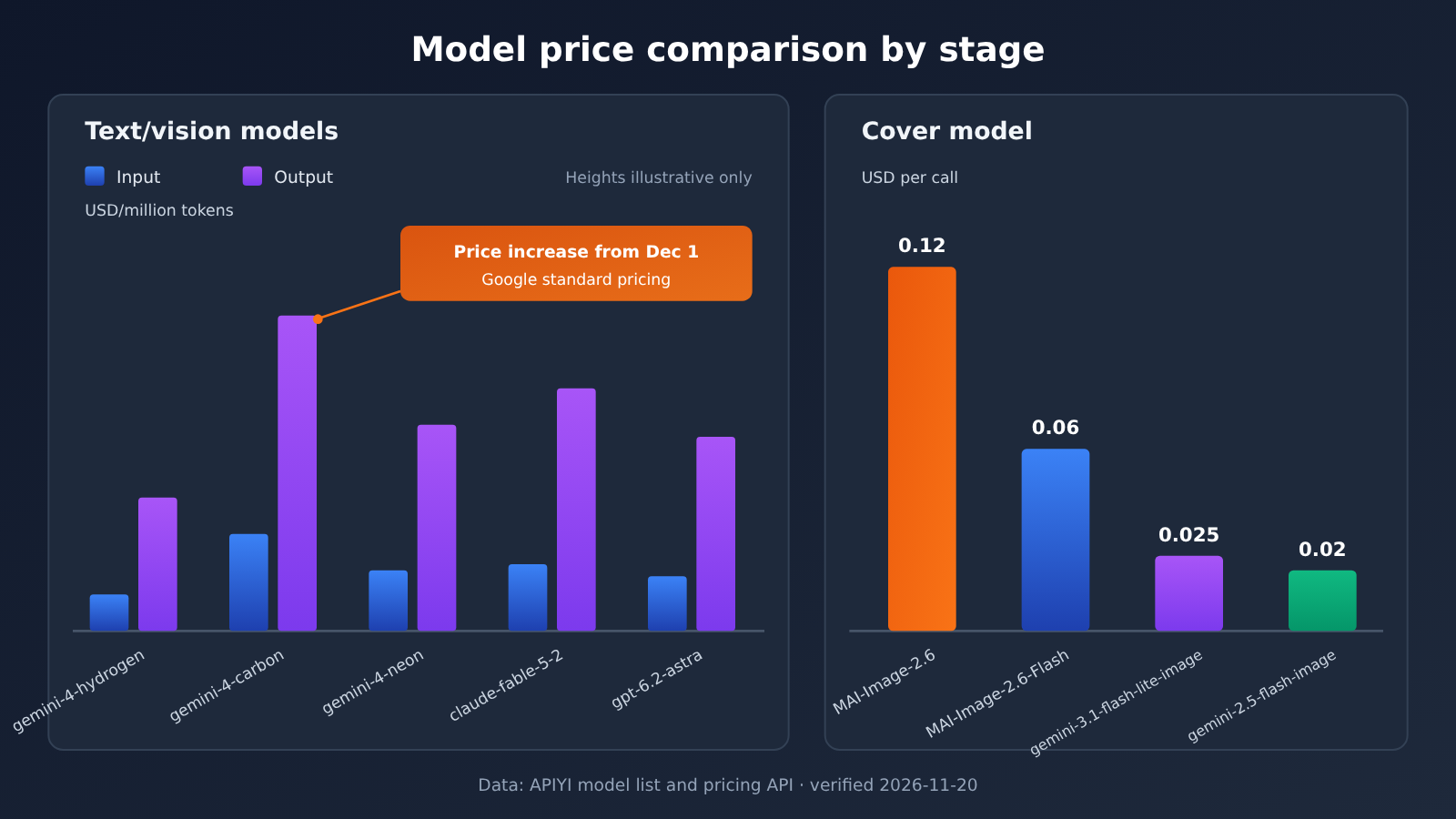
Next up: looking up model names and checking prices. The prices below were verified on 2026-11-20 against APIYI’s model master table at docs.apiyi.com/models.md (that version was updated 2026-11-19 10:59, UTC+8) and the pricing API at api.apiyi.com/api/pricing (version shell-api-modelmak-v1). When model_ratio in the pricing API is 1, that maps to $2 per million input tokens, so you can convert from there yourself.
| Model ID | Input (USD per million tokens) | Output | Cache read | Best for |
|---|---|---|---|---|
gemini-4-hydrogen |
1.5 | 7.5 | 0.075 | Inspecting visuals and revising copy, cost-focused |
gemini-4-carbon |
2 | 10 | 0.1 | Inspecting visuals and revising copy; introductory pricing through 2026-11-30 |
gemini-4-argon |
2 | 10 | 0.1 | Text and comprehension tasks |
gemini-4-neon |
3 | 15 | 0.15 | Fallback when you need more capability |
claude-fable-5-2 / claude-fable-5-2-thinking |
8 | 40 | 0.2 | Polishing long copy, complex rewrites |
gpt-6.2-astra |
8 (16 above 272000 tokens) | 40 | 0.4 | Demanding text tasks |
Two things deserve extra attention. gemini-4-carbon‘s 2 / 10 / 0.1 matches Google’s introductory pricing through 2026-11-30; starting December 1, Google’s standard price is 4 for input and 20 for output, so your costs will double — recheck before you commit to long-running batches. For gpt-6.2-astra, once you exceed 272000 tokens, the master table lists input at 16, while the pricing API also shows output 60 and cache read 0.8 for that tier. Where the two sources disagree, trust the backend billing you actually see when you make the call. gemini-4-neon isn’t listed in this version of the master table, but the pricing API does have a record for it, and the converted figure matches Google’s list price.
Cover work is billed per call, so here’s a separate table:
| Cover model ID | Price per call (USD) | Best for |
|---|---|---|
MAI-Image-2.6 |
0.12 | Main cover, when you need higher quality |
MAI-Image-2.6-Flash |
0.06 | Trying out multiple versions |
gemini-3.1-flash-lite-image |
0.025 | Batch sketches |
gemini-2.5-flash-image |
0.02 | Cheap, fast image generation |
Note that MAI-Image-2.7 doesn’t exist yet, so don’t put it in your script as a callable model. Kling, Muse, and gemini-4-flash-lite are also absent from both the master table and the pricing API, so rule them out when you plan the pipeline.
Step 3: Point the paid step to the same base_url
This step is a tiny change. If you were using the official OpenAI SDK before, you only need to change two things:
- Replace
api_keywith the key you generated in the APIYI dashboard; - Set
base_urltohttps://api.apiyi.com/v1.
After that, for visual-analysis requests, set model to gemini-4-hydrogen; for copy-editing requests, use claude-fable-5-2 or keep using Gemini; and for cover generation, use MAI-Image-2.6-Flash. All three stages share one client object — the only difference is the model ID. Chat-style requests go through the OpenAI-compatible /chat/completions endpoint. For the specific parameters and response format of image models, refer to the model documentation.
View the per-stage configuration checklist
– **Client**: Initialize it only once, keep `base_url` unchanged, and put the key in an environment variable, for example `APIYI_API_KEY`.
– **Visual analysis**: Feed the keyframe screenshots and locally transcribed subtitles together as input, and set `model` to `gemini-4-hydrogen`; if your budget is flexible or you need stronger comprehension, switch to `gemini-4-carbon`.
– **Copy editing**: Use the shot summary output from the previous step as context, and choose `claude-fable-5-2` for `model`; for long drafts that need multi-step reasoning, use `claude-fable-5-2-thinking`.
– **Cover generation**: First use `gemini-2.5-flash-image` to generate a few draft versions, then use `MAI-Image-2.6` for the final cover.
– **Caching**: The subtitles for the same video get read repeatedly by multiple stages, so try to keep the shared portion as a consistent prefix to take advantage of cache-read pricing.
– **Logging**: For each request, record the model ID and returned token usage, then reconcile them item by item against the dashboard usage at the end of the month.
🚀 Quick-start tip: First, use the free trial credit for new users on APIYI (apiyi.com) to run a short video through all three steps above, note the actual token usage at each stage, and then decide which model tier to use for longer videos.
Step 4: Estimating the Budget for a Single Video
When estimating, work out the token-based costs and the per-call costs separately. Here’s a hypothetical example: if reviewing footage plus revising copy consumes a total of 1 million input tokens and 100,000 output tokens, using gemini-4-hydrogen that comes to 1.5 + 0.75, or about $2.25; for the cover, generating 4 Flash drafts and 1 final version works out to 4 × 0.06 + 0.12, which is $0.36. The token counts here are just made-up numbers for illustration — your actual usage depends on video length, frame-sampling density, and how many rounds of copy revision you go through.
The nice thing about this estimation method is that every line item can be matched against your backend bill, line by line. By comparison, if the four stages were spread across four different providers, the exchange rates, billing units, and charge timings would all differ — even if the total isn’t large, reconciling the bill eats up a lot of time.
Common Questions (FAQ)
Q1: A single video touches several models — which steps exactly?
Usually four: transcription, visual analysis, copy revision, and cover art. Some pipelines also add voiceover or voice cloning. Transcription can run on local Whisper without any model fees; the steps that actually generate model costs are typically visual analysis, cover art, and copy revision.
Q2: Isn’t splitting up the work at odds with consolidating the entry point? Wouldn’t one model be simpler?
They don’t conflict. Splitting the work is about matching quality to cost; consolidating is about billing and reconciliation. Using one model is certainly simpler, but visual analysis, copywriting, and image generation demand very different capabilities, so forcing them into one often costs more than it saves. The better approach: pick models individually, keep a single invocation entry point.
Q3: Can I use $2.71 per long video directly as a budget figure?
Better not to apply it directly. That’s a number the author cited as reported by MindStudio, running through OpenRouter, not an APIYI bill — and the model mix, video length, and frame-sampling count may not match yours. The safer approach is step four in this article: recalculate with your own token usage and current unit prices.
Q4: For visual analysis, should I choose gemini-4-hydrogen or gemini-4-carbon?
If budget comes first, choose `gemini-4-hydrogen`: input 1.5, output 7.5, cached reads 0.075 — the lowest unit price in this group. For stronger understanding, choose `gemini-4-carbon`, but note that its 2 / 10 is an introductory price valid through 2026-11-30; from December 1, Google’s standard price is input 4, output 20, so re-check pricing before long-term use.
Q5: How do I switch my existing scripts to the unified entry point?
Register at APIYI apiyi.com, generate an API key, change the SDK’s `base_url` to the platform’s invocation address, then change the `model` field per step. The existing request structure barely needs to change, and new users get free test credits — you can validate the whole pipeline with one short video first.
Q6: Can voice cloning go through this entry point too?
No. Voice cloning isn’t currently on APIYI’s catalog. If you need that step, you’ll have to use a separate service and track its costs separately. When planning your budget, list it as its own line item so it doesn’t get mixed in with the unified entry point’s consumption.
Q7: Are there any known limitations to avoid up front?
A few: `MAI-Image-2.7` doesn’t exist yet; Kling, Muse, and `gemini-4-flash-lite` aren’t found in either the summary table or the pricing interface, so don’t put them in your scripts. `gpt-6.2-astra` has a higher unit price once you exceed 272000 tokens, and the summary table and pricing interface differ slightly on tier details — actual charges are authoritative. Prices change, so it’s best to re-check against that day’s model summary table before running a batch.
Key Takeaways: Orchestrating Several Models for a Single Video
- Split first, then connect: keep transcription and editing local, and only route the steps that generate costs through the API.
- Keep the division of labor: pick the best-fit model for watching footage, revising copy, and making thumbnails — no need to force everything onto one model.
- One entry point: paid steps share a single Key and base_url, so switching models just means changing the model ID.
- Separate the accounting: text and vision are billed by token, thumbnails by call, so budget in two columns.
- Mind the timing:
gemini-4-carbonintro pricing runs through 2026-11-30, after which standard pricing goes up. - Off-shelf item, listed separately: voice cloning isn’t part of the unified entry point and has to be accounted for on its own.
- External numbers are reference only: the $2.71 is the author’s own figure on OpenRouter, not an APIYI bill.
Summary
Running one video through several models isn’t a problem in itself — the problem is a bill that’s been split so many ways it no longer adds up. Boiling it down, there are three points:
- Local first: transcribe with local Whisper and do the editing locally — neither step incurs model fees.
- Consolidate the paid steps: watching footage, revising copy, and making thumbnails all go through one base_url, split by model ID.
- Price it at the day’s rates: estimate token-based and per-call costs separately, and re-check prices and available models before running a batch.
My suggestion: run one short video through the whole pipeline first, note the real usage at each step, then scale up to long videos. I’d recommend doing this validation with the free test credits on APIYI apiyi.com — the division of labor stays the same, and you only have one entry point to check for the bill.
📚 References
-
APIYI Model List: Overview of models and unit prices
- Link:
docs.apiyi.com/models.md - Note: The main source for the prices in this article; this version was updated on 2026-11-19 10:59 (UTC+8)
- Link:
-
APIYI Pricing API: Real-time pricing calculated by multiplier
- Link:
api.apiyi.com/api/pricing - Note: Version
shell-api-modelmak-v1, where amodel_ratioof 1 corresponds to $2 per million tokens for input
- Link:
-
MindStudio Video Editing Skill Write-up: Published 2026-11-19
- Note: The claim of $2.71 for one long video comes from the author’s own account as retold in that article, and it runs through OpenRouter
Author: APIYI Technical Team
Technical Contact: Feel free to reach out to us on the APIYI homepage; for more models and invocation instructions, check out the docs.apiyi.com documentation center


