

Author’s note: Microsoft-Decision-1.1 became generally available on 2026-11-17. It only picks among the options you hand it, scores them, or answers yes/no — it doesn’t write long text. This article explains which step in a pipeline it’s suited to replace, which document you should be reading for pricing, and why the numbers in that post can’t be copied straight into a cost table.
During Microsoft Ignite, TestingCatalog published a post on 2026-11-17. The post said “MAI Decision 1,” but the image attached was Artificial Analysis’s Decision 1.1 leaderboard chart. Plenty of teams are already using large language models for request routing, ticket classification, priority ranking, and output validation — and after seeing that post, they had three questions: which model do I integrate, which step does it replace, and can I actually use the “10x faster, 200x cheaper” numbers from the post?
The short answer: hand off judgments with a fixed set of options to Microsoft-Decision-1.1, and keep long-form generation with the large language model. Microsoft’s GA announcement on 2026-11-17 declared it generally available, and the Microsoft Foundry docs spell out how to call it. This article sticks to the GA post and the official docs; the social post is just a lead.
This is not a retelling of that post. The multipliers in it never say what they’re compared against, and there’s a “2.2x” in both the post’s images and Microsoft’s internal use cases that measure against different baselines — we’ll take them one at a time. On 2026-11-18 we checked the model table and pricing endpoint over at APIYI apiyi.com; the results are in the pricing section.
The point: After reading this, you’ll be able to tell which step in your pipeline can go to Microsoft-Decision-1.1, know which document to consult for pricing, and avoid testing a model ID that doesn’t exist yet against the wrong endpoint.
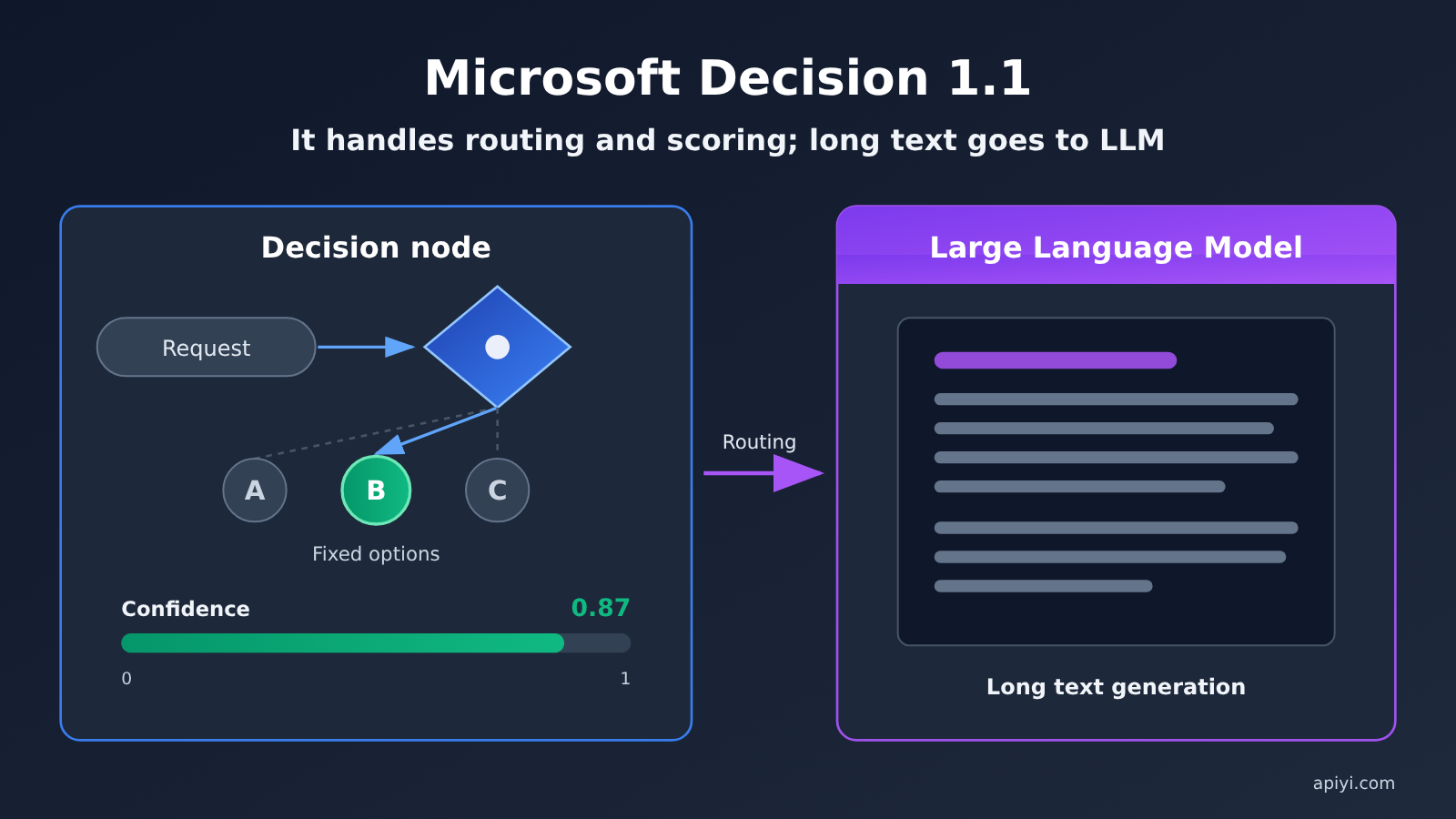
Microsoft Decision 1.1: Key Facts at a Glance
First, let’s separate the official information from what the post says. The table below only includes details that can be verified in Microsoft’s GA announcement, the Ignite Book of News, and the Foundry documentation.
| Item | Details |
|---|---|
| General availability date | 2026-11-17, announced in Microsoft’s GA post |
| Model name | Microsoft-Decision-1.1 |
| Base model | Gemma 4 26B A4B (consistent with the GA post and the Ignite Book of News) |
| Use cases | Routing, classification, prioritization, validation, and workflow control |
| How it works | Selects among options provided by the developer, returns a calibratable confidence score, and can abstain when uncertain |
| Compared with the first version | More than 2x faster, keeps pricing low, and adds image input |
| Official availability channels | Microsoft Foundry, OpenRouter, Vercel AI Gateway |
| APIYI (apiyi.com) status | As of 2026-11-18, it wasn’t listed in either the model list or the pricing API |
“Choosing from a given set of options” is the key to understanding this model. It doesn’t write paragraphs or explain its reasoning—it just answers the question you’ve designed in advance. This kind of work used to be handled by Large Language Models as a side task; now you can hand it off to a dedicated small model.
Microsoft-Decision-1.1 and Microsoft-Decision-1 Aren’t the Same Model
The post text says Decision 1, but the accompanying image shows Decision 1.1, so it’s easy to mistake the two versions for the same model. They actually use different base models and were released at different times. Before integrating, confirm which one you’re deploying.
| Comparison | Microsoft-Decision-1 | Microsoft-Decision-1.1 |
|---|---|---|
| Release date | 2026-10 | General availability on 2026-11-17 |
| Base model | Qwen3.5-9B | Gemma 4 26B A4B |
| Input price (Foundry) | $0.042 per million tokens | Tiered pricing; see the pricing table below |
| Output price | Free | Free |
| Image input | Not mentioned in available materials | Added, per the GA post |
| Availability channels | Foundry, OpenRouter | Foundry, OpenRouter, Vercel AI Gateway |
| Other notes | The OpenRouter page lists a context window of about 33K | Microsoft says it’s more than twice as fast as the first version |
If you already wrote an evaluation script for Microsoft-Decision-1 in October, you’ll need to redeploy when switching to 1.1 and update the deployment name. Because the two versions use different base models, you’ll also need to revalidate the confidence thresholds you tuned earlier.
How to Call Microsoft Decision 1.1: It’s Not a Chat Completions Endpoint
This is the easiest place to trip up. According to the Microsoft Foundry docs, Microsoft-Decision-1.1 uses the Decision API type, not the familiar chat completions. You send requests to the /providers/microsoft/v1/systemone path on your Foundry resource, and in the request body the model field holds your own deployment name, not the model name. When deploying, pick version 1; the deployment type can be GlobalStandard, and in some regions you can also choose DataZoneStandard.
It only supports three question types, and it returns an answer plus a probability — no free-form text, no reasoning:
| Question type | Purpose | What it returns | Typical scenario |
|---|---|---|---|
noul |
Decide yes or no | A probability between 0 and 1 | Whether this output is compliant, whether this document needs manual review |
choice |
Pick one from a fixed set of options | The selected option | Which downstream model to route the request to, which category to assign a ticket to |
score |
Rate on a low-to-high scale | A value on the scale | Urgency triage, scoring answer quality |
So when you migrate, the old prompt that said something like “Please pick one of the following three categories and explain your reasoning” needs to become a choice question with the options listed, and the reasoning part gets dropped entirely. If the downstream really does need explanation text to show users, hand that off to a Large Language Model to generate.
Microsoft Decision 1.1 Pricing: Go by the Regional Prices in Microsoft’s GA Document
Here are the prices listed in Microsoft’s GA document, dated 2026-11-17. These are Microsoft Foundry prices, not APIYI prices.
| Deployment Region | Input Price (per million tokens) | Output Price |
|---|---|---|
| Global Standard | $0.042 | Free |
| US Data Zone | $0.046 | Free |
| EU Data Zone | $0.05 | Free |
| APAC Data Zone | $0.05 | Free |
The Ignite Book of News says “pricing as competitive as the first version.” But only Global Standard matches the first version’s $0.042; the three data zones are all higher. So when you’re putting together a cost table, go by the regional prices in the GA document. Also, output is free because this model only returns an answer and a probability—the output itself is very short, and the cost mainly depends on how much context you put in each time.
Now, can you call it through APIYI right now? APIYI apiyi.com provides an OpenAI-compatible unified interface at https://api.apiyi.com/v1; it’s a chat-completion-style interface. The Decision model uses a different interface that only returns an answer and a probability, so even if it’s listed later, you can’t test it by putting the model ID into a regular chat request. We checked APIYI’s model list and pricing interface on 2026-11-18; at that time there were 283 models, and none of them included Microsoft-Decision-1, Microsoft-Decision-1.1, or any decision-related ID. The only models in the model list with “MAI” in the name were the image models MAI-Image-2.6 and MAI-Image-2.6-Flash, which are not the same product as this decision model. It’s not listed yet, but we’ll list this model as soon as possible; model IDs and prices are subject to the platform’s model list.
How to Read the Numbers in the Post: Three Sets of Multipliers, Three Comparison Targets
The TestingCatalog post mentions “10x faster and 200x cheaper,” and there are also two “2.2x” figures, one from the leaderboard image and the other from an internal Microsoft use case. Their comparison targets are all different, so they can’t be combined into a single sentence.
| Number | Source | Comparison target | Can it go into the cost table? |
|---|---|---|---|
| 10x faster, 200x cheaper | Body of the TestingCatalog post | An unnamed general-purpose model; no corresponding comparison can be found in the GA post | No |
| Score 68, 6 points higher than Decision 1, 2.2x faster | Post image, i.e., the Artificial Analysis leaderboard image | Microsoft-Decision-1 | Only as a leaderboard reference |
| 2.2x faster, cost about 1/4.4 of the comparison model | Microsoft GA post, internal Copilot use case | A Large Language Model | Only as Microsoft’s own statement |
The leaderboard section comes from Microsoft’s paraphrase of the Artificial Analysis Decision Index v2.1. According to that paraphrase, Microsoft-Decision-1.1 scores 68, 6 points higher than the first version, and higher than Jev 1.14, Google Gemini Decision 1, and OpenAI GPT-6 Luna (Decisions). The GA post also says it is “more than twice as fast as the first version, at the same cost.” These are officially paraphrased leaderboard results, not our test data. A leaderboard ranking also doesn’t equal what you’ll pay.
The Copilot example is a different matter. Microsoft uses it in Copilot to decide whether a request should go to Copilot or Cowork; its accuracy is comparable to a Large Language Model, it’s 2.2x faster, and its cost is about 1/4.4 of that Large Language Model. The comparison target for this 2.2x is “a Large Language Model,” while the 2.2x in the image compares against Decision 1. The two numbers just happen to be the same.
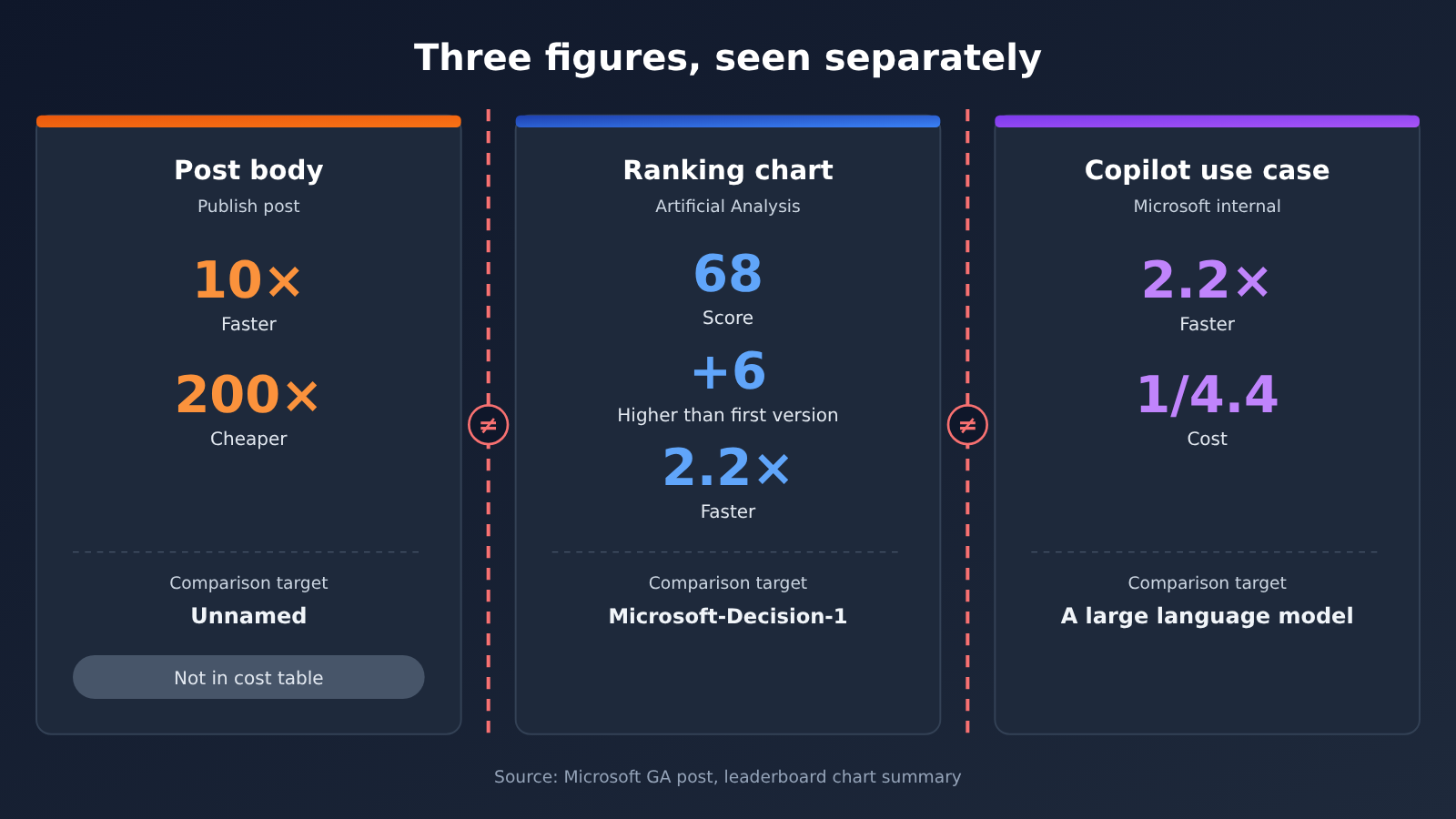
The image above separates the three sets of numbers. The data sources are the Microsoft GA post and the paraphrase of the leaderboard image; it was compiled by the APIYI apiyi.com technical team and does not include any of our own test results.
Microsoft Decision 1.1 Impact Analysis
Impact on developers: let it handle routing and scoring, leave the long-form writing to the Large Language Model
If you’re already using a Large Language Model for routing, classification, prioritization, and validation, then the step you can swap out is the “making the judgment” part — the content generation step stays exactly as it is. Microsoft-Decision-1.1 only returns an answer plus a confidence score drawn from a fixed set of options, and that single constraint is what determines where it belongs. When you integrate it, you can break the work down in this order:
- List the allowed options: turn the “please judge” wording in your original prompt into an explicit list of options, such as downstream model names, ticket categories, or risk levels. If you can’t write the options out, that’s a sign this step isn’t ready to be handed over to it yet.
- Pick the question type: use
noulfor yes/no questions,choicefor selecting exactly one option, andscorefor grading. Don’t try to get it to output a paragraph. - Set a confidence threshold: it returns a calibratable confidence score, and it can also decline to decide. Anything above the threshold executes directly; anything below goes into your fallback flow.
- Hand back to a human or the Large Language Model when uncertain: low-confidence requests go to human review, or back to the Large Language Model to re-decide. This step has to be written into the flow — you can’t skip it.
- Leave the explanatory text to the Large Language Model: user-facing replies, long-form content, code, and explanations are all generated by the Large Language Model. The Decision model is only responsible for deciding who writes that content and which path it takes.
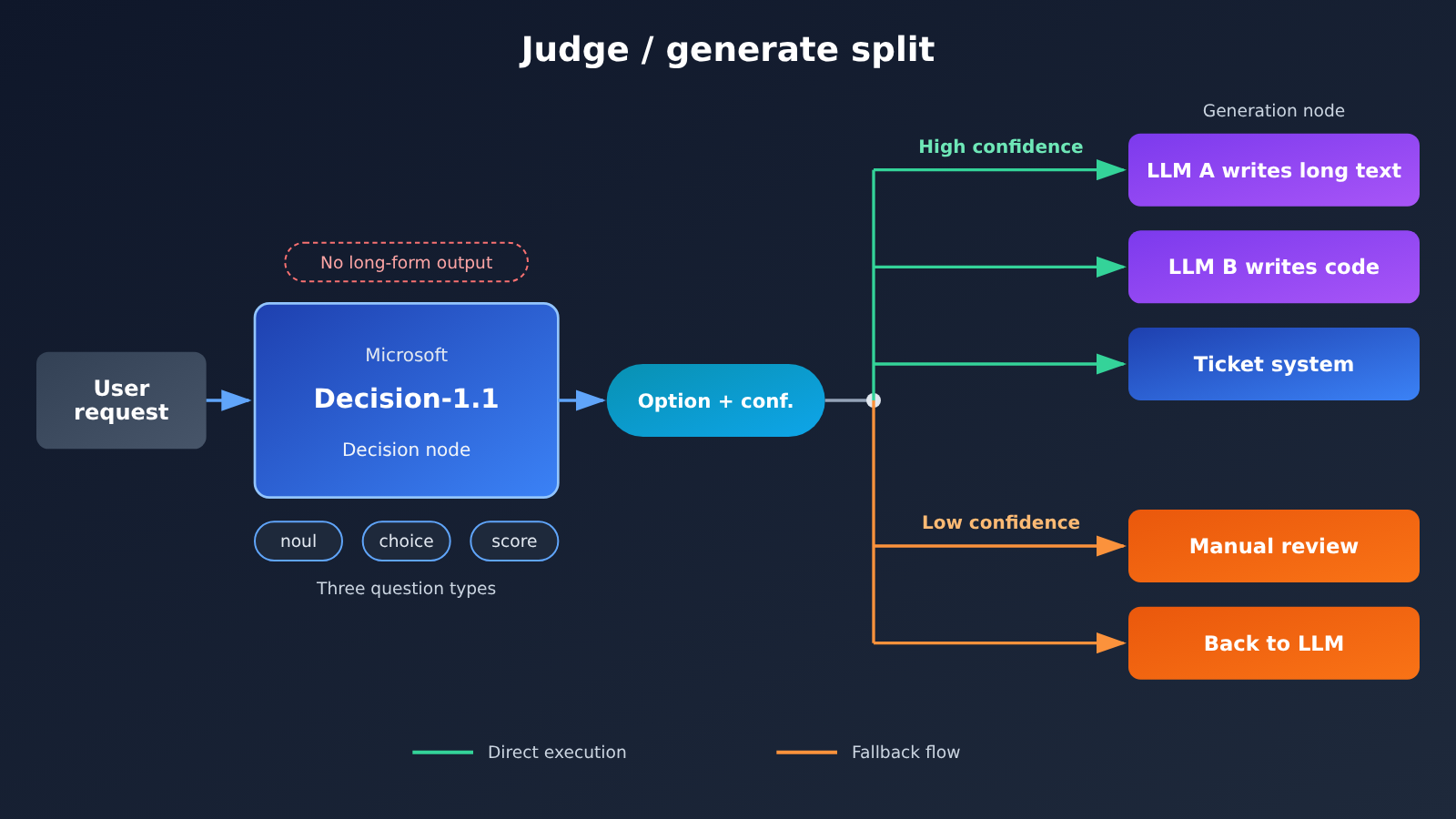
Once you’ve split things up this way, the decision node and the generation node have separate responsibilities, which also makes troubleshooting easier: if routing is wrong, check the decision node; if the content is poorly written, check the Large Language Model. The Large Language Model side doesn’t need any changes — the chat model you already call through APIYI apiyi.com can keep generating long-form content.
Impact on existing pipelines: which steps are suitable for replacement
Not all “judgments” are suitable for migration. Here’s a simple breakdown by common scenario:
- Suitable for migration: routing requests to different models, classifying customer support tickets, determining whether content needs human review, grading urgency, and validating whether the output format complies. These all have fixed options, and the results can be used directly by programs.
- Migrate with caution: classifications with many options that change frequently, and judgments that require large amounts of context. The context size noted on OpenRouter for the first version is about 33K; for the exact context length of 1.1, refer to the Foundry documentation. Oversized inputs need to be truncated or summarized first.
- Not suitable for migration: review opinions that require explanations, content that needs rewriting or completion, and open-ended Q&A. These are still work for Large Language Models.
One more thing to note: it returns only the answer and probability. Logs or audit records that previously relied on the Large Language Model to “give reasons along the way” will be missing that part. If compliance requires retaining explanations, you can call the Large Language Model again only for low-confidence or rejected samples to generate an explanation, so you don’t have to pay the long-text cost every time.
Industry impact: specialized small models take on some of the Large Language Models’ judgment work
This release points to a direction: judgment-type requests are being split out from general-purpose Large Language Models and handed to specialized small models. The competitor names mentioned in the post, along with Google Gemini Decision 1 and OpenAI GPT-6 Luna (Decisions) on the leaderboard, show that this has already become a separate category.
For developers, this brings two changes:
- Cost structure: judgment-type requests are billed by input, with output free; cost is mainly determined by prompt length. The benefits of trimming context are more obvious than before.
- Evaluation method: judgment nodes need to be evaluated separately for accuracy and confidence calibration, not just whether the final answer is good. Leaderboard scores can be used for initial screening, but you still need to validate with your own business samples in the end.
For teams that want to first compare results on the Large Language Model side, you can use APIYI (apiyi.com)’s unified interface to switch between multiple chat models for testing. Once the judgment node is running on Foundry, combine the two ends.
Microsoft Decision 1.1 Key Takeaways
- Don’t mix versions: The 1.1 base is Gemma 4 26B A4B, while the October Decision 1 base is Qwen3.5-9B.
- Only judge when there are options: Routing, classification, prioritization, and validation go to it; long-form content is still generated by the large model.
- Three task types:
noul,choice,score— they return only the answer and probability, not the reasoning. - Different invocation path: Requests go to
/providers/microsoft/v1/systemone, with the deployment name in themodelfield. - Pricing per the GA post: Foundry input pricing ranges from $0.042 to $0.05 per million tokens depending on tier; output is free.
- Post multipliers don’t belong in the cost table: The 10x and 200x don’t name what they’re compared against, and the two 2.2x figures should also be understood separately.
- APIYI status: As of 2026-11-18, the APIYI apiyi.com model list has no such ID — don’t test it with the chat endpoint.
Summary
Microsoft-Decision-1.1’s role is clear: it’s a decision node in the pipeline, not a writing tool.
- Purpose: Route, classify, score, and validate among the options the developer provides, and return a confidence level — it can decline to decide when uncertain.
- Boundaries: No free-form text and no reasoning. Long-form content, code, and explanations still go to the large model, while low-confidence results fall back to a human or the large model.
- Cost basis: Use the Foundry tier pricing dated 2026-11-17 in Microsoft’s GA post. The multipliers and leaderboard rankings in the post are not price quotes.
Recommendation: start with a single judgment step that has fixed options and complete logs, test accuracy and thresholds on Foundry with your own samples, then decide whether to expand. On the generation side, you can continue to call various chat models through APIYI apiyi.com. For the Decision model’s listing status, refer to the platform’s model list.
📚 References
-
Microsoft Microsoft-Decision-1.1 general availability announcement: the GA post, covering intended uses, regional pricing, leaderboard citations, and internal Copilot use cases
- Link:
aka.ms/decision-model-ga - Notes: this article’s pricing and official performance claims are based on this source
- Link:
-
Microsoft Ignite 2026 Book of News: base model and pricing wording
- Link:
news.microsoft.com/events/ignite/2026/book-of-news/ - Notes: the base model is Gemma 4 26B A4B; detailed pricing still follows the GA post
- Link:
-
Microsoft Foundry docs: Using the Microsoft Decision model: deployment and invocation methods
- Link:
learn.microsoft.com/en-us/azure/foundry/foundry-models/how-to/use-foundry-models-microsoft-decision - Notes: the Decision API types, request paths, and official descriptions of the three task types
- Link:
-
Microsoft-Decision-1 launch article (2026-10): information on the previous version
- Link:
commandline.microsoft.com/microsoft-decision-1-model-foundry - Notes: used to distinguish Decision 1 from 1.1
- Link:
-
OpenRouter model page: third-party access pages for both versions
-
Link:
openrouter.ai/microsoft/microsoft-decision-1.1 -
Notes: the first version’s page lists a context window of roughly 33K
-
-
TestingCatalog post: where this discussion started
- Link:
x.com/testingcatalog/status/2122759893174178173 - Notes: this is a paraphrase; the multiplier figures in it are not used as a pricing basis
- Link:
Author: APIYI technical team
Technical discussion: Feel free to reach us through the APIYI homepage; more resources are available at the docs.apiyi.com documentation center


