
Many developers focus on only one thing when choosing an API proxy service for the first time: price. It’s not until they launch an image-intensive application or run a high-concurrency batch task that they hit the harsh reality of 502/504 errors or agonizingly slow performance. That’s when they realize: The real difference between API proxy services isn't the price—it's the infrastructure. Bandwidth, concurrency capacity, and stability are all built on significant financial investment.
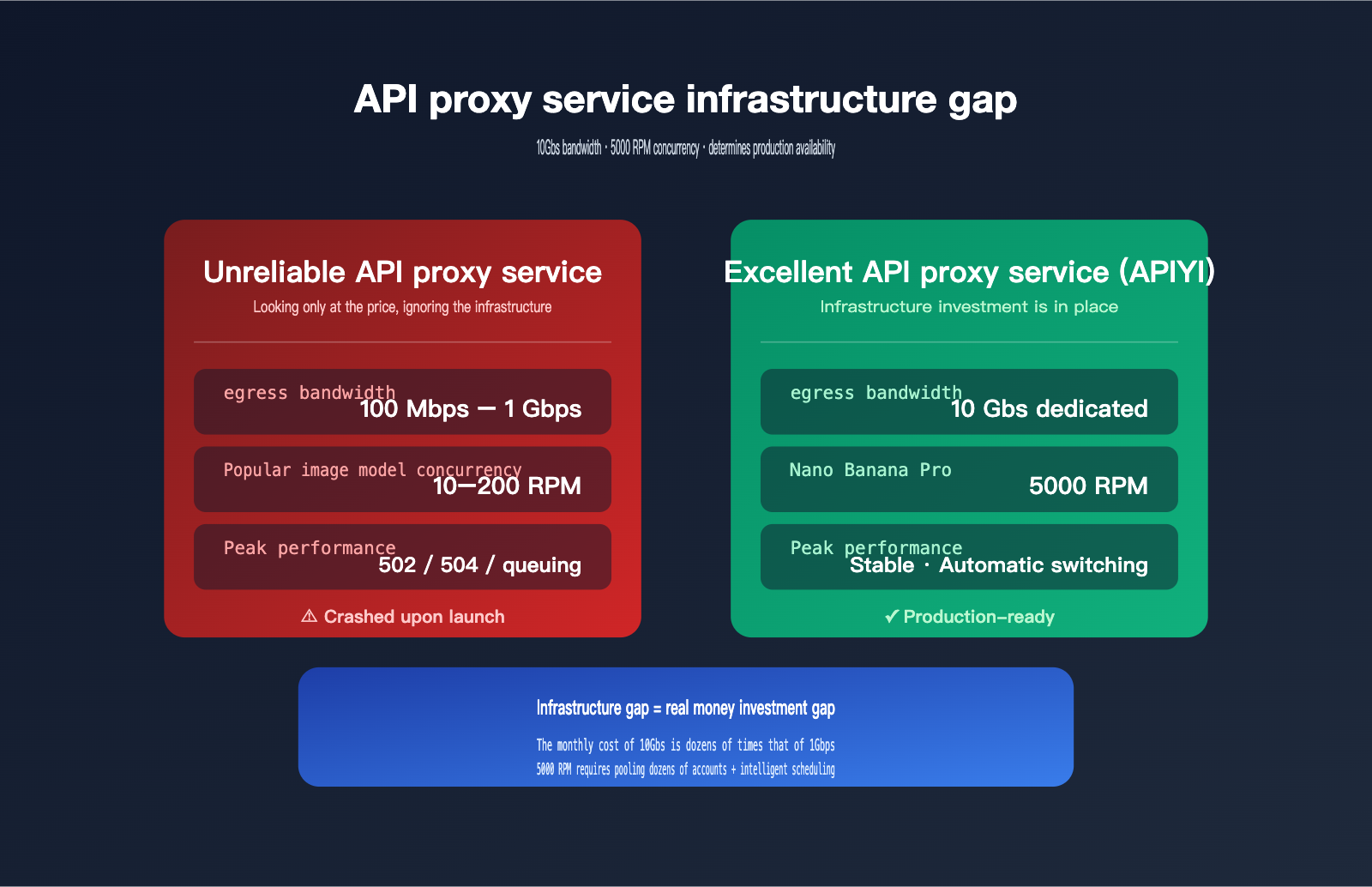
This article takes a representative, real-world perspective: image generation models. Base64 responses from image generation APIs like Nano Banana Pro can reach 20MB per image. Concurrent requests for 10 images mean instantly swallowing 200MB of data, which is a brutal test of a proxy service's bandwidth and concurrency capacity. Google's official rate limit for Gemini 3 Pro Image is only 10 requests/minute (Tier 1), but APIYI, through resource pooling and infrastructure investment, pushes this number to 5000 RPM—500 times the official limit. Let's break down the engineering logic behind this.
5 Core Differences Between Excellent and Unreliable API Proxy Services
Here’s the bottom line. The table below covers the 5 most critical dimensions of infrastructure, serving as your first filter for determining if a proxy service is professional.
| Dimension | Typical Unreliable Proxy | Excellent Proxy Standard (e.g., APIYI) |
|---|---|---|
| Egress Bandwidth | 100Mbps – 1Gbps, shared | 10Gbps dedicated, supports 60 concurrent 4K streams |
| Popular Model Concurrency | Follows official limits (starts at 10 RPM) | 5000 RPM (Nano Banana Pro tested) |
| Upstream Account Pool | 1–3 accounts, single point of failure | Multi-account pooling + automatic failover |
| Node Redundancy | Single region, single node | Multi-region, multi-node + load balancing |
| Stability SLA | No commitment, frequent 503/502 errors | Near-official levels, real-time failover |
The key takeaway from this table is that every number is backed by real hardware investment. The monthly cost of 10Gbps dedicated bandwidth is 50–100 times that of 100Mbps shared bandwidth; supporting 5000 RPM requires dozens or even hundreds of upstream accounts managed by intelligent scheduling. Cheap proxy services aren't malicious; they just don't have the capital to build this out.
🎯 First Principle: Choosing an API proxy service isn't about picking the lowest price; it's about evaluating infrastructure investment. I recommend prioritizing providers like APIYI (apiyi.com) that publicly disclose their bandwidth and RPM data. Once these numbers are promised publicly, they are monitored by competitors. Any proxy service that can't provide specific bandwidth figures is likely taking the low-cost, shared-resource route.
Why Image Models Demand Massive Bandwidth from API Proxy Services
This is the most underestimated dimension of performance. For text-based models, a single API call usually involves just a few KB to tens of KB, putting virtually no pressure on bandwidth. But image models are an entirely different beast—a single response can reach tens of megabytes, instantly saturating your network link.
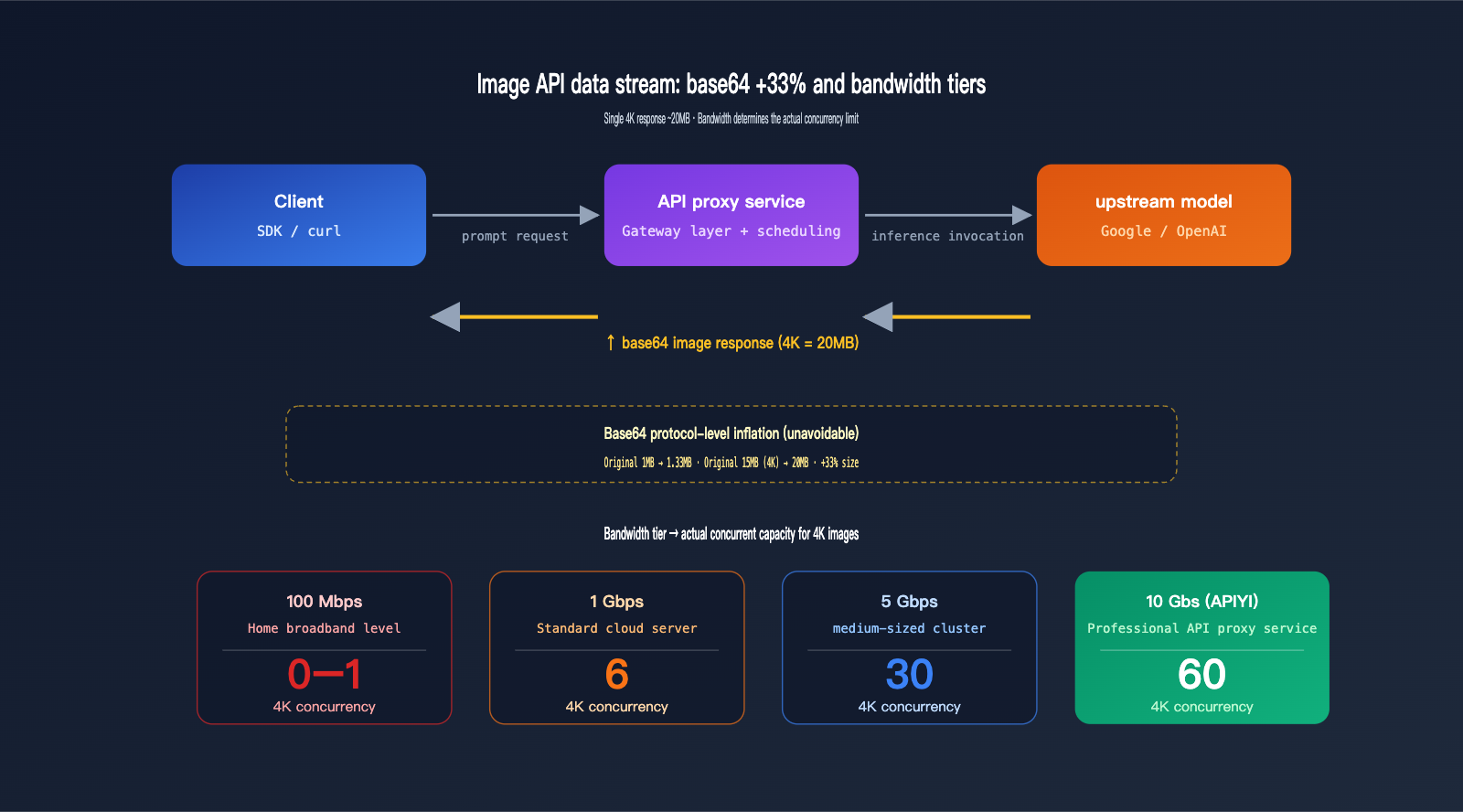
Base64 Encoding: The 33% Hidden "Volume Tax" on Image APIs
Both Google and OpenAI's image APIs use base64 encoding to transmit binary images. This is a design choice dictated by the protocol—HTTP/JSON is natively text-based, so binary data must be encoded first. The trade-off is that base64 encoding inflates every 3 bytes into 4, resulting in a theoretical 33% increase, which can reach 37% when accounting for line breaks.
| Original Size | After Base64 Encoding | Growth Rate |
|---|---|---|
| 1 MB | ~1.33 MB | +33% |
| 5 MB (HD) | ~6.7 MB | +33% |
| 15 MB (4K Raw) | ~20 MB | +33% |
| 30 MB (4K Multi-image) | ~40 MB | +33% |
This inflation is protocol-level and unavoidable. With Nano Banana Pro, a 4K generated image is about 15MB, meaning a 20MB response per call is the norm after base64 encoding. This means for every successful call, the API proxy service must fully receive 20MB from the upstream provider and then fully transmit it to the client—running the link in both directions.
Concurrent 4K Capacity at Different Bandwidths
Converting bandwidth into actual concurrency reveals the hard gap in infrastructure. The table below is based on standard base64 image API scenarios.
| Proxy Bandwidth | Actual Available Rate | 4K (~20MB) Concurrency | Suitable Scenario |
|---|---|---|---|
| 100 Mbps (Home Broadband) | ~12 MB/s | 0–1 | Toy projects |
| 500 Mbps (Small VPS) | ~60 MB/s | 3 | Testing |
| 1 Gbps (Standard Cloud) | ~120 MB/s | 6 | Low traffic |
| 5 Gbps (Mid-sized Cluster) | ~600 MB/s | 30 | Medium traffic |
| 10 Gbps (Pro Proxy) | ~1200 MB/s | 60 | Production-ready |
Bandwidth and concurrency have a strict linear relationship; there are no "hacks" to bypass physical bottlenecks. If a proxy service runs on a standard 1Gbps cloud server, the 7th concurrent 4K request will start queuing, leading to that "slow during peak hours, fine at night" user experience.
🎯 Bandwidth in Action: When calling the Nano Banana Pro 4K model via APIYI (apiyi.com), 10Gbps of dedicated bandwidth ensures that 60 concurrent requests remain instantaneous. This isn't just marketing fluff—it's real hardware investment. The monthly cost of a 10Gbps port is dozens of times higher than 1Gbps; small-scale proxy services simply can't afford it.
Memory and Connection Pools: The Invisible Hurdle
Concurrent image requests have a second hurdle: memory and connection pools. 10 concurrent 4K requests mean the proxy process must hold 200MB of base64 data in its buffer; 100 concurrent requests mean 2GB. The Node.js, Python, or Go process running the proxy must have sufficient heap memory and a refined streaming design, or it will crash with an OOM (Out of Memory) error.
The "randomly failed image generation requests" often seen with low-quality proxy services are frequently caused by OOM-induced process restarts, which drop all active requests. From the client side, this looks like a 502, 504, or connection reset, but the root cause is poor memory management at the proxy level.
🎯 Architectural Advice: APIYI (apiyi.com) uses a streaming base64 forwarding design at the gateway layer. The proxy process doesn't need to buffer the entire image into memory before forwarding; instead, it pushes data to the client as it's received from the upstream. This architectural difference allows APIYI to handle 3-5 times the concurrency of traditional proxy services on the same hardware, which is critical for image-intensive scenarios.
The Truth About Concurrent Capacity for Popular Image Models
Bandwidth is the foundation, but concurrent capacity is the skyscraper built on top. This section dives into why, even though the official limit is just 10 RPM, APIYI can hit 5,000 RPM—the secret lies in upstream account pooling and intelligent scheduling.
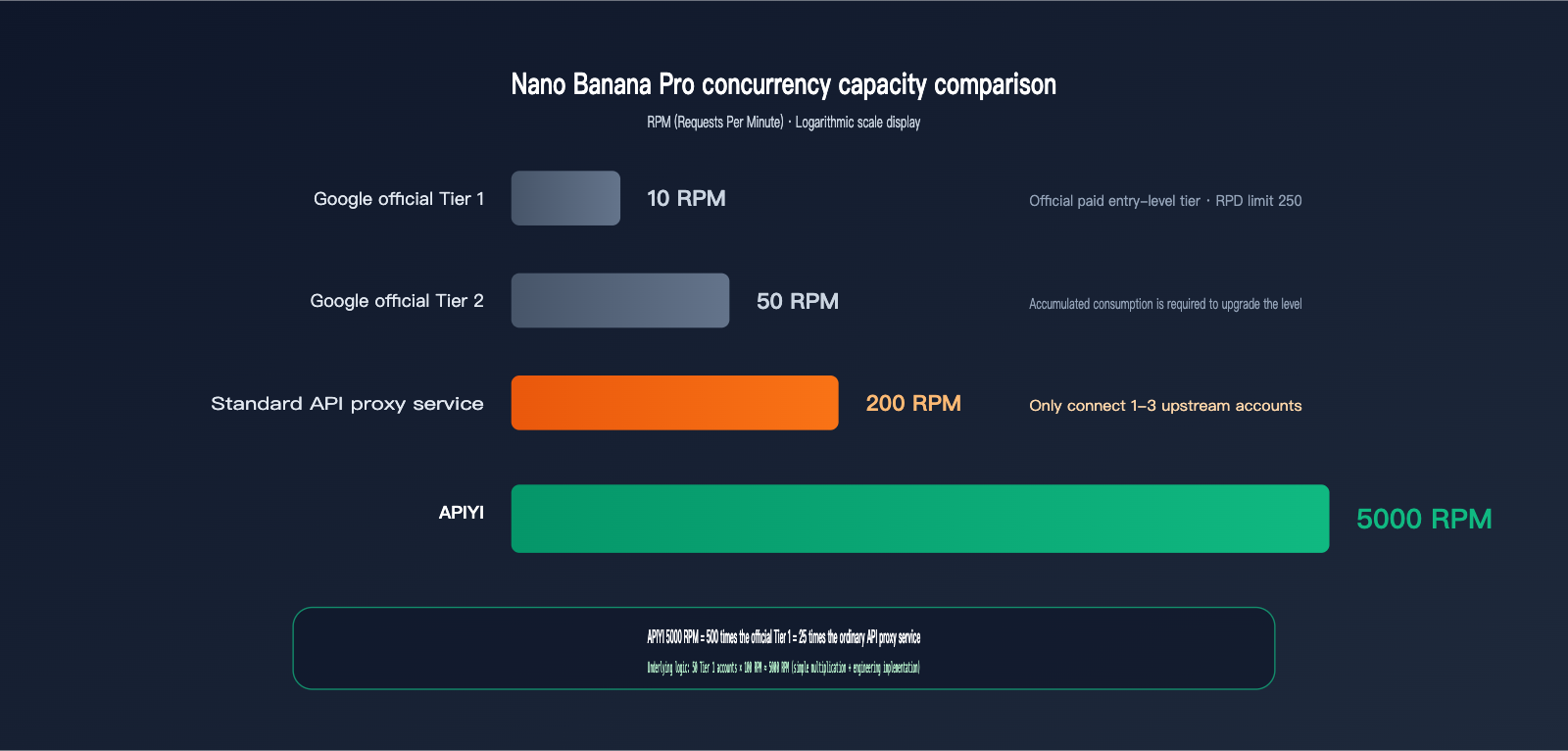
Google's Official Rate Limits for Gemini 3 Pro Image
Google AI Studio's official rate limits for gemini-3-pro-image-preview (i.e., Nano Banana Pro) are as follows:
| User Tier | RPM | RPD | Notes |
|---|---|---|---|
| Free Tier | Extremely low or N/A | Very low | Trial only |
| Paid Tier 1 | ~10 | 250 | Most paid users |
| Paid Tier 2 | ~50 | 1000 | Requires cumulative spend |
| Paid Tier 3+ | 100+ | Higher | Large enterprise clients only |
More importantly, Google's documentation explicitly states: "rate limits are not guaranteed and actual capacity may vary." The official quota isn't a guarantee; actual capacity fluctuates and tightens further during upstream load spikes.
How API Proxy Services Achieve "Concurrent Amplification"
5,000 RPM isn't magic—it's engineering. High-quality API proxy services push concurrency from 10 RPM to 5,000 RPM through three layers:
- Upstream Account Pooling: Maintaining dozens to hundreds of enterprise-tier accounts, with each account handling a portion of the traffic.
- Intelligent Load Balancing: Real-time monitoring of remaining quotas for each account, distributing new requests based on weight.
- Automatic Failover: If an upstream account hits a rate limit or returns a 5xx error, the system immediately switches to the next one, keeping the process transparent to the client.
50 Tier 1 accounts × 100 RPM ≈ 5,000 RPM. That’s the simple math. But real-world engineering is far more complex—it requires effective account maintenance, top-ups, monitoring, isolation, and handling Google's risk control measures against abnormal calling patterns. This entire infrastructure is the true cost behind that 5,000 RPM figure.
🎯 Concurrency Recommendation: If your application is a consumer-facing image generation product (e.g., real-time avatar generation, posters, or AI art galleries), 5,000 RPM is the critical threshold to ensure a smooth experience during peak hours. By connecting to Nano Banana Pro via APIYI (apiyi.com), you get full concurrent capacity with a single token—no need to manage your own account pool.
Signs of Bottlenecks in Unreliable API Proxy Services
If a low-end proxy service only connects to 1–3 upstream accounts, its actual concurrency limit might only be 30–300 RPM. When user traffic exceeds this, you'll see:
- Request queuing delays (from seconds to tens of seconds)
- Occasional 429 Rate Limit errors (passed through from the upstream)
- Widespread request failures during peak hours
- Noticeable performance gaps (e.g., "fast at night, slow during the day")
These symptoms are fatal for online businesses, especially consumer-facing products—a 30% failure rate during peak hours is enough to drive users away.
5 Typical Symptoms of Unreliable API Proxy Services
By now, you probably know how to spot a reliable proxy service. Here’s a checklist of symptoms to verify whenever you test a new provider.
| Symptom | Root Cause | Self-Test Method |
|---|---|---|
| Frequent 502 Bad Gateway | Upstream account rate-limited or cut off | Send 100 identical requests during peak hours |
| 504 Gateway Timeout | Inference timed out / no keep-alive | Run a high-quality 4K generation |
| Slow/Unstable image downloads | Insufficient or shared bandwidth | Run batch 4K speed tests |
| Stable at night, slow during the day | Hit concurrent capacity limit | Repeat stress tests at different times |
| Occasional connection reset | Memory OOM / process restarts | Run 50 concurrent requests for 5 minutes |
Frequent 502/504 Errors Signal Upstream Rate Limiting
The "intermittent 502s" common in unreliable proxy services are almost always due to an undersized upstream account pool. When local traffic spikes, the upstream rate limit is hit, and the error is passed back to the client as a 502. This is hard to notice during low-traffic periods but triggers constantly once you go live.
If Text Works but Images Crash, It's a Bandwidth Issue
Many developers notice: "The text API is perfectly fine, but the image API is slow." This is a classic symptom of a bandwidth bottleneck. A text API request is only a few KB, but a 20MB image request can saturate shared bandwidth instantly. This isn't a model issue—it's an infrastructure issue with the proxy service.
🎯 Quick Verification Method: Use the same prompt and model to initiate 10 concurrent 4K requests on two different proxy services and compare the total time taken. If the difference is more than 3x, the provider's infrastructure is severely inadequate. We recommend using APIYI (apiyi.com) as a benchmark, as 10Gbps bandwidth and 5,000 RPM are industry-verifiable hard metrics.
🎯 Diagnostic Advice: If you suspect a proxy service's infrastructure is lacking, compare it directly against APIYI (apiyi.com) using the same request. If APIYI runs stably while the other service frequently returns 502s, you can be certain their concurrency or bandwidth isn't up to par.
How to Identify a Professional API Proxy Service: 5 Validation Dimensions
Now that you know the gaps, here are five hard metrics to use when selecting a provider. You can find these dimensions in public documentation; if a provider doesn't meet them, you can cross them off your list immediately.
Dimension 1: Public Commitment to Bandwidth
Professional API proxy services will clearly state "Dedicated 10Gbps Bandwidth" or similar figures on their product pages. If they use vague terms like "high-speed nodes," it's likely they are actually providing 1Gbps shared bandwidth or less. If you're planning to run image-intensive workloads, bandwidth ≥ 5Gbps is the baseline.
Dimension 2: Published RPM Limits for Popular Models
Providing specific RPM (Requests Per Minute) numbers for individual models indicates that they have a real account pool and stress-test data to back it up. For example, the 5000 RPM limit for Nano Banana Pro published by APIYI, along with specific concurrency caps for other models, are verifiable, hard commitments you can hold them accountable for.
Dimension 3: Support for Long Tasks and Streaming Responses
A gpt-image-2 high-tier request might take over 200 seconds, and Claude Code long-running tasks can take hours. Professional API proxy services implement link keep-alive and optimized streaming responses. Inferior services often default to a 60-second timeout, causing long tasks to drop connections.
Dimension 4: Robust Backend and Logging
Being able to see latency, status codes, token usage, and error details for every request is fundamental. Without a backend, or with a poorly designed one, it's impossible to diagnose whether an issue lies with the proxy layer or the upstream provider.
Dimension 5: Consistent Content Output and Maintenance Updates
If a proxy service hasn't updated its blog in months, doesn't respond to new model versions, or fails to sync upstream changes in its announcements, it likely lacks a dedicated operations team. When upstream protocols change (like Anthropic adjusting the cache_control field), these services often experience prolonged downtime.
🎯 Selection Tip: I recommend turning these five points into a checklist. Score each potential provider, and only consider integrating if they pass all five. APIYI (apiyi.com) lists these dimensions clearly on their public pages, making them one of the few providers in the industry that are transparent about their infrastructure data.
FAQ
Q1: Is 5000 RPM just marketing fluff, or is it actually achievable?
5000 RPM is the capacity limit for the Nano Banana Pro model on APIYI, achieved through multi-account pooling and load balancing. For individual users, we recommend controlling your rate reasonably to avoid triggering upstream security controls. If you truly need a stable, sustained 5000 RPM, you can contact APIYI customer support to set up an enterprise-level quota. For regular users, the 100-500 RPM range is very smooth.
Q2: Is 10Gbps bandwidth meaningful for low-traffic users?
Yes. 10Gbps isn't about "wasting bandwidth on low traffic," it's about "peak capacity." Even if you only run 5 concurrent requests daily, when you hit traffic spikes—like bulk re-generations, product launches, or promotions—that bandwidth headroom determines whether your experience crashes suddenly. Infrastructure investment is inclusive; all users benefit from sufficient bandwidth, not just the big clients.
Q3: Does APIYI (apiyi.com) also suffer from the 33% base64 expansion for image models?
Yes, because this is determined by the protocol layer, not the proxy service. However, APIYI (apiyi.com) absorbs the pressure of this expansion through its 10Gbps bandwidth, so for the client, it feels like a zero-latency pass-through. The platform also supports streaming responses and resumable uploads to further reduce the impact of large base64 data packets on the client.
Q4: How do I test the actual bandwidth of an API proxy service?
The simplest, most brutal way: use the OpenAI Python SDK to configure the proxy's base_url, initiate 10 consecutive 4K image generation requests, and record the total time from sending the request to fully receiving the base64 response. If 10 images take over 5 minutes, you can conclude that the bandwidth or concurrency capacity is insufficient. Run the same test on APIYI (apiyi.com) as a benchmark.
Q5: Why does Google officially limit users to only 10 RPM?
Google's rate-limiting strategy is tiered. New paid accounts start at Tier 1 (10 RPM) to prevent abuse and automatically upgrade to Tier 2 or 3 as spending increases. But even Tier 3 only offers 100+ RPM, making it difficult for average developers to get enterprise-level quotas directly. Proxy services aggregate dozens of accounts at different tiers to achieve total concurrency far beyond the limit of a single account.
Q6: How do I troubleshoot "connection reset" errors common with unreliable proxies?
If it's intermittent and non-reproducible, it's likely the proxy service's process is hitting OOM (Out of Memory) and restarting. Observe if there's a pattern where some requests in a batch succeed while others fail—if the middle requests reset while the first and last succeed, it's almost certainly a process crash. There's no fix on the user side; you have to switch providers. I recommend switching directly to a stable infrastructure provider like APIYI (apiyi.com).
Q7: In high-concurrency scenarios, will the proxy service steal my prompt data?
A legitimate proxy service will not, and they usually have log retention policies and privacy commitments. APIYI (apiyi.com) explicitly states in its user agreement that prompt data will not be used for training or resale. However, for highly sensitive content, I still recommend using a self-hosted vLLM or a private deployment; proxy services are better suited for general business scenarios.
Summary: Infrastructure is the Real Dividing Line for API Proxy Services
Returning to the core argument of this article: The gap between an excellent API proxy service and an unreliable one essentially comes down to the investment in infrastructure. 10Gbps bandwidth, 5,000 RPM concurrency, multi-node redundancy—these numbers might seem abstract, but each one represents real hardware investment and engineering capability. Ultimately, they determine whether your application runs smoothly in a production environment or crashes frequently.
Being cheap isn't a mistake; the mistake is being "so cheap that there's no infrastructure." If your business involves any image generation, batch invocations, long-running tasks, or real-time requirements for end-users, I strongly recommend making infrastructure your top selection criterion, with price as the second.
🎯 Final Recommendation: I suggest using the free trial credits at APIYI (apiyi.com) to run a real stress test—10 concurrent 4K streams for 5 consecutive minutes, while recording latency distribution and error rates. The results of this test will tell you more about the true quality of a proxy service than any marketing copy ever could.
— APIYI Technical Team | Continuously investing in 10Gbps bandwidth and 5,000 RPM concurrency. For more in-depth comparisons, visit the APIYI (apiyi.com) Help Center.


