
{
  "title": "Deep Dive into Sora 2 Character Consistency: 4 Implementation Solutions as of March 2026",
  "description": "Explore the current state of Sora 2 character consistency, including Cameo upload limits, API differences, and alternative solutions like Veo 3.1.",
  "tags": ["Sora 2", "AI Video", "Character Consistency", "API", "Cameo", "Veo 3.1"]
}
Author's Note: A deep dive into the current state of 4 implementation solutions for Sora 2 character consistency in March 2026, including Cameo face upload restrictions, comparison of official direct API vs. reverse API, and recommendations for alternatives like Veo 3.1.
Want to use Sora 2 for an anime series or digital human short films? Character consistency is a core challenge you can't avoid. As of March 2026, Sora 2's character consistency feature is in a very awkward stage—face uploads are completely banned, reverse APIs are basically paralyzed, and the official direct API doesn't support Cameo character embedding. This article will break down the real situation of 4 solutions one by one, helping you avoid pitfalls and find the most practical choice right now.
Core Value: After reading this article, you'll have a clear understanding of the usability and limitations of each Sora 2 character consistency solution, enabling you to make the best technical choice for your creative needs.
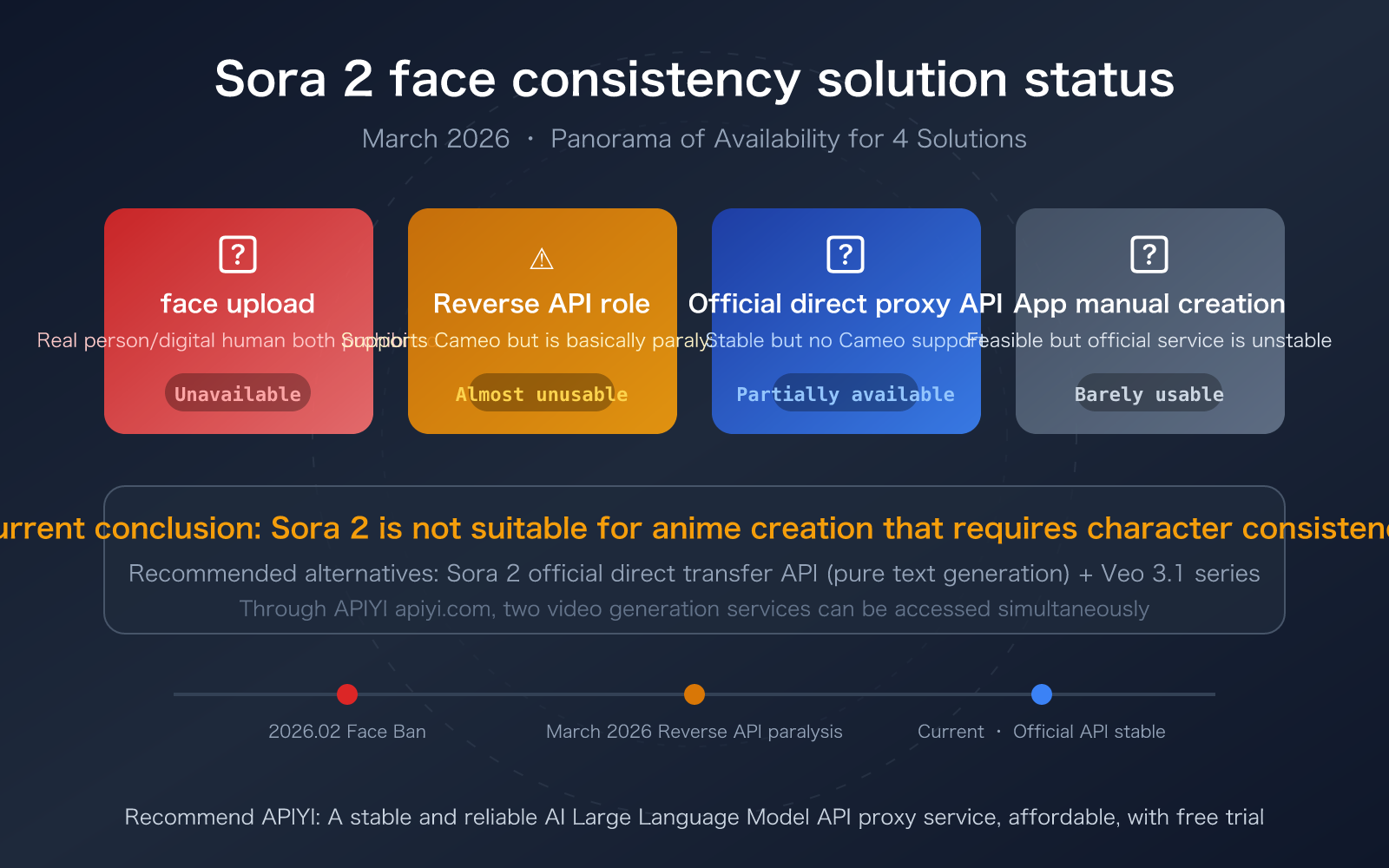
Sora 2 Character Consistency: Key Takeaways
| Solution | Status | Character Consistency Effect | Key Limitations |
|---|---|---|---|
| Face Upload (Real/Digital Human) | 🔴 Unavailable | — | Full ban on uploading face images since February 2026 |
| Reverse API + Cameo Character Reference | 🟡 Nearly Unavailable | 95%+ Consistency | Official reverse API is largely defunct |
| Official Direct API | 🟢 Stable and Available | 70% with pure text descriptions | Does not support Cameo/character embedding, higher cost |
| Manual App Cameo Recording | 🟠 Barely Usable | 95%+ Consistency | Official service frequently overloaded, generation often lags |
Why is Sora 2 Character Consistency So Complicated?
Sora 2's character consistency isn't a single technical issue but a result of multiple intertwined factors. OpenAI significantly tightened its content safety policies in early 2026—face uploads are completely banned (whether for real people or AI-generated digital humans), and Character/Cameo features at the API level are also strictly restricted. Simultaneously, reverse-engineered API services have largely failed due to OpenAI's enhanced risk control measures.
This means: if you want to create a character-consistent anime short or digital human video, Sora 2 currently offers almost no complete and reliable technical path. Let's break down the reality of each solution next.
Sora 2 Character Consistency Method 1: Face Upload (Completely Prohibited)
Current Status: Completely Unavailable
As of February 2026, OpenAI has implemented the strictest face policy:
- Real Photo Uploads: Fully intercepted by the content moderation system; the API will return a moderation error.
- AI-Generated Digital Human Faces: Also prohibited; the system performs OCR and visual detection.
- Anime/Cartoon Style Faces: If they exhibit human likeness, they will also be intercepted.
- Celebrity Faces: This is an absolute no-go zone, triggering copyright and portrait rights protection mechanisms.
OpenAI's official statement clearly states: "Character uploads that depict human likeness are blocked by default," and "Input images with faces of humans are currently rejected." To use real human likeness, you must contact the sales team to apply for special permission, which is practically unobtainable for regular developers.
🎯 Core Issue: This restriction is platform-wide. Whether you use the official API, a reverse-engineered API, or the App, any attempt to upload face images will be blocked. The only exception is recording a Cameo yourself through the App (detailed later).
Sora 2 Character Consistency Method 2: Reverse API + Cameo Character Reference (Basically Crippled)
What is "Official Reverse API"?
"Official Reverse" (官逆) refers to third-party API services that call Sora 2 functionalities by reverse-engineering OpenAI's web or iOS App interfaces to simulate user operations. The key advantage of this method is its ability to access the full functionality of the App, including Cameo character references.
Character Consistency Advantages of Reverse API
When a reverse API is functioning normally, it can:
- Reference previously created Cameo characters via the
charactersparameter. - Incorporate specific characters into video generation, maintaining cross-video consistency.
- Support up to 2 characters appearing simultaneously.
- Achieve character consistency of over 95%.
Current Predicament: Basically Crippled
As of March 2026, reverse APIs face severe challenges:
| Problem | Specific Manifestation | Impact Level |
|---|---|---|
| Risk Control Upgrade | OpenAI frequently updates risk control strategies, leading to widespread blocking of reverse interfaces | Critical |
| Account Ban | Accounts used for reverse engineering are banned in batches; Cookies/Tokens expire rapidly | Critical |
| IP Restriction | Strict IP controls frequently reject requests | Severe |
| Function Degradation | Even when connected, video generation often gets stuck at 99% or returns empty results | Severe |
| Intermittent Service | Availability has dropped from 99%+ to extremely low levels | Critical |
⚠️ Reality Check: While reverse APIs technically still support Cameo character referencing, this capability is practically meaningless due to the underlying channels being largely unusable. If your project relies on the character consistency feature of reverse APIs, it's strongly recommended to develop alternative solutions immediately.
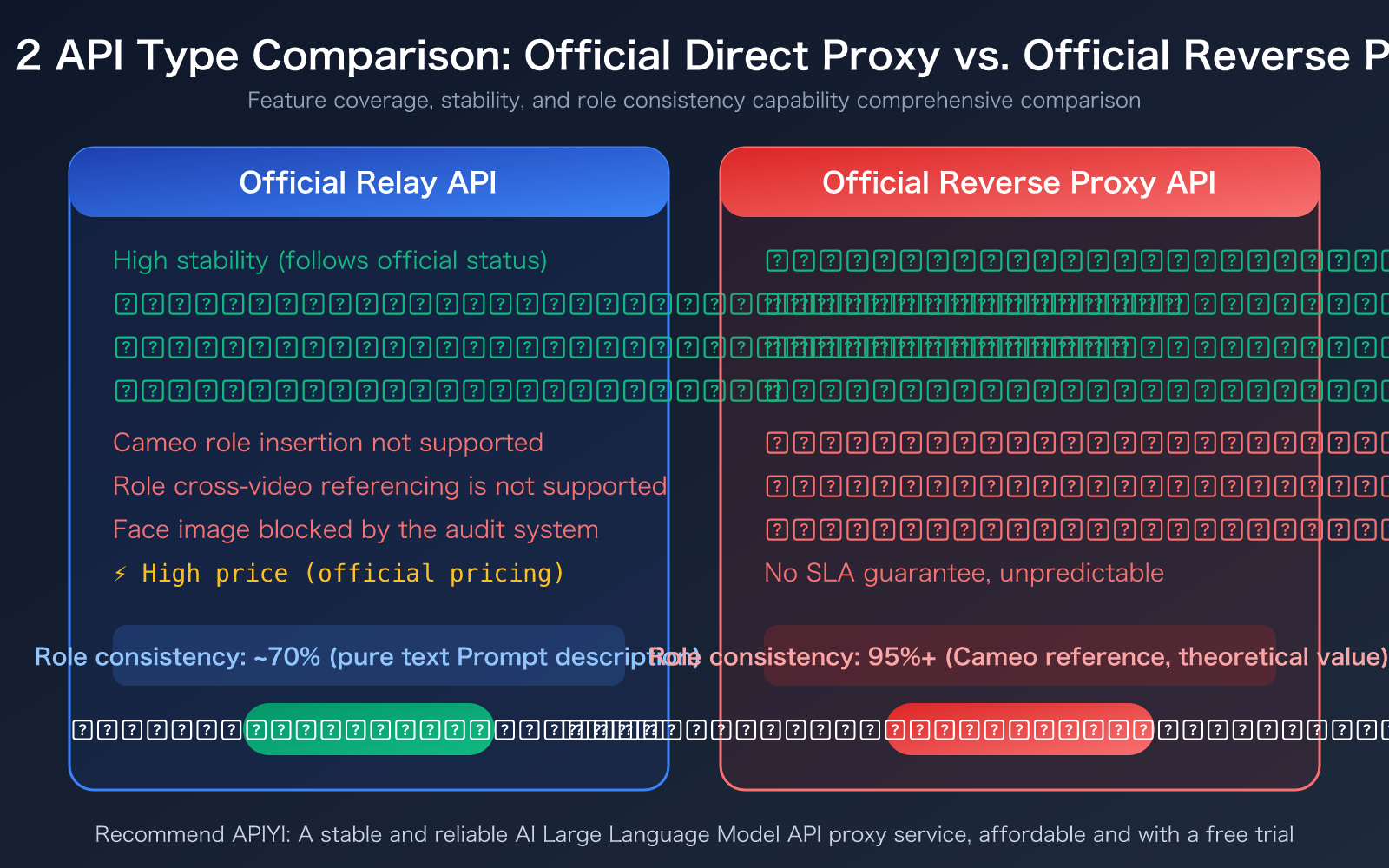
Sora 2 Role Consistency Solution 3: Official Direct API (Stable but Limited)
What is the "Official Direct API"?
The Official Direct API refers to calling Sora 2's video generation capabilities through the official OpenAI API interface (api.openai.com). Through API proxy services like APIYI, developers can use a unified interface format to call this service, ensuring stability.
Capabilities of the Official Direct API
The official API currently supports the following functions:
import openai

client = openai.OpenAI(
    api_key="YOUR_API_KEY",
    base_url="https://vip.apiyi.com/v1"
)

# Sora 2 Video Generation - Pure Text Prompt
response = client.videos.generate(
    model="sora-2",
    prompt="A girl in a red dress turns and smiles under a cherry blossom tree",
    size="1080p",
    duration=5
)
Key Limitations of Sora 2 Official Direct API for Role Consistency
| Feature | Supported | Description |
|---|---|---|
| Pure Text Video Generation | ✅ Supported | Describe character appearance through detailed prompts |
reference_image for Reference |
✅ Supported | Limited to non-face images, supports scene/style reference |
| Cameo Role Citation | ❌ Not Supported | This function is not yet available at the API level |
| Character Cross-Video Citation | ❌ Not Supported | The characters parameter is restricted in the API |
| Face Reference Image | ❌ Intercepted | Content moderation system automatically intercepts face images |
| Remix | ⚠️ Restricted | Only open to specific partners |
By describing the character through pure text prompts, the role consistency is around 70%. This means the appearance of the same character might differ significantly across different videos. This is far from sufficient for anime creation that requires continuous character appearances.
🎯 Recommendation: If your creation doesn't heavily rely on character consistency (e.g., landscape videos, concept videos, product showcases), the Official Direct API is currently the most stable option. We recommend accessing it through the APIYI apiyi.com platform to enjoy a unified interface and stable service.
Sora 2 Role Consistency Solution 4: App Manual Cameo Creation (Feasible but Unstable)
What is Cameo?
Cameo is Sora 2's native feature for role consistency. Users record a 3-10 second video clip within the Sora iOS App. The system then extracts facial features and voice to generate a reusable digital identity. Later, when generating videos, you can maintain consistency by @mentioning this character.
Prerequisites for Creating a Cameo Character
- Subscription Requirement: Requires at least ChatGPT Plus ($20/month) or Pro ($200/month)
- Device Requirement: Only supported for recording via the Sora iOS App
- Recording Requirement: 3-10 seconds of video, with a clear, front-facing view of the face
- Permission Settings: Display name and usage permissions can be set
Current Challenges
Although the Cameo feature itself is functional, the official Sora 2 service is in a highly unstable state as of March 2026:
- Video generation frequently gets stuck at 99% and fails to complete.
- Frequent "under heavy load" errors occur.
- Generation capabilities for newly registered accounts may be disabled entirely.
- Sora 1 was officially retired on March 13, 2026, with all traffic redirected to Sora 2.
This means that even if you successfully create a Cameo character, the actual video generation experience will be very poor. You might spend a lot of time recording and debugging characters, only to find that you can't produce videos stably at all.
Sora 2 Character Consistency Alternatives: The Most Practical Choices Today
Since Sora 2 is facing challenges with character consistency, what alternative paths can we explore?
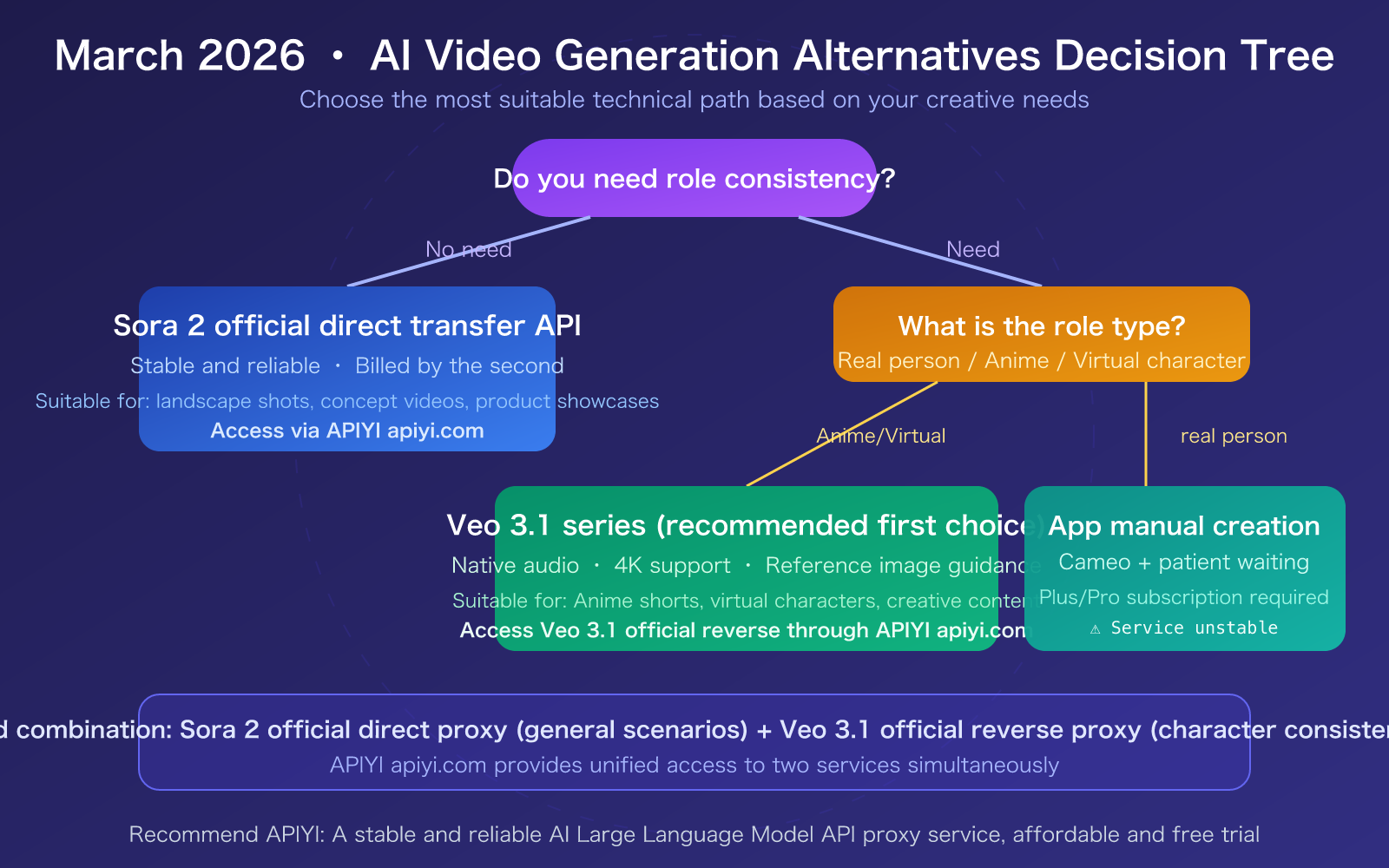
Alternative 1: Sora 2 Direct API + Pure Textual Character Description
If your character consistency requirements aren't extremely high (around 70% is acceptable), you can maintain a degree of consistency through carefully crafted prompts.
Prompting Techniques:
- Use the exact same character description terms in the prompt for each video segment.
- Be as specific as possible: hair color, hairstyle, clothing color and style, body type, accessories, etc.
- Keep the visual style and color palette consistent to minimize variables.
This approach is suitable for concept videos, product promotions, and other scenarios that don't require close-ups of characters. You can reliably access the official direct API through APIYI at apiyi.com.
Alternative 2: Veo 3.1 Series (Currently Recommended)
Google's Veo 3.1 is the most noteworthy alternative to consider right now:
| Feature | Veo 3.1 Standard | Veo 3.1 Fast |
|---|---|---|
| Resolution | 720p / 1080p / 4K | 720p / 1080p |
| Duration | 8 seconds (can be stitched to extend to 60+ seconds) | 8 seconds |
| Native Audio | ✅ Dialogue + Sound Effects Sync | ✅ Supported |
| Reference Image Guidance | ✅ Image-based direction | ✅ Supported |
| Vertical Video Support | ✅ Native 9:16 | ✅ Supported |
| API Pricing | $0.40/second | Lower Price |
| Access Method | Gemini API / Vertex AI | Same as above |
Veo 3.1 can achieve a certain level of character consistency through its "Image-based direction" and "Frame-specific generation" features. While it doesn't natively support character reuse like Sora 2's Cameo, using reference image guidance can lead to an 80-85% consistency level.
🎯 Integration Recommendation: APIYI (apiyi.com) currently offers official reverse proxy access to the Veo 3.1 series at competitive prices. We recommend using both the Sora 2 Direct API and Veo 3.1, choosing the best model for your specific scenario.
Alternative 3: Combination Strategy (Advanced Usage)
For creators with higher character consistency needs, a combination strategy is recommended:
- Character Design Phase: Use an AI image generation model (like Nano Banana Pro) to create character concept art.
- Video Generation Phase: Input the character concept art as a reference image into Veo 3.1.
- Post-Processing Phase: Use video editing tools for fine-tuning and stitching.
- General Scene Supplementation: Use the Sora 2 Direct API to generate transition shots that don't require character appearances.
Frequently Asked Questions
Q1: When will Sora 2’s Cameo feature be available in the official API?
OpenAI has not yet announced a timeline for the API availability of the Cameo feature. This is one of the most discussed feature requests in the OpenAI developer community. Based on community discussions, OpenAI might gradually open it up in the coming months, but there's no exact date. It's recommended to follow the official OpenAI blog for the latest updates.
Q2: Is there any possibility of restoring the reverse API?
The possibility of restoration in the short term is low. OpenAI has been strengthening its risk control measures since 2026, making the technical threshold for reverse engineering increasingly higher. Even if a reverse channel is temporarily restored, it will be quickly blocked again. It's recommended to migrate your workflow to the official direct API proxy service or alternatives like Veo 3.1. APIYI (apiyi.com) allows you to access multiple services simultaneously, facilitating flexible switching.
Q3: How can I quickly test the video generation effects of Sora 2 and Veo 3.1?
It's recommended to use an API aggregation platform that supports multiple models for testing:
- Visit APIYI (apiyi.com) and register an account.
- Obtain your API Key and free credits.
- Use the code examples in this article to call the Sora 2 official direct API proxy service.
- Simultaneously test the Veo 3.1 series to compare character consistency effects.
Summary
Key points for Sora 2 character consistency:
- Face Uploads Fully Prohibited: Starting February 2026, Sora 2 will not allow uploading face images as character references, whether for real people or digital humans.
- Reverse API Essentially Disabled: Although technically supporting Cameo character referencing, the underlying channels are nearly unusable, and reliance on them is not advised.
- Official Direct API Proxy Service is Stable but Limited: It does not support the Cameo feature and can only maintain about 70% character consistency through purely textual descriptions.
- Veo 3.1 is the Current Best Alternative: By using reference images for guidance, it can achieve 80-85% consistency, and its service is stable with rich features.
For anime creation and digital human projects, the most practical current solution is: use the Sora 2 official direct API proxy service for general scenarios + use the Veo 3.1 series for character consistency scenarios.
It's recommended to use APIYI (apiyi.com) for unified access. The platform provides both Sora 2 official direct API proxy service and Veo 3.1 official reverse API services, allowing you to call multiple video generation models with a single API key.
📚 References
-
OpenAI Sora 2 API Documentation: Official video generation API interface description
- Link:
developers.openai.com/api/docs/guides/video-generation - Description: View the latest API parameters and limitations.
- Link:
-
OpenAI Cameo Help Documentation: Guide to creating and using Cameos
- Link:
help.openai.com/en/articles/12435986-generating-content-with-cameos - Description: Understand the official explanation and limitations of the Cameo feature.
- Link:
-
Google Veo 3.1 Documentation: Gemini API video generation guide
- Link:
ai.google.dev/gemini-api/docs/video - Description: API integration and parameter configuration for Veo 3.1.
- Link:
-
APIYI Documentation Center: Unified access guide for multi-model APIs
- Link:
docs.apiyi.com - Description: Tutorial for accessing Sora 2 and Veo 3.1 through APIYI.
- Link:
Author: APIYI Technical Team
Technical Discussion: Welcome to discuss in the comment section. For more resources, visit the APIYI docs.apiyi.com documentation center.


