
Author's Note: Analysis of the frequent 503 "high demand" errors with Nano Banana 2: It's not your code, it's Google's server capacity. 4 solutions with code included. The recommended approach is to temporarily switch to Nano Banana Pro to ensure your service isn't interrupted.
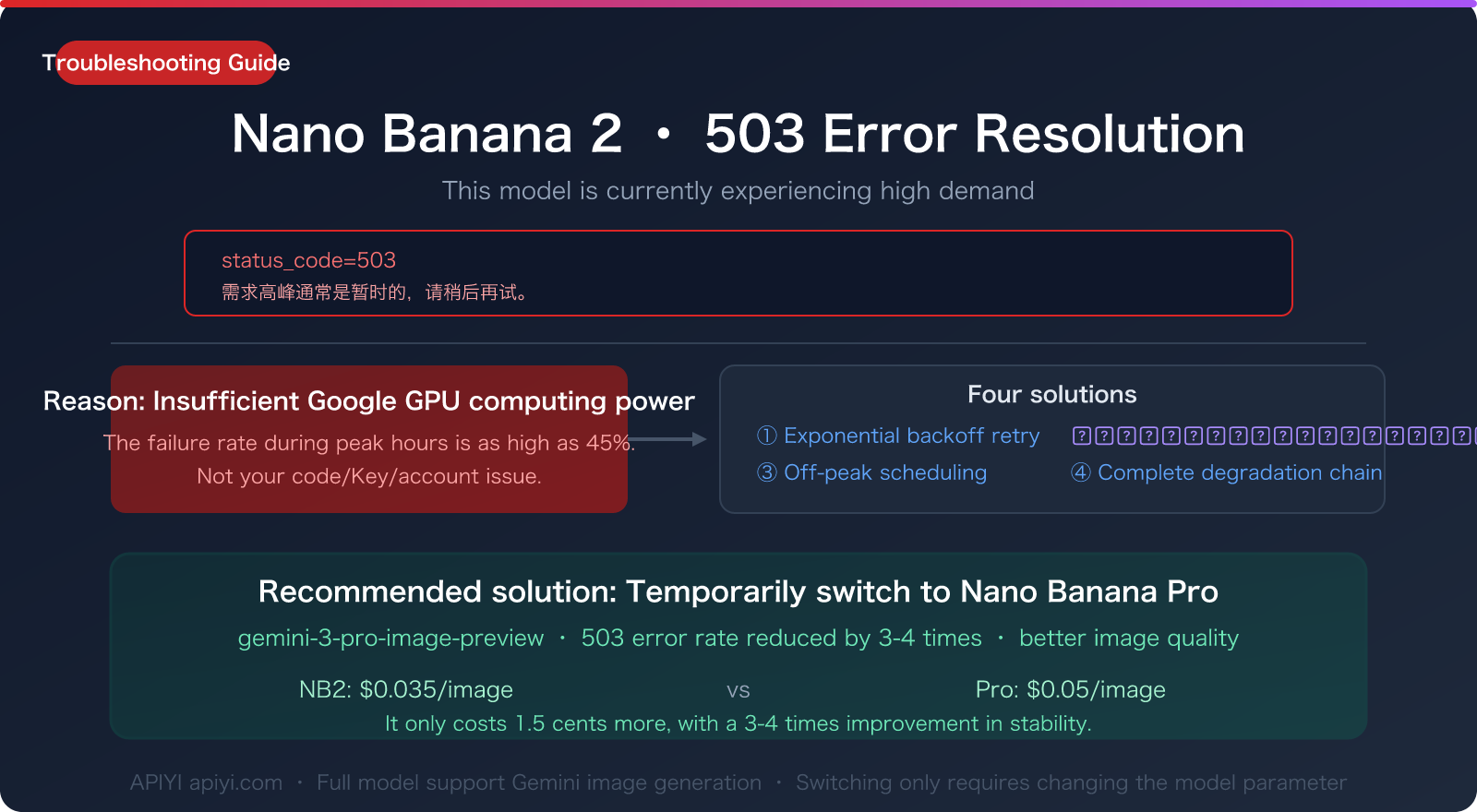
If you've been frequently seeing this error when calling Nano Banana 2 recently:
{
  "error": {
    "code": 503,
    "message": "This model is currently experiencing high demand. Spikes in demand are usually temporary. Please try again later.",
    "status": "UNAVAILABLE"
  }
}
Let's cut to the chase: This isn't a problem with your code, nor is it an issue with your API key. It's caused by insufficient server capacity on Google's end.
Since its release on February 26, 2026, Nano Banana 2 (gemini-3.1-flash-image-preview) has been plagued by 503 errors due to a global surge of developers testing it, combined with the limited server resources allocated to models in Preview status. The failure rate during peak hours is close to 45%.
This article explains what this error really means and provides 4 actionable solutions you can implement immediately to keep your image generation services running.
Key Takeaway: After reading this, you'll understand the pattern behind 503 errors, learn how to handle them automatically in your code, and discover why temporarily switching to Nano Banana Pro is the most reliable fallback strategy.
1. What the 503 "High Demand" Error Really Means
1.1 Decoding the Error Message
Let's break down the error message word by word:
| Field | Meaning |
|---|---|
status_code: 503 |
HTTP 503 Service Unavailable – the service is temporarily down. |
This model is currently experiencing high demand |
The model is receiving more requests than the servers can handle. |
Spikes in demand are usually temporary |
Demand spikes are usually short-lived (hinting it's a temporary issue). |
Please try again later |
Try again later (no specific wait time is given). |
status: UNAVAILABLE |
The service status is "unavailable." |
The core meaning: Google's GPU clusters can't handle the current request volume. Your request itself is perfectly fine; the servers are just overwhelmed.
1.2 It's Not Your Fault – These Actions Won't Fix a 503
Many developers try the following when they encounter a 503, but none of these will help:
| Ineffective Action | Why It Doesn't Work |
|---|---|
| Upgrading your Billing plan | 503 is a server capacity issue, not a quota issue. Paid and free accounts are equally affected. |
| Changing your API Key | The key isn't the problem; all users are impacted during the same time window. |
| Shortening your prompt | The bottleneck is GPU compute power, not request size. |
| Switching regions | The Google Gemini API doesn't support selecting endpoints by region. |
| Retrying repeatedly (without delay) | This further increases server load and might even trigger 429 rate limiting. |
🎯 Key Insight: A 503 is a server-side issue, not a client-side one. The most effective solutions are: switch to another available model, or wait for the servers to recover. When calling Gemini models through APIYI (apiyi.com), the platform automatically load-balances across multiple nodes, which can significantly reduce the chance of encountering a 503.
2. Understanding 503 Error Patterns
Understanding the patterns behind 503 errors can help you schedule your generation tasks more effectively:
2.1 Daily Peak Hours
Based on community statistics (March 2026):
| Time (UTC) | Beijing Time | 503 Error Rate | Description |
|---|---|---|---|
| 00:00-06:00 | 08:00-14:00 | <8% | Best window, highly recommended |
| 06:00-10:00 | 14:00-18:00 | ~15% | Acceptable, occasional failures |
| 10:00-14:00 | 18:00-22:00 | ~45% | Peak congestion zone, nearly half of requests fail |
| 14:00-18:00 | 22:00-02:00 | ~25% | Gradually improving |
| 18:00-24:00 | 02:00-08:00 | ~10% | Relatively stable |
The peak congestion is concentrated during UTC 10:00-14:00 (Beijing Time 18:00-22:00). This is when business hours on the US East Coast and in Europe overlap, creating the highest global request volume.
2.2 Fluctuation Cycle After New Model Releases
Every time Google releases a new model or a major update, 503 errors follow a typical fluctuation cycle:
- Days 1-3: 503 error rates can reach 50-70% (global developers rush to test)
- Days 4-7: Drops to 30-40% (initial hype subsides)
- Weeks 1-3: Drops to 15-25% (Google gradually scales up capacity)
- After Week 3: Stabilizes, dropping to 5-10%
Nano Banana 2 was released on February 26th. By mid-March, it had been over three weeks. The current 503 error rate is declining, but peak hours remain unstable.
2.3 70% of 503 Errors Recover Within 60 Minutes
Community data shows:
- 70% of 503 outages recover automatically within 60 minutes
- 90% of outages recover within 2 hours
- A very small minority last more than 4 hours
This means that if your business can tolerate brief delays, waiting is indeed a valid strategy—but only if your users are willing to wait.
Three: 4 Solutions (With Complete Code)
Solution 1: Exponential Backoff Retry (Most Basic)
Automatically wait and retry, doubling the wait time each attempt to avoid overloading the server:
import requests
import time
import random

API_KEY = "sk-yourAPIKey"
BASE_URL = "https://api.apiyi.com/v1"

def generate_with_retry(prompt, model="gemini-3.1-flash-image-preview", max_retries=5):
    """Exponential backoff retry: automatically waits and retries on 503"""

    for attempt in range(max_retries):
        response = requests.post(
            f"{BASE_URL}/chat/completions",
            headers={
                "Authorization": f"Bearer {API_KEY}",
                "Content-Type": "application/json"
            },
            json={
                "model": model,
                "messages": [{"role": "user", "content": prompt}]
            },
            timeout=120
        )

        if response.status_code == 200:
            return response.json()

        if response.status_code == 503:
            # Exponential backoff: 2^attempt + random jitter
            wait = (2 ** attempt) + random.uniform(0, 1)
            print(f"503 High demand, waiting {wait:.1f}s before retry ({attempt+1}/{max_retries})")
            time.sleep(wait)
            continue

        # Return directly for other errors
        print(f"Error {response.status_code}: {response.text}")
        return None

    print("Max retries reached, recommend switching to Nano Banana Pro")
    return None
Best for: Non-real-time tasks that can tolerate 10-60 second delays.
Solution 2: Switch to Nano Banana Pro (Recommended! Most Reliable)
This is the most recommended solution. Nano Banana Pro (gemini-3-pro-image-preview) is based on the Gemini 3 Pro architecture. Since it handles far fewer requests than NB2, server pressure is lower, and its 503 error rate is significantly lower than NB2's.
def generate_image(prompt, prefer_fast=True):
    """Smart switching: Automatically downgrades to Pro when NB2 returns 503"""

    models = [
        ("gemini-3.1-flash-image-preview", "Nano Banana 2"),    # Priority: Fast & Cheap
        ("gemini-3-pro-image-preview", "Nano Banana Pro"),       # Fallback: Stable & High Quality
    ]

    if not prefer_fast:
        models.reverse()

    for model_id, model_name in models:
        response = requests.post(
            f"{BASE_URL}/chat/completions",
            headers={
                "Authorization": f"Bearer {API_KEY}",
                "Content-Type": "application/json"
            },
            json={
                "model": model_id,
                "messages": [{"role": "user", "content": prompt}]
            },
            timeout=120
        )

        if response.status_code == 200:
            print(f"Generation successful [{model_name}]")
            return response.json()

        if response.status_code == 503:
            print(f"[{model_name}] 503 High demand, trying next model...")
            continue

    return None

# Usage: NB2 first, automatically switches to Pro on 503
result = generate_image("A serene mountain lake at sunrise, photorealistic, 4K")
Why is Pro recommended as a fallback?
| Comparison | Nano Banana 2 | Nano Banana Pro |
|---|---|---|
| Model Name | gemini-3.1-flash-image-preview |
gemini-3-pro-image-preview |
| 503 Error Rate (Peak) | ~45% | ~10-15% |
| Image Quality | Excellent (~95% of Pro) | Best |
| Text Rendering Accuracy | ~90% | ~94% |
| 4K Generation Speed | 20-60 sec (high variance) | 30-60 sec (stable) |
| API Cost | $0.035/image | $0.05/image |
| Stability | High variance | Stable & reliable |
Pro only costs $0.015 (1.5 cents) more per image, but stability improves dramatically—for a production environment, that $0.015 difference is far less than the time cost and user experience loss caused by 503 retries.
🎯 Switch Now: APIYI apiyi.com fully supports the Gemini image generation series. Nano Banana 2 is only $0.035/image, Nano Banana Pro is only $0.05/image. Switching only requires changing the
modelparameter; no need to change your API Key or endpoint.
Solution 3: Off-Peak Scheduling (Good for Batch Generation)
Schedule non-real-time image generation tasks for off-peak hours:
from datetime import datetime, timezone

def should_use_pro():
    """Determine if currently in NB2 peak hours, automatically use Pro during peak"""
    now = datetime.now(timezone.utc)
    hour = now.hour

    # UTC 10:00-14:00 is the 503 peak period
    if 10 <= hour <= 14:
        return True   # Use Pro during peak
    return False       # Use NB2 off-peak

def smart_generate(prompt):
    """Automatically selects model based on time of day"""
    if should_use_pro():
        model = "gemini-3-pro-image-preview"
        print("Currently peak hours, automatically using Nano Banana Pro (more stable)")
    else:
        model = "gemini-3.1-flash-image-preview"
        print("Currently off-peak, using Nano Banana 2 (faster & cheaper)")

    return generate_with_retry(prompt, model=model)
Core Logic:
- UTC 10:00-14:00 (Beijing 18:00-22:00) → Automatically use Pro
- Other times → Use NB2 to save costs
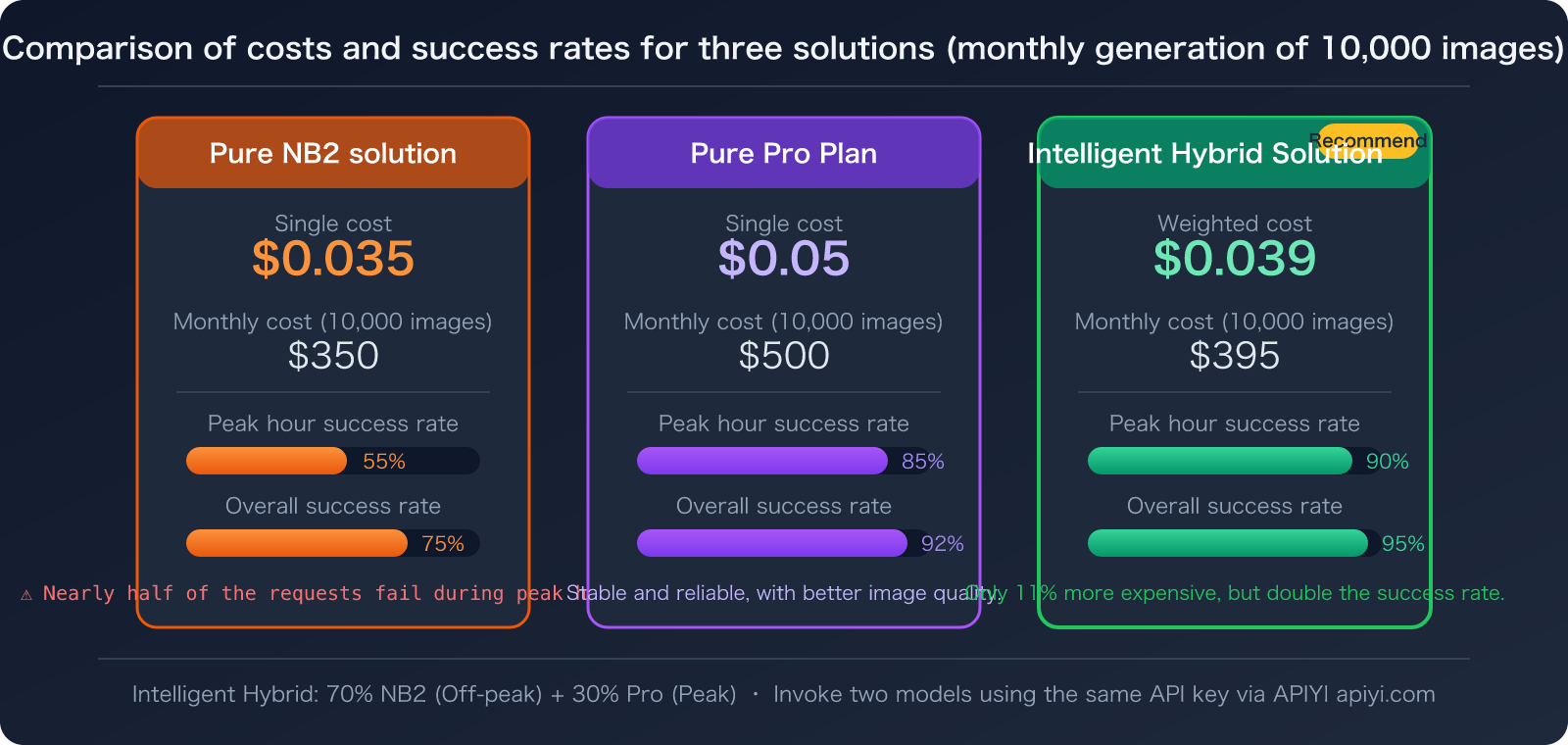
🎯 Time Optimization: Call both models via APIYI apiyi.com. NB2 costs $0.035/image off-peak, Pro costs $0.05/image during peak. Estimating 70% off-peak + 30% peak usage, the weighted average cost is about $0.039/image—close to the price of using NB2 alone, but with significantly improved stability.
Solution 4: Complete Fallback Chain (Recommended for Production)
Combine all three strategies for maximum reliability:
import requests
import time
import random
from datetime import datetime, timezone

API_KEY = "sk-yourAPIKey"
BASE_URL = "https://api.apiyi.com/v1"

# Model fallback chain
FALLBACK_CHAIN = [
    ("gemini-3.1-flash-image-preview", "Nano Banana 2",  3),   # Max 3 retries
    ("gemini-3-pro-image-preview",     "Nano Banana Pro", 2),   # Max 2 retries
]

def generate_production(prompt, resolution="1024"):
    """Production-grade image generation: Fallback chain + exponential backoff"""

    now = datetime.now(timezone.utc)
    is_peak = 10 <= now.hour <= 14

    chain = FALLBACK_CHAIN.copy()
    if is_peak:
        # Peak hours: start directly with Pro
        chain.reverse()

    for model_id, model_name, max_retries in chain:
        for attempt in range(max_retries):
            try:
                response = requests.post(
                    f"{BASE_URL}/chat/completions",
                    headers={
                        "Authorization": f"Bearer {API_KEY}",
                        "Content-Type": "application/json"
                    },
                    json={
                        "model": model_id,
                        "messages": [{"role": "user", "content": prompt}],
                        "image_resolution": resolution
                    },
                    timeout=120
                )

                if response.status_code == 200:
                    result = response.json()
                    print(f"✅ Success [{model_name}] (Attempt {attempt+1})")
                    return result

                if response.status_code == 503:
                    wait = (2 ** attempt) + random.uniform(0, 1)
                    print(f"⏳ [{model_name}] 503, waiting {wait:.1f}s")
                    time.sleep(wait)
                    continue

                if response.status_code == 429:
                    print(f"🚫 [{model_name}] 429 Rate limited, moving to next model")
                    break

            except requests.Timeout:
                print(f"⏰ [{model_name}] Timeout, moving to next model")
                break

        print(f"❌ [{model_name}] All retries failed, trying next model")

    print("All models unavailable, please try again later")
    return None

# Usage example
result = generate_production(
    "A cute robot holding a bouquet of flowers, digital art style",
    resolution="2048"
)
📦 Fallback Chain Workflow Details
Off-peak workflow:
NB2 (retry 3x) → NB2 503 → NB2 503 → NB2 503
  → Pro (retry 2x) → Success ✅

Peak workflow (auto-reversed):
Pro (retry 2x) → Success ✅
4. API Cost Quick Calculation
| Model | Model Name | Cost per Image | 10K Images per Month | 100K Images per Month |
|---|---|---|---|---|
| Nano Banana 2 | gemini-3.1-flash-image-preview |
$0.035 | $350 | $3,500 |
| Nano Banana Pro | gemini-3-pro-image-preview |
$0.05 | $500 | $5,000 |
| Smart Mix (70% NB2 + 30% Pro) | Auto-switching | ~$0.039 | $395 | $3,950 |
With the Smart Mix strategy, your monthly cost only increases by about 11% compared to using only NB2, but the generation success rate jumps from ~55% (during peak hours) to over ~90%.
🎯 Cost-Effective Solution: Via the APIYI platform at apiyi.com, Nano Banana 2 costs just $0.035/image, and Nano Banana Pro is only $0.05/image. The platform fully supports the Gemini image generation series. Switching models is as simple as changing one parameter—no need to swap keys or endpoints.
5. 503 Error vs. Other Common Errors
Besides 503, you might encounter other errors when using Nano Banana 2. Distinguishing between them helps you troubleshoot faster:
| Error Code | Error Message | Cause | Solution |
|---|---|---|---|
| 503 | This model is currently experiencing high demand | Insufficient server compute capacity | Retry / Switch to Pro |
| 429 | Resource has been exhausted | Quota exhausted or rate-limited | Wait for quota refresh / Upgrade plan |
| 400 | IMAGE_SAFETY | Content moderation block | Adjust prompt wording |
| 500 | Internal server error | Google internal error | Wait / Retry |
| 408 | Request timeout | Generation timeout (common for 4K) | Reduce resolution / Retry |
Key Distinctions:
- 503 vs. 429: 503 means the server is busy, affecting everyone; 429 is a personal quota/rate limit issue.
- 503 vs. 500: 503 is overload, usually recovers quickly; 500 is a bug, may take longer to fix.
- Upgrading your billing plan only helps with 429 errors, not 503 errors.
6. Frequently Asked Questions (FAQ)
Q1: How long does it take for a 503 error to recover?
Based on community statistics: 70% recover within 60 minutes, and 90% recover within 2 hours. If your task isn't urgent, waiting 30-60 minutes before retrying usually resolves it. If your task is urgent, switching directly to Nano Banana Pro is the fastest solution.
Q2: Can upgrading to a paid plan solve the 503 issue?
No. This is a pitfall many developers have fallen into. The 503 error is a server-side compute resource issue and has nothing to do with your account tier. Paid and free users are completely equal when facing a 503. If you're upgrading your Billing plan specifically to solve 503 errors, that money is wasted.
Q3: Does Nano Banana Pro also get 503 errors?
Yes, but the probability is much lower. During peak hours, Pro's 503 error rate is around 10-15%, while NB2's can be as high as 45%. The reason is that Pro has a far smaller user base than NB2 (NB2 has a free tier of 5000 calls/month, attracting a large number of free users), resulting in less server pressure.
🎯 Pro is more stable: Calling Nano Banana Pro via APIYI apiyi.com costs only $0.05/image, just 1.5 cents more than NB2's $0.035, but reduces the 503 error rate by 3-4 times. For production environments, this is an obviously cost-effective choice.
Q4: What's the difference in API calls between the two models?
The API endpoint and format are exactly the same; you only need to switch the model parameter:
# Nano Banana 2 (Cheaper but less stable)
model = "gemini-3.1-flash-image-preview"

# Nano Banana Pro (A bit more expensive but stable)
model = "gemini-3-pro-image-preview"
When calling via APIYI apiyi.com, both models use the same API Key and the same endpoint, making switching costless.
Q5: Is there a way to completely avoid 503 errors?
There's no 100% guaranteed method because this is a Google server-side issue. However, the following combined strategies can minimize the actual impact of encountering a 503:
- Fallback Chain: Automatic switch from NB2 → Pro
- Off-Peak Scheduling: Use Pro during peak hours, NB2 during off-peak
- Exponential Backoff: Automatically wait and retry after a 503
- Multi-Platform Load Balancing: Call through third-party platforms like APIYI apiyi.com, leveraging their multi-node load balancing capabilities.
🎯 Optimal Solution: By calling both NB2 and Pro simultaneously on the APIYI apiyi.com platform, combined with a fallback chain and off-peak scheduling, you can increase the overall success rate of image generation to over 95%, with a weighted cost of only ~$0.039/image.
Summary
The 503 High Demand error for Nano Banana 2 is not a problem with your code; it's a concentrated manifestation of insufficient compute resources on Google's servers. The core coping strategies are:
- Understand the Nature: 503 is a server-side issue; upgrading Billing doesn't help, changing your Key doesn't help.
- Know the Pattern: UTC 10:00-14:00 is the peak disaster zone; operating off-peak can significantly reduce the 503 rate.
- Switching to Pro is the Fastest Fix:
gemini-3-pro-image-previewcosts only $0.05/image and reduces the 503 rate by 3-4 times. - Use a Fallback Chain for Production: NB2 → Pro auto-switch + Exponential Backoff + Off-Peak Scheduling.
- The Cost Difference is Minimal: A smart hybrid strategy has a weighted cost of only ~$0.039/image, which is 11% more expensive than pure NB2, but increases the success rate from 55% to 95%.
🎯 Get Started: APIYI apiyi.com fully supports the Gemini image generation series—Nano Banana 2 is only $0.035/image, Nano Banana Pro is only $0.05/image. After registering, get your Key at
api.apiyi.com/tokento start calling. Both models share the same Key and endpoint, enabling zero-cost switching for your fallback chain.
This article was compiled by the APIYI technical team based on community data and actual API call statistics, updated March 2026. For the latest status of Gemini image models, please follow the APIYI Help Center at help.apiyi.com.


