

Author’s note: Using the open-source project DeepTutor as an example, this article explains how to turn course materials into a learning profile, plug in your own model key, generate a learning path, and produce practice questions based on your mastery — plus what the costs look like and where the results stop.
When you’re teaching yourself a course, the hardest part usually isn’t finding material. It’s that nobody tells you “here’s where you are now, and here’s what to practice next.” Throw an entire textbook at a chatbot and it can answer scattered questions, but it won’t remember which chapter you failed to grasp last week. This article covers a more reliable approach: first build your course materials into your own learning profile, then let the AI generate questions based on your mastery. The example tool is the open-source project DeepTutor.
This is not a “one-click score booster” recommendation. The questions and explanations the AI produces can both be wrong, and how much you learn ultimately depends on the quality of the materials you upload and how much practice you put in yourself. This article only covers the parts you can actually put to work: installation, connecting a model, building a knowledge base, generating a learning path, generating questions, calculating costs, and avoiding pitfalls.
Core value: after reading this, you’ll be able to set up an “AI teacher” on your own computer, understand how each of its modules fits together, and know which results you shouldn’t expect from it.
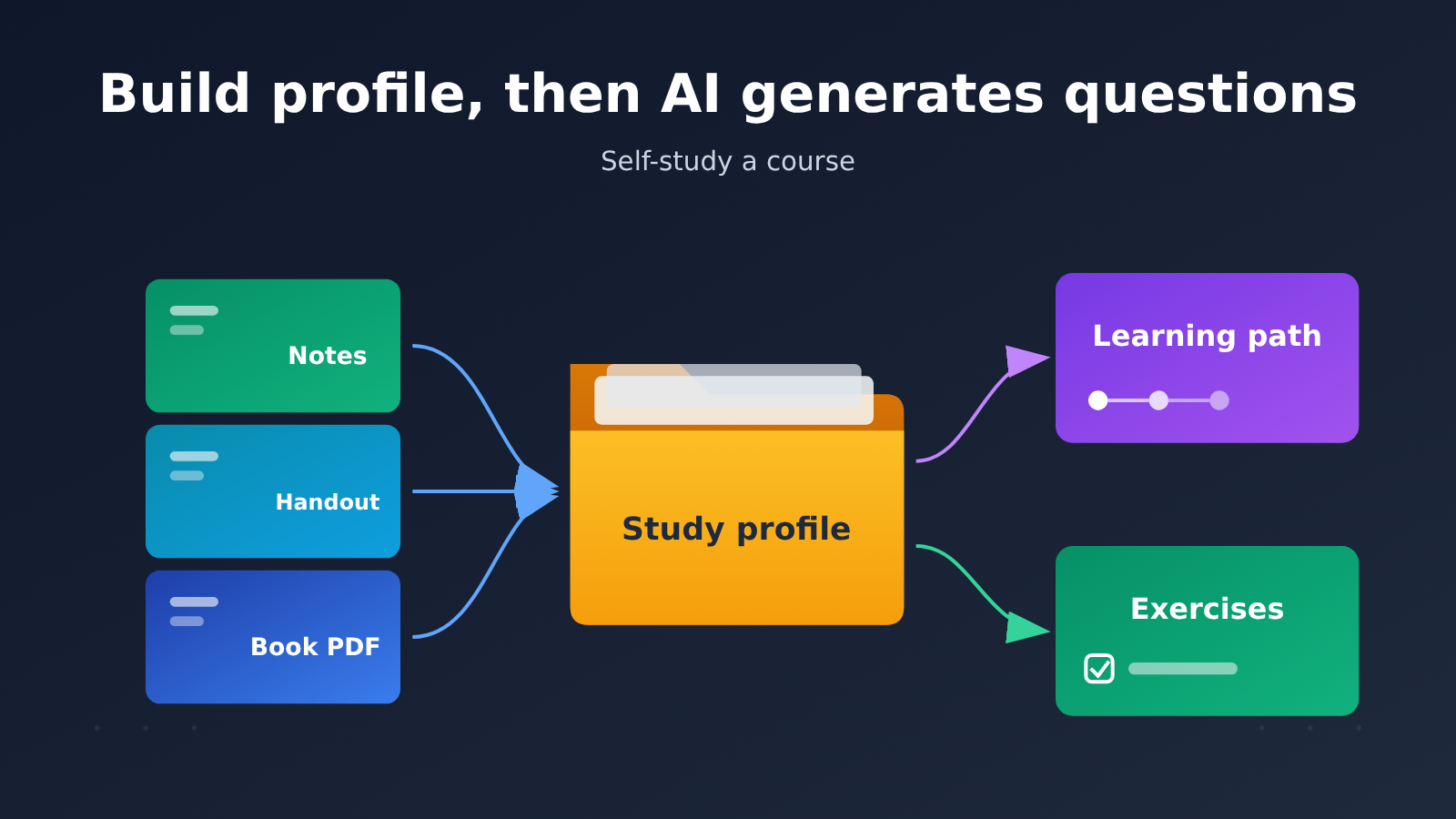
Core Points for Using AI as a Teacher to Self-Study a Course
DeepTutor is an open-source project from the Data Intelligence Lab at the University of Hong Kong (HKUDS) on GitHub. The repo description reads “Lifelong Personalized Tutoring.” According to data returned by the GitHub API on 2026-11-23, the repo has about 61,000 stars, more than 7,000 forks, Python as its primary language, an Apache-2.0 license, and an arXiv technical report. These numbers are the platform’s self-reported popularity metrics; they don’t represent teaching effectiveness. We chose it as an example mainly because its modules line up neatly with the “learning profile” thread.
The table below summarizes the main modules listed on the official site and the role each plays in a self-study context:
| Module (as described on the official site) | Main function | Role in the learning profile |
|---|---|---|
| Workspaces | Manage separately by subject or project | One profile per course, so they don’t interfere with each other |
| Resources | Chat history, favorites, questions, learning records, knowledge base | The profile’s “storage cabinet”—materials and missed questions live here |
| Learning | Books, Mastery Paths, Reading, Practice | Generate learning paths from materials and let you practice |
| Chat | Context-aware conversations; the agent can call tools, skills, and sources | Ask follow-up questions anytime; answers cite your materials |
| Calendar | Events, review, and planning commands | Turn review plans into specific dates |
| Notebook | Organize sources into your own pages; discuss paragraph by paragraph | Build up personal notes |
A Closer Look at How the Learning Profile Relates to Question Generation
The “learning profile” isn’t a button in DeepTutor; it’s what you get when several modules work together: one Workspace holds the knowledge base for the course, your conversation history, learning records, and questions. The more complete the profile, the closer the AI-generated learning paths and questions will be to what you’re actually learning—rather than generic internet common knowledge. On the flip side, if you upload only a few scattered screenshots, even the best model can only generate questions “from vague impressions.”
Question generation relies on Mastery Path and Practice in Learning. According to the project’s release notes, starting with v1.4.9, graded questions in Mastery Path flow into the Question Bank, while Practice and Reading are tied to sessions. That means the questions you’ve worked through and the places you got wrong are retained, and you can later go back to the Question Bank to review. This creates a closed loop: read the materials → follow the learning path → do questions → enter the Question Bank → review again.
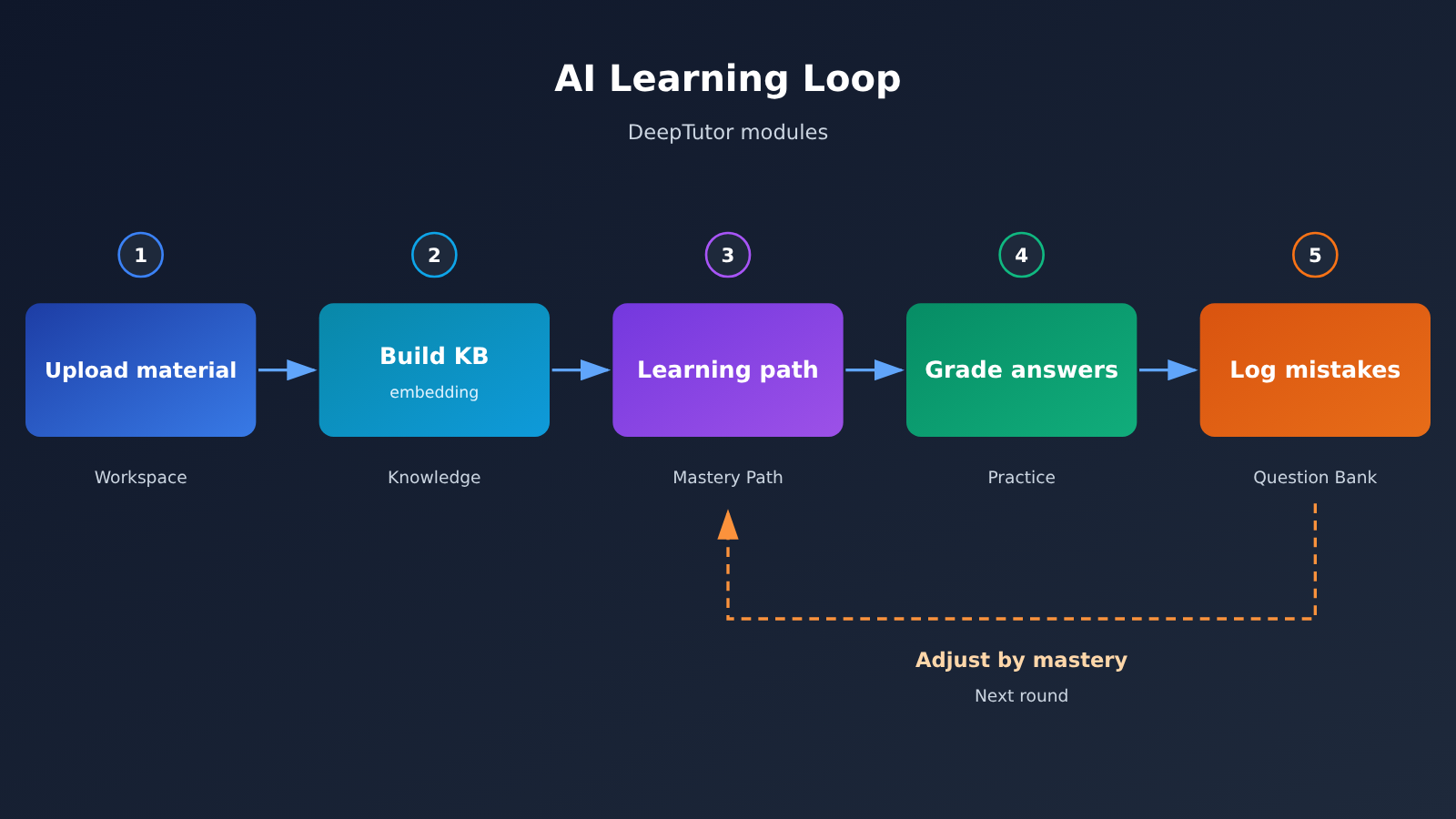
Before You Use AI as a Teacher: Choosing Between the Desktop App and pip
DeepTutor’s official site lists three installation methods: desktop installer, pip, and Docker. For most students and parents, the desktop app is the easiest option; if you’re comfortable with the command line and want to run tasks through the CLI, choose pip; if you need to run it on a server or isolate the environment, choose Docker.
| Installation method | Environment requirements (as stated on the official site) | How to start | Who it’s for |
|---|---|---|---|
| Desktop app | macOS Apple Silicon, macOS Intel, Windows x64 | Download the installer from GitHub Releases and double-click to open | Students, parents, and people who don’t want to touch the command line |
| pip | Python 3.11–3.14, Node.js 22 LTS | deeptutor init followed by deeptutor start |
Career changers, developers, and people who need the CLI |
| Docker | Docker installed | Run the official image and open 127.0.0.1:3782 in your browser |
People who want to keep the service running on one machine long term |
Desktop users should update to v1.7.4 or later first. According to the project’s release notes from 2026-11-20, v1.7.4 is a desktop security update: that day, desktop release credentials were exposed in GitHub Actions artifacts. The affected artifacts were deleted, and the project immediately rotated the runtime signing keys for the macOS and Windows desktop apps. The official notes say that migrating between the old and new runtimes backs up the workspace first, but if you’ve already accumulated a lot of material in your profile, manually backing up once more before updating will give you extra peace of mind.
The pip route gives you an extra CLI. deeptutor chat starts an interactive command-line conversation, deeptutor run <capability> "<message>" runs a single task, and deeptutor config show and deeptutor config providers let you inspect the current configuration. If you just want to study without hassle, the desktop app is enough; both routes share the same data and core functionality.
Use AI as a Teacher to Get Started Fast: 5 Steps to Set Up a Learning Profile
Step 1: Install DeepTutor
Desktop app: Head to the Releases page of the HKUDS/DeepTutor GitHub repo and download the latest installer for your OS. Make sure the version is at least v1.7.4, then install it and open it.
pip route: First check that your Python version is between 3.11 and 3.14 and that Node.js 22 LTS is installed. Then run pip install -U "deeptutor[full]", deeptutor init, and deeptutor start in that order. deeptutor init walks you through an interactive configuration; we’ll cover exactly how to fill it in next.
Step 2: Add a Custom Provider in Settings to Connect a Model
According to the README, Settings is the app’s control plane. Models & services is broken down into Providers, Language models, Task models, Embedding, Search, Voice, and Multimodal generation. A provider stores the vendor address and credentials and can be reused by multiple services, so you only configure a provider once, then pick models separately for chat, tasks, and embeddings.
In the official Provider docs’ LLM Providers table, there’s a Custom (OpenAI-compat) row with the binding custom, an empty default Base URL that you fill in yourself. Take APIYI as an example: it offers an OpenAI-compatible interface where a single key lets you call Claude, GPT, Gemini, and other models. Here’s how to fill it in:
| Where to configure | Value to enter | Notes |
|---|---|---|
| Providers → Add new | Custom (OpenAI-compat) | Set binding to custom |
| Base URL | https://api.apiyi.com/v1 |
The official docs state custom URLs won’t be rewritten |
| API Key | A key created in the APIYI console | Don’t write the plaintext value into the config file |
| Language models | claude-sonnet-5-5 |
Handles the main chat work: explaining, answering questions, generating exercises |
| Task models | claude-haiku-5-5 |
A small, fast model for automated work like naming conversations and writing starting points |
| Embedding | text-embedding-3-large |
Required for the knowledge base / RAG index |
A few details are worth noting. Model IDs are case-sensitive, and whether the version number uses dots or hyphens depends on the platform’s model list—just copy the table above. If you leave Task models empty, the README says it falls back to the current default model, which means Sonnet ends up doing this grunt work; it works, but it costs more. The official developer docs also mention that a plaintext api_key in the config file and credentials embedded in URLs will be rejected, so when configuring from the command line you should use api_key_env to point at an environment variable.
If you’re going through deeptutor init, the flow is roughly: choose Custom / Other as the provider, set binding to custom, edit the Base URL, enter the key, fetch the model list, select or manually type the model name, test the connection, then optionally configure embeddings and web search, and finally Review & save. Failing to fetch the model list isn’t fatal—the official troubleshooting notes say it falls back to a built-in model list, and you can just type the model name manually.
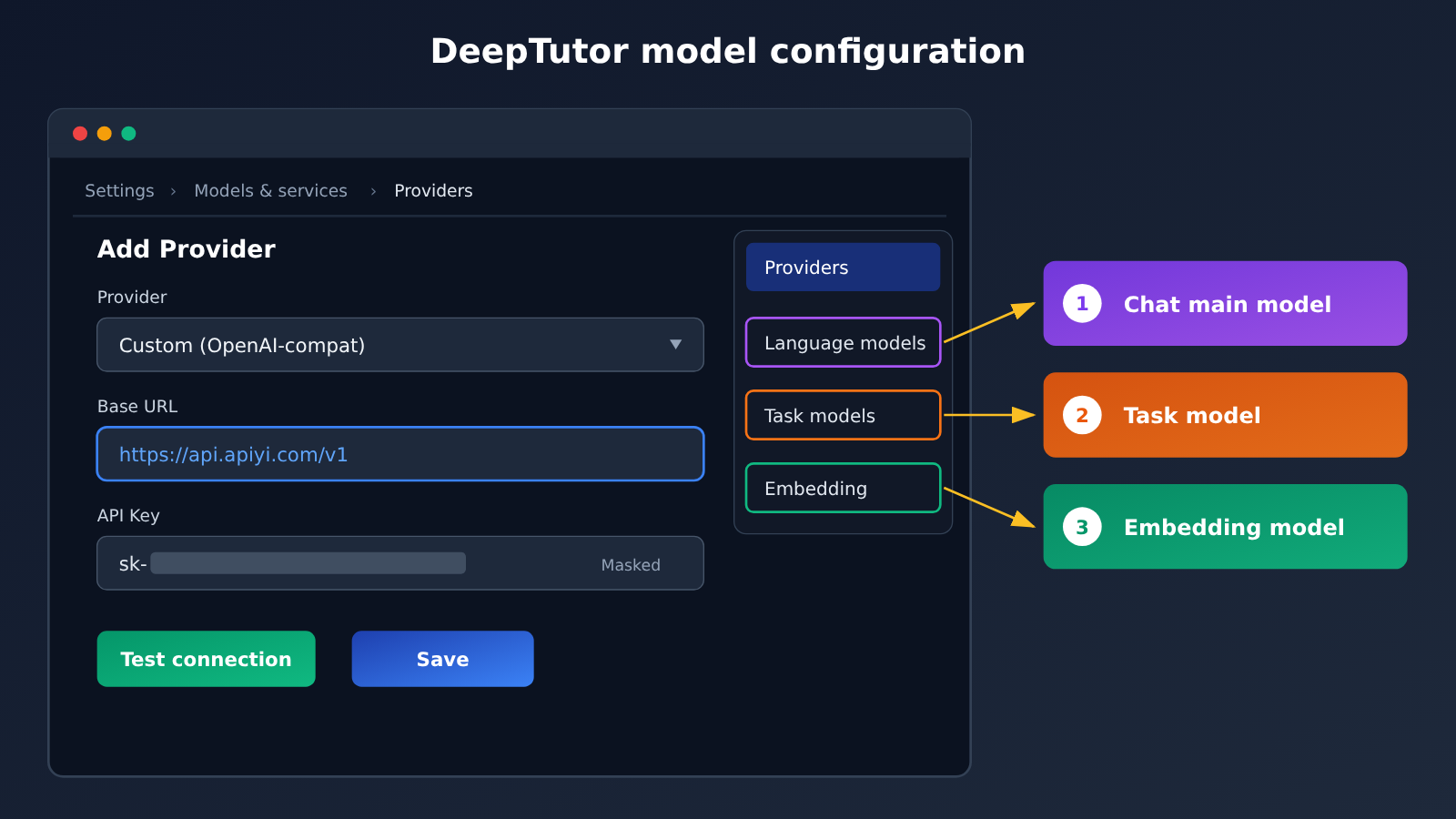
🚀 Quick start: The first time you configure this, we recommend running a “test connection” with APIYI’s free trial quota at apiyi.com to confirm both the chat model and embeddings return properly before you start uploading a large batch of material—that way you don’t discover a wrong key or model name halfway through indexing.
Step 3: Create a Workspace and upload course materials
Create one Workspace per course — keep things like “Linear Algebra,” “CS 408 grad exam prep,” and “my kid’s 8th-grade physics” separate. Upload the course textbook PDF, lecture handouts, past exam papers, and your own notes to the knowledge base. The closer the materials are to the exam or course syllabus, the better. For copyrighted materials, please use them only for personal study.
When uploading, you can choose a document parsing engine. The official list includes options like Text-only, MinerU, Docling, Tika, markitdown, PyMuPDF4LLM, and LiteParse, and local model downloads are off by default. For plain-text materials, the default or Text-only is enough. For PDFs with lots of formulas, lots of tables, or scanned pages, try a few engines one at a time, open the parsed result and spot-check a few pages, then pick the one with the most complete recognition. According to the v1.7.0 docs, embeddings support resumable checkpoints, so if the network drops halfway through a large batch of materials, you don’t have to start over. Advanced users who need graph-based retrieval can also install the LightRAG engine with pip install 'deeptutor[rag-lightrag]'.
Step 4: Generate a Mastery Path and let it quiz you
Once indexing finishes, go to Learning and generate a Mastery Path from this course’s knowledge base. A good prompt spells out the background — for example, “I’m a total beginner, and my goal is to be able to do all the end-of-chapter exercises for Chapters 1 through 6 of the textbook in three months,” rather than just “help me learn linear algebra.” After the path is generated, read through it once, delete the parts that aren’t in the exam scope, then start studying section by section.
After finishing each section, go to Practice and do the questions. Graded questions go into the Question Bank, and questions you got wrong can be bookmarked so you can revisit them all later. Verify every answer against the textbook or the standard solution — especially calculation problems and proof problems that require rigorous derivation. If you find that a question itself is wrong, point it out in the conversation and have it rewrite the question. That correction process is itself a form of learning.
Step 5: Use Learning Records to Review and Schedule Review Sessions
In Resources, check your learning records, bookmarks, and questions to identify the concepts you keep getting wrong. Then go back to Chat and have the AI re-explain them using the original materials, and use Calendar to schedule reviews on specific dates. According to the v1.7.3 notes, the new learning records are displayed more clearly, making it easier to see which chapter you’re actually stuck on.
The Cost of Using AI as a Teacher: Tutoring Conversations and RAG Indexing Are Two Separate Bills
A lot of people assume an “AI teacher” only costs you money when it’s chatting. In reality, you have to count two separate bills. The first is the tutoring conversation — the main model’s explanations, Q&A, and quiz generation, plus the task model’s background chores — billed by input and output tokens. The second is RAG indexing — splitting materials into chunks and calling an embedding model to generate vectors. That mostly happens when you upload materials, with a small amount of usage during retrieval afterward.
The prices below come from the APIYI model pricing table at docs.apiyi.com/models (data updated 2026-11-22). Units are per 1 million tokens; the platform’s live list is authoritative:
| Model | Use case | Input | Output | Cache read |
|---|---|---|---|---|
| claude-sonnet-5-5 | Main tutoring conversation | $2 | $10 | $0.1 |
| claude-haiku-5-5 | Task model (≤100K input tier) | $0.1 | $0.5 | $0.01 |
| claude-haiku-5-5 | Task model (>100K input tier) | $0.5 | $2.5 | $0.05 |
| text-embedding-3-large | Knowledge base embedding | $0.13 | $0.13 | — |
| claude-opus-5-5 | Fallback, in-depth explanation of hard problems | $4 | $20 | $0.2 |
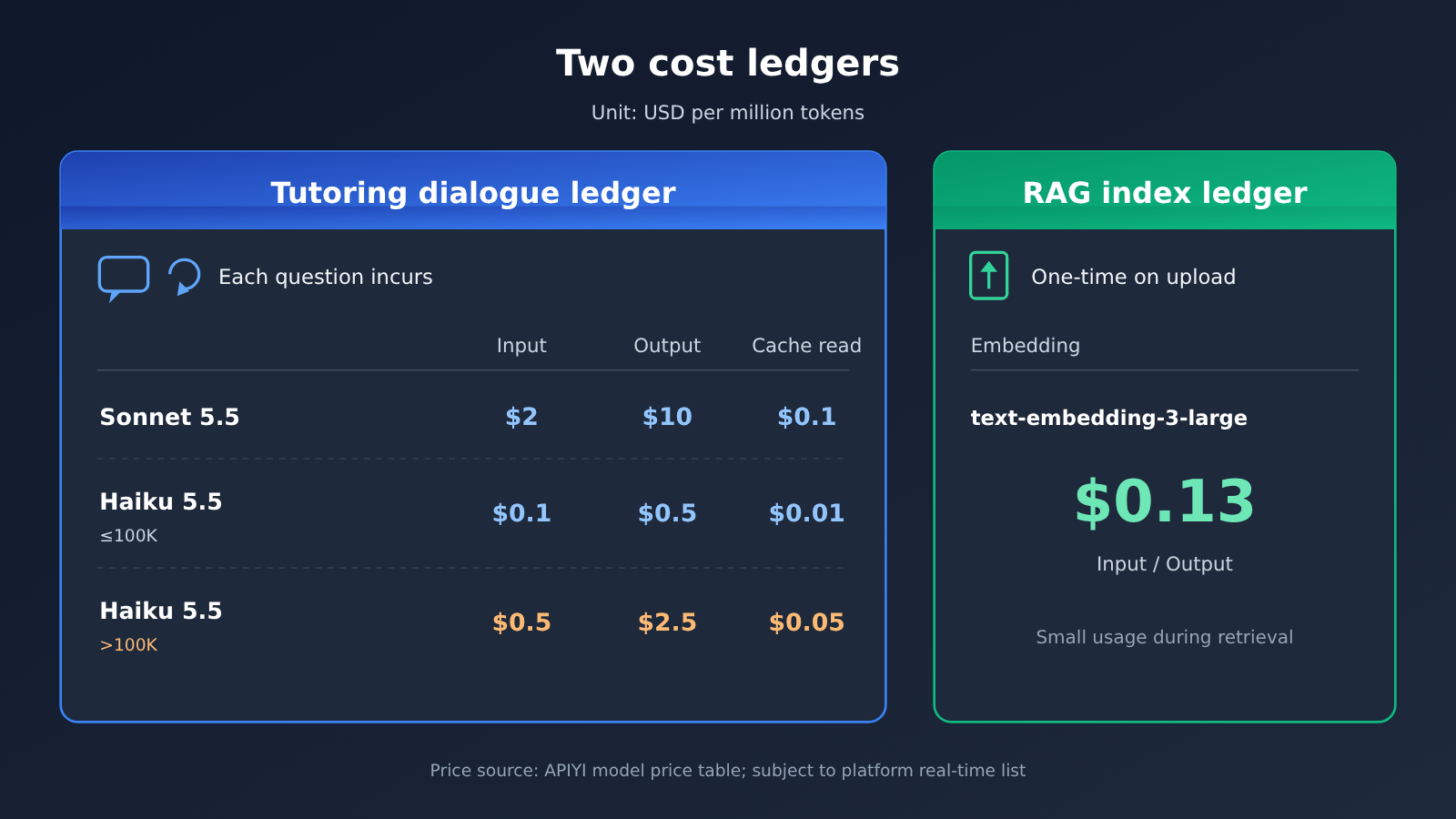
Here’s a rough sketch with a set of made-up numbers to show the thinking: if all the materials for a course total about 1 million tokens, a full indexing pass with text-embedding-3-large costs roughly $0.13 in embedding fees — a relatively small one-time expense. Tutoring conversations, on the other hand, keep happening. Say a single Q&A with retrieved materials runs 20K input tokens and 3K output tokens; with Sonnet 5.5 that’s about 0.02 × 2 + 0.003 × 10 ≈ $0.07. If context that gets repeatedly cited in a long conversation hits the cache, that portion is billed at just $0.1 per million, which cuts the cost noticeably. These are only examples of how to do the math — your actual usage depends on how long your materials are, how often you ask questions, and how long your conversations run.
A few cost-saving rules follow from this: hand off chores like naming things and writing intro copy to Haiku 5.5 — don’t leave the task model slot empty. Keep the context you feed the task model under 100K per call so you stay out of the expensive tier. Switch to Opus only temporarily, for the hard problems Sonnet can’t explain clearly. With APIYI’s single endpoint at https://api.apiyi.com/v1, you can switch among these models without registering and topping up an account with each vendor.
💰 Cost note: APIYI is an API gateway, not a model host, so upstream vendors’ content policies, rate limits, and outages pass straight through. Pay-as-you-go means you pay for what you use, which suits a self-study scenario where usage swings a lot. Start with the free quota, watch your real consumption for a week, and then decide on a budget.
A Few Things You Can’t Count on When Using AI as a Teacher
Setting boundaries clearly matters more than overselling what it can do. Here are a few things to keep in mind before you start:
- AI-generated questions and explanations can be wrong: this includes calculation errors, confused concepts, and contradictory conditions in the question stem. You must check them against the textbook.
- It can’t replace practice with the question types used on the real exam: the style of generated questions may not match your target exam, so you still need to work through real past papers yourself.
- Material quality sets the ceiling: for chapters that are blurry scans or fail to parse, the AI can’t retrieve them and will “make things up.”
- Its judgment of your mastery depends on your answers: if you fill in answers carelessly, your learning path will get thrown off.
- It can’t do your homework for you: treat it as a practice partner and Q&A helper, not a ghostwriting tool. Parents especially should pay attention to how their kids use it.
- Open-source projects iterate quickly: there are many open issues on GitHub, and interface and settings names may change between versions. Refer to the official docs for the current version.
FAQ
Q1: What is DeepTutor, and is it good for AI tutoring?
DeepTutor is a personalized tutoring app open-sourced by HKUDS on GitHub under the Apache-2.0 license. It puts the knowledge base, learning path, question bank, and review calendar all in one Workspace — a good fit for people who already have defined course materials and want to study systematically or prep for exams. If you have no materials and just want to chat, a regular chat tool is enough.
Q2: How is using AI as a teacher different from just asking a chatbot?
A regular chatbot mostly relies on the model’s own knowledge, and once the conversation ends, it’s hard to carry your learning progress forward. Tools like DeepTutor first build your materials into a knowledge base, so answers and questions are retrieved from your textbook, and the questions you’ve done plus your study records are kept. The former wins on being ready whenever you are; the latter wins on “remembering where you left off.”
Q3: Desktop app or CLI — which one should I pick?
Students and parents who just want to study should go with the desktop app — download and you’re set, just remember to update to v1.7.4 or later. If you need to run batch tasks, write scripts, or deploy on a server, go with the pip install so you can use CLI commands like `deeptutor chat` and `deeptutor run`. The core learning features are the same on both.
Q4: The connection test returns 401 or I can’t fetch the model list. What should I do?
The official troubleshooting notes that a 401 from provider probing is usually a wrong Key — check for extra spaces or an incomplete paste. Failing to fetch `/models` isn’t a fatal error; the system falls back to the built-in model list, and you can just type a model name like `claude-sonnet-5-5` manually. Also make sure the Base URL ends with `/v1`.
Q5: How do I quickly connect DeepTutor through APIYI?
Three steps:
1. Sign up at APIYI apiyi.com, create an API key, and claim the free trial quota
2. In Settings → Providers, add a Custom (OpenAI-compat) provider and set the Base URL to `https://api.apiyi.com/v1`
3. Pick Sonnet 5.5, Haiku 5.5, and text-embedding-3-large for Language models, Task models, and Embedding respectively, then click Test Connection
One key covers both chat and embedding services, and if you later want to compare results with another model, you only need to change the model name.
Q6: Can I run it fully locally without cloud models?
Yes. The official docs say Ollama or any other local OpenAI-compatible service works with an empty Key and a Base URL such as `localhost:11434/v1`. The trade-off is that local models’ explanation quality and question accuracy are limited by your GPU and model size; a common approach is to treat embedding and chat separately and mix and match based on your hardware.
Q7: Can AI-generated questions be used as standard answers?
No. AI-generated questions and explanations are only practice material — correctness must be verified against the textbook, the answers your teacher gave, or authoritative solutions. When you spot an error, point it out and have the AI re-derive it from the source material; that correction process often teaches you more than getting a question right.
Key Takeaways: Self-Studying with AI as Your Teacher
- Build the archive first, then generate questions: one Workspace per course, with materials, notes, and the question bank all kept in one place.
- The loop closes through the question bank: graded Mastery Path questions land in the Question Bank, and you can redo the ones you got wrong.
- Two install paths, pick one: students and parents should use the desktop app; if you need the CLI, use pip. Desktop users, update to v1.7.4+.
- Configure the custom provider once: put APIYI’s OpenAI-compatible URL in Base URL, and specify each of the three model types.
- Costs come in two parts: tutoring conversations bill continuously, while embedding indexing is mostly a one-time cost at upload.
- Don’t leave the task model blank: hand the grunt work to Haiku 5.5 — cheaper than running everything on Sonnet.
- There are limits to what it can do: questions can be wrong; material quality and practice volume are what really decide the outcome.
Summary
Self-studying a course with AI as your teacher comes down to the order you do things in:
- Build the study archive first: upload textbooks, lecture notes, and past exam papers into a dedicated Workspace, then spot-check how well the parsing turned out.
- Then get the models configured: set up the Custom (OpenAI-compat) provider once, so chat, tasks, and embeddings each do their own job.
- Finally, generate questions based on your mastery: work through a section with Mastery Path and Practice — learn one, drill one — with wrong answers going into the question bank and reviews going into the calendar.
AI can help you organize your materials, answer questions on demand, and act as a practice partner, but judging right from wrong and sticking with practice is still on you. A good move: get your configuration working first on APIYI apiyi.com using the free credits, run a one-week trial with a single chapter, and then decide whether to move the whole course in.
📚 Reference Materials
-
GitHub – HKUDS/DeepTutor: Open-source repository and Releases downloads
- Link:
github.com/HKUDS/DeepTutor - Details: README, release notes (including the v1.7.4 security update), and desktop installer packages
- Link:
-
DeepTutor Official Docs – Providers: Model provider configuration guide
- Link:
docs.deeptutor.info/get-started/providers - Details: Binding and Base URL rules for Custom (OpenAI-compat)
- Link:
-
DeepTutor Official Website: Module overview and installation methods
- Link:
deeptutor.info - Details: The three installation paths (desktop, pip, Docker) and environment requirements
- Link:
-
APIYI Model Pricing Overview: Model IDs and billing prices
- Link:
docs.apiyi.com/models - Details: Input, output, and cache-read pricing for Sonnet 5.5, Haiku 5.5, and text-embedding-3-large
- Link:
Author: APIYI Technical Team
Technical Support: If you run into any configuration issues, feel free to reach out through the APIYI official website homepage. For more integration guides, take a look at the official documentation center.


