
One of the biggest headaches in e-commerce operations is the high cost, long turnaround times, and inconsistent quality of product photography. A standard set of studio-quality main images—covering everything from lighting and shooting to post-processing—can easily cost thousands of dollars and take 3-5 business days. Now, Nano Banana Pro API can turn a mobile snapshot or a 3D model render into a studio-grade e-commerce main image in under 10 seconds, complete with multi-angle generation and intelligent background replacement.
Core Value: By the end of this article, you'll master three core techniques for using the Nano Banana Pro API to handle the entire workflow—from "quick snap/3D model" to "e-commerce main image + multi-angle + background replacement"—slashing your product image production costs by 90%.
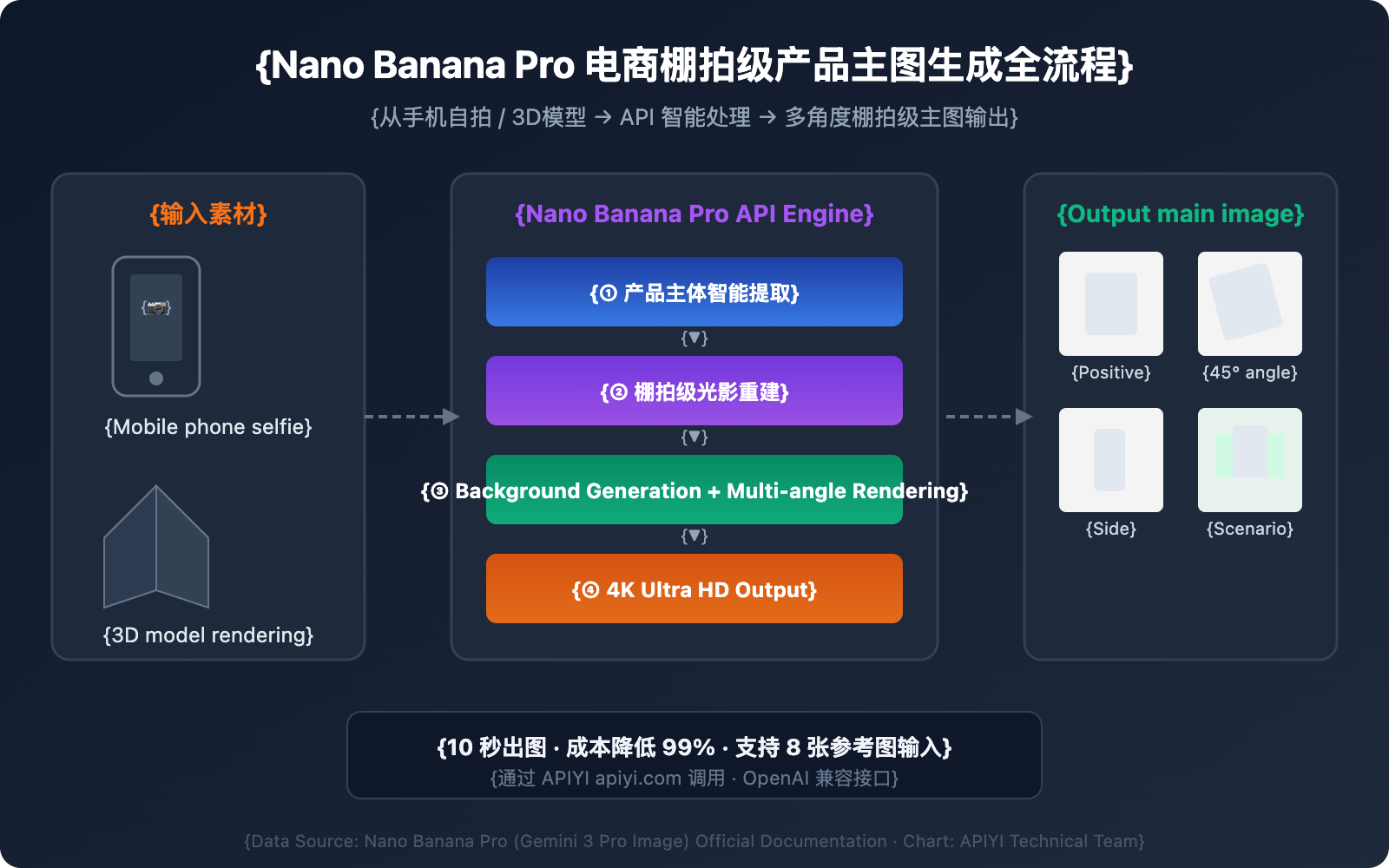
Nano Banana Pro E-commerce Main Image: Core Capabilities at a Glance
Before we dive into the hands-on guide, let's look at the five core capabilities of Nano Banana Pro (based on Gemini 3 Pro Image) for e-commerce product photography.
| Core Capability | Technical Specs | E-commerce Value |
|---|---|---|
| Product Subject Extraction | Intelligently identifies the subject, automatically removing fingers/clutter. | Say goodbye to manual clipping; get clean product images with one click. |
| Studio-grade Lighting Reconstruction | Three-point lighting simulation with natural contact shadows. | Rivals professional studio results. |
| Multi-angle Consistency | Supports 8 standard angles including front, side, top-down, and 45°. | Generate a full set of main images from a single shot. |
| Intelligent Background Replacement | Various modes: pure white, lifestyle scenes, gradients, etc. | Complies with standards for platforms like Amazon, Shopee, and more. |
| 4K Ultra-HD Output | Up to 4096×4096 resolution. | Supports zooming in on main images and high-quality detail page displays. |
🎯 Technical Tip: Nano Banana Pro supports up to 8 reference images simultaneously (double the standard version), making it perfect for maintaining consistency across multi-angle e-commerce images. You can quickly call this model via the APIYI (apiyi.com) platform without needing to configure your own Google Cloud environment.
Nano Banana Pro: A 3-Step Guide to Generating E-commerce Main Images
Step 1: Transforming Product Selfies into Studio-Grade Main Images
This is the most common scenario—you've got a casual product photo taken with your phone, and you need to turn it into a standard e-commerce main image with a clean white background and studio-quality lighting.
Core Prompt Template:
Transform this product photo into a professional e-commerce product shot.
Clean studio lighting with soft key light from upper-left, fill light from right.
Pure white background (RGB 255,255,255).
Remove all fingers, hands, and background clutter.
Add subtle natural contact shadow at the base.
Product centered, occupying 80% of frame.
4K resolution, commercial photography quality.
Minimalist Code Example:
import openai
import base64
import re

client = openai.OpenAI(
    api_key="YOUR_API_KEY",
    base_url="https://api.apiyi.com/v1"  # Using the APIYI unified interface
)

response = client.chat.completions.create(
    model="nano-banana-pro",
    messages=[{
        "role": "user",
        "content": [
            {"type": "text", "text": "Transform this product photo into a professional e-commerce product shot. Pure white background, studio lighting, remove background clutter, add contact shadow. 4K resolution."},
            {"type": "image_url", "image_url": {"url": "YOUR_PRODUCT_PHOTO_URL"}}
        ]
    }]
)

# Extract Base64 image data from the response and save it
content = response.choices[0].message.content
match = re.search(r'data:image/[^;]+;base64,([A-Za-z0-9+/=]+)', content)
if match:
    with open("product_main_image.png", "wb") as f:
        f.write(base64.b64decode(match.group(1)))
    print("Studio-grade product main image generation complete")
View Full Code (Including error handling and batch generation)
#!/usr/bin/env python3
"""
Nano Banana Pro E-commerce Studio-Grade Product Image Generator
Supports: Selfie-to-main-image, multi-angle generation, background replacement
"""
import openai
import base64
import re
import os
from datetime import datetime

# Configuration
API_KEY = "YOUR_API_KEY"
BASE_URL = "https://api.apiyi.com/v1"

client = openai.OpenAI(api_key=API_KEY, base_url=BASE_URL)

def generate_product_shot(image_url, prompt, output_name="product_shot"):
    """Generates a single e-commerce product main image"""
    try:
        response = client.chat.completions.create(
            model="nano-banana-pro",
            messages=[{
                "role": "user",
                "content": [
                    {"type": "text", "text": prompt},
                    {"type": "image_url", "image_url": {"url": image_url}}
                ]
            }]
        )

        content = response.choices[0].message.content
        match = re.search(r'data:image/[^;]+;base64,([A-Za-z0-9+/=]+)', content)

        if not match:
            match = re.search(r'([A-Za-z0-9+/=]{100,})', content)

        if match:
            timestamp = datetime.now().strftime("%Y%m%d_%H%M%S")
            filename = f"{output_name}_{timestamp}.png"
            with open(filename, "wb") as f:
                f.write(base64.b64decode(match.group(1)))
            print(f"✅ Saved: {filename}")
            return filename
        else:
            print("❌ Image data not found")
            return None

    except Exception as e:
        print(f"❌ Generation failed: {e}")
        return None

def batch_product_shots(image_url, angles):
    """Batch generates multi-angle product main images"""
    results = []
    for angle_name, prompt in angles.items():
        print(f"🔄 Generating {angle_name} angle...")
        result = generate_product_shot(image_url, prompt, f"product_{angle_name}")
        if result:
            results.append(result)
    return results

# Prompt Template Library
PROMPTS = {
    "white_bg": "Transform into professional e-commerce product shot. Pure white background (RGB 255,255,255). Clean studio lighting, soft key light upper-left, fill light right. Remove all clutter. Natural contact shadow at base. Product centered at 80% frame. 4K commercial quality.",
    "front": "Professional e-commerce product shot, front view straight-on angle. Pure white background, studio lighting. Product centered. 4K resolution.",
    "side_45": "Professional e-commerce product shot, 45-degree angle view from upper-right. Pure white background, studio lighting. Show product depth and texture. 4K resolution.",
    "side_left": "Professional e-commerce product shot, left side profile view. Pure white background, studio lighting. Highlight side details. 4K resolution.",
    "top_down": "Professional e-commerce product shot, top-down bird's eye view. Pure white background, even lighting no harsh shadows. 4K resolution.",
    "lifestyle": "Place this product in a modern minimalist lifestyle setting. Soft natural window light, light wood table, subtle bokeh background. Product as hero element. 4K commercial photography."
}

if __name__ == "__main__":
    product_url = "YOUR_PRODUCT_PHOTO_URL"

    # Single white background main image
    generate_product_shot(product_url, PROMPTS["white_bg"], "main_image")

    # Multi-angle image set
    multi_angle = {
        "front": PROMPTS["front"],
        "side_45": PROMPTS["side_45"],
        "side_left": PROMPTS["side_left"],
        "top_down": PROMPTS["top_down"]
    }
    batch_product_shots(product_url, multi_angle)
Optimization Tips for Selfie-to-Studio Conversion:
| Prompt Parameter | Recommended Value | Description |
|---|---|---|
background |
Pure white (RGB 255,255,255) |
Standard white background for major platforms |
lighting |
soft key light upper-left |
Simulates studio three-point lighting |
shadow |
natural contact shadow |
Adds realism with a base contact shadow |
framing |
centered, 80% of frame |
Meets platform requirements for product ratio |
resolution |
4K |
Ultra-clear output that supports zooming |
cleanup |
remove fingers, clutter |
Automatically clears hands and background mess |
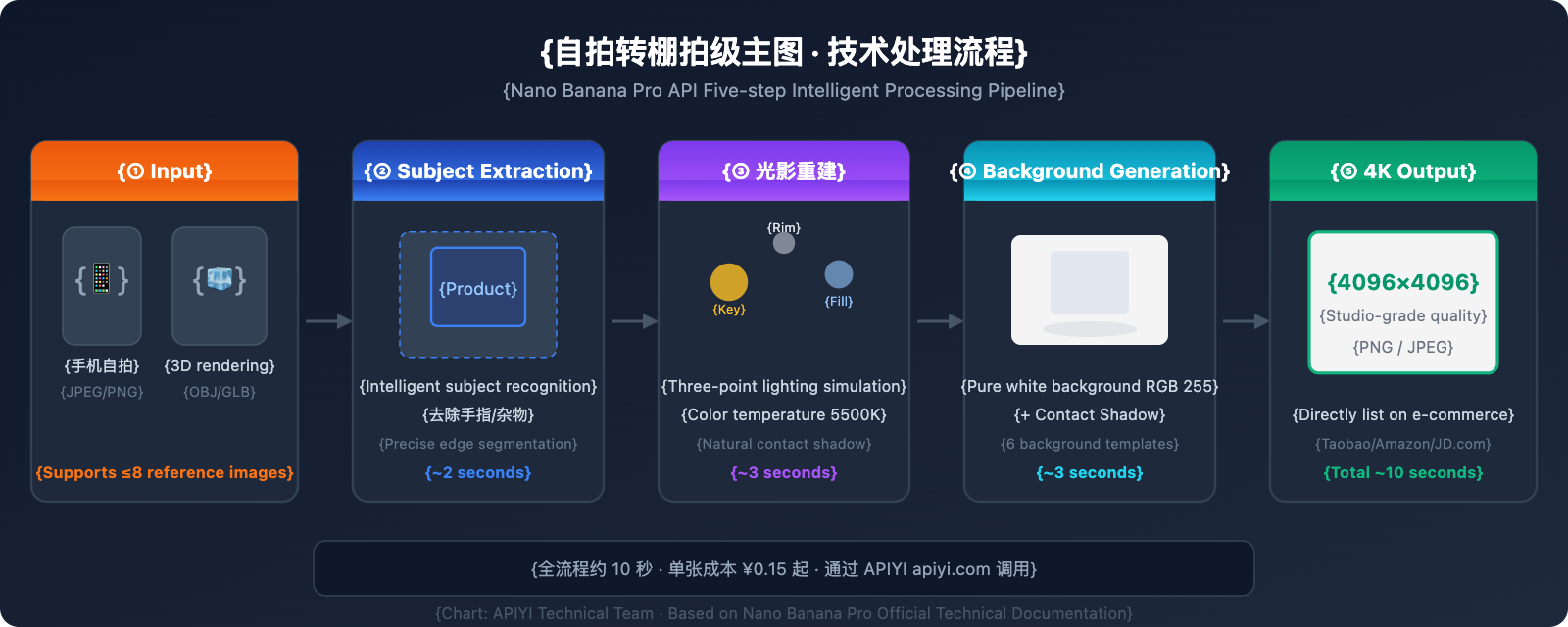
Step 2: Converting 3D Renders to Photorealistic E-commerce Shots
If you have 3D models of your products (like industrial designs, furniture, or 3C gadgets), you can transform those renders into "real-life" e-commerce main images, stripping away that artificial CG look.
3D-to-Realism Prompt Template:
Convert this 3D rendered product into a photorealistic e-commerce product photograph.
Add realistic material textures: subtle surface imperfections, accurate light reflections.
Studio photography lighting setup: key light 45° upper-left, rim light from behind.
Pure white background with soft gradient at edges.
Add micro-details: slight dust particles in light beam, realistic contact shadow.
The result should be indistinguishable from a real studio photograph. 4K resolution.
Key Tip: Asking the AI to add real-world "micro-imperfections" (like dust particles in the light or subtle surface texture variations) is the secret to eliminating that CG feel.
Optimization Parameters for 3D-to-Realism
| Optimization Dimension | Prompt Keywords | Effect Description |
|---|---|---|
| Material Realism | subtle surface imperfections |
Adds tiny surface flaws to eliminate the "plastic" look |
| Lighting Realism | realistic light reflections, caustics |
Physically accurate light reflections and refractions |
| Environmental Realism | micro dust particles in light |
Adds "airiness" with micro-dust in light beams |
| Shadow Realism | soft penumbra shadow, ambient occlusion |
Physically correct penumbra and ambient occlusion |
| Color Realism | slight color temperature variation |
Subtle color shifts to avoid a uniform, artificial look |
💡 Pro Tip: Nano Banana Pro can also transform 2D product images into shots with 3D visual depth—perfect for products that don't have 3D models yet. Just specify your target perspective (e.g.,
45-degree perspective view), and the model will infer a realistic 3D perspective from your flat photo.
Step 3: Multi-Angle Image Sets + Smart Background Replacement
E-commerce platforms usually require 5-8 main images showing different angles and scenarios. Nano Banana Pro’s multi-image input capability (up to 8 reference images) ensures product consistency across all angles.
Multi-Angle Generation Strategy:
# Multi-angle Prompt Configuration
ANGLE_PROMPTS = {
    "Front Main": "Front view, straight-on angle, eye level. Pure white background. Studio lighting.",
    "45-Degree": "45-degree angle from upper-right. Show depth and form. Pure white background.",
    "Side View": "Left side profile view. Highlight side panel details. Pure white background.",
    "Top-Down": "Top-down overhead view. Show top surface layout. Pure white background.",
    "Lifestyle": "Product placed on modern desk, natural daylight from window, lifestyle photography."
}

# Generate each angle sequentially
for angle, prompt in ANGLE_PROMPTS.items():
    full_prompt = f"Professional e-commerce product shot, {prompt} Product must match the reference exactly. 4K resolution."
    generate_product_shot(product_url, full_prompt, f"angle_{angle}")
Smart Background Replacement Template Library:
| Background Type | Prompt Keywords | Best For |
|---|---|---|
| Pure White | Pure white background RGB(255,255,255) |
Main images for Amazon, Tmall, JD |
| Light Gray Gradient | Light gray gradient background, studio |
Global marketplaces / Standalone sites |
| Lifestyle | Modern minimalist desk, natural light |
Social media / Instagram / Pinterest |
| Transparent | Transparent background, alpha channel |
Detail page assets / Compositing |
| Brand Color | Solid background color #YOUR_COLOR |
Brand websites / Campaign pages |
| Holiday Theme | Festive red and gold decorative background |
Holiday sales and promotions |
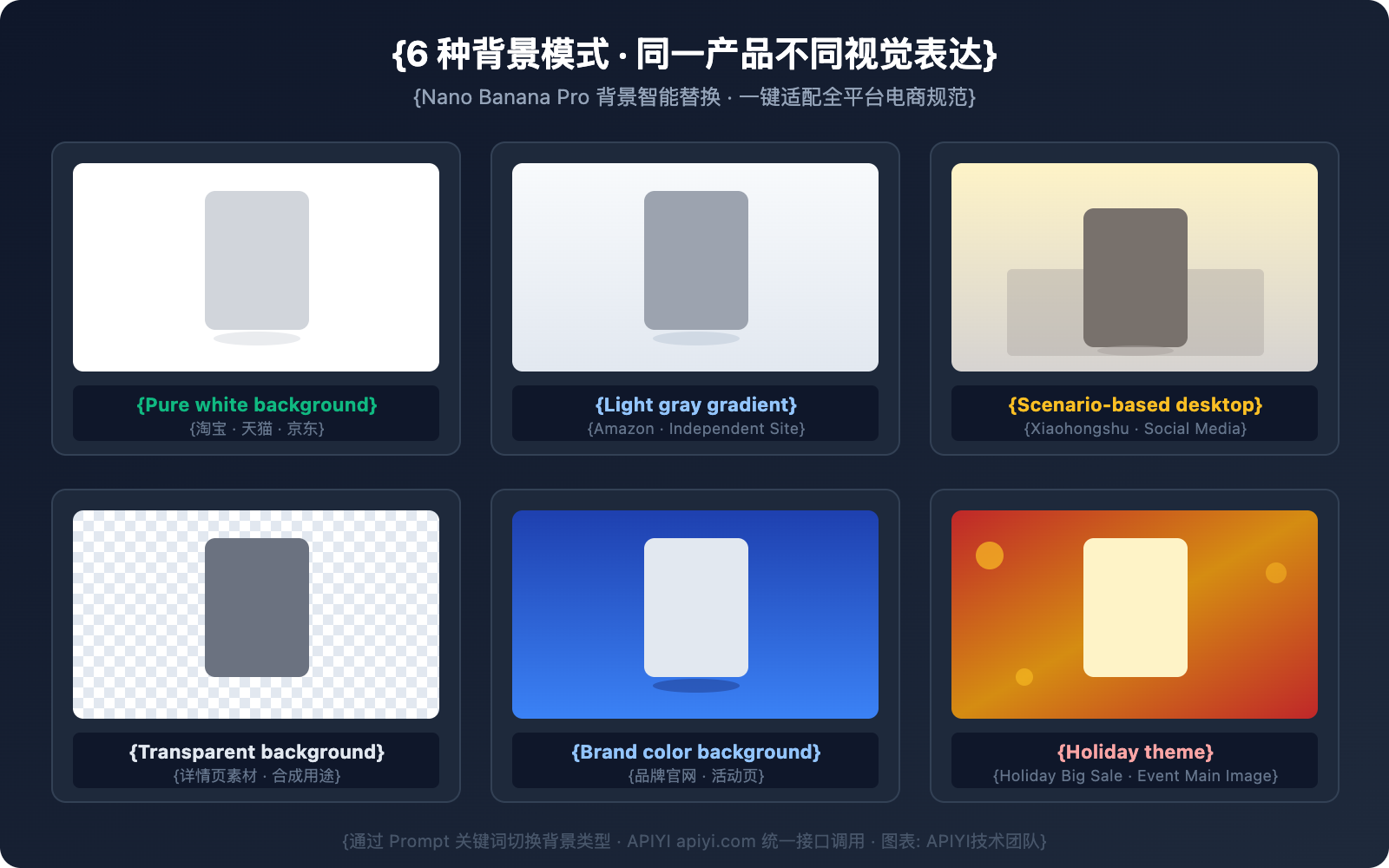
🚀 Quick Start: We recommend using the APIYI (apiyi.com) platform to call the Nano Banana Pro API. It saves you the hassle of Google Cloud environment configuration and provides an OpenAI-compatible interface—you can integrate it by changing just one line of
base_urlin your existing code.
Nano Banana Pro E-commerce Main Image Prompt Engineering Best Practices
Mastering prompt engineering is the key to leveling up your e-commerce main images. Here's a breakdown of the prompt writing standards we've developed after extensive testing.
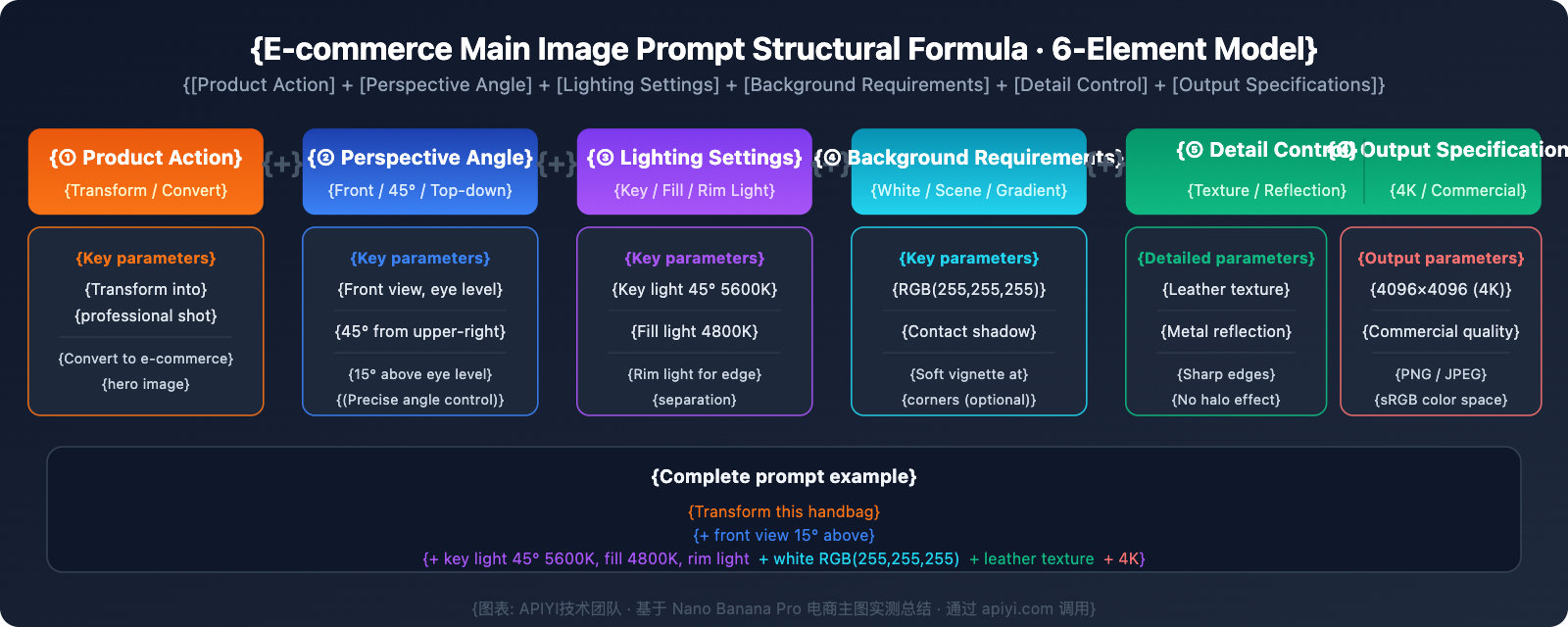
The Prompt Structure Formula
A high-quality e-commerce main image prompt should include 6 core elements:
[Product Action] + [Perspective/Angle] + [Lighting Setup] + [Background Requirements] + [Detail Control] + [Output Specs]
Real-world Example:
Transform this handbag photo into a professional e-commerce hero image.    [Action]
Front-facing view, slightly elevated camera angle (15° above eye level).   [Perspective]
Three-point studio lighting: key light 45° upper-left at 5600K,           [Lighting]
fill light right at 4800K, rim light behind for edge separation.
Pure white background (RGB 255,255,255) with soft vignette at corners.    [Background]
Enhance leather texture details, show stitching clearly,                   [Details]
accurate metal hardware reflections.
4K resolution (4096x4096), commercial photography standard.                [Output]
Common E-commerce Image Issues & Prompt Fixes
| Common Issue | Root Cause | Prompt Fix |
|---|---|---|
| Product distortion | Angle description isn't precise enough | Add precise angle parameters, like 15° above eye level |
| Background isn't pure white | RGB values not specified | Explicitly write RGB(255,255,255) |
| Shadows too heavy | Imbalanced lighting description | Add soft fill light to reduce shadow density |
| Texture distortion | Missing material description | Add leather texture / metal reflection / matte plastic |
| Color deviation | Color temperature not controlled | Specify neutral color temperature 5500K |
| Jagged edges | Insufficient resolution | Ensure 4K resolution and describe clean sharp edges |
Nano Banana Pro E-commerce Product Image: Cost and Efficiency Analysis
Traditional Studio Photography vs. AI Product Image Generation: Cost Comparison
| Comparison Metric | Traditional Studio | Nano Banana Pro API | Efficiency Boost |
|---|---|---|---|
| Cost per product shoot | ¥500-3000/set | ¥0.15-0.35/image | 99% reduction |
| Turnaround time | 3-5 business days | 10-30 seconds/image | 1000x faster |
| Multi-angle set (5 images) | ¥2000-8000 | ¥0.75-1.75 | 99.9% reduction |
| Background replacement | ¥50-200/image (retouching fee) | ¥0.15-0.35/image | 95% reduction |
| Lifestyle scene composition | ¥500-2000/image | ¥0.15-0.35/image | 99% reduction |
| Retouching iterations | 1-2 days/round | Instant regeneration | Real-time iteration |
💰 Cost Optimization: By calling the Nano Banana Pro API through the APIYI platform, you'll get prices lower than Google's official rates—starting as low as ¥0.15 per image. Generating 1,000 e-commerce product images costs less than ¥200, which is literally one-thousandth of the cost of traditional studio photography.
Recommended Product Categories
Based on our testing, Nano Banana Pro performs best for the following categories:
- Excellent Results ⭐⭐⭐⭐⭐: 3C digital products, home appliances, furniture, bags/luggage, shoes, jewelry.
- Great Results ⭐⭐⭐⭐: Clothing (flat-lay/hanging), food packaging, beauty products, daily necessities.
- Good Results ⭐⭐⭐: Clothing (on models), fresh food, transparent/reflective materials.
- Needs Fine-tuning ⭐⭐: Products with extremely fine structures (chips/tiny parts), text-heavy products.
FAQ
Q1: Can Nano Banana Pro’s generated images really match the quality of a professional studio shoot?
For most standardized product categories (like 3C digital, appliances, or bags), the images generated by Nano Banana Pro are already very close to professional studio quality—it's hard for average consumers to tell the difference. The key lies in your prompt accuracy. If you specify lighting parameters, material descriptions, and background requirements correctly, the 4K output's detail is more than enough for any e-commerce platform. We suggest getting some test credits via APIYI to see how it handles your specific products.
Q2: How do I ensure the product looks consistent across multiple angles?
Nano Banana Pro supports up to 8 reference images, which is the secret to maintaining consistency. Here's the workflow: first, generate a "hero shot" from one angle that you're happy with. Then, use that hero shot as a reference image and adjust your prompt to generate other perspectives. When calling the API via APIYI, you just need to add multiple image_url objects to the content array to pass in your reference images.
Q3: What should I do if there are jagged edges or halos around the product after background replacement?
This usually happens if the original product edges aren't clear or if the prompt lacks edge control parameters. Try adding clean sharp edges, no halo effect, precise product boundary to your prompt to sharpen things up. Also, try to use input images where the product has a high contrast with its original background; it makes it much easier for the AI to identify the boundaries accurately.
Q4: Can I upload these generated images directly to e-commerce platforms?
Yes, you can. Nano Banana Pro outputs up to 4096×4096 resolution, which easily meets the requirements for major platforms like Taobao (800×800+), Tmall (800×800+), JD.com (800×800+), and Amazon (1000×1000+). For white-background shots, you can precisely control the RGB values to 255,255,255 to meet platform standards. Just a heads-up: some platforms have specific labeling requirements for AI-generated content, so make sure to follow your local platform policies.
Summary
Nano Banana Pro API is completely redefining the way we create e-commerce product visuals. By following the 3-step method introduced in this article:
- Selfie to Studio — Turn simple phone snapshots into professional-grade white-background main images.
- 3D to Real — Ditch the "CG look" and transform 3D renders into lifelike photography.
- Multi-angle + Background Replacement — Generate a complete set of main images in one go, perfectly tailored for any platform.
This workflow can slash the cost of creating main images from thousands of dollars to less than a buck, while cutting turnaround times from days to just a few seconds. For small-to-medium sellers and high-volume merchants, this means high-quality product visuals are no longer a barrier to entry.
We recommend using APIYI (apiyi.com) to quickly integrate the Nano Banana Pro API. The platform offers OpenAI-compatible interface formats, pay-as-you-go pricing, and doesn't require setting up a Google Cloud environment—making it perfect for e-commerce teams of all sizes to quickly validate and scale their operations.
📝 Author: APIYI Team | Technical Support & API Integration: apiyi.com


