
gemini-3.1-pro-preview and gemini-3.1-pro-preview-customtools are two model endpoints released by Google on the same day. While they share the same pricing and reasoning capabilities, their behaviors are night and day. This article compares the differences across 6 key dimensions to help you make the right choice for your Agent development.
Core Value: By the end of this post, you'll clearly understand when to use the standard version versus the customtools version, helping you avoid common pitfalls in Agent development.
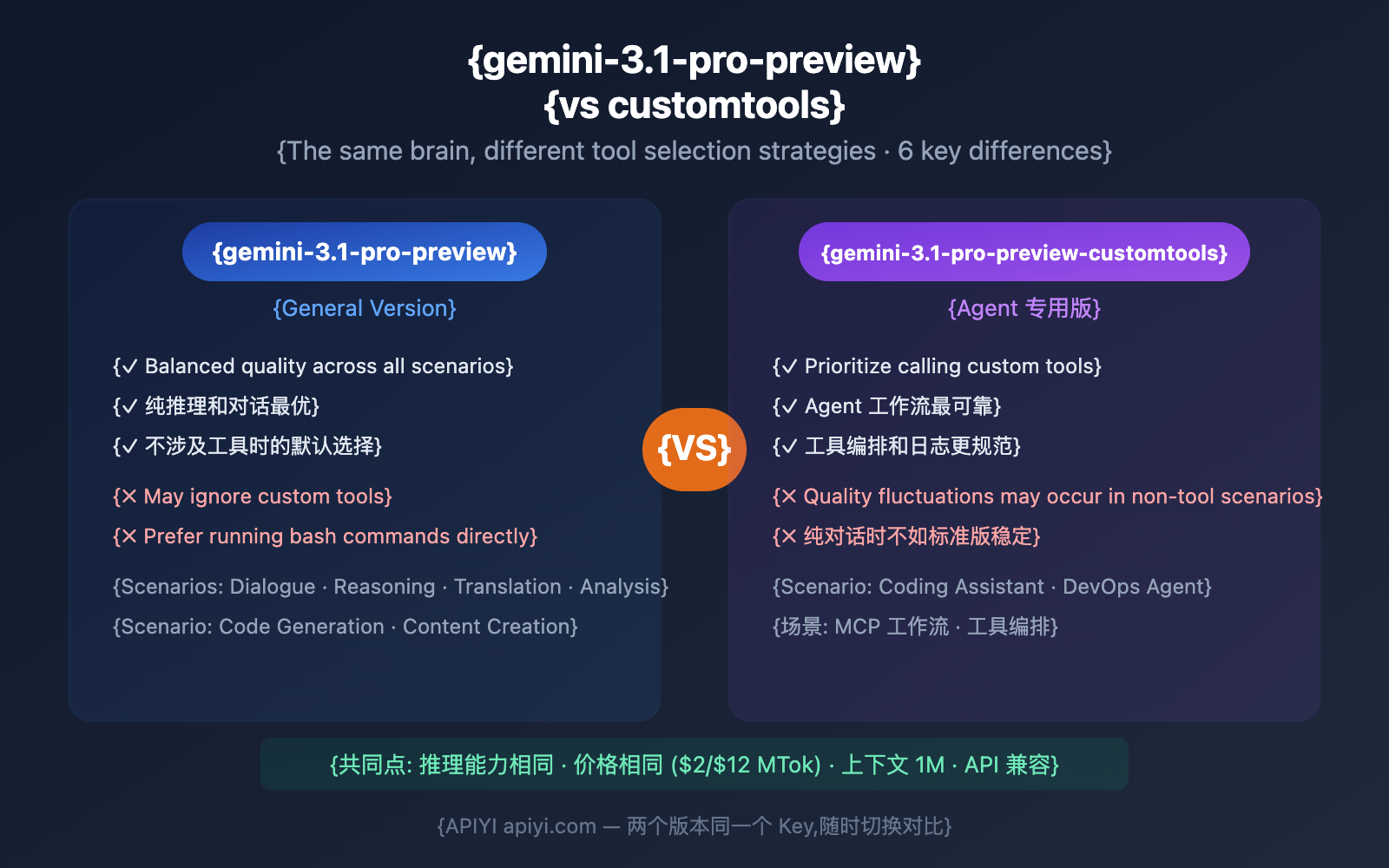
The Bottom Line: Which version should you use?
If you're in a hurry, here's the quick breakdown:
| Your Scenario | Which to choose | Reason |
|---|---|---|
| Pure conversation/Q&A | Standard | Most stable output quality |
| Text translation/analysis | Standard | No tool calling involved |
| Code generation (no tools) | Standard | Outputs code directly |
Coding Assistant (with view_file, etc.) |
customtools | Ensures tools are called correctly |
| DevOps Agent (bash + custom tools) | customtools | Prevents the model from using bash to bypass your tools |
| MCP workflows | customtools | Guarantees tool priority |
| Not sure? | Start with Standard; switch if tools are skipped | Google's official advice |
🎯 Google's official word: "If you are using gemini-3.1-pro-preview and the model ignores your custom tools in favor of bash commands, try the gemini-3.1-pro-preview-customtools model instead."
Difference 1: Tool Calling Priority — The Core Distinction
This is the only fundamental difference between the two versions. When a model has both "bash execution" and "custom tool" capabilities, how does it choose?
The Problem with the Standard Version: Sneaking in bash
When you register a view_file tool for the standard version but ask it to look at a file:
User: "Check the contents of src/main.py"
Standard Version Behavior: Executes the bash command `cat src/main.py`  ← It bypassed your tool!
In developer discussions on Hacker News, several developers reported similar issues:
- "The model tries to edit files in weird ways instead of using the provided text editing tools."
- "Poor tool-calling ability; it often takes detours."
- "Prone to getting stuck in loops and failing to make progress."
The Fix in the customtools Version: Respecting Your Tools
User: "Check the contents of src/main.py"
customtools Version Behavior: Calls view_file("src/main.py")  ← Uses your registered tool ✓
| Scenario | Standard Version Behavior | customtools Version Behavior |
|---|---|---|
| View file | cat src/main.py (bash) |
view_file("src/main.py") |
| Search code | grep -r "TODO" *.py (bash) |
search_code("TODO", "*.py") |
| Edit file | sed -i 's/old/new/' file (bash) |
edit_file(path, old, new) |
| List files | ls -la src/ (bash) |
list_files("src/") |
| Run tests | pytest tests/ (bash) |
run_tests("tests/") |
Difference 2: General Quality Performance — Standard Version is More Stable
Google explicitly includes an important warning in their official documentation:
"While gemini-3.1-pro-preview-customtools is optimized for agentic workflows that use custom tools and bash, you may see quality fluctuations in some use cases which don't benefit from such tools."
This means the customtools version might be less stable than the standard version in the following scenarios:
| Scenario Type | Standard Version Quality | customtools Version Quality | Notes |
|---|---|---|---|
| Pure text chat | ⭐⭐⭐⭐⭐ | ⭐⭐⭐⭐ | Possible minor fluctuations |
| Long-form writing | ⭐⭐⭐⭐⭐ | ⭐⭐⭐⭐ | Standard is better when tools aren't involved |
| Mathematical reasoning | ⭐⭐⭐⭐⭐ | ⭐⭐⭐⭐⭐ | Core reasoning capabilities are the same |
| Code generation (no tools) | ⭐⭐⭐⭐⭐ | ⭐⭐⭐⭐ | Standard version is slightly better |
| Agent + Custom tools | ⭐⭐⭐ | ⭐⭐⭐⭐⭐ | customtools is significantly better |
| Mixed bash + Custom tools | ⭐⭐⭐ | ⭐⭐⭐⭐⭐ | The core advantage of customtools |
Key Takeaway: The customtools version isn't a "stronger" model; it's a fine-tuned version that "focuses more on tool calling." In scenarios that don't involve tools, the standard version is actually better.
💡 Selection Advice: If more than 50% of your application's requests don't involve tool calling, we recommend keeping the standard version as your default and only switching to the customtools version for Agent workflows. APIYI apiyi.com supports dynamically switching the
modelparameter in your code based on the specific scenario.
Difference 3: Model Parameters and Specs — Exactly the Same
At the "hardware spec" level, the two versions are identical:
| Spec | Standard Version | customtools Version |
|---|---|---|
| Input Context | 1,048,576 tokens | 1,048,576 tokens |
| Max Output | 65,536 tokens | 65,536 tokens |
| Input Price (≤200K) | $2.00 / 1M tokens | $2.00 / 1M tokens |
| Input Price (>200K) | $4.00 / 1M tokens | $4.00 / 1M tokens |
| Output Price (≤200K) | $12.00 / 1M tokens | $12.00 / 1M tokens |
| Output Price (>200K) | $18.00 / 1M tokens | $18.00 / 1M tokens |
| Context Caching | $0.20-$0.40 / 1M | $0.20-$0.40 / 1M |
| ARC-AGI-2 | 77.1% | Same (not released separately) |
| SWE-Bench | 80.6% | Same (not released separately) |
| GPQA Diamond | 94.3% | Same (not released separately) |
| Thinking System | Low / Medium / High | Low / Medium / High |
| Multimodal Input | Text/Image/Audio/Video | Text/Image/Audio/Video |
Key Point: Google hasn't released separate benchmark data for the customtools version because the underlying model is the same. The only difference lies in the tuning of tool-calling behavior.
Difference 4: API Call Method — Only the 'model' Parameter Differs
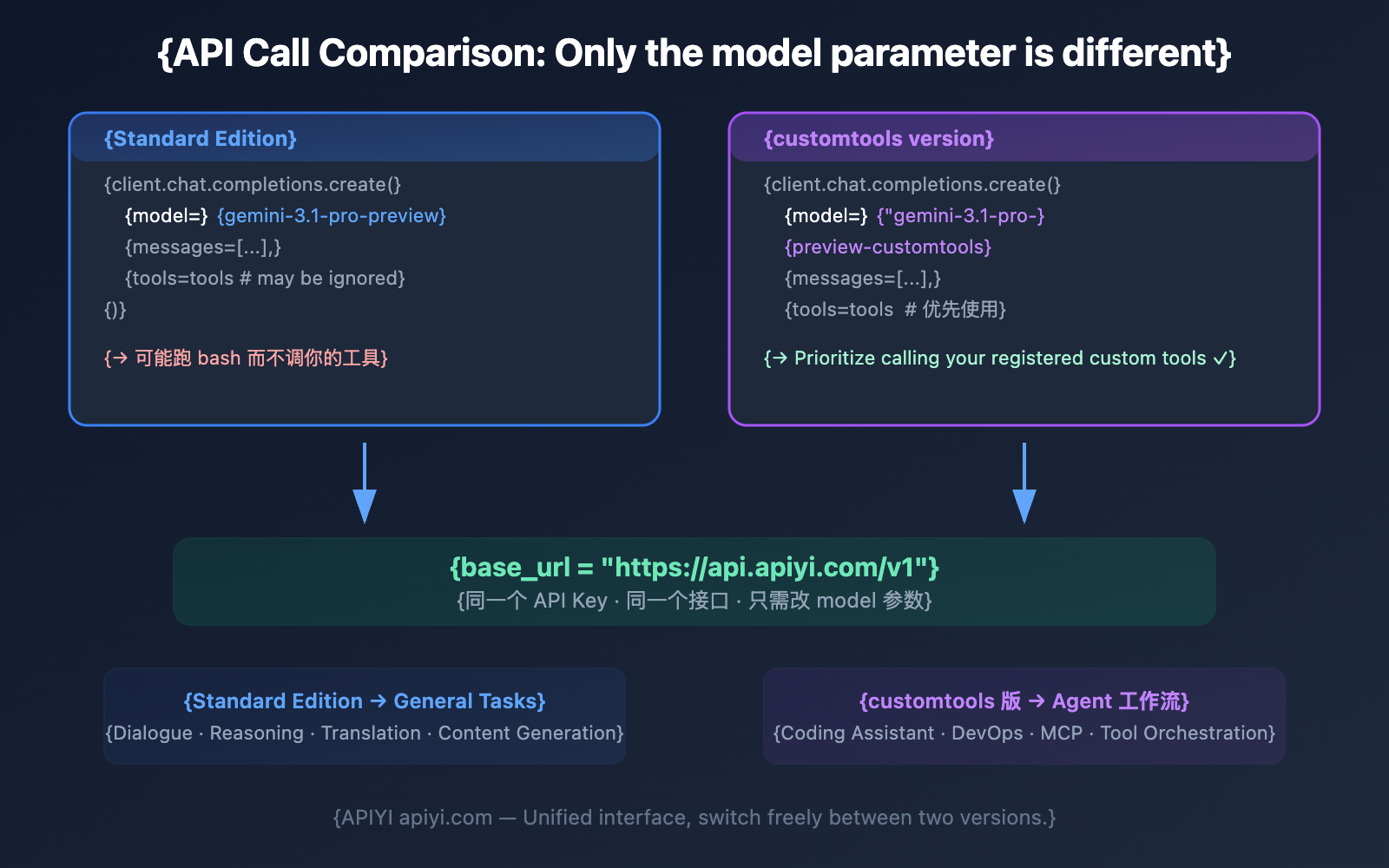
Code Example: One-click Switch Between Standard and customtools Versions
import openai

client = openai.OpenAI(
    api_key="YOUR_API_KEY",
    base_url="https://api.apiyi.com/v1"  # APIYI Unified Interface
)

# Define custom tools
tools = [{
    "type": "function",
    "function": {
        "name": "view_file",
        "description": "View the contents of a specified file",
        "parameters": {
            "type": "object",
            "properties": {
                "file_path": {"type": "string", "description": "File path"}
            },
            "required": ["file_path"]
        }
    }
}]

# Standard version: Might skip the tool
resp_standard = client.chat.completions.create(
    model="gemini-3.1-pro-preview",
    messages=[{"role": "user", "content": "Check src/main.py"}],
    tools=tools
)

# customtools version: Prioritizes tool usage
resp_custom = client.chat.completions.create(
    model="gemini-3.1-pro-preview-customtools",
    messages=[{"role": "user", "content": "Check src/main.py"}],
    tools=tools
)

# Compare behavioral differences
print("Standard:", resp_standard.choices[0].message)
print("customtools:", resp_custom.choices[0].message)
Difference 5: Developer Experience — Community Feedback
Developer feedback from Hacker News and GitHub reveals the pain points of the standard version in Agent scenarios:
Issues with the Standard Version in Agent Scenarios
Developer feedback from Hacker News discussions:
| Problem Description | Root Cause Analysis | Can customtools solve it? |
|---|---|---|
| "The model tries to edit files in weird ways instead of using the provided text editing tools" | Standard version favors bash | Yes — Prioritizes custom tools |
| "Poor tool calling ability, often takes detours" | Low tool priority | Yes — Boosts tool priority |
| "Gets stuck in loops, can't move forward" | Confusion switching between tools and bash | Partially — Clearer tool paths |
| "Consumes massive thinking tokens then does something nonsensical" | Conflict between model reasoning and tool selection | Partially — More deterministic tool selection |
| "Constantly needs to be told to 'continue' or 'finish'" | Agent main loop issue | No — This is a general model issue |
GitHub Copilot's Practice
When the GitHub Copilot team integrated Gemini 3.1 Pro, they noted:
"The model excels in edit-then-test loops with high tool precision, achieving goals with fewer tool calls."
This shows that with the right tool-calling framework, Gemini 3.1 Pro's Agent capabilities are quite powerful. The customtools version is specifically designed to trigger this "high tool precision" more reliably.
🚀 Practical Advice: If you're building coding assistant products, I'd recommend starting directly with the
customtoolsversion to avoid the tool-skipping issues found in the standard version. You can quickly deploy and test it via APIYI (apiyi.com).
Difference 6: Applicable Agent Frameworks and Coding Tools
| Tool/Framework | Recommended Version | Reason |
|---|---|---|
| In-house Agents (with custom tools) | customtools | Ensures tools are called correctly |
| Claude Code-like products | customtools | Requires tools like view_file, edit_file, etc. |
| Cursor | customtools | IDE toolsets need guaranteed priority |
| GitHub Copilot | Built-in adaptation | Copilot optimized tool calling on its own |
| LangChain Agent | customtools | Tools registered by the framework need priority calling |
| MCP Protocol Agents | customtools | MCP tools need priority |
| Pure RAG applications | Standard Version | Usually doesn't involve bash vs. tool conflicts |
| Chat applications | Standard Version | No tool calling involved |
| Content Generation APIs | Standard Version | Pure text output |
How to Decide if You Need to Switch from Standard to the customtools Version
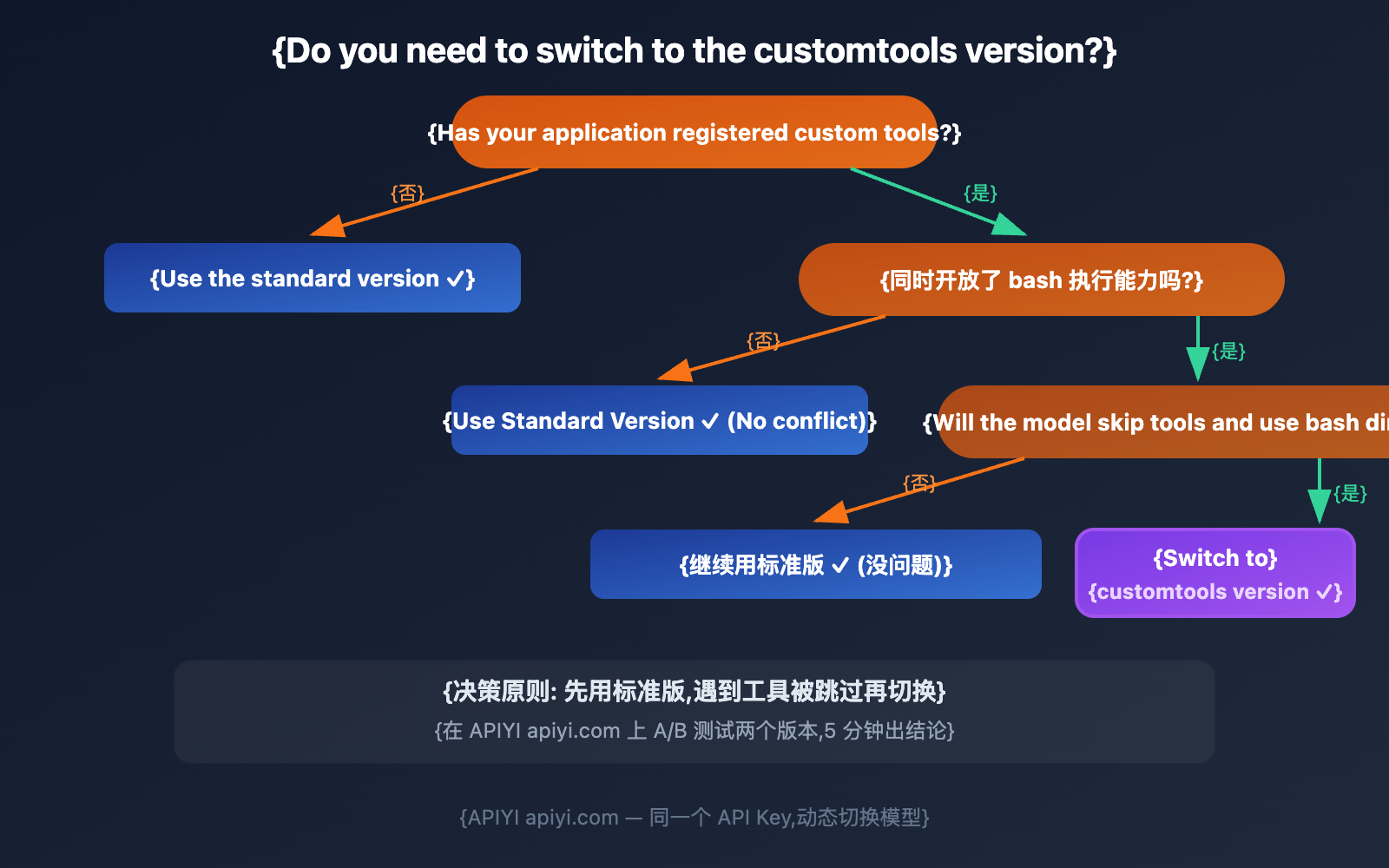
Quick Diagnosis Checklist
If you encounter the following situations while using the standard version, it's a sign you should switch to the customtools version:
- The model executes
catinstead of calling yourview_filetool. - The model executes
grepinstead of calling yoursearch_codetool. - The model executes
sedinstead of calling youredit_filetool. - Bash commands frequently appear in the tool call logs.
- The model's tool call rate is lower than expected (below 50%).
- The model seems "unaware" that custom tools are available.
If two or more of these apply, we recommend switching to gemini-3.1-pro-preview-customtools immediately.
Advanced: Dynamically Switching Versions in Code
The best practice isn't "choosing one or the other," but rather dynamically routing based on the request type:
import openai

client = openai.OpenAI(
    api_key="YOUR_API_KEY",
    base_url="https://api.apiyi.com/v1"  # APIYI 统一接口
)

def smart_route(messages, tools=None):
    """根据是否需要工具,动态选择模型版本"""
    if tools and len(tools) > 0:
        # 有自定义工具 → 用 customtools 版确保工具被调用
        model = "gemini-3.1-pro-preview-customtools"
    else:
        # 纯对话/推理 → 用标准版确保质量稳定
        model = "gemini-3.1-pro-preview"

    return client.chat.completions.create(
        model=model,
        messages=messages,
        tools=tools
    )

# 场景 1: 纯推理 → 自动选标准版
resp1 = smart_route(
    messages=[{"role": "user", "content": "解释量子纠缠原理"}]
)

# 场景 2: Agent 工作流 → 自动选 customtools 版
tools = [{"type": "function", "function": {
    "name": "view_file",
    "description": "查看文件",
    "parameters": {"type": "object", "properties": {
        "path": {"type": "string"}
    }, "required": ["path"]}
}}]

resp2 = smart_route(
    messages=[{"role": "user", "content": "查看 config.py"}],
    tools=tools
)
💰 Cost Tip: Both versions are priced exactly the same; dynamic routing won't add any extra cost. With APIYI's (apiyi.com) unified interface, switching models is as simple as changing a string.
FAQ
Q1: Is the customtools version more expensive?
No. The pricing for both versions is exactly the same: $2.00 / 1M tokens for input and $12.00 / 1M tokens for output. When calling via the APIYI (apiyi.com) platform, you can use both versions with the same API Key.
Q2: I’m only using function calling and haven’t granted bash execution permissions. Do I need the customtools version?
Usually not. The customtools version mainly solves the issue where the model prioritizes bash when both bash and custom tools are available. If your Agent doesn't have bash execution capabilities, the standard version's tool calling is already reliable enough.
Q3: What exactly is the “quality fluctuation” in the customtools version?
Google hasn't released specific data. Based on developer feedback, it's mostly seen in scenarios that don't involve tools, like pure conversation or long-form text generation, where output consistency and writing style might fluctuate slightly. For tool-intensive Agent scenarios, the overall quality of the customtools version is actually better.
Q4: Can I use both versions at the same time?
Of course. We recommend dynamic routing in your code based on the request type: send requests involving tool calls to the customtools version and pure text requests to the standard version. Using APIYI's (apiyi.com) unified interface, you just need to change the model parameter.
Summary: Standard vs. Customtools 6-Point Quick Comparison
| # | Comparison Dimension | Standard Version | customtools Version | Recommendation |
|---|---|---|---|---|
| 1 | Tool Priority | Might prioritize bash | Prioritizes custom tools | Use customtools for Agents |
| 2 | General Quality | Balanced across all scenarios | Slight fluctuations in non-tool scenarios | Use standard for general tasks |
| 3 | Specs/Price | Identical | Identical | No cost difference |
| 4 | API Call | Only model parameter differs | Only model parameter differs | One-click switch |
| 5 | Community Feedback | Standard tool calling can be unreliable | Tool calling is more reliable | Choose customtools for Agent scenarios |
| 6 | Applicable Frameworks | Chat/RAG/Pure Reasoning | Cursor/Claude Code/MCP | Depends on your app type |
Bottom line: customtools isn't an upgrade; it's a specialized version — same brain, different tool selection strategy. Use customtools for developing Agents and the standard version for everything else. You can freely switch between both versions via APIYI (apiyi.com) using the same API Key.
Selection Decision Quick Check
| Your Question | Answer |
|---|---|
| I'm only building a chat app | Use standard version |
| I'm developing an Agent | Use customtools version |
| Which version is stronger? | Reasoning power is the same; customtools is more reliable for tool calling |
| Do I need to change code to switch? | Just change the model parameter; the rest of the code stays the same |
| Is there a cost difference? | Exactly the same |
References
-
Google AI Documentation: Gemini 3.1 Pro Preview Model Page
- Link:
ai.google.dev/gemini-api/docs/models/gemini-3.1-pro-preview - Description: Introduction to the customtools endpoint and usage precautions.
- Link:
-
Gemini 3 Developer Guide: FAQ — When to Switch Models
- Link:
ai.google.dev/gemini-api/docs/gemini-3 - Description: Official recommendations on when to switch from the standard version to the customtools version.
- Link:
-
Gemini API Changelog: February 19, 2026 Release Notes
- Link:
ai.google.dev/gemini-api/docs/changelog - Description: First announcement of the customtools variant.
- Link:
-
Hacker News Discussion: Developer feedback on Gemini 3.1 Pro tool calling
- Link:
news.ycombinator.com/item?id=47074735 - Description: Real-world developer experiences and issue reports.
- Link:
-
GitHub Copilot Changelog: Gemini 3.1 Pro Integration
- Link:
github.blog/changelog/2026-02-19-gemini-3-1-pro-is-now-in-public-preview-in-github-copilot - Description: Evaluation of tool precision in coding assistant scenarios.
- Link:
📝 Author: APIYI Team | For technical discussions, visit APIYI at apiyi.com
📅 Updated: February 20, 2026
🏷️ Keywords: gemini-3.1-pro-preview-customtools, standard version comparison, Agent development, tool calling, function calling, model selection


