
電商運營最頭疼的問題之一:產品拍攝成本高、週期長、效果不穩定。一套標準的棚拍產品主圖,從布光、拍攝到後期修圖,動輒花費數千元和 3-5 個工作日。現在,Nano Banana Pro API 可以在 10 秒內將手機自拍或 3D 模型渲染圖轉化爲電商棚拍級產品主圖,並支持多角度生成和背景智能替換。
核心價值: 讀完本文,你將掌握用 Nano Banana Pro API 完成從「隨手拍/3D模型」到「電商主圖 + 多角度 + 背景替換」全流程的 3 個核心技巧,讓產品圖製作成本降低 90%。
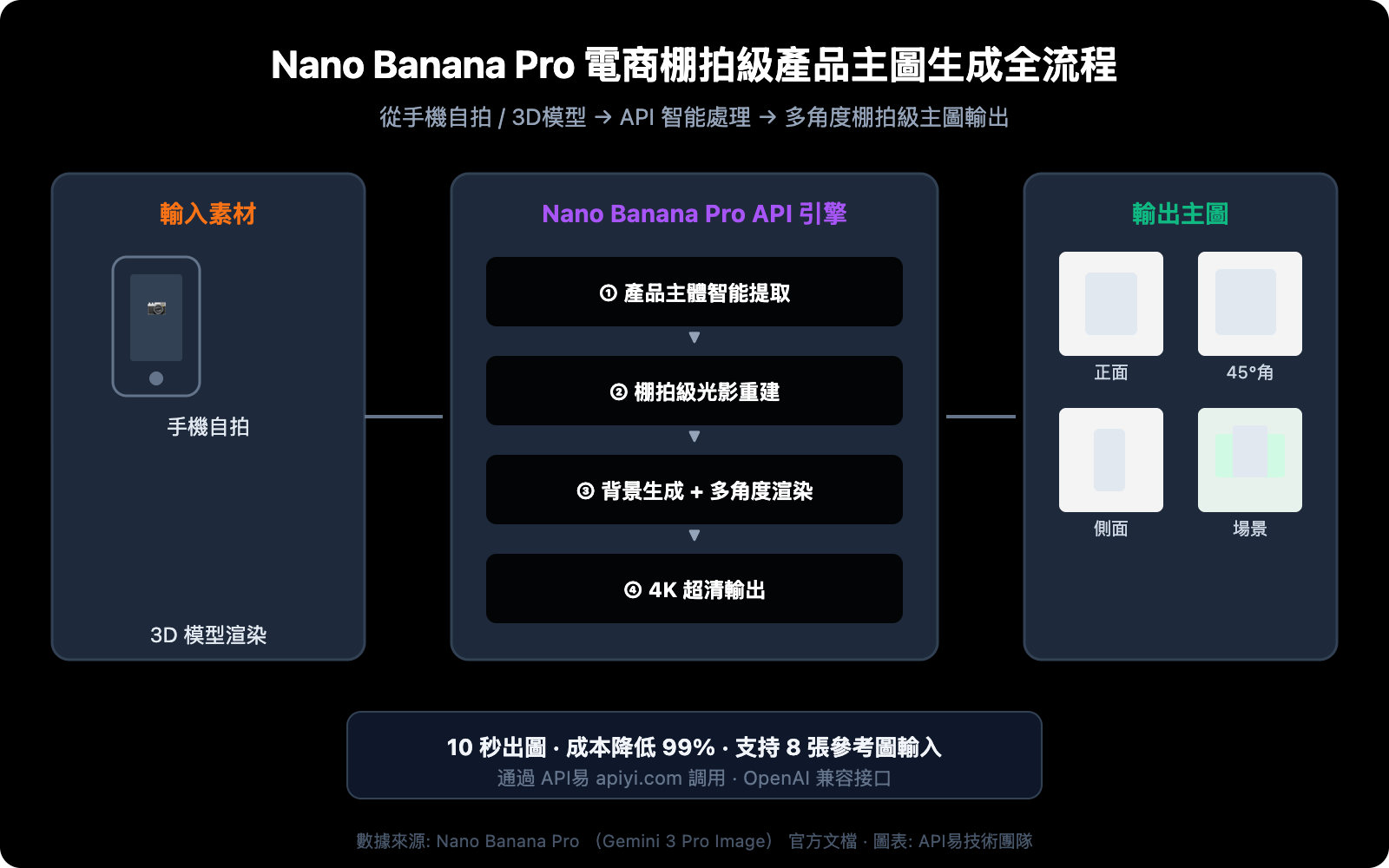
Nano Banana Pro 電商產品主圖 核心能力一覽
在深入實操之前,先了解 Nano Banana Pro(基於 Gemini 3 Pro Image)在電商產品攝影場景下的 5 大核心能力。
| 核心能力 | 技術規格 | 電商價值 |
|---|---|---|
| 產品主體提取 | 智能識別主體,自動去除手指/雜物 | 告別摳圖,一鍵獲得純淨產品圖 |
| 棚拍級光影重建 | 三點布光模擬,自然接觸陰影 | 媲美專業棚拍效果 |
| 多角度一致性生成 | 支持正面/側面/俯視/45°等 8 個標準角度 | 一次拍攝生成完整主圖套圖 |
| 背景智能替換 | 純白底/場景底/漸變底等多種模式 | 適配淘寶、亞馬遜、Shopee 等平臺規範 |
| 4K 超高清輸出 | 最高 4096×4096 分辨率 | 支持主圖放大、詳情頁大圖展示 |
🎯 技術建議: Nano Banana Pro 支持最多 8 張參考圖同時輸入(比標準版翻倍),非常適合多角度電商主圖的一致性生成。通過 API易 apiyi.com 平臺可快速調用該模型,無需自行配置 Google Cloud 環境。
Nano Banana Pro 電商主圖生成 3 步實操流程
第一步:產品自拍轉棚拍級主圖
這是最常用的場景——你只有一張手機隨手拍的產品照片,需要轉化爲電商平臺標準的白底棚拍主圖。
核心 Prompt 模板:
Transform this product photo into a professional e-commerce product shot.
Clean studio lighting with soft key light from upper-left, fill light from right.
Pure white background (RGB 255,255,255).
Remove all fingers, hands, and background clutter.
Add subtle natural contact shadow at the base.
Product centered, occupying 80% of frame.
4K resolution, commercial photography quality.
極簡代碼示例:
import openai
import base64
import re

client = openai.OpenAI(
    api_key="YOUR_API_KEY",
    base_url="https://api.apiyi.com/v1"  # 使用 API易 統一接口
)

response = client.chat.completions.create(
    model="nano-banana-pro",
    messages=[{
        "role": "user",
        "content": [
            {"type": "text", "text": "Transform this product photo into a professional e-commerce product shot. Pure white background, studio lighting, remove background clutter, add contact shadow. 4K resolution."},
            {"type": "image_url", "image_url": {"url": "YOUR_PRODUCT_PHOTO_URL"}}
        ]
    }]
)

# 從響應中提取 Base64 圖片數據並保存
content = response.choices[0].message.content
match = re.search(r'data:image/[^;]+;base64,([A-Za-z0-9+/=]+)', content)
if match:
    with open("product_main_image.png", "wb") as f:
        f.write(base64.b64decode(match.group(1)))
    print("棚拍級產品主圖生成完成")
查看完整代碼(含錯誤處理和批量生成)
#!/usr/bin/env python3
"""
Nano Banana Pro 電商棚拍級產品主圖生成器
支持:自拍轉主圖、多角度生成、背景替換
"""
import openai
import base64
import re
import os
from datetime import datetime

# 配置
API_KEY = "YOUR_API_KEY"
BASE_URL = "https://api.apiyi.com/v1"

client = openai.OpenAI(api_key=API_KEY, base_url=BASE_URL)

def generate_product_shot(image_url, prompt, output_name="product_shot"):
    """生成單張電商產品主圖"""
    try:
        response = client.chat.completions.create(
            model="nano-banana-pro",
            messages=[{
                "role": "user",
                "content": [
                    {"type": "text", "text": prompt},
                    {"type": "image_url", "image_url": {"url": image_url}}
                ]
            }]
        )

        content = response.choices[0].message.content
        match = re.search(r'data:image/[^;]+;base64,([A-Za-z0-9+/=]+)', content)

        if not match:
            match = re.search(r'([A-Za-z0-9+/=]{100,})', content)

        if match:
            timestamp = datetime.now().strftime("%Y%m%d_%H%M%S")
            filename = f"{output_name}_{timestamp}.png"
            with open(filename, "wb") as f:
                f.write(base64.b64decode(match.group(1)))
            print(f"✅ 已保存: {filename}")
            return filename
        else:
            print("❌ 未找到圖片數據")
            return None

    except Exception as e:
        print(f"❌ 生成失敗: {e}")
        return None

def batch_product_shots(image_url, angles):
    """批量生成多角度產品主圖"""
    results = []
    for angle_name, prompt in angles.items():
        print(f"🔄 正在生成 {angle_name} 角度...")
        result = generate_product_shot(image_url, prompt, f"product_{angle_name}")
        if result:
            results.append(result)
    return results

# Prompt 模板庫
PROMPTS = {
    "white_bg": "Transform into professional e-commerce product shot. Pure white background (RGB 255,255,255). Clean studio lighting, soft key light upper-left, fill light right. Remove all clutter. Natural contact shadow at base. Product centered at 80% frame. 4K commercial quality.",
    "front": "Professional e-commerce product shot, front view straight-on angle. Pure white background, studio lighting. Product centered. 4K resolution.",
    "side_45": "Professional e-commerce product shot, 45-degree angle view from upper-right. Pure white background, studio lighting. Show product depth and texture. 4K resolution.",
    "side_left": "Professional e-commerce product shot, left side profile view. Pure white background, studio lighting. Highlight side details. 4K resolution.",
    "top_down": "Professional e-commerce product shot, top-down bird's eye view. Pure white background, even lighting no harsh shadows. 4K resolution.",
    "lifestyle": "Place this product in a modern minimalist lifestyle setting. Soft natural window light, light wood table, subtle bokeh background. Product as hero element. 4K commercial photography."
}

if __name__ == "__main__":
    product_url = "YOUR_PRODUCT_PHOTO_URL"

    # 單張白底主圖
    generate_product_shot(product_url, PROMPTS["white_bg"], "main_image")

    # 多角度套圖
    multi_angle = {
        "front": PROMPTS["front"],
        "side_45": PROMPTS["side_45"],
        "side_left": PROMPTS["side_left"],
        "top_down": PROMPTS["top_down"]
    }
    batch_product_shots(product_url, multi_angle)
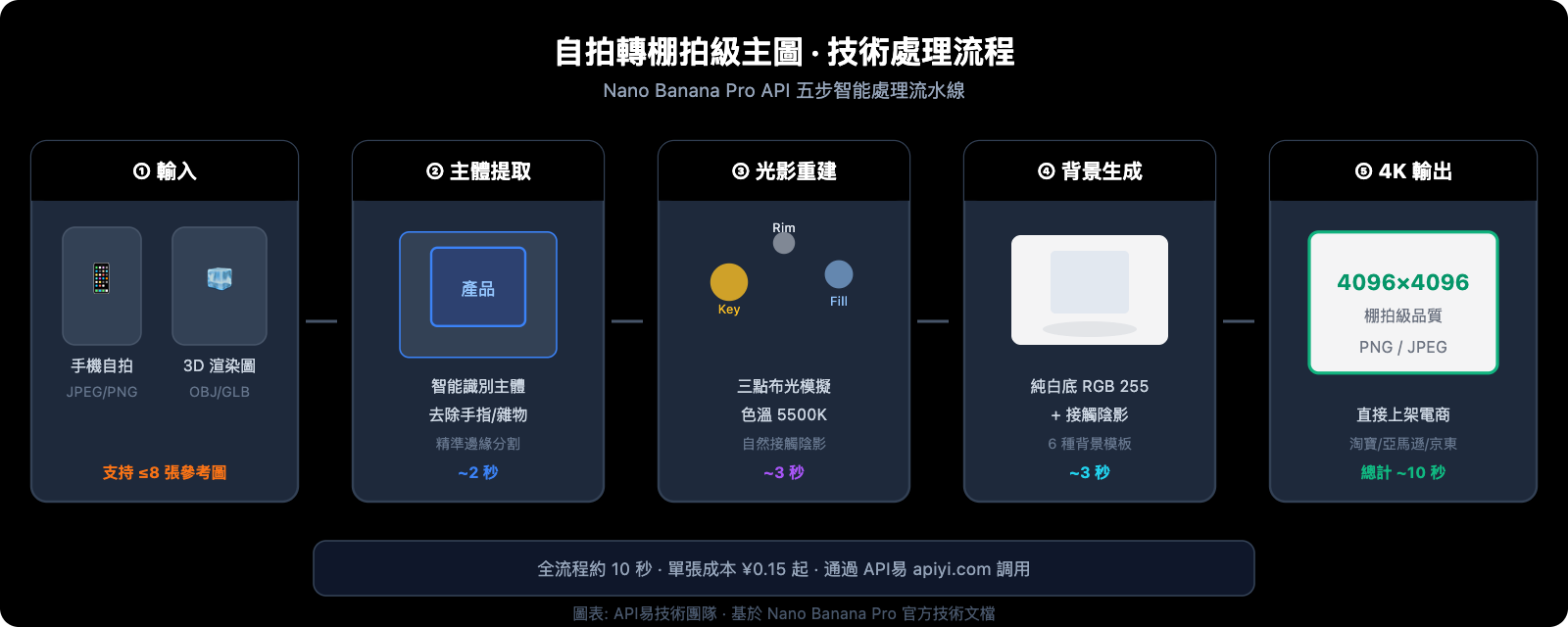
自拍轉棚拍 Prompt 調優要點:
| Prompt 關鍵參數 | 推薦值 | 說明 |
|---|---|---|
background |
Pure white (RGB 255,255,255) |
淘寶/天貓標準白底 |
lighting |
soft key light upper-left |
模擬棚拍三點布光 |
shadow |
natural contact shadow |
增加真實感的底部接觸陰影 |
framing |
centered, 80% of frame |
符合電商平臺主圖佔比要求 |
resolution |
4K |
支持放大查看的超清輸出 |
cleanup |
remove fingers, clutter |
自動清除手指和雜物 |
第二步:3D 模型渲染圖轉電商實拍風格
如果你的產品有 3D 建模(如工業設計、傢俱、3C 數碼產品),可以將渲染圖轉化爲「看起來像真實拍攝」的電商主圖,避免 CG 感。
3D 模型轉實拍 Prompt 模板:
Convert this 3D rendered product into a photorealistic e-commerce product photograph.
Add realistic material textures: subtle surface imperfections, accurate light reflections.
Studio photography lighting setup: key light 45° upper-left, rim light from behind.
Pure white background with soft gradient at edges.
Add micro-details: slight dust particles in light beam, realistic contact shadow.
The result should be indistinguishable from a real studio photograph. 4K resolution.
關鍵技巧:讓 AI 添加真實世界的微瑕疵(光線中的灰塵顆粒、表面的細微紋理變化),是消除 CG 感的核心方法。
3D 轉實拍效果優化參數
| 優化維度 | Prompt 關鍵詞 | 效果說明 |
|---|---|---|
| 材質真實感 | subtle surface imperfections |
添加微小表面瑕疵,消除塑料質感 |
| 光線真實感 | realistic light reflections, caustics |
物理正確的光線反射和折射 |
| 環境真實感 | micro dust particles in light |
光束中的微塵顆粒增加空氣感 |
| 陰影真實感 | soft penumbra shadow, ambient occlusion |
物理正確的半影和環境遮蔽 |
| 色彩真實感 | slight color temperature variation |
微妙的色溫變化,避免均勻的 CG 感 |
💡 進階技巧: Nano Banana Pro 支持將 2D 產品圖轉化爲具有 3D 視覺深度的效果,這對於還沒有 3D 建模的產品同樣適用。只需在 Prompt 中指定目標視角(如
45-degree perspective view),模型即可根據平面照片推理出合理的立體透視效果。
第三步:多角度主圖套圖 + 背景智能替換
電商平臺通常要求 5-8 張產品主圖,包含不同角度和場景。Nano Banana Pro 的多圖輸入能力(最多 8 張參考圖)可以保證多角度生成的產品一致性。
多角度生成策略:
# 多角度 Prompt 配置
ANGLE_PROMPTS = {
    "正面主圖": "Front view, straight-on angle, eye level. Pure white background. Studio lighting.",
    "45度角": "45-degree angle from upper-right. Show depth and form. Pure white background.",
    "側面圖": "Left side profile view. Highlight side panel details. Pure white background.",
    "俯視圖": "Top-down overhead view. Show top surface layout. Pure white background.",
    "使用場景圖": "Product placed on modern desk, natural daylight from window, lifestyle photography."
}

# 依次生成每個角度
for angle, prompt in ANGLE_PROMPTS.items():
    full_prompt = f"Professional e-commerce product shot, {prompt} Product must match the reference exactly. 4K resolution."
    generate_product_shot(product_url, full_prompt, f"angle_{angle}")
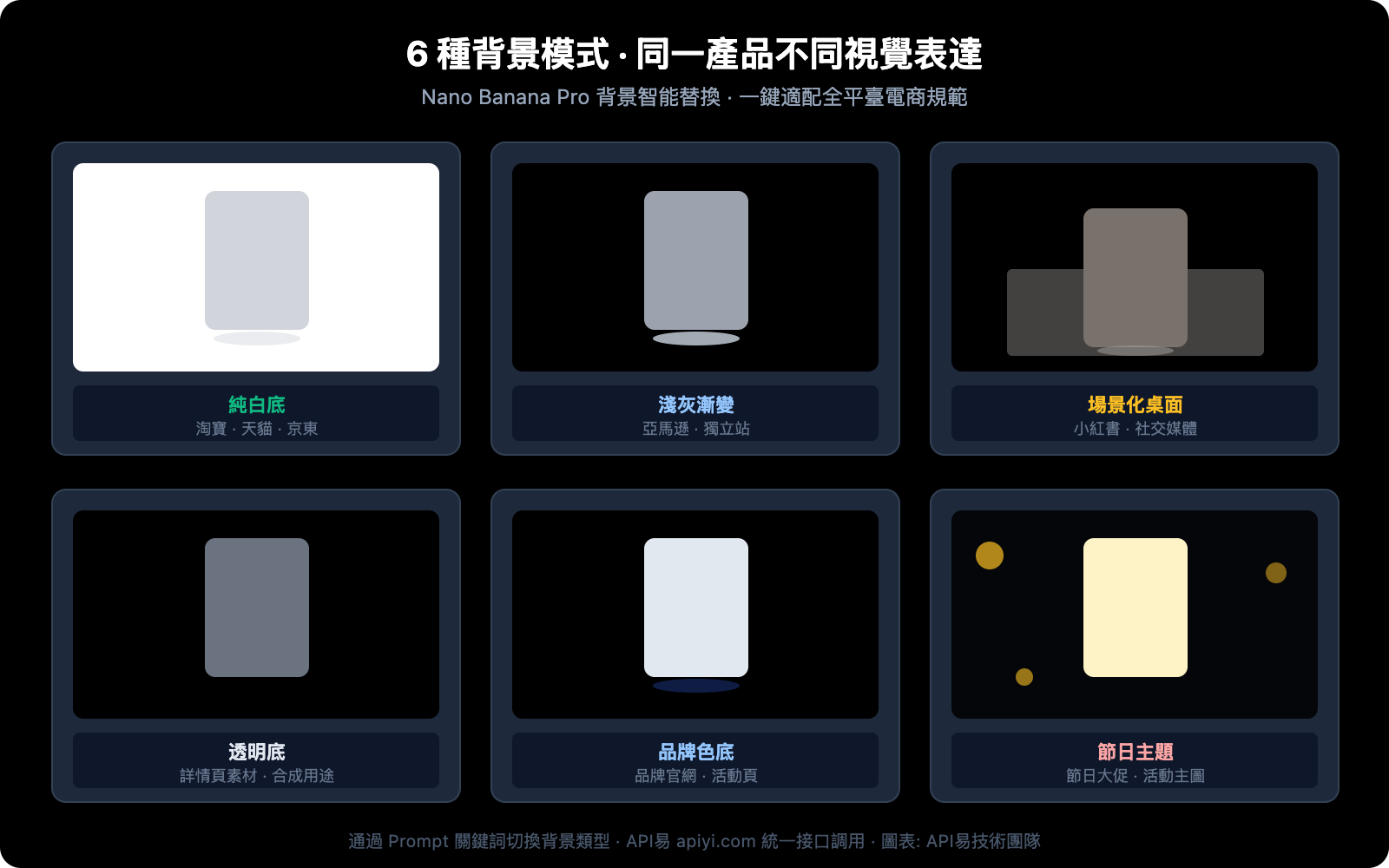
背景智能替換模板庫:
| 背景類型 | Prompt 關鍵詞 | 適用平臺 |
|---|---|---|
| 純白底 | Pure white background RGB(255,255,255) |
淘寶/天貓/京東主圖 |
| 淺灰漸變 | Light gray gradient background, studio |
亞馬遜/獨立站 |
| 場景化 | Modern minimalist desk, natural light |
小紅書/社交媒體種草 |
| 透明底 | Transparent background, alpha channel |
詳情頁素材/合成用途 |
| 品牌色底 | Solid background color #YOUR_COLOR |
品牌官網/活動頁 |
| 節日主題 | Festive red and gold decorative background |
節日大促活動主圖 |
🚀 快速開始: 推薦使用 API易 apiyi.com 平臺調用 Nano Banana Pro API,免去 Google Cloud 環境配置。該平臺提供 OpenAI 兼容接口,現有代碼改一行 base_url 即可接入。
Nano Banana Pro 電商主圖 Prompt 工程最佳實踐
掌握 Prompt 工程是提升電商主圖質量的關鍵。以下是經過大量測試總結的 Prompt 編寫規範。
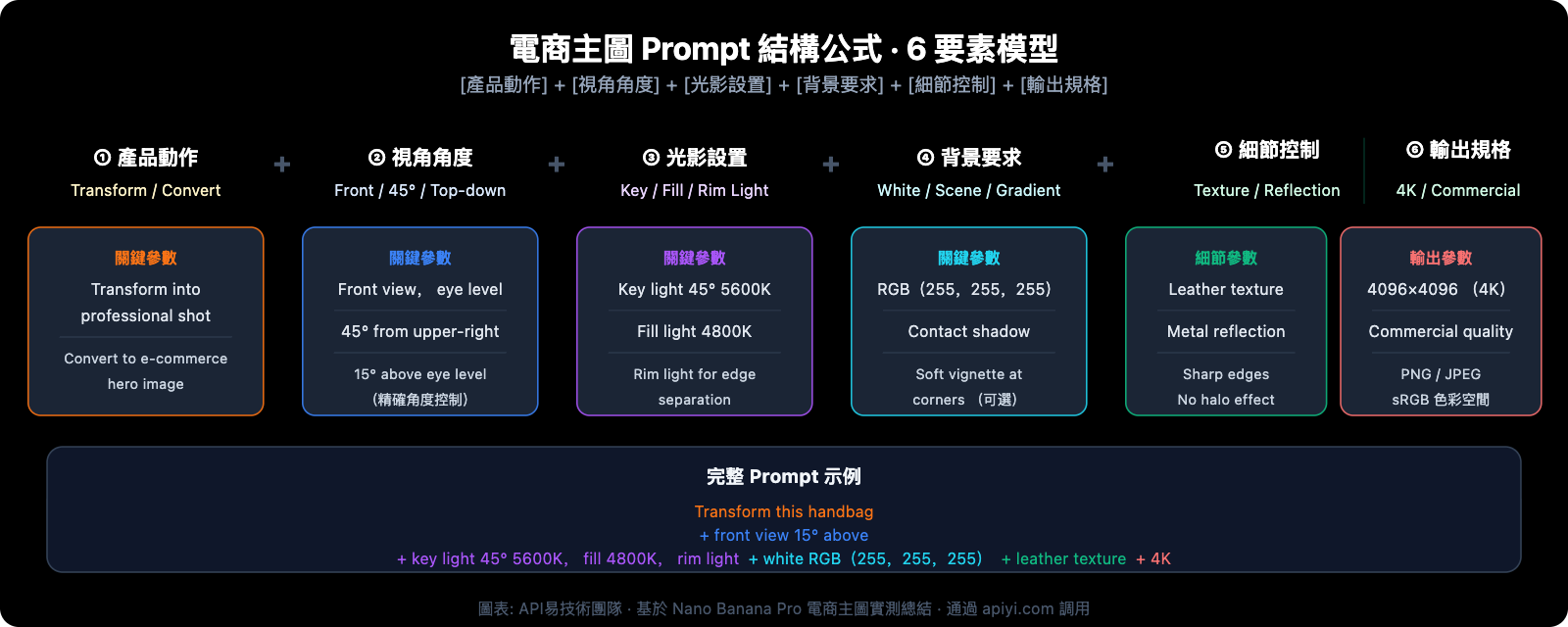
Prompt 結構公式
一個高質量的電商主圖 Prompt 應包含 6 個核心要素:
[產品動作] + [視角/角度] + [光影設置] + [背景要求] + [細節控制] + [輸出規格]
實際示例:
Transform this handbag photo into a professional e-commerce hero image.    [動作]
Front-facing view, slightly elevated camera angle (15° above eye level).   [視角]
Three-point studio lighting: key light 45° upper-left at 5600K,           [光影]
fill light right at 4800K, rim light behind for edge separation.
Pure white background (RGB 255,255,255) with soft vignette at corners.    [背景]
Enhance leather texture details, show stitching clearly,                   [細節]
accurate metal hardware reflections.
4K resolution (4096x4096), commercial photography standard.                [輸出]
電商主圖常見問題及 Prompt 修復
| 常見問題 | 原因分析 | Prompt 修復方案 |
|---|---|---|
| 產品變形 | 角度描述不夠精確 | 添加精確角度參數,如 15° above eye level |
| 背景不夠純白 | 未指定 RGB 值 | 明確寫 RGB(255,255,255) |
| 陰影過重 | 光照描述不均衡 | 添加 soft fill light to reduce shadow density |
| 材質失真 | 缺少材質描述 | 補充 leather texture / metal reflection / matte plastic |
| 產品顏色偏差 | 色溫未控制 | 指定 neutral color temperature 5500K |
| 邊緣鋸齒 | 分辨率不足 | 確保 4K resolution 並描述 clean sharp edges |
Nano Banana Pro 電商產品主圖 成本與效率分析
傳統棚拍 vs AI 主圖生成成本對比
| 對比維度 | 傳統棚拍 | Nano Banana Pro API | 效率提升 |
|---|---|---|---|
| 單品拍攝成本 | ¥500-3000/組 | ¥0.15-0.35/張 | 降低 99% |
| 出圖時間 | 3-5 個工作日 | 10-30 秒/張 | 提速 1000x |
| 多角度套圖(5張) | ¥2000-8000 | ¥0.75-1.75 | 降低 99.9% |
| 背景替換 | ¥50-200/張(修圖費) | ¥0.15-0.35/張 | 降低 95% |
| 場景化合成 | ¥500-2000/張 | ¥0.15-0.35/張 | 降低 99% |
| 修圖迭代 | 1-2天/輪 | 即時重新生成 | 實時迭代 |
💰 成本優化: 通過 API易 apiyi.com 平臺調用 Nano Banana Pro API,價格低於 Google 官方定價,每張圖低至 ¥0.15 起。批量生成 1000 張電商主圖的成本不到 ¥200,是傳統棚拍成本的千分之一。
適用產品品類推薦
根據實測效果,以下品類使用 Nano Banana Pro 生成電商主圖效果最佳:
- 效果極佳 ⭐⭐⭐⭐⭐:3C 數碼、家電、傢俱、箱包、鞋靴、飾品
- 效果優秀 ⭐⭐⭐⭐:服裝(平鋪/掛拍)、食品包裝、美妝產品、日用品
- 效果良好 ⭐⭐⭐:服裝(模特上身)、生鮮食品、透明/反光材質產品
- 需要調優 ⭐⭐:極細微結構產品(芯片/零件)、純文字密集產品
常見問題
Q1: Nano Banana Pro 生成的電商主圖能達到真實棚拍的效果嗎?
對於大多數標準化產品品類(3C 數碼、家電、箱包等),Nano Banana Pro 生成的主圖已經非常接近專業棚拍效果,普通消費者難以區分。關鍵在於 Prompt 的精確度——指定好光影參數、材質描述和背景要求,4K 輸出的細節表現力完全滿足電商平臺的主圖要求。建議通過 API易 apiyi.com 獲取測試額度,用你自己的產品實測效果。
Q2: 如何保證多角度生成的產品保持外觀一致?
Nano Banana Pro 支持最多 8 張參考圖輸入,這是保持一致性的關鍵。操作方法是:先用一個角度生成滿意的標準圖,然後將這張標準圖作爲參考圖,配合不同角度的 Prompt 生成其他視角。在 API易 apiyi.com 平臺調用時,只需在 content 數組中添加多個 image_url 對象即可傳入參考圖。
Q3: 背景替換後產品邊緣會出現毛邊或光暈怎麼辦?
這通常是因爲原圖產品邊緣不清晰或 Prompt 中缺少邊緣控制參數。建議在 Prompt 中添加 clean sharp edges, no halo effect, precise product boundary 來強化邊緣質量。同時,輸入圖片儘量使用與背景有較大色差的照片,便於 AI 準確識別產品邊界。
Q4: 生成的主圖能直接上架電商平臺嗎?
可以直接使用。Nano Banana Pro 輸出最高 4096×4096 分辨率,滿足淘寶(800×800 起)、天貓(800×800 起)、京東(800×800 起)、亞馬遜(1000×1000 起)等主流平臺的圖片要求。白底主圖的 RGB 值可精確控制爲 255,255,255,符合各平臺的白底規範。需要注意的是,部分平臺對 AI 生成圖片有標註要求,請遵守當地平臺政策。
總結
Nano Banana Pro API 正在重新定義電商產品視覺的生產方式。通過本文介紹的 3 步方法:
- 自拍轉棚拍 — 手機隨手拍即可獲得專業級白底主圖
- 3D 轉實拍 — 消除 CG 感,渲染圖變真實攝影
- 多角度 + 背景替換 — 一次生成完整主圖套圖,適配全平臺
這套工作流可以將電商主圖的製作成本從數千元降至不到 1 元,出圖速度從數天縮短至數十秒。對於中小賣家和批量上新的商家而言,這意味着產品視覺不再是競爭的門檻。
推薦通過 API易 apiyi.com 快速接入 Nano Banana Pro API,該平臺提供 OpenAI 兼容接口格式、按量計費、無需配置 Google Cloud 環境,適合各類規模的電商團隊快速驗證和規模化使用。
📝 作者: APIYI Team | 技術交流與 API 接入支持: apiyi.com


