

Author’s note: Using a mega-project like GTA 6 as a reference, I’ll break game development tasks into three layers, explain how much work Vibe Coding can take over right now, and where the costs show up once it does.
GTA 6 and Vibe Coding: The Conclusion First
Let’s start with the conclusion: what Vibe Coding can take over is “drafting”; what it can’t take away is “accountability for delivery.” In an open world on the scale of GTA 6, AI can churn out a lot of prototype code, small editor tools, and candidate dialogue lines. But cross-region loading, save compatibility, frame-time budgets, and content compliance still ultimately have to be signed off by the team.
There’s only one criterion: after something goes wrong, can it be discovered and rolled back at low cost. Tasks that can be discovered cheaply are good candidates for AI drafting. Tasks that only surface through dedicated testing can be implemented with AI assistance only under human acceptance review. If a failure would damage player saves, platform certification, or brand reputation, the team has to own the responsibility.
This article won’t hand you a number like “AI can replace X percent of jobs.” The public evidence available today can’t support such a figure, and adoption rates by themselves don’t tell you anything about replacement rates.
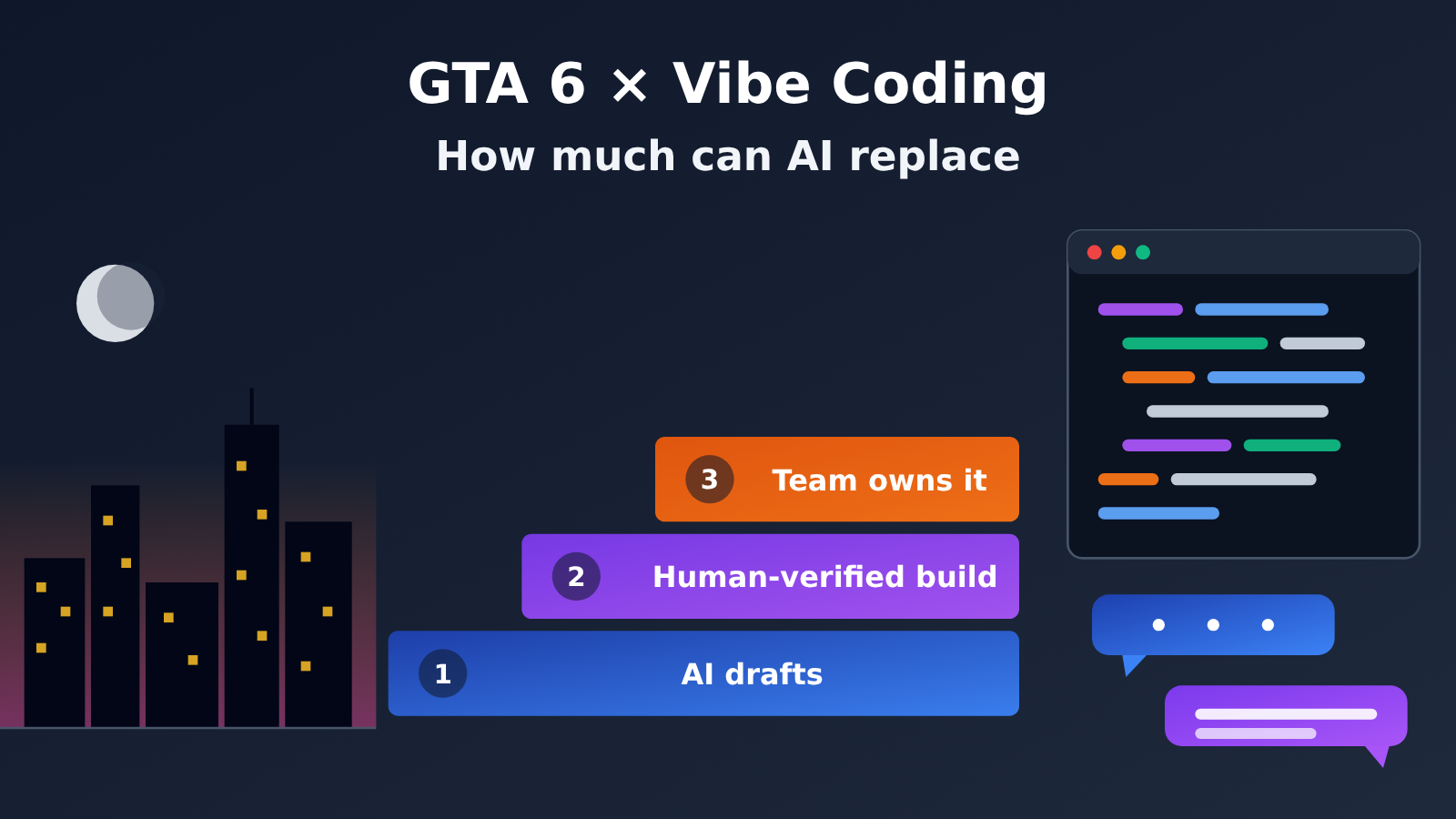
GTA 6 Vibe Coding Division of Labor Knowledge Map
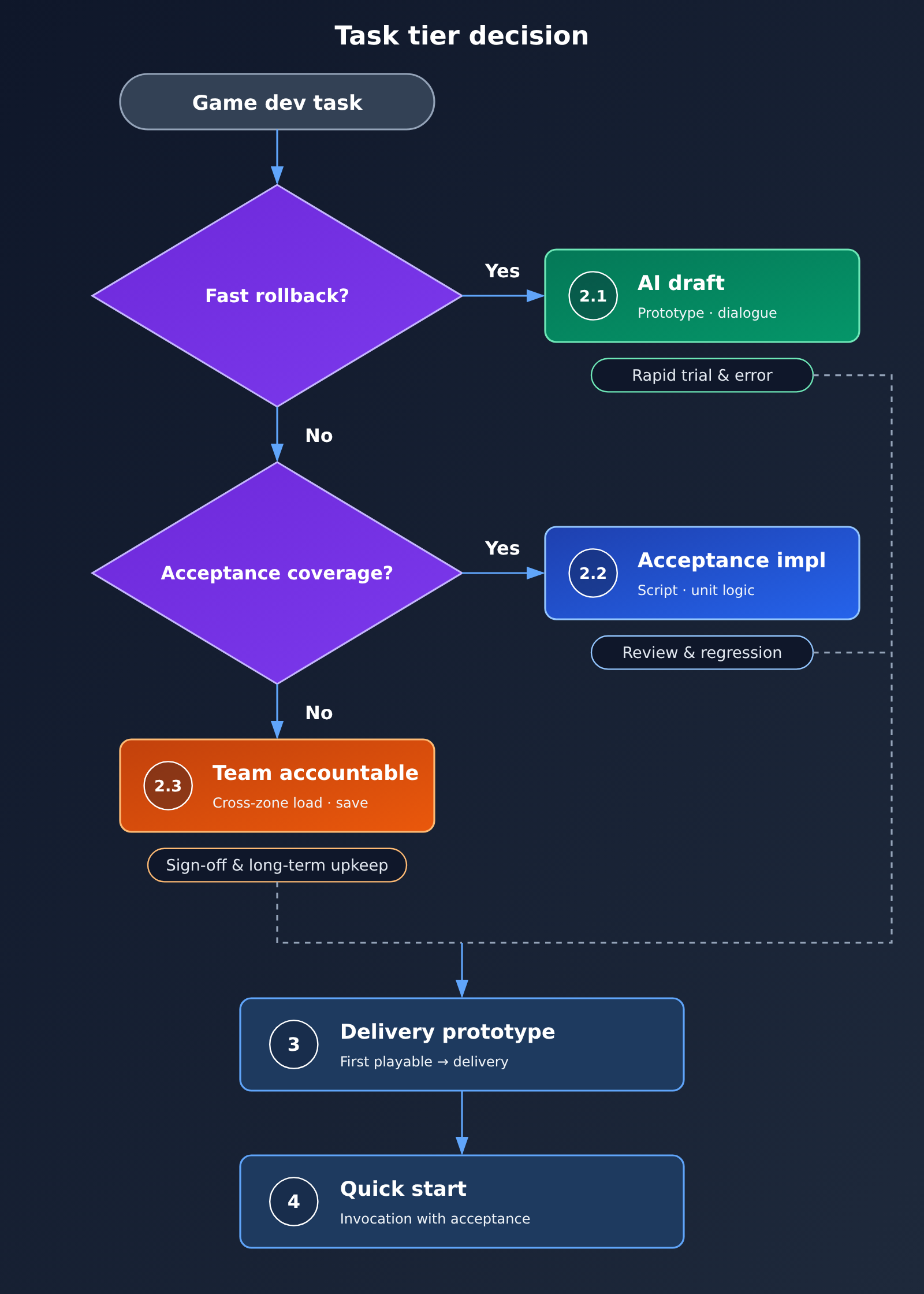
Figure note: First use “can an error be discovered at low cost?” to decide which layer a task belongs to, then use “can it be covered by acceptance criteria?” to separate the second layer from the third. The conclusions from all three layers ultimately land on the delivery prototype example in Section 3, which tests whether the layering holds up; Section 4 gives an invocation and acceptance approach you can apply directly.
Index and Reading Order
- 1 Boundaries of evidence: Start by clarifying what GTA 6 and the various studies can and cannot prove; the judgments that follow are built on this foundation.
- 2 The three layers of division of labor: 2.1, 2.2, and 2.3 are three parallel layers you can look up as needed; each layer comes with examples and evidence.
- 3 Delivery prototype example: Using one small feature, it lays out the cost between “first playable” and “deliverable”.
- 4 Quick start: It puts the layering into code, providing an invocation example with a human review step and an acceptance checklist.
To Know: Essential Terms for Understanding Vibe Coding Game Development
| Term | Concise explanation |
|---|---|
| Vibe Coding | Driving AI to write code with natural language; the developer mainly watches how it runs rather than reading every line |
| First playable | The state where a feature runs in the game for the first time and can be operated by a person |
| Streaming | An open world loads and unloads scenes in chunks based on player position, avoiding loading everything at once |
| Frame time | The number of milliseconds it takes to render one frame, which determines whether the game stutters |
| Save regression | After changing code, re-verify with an old save to confirm the player’s progress hasn’t been broken |
| F1 | A metric that measures both precision and recall; the higher the value, the closer the structure is to the ground truth |
1 The Evidence Boundaries of GTA 6 and Vibe Coding
1.1 What GTA 6 Can Tell Us
Rockstar announced on its official Newswire that GTA 6 has officially shipped. The official credits page lists a large number of contributors by department, from programming and art to QA, with a very detailed division of labor. I’m using this list only to show readers how many kinds of roles a AAA open-world game needs to coordinate. There’s nothing in the credits page that indicates what AI models Rockstar used internally, so this article doesn’t make that kind of inference.
The reason for using GTA 6 as a reference is that it pushes the variable of “scale” to its limit. When dozens of systems are stacked together, whether a single module can be written quickly is no longer the bottleneck; whether modules can coexist stably is. Epic’s official City Sample documentation shows this integration difficulty: streamed city blocks, crowds, vehicles, and physics systems all have to work at the same time, and if any one part slows down frame time, the whole city can stutter.
1.2 What Vibe Coding Was Originally Built For
When Karpathy introduced Vibe Coding in early 2025, he was describing a “just follow the vibe” way of writing code, aimed mostly at throwaway weekend projects. That origin matters: if a weekend project breaks, you rewrite it; a commercial game you have to maintain for years, you can’t. To bring it into a team, you have to add explicit interface contracts and acceptance criteria.
1.3 Adoption, Efficiency, and Replacement Rate Are Three Separate Things
The table below collects the main evidence used in this article, along with how far each piece of evidence can actually take us.
| Evidence source | Key fact | What it supports | What it doesn’t support |
|---|---|---|---|
| GDC industry survey (2026-11-12) | Over 2,600 respondents; 40% self-report using generative AI at work, and 57% of adopters use it daily | Generative AI has become part of many practitioners’ daily work | The size of the efficiency gain, the share of jobs replaced |
| Unity visual scripting experiment | 7 models × 8 task types × 5 runs, 280 runs total; best F1 was 87.11% for completing existing graphs and 48.70% for writing graphs from scratch | Completion is far more reliable than creating from zero | Whether a project can ship, runtime quality |
| METR 2025 randomized experiment | Experienced developers familiar with the project, allowed to use AI, took 19% longer on average | In a familiar codebase, AI doesn’t necessarily speed things up | AI slows down development across the board |
| METR 2026 follow-up | Point estimate flipped toward time saved, but the confidence interval crosses zero and results are affected by selection effects | The effect is shifting, and conclusions are still unstable | A significant speedup has been confirmed |
| Ubisoft Ghostwriter | Generates candidate short NPC lines, with humans setting character and context and reviewing the output | The “humans set the frame, AI produces candidates” model can work in practice | Writers can be replaced |
The easiest row to misread here is the first one. 40% of people using it only shows the tool has spread; some people using it daily only shows habits have formed. Between that and “40% of jobs have been replaced” sit two separate gates: efficiency and responsibility.
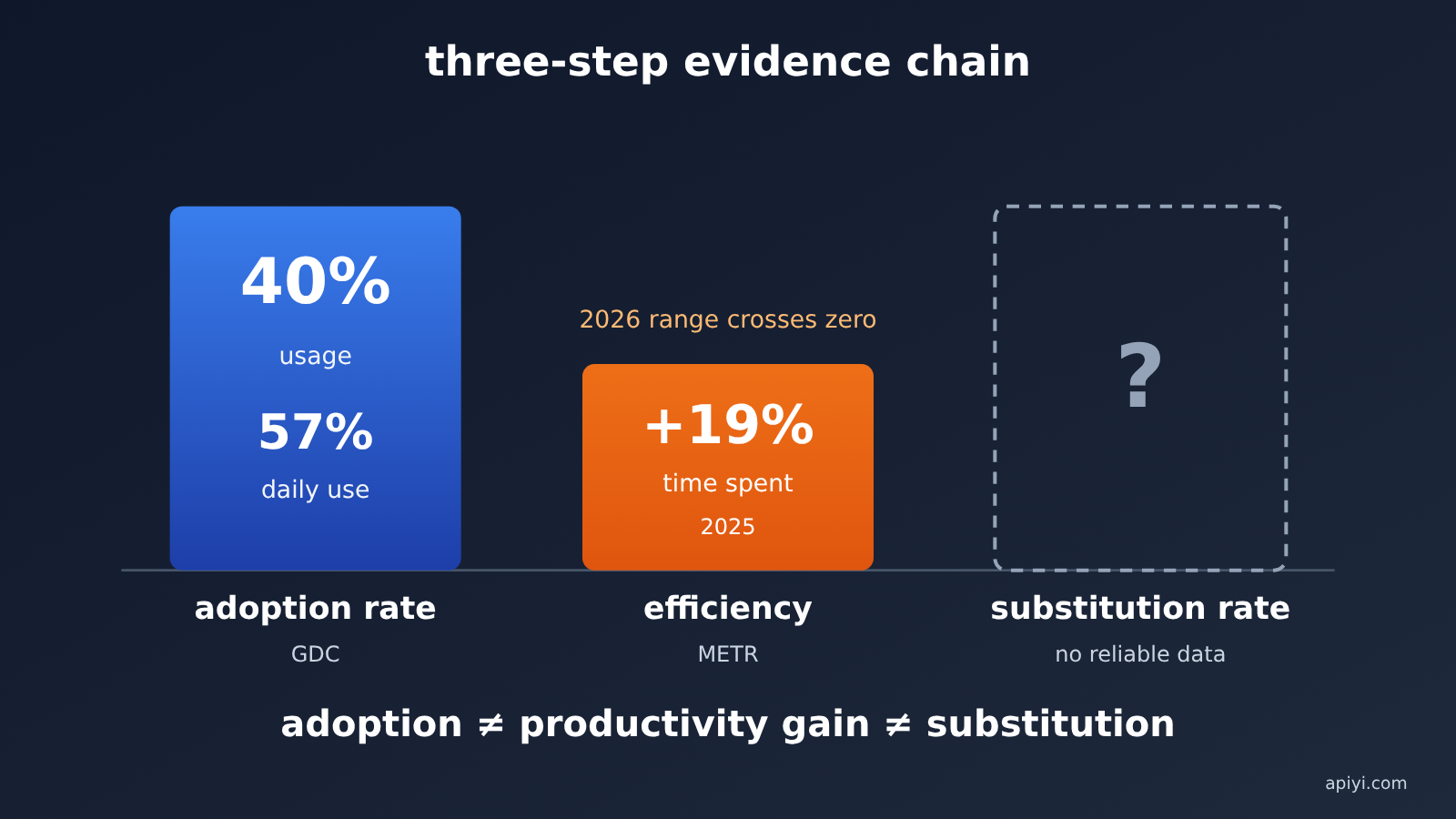
The chart above makes one point: every step from adoption to replacement needs its own evidence, and right now the last step is still empty.
The Three-Layer Division of Labor for Vibe Coding in Game Development
Here’s the overview table first, then we’ll break it down layer by layer.
| Layer | Typical tasks | How to tell | AI’s role | Human’s role |
|---|---|---|---|---|
| 2.1 AI drafts it | Gameplay prototypes, one-off debugging tools, dialogue candidates, test data generation | Mistakes are obvious at a glance and can be thrown away | Lead author | Picks and decides direction |
| 2.2 AI implements under human acceptance | Editor extensions, visual scripting completion, standalone game logic, unit tests | Clear acceptance criteria can be written | Implementer | Review, regression, merge |
| 2.3 The team bears responsibility | Streaming and cross-region loading, save format, frame-time budget, platform certification, content compliance | The cost of a mistake is high and hard to reproduce | Helps with research, proposes options | Designs, signs off, maintains long term |
2.1 Game Dev Tasks That Are Fine to Hand to AI for Drafting
The shared trait of this layer is that “trial and error is cheap.” A jump-feel prototype, a debug panel that prints NPC state, a batch of fake data for stress testing — if it’s written badly, it won’t hurt anyone. You just turn it off. Vibe Coding here is closest to Karpathy’s original intent: letting the AI run free actually gives you the highest efficiency.
Ubisoft’s Ghostwriter is a great example. What it generates are candidate short lines for NPCs, like a complaint from a passerby after being bumped into. The character setup and situation are set by the writers, and the generated results are reviewed and selected by the writers too. AI handles the volume, humans handle the selection — I think this division of labor is the most solid model right now.
2.2 Game Dev Tasks AI Can Implement Under Human Acceptance
Tasks in the second layer need to go into the official codebase, so acceptance criteria have to come first. The Unity visual scripting experiment gives a pretty clear signal: when completing an existing node graph, the best model hits an F1 of 87.11%; when asked to write a graph from scratch, even the best only reaches 48.70%. Note that these two numbers are the top scores of their respective task groups, and they only measure structural correctness.
The takeaway for teams is very practical. Have a human lay out the skeleton and define the interfaces first, then let the AI fill them in — the success rate is much higher. The METR experiment is a similar reminder: veterans who know the project well aren’t necessarily faster with AI, because reviewing and correcting AI output itself takes time. So the payoff at this layer comes from “writing less,” and the cost is “reviewing more.” You have to account for both together.
2.3 Game Dev Tasks the Team Must Own
The third layer is the real hard part of open worlds. The kind of block streaming, crowds and vehicles, and physics-system integration shown in City Sample — problems often only show up on a specific route, at a specific speed, with a specific save state. AI can help you look up docs and list options, but it can’t take responsibility for the crash after launch on your behalf.
The save format is the most typical example. Rename one field, all the new-save tests pass, but an old player’s dozens of hours of progress might fail to load outright. The cost of this kind of problem isn’t in writing the code — it’s that finding it requires preparing a mountain of old saves and running a full regression. For work at this layer, even if most of the code is drafted by AI, the person who signs off has to be a team member.
3 Vibe Coding Costs in a GTA 6-Style Open World: A Delivery Mission Worked Example
Here’s a delivery mission prototype that shows the gap between “first playable” and “shippable.” This is a reasoned worked example, not something we measured. Suppose an open-world project wants to add a “pick up—drive—deliver” side activity, with AI drafting most of the code.
3.1 The First Playable Stage
Describe the requirements in natural language, and the AI can quickly write the pickup-point trigger, navigation marker, timer, and reward payout. Run it once in a test scene and the feature is complete — it looks “done.” That’s the charm and the trap of Vibe Coding in one moment: the demo looks great, but all it proves is that the feature works on the ideal path.
3.2 Four Costs You Have to Cover to Get From First Playable to Shipping
Using the accounting of this article, the real cost shows up in the four items below.
| Metric | What to check | Why investment is still needed after AI drafting | Level |
|---|---|---|---|
| Human review | Whether the code follows the project’s interface, naming, and memory allocation conventions | The AI doesn’t know team conventions, and review time grows with code volume | 2.2 |
| Cross-region streaming | When a delivery route passes through streaming cells, are the destination marker and cargo state preserved? | Only exposed on long drives; a test scene won’t catch it | 2.3 |
| Save-game regression | Saving and loading mid-delivery — are older save files still compatible? | Requires preparing saves from multiple versions and verifying them repeatedly | 2.3 |
| Frame time | Does the navigation and timer logic drag down frame time in dense urban areas? | Requires performance profiling on target hardware | 2.3 |
Only the first of the four falls in the second layer; the other three all sit in the third. That’s my core take on Vibe Coding: it compresses the time it takes to “write it out,” while delivery time on a large game is mostly spent “proving it doesn’t break under any conditions.” The more a project looks like GTA 6, the bigger that latter share gets.
3.3 How to Check Whether This Worked Example Applies to Your Project
Take a feature your project recently finished, and record the work that happened between first playable and merged-to-production. If most of the time went into coding, AI can save you a meaningful chunk. If most of it went into review, regression, and performance tuning, the savings from AI drafting get diluted — and that’s when you should be investing in automated tests instead.
4 Vibe Coding Game Development Quick Start: An AI Invocation Flow with Acceptance
4.1 Minimal Example: Generating NPC Dialogue Candidates (Layer 1)
This is a typical Layer 2.1 usage, modeled on Ghostwriter’s approach: a human specifies the character and situation, and the AI only produces candidates.
import openai

client = openai.OpenAI(
    api_key="YOUR_API_KEY",
    base_url="https://api.apiyi.com/v1"  # APIYI unified interface
)

prompt = "角色:脾气暴躁的出租车司机。情境:被玩家抢了车。请给出 5 条不超过 12 个字的台词候选。"
response = client.chat.completions.create(
    model="gpt-4o-mini",
    messages=[{"role": "user", "content": prompt}]
)
print(response.choices[0].message.content)
The scriptwriter picks from the output, and it never goes straight into the game—that’s what keeps it at Layer 1.
4.2 Full Example: Drafting Code with an Acceptance Checklist (Layer Two)
The whole point of layer 2.2 is to make the AI’s output “come out with acceptance criteria attached.” The wrapper below asks the model to hand you both the code and the key testing points, and it tags the result as pending review.
View the full implementation code
import openai
from typing import Optional

client = openai.OpenAI(
    api_key="YOUR_API_KEY",
    base_url="https://api.apiyi.com/v1"
)

SYSTEM_PROMPT = """You are a game client engineer. Output three parts:
1. Code draft (implement only the given interface, do not change the interface signature)
2. Acceptance checklist: list the risk points related to cross-region loading, save read/write, and frame time
3. Assumptions you cannot confirm and that require human judgment
"""

def draft_with_checklist(
    task: str,
    interface: str,
    model: str = "gpt-4o-mini",
    extra_context: Optional[str] = None
) -> dict:
    """Draft code with an acceptance checklist attached; results are marked pending human review by default"""
    user_content = f"Task: {task}\nInterface that must be followed:\n{interface}"
    if extra_context:
        user_content += f"\nProject conventions:\n{extra_context}"

    try:
        resp = client.chat.completions.create(
            model=model,
            messages=[
                {"role": "system", "content": SYSTEM_PROMPT},
                {"role": "user", "content": user_content}
            ],
            max_tokens=2000
        )
        return {
            "status": "pending_review",  # Layer two: must pass human acceptance before merging
            "content": resp.choices[0].message.content
        }
    except Exception as e:
        return {"status": "error", "content": str(e)}

result = draft_with_checklist(
    task="Timer and timeout detection for delivery tasks",
    interface="class DeliveryTimer { void Start(float limit); bool IsExpired() const; void Serialize(Archive& ar); }",
    extra_context="No heap allocations inside Tick; save fields may only be added, never renamed"
)
print(result["status"])
print(result["content"])
Notice that a human pins down the interface first — which lines up exactly with the Unity experiment’s conclusion that “completion is far more reliable than creating from a blank page.” The risk points the model lists are just reminders; cross-region loading and save compatibility still have to be verified by the team through real testing at layer 2.3.
Suggestion: Models differ noticeably in code completion and dialogue style. With APIYI apiyi.com you can switch between OpenAI, Claude, Gemini, and other models using the same API key. Use the free trial credits for new users to run one comparison round on your own tasks first, then decide which model your team defaults to.
4.3 Model Selection Suggestions for Different Tasks
| Task Type | Recommended Approach | Corresponding Level | Available Platforms |
|---|---|---|---|
| Dialogue lines, descriptive text candidates | Go with fast, low-cost models and generate candidates in batches | 2.1 | APIYI apiyi.com, official API |
| Editor tools, script completion | Go with models that are strong at coding, paired with clear interfaces | 2.2 | Same as above |
| Architecture proposals, performance troubleshooting ideas | Go with models that are strong at reasoning, and treat their output as reference only | 2.3 | Same as above |
Model rankings change fast, so we’re only offering selection approaches here. The most reliable method is to run small-sample tests on your own real tasks and evaluate the results using the four metrics from Section 3, rather than relying on general benchmarks.
Frequently Asked Questions (FAQ)
Q1: What is Vibe Coding, and is it suitable for game development?
Vibe Coding refers to a development approach where you use natural language to drive AI to write code, focusing mainly on whether it runs. It was originally aimed at one-off small projects; in game development, it’s well suited to prototypes and tools, but before it goes into a formal codebase you need to add interface contracts and acceptance processes.
Q2: Is GTA 6 developed with AI?
Public information can’t answer this question. Rockstar’s release announcement and credits page show roles and division of labor, but don’t disclose internal tools or models. This article uses GTA 6 only as a reference point for a very large-scale project.
Q3: The GDC survey says 40% of people are using generative AI — does that mean 40% of jobs have been replaced?
No. That number is self-reported usage — it shows the tools are widespread, but it doesn’t measure efficiency, and it certainly doesn’t measure job replacement. METR’s randomized experiment even found that experienced developers familiar with a project actually took more time on average when using AI, and follow-up results were still unstable.
Q4: What’s the difference between indie games and AAA projects in terms of Vibe Coding benefits?
The smaller the project, the higher the share of tasks in layers 2.1 and 2.2, and the more noticeable the time AI drafting saves. The closer a project gets to GTA 6’s scale, the more third-layer work there is — cross-region loading, save compatibility, frame timing — and the more AI’s savings get diluted by acceptance costs.
Q5: How can I quickly test this article’s layered approach with an API?
Sign up at APIYI apiyi.com to get an API key and free testing credits, set the base_url in the Section 4 code to `https://api.apiyi.com/v1`, start with a first-layer task like generating dialogue-line candidates, then pick a small feature with a clear interface for a second-layer test.
Q6: What are the known limitations of Vibe Coding in game development?
There are three main ones. Generating structure from scratch is significantly less reliable than completing existing code; the output only ensures “looks like it runs,” making it hard to cover edge cases like streaming, saves, and performance; and reviewing AI code itself takes time. The countermeasures are to define interfaces first, enforce an acceptance checklist, and leave third-layer work to the team. To compare how several models perform on these limitations at low cost, you can test them side by side through a unified interface at APIYI apiyi.com.
Back to the title’s question: how much traditional development work can Vibe Coding replace? The more accurate answer right now is that it can take over a good chunk of “writing the first version” work, but the effort in the delivery stage grows as the project scales — and that work can only be handled by the team. The most practical way to test this is to take your project’s next feature and separately record the AI drafting time and the time for the four acceptance checks in Section 3. Whichever is longer tells you where to invest next. If you want to try it hands-on, start with APIYI apiyi.com’s free credits and run several mainstream models on your real tasks with a single key.
📚 References
-
Rockstar Newswire – GTA 6 Launch Announcement: Official release information
- Link:
rockstargames.com/newswire/article/39akk424a9oo53/grand-theft-auto-vi-now-available - Notes: Confirms that GTA 6 has officially launched
- Link:
-
Rockstar – GTA 6 Official Credits Page: Development team roles
- Link:
rockstargames.com/VI/credits - Notes: Useful for understanding how a AAA project is staffed by discipline; doesn’t cover internal tooling
- Link:
-
Andrej Karpathy – Original Vibe Coding Post: Origin of the concept
- Link:
x.com/karpathy/status/1886192184808149383 - Notes: The concept’s original context leaned toward one-off weekend projects
- Link:
-
GDC – State of the Game Industry (November 2026): Industry survey
- Link:
gdconf.com/state-of-the-game-industry-november-2026/ - Notes: Self-reported data on generative AI adoption
- Link:
-
Unity Visual Scripting Generation Experiment: The author’s publicly shared experiment log
- Link:
zenodo.org/records/22663948 - Notes: Compares structural correctness between completion and from-scratch generation
- Link:
-
METR – AI Experiment with Experienced Open-Source Developers, and Follow-up: Randomized controlled study
- Link:
metr.org/blog/2025-07-10-early-2025-ai-experienced-os-dev-study/ - Link:
metr.org/blog/2026-02-24-uplift-update/ - Notes: Empirical data on how AI affects developer productivity in familiar projects
- Link:
-
Ubisoft – Introducing Ghostwriter: NPC dialogue assistance tool
- Link:
news.ubisoft.com/en-us/article/7Cm07zbBGy4Xml6WgYi25d/the-convergence-of-ai-and-creativity-introducing-ghostwriter - Notes: A real-world example of “humans define the framework, AI generates the candidates”
- Link:
-
Epic Games – City Sample Documentation: Open-world integration example
- Link:
dev.epicgames.com/documentation/en-us/unreal-engine/city-sample-project-unreal-engine-demonstration - Notes: How streaming city blocks, crowds, vehicles, and physics systems are integrated
- Link:
Author: APIYI Technical Team
Get in touch: Reach us through the APIYI official website homepage — for more integration resources, check out the docs.apiyi.com documentation center


