

Summary: This article answers whether the Claude Artifacts desktop app is free, and breaks down four kinds of limits: plan eligibility, usage quota, runtime requests, and OS permissions.
Bottom line: Installing it is free. The official announcement and pricing page don’t list a separate price for “Install as app.” As long as a Free user is within the desktop install Beta rollout, they can install an eligible Artifact they built as an app. But that doesn’t mean “unlimited free use.” Creating and iterating on Artifacts consumes Claude plan quota. Every time the installed app sends a request to Claude, it also counts against the end user’s own plan quota. Only operations done by the program itself that don’t call the model—such as filtering a list or calculating a discount—avoid model-request metering.
Three more conditions change what you can do. First, the client must be Claude Desktop for macOS or Windows, version 6.28899.0 or later, online, and signed in. Second, the Free plan doesn’t include persistent storage or connectors for the new Artifacts. Third, Team and Enterprise system permissions are also constrained by organization policies and device policies, and the stricter of the two wins. Anthropic hasn’t published a cap on the number of installs, nor a fixed number of free inference calls per Artifact. This article won’t invent such numbers on Anthropic’s behalf.
Source note: The facts in this article come from Anthropic’s official announcement, pricing page, and Help Center (checked 2026-11-27; public USD prices, excluding tax). Anything marked “worked example” is an arithmetic extrapolation based on public pricing and does not represent an actual bill. This article is not based on hands-on testing and does not rely on community experience; if you see specific quota-consumption figures, go by the data in your own account under Settings → Usage.
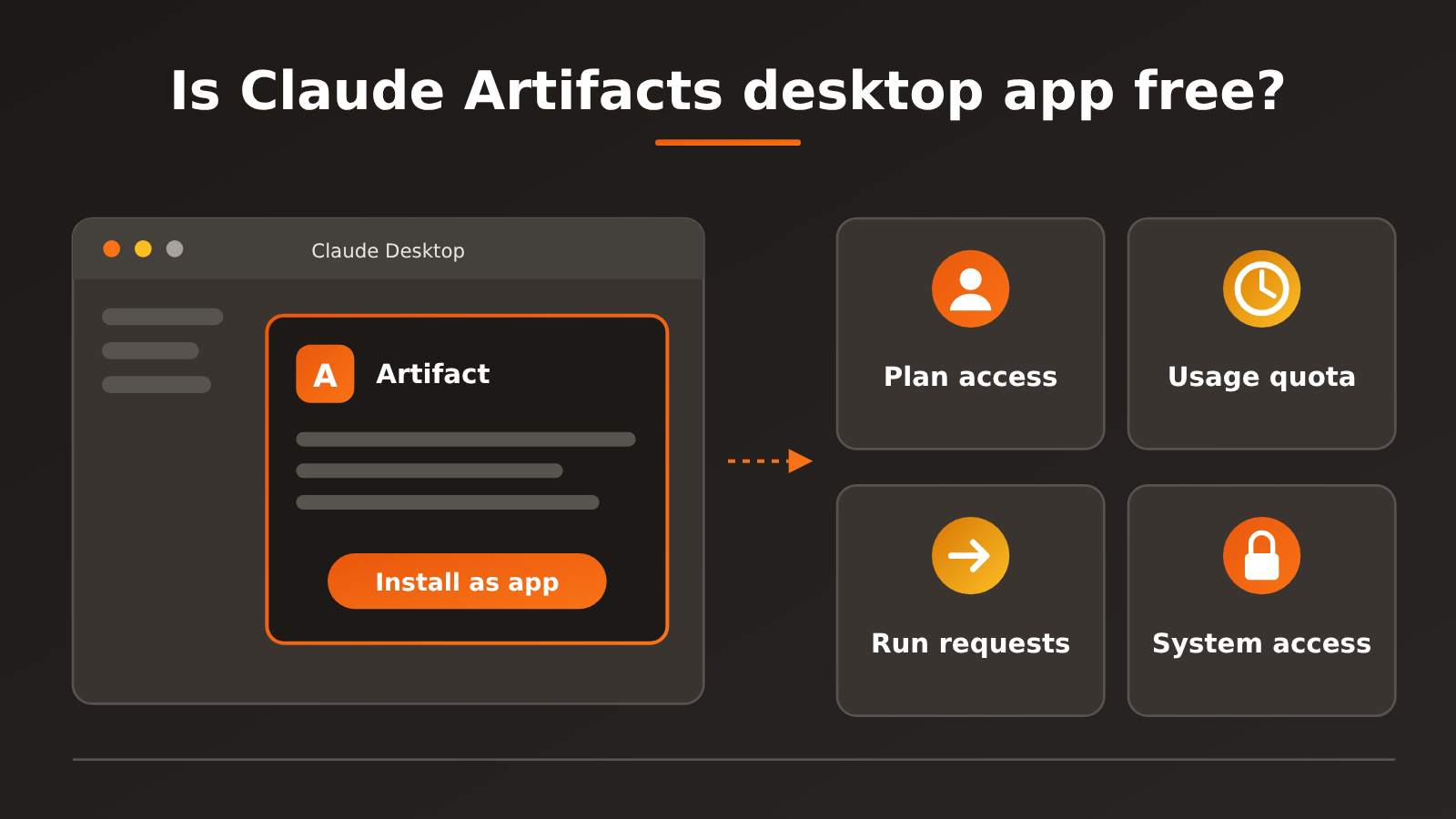
Claude Artifacts Desktop App Knowledge Map
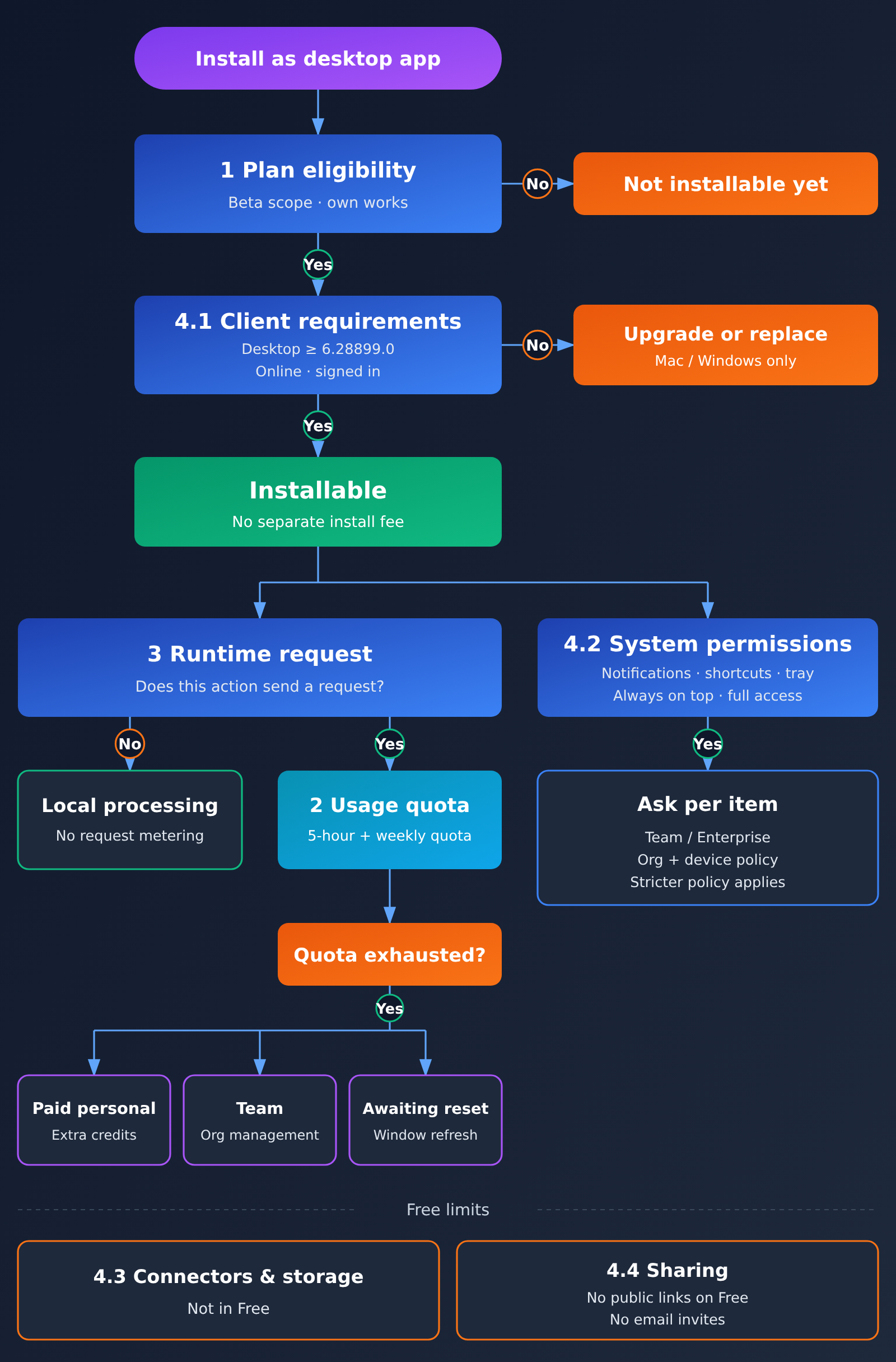
Figure note: The diagram follows the sequence “Can I install it? → Which actions are metered after installation? → What permissions does it need?” The runtime request branch on the left and the system permissions branch on the right are parallel; neither comes first. Quota only depends on “whether a request is sent to Claude,” and permissions only depend on “which system capabilities the app wants to access.” If you mistake a permission being blocked by policy for an exhausted quota, you’ll troubleshoot in the wrong direction.
In This Article
- 1 Plan eligibility: First confirm what your plan allows; this is the premise for every decision that follows.
- 2 Usage quota: Explains where usage is deducted and who owns each kind of “credit.”
- 3 Runtime requests: Explains which actions are metered and how to design an app that uses less quota.
- 4 System permissions and feature boundaries: Client, permissions, storage, and sharing can be checked as needed; there’s no required order.
- 5 Reusing similar tools outside Claude: If you need to call it via API, see this section.
- 6 Launch checklist: Check each item before going live.
To Know: Key Terms for Understanding Claude Artifacts Quotas
| Term | Plain-language explanation |
|---|---|
| Artifact | Standalone content or a small app generated by Claude in a conversation; it can be previewed, iterated on, and shared |
| Install as app | Installing an eligible Artifact as a standalone app in Claude Desktop; currently in Beta |
| Five-hour session window | A short usage window that starts from the first message for most accounts; when the limit is reached, wait for it to reset |
| Weekly quota | A weekly usage cap that resets at a time designated for the account |
| Extra usage credits | An optional mechanism for paid individual plans to keep using the service after the quota is exhausted, billed at standard API pricing |
| Platform API credits | Credits that Max, Ultra, and Team include for Claude Console organizations, used only for platform API business |
| Full access | The highest level of system permission that allows an app to run programs and read, write, and delete files |
1 Plan Eligibility for the Claude Artifacts Desktop App
1.1 Can Each Plan Install and Use Claude Artifacts?
Officially, any Free user who has been given access to this feature can install Artifacts they’ve built themselves in the compatible Claude Desktop app, as long as those Artifacts qualify. There’s no separate subscription for installing and no per-install charge. The difference between plans isn’t whether you can install — it’s how much allowance you get, plus storage, connectors, and sharing options.
| Plan | Public price (USD, tax excluded) | Usage (official relative description) | Artifact-related eligibility differences |
|---|---|---|---|
| Free | 0 | Limited five-hour and weekly allowances; message counts vary with demand | Can install your own creations; no new persistent storage, no connectors, no public links or email invites |
| Pro | $20/month; $200/year (the pricing page shows roughly $17/month) | At least 5× Free per five hours, with a higher weekly allowance | Connectors and persistent storage available; optional public link or email invite |
| Max | $100/month | Five-hour and weekly allowances are each 5× Pro | Same as Pro |
| Ultra | $200/month | Weekly allowance is 10× Pro; verified accounts have no five-hour limit | Still subject to weekly allowance, model, or feature boundaries |
| Team | Standard seat: $20/seat/month billed annually, $25 month-to-month; Premium seat: $100/seat/month billed annually, $125 month-to-month | Standard seat higher than Pro; Premium seat 5× standard | 2 to 150 people; installation and permissions are controlled by admins |
| Enterprise | $20 per seat per month, billed annually, 20-seat minimum, plus actual usage billed at API rates | Depends on the contract | Three permissions are off by default; legacy seat plans follow their original terms |
1.2 Plan Cost Examples
Cost example: under the current Enterprise plan, the base seat fee is 20 seats × $20 × 12 months = $4,800 per year, with actual inference usage billed separately. For Team with two standard seats on monthly billing, the base monthly fee is $50 — assuming both people stay within the included allowance and don’t turn on paid extra usage. Both figures cover seats only; neither has anything to do with “installing an Artifact.” There is no installation surcharge of any kind.
2 Where Claude Artifacts Usage Is Deducted From
2.1 Claude Artifacts Shares the Same Allowance as Other Entry Points
Claude requests triggered by the “official” desktop app share the same plan usage as web Claude, desktop chat, and Claude Code (if you’re eligible to use it). The organization management guide says verbatim, “There’s no separate allowance to provision” — meaning you don’t need to allocate a separate quota. So if you’ve been having long conversations with Claude on the web all day, by the time you open the installed Artifact in the evening, your remaining allowance may already be low.
Factors that affect consumption include: the model used when creating it, conversation length, input file size, task complexity, and connectors. Context length is a separate matter — it determines how much information a single session can hold at most, and it’s measured separately from plan consumption over a period of time.
2.2 The Difference Between Extra Usage Credits and Platform API Credits
| Quota Type | Who It Applies To | Can It Be Used for the Installed Artifact | How It’s Managed |
|---|---|---|---|
| In-plan five-hour/weekly allowance | All plans (Ultra verified accounts have no five-hour limit) | Yes — this is the main source of consumption | Auto-resets; check Settings → Usage |
| Extra usage credits (individual) | Pro, Max, Ultra | Yes — continues at standard API pricing once the allowance runs out | Individuals set a monthly spending cap in the menu |
| Organization extra usage | Team, legacy-seat Enterprise | Yes — determined by the organization | Managed by admins |
| Pay-as-you-go Enterprise | New Enterprise | Billed starting from the first billable token | Applies spending limits at the organization level and other tiers |
| Platform API credits | Max (100 USD/month), Ultra (200 USD/month), Team (up to 500 USD/month combined) | No | Goes into the linked Claude Console organization |
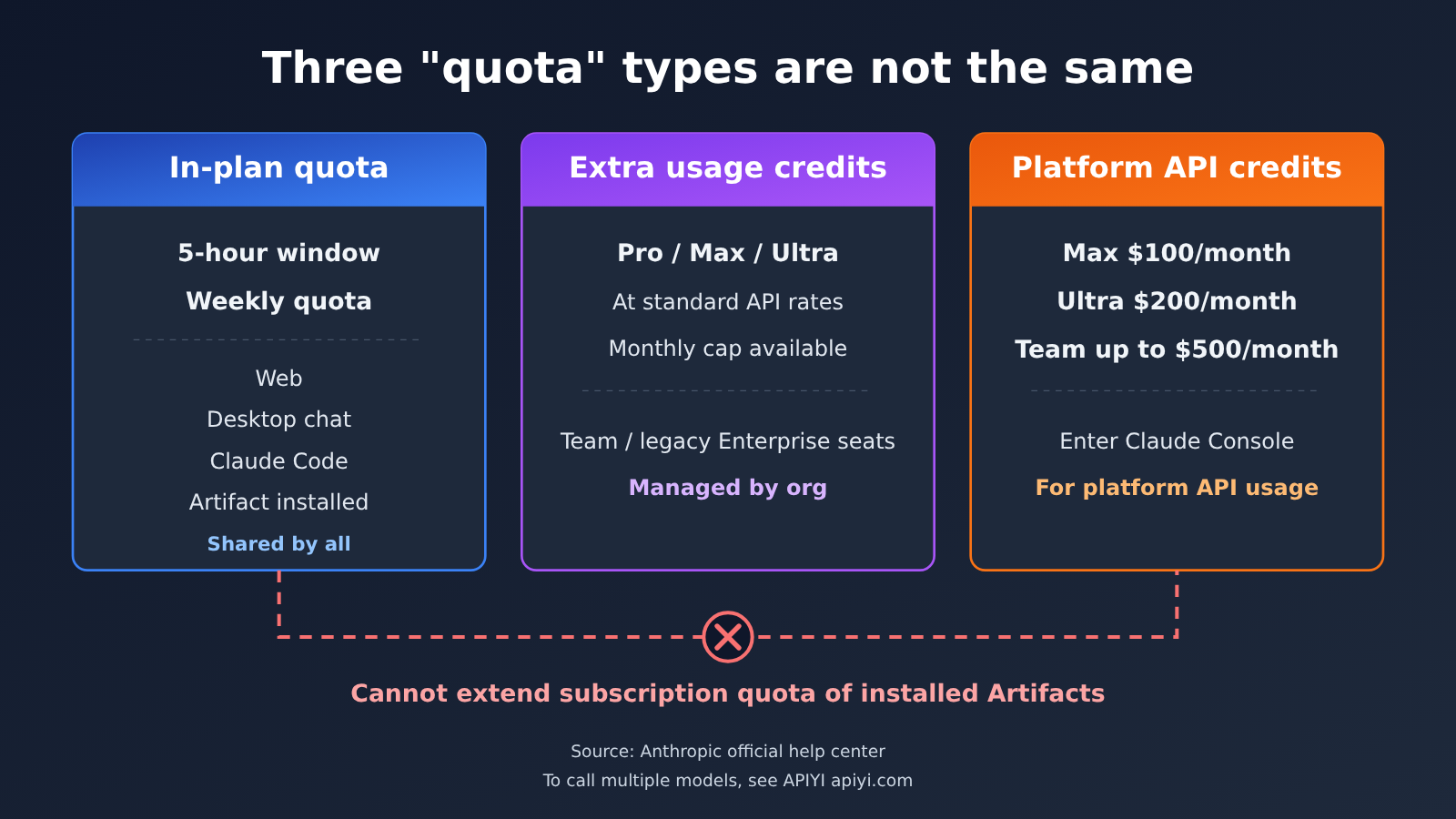
The last row is where people most often get it wrong. Platform API credits belong to the developer side of Claude Console, and they’re a separate account from both the Claude plan allowance and the extra usage credits you get after hitting the cap — three different buckets, and they can’t be used to extend the usage time of the installed Artifact.
2.3 How to Check Your Remaining Claude Artifacts Allowance
“Officially,” Anthropic hasn’t published an install-count limit, a fixed number of free inference calls per Artifact, or a promise that “one button click equals some number of message credits.” The more reliable approach: check Settings → Usage once before and once after using an Artifact, and record the difference. The five-hour window starts counting from the first message; the weekly allowance resets at the time specified for your account, and after you hit the cap you can wait for the reset. If you’re on a team seat, go by the organization’s usage dashboard.
3 Claude Artifacts running requests: which actions actually count
3.1 The boundary between app logic and Claude requests
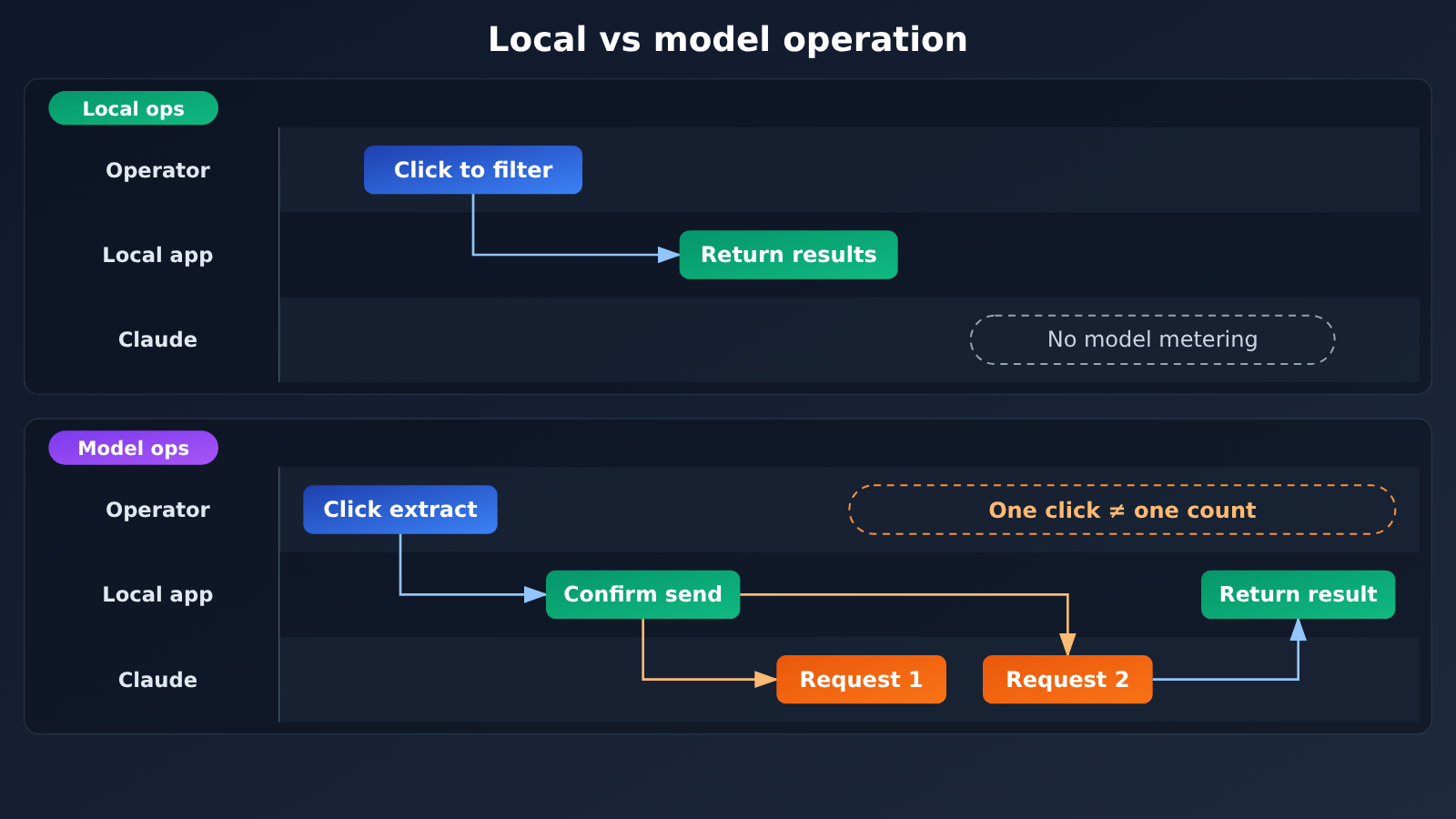
Interactions in an installed app fall into two buckets. One is work the Artifact’s own code handles locally — adding or removing checklist items, calculating a discount, starting and stopping a timer. None of that sends a request to Claude, so there’s no model request metering. The other is work where the app explicitly calls Claude — “summarize this text,” for example — and that counts against the user’s plan. Note that Claude requests inside an Artifact don’t require you to configure a platform API key separately.
| Example action | Sends a request to Claude? | What gets metered |
|---|---|---|
| Generating or editing an Artifact in the conversation | Yes | The creator’s own plan |
| Checklist filtering, discount math, countdowns | No (the program itself handles it) | No model request metering |
| Clicking “Extract action items” to call the model | Yes, and possibly more than one request | The current user’s own plan |
| Someone else opens your shared app and calls Claude | Yes | That user’s own plan — the creator doesn’t pay for viewers |
| Using paid connectors or data storage | Depends on the feature | Also subject to each one’s own eligibility |
3.2 Design patterns that keep Claude Artifacts from burning through quota
(An official scenario, not hands-on testing.) For a personal checklist tool, you can have Claude generate a sample once, then hand all subsequent additions, deletions, and filtering to the program. That way only the creation stage consumes quota. If you need to keep items across sessions, you’ll also want to check whether your paid plan includes Artifact storage eligibility.
For a tool that turns meeting notes into action items, three principles are worth following:
- Call Claude only when the operator actively clicks “Extract,” and tell them up front what content will be sent to the model.
- Test three failure cases: quota running low, the user declining, and the network dropping. Confirm that the original text is never lost in any of them.
- A single click can produce multiple requests, so design in limits on request count — don’t treat “number of key presses” as your metering unit.
4 Claude Artifacts Desktop App: System Permissions and Feature Boundaries
4.1 Client requirements and unsupported cases
The “official” installation and launch require a supported Mac or Windows version of Claude Desktop, version 6.28899.0 or later, plus an internet connection and a signed-in account. Linux, the web version, and mobile don’t offer this desktop installation capability. The initial release doesn’t support template-generated Docs, Slides, Sheets, and other artifacts, legacy Artifacts, or Cowork’s legacy live artifacts. HIPAA-ready configurations and hybrid deployments are also unavailable.
4.2 System permission defaults
By default, the app only has browser-level permissions. The client asks the user for each of these individually: notifications, global shortcuts, menu bar or tray, always-on-top windows, and similar capabilities. Full access allows the app to run programs and read, write, and delete files. On individual plans, full access applies only to eligible artifacts created by the user; team artifacts must also satisfy both creator and administrator constraints.
| Permission | Individual plan | Team default | Enterprise default |
|---|---|---|---|
| Install apps | Eligible artifacts created by the user can be installed | On | Off |
| App permissions (notifications, etc.) | Requested item by item | On | Off |
| Full access | Own artifacts only | Off | Off |
| When policies conflict | N/A | Stricter of organization and device policies | Stricter of organization and device policies |
Note: After the app releases a new version, it re-requests permissions that were previously granted. It’s normal for users to see the prompt again.
4.3 Connectors and storage
Pro, Max, Ultra, Team, and Enterprise plans can use Artifact connectors and data storage on web and desktop. Generally, each user needs to connect and authorize their own third-party accounts. Default limits for the new storage are: up to 100 MB of data and 25,000 records per artifact, whichever is reached first. Each uploaded file can be up to 20 MB; up to 5,000 files per artifact and 1 GB total; and a single SVG file is limited to 2 MB. The legacy artifact rule of “20 MB of text” doesn’t apply to new desktop installations.
4.4 Sharing and invocation by others
When sharing an artifact, creators don’t pay for viewers; when eligible users invoke Claude, the usage counts toward their own quota. Free creators don’t have the public link or invite-by-email options. Visitors outside the organization and unauthenticated visitors who open public links can’t use the Claude and connector parts of the artifact; invited users from outside the organization have similar restrictions. “Can view the artifact,” “can install it,” “can run Claude features,” and “can obtain system permissions” are four separate things to check.
5 Reusing Similar Tools Outside Claude Artifacts
If your tool needs to run outside Claude Desktop — say, deployed to a Linux server or plugged into your own business systems — then the Artifact plan quota won’t help you. You’ll need to call the model API directly. APIYI apiyi.com provides an OpenAI-compatible interface: one key lets you call Claude, GPT, Gemini, and other models, billed by usage — which makes it easy to compare costs against the Artifact approach.
5.1 A Minimal Example
import openai

client = openai.OpenAI(
    api_key="YOUR_API_KEY",
    base_url="https://api.apiyi.com/v1"
)

resp = client.chat.completions.create(
    model="claude-sonnet-4-5",  # Model names follow the platform's model list
    messages=[{"role": "user", "content": "把这段会议纪要整理成行动项:……"}]
)
print(resp.choices[0].message.content)
See the full implementation: call after confirmation, cap the request count, keep the original text on failure
import openai

client = openai.OpenAI(
    api_key="YOUR_API_KEY",
    base_url="https://api.apiyi.com/v1"
)

MAX_CALLS_PER_CLICK = 1  # Maximum number of requests a single click can trigger

def extract_action_items(notes: str, confirmed: bool) -> dict:
    """Only call the model after user confirmation; on any failure, return the original text to avoid data loss."""
    if not confirmed:
        return {"ok": False, "reason": "用户未确认发送", "original": notes}
    if not notes.strip():
        return {"ok": False, "reason": "内容为空", "original": notes}

    calls = 0
    try:
        calls += 1
        if calls > MAX_CALLS_PER_CLICK:
            raise RuntimeError("超过单次点击请求上限")
        resp = client.chat.completions.create(
            model="claude-sonnet-4-5",
            messages=[
                {"role": "system", "content": "只输出编号行动项,每项含负责人和截止时间。"},
                {"role": "user", "content": notes},
            ],
            max_tokens=800,
        )
        return {"ok": True, "items": resp.choices[0].message.content, "original": notes}
    except Exception as e:  # network outage, insufficient quota, etc.
        return {"ok": False, "reason": str(e), "original": notes}

if __name__ == "__main__":
    print(extract_action_items("周五前小王提交报价;下周一评审。", confirmed=True))
🚀 Quick-start tip: Validate the interaction flow in an Artifact first, then move the parts that need to run outside Claude Desktop over to the API. Once you register with APIYI apiyi.com you can claim free trial credits; the same code with a different
modelparameter lets you compare results and per-unit prices across models side by side.
6 Claude Artifacts Pre-Launch Acceptance Checklist
Before you go live, it’s worth checking off items along the following four lines. When piloting with a team, set up two accounts in the same organization that both have permissions: the author account creates and updates versions, while the second account installs and runs under its own permissions — verifying system notifications, calendar access, and Claude requests separately.
- Plan eligibility: Has the account already received the installation beta? Is the Artifact a new, eligible Artifact created by the account holder?
- Usage quota: Check Settings → Usage once before and once after use. For teams, watch organization usage over a week and note both seat count and billing type.
- Runtime requests: Which buttons call Claude? How many requests does a single click send? If quota runs low, can the original text be preserved?
- System permissions: If enabling a feature fails, check organization policy and device policy first, then decide whether quota is exhausted. Record file export, viewer access, shared storage, and model invocation budget separately.
If you can answer all four clearly, you can judge whether this Artifact app is “free to use” under your plan — and just how free that really is.
FAQ
Q1: Are Claude Artifacts desktop apps free for Free users?
Installation itself costs nothing, and there’s no separate subscription. But creating Artifacts and the Claude requests inside the apps both consume the limited quota of the Free plan, and Free doesn’t include the new persistent storage, connectors, or public sharing options.
Q2: Is there a cap on Claude Artifacts installations? How many calls can I make per day?
Anthropic hasn’t published an installation cap, a fixed number of free inferences per Artifact, or a conversion rate between button clicks and message quota. Go by the actual changes in your own account’s Settings → Usage, and don’t trust any “fixed number of calls” claims.
Q3: Can the platform API credits included with Max and Ultra be used for Artifacts?
No. Those credits go to the Claude Console organization and are used for platform API work; they’re counted separately from plan quota and extra usage credits. If you’re already doing API development, you can also call Claude and other models pay-as-you-go through APIYI apiyi.com and manage costs across multiple models in one place.
Q4: If someone uses a Claude Artifact I shared, does it eat into my quota?
No. Anthropic states that sharing doesn’t charge the creator for viewers, and eligible users’ Claude calls count against their own plans. Viewers outside the organization, or anyone opening a public link without signing in, can’t use the Claude parts.
Q5: A Team member says the feature isn’t available — is that because quota ran out?
Not necessarily. Team disables full access by default, and Enterprise disables all three permissions by default. On top of that, the stricter of organization policy and device policy wins. Check admin settings first, then look at quota in the Usage panel.
Q6: What if I want to run a similar tool on Linux or my own system?
The desktop install doesn’t support Linux, web, or mobile. Instead, call the model API directly: get a key at APIYI apiyi.com, set `base_url` in the Section 5 code to the platform address, and verify it — new users get free test credits.


