
Author’s note: When you’re using Claude Code, Codex, or Cursor for automation, having the agent look at screenshots, find coordinates, and click buttons often falls apart the moment a dialog pops up, the resolution changes, or a new version ships. This article breaks down CLI-Anything’s approach: first bolt a command-line layer onto the software that the agent can call, then let the agent call it.
If you’ve ever had an agent drive GIMP, Blender, or your company’s internal admin dashboard, you’ve probably hit this: the same task worked yesterday, but today a dialog, a UI redesign, or a window resize leaves the agent stuck in front of some button, screenshotting it over and over. The problem usually isn’t that the model isn’t smart enough — it’s that the interface was built for humans to look at, not for programs to call.
This isn’t another “GUI automation is dead” argument. Screen manipulation still has value in scenarios where no interface exists at all, but for tasks that need to run stably and repeatably, adding a command-line layer to the software is usually the more reliable path. That’s exactly what CLI-Anything, open-sourced by the HKU Data Intelligence Lab (HKUDS), is doing. As of 2026-11-23, it has 62,812 stars on GitHub.
Core value: after reading this, you’ll understand why you’d want to give an agent a CLI, how to install and call CLI-Hub, which commands you need to generate a new CLI from the plugin, where the tokens actually go across the 7 stages, and which tier of model to pick.
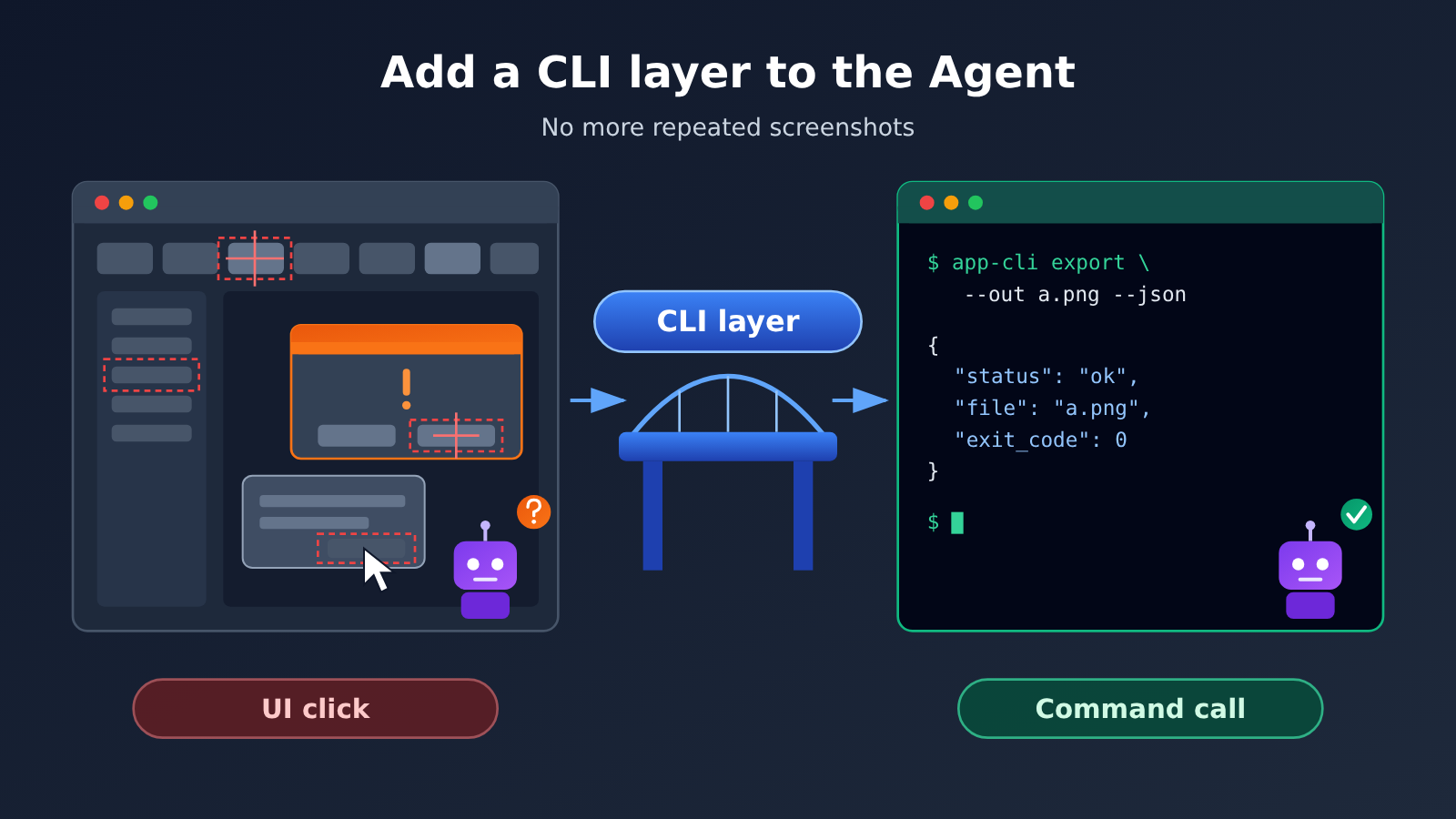
Why AI Keeps Getting Stuck at the Interface When Operating Software
Vision-based GUI automation usually follows a chain like this: take a screenshot, recognize elements, infer coordinates, simulate a click, then take another screenshot to confirm the result. Every step depends on the current state of the interface — theme colors, resolution, language packs, and pop-up windows that were never closed can all throw off recognition. Once errors pile up, the agent tends to retry repeatedly, which drives up both time and token usage.
The second problem is that results are hard to verify. Seeing “saved successfully” on screen doesn’t mean the file contents are actually correct. If the agent wants to confirm the output, it can only take another screenshot or reopen the file to check, and the whole process lacks a structured return value. This weakness gets amplified in scenarios that require repeatable execution, like batch processing and scheduled tasks.
The third problem is maintenance cost. Every time the software is upgraded, the button positions and menu hierarchy that the scripts relied on may change, and scripts recorded from the interface have to be adjusted accordingly. Command-line arguments and return formats, by contrast, are usually more stable, and the agent can directly get the exit code and JSON output when it invokes them.
It’s worth stressing that this doesn’t mean GUI automation is always a bad idea. For legacy systems with no source code and no API, screen-based operation is still a viable option. But as long as the software has source code or an analyzable interface, adding a thin CLI layer is often more reliable than training an agent to click buttons.
CLI-Anything Key Facts at a Glance
CLI-Anything’s GitHub description is “Making ALL Software Agent-Native,” and its README tagline is “Today’s Software Serves Humans. Tomorrow’s Users will be Agents.” Its goal is to add a command-line interface layer between agents and existing software. The following data comes from the GitHub page, README, and the official site’s own description.
| Item | Details (as of 2026-11-23) |
|---|---|
| Repository | github.com/HKUDS/CLI-Anything, primary language Python, Apache-2.0 license |
| Community metrics | GitHub shows 62,812 stars, 5,702 forks, and 286 open issues |
| Timeline | Created on 2026-03-08, last pushed on 2026-11-20; latest release v0.4.0 published on 2026-06-25 |
| README badges | 18 app demos, Tests 2,461 Passing, technical report arXiv:2606.03854 |
| Runtime requirements | Python ≥3.10, Click ≥8.0; output supports both JSON and human-readable formats |
| Two entry points | CLI-Hub’s ready-made ecosystem; a 7-stage generator driven by an agent plugin or skill |
CLI-Anything’s Approach: Turning Software into a Command-Line Layer
CLI-Anything’s core idea is to first analyze the software’s source code, map the user’s UI actions to the underlying APIs, and then generate a Click-based command-line tool. The generated CLI comes with a REPL, JSON output, and undo/redo, so an agent can operate the software just like calling ordinary commands and directly parse the returned results.
The README sums up the design goal as “Deterministic & Reliable”: the same input yields consistent results, making agent behavior easier to predict. It also emphasizes zero-config installation and a unified REPL interface, so CLIs for different software stay consistent in how they’re used. v0.4.0 also adds CLI-Matrix, with commands such as cli-hub can <task> and cli-hub matrix preflight for checking capabilities and the environment before running a task.
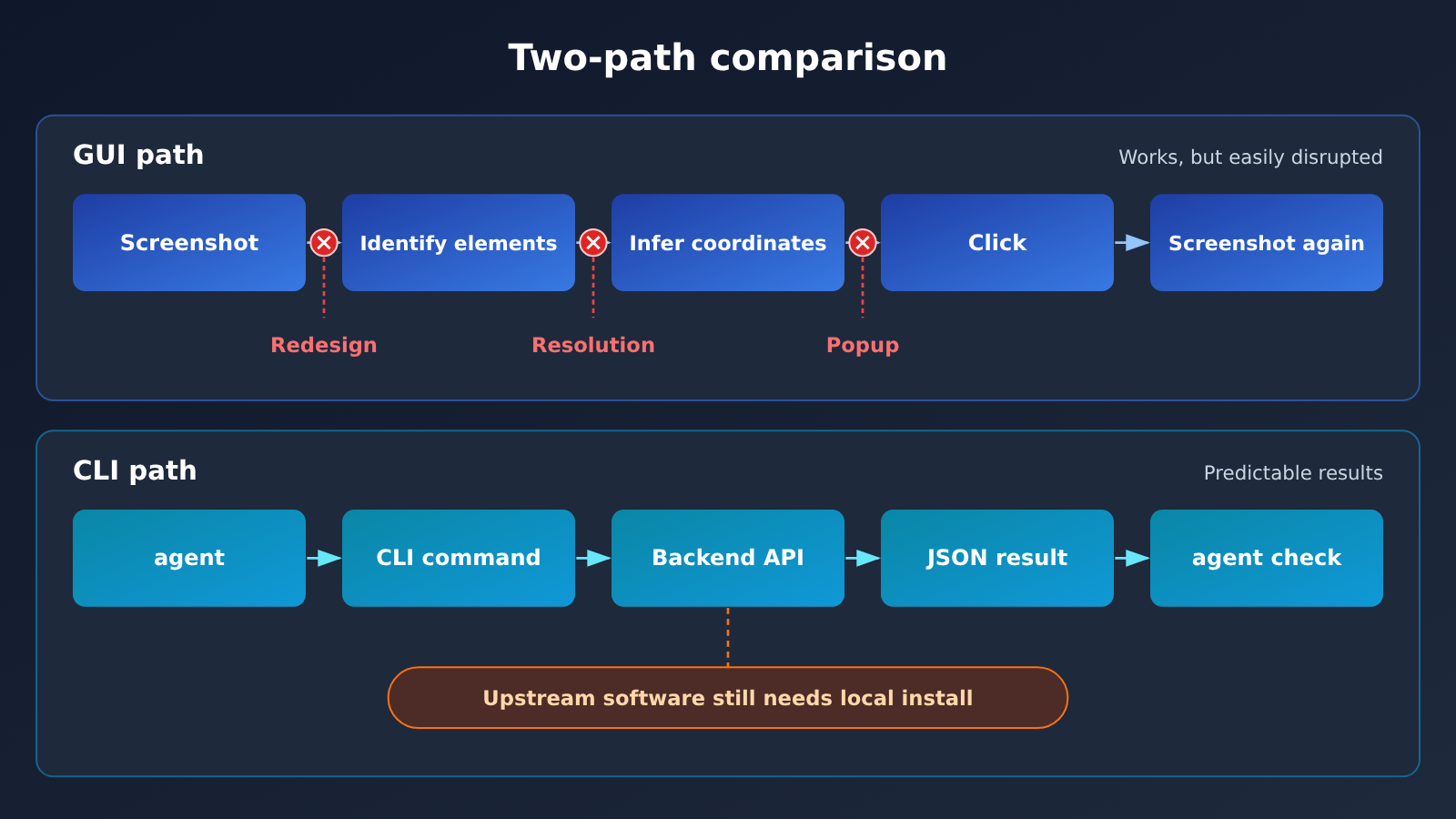
Choosing Between CLI-Anything’s Two Entry Points
The README lays out two entry points. The first is to use the existing ecosystem: install CLI-Hub, browse the registry, and directly install CLIs that others have already built. The second is to install a plugin or skill for your agent and use the 7-stage generator to create a new agent-native CLI for a piece of software. Which one to choose mainly depends on whether the target software is already listed.
| Dimension | CLI-Hub off-the-shelf route | Generator build-your-own route |
|---|---|---|
| When to use | The target software is already listed, e.g. GIMP, Blender, LibreOffice | Internal tools, niche software, or when the existing CLI doesn’t meet your needs |
| Prerequisites | Install cli-anything-hub and the upstream app |
Python 3.10+, with the target software’s source code available locally or online |
| Time investment | Ready to use after installation | Need to work through all 7 stages, then test and validate |
| Token usage | Mostly the calls the agent makes while running tasks | Analyzing source code and writing tests creates many long-context calls |
| Maintenance | Community CLIs are maintained by their respective authors; check the instructions before use | You maintain it yourself, and can use refine to fill gaps incrementally |
In short, if a ready-made CLI already exists, use it first. Only when you can’t find a suitable tool, or need to connect it to your team’s internal systems, should you spend tokens on the generator route.
CLI-Anything Quick Start: The Ready-Made CLI-Hub Route
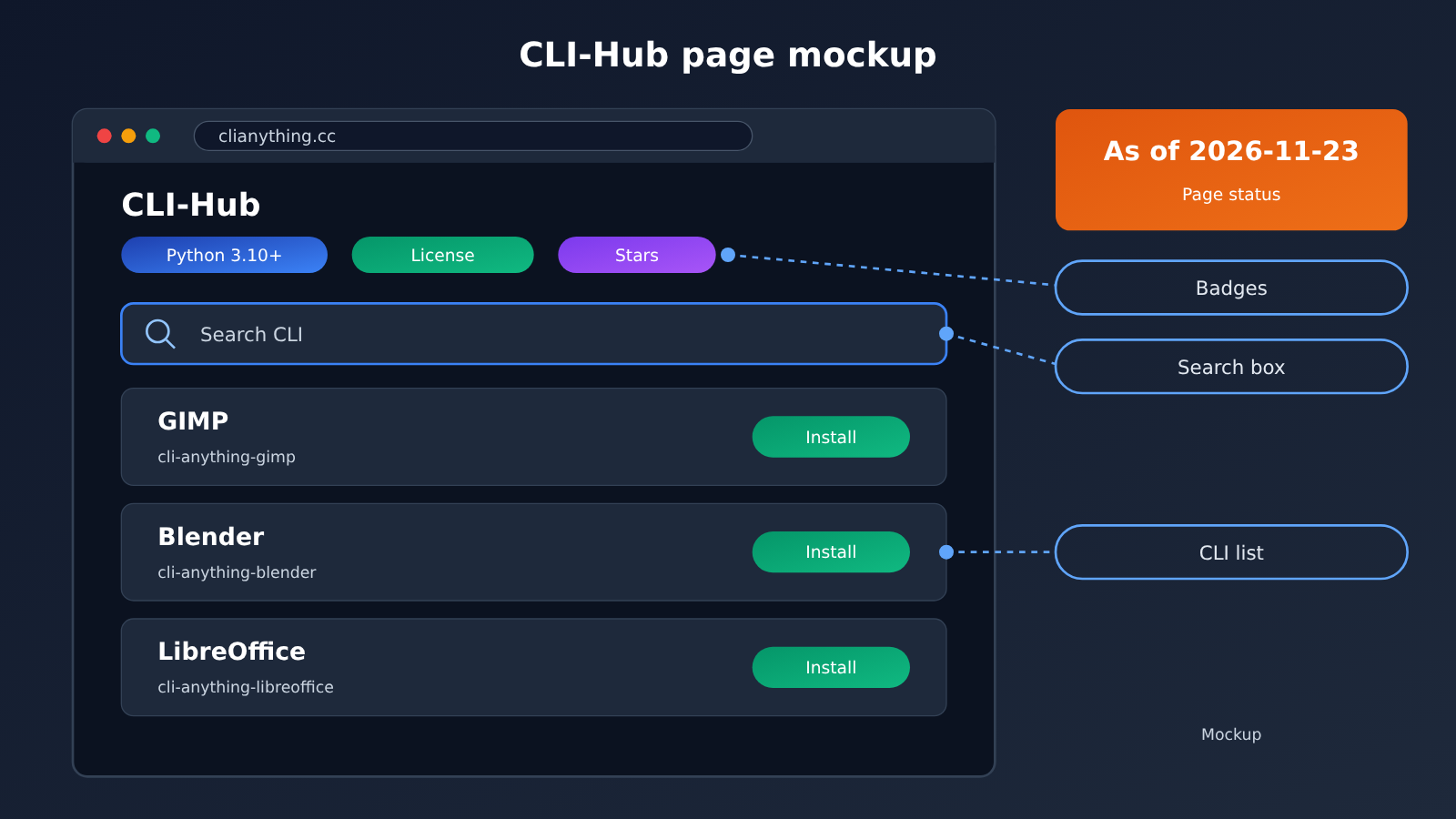
CLI-Hub is the command-line registry for CLI-Anything, and its official site is clianything.cc. Here’s how to install and use it:
- Install the client:
pip install cli-anything-hub - Browse all CLIs:
cli-hub list, or search by keyword:cli-hub search image - Check the details:
cli-hub info gimpto confirm dependencies and usage - Install:
cli-hub install gimp - Run:
cli-hub launch gimp, and you can keep appending arguments after it
For day-to-day maintenance you’ll use cli-hub update <name> and cli-hub uninstall <name>. If you want to know upfront whether a task can be completed, you can use cli-hub can <task> and cli-hub matrix preflight, both added in v0.4.0, to run a preflight check.
There’s one detail that’s easy to miss, and the README calls it out explicitly: some CLIs are just wrappers around real desktop software or backend programs. If the CLI you pick depends on upstream tools like GIMP, Blender, or LibreOffice, you’ll need to install those programs separately. The CLI layer can’t stand in for the software itself — it just gives the agent a stable entry point to call.
If you’d like the agent to go find tools in CLI-Hub by itself, install the meta skill: npx skills add HKUDS/CLI-Anything --skill cli-hub-meta-skill -g -y. The README states that it supports SKILL-compatible agents such as OpenClaw, Nanobot, Claude Code, Codex, Reasonix, and Antigravity. Once it’s installed, you can just tell the agent: “Find appropriate CLI software in CLI-Hub and complete the task: ……”.
🚀 Quick Start: CLI-Hub itself doesn’t call any Large Language Model — the tokens are actually consumed by the agent driving it. In Claude Code, set
ANTHROPIC_AUTH_TOKEN=sk-...and pointANTHROPIC_BASE_URL=https://api.apiyi.comat the root domain (no/v1needed), and you can call the Claude family of models through APIYI. On first use, write{"hasCompletedOnboarding": true}into~/.claude.jsonto skip the onboarding flow.
CLI-Anything Quick Start: Building a New CLI with the Generator
The generator comes as a Claude Code plugin and also supports agents like Cursor, Codex, OpenCode, and GitHub Copilot CLI. Before you start, confirm two things: Python 3.10+ is installed on your machine, and the target software’s source code is available locally or accessible online.
In Claude Code, run these in order:
- Add the plugin marketplace:
/plugin marketplace add HKUDS/CLI-Anything - Install the plugin:
/plugin install cli-anything - Specify the target software:
/cli-anything <software-path-or-repo>, for example/cli-anything ./gimp
The entry command for older plugin versions is /cli-anything:cli-anything. If the command isn’t recognized, check the plugin version first.
What Each of CLI-Anything’s 7 Stages Does
| Stage | Responsibility in the README | Token usage characteristics |
|---|---|---|
| 1. Analyze | Scan source code and map GUI actions to APIs | Reads a lot of source code; highest input token usage |
| 2. Design | Design command groups, state model, and output format | Reasoning-heavy; needs a stronger model |
| 3. Implement | Write the Click CLI with REPL, JSON output, and undo/redo | Writes more code; higher output token usage |
| 4. Plan Tests | Write TEST.md and plan unit tests and E2E tests | Requires repeatedly referring back to earlier design |
| 5. Write Tests | Write test code | Write code, run, fix; may take multiple rounds |
| 6. Document | Update TEST.md | Light usage |
| 7. Publish | Generate setup.py and install to PATH | Light usage |
After generation is complete, go into the generated directory to install and verify: cd gimp/agent-harness && pip install -e ., then run cli-anything-gimp --help to inspect the command tree, and run cli-anything-gimp project new --width 1920 --height 1080 -o poster.json to try an actual invocation.
Testing and Acceptance After Generation
Don’t treat “generation complete” as “ready to ship.” At a minimum, we recommend these acceptance checks: run the unit tests and E2E tests produced by the generator and confirm they all pass; pick a few typical tasks from your team’s real requirements and use --help to verify that corresponding commands exist; check that JSON output fields are stable; and finally, have an agent complete a full task through this CLI to confirm the resulting files really match expectations.
If coverage isn’t sufficient, use the refine commands. /cli-anything:refine ./gimp performs a gap analysis; /cli-anything:refine ./gimp "I want more CLIs on image batch processing and filters" adds commands in the direction you specify. The README says each refinement is incremental and non-destructive and won’t overwrite existing commands.
CLI-Anything Generation Costs: Where the Tokens Go Across 7 Stages
Most of the generator’s cost comes from two stages: Analyze reads the source code over and over, and Write Tests writes, runs, and fixes tests across multiple rounds. Both are long-context tasks — the same batch of source code gets referenced again and again — so cache hit rate has a big impact on total cost. A practical approach is to assign models by stage rather than locking the whole pipeline onto the most expensive tier.
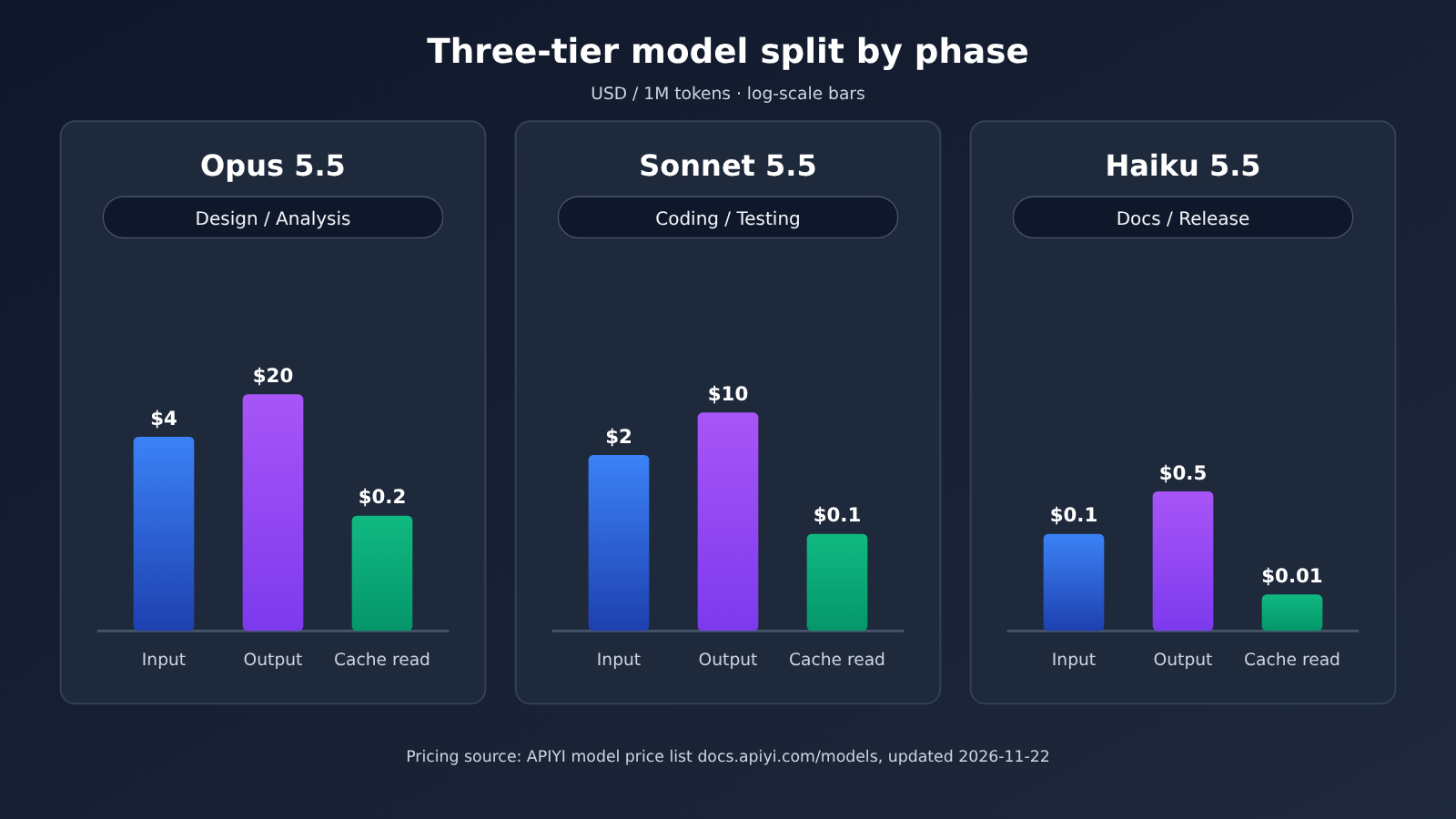
| Model tier | Suitable stages | Input (per 1M tokens) | Output (per 1M tokens) | Cache reads (per 1M tokens) |
|---|---|---|---|---|
| Opus 5.5 | Design architecture design, Analyze for complex software | $4 | $20 | $0.2 |
| Sonnet 5.5 | Implement, Write Tests, and other main coding stages | $2 | $10 | $0.1 |
| Haiku 5.5 | Document, Publish, and everyday CLI-Hub calls | $0.1 | $0.5 | $0.01 (≤100K input tier) |
The prices in this table come from the APIYI model price master list, with data updated on 2026-11-22. As you can see, cache read prices across all three tiers are far below regular input prices, so when Analyze rereads the same source code, hitting the cache noticeably lowers cost. If you drive the generator through Claude Code, APIYI’s ClaudeCode group gets a 5% discount by default, and you can stack it with top-up bonuses —check the scenario docs at docs.apiyi.com for the specifics.
One thing worth stating plainly: APIYI’s official docs specifically warn that long-context tasks like writing code and deep agent exploration burn through pay-as-you-go budget fast — $5 of credit may not even finish one deep research run. Generating a CLI for a mid-to-large software project falls squarely into this category. If your usage is heavy and you can connect directly to the official site, a subscription plan may be more economical. Also keep in mind that APIYI is a gateway, not a model host — upstream providers’ content policies, rate limits, and outages pass straight through, so long-running tasks should leave room for retries.
💰 Cost tip: If you’re calling the OpenAI-compatible interface from your own scripts — say, using a small model to batch-validate CLI output — you can point
base_urlathttps://api.apiyi.com/v1and switch between tiers with a single key. Get the pipeline working with Haiku first, then decide which stages need an upgrade to Sonnet or Opus.
Impact analysis: what happens when AI-operable software gets a CLI
Impact on developers
- Debugging changes shape: when an agent fails, you’re looking at commands, arguments, and exit codes instead of a string of screenshots — much faster to diagnose
- Tasks become reproducible: the same command can go into a script, CI pipeline, or cron job without depending on desktop state
- Skills transfer: the CLI itself isn’t tied to any one agent — Claude Code, Codex, Cursor, and others can all invoke the same toolset
Impact on teams and internal tooling
- Internal systems connect to agents more easily: in-house tools with source code available can get a generated CLI, cutting down on interface work done specifically for agents
- Ownership needs to be explicit: self-built CLIs need someone tracking upstream versions; community CLIs are maintained by their respective authors, so confirm the protocol and update cadence before adopting one
- Evaluation returns to engineering standards: test pass rates, command coverage, and output stability should go through review like any other code
FAQ
Q1: What is CLI-Anything?
CLI-Anything is an open-source project from HKUDS with the goal of making software “agent-native.” On one hand, it offers ready-made command-line tools through CLI-Hub; on the other, it provides a 7-stage generator that analyzes software source code and produces a Click CLI with JSON output, so agents can call it reliably.
Q2: How is adding a CLI different from letting an agent operate the screen directly?
Screen operation has broader applicability in scenarios without an interface, but it’s vulnerable to pop-ups, redesigns, and resolution changes, and results are harder to verify. The CLI route requires upfront generation and testing cost, but afterwards execution is more deterministic and return values are structured — a better fit for tasks that need to run repeatedly. The two approaches can coexist.
Q3: Once a CLI is installed, do I still need the original software?
Yes. The README explicitly warns that some CLIs wrap real desktop software or backend programs — GIMP, Blender, LibreOffice, for example — and the upstream software still has to be installed separately. The CLI is just the invocation entry point; it doesn’t include the software itself.
Q4: Can the generator handle any software in one shot?
Not in that sense. The generator requires the target software’s source code to be available and needs all 7 stages to run; after generation you still have to run tests and accept the results, and if coverage falls short you’ll need refine to fill in the gaps. The more complex the software, the more tokens and manual checking it takes.
Q5: How do I configure a model API for the generator?
In Claude Code, set `ANTHROPIC_AUTH_TOKEN` and `ANTHROPIC_BASE_URL=https://api.apiyi.com` to use the Claude series models offered by APIYI — the ClaudeCode group gets a default 5% discount. New users get free trial credits after registering at apiyi.com, so you can run through the workflow once with a small open-source project before budgeting for a full-scale one.
Q6: What limitations does CLI-Anything have right now?
Three main ones: the generation process is a long-context task, so pay-as-you-go billing adds up; the quality and maintenance pace of community CLIs depend on their respective authors; and closed-source software without source code is hard to run through the generator route. Also, the repo’s main branch is still being updated after v0.4.0, so command details should follow the latest README.
Key Takeaways: Adding a CLI Layer to Software for AI Operations
- The fragility of GUI automation: Pop-ups, redesigns, and resolution changes can break the screenshot-and-click chain—and the results are hard to verify anyway
- How CLI-Anything does it: It analyzes the source code, maps UI actions to APIs, and generates a Click CLI with JSON output
- The off-the-shelf route: Start with
cli-hub search; when you find a suitable tool, install it directly—and remember to install the upstream software too - The DIY route: Python 3.10+ plus the Claude Code plugin, run all 7 stages, and complete test acceptance
- Where the cost goes: Analyze (reading source code) and Write Tests (multiple rounds of fixes) burn the most tokens, so cache hits really matter
- Tiering the models: Opus handles design, Sonnet handles coding, Haiku handles wrap-up and day-to-day calls—and you can switch between all of them through APIYI
Summary
The reason CLI-Anything is getting attention this time is pretty straightforward: it swaps “teaching an agent to click buttons” for “adding a command-line layer to the software,” giving the agent a deterministic entry point and structured return values when it invokes the software.
- Search before building: Look for an existing tool in CLI-Hub first; only fall back to the generator if you can’t find one
- Don’t skip acceptance: The upstream software has to be installed, tests have to be run after generation, and community CLIs need their maintenance status verified
- Control costs by stage: Pay attention to caching during long-context stages, and use different model tiers for different stages
If you’re about to try the generator on an internal tool, you can first use the free credits at APIYI (apiyi.com) to get a small project working end to end. Once you’ve measured the token consumption of a single generation, you can then decide between pay-as-you-go and a subscription plan.
📚 References
-
GitHub – CLI-Anything: Project source code, README, and release notes
- Link:
github.com/HKUDS/CLI-Anything - Notes: The 7-phase breakdown, installation commands, and upstream software reminders all come from the README
- Link:
-
CLI-Hub Official Site: Browse and search ready-made CLIs
- Link:
clianything.cc - Notes: See the software already included and author info for each CLI
- Link:
-
CLI-Anything Project Page: Project intro and demos
- Link:
hkuds.github.io/CLI-Anything - Notes: Learn about the types of software covered in the demos
- Link:
-
CLI-Anything Technical Report: Design principles and evaluation
- Link:
arxiv.org/abs/2606.03854 - Notes: Great for readers who want to dig into the method details
- Link:
Author: APIYI Technical Team
Technical discussion: Feel free to reach out to us on the APIYI website homepage. For Claude Code integration and model pricing, check out the docs.apiyi.com documentation center.


