

Author’s note: If your own results with a model are worse than the official leaderboard, don’t jump to conclusions. Often it’s because the reasoning-effort tier, the entry-point window, or the model ID doesn’t match the one used in the benchmark. This article lays out the order for checking these three things—check them first, then decide whether to switch models.
Many developers run into the same gap. An official announcement says a model scored high on a leaderboard, but when you try similar tasks yourself, the results are clearly worse than expected—so you suspect the model has “gotten dumber” or been “nerfed.” This article offers a more practical troubleshooting approach: first make sure the reasoning-effort tier, entry-point window, and model ID match, then determine whether the gap is real.
This is not a secret recipe where “flipping three switches” will let you match the official leaderboard. All the differences below come from public documentation. They can only help you confirm whether you’re comparing the same thing; they can’t guarantee that you’ll get the leaderboard score after adjusting them, and they don’t mean APIYI has reproduced the official leaderboard.
The main takeaway: After reading this article, you’ll know the order for checking these three things and which document to look at for each step. You’ll also know which pricing and endpoints to check before switching models if a gap remains after your checks.
Where official benchmarks really diverge — the key points
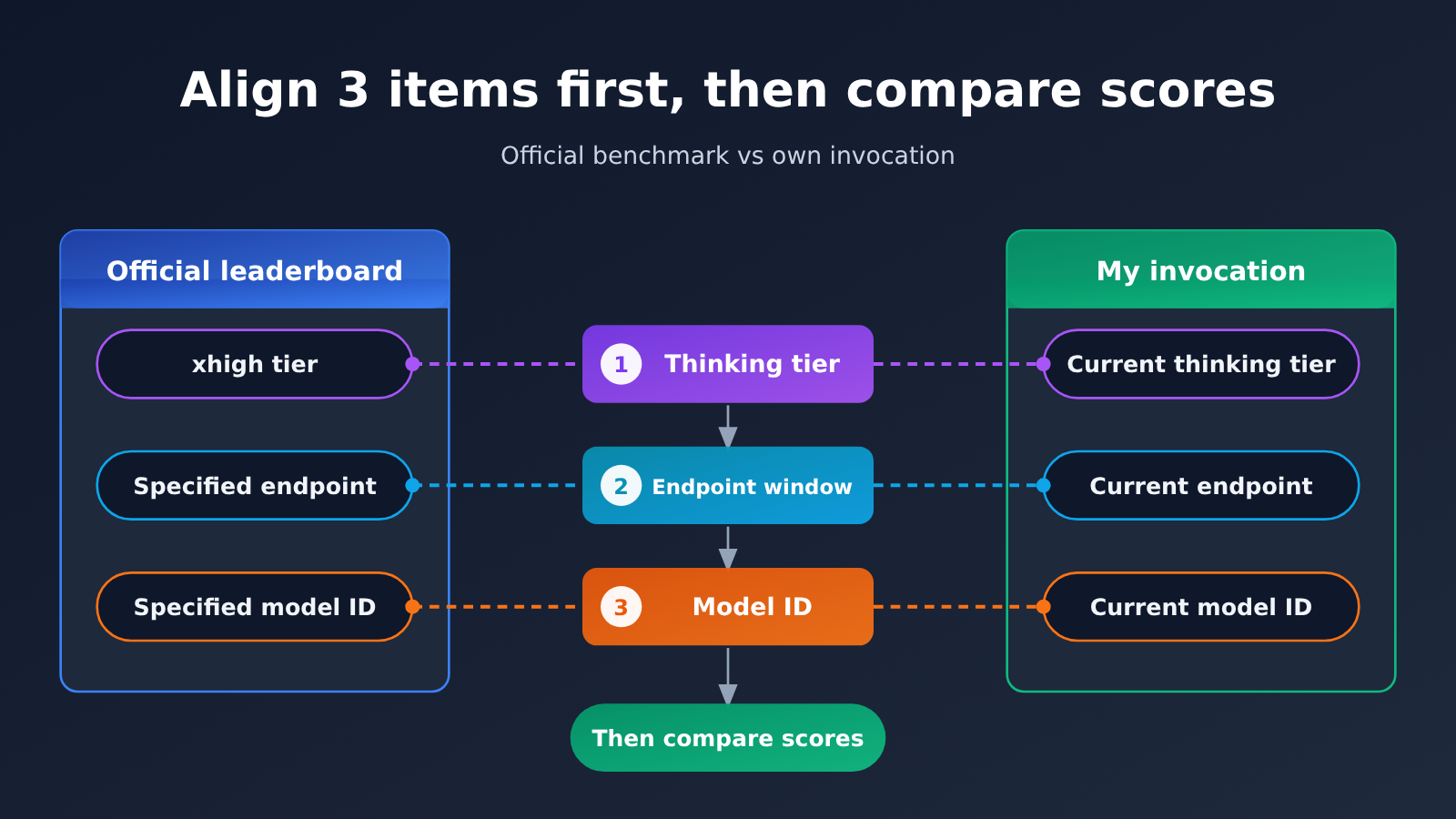
Let’s start with the conclusion. A leaderboard score is never the score of “a model name” — it’s the score under “a specific model ID + a specific thinking tier + a specific entry-point condition.” If any one of those three differs, the number you get can’t be compared directly with the leaderboard.
| Item to verify | Typical difference (from public docs) | What happens when it doesn’t match | Priority |
|---|---|---|---|
| Thinking tier | Neon defaults to high on the API, with low, medium, and xhigh also available; Carbon defaults to medium and has no xhigh |
Output length and reasoning depth differ, so results differ | Step 1 |
| Entry window | Neon’s API window is 1,048,576 tokens, while the Antigravity docs state a maximum of 512K |
The long-context capability on the leaderboard may not fit into your entry point | Step 2 |
| Model ID | Gemini 4 has at least four IDs — argon, carbon, hydrogen, neon — each with different thinking tiers and pricing |
Comparing A’s results with B’s leaderboard isn’t comparing the same model | Step 3 |
Why the thinking tier comes first when checking official benchmarks
The thinking tier is the variable most easily overlooked, because it usually has a default value — you can call the model without setting it and everything works. The problem is that defaults differ between models. Take Gemini 4: Neon defaults to high on the API, while Carbon defaults to medium. Same prompt, different tier, and both output length and final result change.
Leaderboards usually state which tier was tested. Scores quoted in official announcements — such as Neon’s 61 on Artificial Analysis at the xhigh tier — have to be read together with the tier. If you compare your default high against an xhigh score, you’re not comparing the same conditions. Even more importantly, Carbon has no xhigh tier at all, so “cranking Carbon up to max” isn’t the same as Neon’s xhigh.
Different entry points may also use different names for the same tier. In Antigravity, Neon’s top tier shows up in the UI as Extra, which doesn’t match the xhigh name in the API docs. When verifying, follow the mapping in the documentation rather than just reading the labels.
Why the entry window and model ID matter just as much
The entry window determines how much context you can feed the model. Neon called through the API has a window of 1,048,576 tokens, whereas the Antigravity docs say up to 512K. If the leaderboard tested long-document retrieval or understanding of a large codebase, then even with the same model, a smaller window can truncate content and give you worse results.
The model ID is the “hardest” item of the three. This Gemini 4 generation has at least four IDs — argon, carbon, hydrogen, neon — with different thinking tier settings and prices. Taking Hydrogen’s results and comparing them against Neon’s xhigh leaderboard score, a gap is entirely expected. Before you call, check the model list on APIYI apiyi.com to confirm exactly which ID you’ve written into your request — don’t fill it in from memory or from someone else’s screenshot.
Quick-Start Steps for Matching the Official Benchmarks
This section turns the three checks into concrete actions. To make them easy to copy, parameter names, model IDs, and URLs are all in inline code, so you can check each item against your own request.
Step 1: Confirm the entry point and endpoint
First, figure out which entry point you’re using to access the model: the web UI, an IDE plugin, or direct API calls. Context window limits and tier names can differ across entry points. If you’re using an OpenAI-compatible interface, set base_url to https://api.apiyi.com/v1 and put the key generated in the APIYI console into api_key. That way, when you switch models later, you only change the model field; the entry conditions stay the same, so the comparison is meaningful.
Step 2: Write the full model ID
In your request, write model as the full ID, such as gemini-4-neon or gemini-4-carbon, not the vague “Gemini 4.” After that, go back to the model summary table and check again to confirm this is the ID tested on the leaderboard. If the leaderboard tested Neon but you’re calling gemini-4-hydrogen, there’s no point in doing any further comparison—fix the ID first.
Step 3: Explicitly set the thinking tier
Don’t rely on defaults—explicitly specify the thinking tier in your request. For the exact field name, check the official docs for the corresponding model. Keep three things in mind when setting it:
- Match the tier tested on the leaderboard: If the leaderboard says
xhigh, setxhigh; if it sayshigh, sethigh. - Make sure the tier exists: Carbon doesn’t have
xhigh, so forcing an alignment with Neon’sxhighleaderboard result doesn’t make sense. - Watch for name mapping: In the Antigravity UI,
Extramaps to Neon’s highest tier; when you move to the API, switch to the tier name used in the docs.
Step 4: Check whether the context exceeds the entry point’s window
If your test content is long, estimate the token count first and compare it with the entry point’s limit. When calling Neon via the API, the limit is 1,048,576 tokens; the Antigravity docs list a maximum of 512K. Content over the limit gets truncated or returns an error—so the “poor performance” you see in that case is really just incomplete input.
🚀 Quick start: If you want to compare multiple model IDs under the same entry conditions, you can use APIYI apiyi.com to call Gemini, Claude, GPT, and other models with one API key. New users get free testing credits, which makes it a good way to align tiers and IDs first, then run a small-scale comparison.
Checklist for the three checks
| Check | Field to inspect in the request | Passing criteria | Common mistake |
|---|---|---|---|
| Entry point | base_url |
Stick to one entry point, such as https://api.apiyi.com/v1 |
Testing once on the web and once via API, then comparing the mixed results |
| Model ID | model |
The full ID that matches the leaderboard | Comparing hydrogen against a neon benchmark |
| Thinking tier | Thinking-tier parameter (field name per docs) | Matches the tier tested on the leaderboard, and that tier exists | Relying on defaults; setting xhigh for Carbon |
| Context | Input token count | Does not exceed the entry point’s context window limit | Stuffing million-token-scale content into a 512K entry point |
Still a Gap After Checking Official Baselines: Compare Prices and Endpoints Before Switching Models
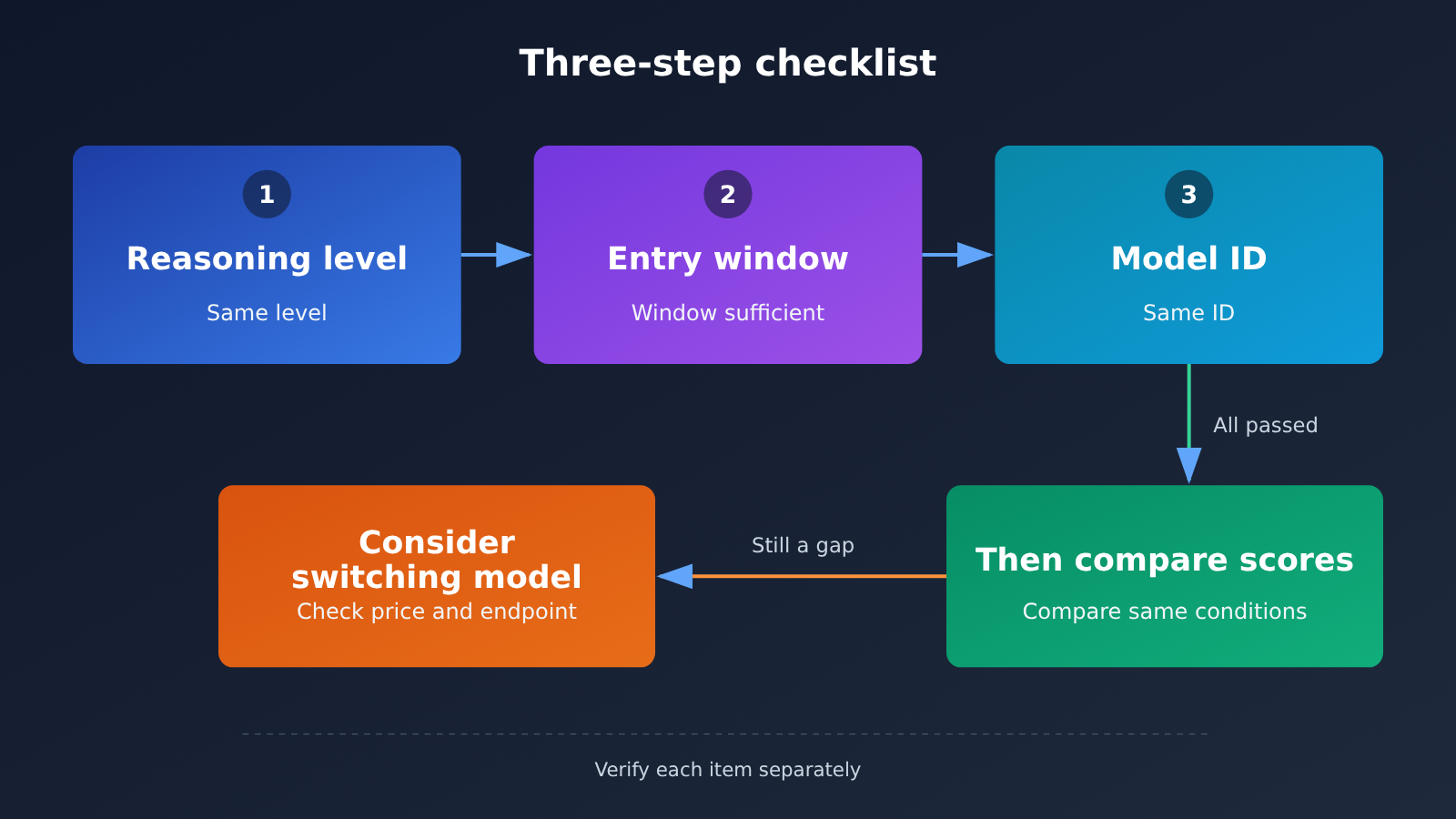
Once all three items line up and the gap is still obvious, that’s when it’s worth considering a model switch. Switching models isn’t just about changing a name—you also need to look at capability tier and cost at the same time, because the list prices for the various Gemini 4 IDs differ quite a bit. Below are the APIYI listed prices checked on 2026-11-20, all in USD per million tokens.
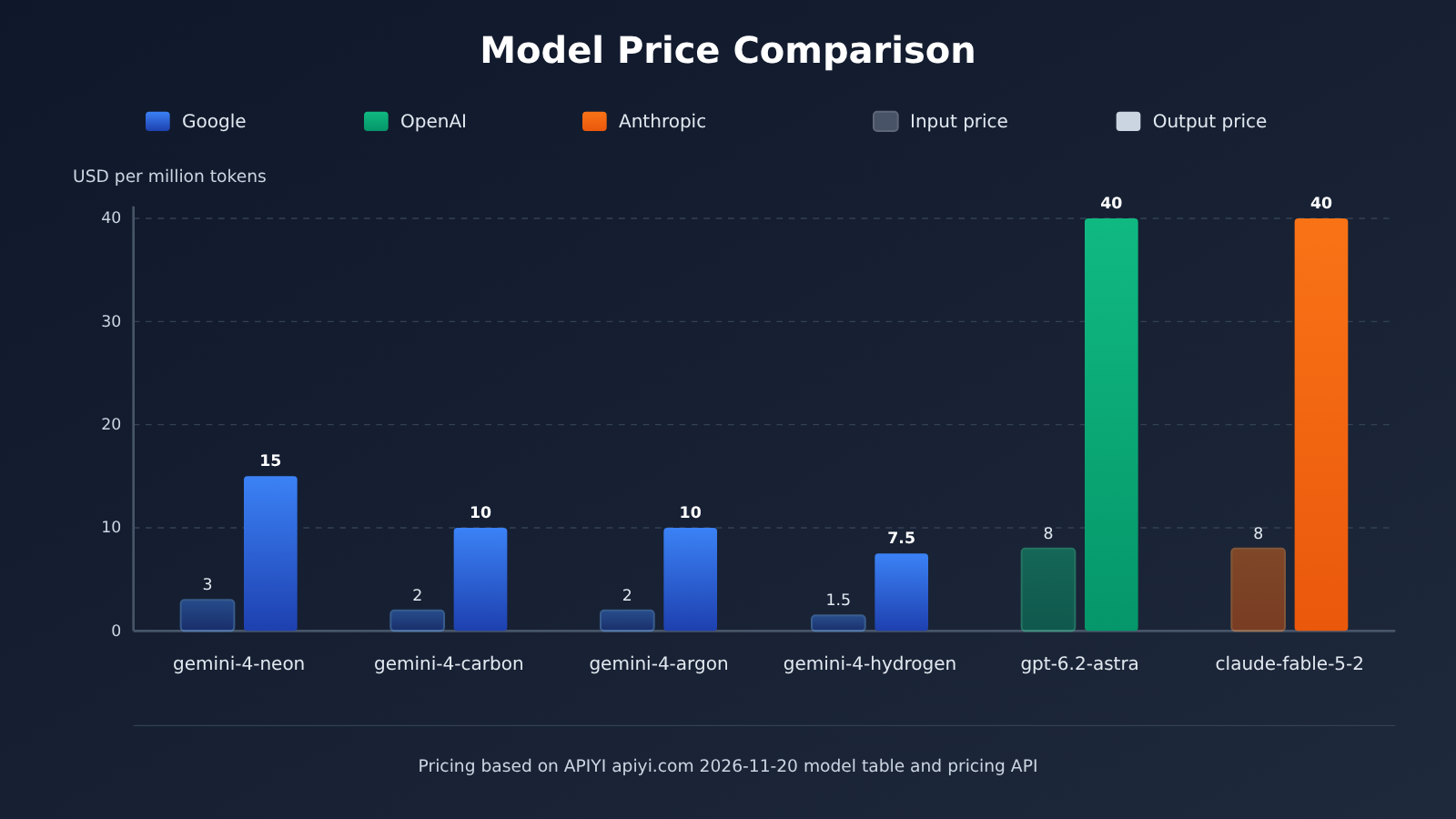
| Model ID | Input | Cache read | Output | Notes |
|---|---|---|---|---|
gemini-4-neon |
3 |
0.15 |
15 |
Refer to the pricing API; consistent with Google’s list price |
gemini-4-carbon |
2 |
0.1 |
10 |
Corresponds to Google’s introductory price through 2026-11-30 |
gemini-4-argon |
2 |
0.1 |
10 |
From the model master table |
gemini-4-hydrogen |
1.5 |
0.075 |
7.5 |
Lowest unit price of the four |
gpt-6.2-astra |
8 |
0.4 |
40 |
Input is 16 after 272000 tokens; see below for details |
claude-fable-5-2 / claude-fable-5-2-thinking |
8 |
0.2 |
40 |
Both IDs have the same price |
A few things in this table need to be explained separately; otherwise, it’s easy to miscalculate costs:
- Where gemini-4-neon comes from: The model master table updated at 2026-11-19 10:59 (UTC+8) didn’t include it, but the pricing API does. The pricing API gives
model_ratioas1.5,completion_ratioas5, andcache_ratioas0.05. Since amodel_ratioof1equals input2USD per million tokens, that works out to input3, output15, and cache read0.15. - Timing on gemini-4-carbon’s price: The current price corresponds to Google’s introductory price through 2026-11-30. Starting December 1, Google’s standard price is input
4and output20, so factor that change into long-term budgeting. - gpt-6.2-astra’s tiering: The model master table lists the first tier as input
8, cache read0.4, and output40, with input16after272000tokens. When input exceeds272000tokens, the pricing API calculates output as60and cache read as0.8. Refer to both pieces of information together.
💡 Recommendation: When switching models, put the candidate IDs under the same
base_urland compare them using the same thinking tier and input—only then will the conclusion hold up. You can look up the current prices for these IDs in APIYI apiyi.com’s model master table and pricing API. Confirm once more before calling; don’t rely only on this table.
Endpoint and Billing Checklist When Switching Models
| Checkpoint | Where to look | Why check it |
|---|---|---|
| Does the model ID exist? | Model master list docs.apiyi.com/models.md |
The master list version may lag behind, so some IDs need to be checked again via the pricing endpoint |
| Current unit price and multiplier | Pricing endpoint api.apiyi.com/api/pricing |
The multiplier can be converted into a USD unit price; the version number is shell-api-modelmak-v1 |
| Long-context tiering | Cross-check both the master list and the pricing endpoint | For example, gpt-6.2-astra changes unit price after exceeding 272000 tokens |
| Invocation endpoint | https://api.apiyi.com/v1 |
OpenAI-compatible format; switching models only requires changing model |
| Upstream price changes | Official pricing announcement | For example, Carbon’s introductory price ends on 2026-11-30 |
Common Questions FAQ
Q1: What conditions does the official benchmark score actually correspond to?
Leaderboard scores correspond to a combination of “a specific model ID + a specific thinking tier + a specific entry-point condition” — not a generic model name. For example, Neon’s score of 61 is an Artificial Analysis result under the `xhigh` tier. Quoting that number without the tier it came from is an easy way to mislead yourself.
Q2: Which should I check first — thinking tier, entry-point window, or model ID?
The suggested order is thinking tier first, then entry-point window, and finally the model ID. Once all three line up, compare scores. In practice, you can also just glance at the ID first, because if the ID is wrong, there’s no point looking at the other two. The order is about eliminating variables one at a time, not about mechanically following a fixed sequence every time.
Q3: If I crank the thinking tier to maximum, will I hit the official benchmark?
No, that’s not something anyone can promise. Aligning the tier only guarantees you’re comparing under the same conditions as the leaderboard; task distribution, prompt phrasing, sampling method, and other factors can still introduce differences. Also, not every ID has a top tier — Carbon, for instance, has no `xhigh`, and setting it to its own top tier isn’t the same as Neon’s `xhigh`.
Q4: Why does the same Neon behave differently in an IDE versus calling the API directly?
The entry-point conditions may differ. When Neon goes through the API, the window is `1,048,576` tokens, while the Antigravity docs say a maximum of `512K`. The tier naming doesn’t match either — the top tier in the Antigravity UI is called `Extra`. Long-context tasks performing worse in a smaller-window entry point is a result of condition differences; it doesn’t mean the model itself has degraded.
Q5: How do I compare multiple model IDs under the same entry point?
You can do it in three steps:
1. Register at APIYI apiyi.com and generate an API key; new users can claim free trial credits.
2. Set `base_url` uniformly to `https://api.apiyi.com/v1`, and switch IDs by changing only the `model` field.
3. Explicitly set the same thinking tier for each ID, and compare using the same batch of inputs.
With the entry point and tier both fixed, the differences mainly come from the models themselves.
Q6: gemini-4-neon isn’t in the master model table — can I still call it?
The master table updated on 2026-11-19 doesn’t include `gemini-4-neon`, but the pricing endpoint does have its multiplier, which works out to `3` for input, `15` for output, and `0.15` for cache reads in USD per million tokens — consistent with Google’s list price. My recommendation is to treat the real-time results from the APIYI apiyi.com pricing endpoint as authoritative, and confirm once more before you make the call.
Q7: What’s the easiest thing to miscalculate when switching models?
The most common mistakes are the long-context tier boundaries and price validity. For `gpt-6.2-astra`, once you go past `272000` tokens the input price changes from `8` to `16`, and the pricing endpoint also states that output is then billed at `60` and cache reads at `0.8`. Carbon is currently on an introductory price; starting December 1, Google’s standard price will be `4` for input and `20` for output.
Checking Official Benchmarks: Key Takeaways
- A benchmark score comes with conditions: the score maps to a combination of “model ID + thinking tier + entry point” — it’s not the score of the model name itself.
- Check the thinking tier first: Neon defaults to
high, Carbon defaults tomediumand has noxhigh, so don’t just rely on the defaults. - Then check the entry point’s window: Neon on the API offers
1,048,576tokens, while the Antigravity docs list a maximum of512K. - The ID has to be the same one: Gemini 4 has at least four IDs. Comparing Hydrogen’s results against Neon’s leaderboard entry tells you nothing.
- Aligning the conditions doesn’t guarantee a tie: matching the conditions only makes the comparison valid — it doesn’t promise your score will match the leaderboard.
- Switching models means comparing shelf prices: use a single endpoint on APIYI apiyi.com to compare multiple IDs, and cross-check prices in both the summary table and the pricing interface.
Summary
When a model underperforms the official benchmark, check these three things in this order:
- Match the thinking tier: explicitly set the same tier used in the benchmark, and confirm this ID actually has that tier.
- Match the entry point’s window: make sure your entry point can hold the test content, and watch for different tier naming across entry points.
- Match the model ID: put the full ID in the request, then go back to the model summary table and verify it word for word.
Once all three line up, if a gap still remains, that’s when you consider switching models. When you switch, compare capability tier, unit price, long-context tiers, and price freshness all at once. Your decision at that point should rest on comparisons made under identical conditions — not on a leaderboard number quoted without its conditions.
We recommend verifying multiple model IDs under the same https://api.apiyi.com/v1 endpoint via APIYI apiyi.com. Once the entry point and tier are pinned down, your comparison conclusions become much more reliable.
📚 References
-
APIYI Model List: A summary of model IDs and shelf prices
- Link:
docs.apiyi.com/models.md - Note: This article references the version updated on 2026-11-19 10:59 (UTC+8), which you can use to verify whether a model ID exists
- Link:
-
APIYI Pricing API: Real-time ratios and unit prices
- Link:
api.apiyi.com/api/pricing - Note: Version
shell-api-modelmak-v1. Whenmodel_ratiois1, it equals input at 2 USD per million tokens, and you can use this to convert the unit price of each model
- Link:
-
Google Gemini 4 Official Docs and Pricing: Thinking levels, window, and list prices
- Link:
ai.google.dev - Note: Look up the default thinking level, available levels, API window limit, and price change timing for each ID
- Link:
Author: APIYI Technical Team
Technical Exchange: Feel free to contact us via the APIYI official website homepage. More model and API documentation is available in the APIYI documentation center


