

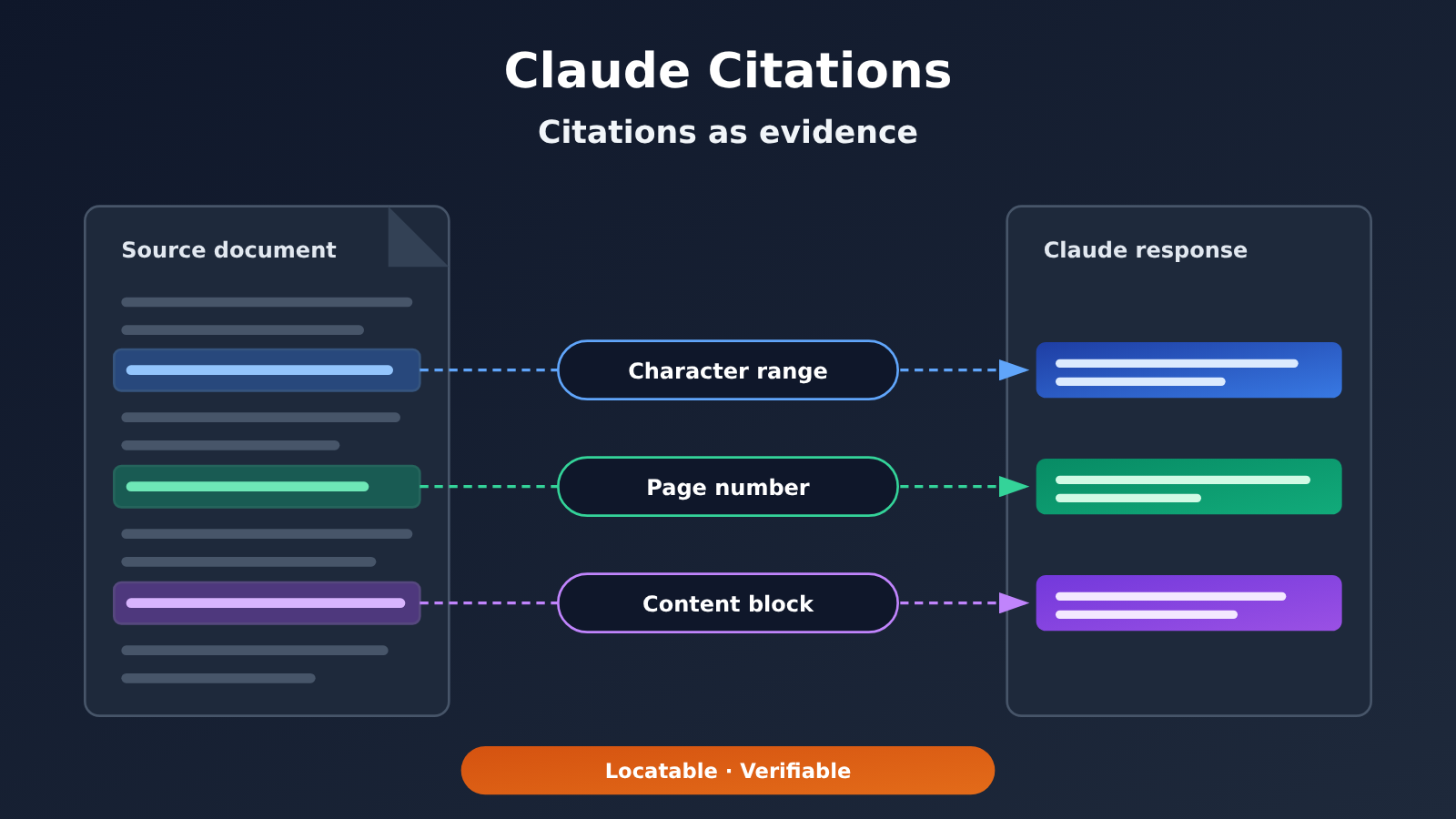
Short answer: Claude Citations let the model’s responses point to specific passages and locations in the documents you provide. Plain text is located by character range, PDFs by page, and custom content by block. If you want citations to be genuinely verifiable, the key lies on the application side: save each conclusion’s field values, the corresponding citation objects, and the qualifying conditions together. During the conversion to structured data, citations must not be lost.
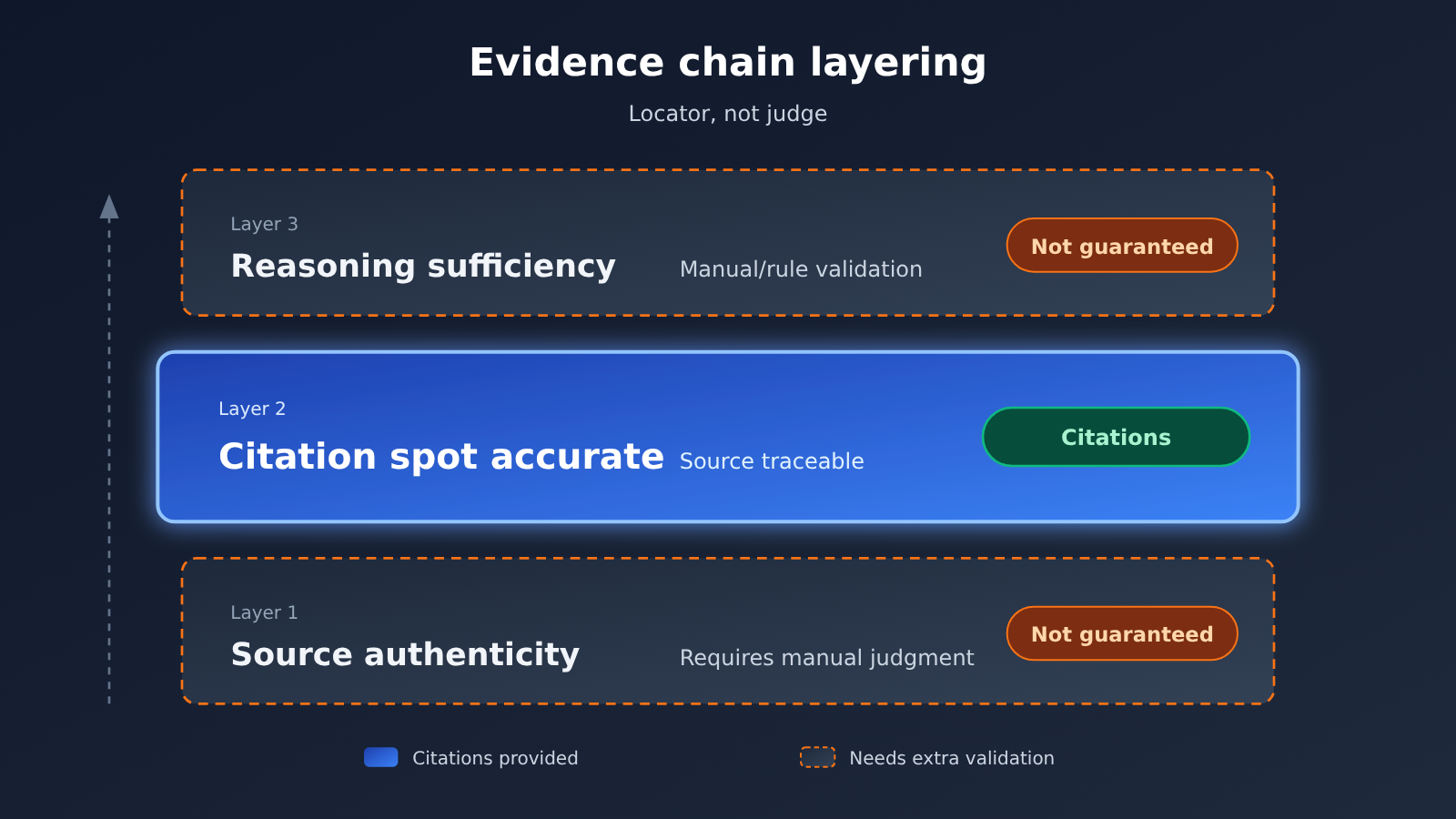
One caveat worth stating up front: a correct citation location only means “this sentence can be found in the document.” It doesn’t mean the source itself is true, and it doesn’t mean the reasoning is sound. Citations are a tool for human verification — they don’t replace verification.
What you’ll learn from this article:
- Which inputs Claude Citations works with, and what the three locating methods are.
- Why you can’t use strictly structured output
output_config.formatalongside citations turned on, and what the official recommendation is instead. - The limitations of scanned PDFs and images when it comes to citation support, and the workarounds available on the application side.
- How to design a “field value + citation + qualifying condition” data structure so that details like price, context length, and region can withstand scrutiny.
Index: The preamble uses a concept table to explain the relevant terms, then describes how this capability affects different groups of people. The “Objective Facts” section, based on the official documentation, covers locating methods, compatibility conflicts, and input limitations. The “Analysis and Judgment” section discusses how to turn citations into verifiable evidence, and which claims you shouldn’t make publicly.
Claude Citations: Concepts You Need to Know First
| Concept | Quick explanation |
|---|---|
| Citations | A Claude API capability that returns, in the answer, the cited snippets from documents the user provided, together with their locations |
| Character range location | How plain-text documents get cited — the cited source text is marked by its start and end character positions |
| Page number location | How PDF documents get cited — the source is marked by page |
| Content block location | How custom content gets cited — the unit is the block the developer defines |
| Strict structured output | Constraining the model to output in a specified format via output_config.format; it can’t be enabled at the same time as citations |
| Extractable text | The text layer in a PDF that can be read directly; scanned documents often don’t have this layer |
| OCR | Optical character recognition — converting text in images into text. This is handled on the application side, not a Claude citation capability |
| Qualifying condition | The premise that makes a given value hold — for example, the billing unit, model version, or applicable region |
Claude Citations: Impact at a Glance
| Audience | Impact |
|---|---|
| Developers | You can add locatable sources to Q&A, retrieval-augmented, and data-extraction apps; but you’ll need to make a trade-off between structured output and citations, and design the parsing logic yourself |
| Content and research professionals | When verifying, you can jump straight to the source snippet or page instead of hunting through it page by page; but you still have to judge whether the source is trustworthy and whether the conclusion holds |
| Product and operations | A good fit for displaying information that must come with a source, like “price, specs, policy”; scanned documents need to be converted to text and verified first |
| General users | Answers with sources make self-checking easier, but “has citations” shouldn’t be read as “definitely correct” |
Claude Citations: The Objective Facts
The following facts are based on Claude’s official documentation (source: platform.claude.com/docs/en/build-with-claude/citations), verified on 2026-11-17. This page is a continuously maintained document, and we couldn’t verify when this feature was first released, so no first-release date is given here.
The Three Positioning Methods of Claude Citations
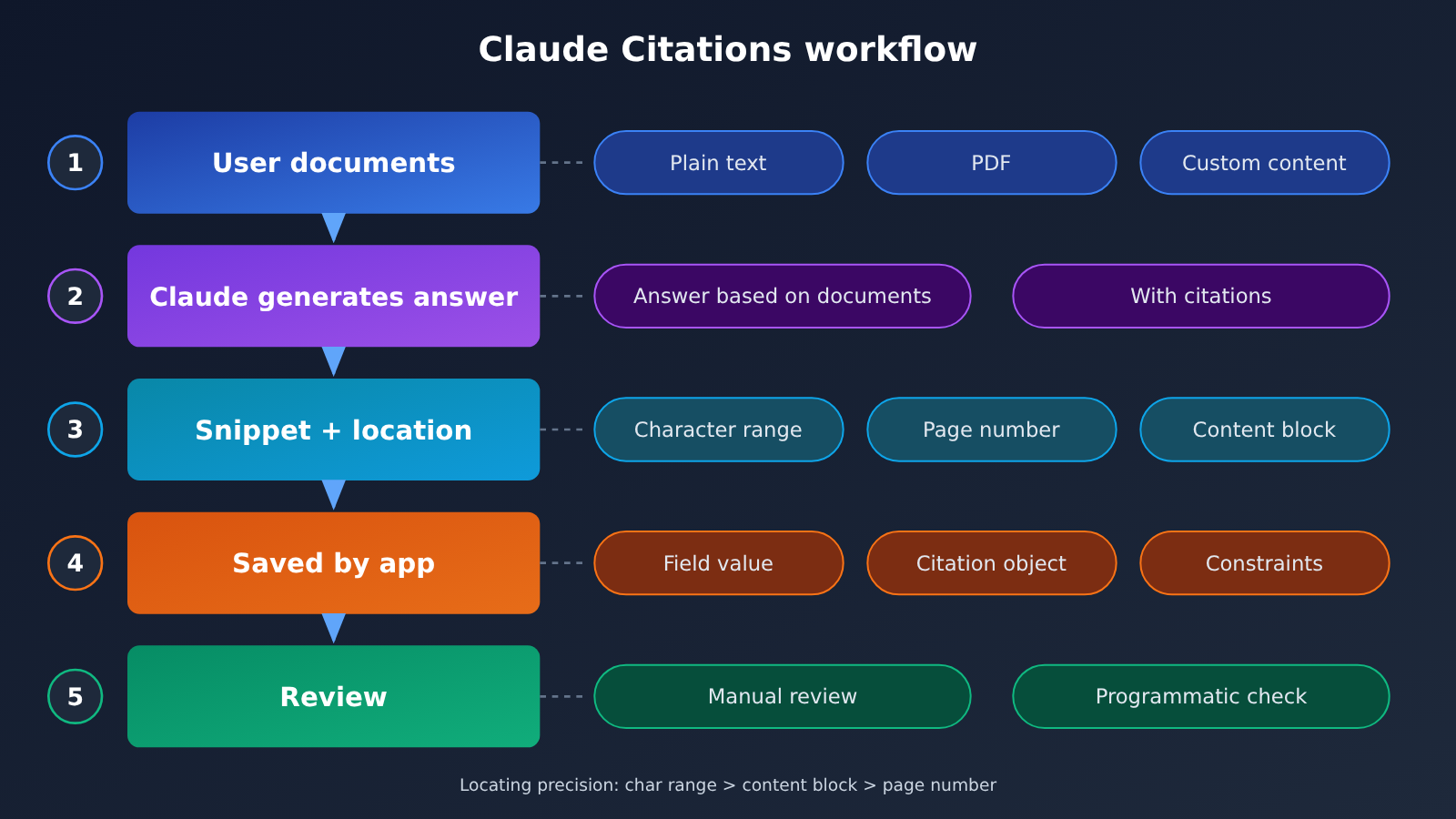
Citations apply to documents you provide yourself. When the model answers, it returns the quoted original passages along with their position in the document. The granularity of the location depends on the document type:
| Document type | Location method | How to use it during review |
|---|---|---|
| Plain text | Character range | Extract the original text using the start and end positions, so you can compare it character by character |
| Page number | Jump to the corresponding page and inspect it manually; you’ll need to find the exact spot within the page yourself | |
| Custom content | Content block | Look it up by the block the developer defined; granularity is determined by how it was split |
As you can see, the three methods don’t offer the same precision. Character ranges are the finest and best suited for programmatic verification; page numbers require manual searching within the page; and content-block precision depends entirely on how the developer split things up. If blocks are cut too large, the citation may be “correct,” but the verification cost goes up noticeably.
Claude Citations Isn’t Compatible with Strict Structured Output
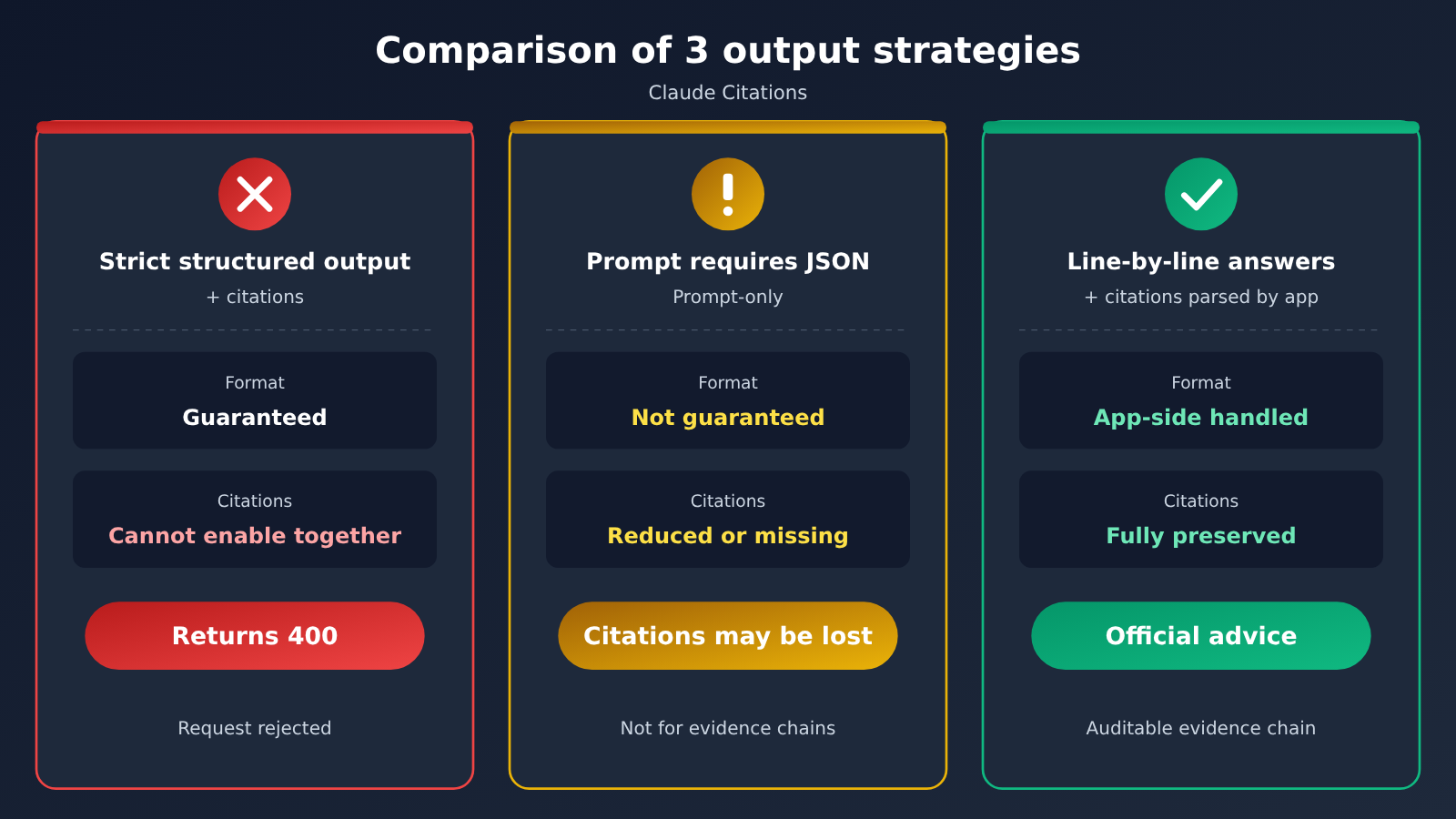
This is the pitfall you’re most likely to hit in production. The official docs state it plainly: once citations are enabled, you can’t use strict structured output output_config.format at the same time — turning both on makes the request return a 400 error.
The official alternative is to have the model answer field by field, line by line, with citations attached, and then let your program parse that into the structure you need. There’s another approach that looks workable: just ask the model in the prompt to output JSON. That does sometimes give you JSON, but citations may become sparse or disappear entirely. Keep the two approaches distinct:
- Strict structured output: the format is guaranteed, but it can’t be enabled alongside citations.
- Asking for JSON in the prompt only: the format isn’t guaranteed, citations may be missing, and it’s not suitable for building an evidence chain.
- Field-by-field, line-by-line answers with citations, then parsed by your program: the officially recommended route — the application side owns the format, and citations survive.
Claude Citations input limitations
| Input type | Can it be cited directly? | Notes |
|---|---|---|
| PDFs with a text layer | Yes | Located by page |
| Scanned PDFs with no extractable text | No, not directly | No text layer, so the text can’t be located |
| Images | Not supported | Citation capability doesn’t cover image content |
| Text produced by OCR | Depends on how your application handles it | OCR is a recommended application-side practice, not part of image citation |
It’s worth being precise about what “can’t be cited directly” means here. It refers to scanned PDFs that lack extractable text — it doesn’t mean all scanned material is forever off-limits. Developers can first pull the text out on the application side, then pass that text to the model as a document.
On the claims about improved results
The vendor has claimed that the citations feature delivers roughly a 20% improvement. That number can only be attributed to the vendor’s own statement; this article hasn’t independently verified it. This article also didn’t run any performance tests, so it doesn’t offer any quantitative conclusions about the benefit.
Claude Citations: Analysis and Judgment
The interpretation and recommendations below are based on the facts above. They reflect the author’s judgment, not official conclusions.
Turning Claude Citations into “field value + citation + qualifiers”
The real value of citations is that they let every conclusion be traced and verified. If all that ends up in your database is a single number — “128K” or “3 dollars” — then the citation was lost during data transformation, and no one can later confirm where it came from or under what conditions it held true.
A safer approach is to store three parts for every factual field: the field value, the citation object, and the qualifiers. Below is an example data structure for the application side. Field naming is up to the developer; this is not the format returned by the Claude API:
{
  "field": "input_price",
  "value": "3",
  "qualifiers": {
    "unit": "USD per million input tokens",
    "model_version": "<version noted in the documentation>",
    "region": "<applicable region; null if the documentation doesn't mention it>"
  },
  "citation": {
    "doc_id": "pricing-2026-11",
    "location_type": "page",
    "location": "<page number or character range returned by the model>",
    "quoted_text": "<source snippet returned by the model>"
  },
  "verified": false
}
The price figures in the example are only there to demonstrate the structure; they don’t represent any real price. A few design points to keep in mind:
- Prices must keep their billing unit: the same number billed per thousand tokens versus per million tokens means a thousandfold difference.
- Capabilities must keep their version: context length and feature support change from one model version to the next, and a number divorced from its version goes stale fast.
- Region-specific information needs its scope spelled out: when the documentation doesn’t mention it, record it as empty — don’t infer it and fill it in yourself.
- Keep the source snippet: during review you can compare it directly instead of calling the model again.
Use Line-by-Line Answers Instead of Strict Structured Output
Since citations and output_config.format can’t be enabled at the same time, engineering has to accept that “you’re responsible for the format yourself.” A workable flow looks like this:
- List each field to be extracted in the prompt, ask the model to answer only one field per line, and attach a citation to that line.
- On the application side, parse line by line and match each line’s answer text with the citation object it carries.
- Use fixed rules to convert the text into the target structure, while writing the citation as-is into the
citationfield. - Flag lines that have no citation, send them to manual review or drop them outright, and don’t store them as confirmed facts.
This adds a parsing step compared with just taking JSON directly, but what you get in return is a source for every field. For information where mistakes are costly, like prices and compliance clauses, that extra step is worth it.
Scanned Material: Get the Text First, Then Verify It Again
For scanned PDFs, the application can first use OCR to get the text and then hand it to the model for citation. But OCR itself introduces errors, so at minimum you need to verify the following:
- Numbers and units: decimal points, thousands separators, and currency symbols are the easiest to misread, and they’re exactly the core of price information.
- Table structure: misaligned rows and columns make values map to the wrong item, and no matter how accurate the citation location is, it means nothing.
- Page mapping: positions in the OCR text must map back to the original scanned page, otherwise reviewers can’t find the source.
In other words, in this pipeline citations point to the OCR text, not the original scanned image. The ceiling on reliability is set by OCR quality.
What Claude Citations Can’t Prove
Citations make an answer more verifiable, but you should be measured when describing them externally. The following claims lack support and shouldn’t be used:
- “Automatically searches and verifies online”: Citations apply to documents the user supplies; they don’t involve any web retrieval.
- “Zero hallucinations”: Correct citation placement doesn’t mean the model’s summaries and reasoning are free of bias or error.
- “The sources are guaranteed reliable”: If the source document itself is wrong, the citation just points to the error more precisely.
- “All scanned PDFs are impossible to handle”: The limitation is that with no extractable text, you can’t cite directly — but the application side still has workarounds.
A more accurate way to frame it: Claude Citations lowers the cost of proving “where this sentence came from,” while “is this sentence actually right” still needs a person or a rule to decide.
Directions Worth Watching
The following are predictions or things to keep an eye on — not confirmed facts:
- Whether citations and strict structured output can coexist in future versions. Once they do, the line-by-line parsing approach described earlier can be greatly simplified.
- Whether citation capability will extend to visual grounding on images or scanned pages. Right now the docs explicitly say image citations aren’t supported.
- Whether the vendor’s claimed accuracy gains hold across different document types — that needs third-party or your own business data to verify.
Until these questions have clear answers, the safer strategy is to treat Claude Citations as a “locator” in the evidence chain, not a “judge.”
Better to have no books at all than to trust them completely. — Mencius, Jinxin II


