
Author’s note: ChatGPT Dots advances user-authorized work around long-term goals. Its ability to keep executing depends on the interplay of task state, context, tools, and scheduling.
Bottom line up front: ChatGPT Dots, released by OpenAI on September 29, 2026, turns AI from “a Q&A tool that waits for your question” into “an executor that accepts delegated tasks and keeps pushing work forward.” Each Dot has its own cloud computer and browser, can retain project context, proactively research authorized information sources, and start work based on time or events. When something requires judgment and approval, it hands the decision back to the user. The “24 hours” in the title refers to a working model: after you leave, the agent can still decide its next step based on goals, events, time, and task state. It doesn’t promise infinite loops, real-time monitoring, or zero-cost operation. Dots is currently available to individual ChatGPT Pro 100/200/500 users, as well as eligible Business Premium, Enterprise, Edu, and Healthcare workspaces.
The sections below first compare Dots with regular ChatGPT, Cron scripts, and traditional workflows, then break down the internal mechanics that keep it working, including the relationship among task state, memory, proactive research, scheduled tasks, and background agents. Next, they organize use cases from official demos, media hands-on tests, and user reports, presenting the three kinds of evidence separately. Finally, drawing on the OpenAI Agents SDK and Microsoft Research’s SentinelBench, they explain which technical components persistent agents need, what costs and risks they involve, and which work is worth handing to them.
Terms to Know: ChatGPT Dots
| Term | Explanation |
|---|---|
| Always-on Agent | An AI system that can keep advancing delegated work during the gaps when the user isn’t sending messages |
| Cron | A scheduling approach that launches a program on a fixed time rule, for example “run once every day at 9 o’clock” |
| Event trigger | Starting a processing flow only when a specified change occurs, such as a new bug report showing up in a Slack channel |
| Task state | Information recording how far a piece of work has progressed, what the result was, and what it’s still waiting on |
| Long-term memory | User preferences, project decisions, and background materials saved across tasks |
| Tool calling | The model invoking external programs to look up information or perform actions |
| Proactive Research | Dot doing read-only background research on authorized data sources when no new message has arrived |
| Background Agent | Sub-agents that Dot dispatches to handle part of the work in parallel |
| Human-in-the-loop | The steps in a task that need a person to judge, approve, or correct |
| False positive rate | The share of notifications the system raises that don’t actually need action, out of all notifications |
| Prompt Injection | Malicious instructions hidden in external content like web pages or emails, trying to hijack the Agent’s behavior |
| Token | The basic unit the model uses to measure input and output, which directly determines invocation cost |
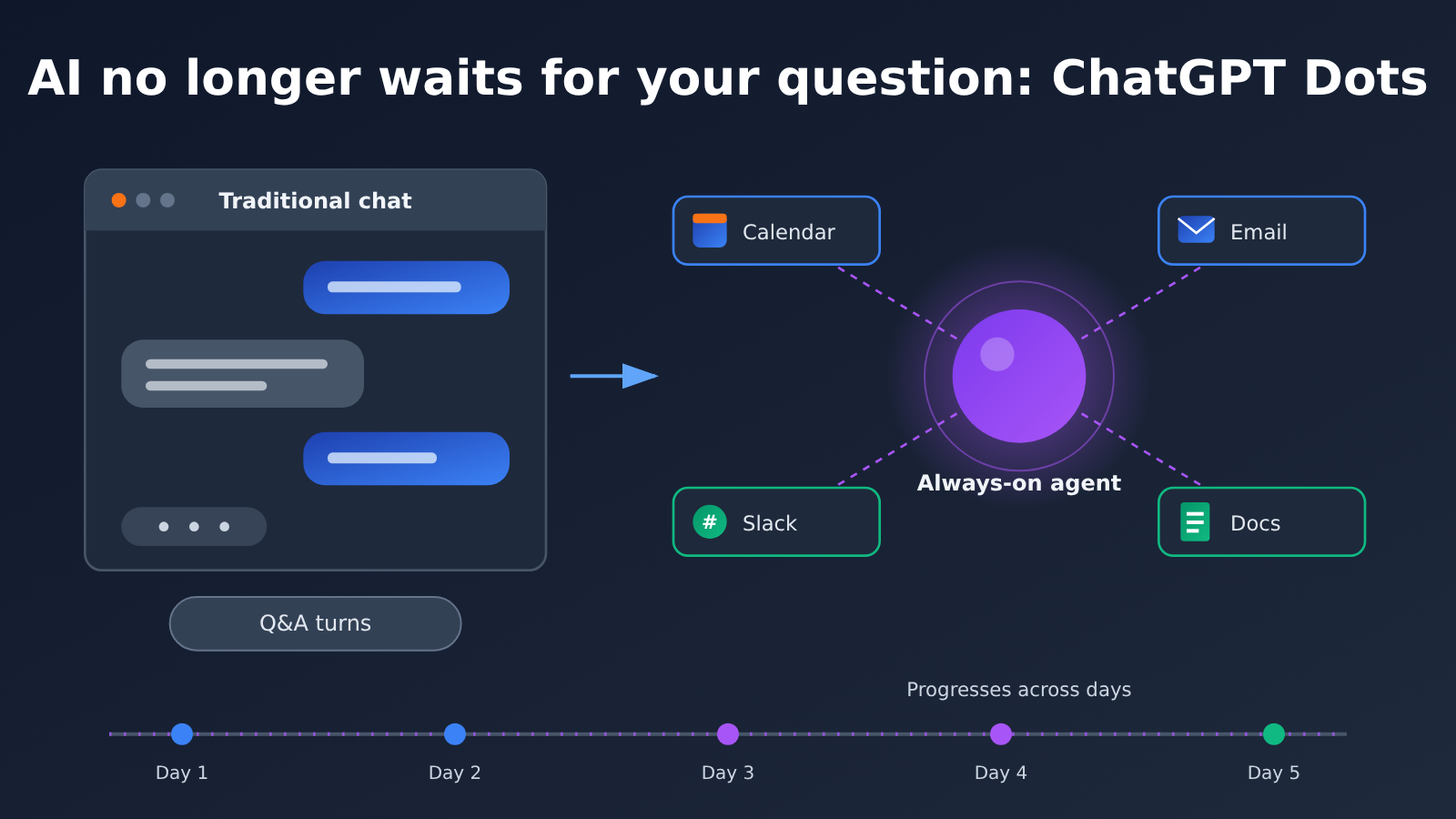
1 From Waiting for a Prompt to Taking Ownership of Tasks: What ChatGPT Dots Changes
1.1 ChatGPT Dots’ Official Positioning
According to OpenAI’s article “Introducing dots” and its help documentation, Dots is an always-on personal AI agent. The official description highlights these core capabilities:
- Always-on operation: It can keep working on delegated tasks even when the user hasn’t sent a new message.
- Its own cloud computer: Each Dot has a separate cloud computer and browser, so cloud tasks continue even after the user’s computer is turned off.
- Persistent context: It can use ChatGPT memory, past conversations, and information from connected apps.
- Proactive research: It conducts background research on authorized data sources and surfaces information worth paying attention to.
- Multi-project execution: It can work on multiple projects at once, break tasks down, and launch background agents to process them in parallel.
- Cross-platform communication: You can reach the same Dot through ChatGPT Web, desktop, mobile, Slack, and Microsoft Teams.
- Human-AI collaboration: When something requires user judgment or approval, it proactively hands the decision back to the user.
At launch, OpenAI also noted that Dots is integrated with OpenAI’s plugin ecosystem and can connect to more than 4,000 apps. That number describes the size of the ecosystem; the apps and permissions actually available to each account depend on the user’s own connections and authorizations.
1.2 How ChatGPT Dots Changes the Human-Agent Division of Labor
With regular ChatGPT, the user is the task orchestrator: every step has to be initiated by a person, who also has to remember progress and switch back and forth between different conversations. Dots shifts part of the orchestration responsibility to the agent. The user hands over a long-term goal, such as “follow this client project through to launch.” The Dot is responsible for remembering progress, watching for changes, and planning the next step, asking the human to make the call only at key milestones.
So the human role changes from “issuing instructions one by one” to “delegating, supervising, and approving.” The value of this shift is continuous ownership of work: it removes the coordination cost of chasing progress across multiple systems, reconciling information, and pushing for the next step. If you merely add a few more automation steps to a workflow, the gains are limited.
2 Why Traditional Automation Can’t Fully Replace Agents Like ChatGPT Dots
2.1 Technical Comparison of Cron, Workflows, and Persistent Agents
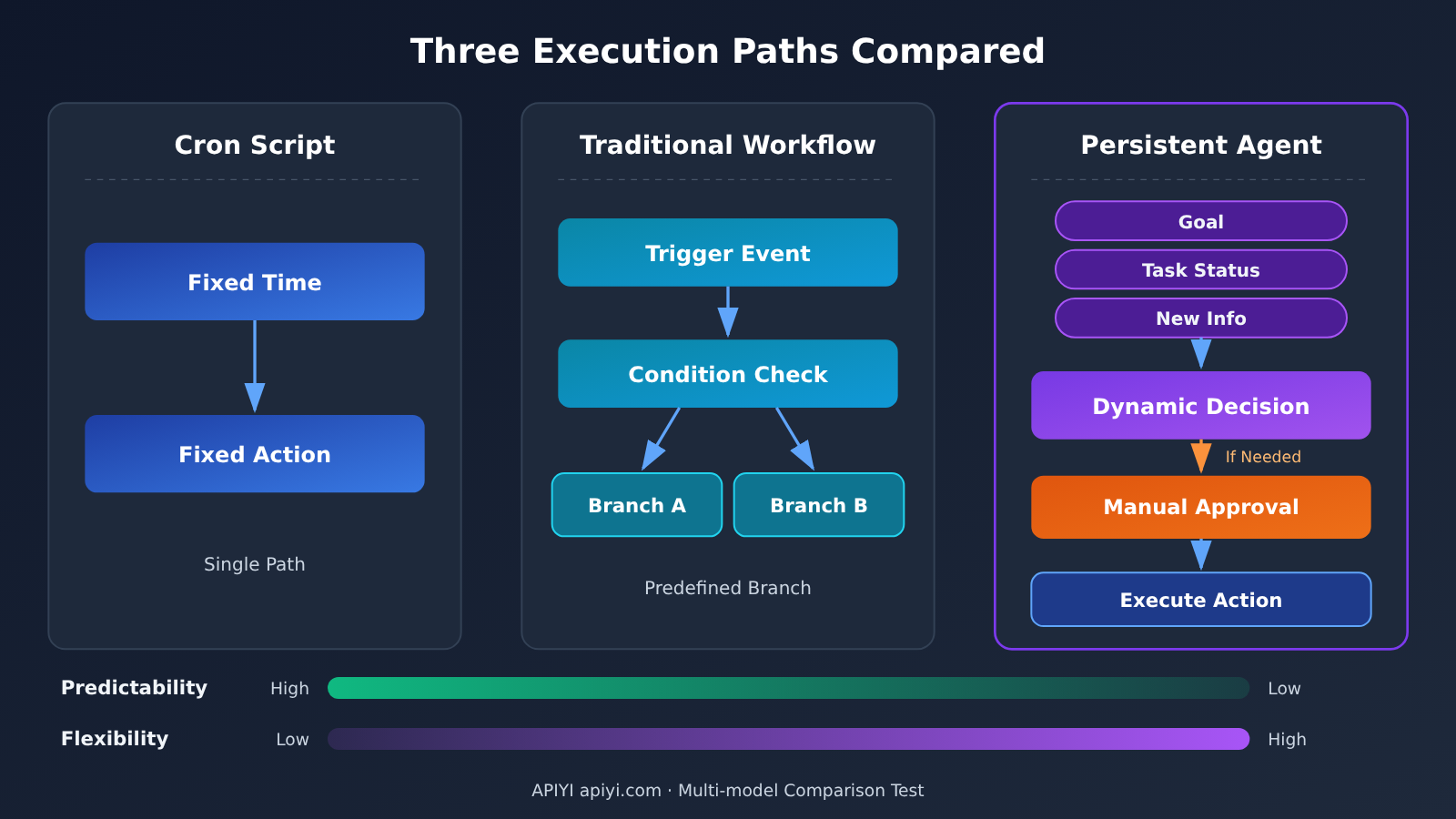
Traditional automation excels at executing pre-written processes, while a persistent Agent can decide the next step based on the current task state and new information. Here’s how the three differ across key dimensions:
| Dimension | Cron scheduled script | Traditional workflow | Persistent Agent (e.g., Dots) |
|---|---|---|---|
| Trigger method | Fixed time | Fixed time or event | Time, events, and task state |
| Execution logic | Pre-written | Pre-orchestrated nodes | Dynamically determined based on context |
| Information understanding | Requires programmatic encoding | Relies on nodes and conditions | Calls models to understand content |
| Exception handling | Predefined rules | Predefined branches | Analyzes the situation and proposes a plan |
| Cross-task memory | Must be built in-house | Depends on workflow configuration | Maintains long-term project context |
| Adjustment method | Modify code | Modify workflow | Adjust using natural language |
| Operating cost | Primarily infrastructure | Software and infrastructure | Models, tools, and infrastructure |
| Predictability | High | Relatively high | Affected by model output |
Here’s an example. A Cron script can check the inbox every 10 minutes and forward emails containing specific keywords. An Agent, meanwhile, focuses on email around a specific goal — when an important email arrives, it works out which project it relates to, whether follow-up is needed, and what reply to draft.
2.2 Tasks with Fixed Rules Still Suit Traditional Automation
For clear, repetitive work with fixed rules — like backing up the database every night or exporting a fixed report every Monday — Cron and workflows are easier to control, verify, and maintain, and they cost less. An Agent’s advantage is concentrated in tasks that require understanding new information and making dynamic adjustments. A more sensible architecture is to let both coexist: deterministic steps go to scripts, judgment steps go to the Agent.
3 How ChatGPT Dots Keep Working Continuously
3.1 Task state decides Dots’ next step
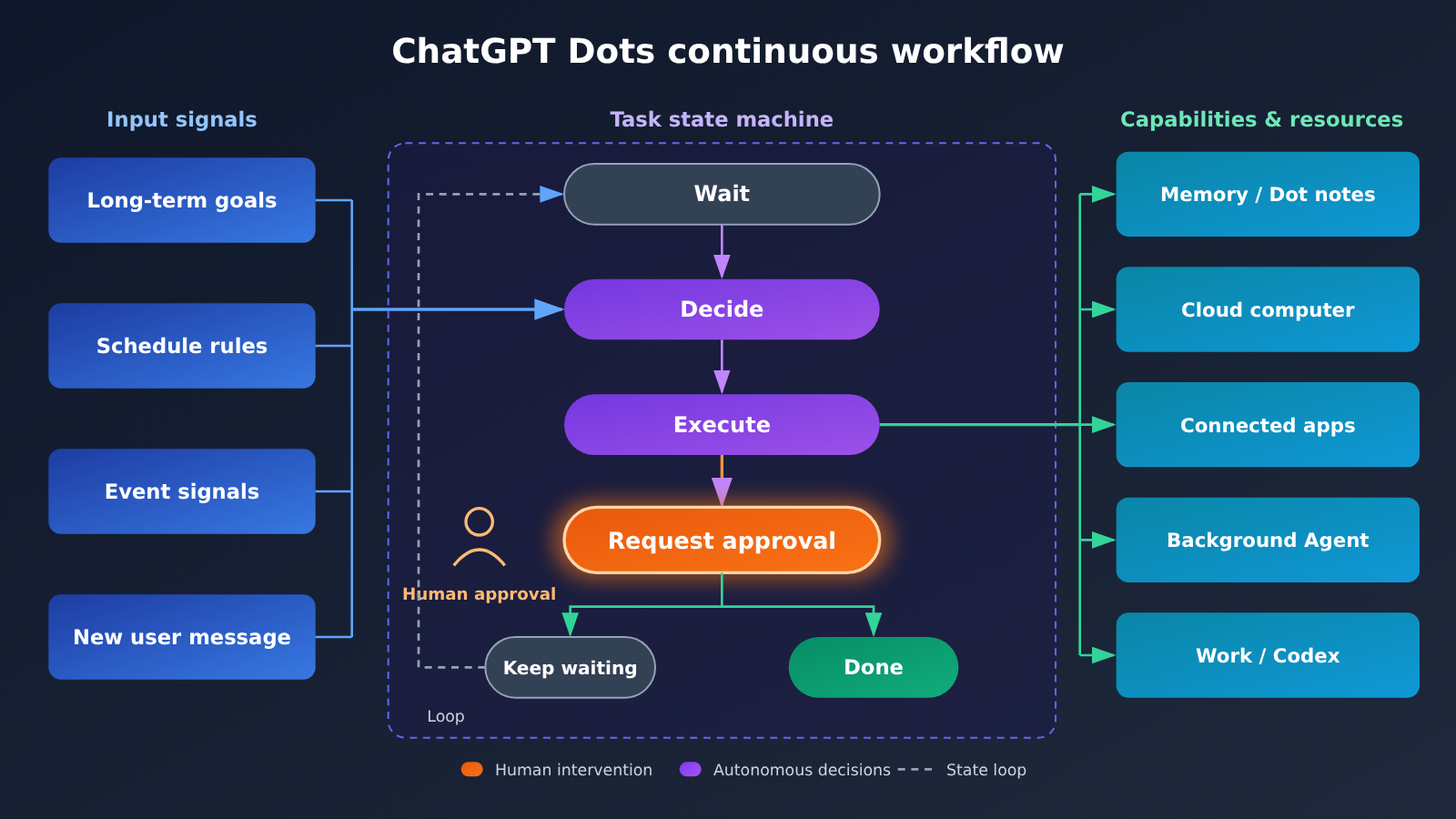
OpenAI’s Tasks and memory documentation explains that a Dot can decide for itself when to pause and when to resume work based on task state, so users don’t need to set a fixed schedule for every step. It can tell when to keep going, wait for external conditions to change, restart at the right moment, adjust subsequent steps based on new information, and proactively ask the user for input when a decision is needed.
So Dots’ “continuous work” is a decision process driven jointly by goals, events, time, and task state—it doesn’t spin idle once every minute. This design lets the Agent stay quiet when nothing new is happening, saving resources for the moments that genuinely require action.
3.2 Long-term memory and project context
A Dot’s context consists of four layers of data:
- ChatGPT Memory: A Dot can access relevant ChatGPT memories and recent conversation context.
- The Dot’s own notes: accumulated user preferences, work habits, project decisions, and long-term responsibilities.
- Current task context: the instructions, files, retrieval results, and tool execution results of the current conversation.
- Data from connected apps: information from authorized apps, which it can study under appropriate conditions to form its own memories.
These four layers are independent of one another. A Dot’s memory is curated relevant context and notes, not the full text of every chat log. A newly created task also doesn’t necessarily carry all of the user’s history with the Dot—the Dot will retrieve past conversations when it needs to fill in the background.
3.3 How proactive research, scheduled tasks, and event monitoring differ
All three mechanisms let Dots keep working when the user isn’t sending messages, but their triggers and permission boundaries are different.
- Proactive research: with no new messages, it runs background research on authorized sources—for example, spotting that a price in a project file doesn’t match an email, or that an important deadline has changed. Its permissions are read-only: it can’t message other people, can’t modify content through plugins, and can’t operate a browser or computer. Any follow-up action must go through the normal permission, approval, and security checks.
- Scheduled Tasks: run at a set time, such as checking the calendar every morning or summarizing project progress every Monday. When you create one, you need to specify what to check, the run time, the time zone, the end date, which changes should trigger a notification, and where the results should go.
- Event Monitoring: when a connected service supports the relevant events, it watches for a specific type of event, such as a new bug appearing in Slack. The user must explicitly tell the Dot what to monitor. Adding the Dot to a channel doesn’t mean it will automatically monitor the whole channel.
Scheduled tasks are preset actions executed on a schedule, while proactive research is judgment-based discovery grounded in context—they’re fundamentally different. Also, stopping a running task and canceling a recurring schedule are two separate operations, so you need to check each one separately.
3.4 Background Agents and delegated tasks
Dots can break complex tasks apart, spin up background Agents to work on them in parallel, and then consolidate the results. It can go further and create ChatGPT Work tasks (standalone complex workflows) and Codex tasks (software development and testing). Once a user connects their local computer to the Dot, the Dot can also dispatch tasks to run in the local environment. Local access is off by default, requires authorization through the ChatGPT desktop app, and can be revoked at any time with Revoke access.
4 What Long-Term Work Can ChatGPT Dots Handle for You
4.1 User-Reported Cases
The following cases come from personal user shares in the Reddit community in October 2026. They are user-reported: no independent verification was performed, and no accuracy rates or statistical data were provided. They represent personal experience only.
| Case | Input information | Dot’s action | Result reported by the user | Where humans stay involved |
|---|---|---|---|---|
| Missed email reminders | Authorized mailbox, project context | Checks the mailbox and identifies forgotten or missed items | Proactively reminds the user to handle missed items | User decides whether and how to reply |
| Cross-system project follow-up | Cloudflare, CRM, Gmail (integrated via Composio MCP) | Moves the project forward across systems, builds and tests custom MCP, creates a customer information collection portal and a Chrome extension, and monitors team email and calendar | Proactively reminds about pending items | User reviews outputs and key decisions |
| Business reporting | Customer financial data | Creates a customer financial dashboard | User says it took about 1 hour; similar work used to take 4–5 days | User checks the data and presentation |
| Recurring operations | Scheduling + Google Sheets add-on | Runs daily and weekly tasks and updates business spreadsheets | User believes it can handle some work that Cron struggles to handle flexibly | User sets rules and spot-checks results |
Another Reddit user ran a roughly one-day test of the mechanics: they handed hundreds of PDFs and thousands of pages of material to Dot for review, and the task still retained progress even as it stretched over multiple days. When they interrupted with a question midway, Dot would pause the review, look up information to answer, and then return to the original task. The user also observed that Dot’s cloud computer, a connected Linux computer, and a background research agent were all running at the same time. He himself also noted that how quotas are calculated across these execution paths has not yet been confirmed.
4.2 Media Hands-On Test: Axios Compares Dots and Meta Muse
Axios reporter Ina Fried published a comparison test of Dots and Meta Muse on October 20, 2026, with the task centered on a trip to watch the WNBA Finals:
- Multi-step planning: Both found that the game date had been moved up and that tickets were not yet on sale; Dots also found a conflict between the trip and the user’s existing schedule.
- Document generation: Dots produced an 8-page party packet and a 38-page commemorative program; Muse’s program was 35 pages. Both programs contained questionable statistics.
- Photo keepsake album: Dots made a 12-page album in 47 seconds; this reflects only the result of that test.
- Real-world shopping: Dots directed the user to the Target app and continued using a saved account, but the entire purchase process was not fully automated.
The author’s conclusion was that this type of agent is suited to research and preparation work, but the results still need human editing and fact-checking. For operations involving accounts and money, the final decision should stay with humans.
The official scenarios also include meeting preparation, sales data monitoring, customer feedback tracking, content creation, GitHub project management, and travel planning. These are product examples that indicate the direction of its capabilities; they should not be treated as a guarantee of what every run will achieve.
5 What Does It Take Behind the Scenes to Keep an Agent Working 24/7?
5.1 The Building Blocks of the Agents SDK
OpenAI’s Building Agents guide boils an agent system down to a few foundational concepts, and these map neatly onto the various stages of continuous operation:
- Agent: a combination of model, instructions, and tools, responsible for understanding and execution.
- Handoff: handing work off to another agent, which corresponds to Dots dispatching a background agent.
- Guardrail: constrains inputs, outputs, and execution behavior, which corresponds to approvals and safety checks.
- Session: maintains conversation history across runs, which corresponds to task state and context continuity.
- Tracing: records the execution process to make troubleshooting and auditing easier.
An agent that can keep working is actually a combination of six components — “tool calling + state management + event monitoring + long-term memory + execution scheduling + safety mechanisms” — and it’s hard to run stably if any one of them is missing.
5.2 Research Insights from SentinelBench
Microsoft Research released SentinelBench in June 2026. It’s a benchmark built specifically to evaluate monitoring agents that need to keep track of external state changes over long periods. The benchmark includes 100 tasks across 10 simulated web environments—email, calendar, finance, professional networking, entertainment, and more—and assesses task completion rate, response time, and resource consumption.
The main takeaway from this research is that long-horizon monitoring tasks depend on staying attentive to the environment and acting only when a change truly warrants action. Continuously executing actions isn’t necessarily effective. This aligns with Dots’ design approach of pausing and resuming based on task state. It’s worth noting that SentinelBench is an independent research benchmark and can’t be used to infer Dots’ specific success rate.
5.3 Design Plan for a Self-Built Continuous Agent
If you want to implement a similar “state-driven” working pattern in your own system, you can build a prototype with an OpenAI-compatible API. The code below is a design example: it shows how the judging step is written, and no run results are included.
import openai

client = openai.OpenAI(
    api_key="YOUR_API_KEY",
    base_url="https://api.apiyi.com/v1"  # APIYI OpenAI-compatible endpoint
)

# Have the model decide whether a new email needs to alert the user
resp = client.chat.completions.create(
    model="gpt-4.1",
    messages=[
        {"role": "system", "content": "你是项目跟进助手,只输出 JSON:{\"action\": \"ignore|remind|ask_human\", \"reason\": \"...\"}"},
        {"role": "user", "content": "项目:官网改版,截止 11 月 30 日。新邮件:设计方说交付推迟到 12 月 5 日。"}
    ]
)
print(resp.choices[0].message.content)
View the full design: a time + event + state-driven Agent loop
import json
import time
import openai

client = openai.OpenAI(
    api_key="YOUR_API_KEY",
    base_url="https://api.apiyi.com/v1"
)

# Task state: the heart of continuous work, it decides what happens next
task = {
    "goal": "跟进官网改版项目直到上线",
    "status": "waiting",          # waiting / judging / awaiting_human / done
    "memory": ["截止日期 11 月 30 日", "发送邮件前必须人工确认"],
    "next_check": time.time(),     # scheduled fallback check
}

def fetch_new_events():
    """Event source: hooks into the email/IM webhook or incremental API; left as a placeholder here"""
    return []

def judge(event: str) -> dict:
    """Call the model to judge: ignore, remind, or ask a human to decide"""
    resp = client.chat.completions.create(
        model="gpt-4.1",
        messages=[
            {"role": "system", "content": "根据目标与记忆判断新事件,只输出 JSON:"
             "{\"action\": \"ignore|remind|ask_human\", \"reason\": \"...\"}"},
            {"role": "user", "content": json.dumps(
                {"goal": task["goal"], "memory": task["memory"], "event": event},
                ensure_ascii=False)}
        ]
    )
    return json.loads(resp.choices[0].message.content)

def run_once():
    events = fetch_new_events()
    # No events and the scheduled check time hasn't arrived yet: just wait, so we don't poll uselessly and burn tokens
    if not events and time.time() < task["next_check"]:
        return
    for ev in events:
        decision = judge(ev)
        if decision["action"] == "ask_human":
            task["status"] = "awaiting_human"   # Human approval step: the Agent doesn't act on its own
            print("需要你决定:", decision["reason"])
        elif decision["action"] == "remind":
            print("提醒:", decision["reason"])
        task["memory"].append(f"已处理事件:{ev[:50]}")
    task["next_check"] = time.time() + 3600     # scheduled fallback once an hour

# In a real deployment, a scheduler or event callback triggers run_once, not a busy while True loop
This design reflects three principles: events come first with a timed fallback; state determines the action; and high-risk actions go through human approval.
🚀 Quick start: When you’re building your own Agent prototype, you can call OpenAI, Claude, Gemini, and other models with a single API key through APIYI apiyi.com, and compare how they handle judgment tasks like “should it act or not.” New users get free test credits.
6 The Boundaries of ChatGPT Dots’ Continuous Work: Reliability, Cost, and Permissions
6.1 False Alarms, Wrong Judgments, and Wasted Polling
The official privacy and safety documentation states plainly that the Agent may misread a task, misjudge materials, generate incorrect data, fail to log in to a website, or run into an unavailable execution environment — and that its output needs to be checked by a human. The questionable statistics that surfaced in Axios’s testing show these risks really do exist in everyday use.
Long-running operation also brings a few costs that are easy to overlook: executing a task and waiting for an event consume different resources; when the model restores context it re-reads materials, which adds token overhead; unnecessary polling causes duplicate executions. That’s exactly why SentinelBench factors response time and resource usage into its evaluation together: long-term monitoring has to be both fast and cheap.
6.2 Permissions and Human Approval
Through Custom Rules, Dots lets users set execution requirements for different actions, in four tiers: execute directly without asking, execute after pre-authorization, ask before executing, and hand back to the user. For example, you can let it tidy up a designated folder automatically, while requiring it to ask before sending an email, requiring confirmation for purchases, and banning it from posting to social media entirely.
Before any operation that could affect the account or disclose information externally, the Auto-review mechanism checks whether the action conforms to instructions, rules, safety requirements, and permission boundaries. Operations like changing a password or moving funds require the user to take over personally, and permanently deleting data or installing software may need approval every single time. Against prompt injection, OpenAI has adopted measures such as distinguishing instruction sources, restricting tools, approval, and continuous monitoring — while stating clearly that these measures can’t eliminate all risk.
6.3 Cost: Personal Pro vs. Enterprise Dots
- Individual users: Pro 100 ($100/month), Pro 200 ($200/month), and Pro 500 ($500/month) all include Dots access. The official Dots documentation for personal Pro doesn’t list a separate monthly fee per Dot. Personal Pro requires you to be at least 18, isn’t yet available in the European Economic Area, the UK, or Switzerland, and access is being rolled out gradually.
- Delegated tasks: ChatGPT Work or Codex tasks launched by a Dot are billed separately according to the corresponding product’s quota or pricing rules, and consumption depends on the model, context, reasoning, tool calls, and retrieval.
- Enterprise workspaces: Enterprise, Edu, and Healthcare get a free admin preview from November 4 to 18, 2026; from November 18, eligible workspaces are enabled by default and billing begins. Enterprises can choose a flat rate by work type or usage-based billing; tasks delegated to Work or Codex are charged separately, and the exact amount follows the pricing that actually applies to the workspace. Each member can create one personal Dot.
6.4 Five Metrics for Evaluating a Persistent Agent
To judge whether an Agent is really “working for you,” you need quantifiable metrics:
| Metric | How it’s calculated | What it tells you |
|---|---|---|
| Task completion rate | Successfully completed tasks / all tasks | Can it actually deliver results |
| Average response time | Time from event occurrence to a valid response | Does it meet the business’s timeliness needs |
| False alarm rate | Triggers with no action needed / all triggers | Are alerts interrupting people |
| Human intervention rate | Tasks requiring user intervention / all tasks | How much manual effort is actually saved |
| Cost per task | Model, tool, and server costs / number of successfully completed tasks | Is it economically worthwhile |
💰 Cost optimization: When you build your own monitoring Agent, the “decide whether action is needed” step is called most often, so it’s a good candidate for tiered model selection: a lightweight model for the first pass, a strong model for deep analysis. Calling multiple models through APIYI apiyi.com with pay-as-you-go billing lets you estimate cost per task using the table above.
7 Which Tasks Are Actually Worth Handing Off to Agents Like ChatGPT Dots
You can judge whether a task is a good fit for an always-on agent across five dimensions:
| Dimension | Better suited for an agent | Better suited for traditional automation or humans |
|---|---|---|
| Rule clarity | Rules are ambiguous and require semantic understanding | Rules are clear and fully encodable → scripts |
| How often information changes | Many information sources, changes at irregular intervals | Changes are fixed and predictable → scheduled scripts |
| Task duration | Long-term projects spanning days or weeks | One-off short tasks → regular chat |
| Decision risk | Low risk, or approval checkpoints can be added | Involves funds, passwords, or irreversible actions → humans |
| Manual coordination cost | Requires tracking progress and reconciling information across multiple systems | Simple operations within a single system |
Based on this, the tasks that are more worth delegating include: long-term research and information tracking, cross-system project follow-up, reminders for missed items, periodic report updates, and meeting preparation and post-meeting action organization. High-risk operations such as money transfers, password changes, and public publishing should stay in human hands, or at least be set to “ask before executing.”
💡 Recommendation: If your team wants to build its own agent workflows beyond Dots, different models vary in tool use, long context, and judgment stability. You can first run a small-scale comparison by switching models with the same codebase on APIYI apiyi.com, then decide which one to use in production.
FAQ
Q1: What is ChatGPT Dots?
Dots is a persistent personal AI Agent that OpenAI launched on September 29, 2026. It has its own cloud computer and browser, can retain project context, proactively research authorized information sources, advance work based on time or events, and hand matters back to the user when a decision is needed.
Q2: Can Dots really run continuously for 24 hours?
“24 hours” describes a working mode: after the user leaves, Dot can still decide when to continue and when to wait based on goals, events, time, and task state. It’s constrained by connected apps, the event types it supports, and usage quotas — it won’t loop endlessly, and it can’t monitor every information source in real time.
Q3: What’s the difference between Dots’ proactive research and scheduled tasks?
Scheduled tasks execute specified actions at set times. Proactive research is read-only research on authorized sources based on context when there are no new messages, surfacing information worth paying attention to. Proactive research itself can’t send messages, modify content, or operate the computer — follow-up actions go through permissions and approval.
Q4: Does using Dots cost extra?
Individual Pro 100/200/500 users are eligible, and the official pricing doesn’t list a separate monthly fee for Dots. Work and Codex tasks delegated by Dot are billed separately under their respective quotas or rules. Enterprise workspaces are billed starting November 18, 2026, with the option of a flat rate by work type or usage-based billing; the actual amount depends on your quote.
Q5: How can developers build a persistent Agent similar to Dots on their own?
You can reference concepts from the OpenAI Agents SDK such as Agent, Handoff, Guardrail, Session, and Tracing, and combine them with state management, event triggers, scheduled fallbacks, and human approval. For model invocation, you can connect to the OpenAI-compatible interface from APIYI apiyi.com, set base_url to `https://api.apiyi.com/v1`, and test multiple models with a single key.
Q6: What are Dots’ known limitations?
The Agent may misjudge tasks or generate incorrect data, may get stuck at the login step, completed actions may not be reversible, and Prompt Injection risk can’t be fully eliminated. Users currently can’t review or delete Dot’s independent memory item by item, and disconnecting a plugin doesn’t automatically clear information already obtained. When validating an Agent approach in your own business, you can start with the free quota from APIYI apiyi.com for small-sample testing, tracking the false positive rate and human intervention rate.
ChatGPT Dots Key Takeaways
- A shift in positioning: Dots turns AI from a passive question-and-answer tool into an executor that takes on delegated work and keeps driving it forward.
- What continuous work really means: The next step is decided by goals, events, time, and task state — not by an endless loop.
- Three mechanisms: Proactive research is read-only, scheduled tasks run on time, and event monitoring runs on demand. These three need to be understood separately.
- Evidence in tiers: Official capabilities, Axios hands-on testing, and user self-reports are three kinds of evidence, and each carries a different level of credibility.
- Clear boundaries: High-risk operations require human takeover, and results still need fact-checking.
- Costs in two layers: Pro subscription eligibility and delegated-task consumption are calculated separately, while enterprises are billed by quote.
- A build-your-own path: Follow the Agents SDK approach to designing state and approvals, and use APIYI apiyi.com to unify interfaces and validate multiple models.
Summary
The core value of ChatGPT Dots is letting a single Agent carry work over the long haul: an independent cloud computer provides the execution environment, long-term memory provides context, proactive research, scheduled tasks, and event monitoring provide the triggers, and Custom Rules along with Auto-review draw the permission boundaries. It suits tasks that span systems and time and that require understanding new information. Work with fixed rules is still more cost-effective when handed off to traditional automation, and high-risk decisions are still left to humans.
When evaluating this kind of Agent, you can use five metrics to judge whether it genuinely saves you time: task completion rate, response time, false positive rate, human intervention rate, and cost per task. If you want to build similar continuous-work capabilities into your own product, I’d recommend validating the results quickly through APIYI apiyi.com first: one API key gives you access to multiple mainstream models with usage-based billing, which makes it a great fit for prototype comparisons.
📚 References
- OpenAI: Introducing dots: The Dots launch announcement, covering product positioning and ecosystem scale
- Link:
openai.com/index/introducing-dots -
Notes: The go-to source for understanding the official capability description
-
ChatGPT Learn: Meet dots / Tasks and memory: Product overview, tasks, memory, proactive research, and recurring tasks
- Link:
learn.chatgpt.com/docs/dots -
Notes: The core document for understanding how the continuous working mechanism operates
-
OpenAI Help Center: Getting started with your dot: Setup, computer connection, rule management
- Link:
help.openai.com/en/articles/20001530-getting-started-with-your-dot -
Notes: The actual step-by-step instructions and limitations
-
OpenAI Help Center: Dots privacy, security, and safety FAQs: Permissions, approvals, Prompt Injection, and data policies
- Link:
help.openai.com/en/articles/20001529-dots-privacy-security-and-safety-faqs -
Notes: A must-read for assessing security boundaries
-
Dots Enterprise admin guide and Pro subscription notes: Enterprise billing methods and Pro pricing
- Link:
learn.chatgpt.com/docs/enterprise/dots-admin-guide -
Notes: Treat this as the authoritative source for cost information
-
OpenAI Building Agents guide: Foundational concepts of the Agents SDK
- Link:
developers.openai.com/tracks/building-agents -
Notes: A technical reference for building your own Agent
-
Microsoft Research: SentinelBench: Benchmark research on long-running monitoring agents
- Link:
microsoft.com/en-us/research/publication/sentinelbench-a-benchmark-for-long-running-monitoring-agents -
Notes: Helps you understand the efficiency and resource trade-offs of continuous monitoring
-
Axios: I tested Dots and Muse: A hands-on test by third-party media
- Link:
axios.com/2026/10/20/battle-of-bots-openai-meta-ai-agents-test - Notes: Real-world task performance and operational hurdles
Author: APIYI Technical Team
Technical inquiries: Feel free to reach us through the homepage of the APIYI apiyi.com website. For more integration materials, visit the docs.apiyi.com documentation center.


