

Author’s note: Run ppt-master with Claude Code or Codex to turn documents into editable, native PowerPoint slides. This article covers installation, common commands, how to choose a model, and how many tokens and dollars a 20-page deck spends on text, images, and layout.
Anyone who gives presentations regularly has hit the same problem: the content has long been written in a PDF or Word file, yet you still have to spend an evening manually laying it out in PowerPoint. Many AI tools claim to generate PPTs in one click, but when you open the result, every slide is just an image—even fixing a typo means regenerating it. The ppt-master covered in this article takes a different path: it lets a Large Language Model generate native PowerPoint objects, so text, shapes, and charts can all be opened and edited directly.
To get straight to the point: it doesn’t render the whole page as an image. The repo describes itself as generating .pptx files with real slide masters, native shapes and connectors, data-driven charts, and tables—not a full-page image dump, and not a template fill-in-the-blank.
Core value: After reading this article, you’ll have ppt-master’s installation steps (each with acceptance criteria), three common commands, which document formats require Pandoc, and a cost table broken down by page count—plus a budget-friendly setup and an quality-first setup.
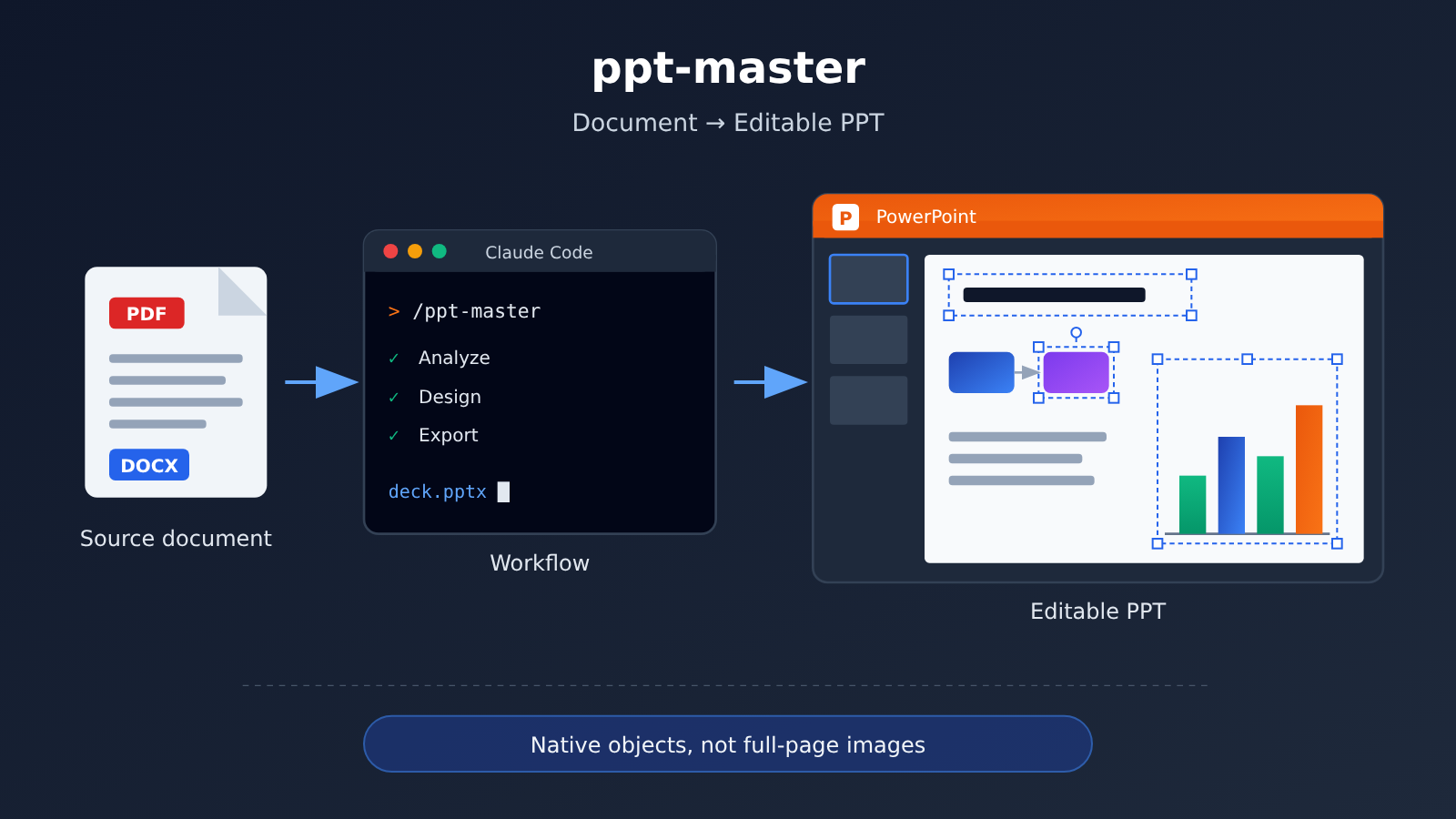
ppt-master Core Takeaways: What It Actually Generates
ppt-master isn’t standalone software. It’s a workflow (a skill). It needs to run inside AI tools that support agents; the repo lists Claude Code (which the author describes as their main development and testing environment), Codex CLI, Gemini CLI, and Cursor. Files are generated on your machine, data stays local, and it isn’t tied to any particular platform or model.
As of 2026-11-27, the repo page shows hugohe3/ppt-master has 80,538 stars, uses the MIT license, and had its latest commit on 2026-11-20. The table below maps its key features to what they mean for you in practice:
| Key point | Description | Why it matters to you |
|---|---|---|
| Native objects | Slide masters, native shapes, connectors, data-driven charts and tables | After generation, you can edit text, colors, and data directly in PowerPoint |
| Workflow, not software | Runs as a skill inside agent tools like Claude Code and Codex CLI | No need to switch tools—you keep using your existing AI coding environment |
| Local generation | Files are produced on your machine; no platform or model lock-in | Internal materials don’t need to be uploaded to an online PPT site |
| Swappable models | You can choose both the main model and the image-generation model | On a tight budget, use a cheaper model; for better results, use a stronger one |
| Extensibility | Extract brand templates, fill content into existing .pptx files, add transitions and narration | Covers common needs like “applying the company template” and “adding animations” |
Why ppt-master Burns Tokens: The Author’s Take
The author’s point, in essence, is harness + model = agent: ppt-master only handles the workflow, and the model sets the quality ceiling. Cheap models can run it too, but the quality gap comes from the model itself, not a bug in the tool.
The author is also upfront that this approach is token-heavy. At its core, you’re trading tokens for page-by-page design and editability. Tools that generate a full slide as an image can deliver with a single image, while ppt-master has the model first analyze the document and plan the structure, then write out definitions for shapes, text boxes, and charts page by page—every step consumes input and output tokens. So figuring out where the money actually goes matters more than agonizing over which version to install.
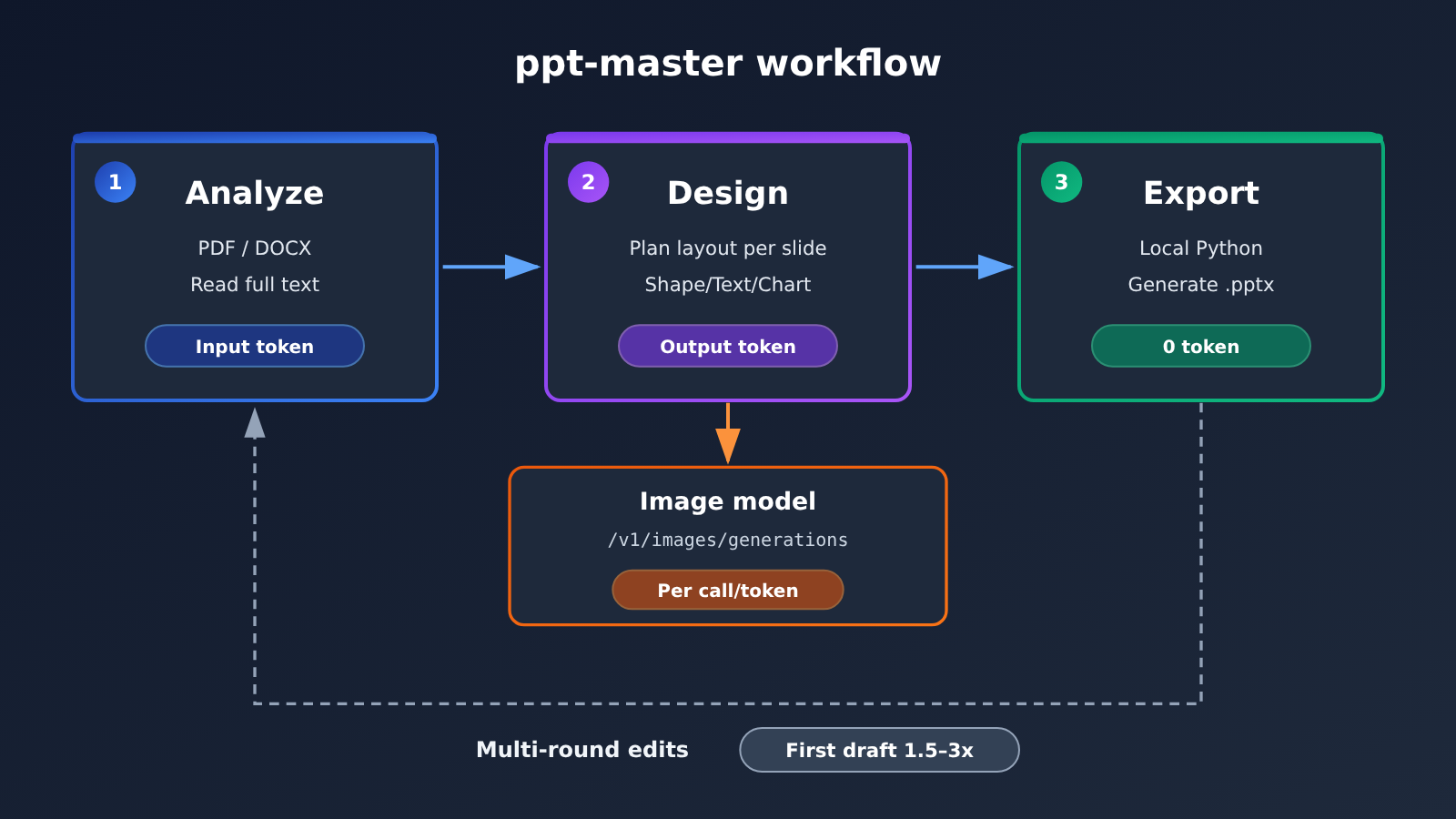
ppt-master Quick Start: Installation, Verification, and Three Common Commands
Step 1: Set Up the Python Environment
Exporting from ppt-master relies on Python, so first make sure your machine has a working Python and pip.
- Run
python --version(on some systems it’spython3 --version) - Acceptance criteria: The terminal shows a Python version number, and
pip --versionreturns without errors
Step 2: Install ppt-master (choose either method)
If you’re using an agent tool that supports a skill marketplace, the easiest route is a one-line install command. If you prefer to manage dependencies manually, you can also grab the repo and install the dependencies with pip.
- Method A, skill marketplace:
npx skills add hugohe3/ppt-master - Another way to use Method A: install from Claude Code’s plugin marketplace; the repo includes
.claude-plugin/marketplace.json - Method B, pip: after getting the repo (
git cloneor download the ZIP), runpip install -r requirements.txtfrom the repo root - Just want to try it first: you can download the ZIP, or use the roughly 23MB skill-only package
- Check: Method A should show ppt-master in the agent tool’s skill list; Method B’s pip install should finish without errors
Step 3: Decide whether you need Pandoc
A lot of people install one extra thing they’ll never use at this step. In fact, only legacy-format documents need Pandoc; common .docx and PDF files are handled directly by Python.
| Input format | How it’s handled | Need Pandoc? |
|---|---|---|
.docx, .html, .epub, .ipynb |
Python parses directly | No |
.doc, .odt, .rtf |
Convert via Pandoc first | Yes |
.tex, .rst, .org, .typ |
Convert via Pandoc first | Yes |
- When you need it, run
pandoc --versionto check whether it’s installed - Check: If your materials are all .docx or PDF, you can skip this step; if you have older formats like .doc or .tex,
pandoc --versionmust return a version number
Step 4: Configure the Models and API Protocol
ppt-master doesn’t bundle a model. The main model is whichever one your agent tool is currently using, while images are generated through a separate image-generation API. This is the step where it’s easiest to “spend money without noticing”: the main model counts tokens every time it reads or writes a page, and every image you generate incurs a charge.
If you want a single key to cover both text models and image-generation models, you can point the OpenAI-compatible endpoint to APIYI (apiyi.com): set base_url to https://api.apiyi.com/v1, and send image-generation requests to /v1/images/generations. For the exact variable to configure in ppt-master, refer to the repository docs. If the image-generation script uses the OpenAI SDK, you usually only need to replace the base_url and api_key values.
- Text API:
https://api.apiyi.com/v1(OpenAI-compatible) - Image-generation API:
https://api.apiyi.com/v1/images/generations - Acceptance criteria: Send a single short prompt and have the agent reply with one sentence, then generate one test image separately. Both should return successfully, and you should see the corresponding invocation records in the APIYI console.
🚀 Getting-started tip: Before running a full 20-page deck, walk through the entire workflow with a small 3-page document. Use the new-user free trial credits on APIYI (apiyi.com) to verify that both the main model and the image-generation model can be invoked, then decide which combination to use for the real run.
Step 5: Three Common Commands
Using ppt-master simply means giving it instructions in natural language within a conversation — it then works through analysis, design, and export in order. The three below cover most everyday scenarios; adjust the wording as needed, since there’s no fixed syntax.
- Main flow:
Make a deck from report.pdf, about 20 pages, for a management presentation - Applying a company template:
Extract the branding and layout template from brand-sample.pptx, then generate a new deck using the content in notes.docx - Adding effects to the finished file:
Add native transitions, animations, and narration to output.pptx - Extra use case: fill new content into an existing .pptx while keeping the original design — handy for weekly and monthly reports that follow a fixed format
- Acceptance test: open the generated .pptx in PowerPoint. Click any title and you should be able to edit the text; click any chart and you should see “Edit Data” — that tells you the output is made of native objects rather than images.
ppt-master Models and Pricing: How Much Text, Images, and Layout Each Cost
The author’s recommended models (as the author describes them)
- Main model: Kimi K3.1 or Gemini, ideally with a context window of around 1M, so a long document can be read in a single pass and cross-page logic stays more coherent
- Image generation model:
gpt-image-2.6-sunburstorgemini-nano-banana-2.1
Unit price reference for 2026-11-27
The prices in the table below come from the APIYI model pricing page (docs.apiyi.com/models), with data dated 2026-11-27. Text models are priced in USD per 1M tokens, while image generation models are billed either per call or per token. Kimi K3.1 isn’t included in this reference price list—if you need it, check the current pricing page at apiyi.com; this article doesn’t give figures for it.
| Model | Type | Input | Output | Cache read | Available platform |
|---|---|---|---|---|---|
qwen3.8-flash |
Text | $0.114 | $0.3876 | $0.01425 | APIYI apiyi.com |
gemini-3.8-flash |
Text | $0.75 | $3.75 | $0.075 | APIYI apiyi.com |
claude-opus-5-5 |
Text | $4 | $20 | $0.2 | APIYI apiyi.com |
gpt-image-2.6-all |
Image generation | Per call $0.025/call | — | — | APIYI apiyi.com |
gemini-nano-banana-2.1 |
Image generation | Per call $0.045/call | — | — | APIYI apiyi.com |
gpt-image-2.6-sunburst |
Image generation | Text $5 / Image $8 | $30 | Text $1.25 / Image $2 | APIYI apiyi.com |
Two things are worth noting. First, output pricing for main models is typically 4–5× the input price, and ppt-master happens to generate a large volume of layout definitions—so output pricing affects the total bill more than input pricing does. Second, cache-read pricing is only about a tenth of the input price, so when you’re revising and repeatedly reading the same document, hitting the cache can save you a lot.
Cost Estimates by Page Count (Estimates)
Using a 20-page deck as the baseline, I estimate text and layout at 60K input + 40K output tokens with 10 images, then scale 10-page and 40-page decks linearly. The table below covers first-version costs — all figures are estimates and don’t include revision rounds.
| Pages | Text/Layout tokens | Images | Budget combo: qwen3.8-flash + gpt-image-2.6-all | Balanced combo: gemini-3.8-flash + nano-banana-2.1 | Premium combo: claude-opus-5-5 + nano-banana-2.1 |
|---|---|---|---|---|---|
| 10 pages | 30K in + 20K out | 5 | ~$0.14 | ~$0.33 | ~$0.75 |
| 20 pages | 60K in + 40K out | 10 | ~$0.27 | ~$0.65 | ~$1.49 |
| 40 pages | 120K in + 80K out | 20 | ~$0.54 | ~$1.29 | ~$2.98 |
Breaking down the 20-page tier: for the text and layout side, qwen3.8-flash runs about $0.02, gemini-3.8-flash about $0.20, and claude-opus-5-5 about $1.04; for the 10 images, gpt-image-2.6-all is about $0.25 and gemini-nano-banana-2.1 about $0.45. gpt-image-2.6-sunburst bills by token, so its cost floats with size and quality — no fixed number to quote here.
Revisions are the most easily underestimated part. Layout revisions call the model over multiple rounds, and the actual token count typically runs 1.5–3× the first version, so it’s best to budget for “first version × 3.”
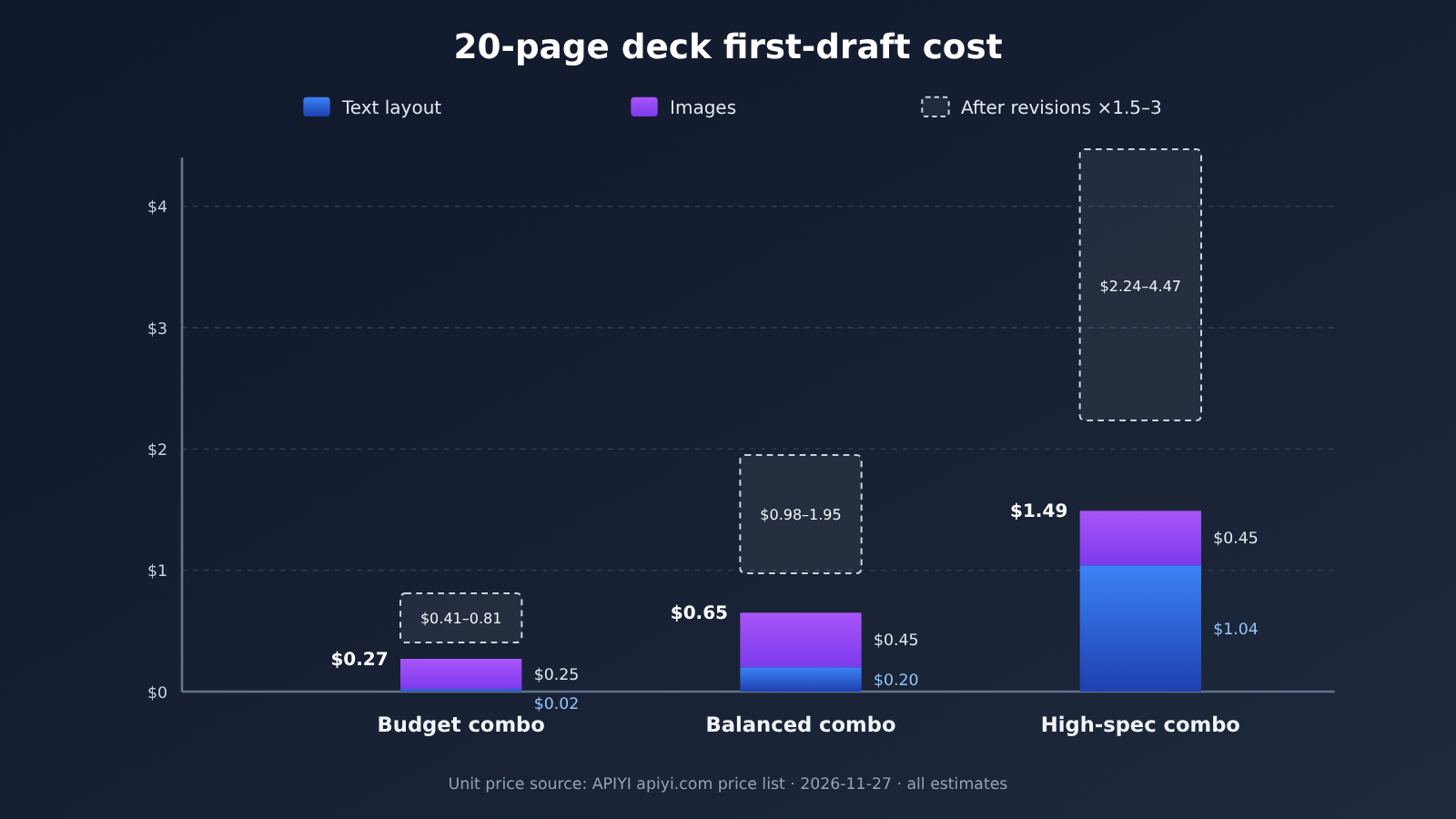
Two Recommended Combinations
Cost-first: use qwen3.8-flash as the main model and gpt-image-2.6-all for images. A 20-page first version runs about $0.27, and even with 3x headroom for revisions you stay under $1. That makes it a good fit for internal weekly syncs, draft decks, and cases where you want to see the structure before deciding whether to polish it.
Quality-first: as the author suggests, pick Kimi K3.1 or Gemini for the main model (both around 1M context; gemini-3.8-flash is listed right in the pricing table), and use gpt-image-2.6-sunburst or gemini-nano-banana-2.1 for images. If you already run an Opus-tier model in Claude Code, you can also let claude-opus-5-5 handle the main model — just accept that text costs about 5x more than the Flash tier.
💰 Pricing tip: before you lock in a combination, it’s best to compare unit prices on the same platform. APIYI apiyi.com covers both the text and image models in the table above with a single key, and switching models only means changing the
modelparameter — so you can run both combinations on the same document and compare results and bills directly.
ppt-master Common Errors and Troubleshooting
| Symptom / Error | Likely Cause | Fix |
|---|---|---|
| Fails to read .doc, .tex, and similar files | Pandoc isn’t installed | Install Pandoc and verify with pandoc --version, or save the file as .docx first |
pip install -r requirements.txt throws errors |
Python version or dependency conflict | Create a clean virtual environment and install again |
Image request returns 401 |
Wrong api_key, or base_url doesn’t point to https://api.apiyi.com/v1 |
Check the key and the URL, and confirm image generation goes through /v1/images/generations |
Returns 429 |
Requests are too dense, or quota is exhausted | Lower concurrency, generate fewer pages at a time, and check your account balance |
| The second half of a long document goes missing or contradicts the earlier part | The main model’s context window isn’t big enough | Switch to a model with ~1M context, or split the document into chapters and generate in batches |
| Text isn’t editable when you open the PPT | You’re not opening the exported .pptx, or a page uses an image instead of layout objects | Confirm the file path; instruct the model to redo that page using native shapes and text boxes |
| The bill far exceeds expectations | Too many revision rounds, or too much output | Lock the outline before generating, and cap the budget at “first version × 3” |
FAQ
Q1: Are the PPTs that ppt-master generates really editable?
Yes. The repo says it outputs a .pptx with slide masters, native shapes, connectors, data-driven charts, and tables — not full-page images. Once you open it, you can edit the titles, body text, and chart data directly, and the accompanying images are inserted as separate image objects.
Q2: Do I have to use Claude Code?
No. Claude Code is the author’s main development and testing environment, but agent-capable tools like Codex CLI, Gemini CLI, and Cursor will work too. The tool only determines how you interact; the quality ceiling is mostly set by the model you configure.
Q3: Roughly how much does a 20-page deck cost?
Estimating 60K input tokens + 40K output tokens and 10 images: a cheap combo comes to about $0.27 for the first version, a balanced combo about $0.65, and using claude-opus-5-5 as the main model about $1.49. Add revisions and you typically multiply by 1.5–3. The unit prices above are dated 2026-11-27 and are all estimates.
Q4: Where can I look up model names and compare prices for the main model and the image model?
You can check them all on the APIYI apiyi.com pricing page — text models and image-generation models are on the same platform, and both the key and base_url (`https://api.apiyi.com/v1`) are shared. New users get free trial credits, which is handy for comparing two combos on a small document first.
Q5: For images, should I pick per-call billing or per-token billing?
If you want predictable costs, go with the per-call `gpt-image-2.6-all` ($0.025/call) or `gemini-nano-banana-2.1` ($0.045/call). `gpt-image-2.6-sunburst` bills per token and gets more expensive at large sizes and high quality, so it’s suited to key pages like covers — no need to use it on every page.
Q6: If results are poor with a cheap model, is that ppt-master’s fault?
According to the author, no. ppt-master only handles the workflow; a cheap model can run it end to end, but the gap in layout planning and copy quality comes from the model itself. One middle-ground approach: use a cheap model to produce the outline and first draft, then once you’re happy with the structure, use a stronger model to polish the key pages.
Q7: Do .docx and PDF need Pandoc installed?
No. .docx, .html, .epub, and .ipynb are handled directly by Python; only formats like .doc, .odt, .rtf, .tex, .rst, .org, and .typ need Pandoc.
Q8: When should I not use ppt-master?
A few cases where it’s not recommended: you only need one or two pages that you could lay out by hand in ten minutes; you have extremely high visual standards and every page needs a designer’s polish; you don’t have an agent-capable AI tool on hand; or your token budget is very tight and you can’t afford multiple revision rounds. In those scenarios, its advantage of “trading tokens for editability” doesn’t really pay off.
ppt-master Key Takeaways
- Native objects, not screenshots: it generates a .pptx where masters, shapes, and charts are all editable — not full-page images pasted in
- It’s a workflow at heart: it runs inside agent tools like Claude Code and Codex CLI, and the model sets the ceiling on quality
- Two ways to install:
npx skills add hugohe3/ppt-masterorpip install -r requirements.txt - Pandoc only when needed: it’s required only for legacy formats like .doc and .tex; .docx and PDF don’t need it
- Estimating a 20-page first draft: about $0.27 with the budget combo, about $1.49 with the premium combo, and revisions multiply that by 1.5–3
- Output tokens are the big cost: the main model’s output price is roughly 4–5x its input price, and layout is exactly an output-intensive task
- Everything on one account: on APIYI apiyi.com, a single key switches between text and image-generation models, so you can compare both combos
Summary
ppt-master solves the problem of “you already have the content, but you still have to lay out the slides by hand.” There are three key points:
- Editability is the selling point: it generates native PowerPoint objects, so later edits don’t require regenerating everything
- It’s clear where the money goes: text and layout consume input and output tokens, images are billed per call or per token, and revisions inflate the first-draft cost by 1.5–3x
- The model combo determines value for money: for cost-first, use qwen3.8-flash + gpt-image-2.6-all; for quality-first, use a 1M-context main model plus sunburst or nano-banana
If you hand in reports every week and already have Claude Code or Codex, try the budget combo on a small 3-page document first. Once you’re happy with it, switch to the quality-first combo for the real version. Conversely, if you only need a page or two, or every page has to be checked pixel by pixel by a designer, this approach isn’t worth it.
I’d recommend running both combos in the same account on APIYI apiyi.com, then deciding based on the bill and the finished output.
📚 References
-
GitHub – ppt-master: Project repository, including installation instructions, model recommendations, and skill package
- Link:
github.com/hugohe3/ppt-master - Note: The feature scope, installation method, and Pandoc format list in this article are based on the repository content
- Link:
-
APIYI Model Pricing: Unit prices for text and image generation models
- Link:
docs.apiyi.com/models - Note: The pricing data in this article is dated 2026-11-27. Before invoking, please refer to the live pricing on the page
- Link:
-
Pandoc Official Website: Legacy document conversion tool
- Link:
pandoc.org - Note: You need to install it when processing formats such as .doc, .tex, and .rst
- Link:
Author: APIYI Technical Team
Technical discussion: For questions about model selection or invocation, feel free to contact us through the APIYI homepage at apiyi.com. For more integration details, see the docs.apiyi.com documentation center


