

GLM-5.4 has officially launched, with three major changes. Architecturally, it’s Zhipu’s first flagship model to use a Loop Transformer, letting one stack of 28 layers run two rounds of computation. On capabilities, it adds video, image, and file inputs. On positioning, it expands from writing code to “Broad Coding”—using code and tools to produce web pages, games, animations, and simulations. One important caveat: the public general-purpose API isn’t available yet. For now, you can try it through partner platforms such as GLM Coding Plan, ZCode, Chat, and TRAE. Developers can get their integration prep done first.
What will you learn from this article?
- GLM-5.4’s launch date, the initial access channels, and the actual details on plan benefits
- How Loop Transformer’s “one set of layers, two rounds” design works, plus the three engineering practices Zhipu used to keep overhead under control
- How visual input, a 1M context window, and 128K output combine into a “see the image → write code → render → revise” closed loop
- How to interpret the official win rate from internal evaluations across 200 scenarios
- A ready-to-reuse OpenAI-compatible integration code sample, plus a pre-integration checklist
Index: Start with the “To Know” concept table and the impact overview to get the terminology straight and see how this launch relates to you. The “Objective Facts” section of the main text walks through, in order, the launch and access channels, architecture and speed, vision and context specs, and use cases and evaluations. The “Analysis and Judgment” section discusses what these changes mean in practice for developers and provides a quick-start code sample. The FAQ at the end answers the most common integration and model-selection questions.
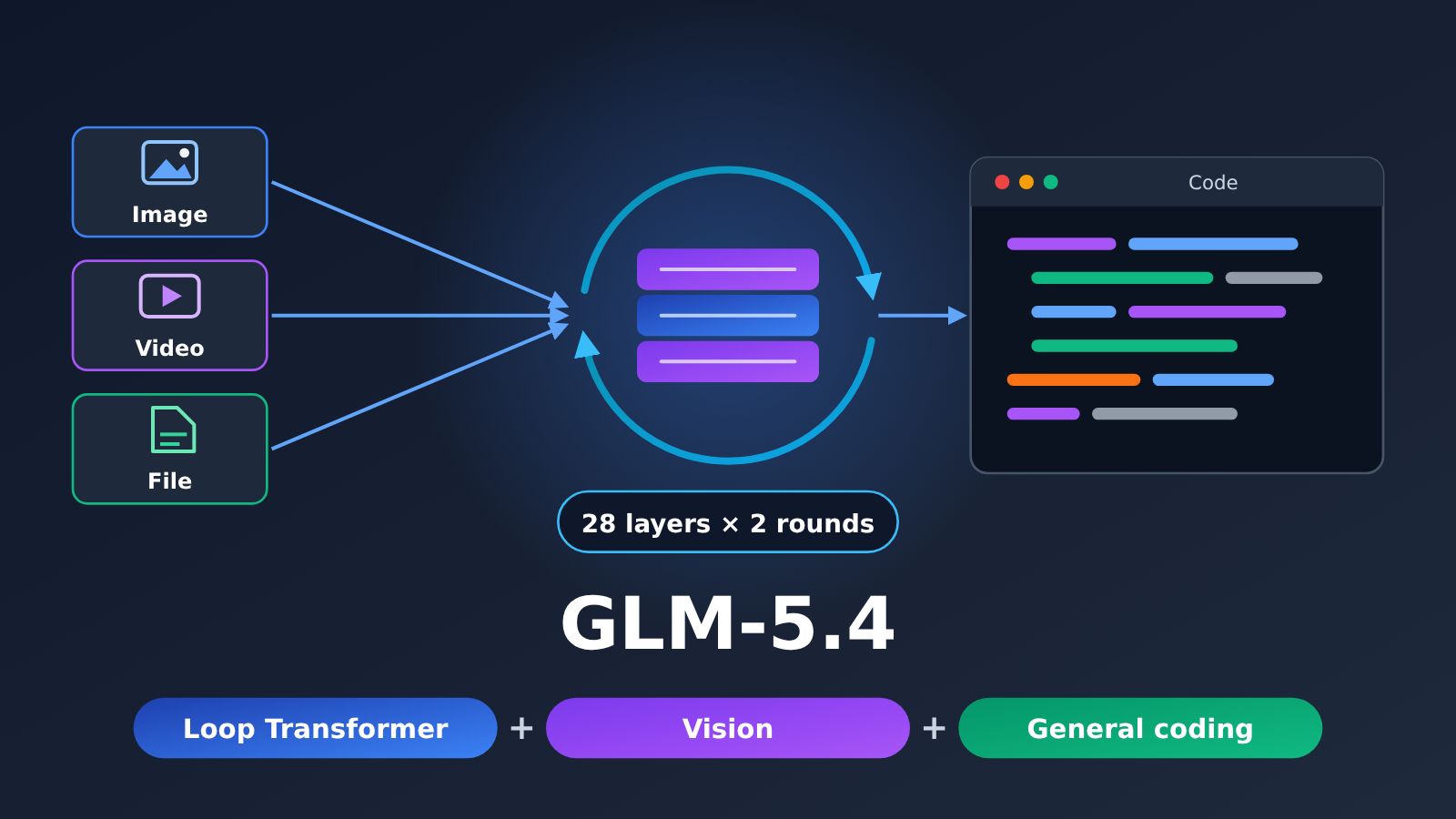
GLM-5.4 Key Concepts at a Glance
| Concept | Quick Explanation |
|---|---|
| Loop Transformer | Runs the same set of layer weights through multiple rounds — the second round keeps computing on top of the representations produced by the first — so weights get reused and the effective computational depth goes up |
| Generalized coding | Zhipu’s framing for its positioning: using code and tools to produce pages, games, animations, CAD simulations, and other deliverables, not just writing code files |
| Residual stream | The main channel through which information is passed along and accumulated across Transformer layers; each layer writes its output back into it |
| Per-token gating | Controls, token by token, how much the second round writes back into the residual stream, helping an existing base model adapt to two-round computation |
| Sparse key-value (KV) reuse | The distant attention key-values selected in the first round are handed straight to the second round, cutting redundant computation and cache overhead |
| Operator fusion | Merging several computational steps into a single pass, reducing the reads and writes of intermediate results in GPU memory |
| GPQA-Diamond | A graduate-level science Q&A benchmark, commonly used to measure reasoning ability |
| Context compression | The agent client automatically trims history when a session approaches the context limit, keeping the important work in focus |
| GLM Coding Plan | Zhipu’s subscription plan aimed at coding scenarios, offered in individual Lite, Pro, and Max tiers plus a team edition |
GLM-5.4 Impact at a Glance
- Coding subscription users: Available on all Coding Plan tiers from day one. If you’re on V2, V3, or a team plan with a weekly quota, the same quota now buys you 1.5× as many GLM-5.4 tokens as GLM-5.3.
- Frontend and creative developers: You can feed screenshots, storyboards, and video straight in as requirements, then pair the model with a client that has browser and screenshot capabilities to reproduce and iterate on visuals.
- API integration developers: The general-purpose API is still in safety evaluation, so you can’t build services on GLM-5.4 in the short term. In the meantime, prepare your code and eval suites against the specs in the developer docs.
- Researchers: This is Loop Transformer engineering landing on a flagship at roughly 750B scale, and the KV reuse plus gating approach is worth a look. Open weights remain a future plan.
GLM-5.4 Facts: Release Date and Available Channels
How the GLM-5.4 release date is stated
Zhipu announced GLM-5.4 on November 23, 2026, and the English research blog, Zhipu’s verified Weibo account, and TRAE China’s integration announcement all use that date. The Chinese research page on the official site shows 16:00 on November 22 — that time is UTC, which works out to exactly 00:00 on November 23 Beijing time. A page date isn’t the same thing as each channel’s actual opening time, so check each product’s notice for the specifics.
Zhipu calls GLM-5.4 its first flagship model built on Loop Transformer. “First” here is scoped to Zhipu’s flagship line — similar recurrent architectures have shown up in academic papers before.
Where GLM-5.4 is available first
| Channel | Availability | Notes |
|---|---|---|
| GLM Coding Plan | All tiers: personal Lite, Pro, Max, and Team | Legacy V1 keeps its existing entitlements; for V2, V3, and Team plans with weekly quotas, quotas convert to 1.5× tokens |
| ZCode / Chat | Zhipu’s own products | ZCode offers three thinking-effort levels — low, high, and max — with max as the default |
| TRAE China | Pro+ and above on day one | Partner platforms can set their own thresholds |
| General-purpose API | Opens after safety evaluation | Specs are already published in the developer docs; aggregator platforms like APIYI (apiyi.com) can only integrate once the official API opens |
| Model weights | Future plan | No timeline yet |
GLM-5.4 Facts: Loop Transformer Architecture and Speed
How GLM-5.4 Gets “One Set of Layers to Run Two Passes”
In a conventional Transformer, hidden states flow through the layers one by one, and each set of weights runs only once. GLM-5.4 continues training on top of the already-pretrained GLM-5 family base model, and makes one group of 28 layers execute two passes. The second pass receives the representations formed by the first pass and runs them through the same set of weights again.
Zhipu reports the base model scale at roughly 750B. Repeated execution adds more effective computational depth, while the weights for the repeated portion are reused, so the parameter count doesn’t grow. The “2–3T class” mentioned in the release is an analogy about capability, not a statement about parameter scale. For tasks that need to satisfy several constraints at once, the second pass gives the model an extra chance to organize and correct its intermediate state.
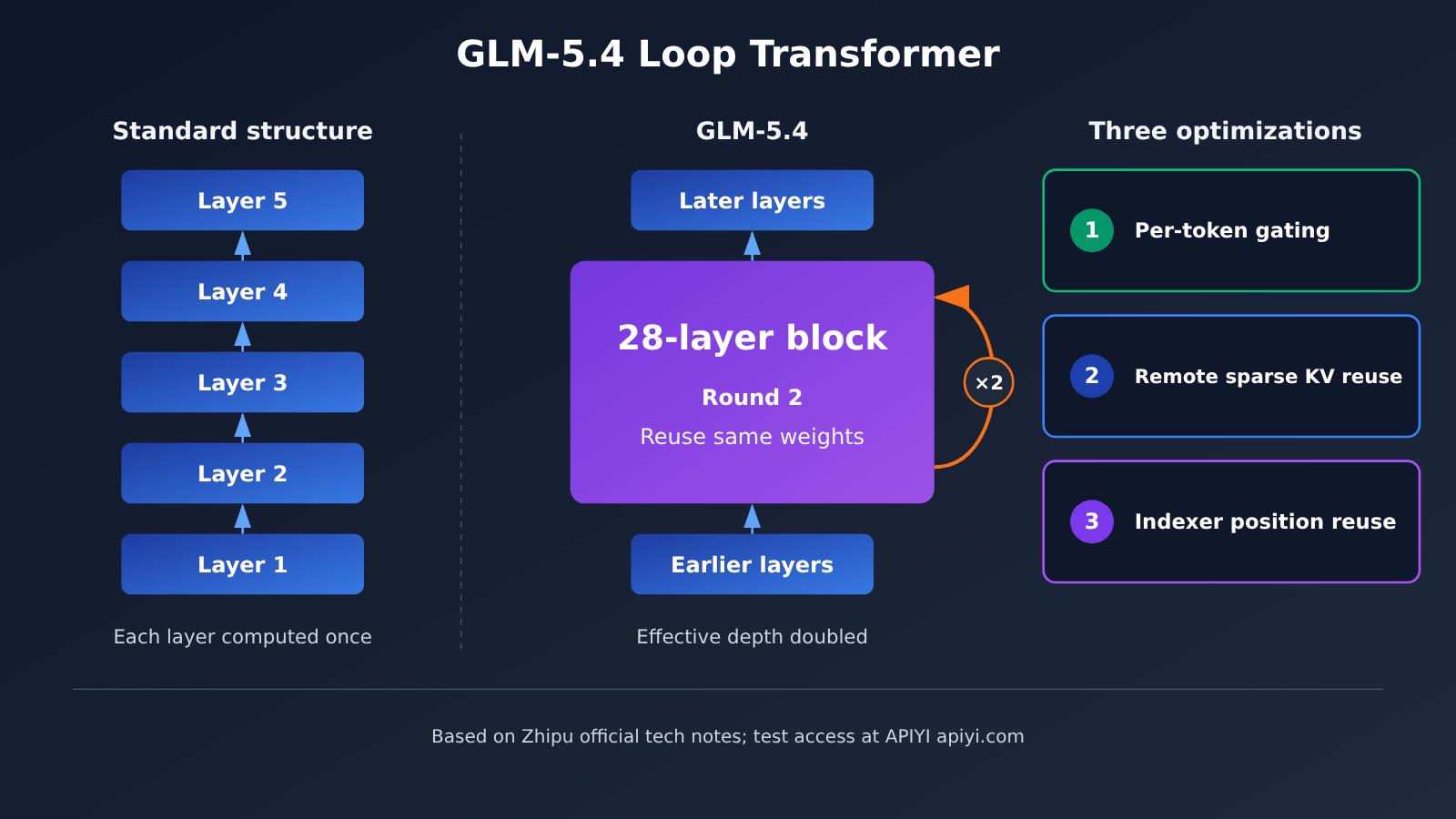
Three Engineering Choices That Keep GLM-5.4’s Extra Overhead in Check
Running the extra pass costs more compute, and it also creates intermediate-state and cache-management problems. The release materials describe the following approaches:
- Per-token gating: limit the proportion written back to the residual stream on each pass, so the existing base model can adapt smoothly to two-pass computation.
- Layered KV reuse: the remote sparse key-values selected in the first pass are used directly by the second pass, and the second pass stores its own new key-values only for nearby positions.
- Indexer result reuse: the attention positions selected by the indexer in the first pass are used again in the second pass, avoiding the cost of selecting them again.
On the serving side, operator fusion also cuts down reads and writes of intermediate results. Zhipu reports a generation rate of up to about 200 token/s off-peak and about 70–80 token/s at peak. That’s the generation speed on the deployment side. How long users actually wait also depends on queueing, input length, thinking usage, tool execution, and the number of retries.
GLM-5.4 Scaling Validation and Thinking Length
To confirm that the loop works at different scales, Zhipu ran scaling validation from 1B and 4B to 30B and 750B. The most complete numbers come from the 30B same-parameter comparison: GPQA-Diamond rose from 47.58 to 56.26, while average output dropped by 2,473 tokens.
The vendor also observed that the flagship model in production tends to think for a long time, and that it treats ongoing reflection and error correction as part of its long-horizon capability. These two observations come from different sources: the first is a small-scale controlled experiment, while the second is a usage description of the flagship. You can’t directly infer one from the other. In practice, you can set a lower setting for simple tasks and a higher setting for complex tasks in ZCode to control the thinking budget.
GLM-5.4 Objective Facts: Vision Capabilities and Context Specs
GLM-5.4 Core Specs vs. GLM-5.3
| Spec | GLM-5.4 | GLM-5.3 (flagship) |
|---|---|---|
| Input types | Video, images, text, files | Text |
| Output types | Text | Text |
| Context window | 1M | 1M |
| Max output | 128K | 128K |
| Architecture | Loop Transformer (28 layers × 2 rounds) | Conventional architecture |
| Interface capabilities | Streaming output, function calling, context caching, structured output | See the official docs |
The comparison target for this vision upgrade is the flagship GLM-5.3. The GLM-5.3-Flash in the lineup is already the first native multimodal version of the GLM-5 series, and we’ve also covered the vision-feedback-driven coding loop, so be sure to use the full version name when discussing it. The 1M context window and 128K max output are the same as GLM-5.3 — what’s new here is the range of input types and execution-oriented capabilities.
How the GLM-5.4 Vision Coding Loop Works
The typical flow goes like this: break the reference image down into layout and behavior requirements, generate implementation code, run it and inspect the page or image result, then fix things based on where it deviates. Whether files and images can be uploaded directly is up to the client. Rendering, taking screenshots, and adjusting the viewport are also client-side capabilities. For example, ZCode’s built-in browser can control pages and capture screenshots, and authorized computer control can operate visible desktop programs.
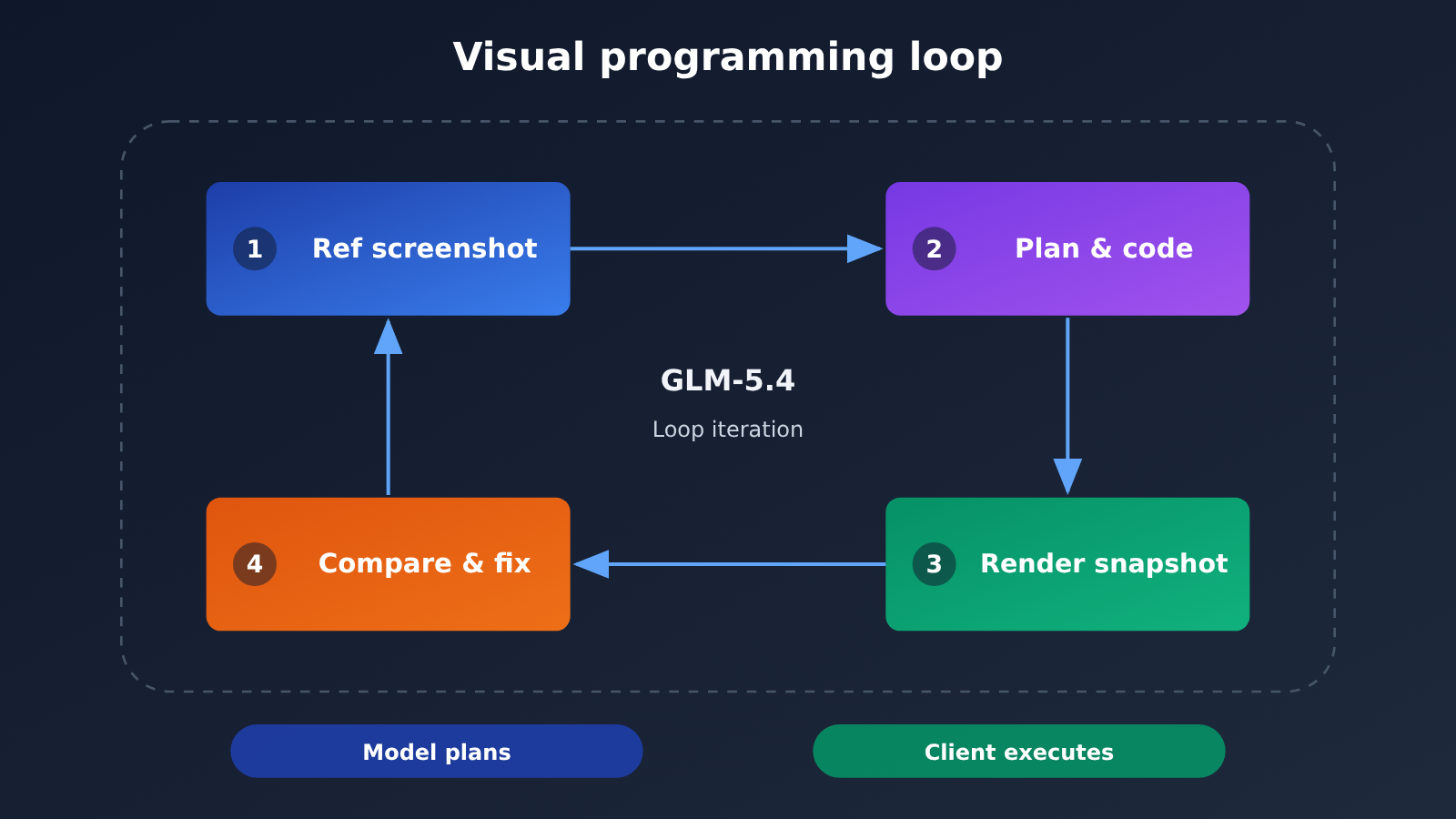
When it comes to using that million-token context, ZCode auto-compacts at around 966K tokens in a session, keeping the working focus intact so the agent can keep absorbing new requirements, render logs, and user feedback. The session compaction strategy and the model’s max output are two different settings — don’t mix them up.
GLM-5.4 Objective Facts: Broad Coding Cases and Benchmark Data
Four Official GLM-5.4 Examples
- Short film “Hello World”: the visuals were drawn with front-end code; the music was planned by the model and then produced by calling third-party music generation tools, with the prompt iterated along the way.
- A complete game: the English announcement lists character movement, physics, maps, combat, and art assets.
- Interactive birdwatching: implemented with mathematical geometry and custom GLSL shaders, without using external 3D models or texture files.
- Six-axis robotic arm: modeled in FreeCAD, with Blender used for motion and visualization, ultimately demonstrating simulated grasping and an audio-accompanied visualization.
What these cases have in common: the model turns the goal into executable code or tool operations, then keeps revising based on observable results.
GLM-5.4 Internal Benchmark Win Rates
Zhipu reported an internal benchmark covering 200 real-world programming scenarios, saying GLM-5.4 stands out in visual programming, visual replication, and long-horizon tasks.
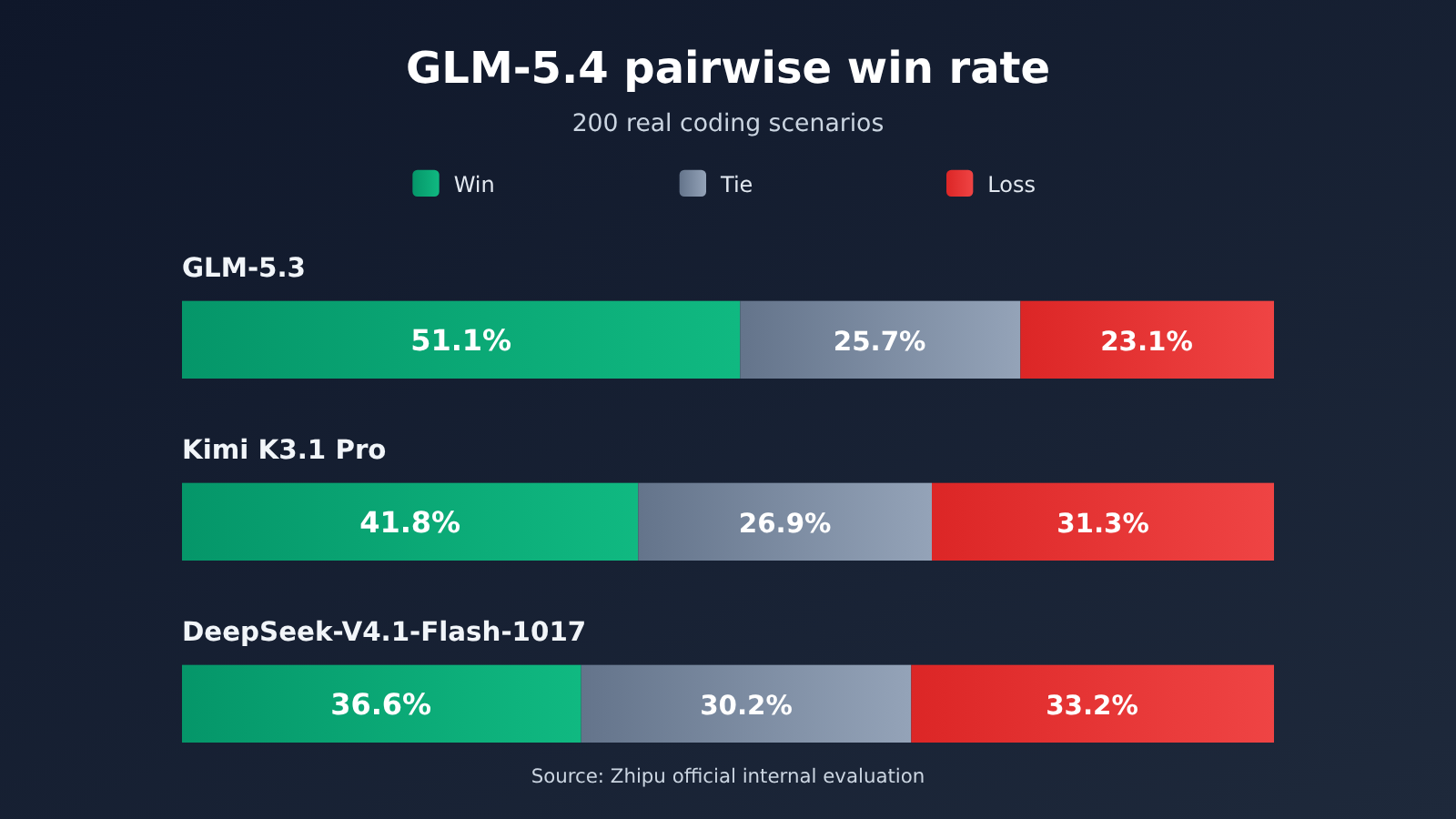
| Comparison target | GLM-5.4 wins | Ties | Losses |
|---|---|---|---|
| GLM-5.3 | 51.1% | 25.7% | 23.1% |
| Kimi K3.1 Pro | 41.8% | 26.9% | 31.3% |
| DeepSeek-V4.1-Flash-1017 | 36.6% | 30.2% | 33.2% |
The win rates here are the proportions that come out of paired head-to-head comparisons, rounded to one decimal place. Vendor internal benchmarks and curated creative examples are two different kinds of evidence: the former describes an overall comparison, the latter showcases specific workflows.
GLM-5.4 Roadmap
The official blog spells out two directions for scaling: keep expanding model size, and improve loop depth, with the hope of eventually allocating rounds according to the computational difficulty at each position. What’s already in place is running selected layer blocks for a fixed two rounds, with difficulty-related variation showing up in the gating write magnitude. GLM-5.3 and GLM-5.3-Flash remain in the product line and can be specified manually.
GLM-5.4 Analysis: What It Means for Developers
Takeaway 1: The Loop Transformer opens a new path in “inference-time compute.” In the past, improving inference quality mainly came down to adding parameters or lengthening the chain of thought. GLM-5.4 uses weight reuse to increase depth; in the 30B comparison, scores went up while outputs got shorter, which suggests this path can, to some degree, replace some explicit thinking tokens with in-layer computation. That said, the flagship model still tends toward long thinking in real-world use, so the “saves more tokens” conclusion can’t be directly applied to the 750B version—you’ll need to test it on your own tasks.
Takeaway 2: The value of vision capabilities depends on the client. The model only outputs text. Whether a screenshot can be uploaded, whether a page can be rendered, and whether results can be sent back to the model for further edits—all of that is decided by the client or your own toolchain. If you’re only doing text chat, GLM-5.4 can produce structural drafts and code suggestions. To complete tasks like “replicate this dashboard,” you need an execution environment with a project environment and browser tools. The path below is an example derived from product capabilities, not an official commitment.
Takeaway 3: Right now is the preparation phase, not the integration phase. The general API isn’t open yet, so production systems can’t rely on GLM-5.4 at this stage. The more pragmatic approach is to write the multimodal message format, structured output, and streaming handling according to the developer docs specs, get the pipeline working with existing models, and then switch the model name and run comparative evaluations once the official release opens up.
GLM-5.4 Quick Start: Setup Code for Integration
A Minimal GLM-5.4 Call Example
The code below uses the OpenAI-compatible interface. The model name is a placeholder — once the general API opens up, use whatever name actually appears in the platform’s model list. Until then, you can swap in a model that’s already live to validate your flow.
import openai

client = openai.OpenAI(
    api_key="YOUR_API_KEY",
    base_url="https://api.apiyi.com/v1"  # APIYI apiyi.com unified interface
)

MODEL = "glm-5.4"  # Placeholder: use the actual name from the model list once the official general API is available

stream = client.chat.completions.create(
    model=MODEL,
    messages=[{"role": "user", "content": "用 HTML+CSS 写一个三栏仪表板骨架"}],
    stream=True,
)
for chunk in stream:
    if chunk.choices and chunk.choices[0].delta.content:
        print(chunk.choices[0].delta.content, end="")
View the full code: screenshot replication + structured output
import base64
import json
import openai

client = openai.OpenAI(
    api_key="YOUR_API_KEY",
    base_url="https://api.apiyi.com/v1"  # Call through APIYI apiyi.com to make multi-model switching and comparison easy
)

MODEL = "glm-5.4"          # Placeholder; replace with the actual model name once it's generally available
FALLBACK = "your-model"    # An already-live model used to validate the flow before launch


def encode_image(path: str) -> str:
    with open(path, "rb") as f:
        return base64.b64encode(f.read()).decode()


def analyze_dashboard(image_path: str, model: str = MODEL) -> dict:
    """Step 1: Break the screenshot down into a structured layout spec"""
    img_b64 = encode_image(image_path)
    resp = client.chat.completions.create(
        model=model,
        messages=[
            {"role": "system", "content": "你是前端架构师,只输出 JSON。"},
            {"role": "user", "content": [
                {"type": "text", "text": (
                    "分析这张仪表板截图,输出 JSON:"
                    "{layout: 栅格描述, components: [{name, position, style}], "
                    "colors: [主色], interactions: [交互要求]}"
                )},
                {"type": "image_url",
                 "image_url": {"url": f"data:image/png;base64,{img_b64}"}},
            ]},
        ],
        response_format={"type": "json_object"},
        max_tokens=4000,
    )
    return json.loads(resp.choices[0].message.content)


def generate_code(spec: dict, model: str = MODEL) -> str:
    """Step 2: Generate the implementation code from the spec"""
    resp = client.chat.completions.create(
        model=model,
        messages=[{"role": "user", "content": (
            "根据以下规格生成单文件 HTML,适配 1440px 屏宽:\n"
            + json.dumps(spec, ensure_ascii=False)
        )}],
        max_tokens=16000,
    )
    return resp.choices[0].message.content


if __name__ == "__main__":
    try:
        spec = analyze_dashboard("dashboard.png")
        html = generate_code(spec)
    except openai.APIError as e:
        print(f"调用失败,切换备用模型:{e}")
        spec = analyze_dashboard("dashboard.png", FALLBACK)
        html = generate_code(spec, FALLBACK)
    with open("output.html", "w", encoding="utf-8") as f:
        f.write(html)
    # Step 3: Render and screenshot it in a browser, then feed the differences versus the original back in as the next round of input
🚀 Quick start: We recommend first using your free new-user quota on APIYI apiyi.com to run through the “decompose → generate → render” flow above. Once the GLM-5.4 general API officially opens, all you need to do is swap
MODELto run the same-task comparison. For image input formats andresponse_formatsupport, refer to the platform’s actual documentation.
GLM-5.4 Pre-Integration Checklist
- Thinking budget: Flagship models tend to think for a long time, so
max_tokensneeds to leave headroom for both reasoning and output. - Streaming output: For long tasks, be sure to turn on
streamso you can watch progress and interrupt early when needed. - Structured intermediate artifacts: Output a JSON spec first, then generate code — this makes validation and reuse much easier.
- Execution-side capabilities: Rendering, screenshots, and file read/write all require your own toolchain or function calling to handle.
GLM-5.4 FAQ
Q1: What is GLM-5.4’s Loop Transformer?
It continues training on the ~750B base of the GLM-5 series, letting one group of 28 layers run two passes with the same set of weights — the second pass keeps computing on top of the first pass’s representations. No extra parameters, but higher effective computational depth.
Q2: How does GLM-5.4 differ from GLM-5.3 and GLM-5.3-Flash?
The GLM-5.3 flagship only accepts text input; GLM-5.4 adds video, image, and file inputs and switches to the Loop Transformer. GLM-5.3-Flash is the first native multimodal version in the GLM-5 series. All three share a 1M context window and 128K max output, and the GLM-5.3 series is still available.
Q3: When will GLM-5.4 be released? When will the general API open up?
Released on November 23, 2026. The official word is that the general API will open after safety evaluations, with no specific date announced yet. Opening the weights is also just a future plan.
Q4: What scenarios is GLM-5.4 best suited for?
– **Visual replication**: Generate front-end pages from screenshots or design mockups
– **Creative coding**: Use code to draw animations, shader scenes, and mini-games
– **Long-horizon engineering tasks**: Keep iterating over requirements, logs, and feedback within a 1M context
– **Tool orchestration**: Work with CAD, 3D software, and audio tools to produce simulations and visualizations
Q5: How can I prepare for GLM-5.4 API integration right now?
1. Register at APIYI apiyi.com to get an API key and a free testing quota
2. Set `base_url` to `https://api.apiyi.com/v1`, then use the code in this article and currently available models to run through the workflow end to end
3. Once the official release opens up, check the platform’s model list, swap in the model name, and run comparative evaluations
Q6: What are the known limitations of GLM-5.4?
The general API isn’t open yet; the model only outputs text, so media artifacts have to be generated by external tools; during peak hours, generation speed is around 70–80 tokens/s, and the flagship tends to think for a long time; win-rate figures come from the vendor’s internal benchmarks, so it’s worth verifying on your own. If you want to compare multiple models, you can use APIYI apiyi.com to switch and test with the same code.
GLM-5.4 Key Takeaways
- Release date: November 23, 2026 — Zhipu’s first Loop Transformer flagship
- Architecture core: ~750B base, a single group of 28 layers runs two rounds with reused weights
- Engineering optimizations: Extra overhead is kept in check through per-token gating, KV reuse, and operator fusion
- New vision capabilities: Video, image, and file input, a 1M context window, and 128K output
- Generalized coding: Uses code and tools to produce pages, games, animations, and mechanical simulations
- Evaluation scope: 51.1% internal paired win rate against GLM-5.3 — this is vendor data
- Getting started: First validate the multimodal code workflow with APIYI apiyi.com, then switch models once it opens up
Overall, what’s interesting about GLM-5.4 isn’t the parameter scale — it’s the combination of two paths: “loop depth” and “vision plus execution.” Its real value will only be tested once the general API opens, in real projects that weigh thinking time, speed, and output quality against each other. This stretch is a good time to get multimodal input, structured output, and rendering loops in place first; by then, you can run side-by-side comparisons through APIYI apiyi.com using the same set of interfaces.
📚 References
- Z.ai GLM-5.4 English release blog: architecture, case studies, and what’s next
- Link:
z.ai/blog/glm-5.4
- Link:
- Zhipu GLM-5.4 Chinese research page: technical notes, ablation experiments, and win-rate charts
- Link:
zhipuai.cn/zh/research/164
- Link:
- Zhipu Open Platform GLM-5.4 model description: input/output specs and interface capabilities
- Link:
docs.bigmodel.cn/cn/guide/models/glm-5.4
- Link:
- Z.ai developer documentation: model availability status
- Link:
docs.z.ai/guides/llm/glm-5.4
- Link:
- ZCode FAQ: thinking levels, context compression, and plan descriptions
- Link:
zcode.z.ai/cn/docs/qa
- Link:
Author: APIYI Technical Team
Technical exchange: Feel free to reach out through the APIYI apiyi.com homepage; for more integration resources, head to the docs.apiyi.com documentation center


