
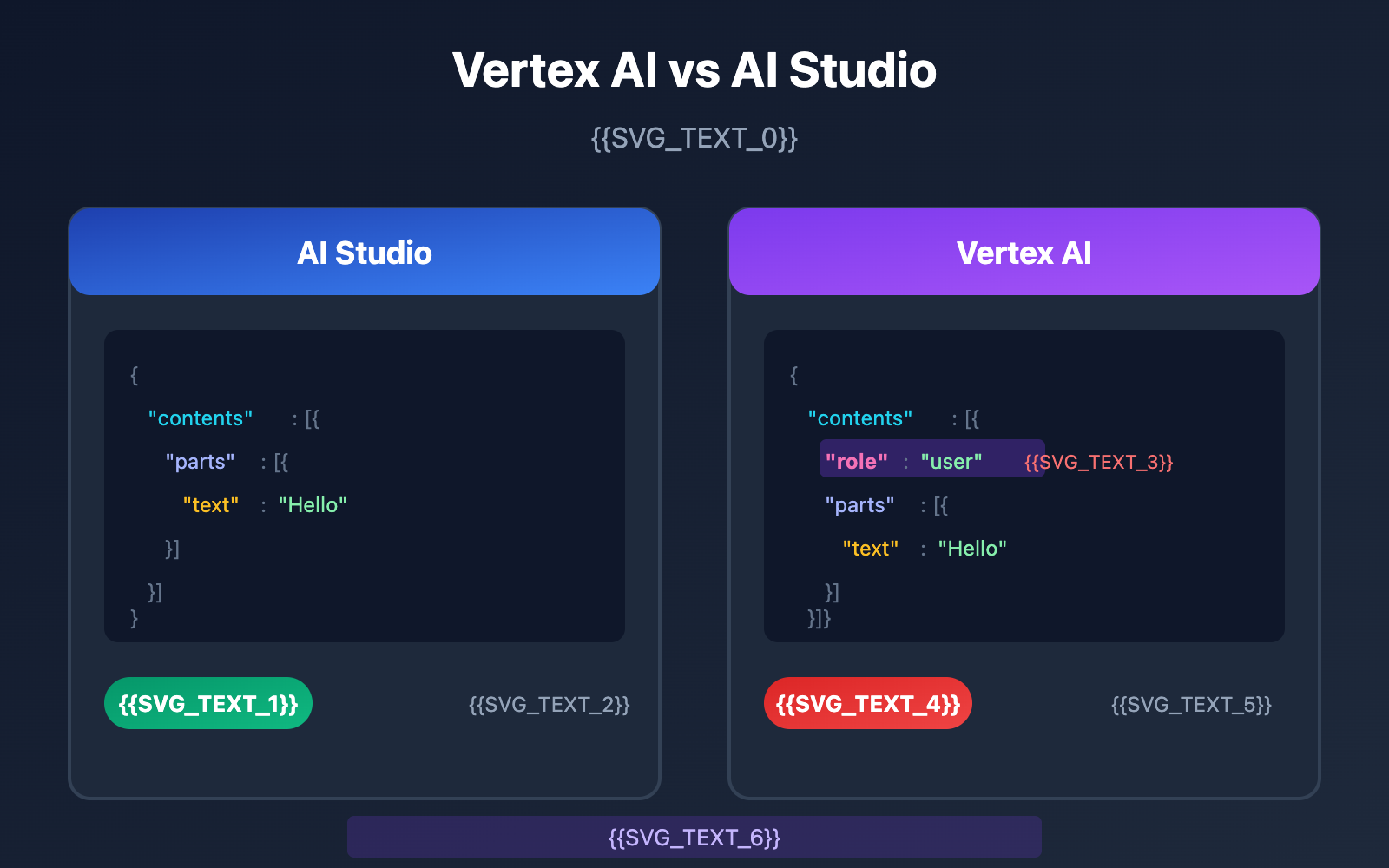
When working with the Google Gemini API, migrating from AI Studio to Vertex AI is a transition most developers eventually make. However, a seemingly minor difference in the role parameter has tripped up plenty of developers:
[&{Please use a valid role: user, model. (request id: xxx) 400 }]
The root cause of this 400 error is simple: Vertex AI mandates that every object in the contents array must include a role field, whereas AI Studio lets you skip it for single-turn conversations.
In this post, we'll dive deep into the request body differences between Vertex AI and AI Studio and walk through complete solutions for three common scenarios.
Core Differences Overview: Vertex AI vs. AI Studio
Before fixing that 400 error, we first need to understand the fundamental differences between the two platforms.
Platform Positioning
| Dimension | AI Studio (Google AI) | Vertex AI |
|---|---|---|
| Target User | Rapid prototyping | Enterprise production |
| Authentication | API Key | Service Account / OAuth |
| Rate Limits | Basic limits, non-commercial | Production-grade, commercial |
| role Field | Optional for single-turn | Mandatory |
| Endpoint Format | generativelanguage.googleapis.com | {region}-aiplatform.googleapis.com |
| Available Platforms | APIYI (apiyi.com), Official API | APIYI (apiyi.com), Google Cloud |
Why the role 400 Error Happens
As an enterprise-grade platform, Vertex AI has much stricter validation for request formats. If your request body is missing the role field, Vertex AI will immediately return:
{
  "error": {
    "code": 400,
    "message": "Please use a valid role: user, model.",
    "status": "INVALID_ARGUMENT"
  }
}
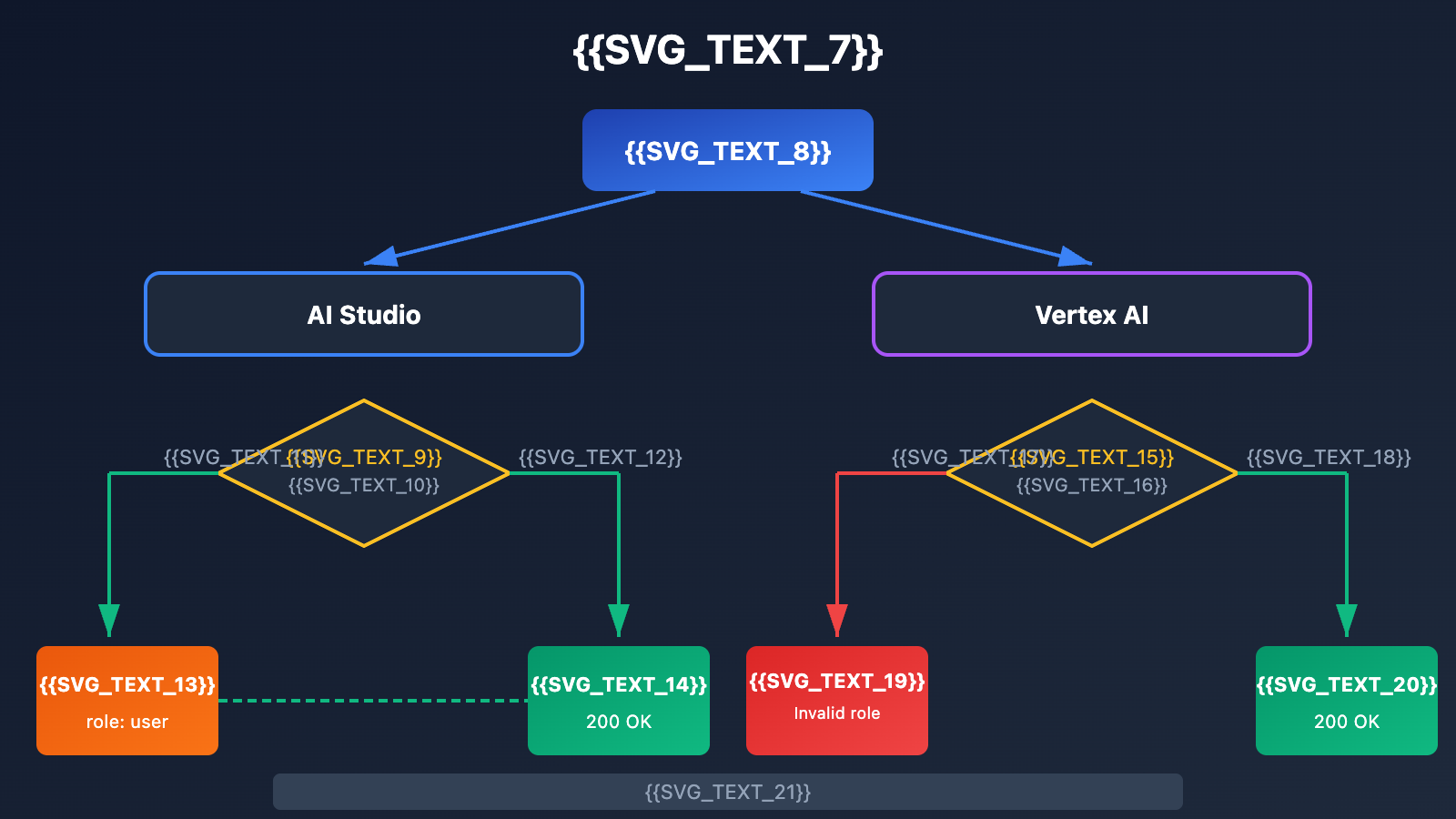
🎯 Technical Tip: When migrating from AI Studio to Vertex AI, we recommend using the APIYI (apiyi.com) platform for testing. It provides a unified API interface that automatically handles parameter differences between platforms, helping you quickly verify your technical implementation.
Detailed Explanation of Vertex AI Request Body Format
Correct Vertex AI Request Format
The request body for the Gemini API on Vertex AI must follow this structure:
{
  "contents": [
    {
      "role": "user",
      "parts": [
        {
          "text": "Explain what a Large Language Model is"
        }
      ]
    }
  ],
  "generationConfig": {
    "temperature": 0.7,
    "maxOutputTokens": 2048
  }
}
Valid Values for the role Parameter
Vertex AI only accepts two values for role:
role Value |
Meaning | Use Case |
|---|---|---|
user |
User Input | Questions or instructions sent to the model |
model |
Model Response | Historical replies in multi-turn conversations |
Incorrect vs. Correct Examples
❌ Incorrect: Missing the role field (AI Studio style)
{
  "contents": [
    {
      "parts": [
        {
          "text": "Hello, how are you?"
        }
      ]
    }
  ]
}
✅ Correct: Includes the role field (Vertex AI style)
{
  "contents": [
    {
      "role": "user",
      "parts": [
        {
          "text": "Hello, how are you?"
        }
      ]
    }
  ]
}
Detailed Explanation of AI Studio Request Body Format
AI Studio's Loose Mode
AI Studio (Google AI) is a bit more flexible with its request formatting. In single-turn conversation scenarios, you can actually omit the role field:
{
  "contents": [
    {
      "parts": [
        {
          "text": "What is machine learning?"
        }
      ]
    }
  ]
}
Request Body Comparison Between the Two Platforms
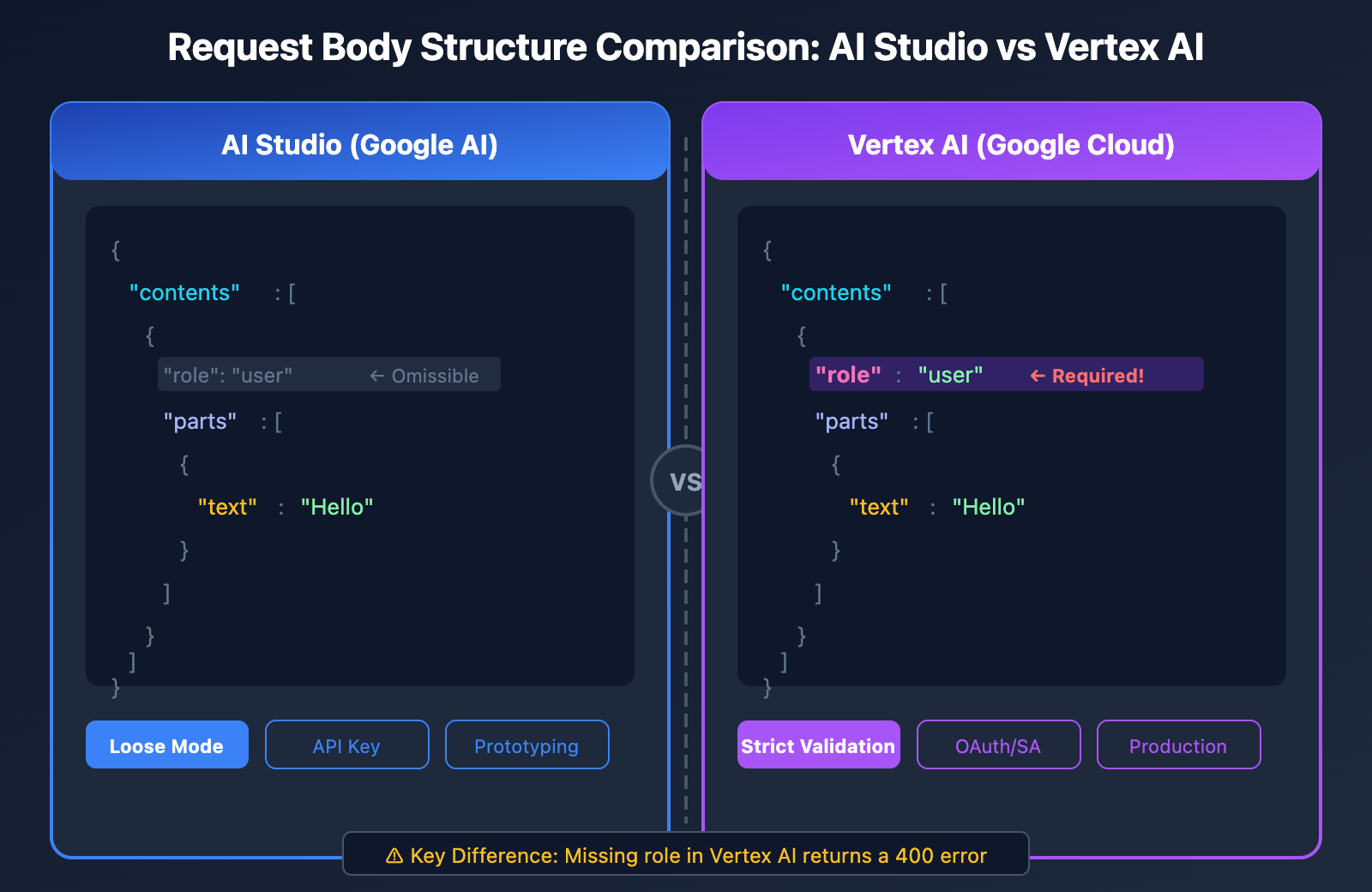
| Field | AI Studio | Vertex AI |
|---|---|---|
contents |
Required | Required |
contents[].role |
Optional (Single-turn) | Required |
contents[].parts |
Required | Required |
contents[].parts[].text |
Required | Required |
systemInstruction |
Supported | Supported |
generationConfig |
Optional | Optional |
Multi-turn Conversation Scenarios
In multi-turn conversations, the formats for both platforms align, as both require the role to be explicitly specified:
{
  "contents": [
    {
      "role": "user",
      "parts": [{"text": "Hello, please introduce yourself"}]
    },
    {
      "role": "model",
      "parts": [{"text": "Hello! I am Gemini, an AI assistant developed by Google..."}]
    },
    {
      "role": "user",
      "parts": [{"text": "What can you do?"}]
    }
  ]
}
Full Solutions for 3 Scenarios
Scenario 1: Calling Vertex AI via Python SDK
When using the official Google Python SDK, make sure you're passing the role parameter correctly:
from google import genai
from google.genai.types import Content, Part

# 初始化客户端
client = genai.Client(
    vertexai=True,
    project="your-project-id",
    location="us-central1"
)

# 正确的请求格式 - 必须包含 role
contents = [
    Content(
        role="user",
        parts=[Part(text="什么是 Vertex AI?")]
    )
]

response = client.models.generate_content(
    model="gemini-2.0-flash",
    contents=contents
)

print(response.text)
Scenario 2: Direct REST API Calls
You can use curl or any HTTP client to call the Vertex AI REST API directly:
curl -X POST \
  -H "Authorization: Bearer $(gcloud auth print-access-token)" \
  -H "Content-Type: application/json" \
  "https://us-central1-aiplatform.googleapis.com/v1/projects/YOUR_PROJECT/locations/us-central1/publishers/google/models/gemini-2.0-flash:generateContent" \
  -d '{
    "contents": [
      {
        "role": "user",
        "parts": [
          {"text": "解释量子计算的基本原理"}
        ]
      }
    ],
    "generationConfig": {
      "temperature": 0.7,
      "maxOutputTokens": 1024
    }
  }'
💡 Quick Start: We recommend using the APIYI (apiyi.com) platform to build your prototypes quickly. It provides out-of-the-box API endpoints that automatically handle the formatting differences between Vertex AI and AI Studio. You won't need to deal with complex configurations, and you can finish your integration in about 5 minutes.
Scenario 3: Calling via OpenAI-Compatible Format
If your codebase is already built around the OpenAI SDK, you can use this compatible format:
import openai

client = openai.OpenAI(
    api_key="YOUR_API_KEY",
    base_url="https://api.apiyi.com/v1"  # 使用 APIYI 统一接口
)

# OpenAI 兼容格式自动处理 role
response = client.chat.completions.create(
    model="gemini-2.0-flash",
    messages=[
        {"role": "user", "content": "什么是神经网络?"}
    ]
)

print(response.choices[0].message.content)
Special Cases: Vertex AI Express Mode
What is Vertex AI Express Mode?
Vertex AI Express Mode is an option that sits right between AI Studio and standard Vertex AI:
| Feature | AI Studio | Vertex AI Express | Vertex AI Standard |
|---|---|---|---|
| Auth Method | API Key | API Key | Service Account |
| Rate Limits | Basic | Production-grade | Production-grade |
| Commercial License | No | Yes | Yes |
| role Requirement | Optional | Required | Required |
| Endpoint | generativelanguage | aiplatform | aiplatform |
Role Requirements in Express Mode
Even though Express Mode uses API Key authentication (the same as AI Studio), it still inherits Vertex AI's strict formatting rules. This means the role field is mandatory.
# Express Mode 示例 - role 必填
import requests

url = "https://us-central1-aiplatform.googleapis.com/v1/projects/YOUR_PROJECT/locations/us-central1/publishers/google/models/gemini-2.0-flash:generateContent"

headers = {
    "Content-Type": "application/json",
    "X-Goog-Api-Key": "YOUR_API_KEY"
}

data = {
    "contents": [
        {
            "role": "user",  # 必须包含!
            "parts": [{"text": "Hello World"}]
        }
    ]
}

response = requests.post(url, headers=headers, json=data)
Troubleshooting Guide for Common Errors
Error 1: Please use a valid role: user, model
Cause: Objects in the contents array are missing the role field.
Solution:
{
  "contents": [
    {
+     "role": "user",
      "parts": [{"text": "..."}]
    }
  ]
}
Error 2: Invalid role value
Cause: The role field uses an invalid value (such as "system" or "assistant").
Solution: Vertex AI only accepts user and model. It doesn't accept system or assistant.
{
  "contents": [
    {
-     "role": "assistant",
+     "role": "model",
      "parts": [{"text": "..."}]
    }
  ]
}
Error 3: Misplaced System Instructions
Cause: Putting the system prompt inside contents instead of using the systemInstruction field.
Solution:
{
  "systemInstruction": {
    "parts": [{"text": "You're a professional technical consultant"}]
  },
  "contents": [
    {
      "role": "user",
      "parts": [{"text": "Help me explain what an API is"}]
    }
  ]
}
💰 Cost Optimization: For projects that require frequent API format testing, you might want to consider calling APIs through the APIYI platform. They offer flexible billing and more competitive pricing, which is great for small-to-medium teams and individual developers during the debugging phase.
Migration Checklist
When you're migrating from AI Studio to Vertex AI, use this checklist to make sure your request format is spot on:
Mandatory Changes
| Check Item | AI Studio Syntax | Vertex AI Syntax |
|---|---|---|
role field |
Can be omitted | Must add "role": "user" |
| Endpoint URL | generativelanguage.googleapis.com | {region}-aiplatform.googleapis.com |
| Authentication | x-goog-api-key |
Authorization: Bearer |
| Model Path | models/gemini-pro | publishers/google/models/gemini-pro |
Code Migration Example
Before Migration (AI Studio):
import google.generativeai as genai

genai.configure(api_key="YOUR_API_KEY")
model = genai.GenerativeModel('gemini-pro')
response = model.generate_content("Hello")
After Migration (Vertex AI):
from google import genai
from google.genai.types import Content, Part

client = genai.Client(vertexai=True, project="your-project", location="us-central1")

contents = [
    Content(role="user", parts=[Part(text="Hello")])  # role is required
]

response = client.models.generate_content(
    model="gemini-2.0-flash",
    contents=contents
)
Handling Roles in Multimodal Requests
Image + Text Requests
When sending multimodal requests that include images, you still need to specify the role:
{
  "contents": [
    {
      "role": "user",
      "parts": [
        {"text": "Describe the content of this image"},
        {
          "inlineData": {
            "mimeType": "image/jpeg",
            "data": "BASE64_ENCODED_IMAGE"
          }
        }
      ]
    }
  ]
}
Using Cloud Storage Files
{
  "contents": [
    {
      "role": "user",
      "parts": [
        {"text": "Analyze the main content of this video"},
        {
          "fileData": {
            "mimeType": "video/mp4",
            "fileUri": "gs://your-bucket/video.mp4"
          }
        }
      ]
    }
  ]
}
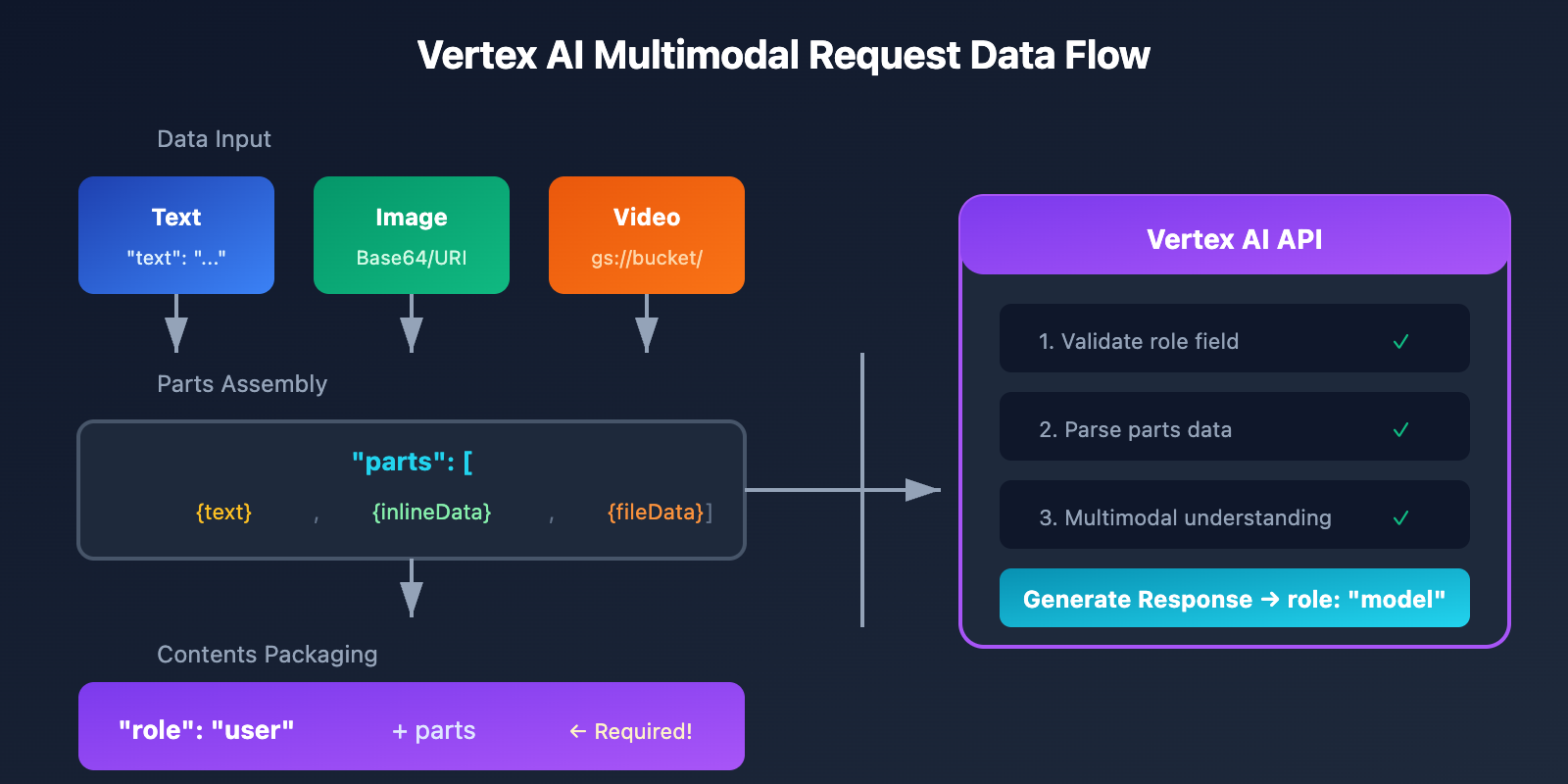
Frequently Asked Questions (FAQ)
Q1: Why can I skip the role in AI Studio but not in Vertex AI?
AI Studio is designed as a tool for rapid prototyping, so its formatting requirements are a bit more relaxed. Vertex AI, on the other hand, is an enterprise-grade production platform that requires strict request formats to ensure system stability and maintainability. You can use the APIYI apiyi.com platform to get free testing credits and quickly verify the format requirements for different platforms.
Q2: Does Vertex AI support the system role?
No, it doesn't. Vertex AI's role field only accepts two values: user and model. System instructions need to be placed in a separate systemInstruction field:
{
  "systemInstruction": {
    "parts": [{"text": "Your system prompt here"}]
  },
  "contents": [...]
}
Q3: How do I map the assistant role from OpenAI's format?
The assistant role in OpenAI's format corresponds to the model role in Vertex AI. If you're using the unified interface from APIYI apiyi.com, this mapping is handled for you automatically.
Q4: How can I quickly test if my request format is correct?
Here are a few recommended ways to validate your requests:
- Use the APIYI Platform: It provides request format validation and helpful error messages.
- Use the Google Cloud Console: Vertex AI Studio offers a visual testing interface.
- Local Mock Testing: Verify your logic in AI Studio first, then adjust the format when migrating to Vertex AI.
Q5: Is the format the same for Vertex AI Express Mode and Standard Mode?
Yes, the request body format is identical for both; they both require the role field. The main difference lies in the authentication method (API Key vs. Service Account).
Summary
The differences in request body formats between Vertex AI and AI Studio primarily come down to the mandatory requirements for the role field:
| Platform | Role Requirement | Valid Values |
|---|---|---|
| AI Studio | Optional for single-turn, mandatory for multi-turn | user, model |
| Vertex AI | Always mandatory | user, model |
| Vertex AI Express | Always mandatory | user, model |
Key steps to fix 400 errors:
- Ensure every
contentsobject includes"role": "user"or"role": "model". - Use the
systemInstructionfield for system instructions instead of therolefield. - Map the OpenAI
assistantformat tomodel.
We recommend using APIYI (apiyi.com) to quickly verify your results. The platform automatically handles compatibility issues across different API formats, letting you focus on your core business logic.
Further Reading:
- Vertex AI Official Documentation: cloud.google.com/vertex-ai/docs
- Gemini API Reference: ai.google.dev/api
- Migration Guide: cloud.google.com/vertex-ai/generative-ai/docs/migrate/migrate-google-ai
📝 Author: APIYI Technical Team | Focused on Large Language Model API integration and optimization.
🔗 Technical Support: Visit APIYI (apiyi.com) for more technical resources and development support.


