
Clawdbot has emerged as the most popular open-source personal AI assistant project of 2026, catching the attention of countless developers and productivity geeks. But before you jump in, there's one question everyone is asking: How much does Clawdbot actually cost? And am I the target user?
Core Value: By the end of this article, you'll have a clear understanding of Clawdbot’s full cost structure and whether you're in the group that stands to benefit the most.
Clawdbot Pricing: The Bottom Line
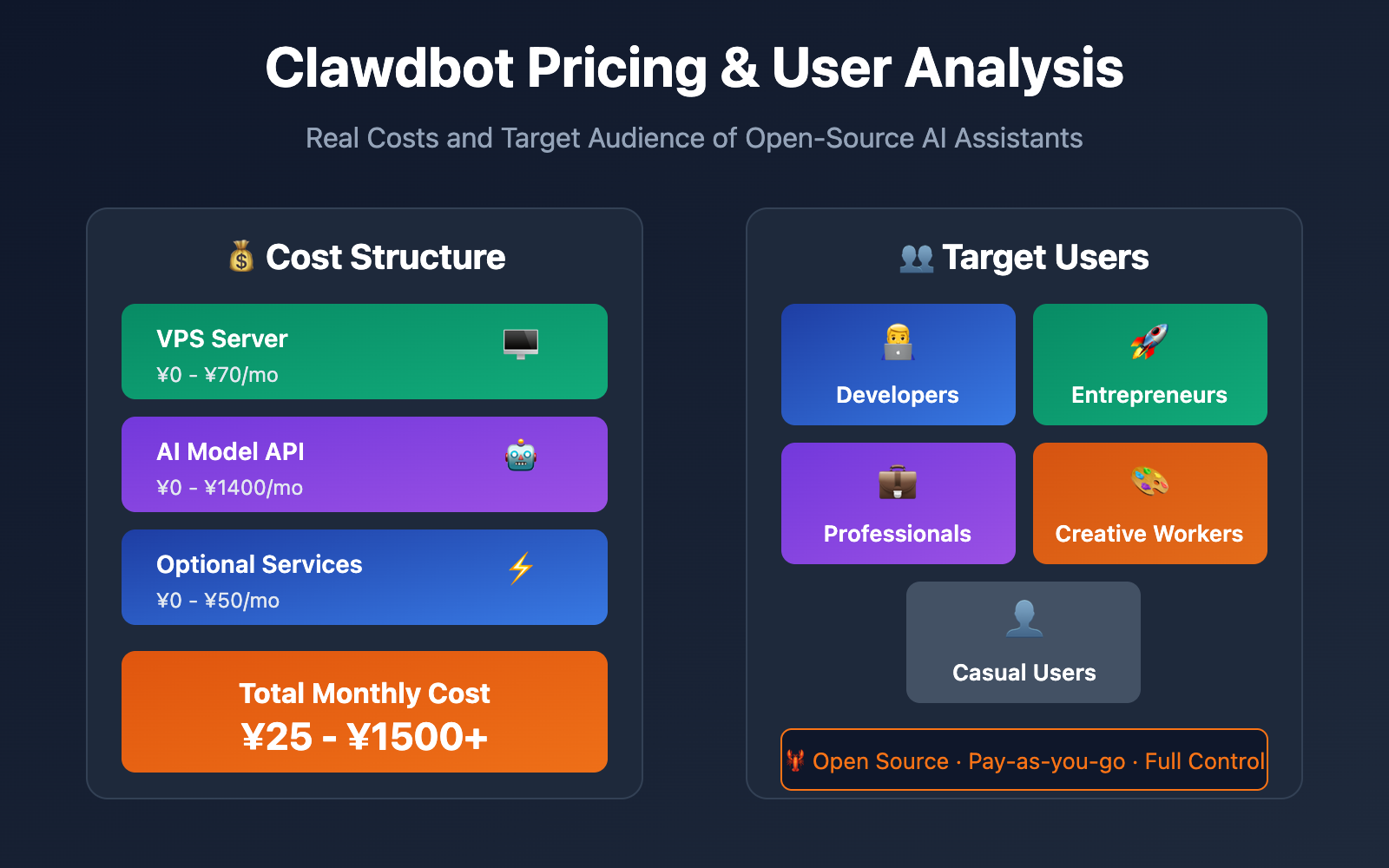
Let's cut to the chase: Clawdbot’s monthly cost typically ranges from ¥25 to ¥1400+. The final number mostly depends on two main factors:
| Cost Type | Minimum Config | Recommended Config | Power User |
|---|---|---|---|
| VPS Server | ¥0 (Local) | ¥35/mo | ¥70/mo |
| AI Model Fees | ¥0 (Local Model) | ¥70-140/mo | ¥200-1400/mo |
| Total Monthly Cost | ¥0 | ¥105-175 | ¥270-1470 |
🎯 Key Takeaway: Clawdbot itself is completely free, open-source software. What you’re paying for are the servers to run it and the AI model API calls. This means you have the flexibility to choose a configuration that fits your specific budget and needs.
Clawdbot Cost Breakdown
Clawdbot's costs can be broken down into three main parts:
Part 1: Runtime Environment Costs
Clawdbot needs a 24/7 environment to stay online and respond to your messages whenever you need it.
| Setup Option | Monthly Cost | Pros | Cons |
|---|---|---|---|
| Local Computer | ¥0 | Zero cost | Needs to be always on; loses connection if shut down |
| Mac mini | ¥0 (one-time) | Stable, quiet, low power | High upfront cost (approx. ¥4000+) |
| VPS Cloud Server | ¥35-70/mo | 24/7 stable operation, hands-off | Recurring expense |
| Home NAS | ¥0 (existing) | Uses existing resources | Requires Docker configuration skills |
| Raspberry Pi | ¥0 (one-time ¥300) | Ultra-low power, silent | Limited performance |
Recommended Solution:
For most users, we recommend a VPS Cloud Server. Here's why:
- European providers like Hetzner offer entry-level servers for about €5/month (~¥40).
- 2GB of RAM is plenty for basic chat functionality.
- 4GB of RAM can handle advanced Skills like browser automation.
- You don't have to worry about power outages, internet drops, or hardware failures.
💰 Cost Optimization: The VPS only acts as the "control plane" for the Clawdbot Gateway. The actual AI heavy lifting happens via cloud APIs. Because of this, even the cheapest VPS is usually enough.
Part 2: AI Model Fees
This is where the bulk of your Clawdbot costs will come from. You've got several options:
| Model Solution | Monthly Cost | Quality | Best For |
|---|---|---|---|
| Local Models (LM Studio) | ¥0 | Fair | High privacy needs, simple tasks |
| Claude API (Pay-as-you-go) | ¥70-200 | Excellent | Regular use, predictable costs |
| Claude Pro Subscription | ¥140/mo | Excellent | Moderate use, fixed budget |
| Claude Max Subscription | ¥700-1400/mo | Top-tier | Heavy use, unlimited Opus access |
| OpenAI API | ¥50-150 | Good | GPT enthusiasts |
| Third-party API Proxy | ¥50-100 | Excellent | Top choice for users in mainland China |
Real-world Example:
Tech blogger Federico Viticci burned through 180 million tokens in his first week with Clawdbot. He opted for a $200/month Claude Max subscription to get unlimited access to the Opus model.
For a typical user doing daily Q&A and simple automations, monthly API consumption usually lands between ¥50 and ¥100.
🎯 Pro Tip: For users in China, we recommend using the APIYI (apiyi.com) platform to call the Claude API. It provides an OpenAI-compatible interface, supports Alipay/WeChat payments, and offers better pricing than official channels without needing overseas payment methods.
Part 3: Optional Value-Added Costs
| Add-on Item | Monthly Cost | Description |
|---|---|---|
| Brave Search API | ¥0-35 | Gives the bot web search capabilities (has a free tier) |
| Domain + SSL | ¥10 | Custom access address (optional) |
| Tailscale | ¥0 | Secure remote access (free) |
4 Typical Configuration Plans for Clawdbot
Option 1: The Zero-Cost Entry
Total Cost: ¥0/month
Runtime Environment: Personal Computer (must stay on)
AI Model: LM Studio Local Models (e.g., Llama 3)
Channel: Discord (Free)
Who it's for: Students wanting to try Clawdbot or users who are extremely privacy-conscious.
Limitations:
- If the computer is off, the bot is off.
- Local model quality isn't quite as good as Claude or GPT.
- Might struggle with complex tasks.
Option 2: The Practical Choice (Recommended)
Total Cost: ¥75-110/month
Runtime Environment: Hetzner VPS ¥35/mo (2GB RAM)
AI Model: APIYI Claude API ¥40-75/mo
Channels: Telegram + Discord
Who it's for: Individual developers, productivity enthusiasts, and casual users.
🚀 Quick Start: We recommend the APIYI (apiyi.com) platform to get Claude API access quickly. It's plug-and-play, offers free test credits upon registration, and takes about 5 minutes to set up.
Option 3: The Professional Setup
Total Cost: ¥175-250/month
Runtime Environment: VPS ¥70/mo (4GB RAM, supports browser automation)
AI Model: Claude Pro ¥140/mo (via OAuth)
Channels: WhatsApp + Telegram + Discord + Slack
Extras: Brave Search API
Who it's for: Freelancers, remote workers, and small teams.
Option 4: The Power User
Total Cost: ¥700-1500/month
Runtime Environment: High-spec VPS ¥100/mo (8GB RAM)
AI Model: Claude Max ¥700-1400/mo (Unlimited Opus)
Channels: All platforms
Extras: All Skills enabled
Who it's for: AI power users, entrepreneurs, and pros who need an Agent for complex collaboration.
Deep Dive: 5 Types of Clawdbot Target Users
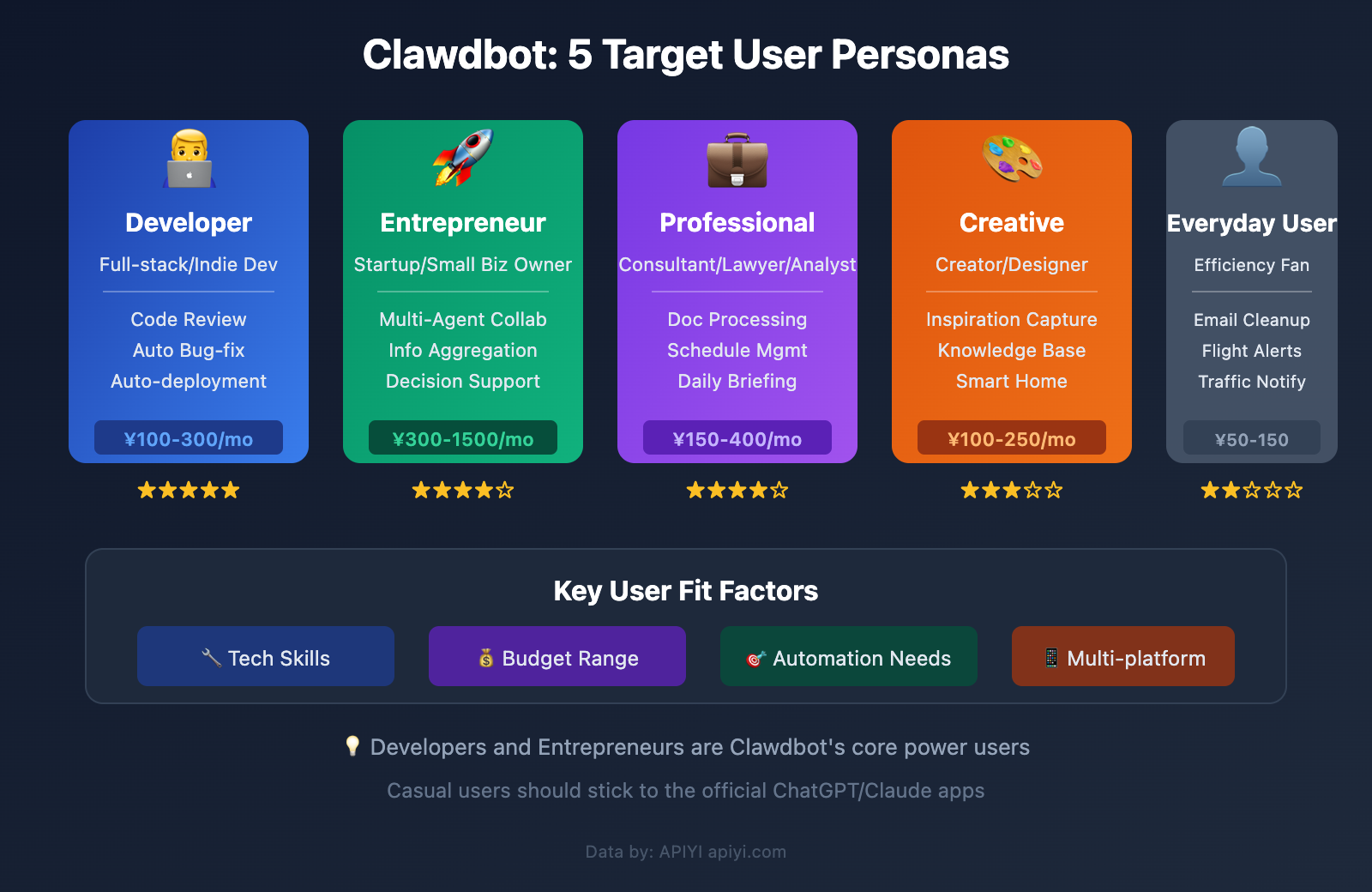
Clawdbot isn't for everyone. Its "self-hosted + command-line configuration" nature means it's designed for a very specific crowd.
User Type 1: Developer
Match Level: ⭐⭐⭐⭐⭐
| Trait | Description |
|---|---|
| Typical Profile | Full-stack Engineer, Indie Dev, DevOps |
| Core Needs | Code review, bug fixes, automated deployment |
| Budget Range | ¥100-300/month |
| Key Scenario | Overnight Agent monitoring to fix code and submit PRs |
Real-world Use Case:
"Developers report that the Agent can watch over code while they sleep, automatically fixing bugs and submitting Pull Requests."
Developers are Clawdbot's heart and soul. They:
- Have the skills to breeze through installation and config.
- Can fully leverage Shell and code execution Skills.
- Can write custom Skills to extend functionality.
- Are perfectly comfortable with command-line interfaces.
💡 Pro Tip: Developers can use the APIYI (apiyi.com) platform to call the Claude API, which helps lower costs while ensuring a more stable connection from within China.
User Type 2: Entrepreneur / Business Owner
Match Level: ⭐⭐⭐⭐☆
| Trait | Description |
|---|---|
| Typical Profile | Startup founder, small business owner, solopreneur |
| Core Needs | Multitasking automation, info aggregation, decision support |
| Budget Range | ¥300-1,500/month |
| Key Scenario | Multi-agent collaboration for a 10x efficiency boost |
Real-world Use Case:
"Entrepreneurs use multiple Agents collaborating across cloud and local hardware to achieve a 10x productivity gain."
Typical scenarios for an entrepreneur using Clawdbot:
- Automatically summarizing daily emails, news, and competitor updates.
- Using multi-agent collaboration to conduct market research.
- Automating customer follow-ups and schedule management.
- Integrating information streams from various SaaS tools.
Note: If an entrepreneur isn't tech-savvy, they'll probably need a developer to help with the initial setup.
User Type 3: Professional
Match Level: ⭐⭐⭐⭐☆
| Trait | Description |
|---|---|
| Typical Profile | Consultant, lawyer, financial analyst, product manager |
| Core Needs | Document processing, schedule management, info retrieval |
| Budget Range | ¥150-400/month |
| Key Scenario | Automated insurance claims, expense tracking, daily briefings |
Real-world Use Case:
"Busy professionals automate insurance claims, expense tracking, and daily briefings, saving several hours every week."
Typical scenarios for professionals:
- Automatically organizing meeting minutes and emailing them to stakeholders.
- Tracking project progress and sending reminders at key milestones.
- Aggregating industry news from multiple channels.
- Auto-generating weekly and monthly reports.
User Type 4: Creative
Match Level: ⭐⭐⭐☆☆
| Trait | Description |
|---|---|
| Typical Profile | Content creator, designer, podcaster, social media influencer |
| Core Needs | Inspiration capture, content assistance, smart home integration |
| Budget Range | ¥100-250/month |
| Key Scenario | Personalized meditation generation, knowledge base mgmt, smart home control |
Real-world Use Case:
"Creatives use Clawdbot to generate custom meditation content, proactively manage their smart homes, and build personal knowledge systems from chat history."
Typical scenarios for creators:
- Automatically extracting creative sparks from daily conversations.
- Building a personal knowledge base (think Obsidian + AI).
- Controlling smart home devices via voice or messaging apps.
- Automatically managing Spotify playlists.
User Type 5: Everyday Efficiency User
Match Level: ⭐⭐☆☆☆
| Trait | Description |
|---|---|
| Typical Profile | Casual users interested in productivity tools |
| Core Needs | Daily automation, reminders, info lookups |
| Budget Range | ¥50-150/month |
| Key Scenario | Email cleanup, flight check-ins, traffic alerts |
Real-world Use Case:
"Everyday users appreciate simple features like automatic email cleanup, flight check-ins, or traffic-aware reminders."
Note: For those without a technical background, Clawdbot has a pretty steep learning curve. If you just need a simple AI to chat with, the official ChatGPT or Claude apps are likely a better fit for you.
Clawdbot User Fit Assessment
Answer the following 5 questions to see if Clawdbot is right for you:
| Question | Yes (+2 pts) | Partial (+1 pt) | No (0 pts) |
|---|---|---|---|
| Are you comfortable with command-line operations? | ✓ | A little | Not at all |
| Do you have a VPS or a computer that runs 24/7? | ✓ | Can buy one | No access |
| Can you accept AI costs of ¥100+/month? | ✓ | Need to think | Unacceptable |
| Do you use more than 3 chat platforms? | ✓ | 2 platforms | Only 1 |
| Do you have clear automation needs? | ✓ | Want to try | None |
Score Interpretation:
- 8-10 points: Highly recommended! You'll get massive value out of Clawdbot.
- 5-7 points: Worth a try; we suggest starting with the budget-friendly setup.
- 0-4 points: It's better to stick with the official ChatGPT/Claude apps for now.
Clawdbot Pricing vs. Competitors
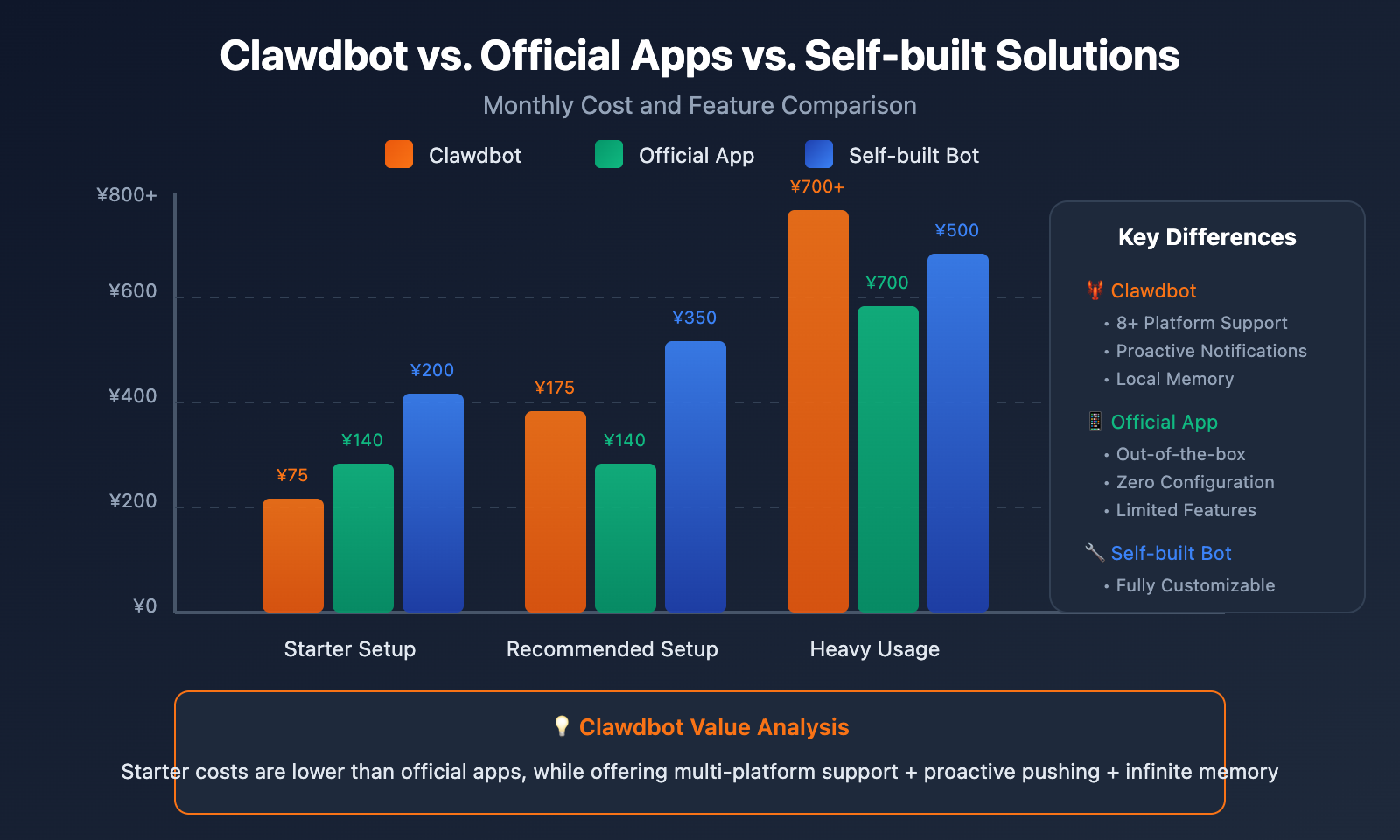
| Comparison Dimension | Clawdbot | ChatGPT Plus | Claude Pro | Self-built Bot |
|---|---|---|---|---|
| Monthly Cost | ¥75-1500 | ¥140 | ¥140 | ¥200-500 |
| Multi-platform Support | 8+ Platforms | App Only | App Only | Requires Dev per Platform |
| Persistent Memory | Unlimited Local Storage | Limited | Limited | Must Implement Yourself |
| Proactive Pushing | Full Support | Not Supported | Not Supported | Must Implement Yourself |
| Customization | Full Control | Limited (GPTs) | Projects | Full Control |
| Entry Barrier | Medium | Low | Low | High |
| Target Audience | Tech-savvy Users | General Users | General Users | Pro Developers |
Core Differences:
While Clawdbot's cost might look similar to official apps on paper, it offers a completely different value proposition:
- Unified Channels: One assistant covers all your chat platforms.
- True Proactivity: It can send you messages first, rather than just waiting for you to ask.
- Complete Data Control: Your memory is stored on your own device.
- Infinite Scalability: Through Skills, you can make it do just about anything.
Clawdbot Cost Optimization Strategies
Strategy 1: Tiered Model Usage
Daily conversations: claude-haiku (lowest cost)
Complex tasks: claude-sonnet (best value)
Critical decisions: claude-opus (only when necessary)
By setting default models in your Clawdbot configuration, you can significantly reduce your API costs.
Strategy 2: Use API Proxies
For users in China, using the official API directly presents several hurdles:
- Payment difficulties (requires an overseas credit card)
- Unstable access
- Higher pricing
💰 Cost Optimization: By calling the Claude API through APIYI (apiyi.com), you'll get more affordable rates than official pricing, plus it supports Alipay and WeChat Pay. The platform provides an OpenAI-compatible interface, so configuring it for Clawdbot is as simple as updating the
baseUrl.
Strategy 3: Optimize VPS Configuration
| Optimization Point | Suggestion |
|---|---|
| Choose European Data Centers | Hetzner and Contabo offer lower prices |
| Upgrade as Needed | Start with 2GB and scale up if it's not enough |
| Annual Discounts | Annual billing usually comes with a 10-20% discount |
Strategy 4: Control Token Consumption
- Regularly clear out useless conversation memory.
- Avoid sending excessively long contexts.
- Use "Skills" instead of repeatedly asking the same types of questions.
FAQ
Q1: Does Clawdbot itself cost money?
No. Clawdbot is completely open-source and free software hosted on GitHub. You only need to pay for the server costs to run it and the AI model invocation fees.
Q2: What’s the minimum cost to get Clawdbot running?
Technically, ¥0. If you use your own computer + a local model (like LM Studio), it won't cost you a dime. However, the actual experience won't be as smooth. A recommended entry-level setup is a VPS (approx. ¥35) + APIYI Claude API (¥40-70), bringing the monthly cost to around ¥75-100.
Q3: Can I use Clawdbot without a technical background?
It's a bit of a learning curve. Currently, Clawdbot requires installation and configuration via the command line and doesn't have a graphical interface. If you're completely unfamiliar with the command line, we suggest:
- Asking a tech-savvy friend to help with the initial setup.
- Or sticking with the official ChatGPT/Claude apps for now.
Q4: How do users in China get Claude API access?
We recommend getting Claude API access through the APIYI (apiyi.com) platform. It supports Alipay and WeChat Pay, provides an API interface identical to the official one, and offers better pricing. Once registered, you'll get an API Key that you can simply plug into the baseUrl field in Clawdbot's config.
Q5: Is Claude Max ($200/month) worth it?
It depends on how heavily you use it. If you:
- Interact with AI for several hours every day.
- Frequently need the Opus model for complex tasks.
- Don't want to worry about Token usage limits.
Then Claude Max might be for you. For most users, a pay-as-you-go API plan is usually more economical.
Q6: What’s the difference between Clawdbot and just using the Claude App?
The biggest differences are:
- Usage Scenario: Clawdbot lives inside your chat apps, whereas the Claude App requires you to open it specifically.
- Proactivity: Clawdbot can proactively send you messages; the Claude App can only respond passively.
- Persistent Memory: Clawdbot's memory is saved locally and permanently, while the Claude App has memory limits.
- Extensibility: Clawdbot can control your computer and execute code; the Claude App can't.
Summary and Recommendations
Clawdbot Pricing Key Points
| Key Point | Description |
|---|---|
| Software is Free | Clawdbot is open-source and free, with zero licensing fees |
| Running Costs | VPS for ¥35-70/month or run it on your local devices |
| AI Costs | From ¥0 (local models) up to ¥1400 (Claude Max) |
| Recommended Budget | ¥100-200/month will give you a high-quality experience |
User Suitability Suggestions
| User Type | Recommended Plan | Budget Suggestion |
|---|---|---|
| Developers | Professional & Stable | ¥150-250/month |
| Entrepreneurs | Power User Version | ¥500-1500/month |
| Professionals | Economic & Practical | ¥100-200/month |
| Creatives | Economic & Practical | ¥100-150/month |
| Casual Users | Stick with the official App for now | ¥0-140/month |
Next Steps
- Evaluate your fit: Use the 5-question quiz above to see if it's right for you.
- Choose your configuration: Pick a plan that fits your budget.
- Get your API: We recommend getting your Claude API quickly through APIYI at apiyi.com.
- Start the installation: Head over to
github.com/clawdbot/clawdbotto begin. - Join the community: Get help and share ideas on the Clawdbot Discord.
References
-
Clawdbot Official Documentation: Complete installation and configuration guide
- Link:
docs.clawd.bot
- Link:
-
VelvetShark Review: An in-depth look at using Clawdbot
- Link:
velvetshark.com/clawdbot-the-self-hosted-ai-that-siri-should-have-been
- Link:
-
MacStories Feature: The future of personal AI assistants
- Link:
macstories.net/stories/clawdbot-showed-me-what-the-future-of-personal-ai-assistants-looks-like/
- Link:
-
Hacker News Discussion: User use cases and shared experiences
- Link:
news.ycombinator.com/item?id=46747644
- Link:
-
Claude Official Pricing: Anthropic subscription and API pricing
- Link:
claude.com/pricing
- Link:
📝 Author: APIYI Team
🔗 Tech Exchange: Visit apiyi.com to get Claude API and unlock more possibilities for AI applications
📅 Updated: January 2026


