
OpenAI began a limited preview of the GPT-5.6 series on June 26, 2026, and this time it chose to split the new model into three tiers and release them all at once: Sol, Terra, and Luna. How to choose between them is the core question this article aims to answer. Here, we’ll compare Sol’s flagship capability with Terra and Luna’s cost-performance approach, and give clear recommendations from the angles of positioning, pricing, benchmark scores, and more.
Core value: By the end of this article, you’ll know which GPT-5.6 version to prioritize in three typical scenarios: limited development budget, pursuit of maximum capability, or pursuit of high speed at low cost.
GPT-5.6: Positioning and Core Differences Across the Three Versions
To understand the GPT-5.6 selection problem, the first thing to clarify is why OpenAI didn’t just ship one “strongest model” this time, but instead split it into three tiers. The answer is simple: different business scenarios demand very different levels of reasoning depth, response speed, and per-request cost. Using one model to cover everything just wastes resources.
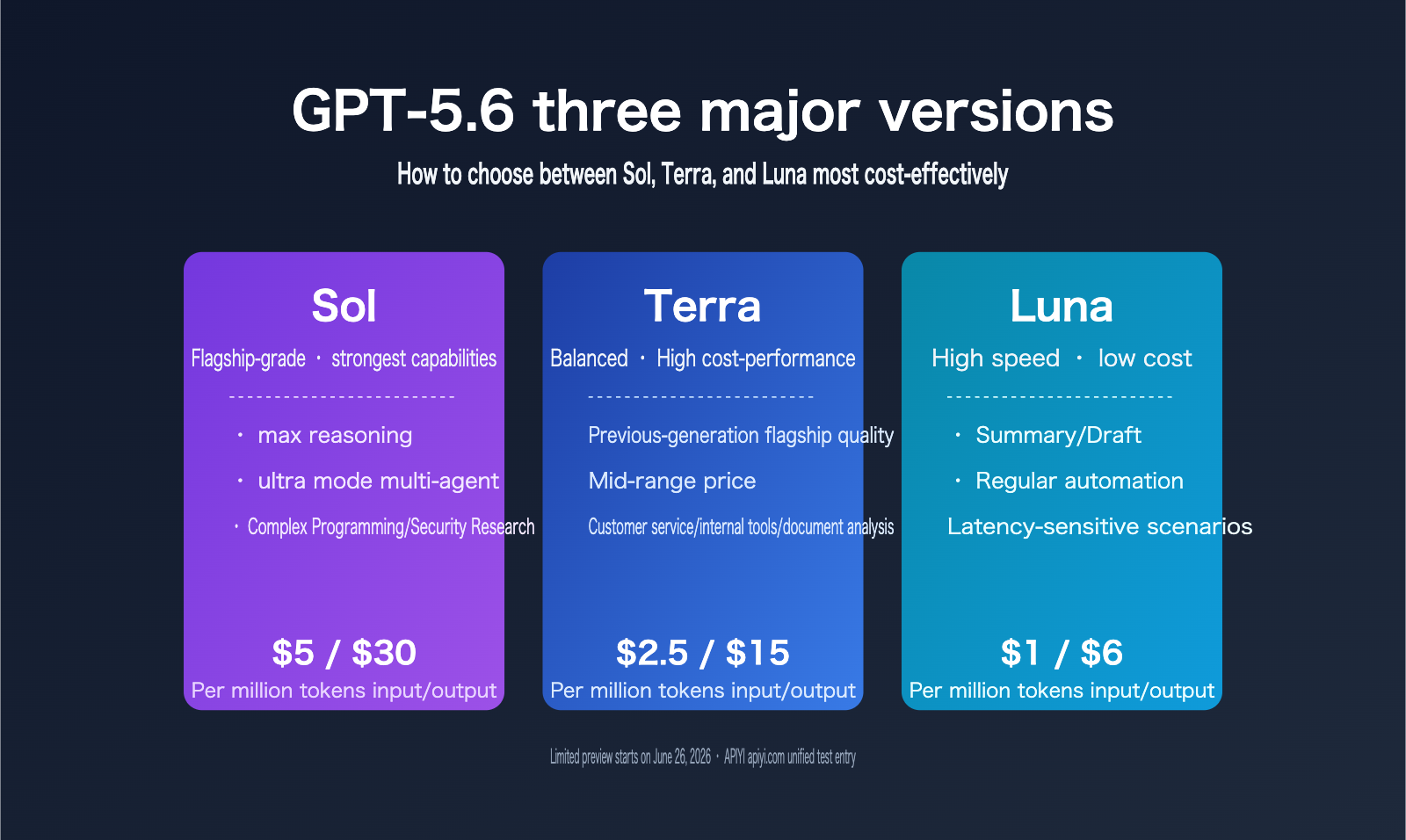
Sol is the flagship version in this release, built for maximum capability. OpenAI positions it as the choice for the hardest problems, such as complex coding tasks and safety research. Terra follows a balanced path, aimed at high-throughput business workloads like customer support conversations, internal tools, and document analysis. OpenAI describes it as having “last-gen flagship quality at a mid-tier price.” Luna focuses on speed and low cost, making it a good fit for summarization, content drafts, and routine automation tasks where latency matters, but top-tier reasoning doesn’t.
| Comparison dimension | Sol | Terra | Luna |
|---|---|---|---|
| Positioning | Flagship, strongest capability | Balanced, high-volume business tasks | Fast and low-cost, routine automation |
| Typical scenarios | Complex coding, safety research | Customer support, internal tools, document analysis | Summaries, drafts, routine automation |
| Exclusive capability | max reasoning, ultra mode | None | None |
| Price positioning | Highest | Last-gen flagship quality, mid-tier price | Lowest |
From this table, it’s clear that GPT-5.6 isn’t just a simple “downgrade for a lower price.” Instead, it’s optimized for different workloads. That’s also the broader trend across the LLM industry over the past year: instead of making everyone queue behind one flagship model, vendors are splitting capability into multiple tiers so developers can mix and match based on task complexity and budget. That lowers compute pressure for the provider and gives smaller teams a way to get near-flagship results at a much lower cost.
If your team needs to connect to Sol, Terra, Luna, or even run A/B tests across Claude models from other providers, using a unified gateway like APIYI apiyi.com can save you from constantly switching between official dashboards, API keys, and billing systems.
GPT-5.6 Pricing Differences: Where Terra’s Value Really Shows Up
Price is usually the first thing most developers look at before deciding which version to use. GPT-5.6 is billed by the million tokens across three versions, and the gap between input and output pricing is pretty noticeable:
| Version | Input Price (per million tokens) | Output Price (per million tokens) | Positioning |
|---|---|---|---|
| Sol | $5.00 | $30.00 | Flagship premium |
| Terra | $2.50 | $15.00 | Roughly half the price of the previous flagship |
| Luna | $1.00 | $6.00 | Lowest cost |
Terra’s pricing strategy is worth a closer look. Officially, Terra is described as “previous-flagship quality at mid-tier pricing.” In plain English, if you’ve been using the previous generation’s flagship model for high-frequency, mid-to-high complexity tasks like customer support Q&A, document summarization, or internal knowledge base retrieval, Terra can likely deliver close-to-equivalent results at about half the cost. For teams that care about cost but don’t want to give up too much quality, this is probably the most practical change in the GPT-5.6 release.
Here’s a simple example to make the cost difference easier to see: suppose a customer service bot consumes 20 million input tokens and 5 million output tokens per month. Running it on Sol would cost about $250, while Terra would cost around $125. Over a year, that adds up to well over a thousand dollars in saved usage costs, and the official description suggests the output quality gap isn’t especially obvious. For small teams and startups, that kind of cost difference often decides whether a product can keep running long-term.
For developers, pricing differences are just numbers on paper. What really matters is the actual cost of running your real workload. Before integrating any GPT-5.6 version in production, we recommend using the APIYI apiyi.com platform to run a comparison test with real business data. Measure the actual output quality and per-task cost of Sol, Terra, and Luna first, then decide which version makes the most sense for long-term use instead of relying only on the published price sheet.
GPT-5.6 Capability Ceiling: max reasoning and ultra mode Are Sol-Only
In the GPT-5.6 family, the real separation isn’t basic Q&A performance. It’s the two new features that are exclusive to Sol: max reasoning and ultra mode.
max reasoning is a new reasoning-intensity option that gives Sol a larger compute budget for reasoning, allowing the model to think longer on a single chain of reasoning before producing a final answer. It’s basically like exposing “thinking time” as a tunable parameter, so you can deliberately increase the investment when handling harder problems.
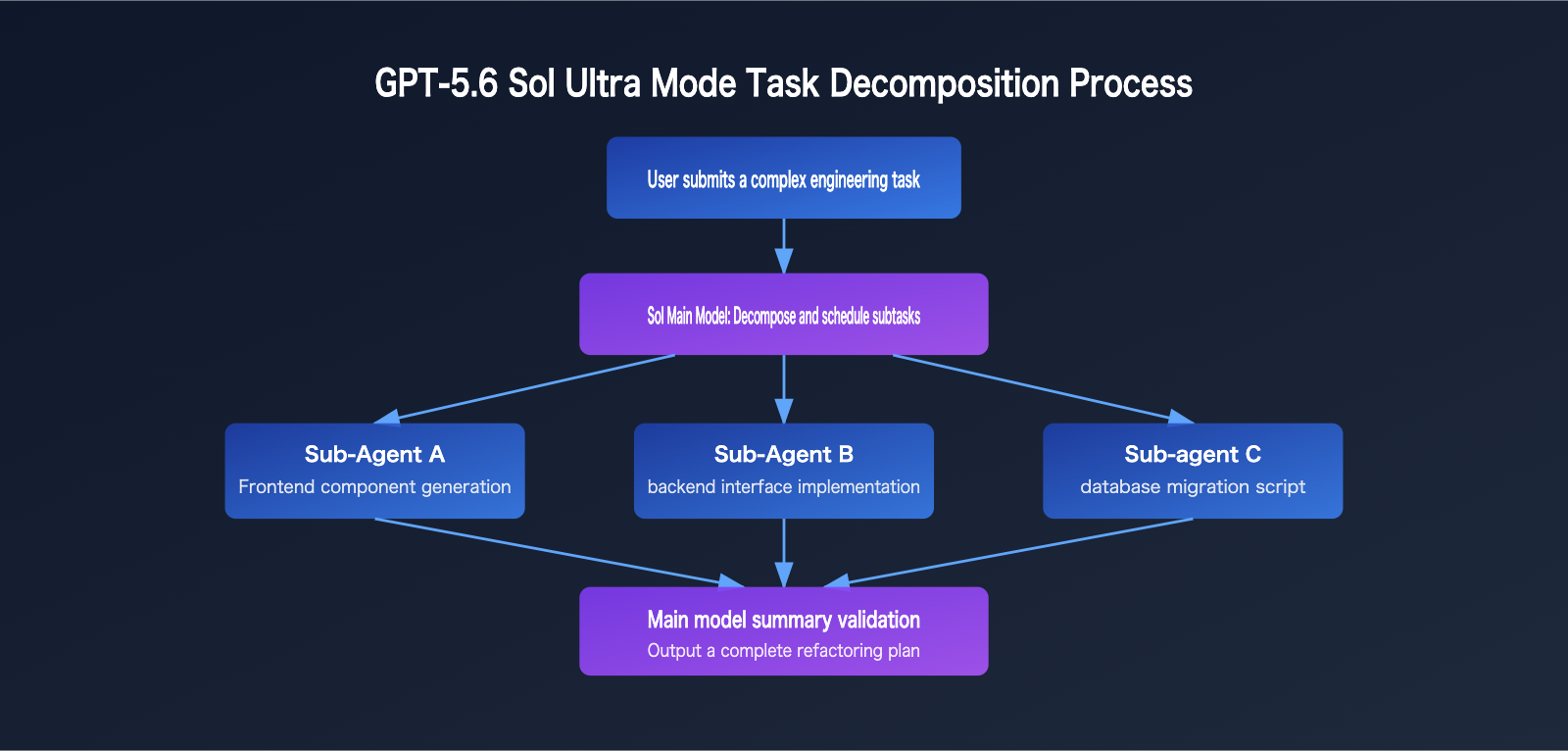
ultra mode goes a step further. It’s a built-in multi-agent system inside the model itself. When a user sends a request in ultra mode, Sol automatically breaks the task into multiple subtasks, schedules several agents in parallel to handle different parts, and then aggregates the results. In other words, the AI isn’t just answering passively anymore — it’s starting to plan tasks, assign work, and combine outputs on its own.
Here’s a concrete example: if you ask Sol Ultra to “refactor a medium-sized project that includes frontend code, backend code, and database migration scripts,” the model will first split the work into three parallel tracks, generate the frontend components, backend APIs, and migration scripts separately, let each sub-agent move forward independently, and then have the main model check whether the interfaces line up and whether any logic conflicts exist before merging everything into a complete solution. That’s especially useful for complex engineering work that spans multiple modules and files.
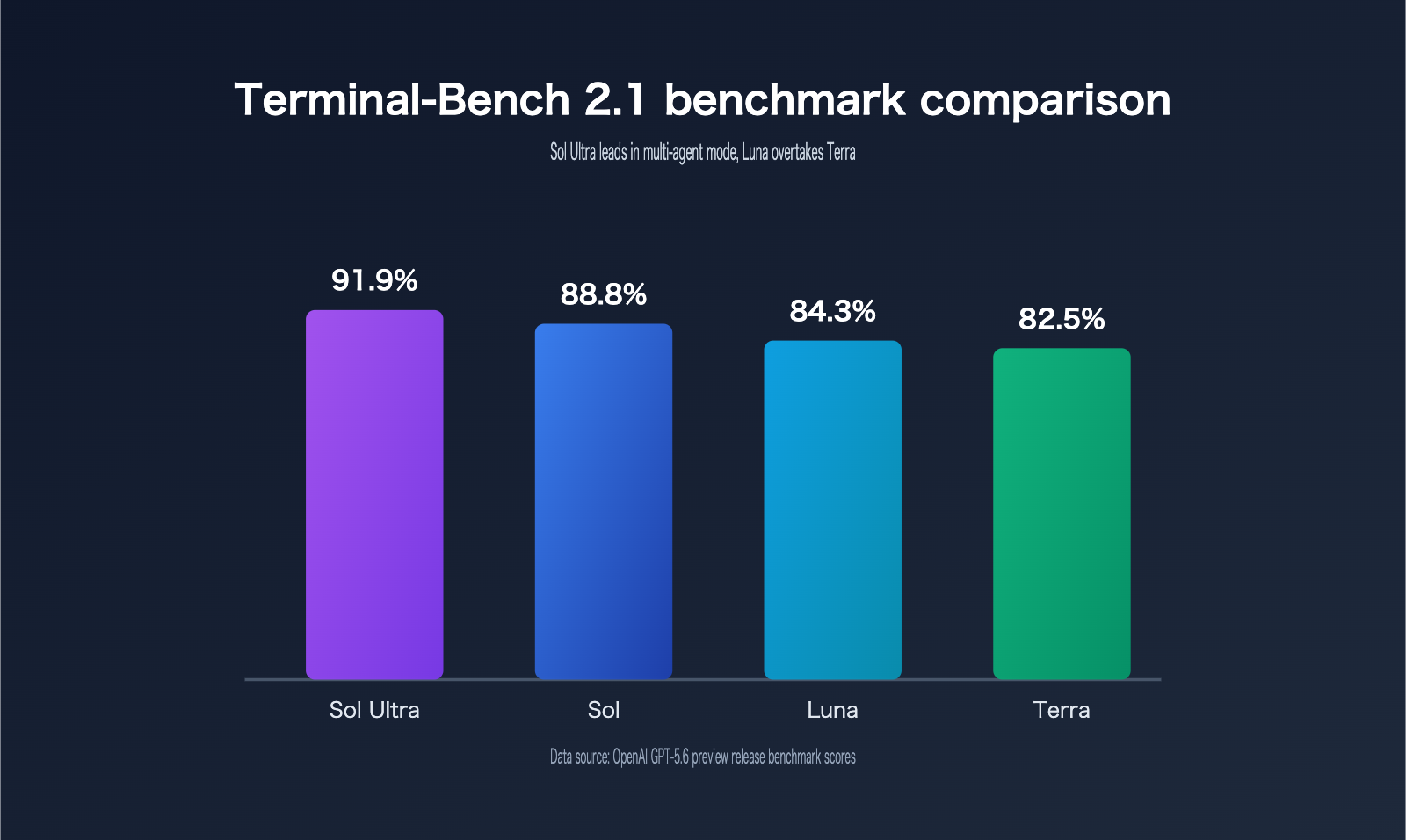
These two capabilities show up clearly in benchmark results. Here’s a comparison from Terminal-Bench 2.1:
| Version/Mode | Terminal-Bench 2.1 Score |
|---|---|
| Sol Ultra | 91.9% |
| Sol (Standard Mode) | 88.8% |
| Luna | 84.3% |
| Terra | 82.5% |
One detail worth noting: Luna actually scores higher than Terra on this benchmark, which shows that GPT-5.6’s tiering isn’t just a simple linear ranking. Different versions have different strengths on different task types, so you can’t just assume “more expensive means better.” That also means version selection shouldn’t rely only on price tier — you’ll want to test against your actual task mix.
How to Choose GPT-5.6: Version Recommendations for Three Typical Scenarios
Based on the positioning, pricing, and benchmark data above, we can group common developer needs into three broad scenarios, each pointing to a different version choice.
When to Choose Sol
- Tasks that involve complex code generation, large codebase refactoring, or anything that needs max reasoning and deep reasoning capabilities
- Work involving security research, penetration test report analysis, or other tasks that push the model’s upper capability limit
- Projects that need ultra mode’s multi-agent capabilities to automatically break down and process complex work in parallel, such as generating code for multiple modules at once and integrating it
For teams with limited budgets that still want to validate whether Sol-level capabilities will meet their needs, a good first step is to test other already available strong reasoning models through APIYI apiyi.com. That way, you can get your technical approach and evaluation metrics in place early, so when Sol becomes available, you can migrate right away.
When to Choose Terra
- High-concurrency but moderately complex business tasks like customer support chats, ticket classification, and internal knowledge base Q&A
- Teams that want quality close to last generation’s flagship, but only have about half the flagship budget
- Tasks like document analysis and contract summarization that need decent accuracy but don’t require top-tier reasoning
When to Choose Luna
- Scenarios that need fast response times, such as content summaries, social post drafts, and routine automation scripts
- Batch processing jobs with high concurrency, low unit cost, and tolerance for some quality trade-offs
- A complement to Sol and Terra for handling simple preprocessing before handing off to higher-end versions for refinement
You don’t actually need to wait for Luna to be fully open to validate this kind of high-speed, low-cost requirement. You can just test similar fast models on APIYI apiyi.com first and get your batch processing flow and cost model sorted out ahead of time.
| Scenario Type | Recommended Version | Key Reason |
|---|---|---|
| Complex programming / security research | Sol (including max reasoning, ultra mode) | Highest capability ceiling, exclusive deep reasoning and multi-agent features |
| High-volume business tasks (support / internal tools / document analysis) | Terra | Close to last-gen flagship quality, at about half the price |
| Fast, low-cost tasks (summaries / drafts / automation) | Luna | Lowest unit price, with some benchmark results even beating Terra |
| Multi-model comparison testing / uncertain budget | Test all three versions first on APIYI apiyi.com | No need to apply for multiple official accounts separately; you can compare them side by side |
GPT-5.6 Decision Guide: How to Understand the Limited Safety Rollout
There’s one practical issue that’s hard to ignore at this point: GPT-5.6 isn’t available to everyone yet. This preview has only been opened to about 20 approved partner organizations, and it’s also been disclosed to the U.S. government. Regular API users and ChatGPT users still can’t access the system, and the official general availability timeline is “in the coming weeks.”
The reason is safety. Sol shows a noticeable jump in capability in high-risk areas like cybersecurity and bio-risk analysis, so OpenAI added several layers of protection, including real-time classifiers, model-level refusal training, and account-level behavior reviews. After weeks of red-teaming and stress testing, they chose a cautious limited preview instead of rolling it out broadly like they often have in the past. One more thing worth noting: the Sol variant hosted by Cerebras is scheduled to go live in July, with inference speeds of up to 750 tokens per second, which is an important signal for low-latency use cases.
| Rollout Milestone | Status | Notes |
|---|---|---|
| June 26, 2026 | Started | Limited preview for about 20 approved organizations, including API and Codex |
| July 2026 | Coming soon | Cerebras-hosted Sol variant, up to 750 tokens/second |
| Coming weeks | Planned | General availability for regular API and ChatGPT users |
From this timeline, you can see that GPT-5.6 is being rolled out much more cautiously than before. Safety evaluation has been moved ahead of general release, rather than being patched in afterward.
💡 Recommendation: Whether you should choose Sol, Terra, or Luna really comes down to your task complexity and budget ceiling, not just chasing the “newest and strongest” model. We recommend testing early through the APIYI apiyi.com platform, which connects to OpenAI, Claude, and other mainstream models in one place. That way, you don’t have to wait for official partner approval, and you can compare Sol, Terra, and Luna on real business data before making a long-term decision.
FAQ
Q1: Can GPT-5.6 be called directly through the API now?
It’s currently in a limited preview stage. Only about 20 approved organizations can access it through the official API and Codex, and it isn’t open to regular developers yet. If you want to try similar capabilities early, you can test other mainstream models that are already available on the APIYI apiyi.com platform as a transition option.
Q2: Compared with the previous flagship model, is Terra actually worth upgrading to?
Based on the data released by the official team, Terra is priced at about half of the previous flagship, while its capability is described as “close to flagship-level quality.” For teams that are cost-sensitive and have moderately complex tasks, it’s worth running a small-scale test first before deciding whether to switch over completely.
Q3: What’s the difference between ultra mode and regular multi-turn conversation?
Regular multi-turn conversation is the model responding to user input turn by turn, while ultra mode means the model proactively breaks a task into multiple subtasks, schedules multiple subagents to handle them in parallel, and then automatically summarizes the results. The whole process doesn’t require the user to step through it manually.
Q4: If Luna beats Terra in benchmarks, does that mean Luna is stronger?
Not entirely. Luna scores higher on specific coding benchmarks like Terminal-Bench 2.1, but Terra is positioned to handle high-concurrency business tasks in a more balanced way. They’re optimized for different goals, so when choosing one, you should test it against your own task type instead of relying on a single benchmark ranking.
Summary
With Sol, Terra, and Luna, GPT-5.6 covers the full spectrum from maximum capability to high speed and low cost. The core selection logic is actually pretty simple: choose Sol when you need deep reasoning and multi-agent collaboration, Terra for high-volume tasks where cost performance matters, and Luna when speed and cost are the top priorities. Right now, because of safety considerations, GPT-5.6 is still in a limited preview involving about 20 organizations, so regular developers can’t access it directly just yet. Before it becomes generally available, it’s a good idea to use platforms like APIYI apiyi.com to validate your technical approach with models that are already open, then switch and evaluate quickly once GPT-5.6 is fully released. That way, you can minimize the progress loss caused by the waiting period.


