
Author's Note: Starting April 1, Google Gemini API is enforcing mandatory spending caps. Tier 1 is capped at $250/month, Tier 2 at $2,000/month, and Tier 3 at $20,000+/month. New users are now required to use prepaid billing, and requests will be suspended once the limit is reached. This article details the tier rules and how to manage them.
If you're using the Google Gemini API, please take note: As of April 1, 2026, Google is officially enforcing mandatory monthly spending caps (Spend Cap) based on your tier. Tier 1 users are limited to $250 per month, Tier 2 to $2,000, and Tier 3 starts at $20,000. Once you hit these limits, all API requests will be paused until the next billing cycle.
Key Takeaways: After reading this, you'll understand your current tier, your spending limit, what happens when you exceed it, and how to navigate these changes.
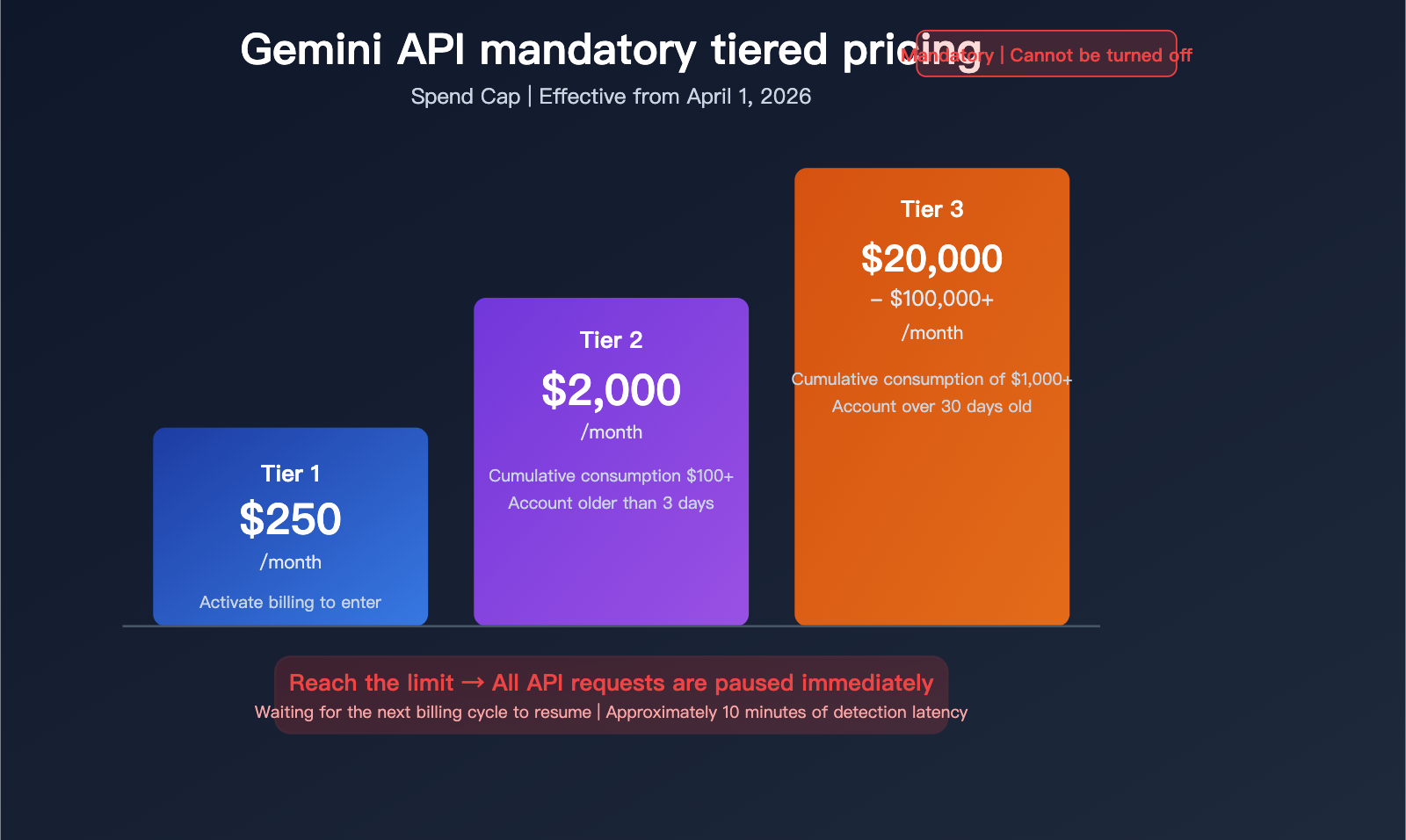
Key Points of Gemini API Billing Tiers
| Point | Description | Impact |
|---|---|---|
| Enforcement Date | April 1, 2026 | Now in effect |
| Tier 1 Monthly Limit | $250 | Most individual developers |
| Tier 2 Monthly Limit | $2,000 | Mid-scale applications |
| Tier 3 Monthly Limit | $20,000 – $100,000+ | Enterprise-level usage |
| Consequence | All requests paused until next cycle | Risk of service interruption |
| New User Requirement | Prepaid billing required | Effective March 23 |
What the Gemini API Billing Changes Mean
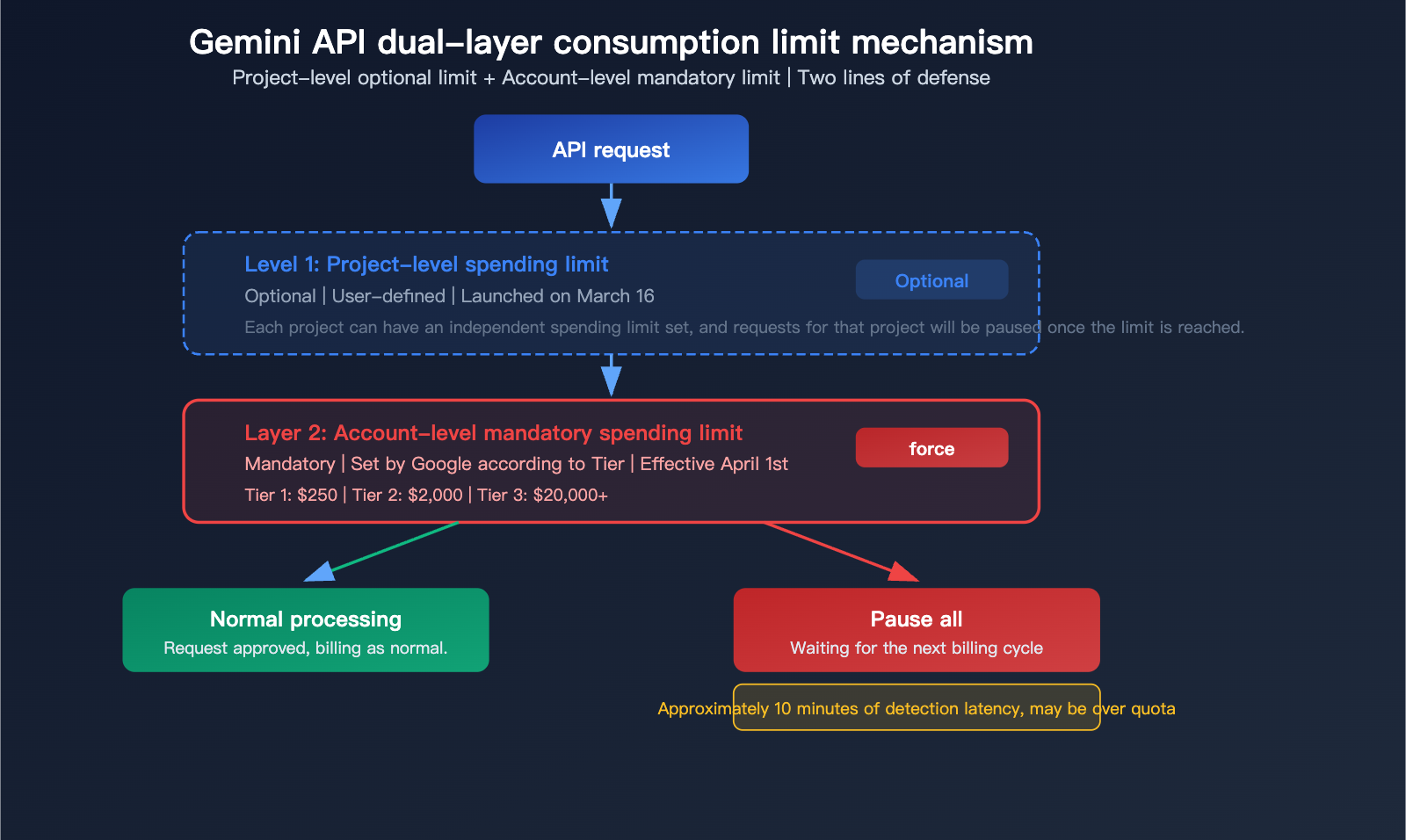
Simply put: Google has set a hard ceiling on your Gemini API bill—once you hit it, service stops. This isn't an optional soft limit; it's a mandatory hard cap. Once your monthly Gemini API consumption reaches your tier's limit, all API requests associated with that billing account will be suspended until the next billing cycle begins.
For developers running Gemini API in production, this means you need to carefully plan your usage and costs, or you might face a sudden service outage mid-month.
Understanding Gemini API Tiered Spending Limits
Gemini API Tier System
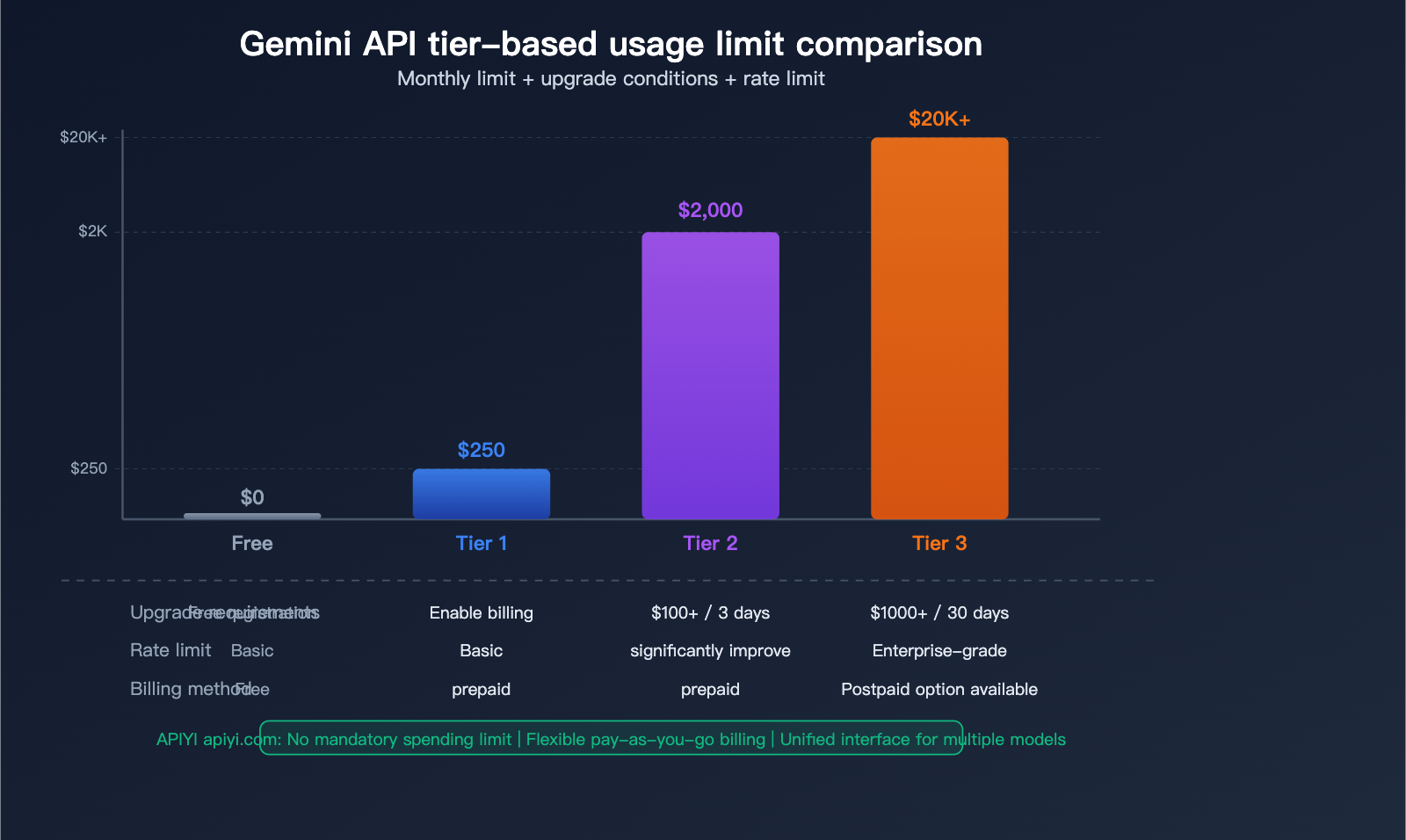
Google categorizes Gemini API users into four distinct tiers, each with its own spending limits and rate limits:
| Tier | Monthly Spending Limit | Upgrade Requirements | Rate Limits |
|---|---|---|---|
| Free | $0 (Free) | No payment required | Basic limits, no spending cap |
| Tier 1 | $250/month | Enabled upon billing | Standard RPM/TPM |
| Tier 2 | $2,000/month | $100+ cumulative spend / 3+ days active | Significantly higher RPM/TPM |
| Tier 3 | $20,000-$100,000+/month | $1,000+ cumulative spend / 30+ days active | Enterprise-grade throughput |
Gemini API Tier Upgrade Mechanism
Tier upgrades are automatic—once you meet the requirements, the system typically upgrades your account within about 10 minutes:
| Upgrade Path | Cumulative Spend Required | Account Age Requirement | Processing Time |
|---|---|---|---|
| Free → Tier 1 | Enable billing | Immediate | Instant |
| Tier 1 → Tier 2 | $100+ | 3+ days | ~10 minutes |
| Tier 2 → Tier 3 | $1,000+ | 30+ days | ~10 minutes |
Key Detail: "Cumulative spend" refers to your total historical spending, not just your current monthly spend. This means if you've spent a total of $100 over the past few months, you'll meet the Tier 2 upgrade criteria even if you haven't spent anything this month.
Consequences of Hitting Gemini API Spending Limits
When you hit your spending limit:
- All API requests are paused: It's not just rate-limiting; it's a complete stop.
- Wait for the next cycle: Service won't resume until the next billing cycle begins.
- ~10-minute delay: There's a roughly 10-minute detection delay when hitting the limit; requests made during this window may still be processed and billed.
- User covers overages: You are responsible for any costs incurred during that detection delay.
⚠️ Risk Warning: The 10-minute detection delay means your actual spending might slightly exceed your limit. For high-frequency invocation scenarios, it's recommended to implement your own usage tracking logic on the client side rather than relying solely on Google's built-in limit mechanism.
Gemini API Prepaid System Explained
Gemini API Prepaid vs. Postpaid
Starting March 23, 2026, new users must use the Prepaid plan:
| Billing Method | Target Audience | Key Features |
|---|---|---|
| Prepaid | New users (mandatory) / All users optional | Pay-as-you-go, real-time balance deduction |
| Postpaid | Tier 3 users only | Monthly billing, traditional invoicing |
Gemini API Prepaid Rules
| Rule | Details |
|---|---|
| Minimum Top-up | $10 |
| Maximum Balance | $5,000 |
| Validity | 12 months |
| Refunds | Non-refundable |
| Auto-refill | Supported |
| Balance Deduction | Near real-time |
Practical Impact: The prepaid system doesn't significantly affect individual developers (with a $10 minimum), but for enterprise users, it means adjusting financial workflows—moving from "use now, pay later" to "load funds, then use."
🎯 Alternative Solution: If you want to avoid the mandatory spending limits and prepaid requirements of the Gemini API, you can use APIYI (apiyi.com) to invoke Gemini series models. APIYI offers flexible pay-as-you-go billing with no mandatory tier limits, while also supporting switching to other models like Claude or GPT-5.4—all with a single API key covering all major models.
Gemini API Billing Change Timeline
Complete Gemini API Change Schedule
| Date | Event | Impact |
|---|---|---|
| 2026.3.16 | Project-level optional spending limits launch | Can be configured in AI Studio |
| 2026.3.23 | Mandatory prepayments for new users | New users must top up before use |
| 2026.4.1 | Mandatory tier spending limits take effect | Tier 1/2/3 limits enforced |
| 2026.6.1 | Gemini 2.5 Flash series sunset | Must migrate to 2.5 series |
Estimated Available Quota for Gemini API Tiers
Under the Tier 1 $250 monthly limit, here’s roughly what you can get:
| Model | $250 Capacity | Note |
|---|---|---|
| Gemini 2.5 Flash (Input) | ~833 million tokens | At $0.30/MTok |
| Gemini 2.5 Flash (Output) | ~100 million tokens | At $2.50/MTok |
| Gemini 2.5 Pro (Output) | ~25 million tokens | At $10/MTok |
| Gemini 2.5 Flash Image | ~6,400 images | At $0.039/image |
For lightweight applications, the $250 Tier 1 limit might be enough. However, for medium-scale production apps, that $250 could run out by mid-month—this is the core risk of these changes.
💰 Cost Optimization: Use APIYI (apiyi.com) to invoke Gemini models without worrying about tier limits or forced service pauses. The platform supports the full Gemini 2.5 Pro and Flash series, billing based on actual usage with no tier restrictions.
Strategies for Handling Gemini API Billing Changes
Option 1: Monitor Usage + Alerts
Implement usage tracking in your client to trigger alerts as you approach your limit:
import openai

client = openai.OpenAI(
    api_key="YOUR_API_KEY",
    base_url="https://vip.apiyi.com/v1"
)

# Invoke Gemini via APIYI, no tier limits
response = client.chat.completions.create(
    model="gemini-2.5-flash",
    messages=[{"role": "user", "content": "Analyze the key data in this report"}]
)

# APIYI bills based on actual usage, no forced pauses
print(response.choices[0].message.content)
View Usage Monitoring Script Example
import openai
from datetime import datetime

# Usage tracker
class SpendTracker:
    def __init__(self, monthly_limit=250):
        self.monthly_limit = monthly_limit
        self.current_spend = 0.0
        self.warning_threshold = 0.8  # 80% warning

    def track(self, input_tokens, output_tokens,
              input_price=0.30, output_price=2.50):
        cost = (input_tokens * input_price +
                output_tokens * output_price) / 1_000_000
        self.current_spend += cost

        if self.current_spend >= self.monthly_limit * self.warning_threshold:
            print(f"WARNING: Spent ${self.current_spend:.2f}"
                  f"/{self.monthly_limit}")

        return self.current_spend < self.monthly_limit

# Recommendation: Use APIYI (apiyi.com) to avoid these limits
tracker = SpendTracker(monthly_limit=250)
Option 2: Use an API Proxy Service to Bypass Limits
The most direct solution is to use a third-party API proxy service to invoke Gemini models, effectively bypassing Google's mandatory spending caps:
| Solution | Spending Limit | Prepayment Required | Multimodal Support |
|---|---|---|---|
| Google Direct | Mandatory Tier Limit | Required for new users | Gemini only |
| APIYI | No mandatory limit | Flexible billing | Gemini + Claude + GPT, etc. |
🚀 Recommended Solution: Use APIYI (apiyi.com) to invoke Gemini series models. You'll bypass Google's mandatory spending limits while enjoying the convenience of a unified interface for multiple models. A single API key allows you to call Gemini 2.5 Pro, Flash, as well as mainstream models like Claude and GPT-5.4.
Option 3: Upgrade Tier + Set Project-level Limits
If you prefer to stick with Google direct:
- Upgrade your Tier ASAP: Meet upgrade requirements by increasing usage and account age.
- Set project-level limits: Configure optional spending caps for each project in AI Studio.
- Diversify billing accounts: Assign different projects to separate billing accounts.
- Hybrid invocation strategy: Use direct connections for mission-critical tasks and a proxy service for non-critical workloads.
Impact of Gemini API Billing Changes on Developers
Impact Analysis by Developer Scale
| Developer Type | Monthly Spend | Tier | Impact Level | Recommendation |
|---|---|---|---|---|
| Individual/Student | <$50 | Tier 1 | Low | Free tier is sufficient |
| Small Project | $50-$200 | Tier 1 | Medium | Watch out for the $250 limit |
| Mid-sized App | $200-$1,500 | Tier 1-2 | High | Upgrade or use an API proxy service |
| Production-grade | $1,500+ | Tier 2-3 | High | Multi-provider strategy recommended |
Most Affected Group: Mid-sized application developers with a monthly spend between $200 and $2,000. They may frequently encounter service interruptions under the $250 Tier 1 limit, yet might not qualify for or want to upgrade to Tier 2.
Gemini API Free Tier Status
The good news is: The Free Tier remains unchanged. There's no need to pay, no spending limit (since it's free), and rate limits stay the same. If you're just experimenting or building prototypes, the Free Tier is still your go-to.
🎯 Selection Advice: If your monthly Gemini API spend is nearing your tier limit, we highly recommend using APIYI (apiyi.com) for your model invocations. The platform has no mandatory spending caps, offers flexible pay-as-you-go billing, and allows you to switch between Gemini, Claude, and GPT at any time, providing multi-model redundancy for your application.
FAQ
Q1: I’m currently on Tier 1, how do I upgrade to Tier 2?
To upgrade, you need a cumulative spend of $100+ and an account age of at least 3 days. Once you meet these criteria, the system will automatically upgrade you within about 10 minutes—no manual action required. Note that "cumulative spend" refers to your total historical spend, not your current monthly spend. If you're worried about hitting the $250 limit before the upgrade kicks in, you can use APIYI (apiyi.com) as a backup channel.
Q2: Will Free Tier requests be paused if I hit my spending limit?
No. The Free Tier and paid tiers are independent. The Free Tier has no spending limit (since it's not billed), and its rate limits remain unchanged. However, if you're mixing free and paid models within the same project, it's best to clearly separate your billing accounts.
Q3: Can I get a refund for my prepaid balance?
No. Prepaid balances are non-refundable and are valid for 12 months. The minimum top-up is $10, and the maximum balance is $5,000. We suggest topping up based on your actual usage to avoid having large balances expire. If you need a more flexible billing method, APIYI (apiyi.com) supports pay-as-you-go billing with no minimum top-up or balance expiration.
Summary
Key takeaways regarding Google Gemini API's mandatory billing tiers:
- Mandatory spending limits are now in effect: Since April 1st, Tier 1 is capped at $250/month, Tier 2 at $2,000/month, and Tier 3 at $20,000+/month. Any requests exceeding these limits will be paused.
- Mandatory prepayments for new users: As of March 23rd, new users must top up their accounts before use. The minimum deposit is $10, with a maximum balance of $5,000, valid for 12 months.
- 10-minute detection latency: There's a 10-minute delay in triggering these limits, which could lead to overages. We recommend implementing your own consumption tracking.
For developers whose monthly usage is approaching these tier limits, the most practical solution is to call Gemini models via APIYI (apiyi.com). You'll benefit from no mandatory spending caps, flexible pay-as-you-go billing, and a unified interface for multiple models. With just one API key, you can access all mainstream models including Gemini, Claude, and GPT, ensuring stable and reliable API services for your applications.
📚 References
-
Official Google Announcement – Gemini API Cost Transparency and Control: Official billing change announcement.
- Link:
blog.google/innovation-and-ai/technology/developers-tools/more-control-over-gemini-api-costs - Note: Contains official explanations of spending limits and the prepayment system.
- Link:
-
Gemini API Billing Documentation: Complete billing rules and tier descriptions.
- Link:
ai.google.dev/gemini-api/docs/billing - Note: Includes tier upgrade criteria, prepayment rules, and spending limit details.
- Link:
-
Gemini API Rate Limits Documentation: Detailed rate limits for each tier.
- Link:
ai.google.dev/gemini-api/docs/rate-limits - Note: RPM/TPM limits for each model across different tiers.
- Link:
-
Complete Guide to Gemini API Billing Changes: In-depth third-party analysis.
- Link:
blog.laozhang.ai/en/posts/google-gemini-billing-tier-policy-changes - Note: Detailed impact analysis and response recommendations.
- Link:
Author: APIYI Technical Team
Technical Discussion: Feel free to share your experience with Gemini API billing in the comments. For more resources on AI model integration, visit the APIYI documentation center at docs.apiyi.com.


