
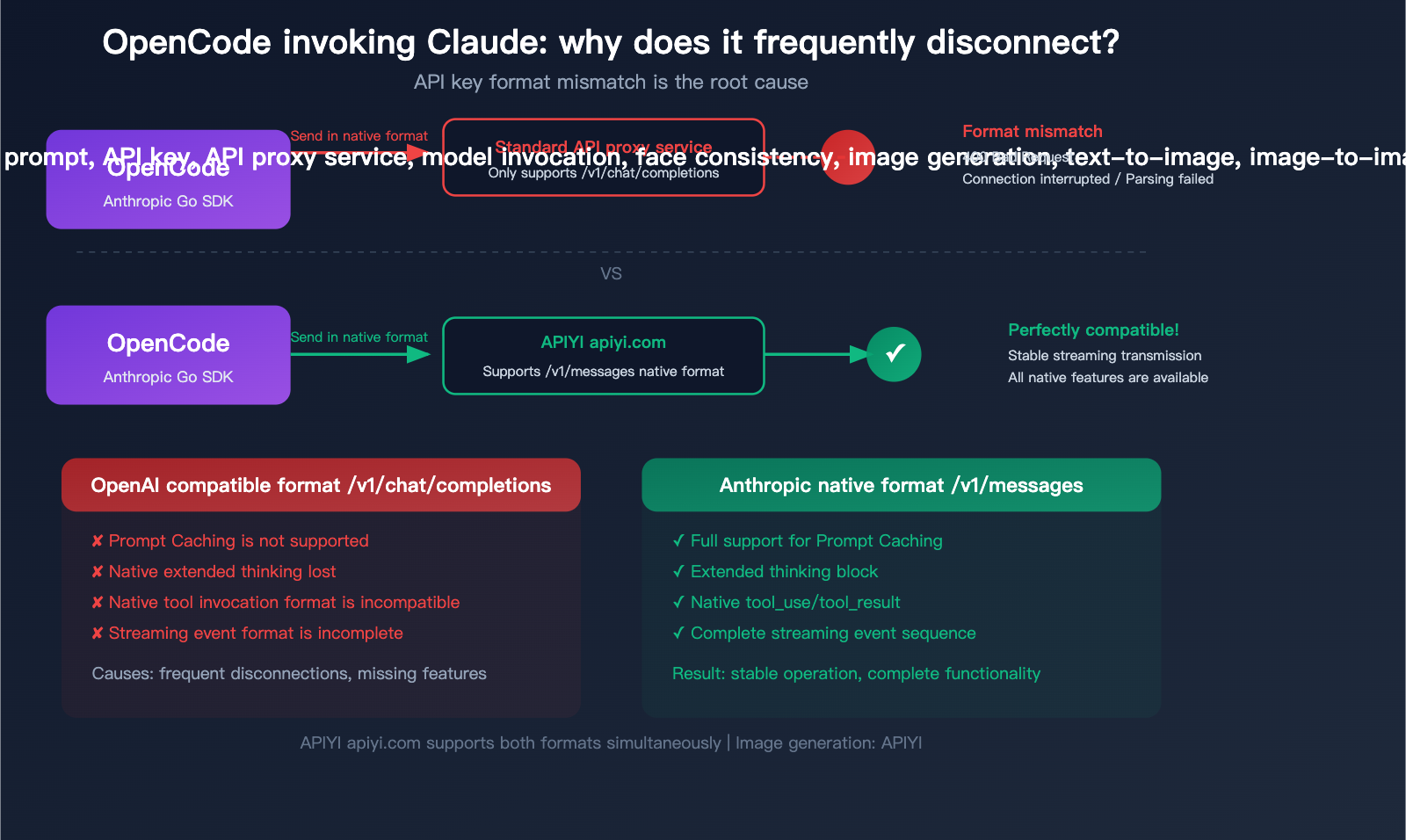
"Why does my Claude model keep disconnecting in OpenCode?" This is a major headache for many developers using OpenCode (now rebranded as Crush) to access Claude models. The core reason is simple: OpenCode uses the native Anthropic SDK to invoke Claude, while many third-party API proxy services only support the OpenAI-compatible format. This format mismatch leads to frequent errors and disconnections.
Key Takeaway: After reading this article, you'll understand the underlying architecture of how OpenCode invokes Claude, the three common causes of interruptions, and the complete solution to resolve them using APIYI's native Anthropic format interface.
What is OpenCode: From OpenCode to Crush
OpenCode is a terminal-based AI coding assistant written in Go, built with the Bubble Tea framework to create a polished TUI (Terminal User Interface). The project gained over 11,600 stars on GitHub and was later acquired by the Charm team, renamed to Crush (charmbracelet/crush, 22,200+ stars).
| Project Info | Details |
|---|---|
| Original Name | OpenCode (opencode-ai/opencode) |
| Current Name | Crush (charmbracelet/crush) |
| Language | Go |
| Interface | TUI (Bubble Tea) |
| GitHub Stars | 22,200+ (Crush) |
| Supported AI Vendors | Anthropic, OpenAI, Gemini, Groq, OpenRouter, xAI, Bedrock, Azure |
| Tool System | File operations, Bash, Grep, Glob, LSP, MCP |
| License | MIT |
Key Differences Between OpenCode, Claude Code, and Aider
| Feature | OpenCode/Crush | Claude Code | Aider |
|---|---|---|---|
| Multi-vendor Support | 7+ native SDKs | Anthropic only | Multi-vendor |
| API Format | Native vendor formats | Anthropic native | Primarily OpenAI-compatible |
| Claude Invocation | Native Anthropic SDK | Native Anthropic SDK | OpenAI-compatible format |
| Extended Reasoning | Conditional trigger (includes "think" keyword) | Built-in support | Model-dependent |
| MCP Support | Supported | Supported | Not supported |
| UI | TUI graphical interface | CLI + TUI | CLI only |
Key Difference: OpenCode uses native SDKs for every AI vendor rather than forcing everything through an OpenAI-compatible format. This means when invoking Claude, it uses the native Anthropic Messages API (/v1/messages), not the OpenAI Chat Completions API (/v1/chat/completions).
🎯 Core Tip: This is the root cause of the issue—if your API proxy service only provides the
/v1/chat/completionsendpoint, OpenCode's native Anthropic SDK won't be able to make calls correctly. APIYI (apiyi.com) supports both OpenAI-compatible formats and native Anthropic formats, which can completely resolve this issue.
title: "3 Root Causes for Frequent Claude Interruptions in OpenCode"
description: "Struggling with Claude disconnecting in OpenCode? We break down the three primary reasons for these interruptions and how to fix them using APIYI."
tags: [Claude, OpenCode, APIYI, AI Development, Troubleshooting]
3 Root Causes for Frequent Claude Interruptions in OpenCode
Reason 1: API Format Mismatch (Most Common)
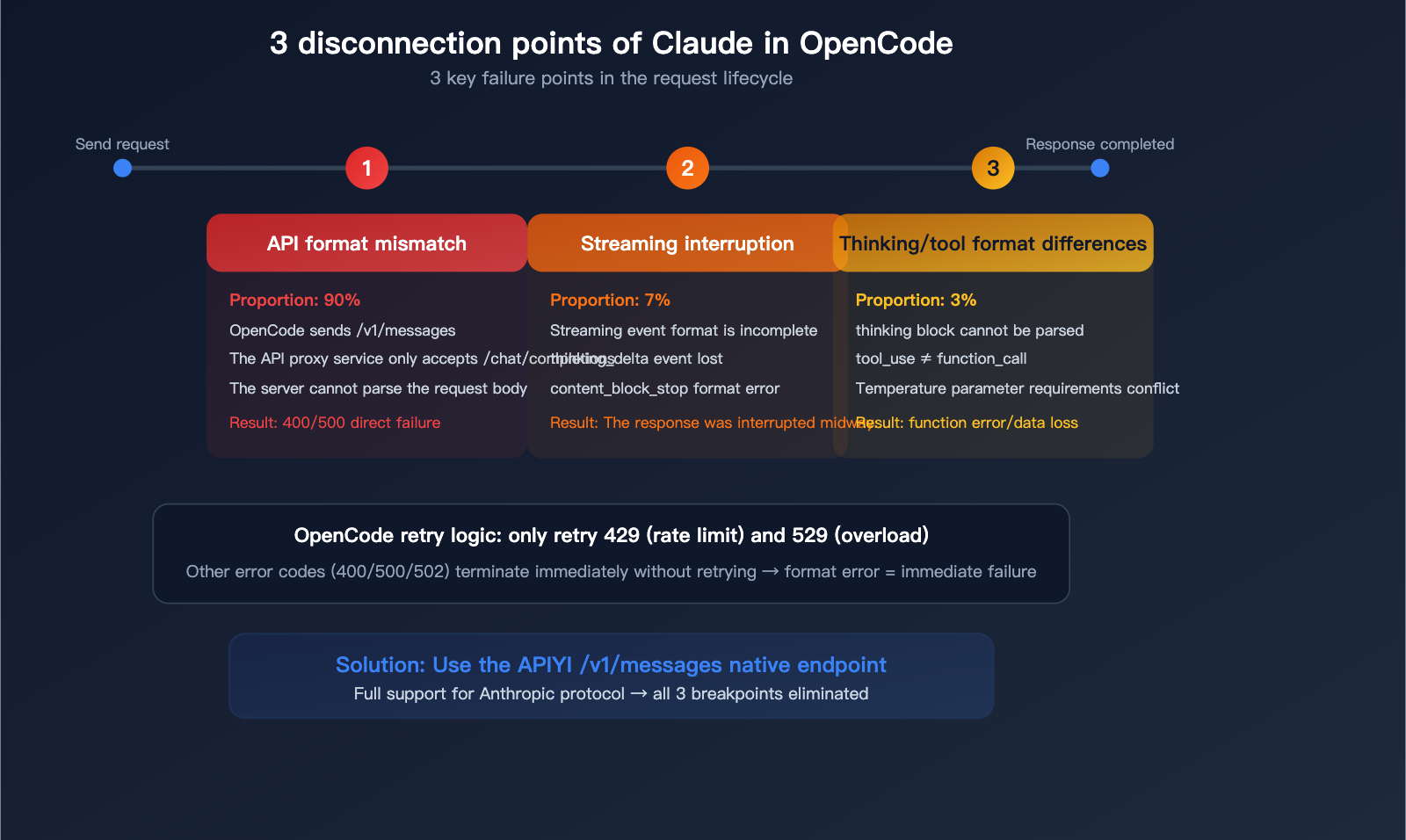
This is the root cause for 90% of users.
OpenCode's Claude invocation path:
OpenCode → Anthropic Go SDK → POST /v1/messages
                                ↑ Uses native Anthropic format
Many API proxy services only provide:
API proxy service → Only supports POST /v1/chat/completions
                                     ↑ OpenAI compatible format
The request structures for these two formats are completely different:
| Comparison | Anthropic Native (/v1/messages) |
OpenAI Compatible (/v1/chat/completions) |
|---|---|---|
| Endpoint | /v1/messages |
/v1/chat/completions |
| Auth Header | x-api-key: sk-ant-xxx |
Authorization: Bearer sk-xxx |
| Message Format | messages: [{role, content: [{type, text}]}] |
messages: [{role, content: "text"}] |
| System Prompt | system: "..." (top-level field) |
messages: [{role: "system", content: "..."}] |
| Tool Use | tool_use / tool_result types |
function_call / tool_calls format |
| Streaming | message_start, content_block_delta |
data: {"choices": [...]} |
| Thinking | thinking block natively supported |
Not supported or requires special handling |
When OpenCode sends an Anthropic-formatted request to an endpoint that only supports OpenAI format, the server fails to parse the request, resulting in an error or connection drop.
Reason 2: Streaming Interruptions
OpenCode uses the Anthropic SDK's Messages.NewStreaming() for streaming responses. The event sequence during streaming is:
ContentBlockStartEvent → ContentBlockDeltaEvent (multiple) → ContentBlockStopEvent → MessageStopEvent
If the API proxy service doesn't fully support the Anthropic streaming format (e.g., it fails to return thinking_delta events or the content_block_stop format is incorrect), OpenCode's event parser will fail and terminate the connection.
OpenCode's retry logic only covers HTTP 429 (Rate Limit) and 529 (Overloaded); other error codes cause an immediate termination without retries. This means 400/500 responses caused by format errors will fail instantly.
Reason 3: Differences in Thinking and Tool Call Formats
OpenCode has specific logic for handling Claude's extended thinking:
- Automatically enabled when user messages contain the "think" keyword.
- Allocates 80% of
maxTokensas a thinking budget when enabled. - Temperature is forced to 1.0.
If the API proxy service doesn't support the native Anthropic thinking block format, the thinking content will be lost or cause parsing errors. Similarly, the native Anthropic tool_use / tool_result format is entirely different from OpenAI's function_call / tool_calls format.
Solution: Use an API Endpoint that Supports Native Anthropic Format
APIYI Dual-Format Support Architecture
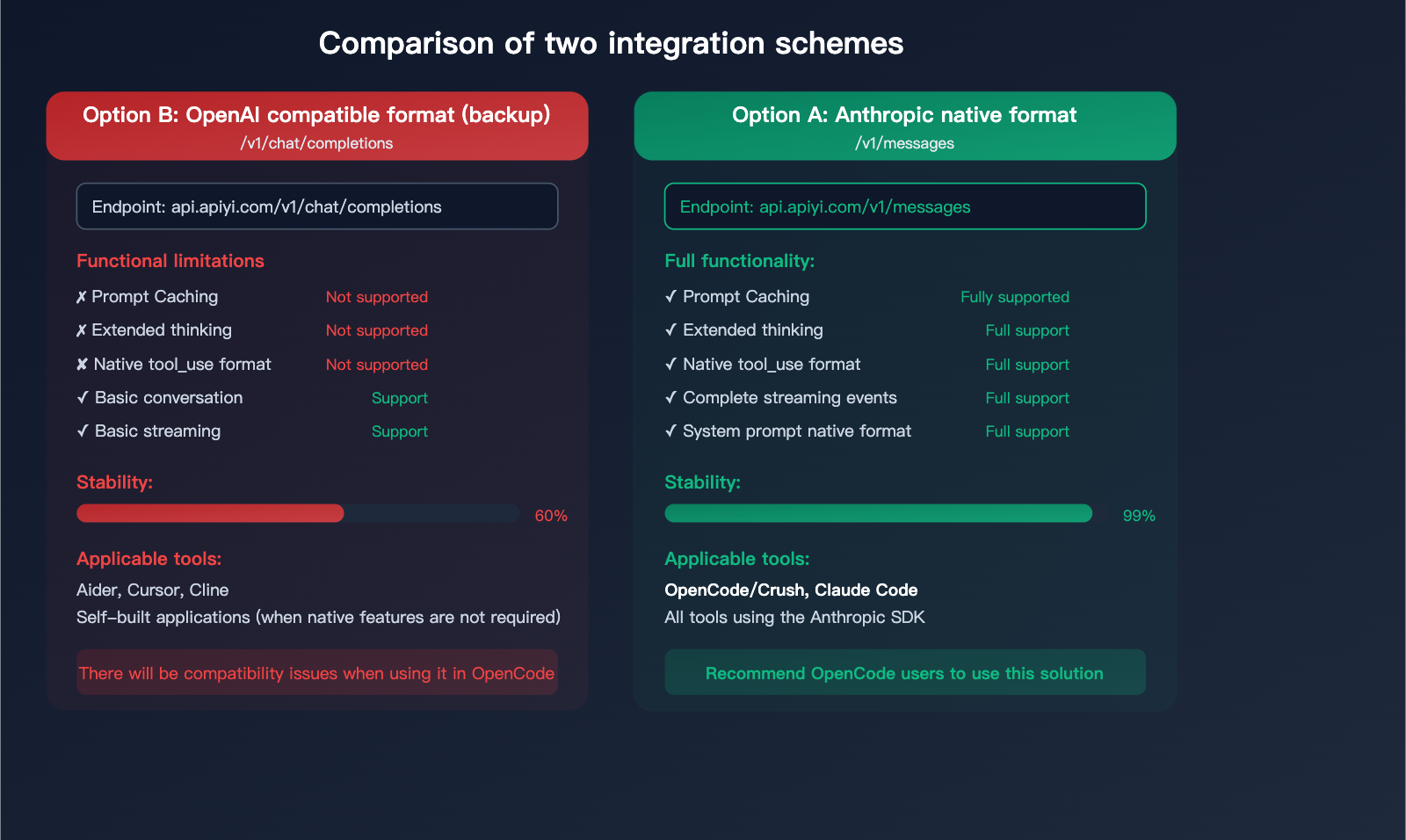
APIYI (apiyi.com) supports both API formats simultaneously, allowing developers to choose based on their tool's requirements:
| Format | Request Endpoint | Suitable Tools | Feature Completeness |
|---|---|---|---|
| Anthropic Native | https://api.apiyi.com/v1/messages |
OpenCode/Crush, Claude Code | 100% Complete |
| OpenAI Compatible | https://api.apiyi.com/v1/chat/completions |
Aider, Cursor, Custom Apps | Basic features only |
Option 1: Configure Anthropic Native Format in OpenCode (Recommended)
Since OpenCode's Anthropic provider doesn't directly expose a Base URL configuration, you need to set it via environment variables:
# Set Anthropic API key (use your APIYI key)
export ANTHROPIC_API_KEY="sk-your-APIYI-key"

# Set Anthropic Base URL (point to APIYI native endpoint)
export ANTHROPIC_BASE_URL="https://api.apiyi.com"

# Start OpenCode
opencode
Or, set it in your .opencode.json configuration file:
{
  "providers": {
    "anthropic": {
      "apiKey": "sk-your-APIYI-key"
    }
  },
  "agents": {
    "coder": {
      "model": "claude-sonnet-4-6",
      "maxTokens": 16000
    },
    "task": {
      "model": "claude-haiku-4-5-20251001",
      "maxTokens": 8000
    }
  }
}
Using with environment variables:
# Add to your .bashrc or .zshrc
export ANTHROPIC_API_KEY="sk-your-APIYI-key"
export ANTHROPIC_BASE_URL="https://api.apiyi.com"
This way, OpenCode will call https://api.apiyi.com/v1/messages via the Anthropic native SDK, retaining all native features: Prompt Caching, extended thinking, and native tool calls.
Option 2: Use OpenAI Compatible Format via Local Provider (Fallback)
If Option 1 doesn't work, you can configure APIYI as a Local Provider in OpenCode:
# Set Local endpoint
export LOCAL_ENDPOINT="https://api.apiyi.com/v1"
export LOCAL_API_KEY="sk-your-APIYI-key"
{
  "providers": {
    "local": {
      "apiKey": "sk-your-APIYI-key"
    }
  },
  "agents": {
    "coder": {
      "model": "claude-sonnet-4-6",
      "maxTokens": 16000
    }
  }
}
Note: This option uses the OpenAI compatible format (/v1/chat/completions) and will lose the following native features:
- Prompt Caching
- Native extended thinking (thinking block)
- Anthropic native tool calling format
💡 Recommendation: Use Option 1 (Anthropic native format) to get full functionality and the best stability.
When obtaining a key from the APIYI (apiyi.com) dashboard, select the [ClaudeCode] group to enjoy an 88% discount.
Complete Guide to APIYI Claude API Invocation
Key Acquisition and Configuration
| Step | Action | Description |
|---|---|---|
| 1. Get Key | Visit api.apiyi.com/token |
Backend token management page |
| 2. Select Token | Use default or create new | Select [ClaudeCode] group for 12% off |
| 3. Note Base URL | https://api.apiyi.com |
Unified entry point |
Two Supported Request Formats
Format 1: Anthropic Native Format (Recommended for OpenCode/Claude Code)
Request URL: https://api.apiyi.com/v1/messages
import anthropic

client = anthropic.Anthropic(
    api_key="sk-your-APIYI-key",
    base_url="https://api.apiyi.com"
)

message = client.messages.create(
    model="claude-sonnet-4-6",
    max_tokens=4096,
    messages=[
        {"role": "user", "content": "Write a quicksort algorithm in Python"}
    ]
)
print(message.content[0].text)
Format 2: OpenAI Compatible Format (Recommended for Aider/Cursor/Custom Apps)
Request URL: https://api.apiyi.com/v1/chat/completions
import openai

client = openai.OpenAI(
    api_key="sk-your-APIYI-key",
    base_url="https://api.apiyi.com/v1"
)

response = client.chat.completions.create(
    model="claude-sonnet-4-6",
    messages=[
        {"role": "user", "content": "Write a quicksort algorithm in Python"}
    ]
)
print(response.choices[0].message.content)
Supported Claude Model List
Latest Mainstream Models (Recommended):
| Model ID | Series | Positioning | Use Case |
|---|---|---|---|
claude-opus-4-6 |
Opus | Top-tier reasoning | Complex architecture design, deep analysis |
claude-sonnet-4-6 |
Sonnet | Balanced performance | Daily coding, code review |
claude-haiku-4-5-20251001 |
Haiku | Fast response | Simple tasks, classification, extraction |
Reasoning Models (Extended thinking enabled by default):
| Model ID | Description |
|---|---|
claude-opus-4-6-thinking |
Opus + Forced reasoning |
claude-sonnet-4-6-thinking |
Sonnet + Forced reasoning |
claude-haiku-4-5-20251001-thinking |
Haiku + Forced reasoning |
Reasoning models use the same underlying model as standard versions, but they force the activation of extended thinking, outputting a more detailed reasoning process, which is perfect for deep analysis.
View code for Anthropic native format with extended thinking
import anthropic

client = anthropic.Anthropic(
    api_key="sk-your-APIYI-key",
    base_url="https://api.apiyi.com"
)

# Use thinking model to force extended thinking
message = client.messages.create(
    model="claude-sonnet-4-6-thinking",
    max_tokens=16000,
    thinking={
        "type": "enabled",
        "budget_tokens": 10000  # Thinking token budget
    },
    messages=[
        {"role": "user", "content": "Analyze the time complexity of this code and optimize it"}
    ]
)

for block in message.content:
    if block.type == "thinking":
        print(f"Thinking process:\n{block.thinking}")
    elif block.type == "text":
        print(f"Final answer:\n{block.text}")
🚀 Quick Start: Visit APIYI at
api.apiyi.com/tokento get your key.
Select the [ClaudeCode] group to enjoy a 12% discount.
A single key supports both Anthropic native and OpenAI compatible formats,
making it compatible with all mainstream AI coding tools like OpenCode, Claude Code, Aider, and Cursor.
Best Integration Methods for AI Coding Tools
| Tool | Recommended Format | Base URL | Recommended Model |
|---|---|---|---|
| OpenCode/Crush | Anthropic Native | https://api.apiyi.com |
claude-sonnet-4-6 |
| Claude Code | Anthropic Native | https://api.apiyi.com |
claude-sonnet-4-6 |
| Aider | OpenAI Compatible | https://api.apiyi.com/v1 |
claude-sonnet-4-6 |
| Cursor | OpenAI Compatible | https://api.apiyi.com/v1 |
claude-sonnet-4-6 |
| Cline (VS Code) | OpenAI Compatible | https://api.apiyi.com/v1 |
claude-sonnet-4-6 |
| Custom App (Python) | Either | See above | Choose as needed |
Quick Configuration Reference
OpenCode/Crush:
export ANTHROPIC_API_KEY="sk-your-APIYI-key"
export ANTHROPIC_BASE_URL="https://api.apiyi.com"
Claude Code:
export ANTHROPIC_API_KEY="sk-your-APIYI-key"
export ANTHROPIC_BASE_URL="https://api.apiyi.com"
claude
Aider:
export OPENAI_API_KEY="sk-your-APIYI-key"
export OPENAI_API_BASE="https://api.apiyi.com/v1"
aider --model claude-sonnet-4-6
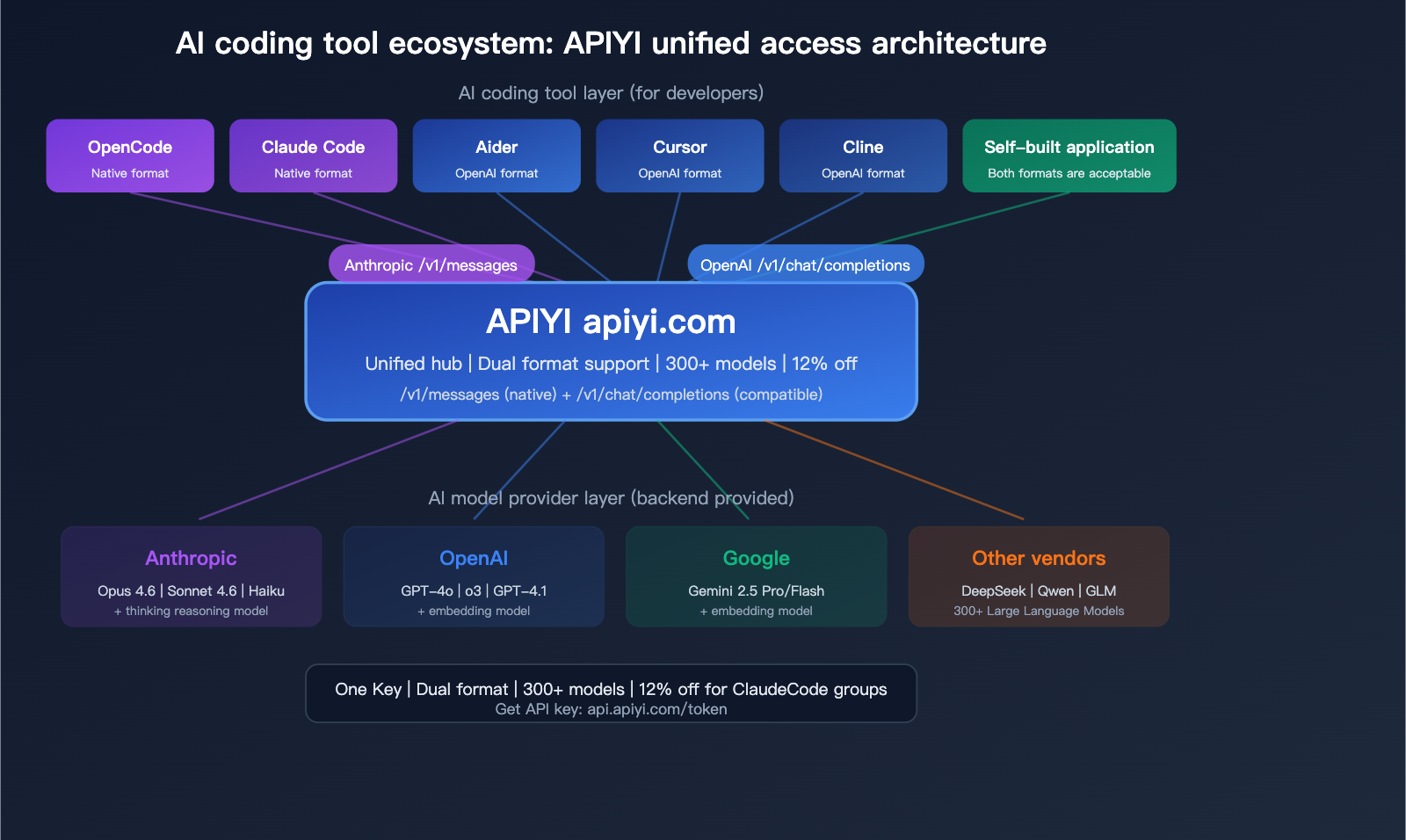
🎯 Unified Management: Use one APIYI (apiyi.com) key to manage API calls for all your AI coding tools.
It supports 300+ models including Claude, GPT, and Gemini, with unified billing and management.
FAQ
Q1: What should I do if OpenCode reports “agent coder not found”?
This is the most common error in OpenCode, indicating that no valid AI provider configuration was found. Check the following: 1) Is the ANTHROPIC_API_KEY environment variable set and valid? 2) Is providers.anthropic.apiKey in your .opencode.json file correct? 3) Does your API key have a remaining balance? Keys obtained via APIYI (apiyi.com/token) can be used directly without any additional configuration.
Q2: Why is the native Anthropic format more stable than the OpenAI-compatible format?
Because OpenCode uses the official Anthropic Go SDK to perform model invocations, the SDK handles Anthropic's specific streaming event formats, retry logic, and error handling internally. Using the OpenAI-compatible format requires an intermediate translation layer, which can lead to the loss of critical information like thinking_delta events or tool_use formats, causing parsing failures. The APIYI (apiyi.com) /v1/messages endpoint fully supports the native Anthropic protocol, eliminating the need for format conversion.
Q3: What is the difference between “thinking” models and standard models? When should I use them?
claude-sonnet-4-6 and claude-sonnet-4-6-thinking are the same underlying model. The "thinking" version forces the activation of extended reasoning, which outputs a detailed chain-of-thought process. The standard version does not enable this by default (in OpenCode, it is automatically enabled if the message contains the "think" keyword). Recommendation: Use the standard version for daily coding (it's faster and more token-efficient), and use the "thinking" version for complex architectural design or debugging.
Q4: OpenCode has been renamed to Crush. Has the configuration method changed?
The core architecture remains the same; Crush inherits all of OpenCode's code. The configuration file name might have changed from .opencode.json to .crush.json (depending on the version), but environment variables remain unchanged. The configuration for ANTHROPIC_API_KEY and ANTHROPIC_BASE_URL is exactly the same. We recommend using the latest version of Crush for better stability and features.
Summary: Choose the Right API Format for Rock-Solid Claude Performance in OpenCode
The root cause of frequent Claude model interruptions in OpenCode/Crush is a mismatch in API formats—OpenCode uses the native Anthropic format, while many API proxy services only support the OpenAI-compatible format.
The solution is straightforward:
- Use an API service that supports the native Anthropic format — such as the
/v1/messagesendpoint from APIYI. - Configure the correct environment variables — set
ANTHROPIC_BASE_URL=https://api.apiyi.com. - Select the appropriate model — use
claude-sonnet-4-6for daily tasks andclaude-sonnet-4-6-thinkingfor deep reasoning.
We recommend using APIYI (apiyi.com) to centrally manage API calls for all your AI coding tools. Visit api.apiyi.com/token to get your key, and select the [ClaudeCode] group to enjoy a 12% discount. A single key is compatible with both native Anthropic and OpenAI formats, ensuring it works seamlessly with all mainstream AI coding tools on the market.
📝 Author: APIYI Technical Team | APIYI apiyi.com – A unified platform for accessing 300+ Large Language Model APIs.
References
-
OpenCode GitHub Repository (Archived): Original project code and documentation.
- Link:
github.com/opencode-ai/opencode - Note: Renamed to Crush.
- Link:
-
Crush GitHub Repository: The active successor project.
- Link:
github.com/charmbracelet/crush - Note: The latest version maintained by the Charm team.
- Link:
-
Anthropic API Documentation: Specifications for the native Messages API format.
- Link:
docs.anthropic.com/en/api/messages - Note: Full request and response format for the
/v1/messagesendpoint.
- Link:
-
APIYI Documentation: Claude API integration guide.
- Link:
apiyi.com - Note: Supports both native Anthropic and OpenAI-compatible formats.
- Link:


