

Author’s note: APIYI published the VEO 3.1 official relay shutdown notice on 2026-11-09 — both the official relay and the official reverse channel for Google video are currently unavailable. This article explains how to stop the veo requests hitting /v1/videos and switch the model field over to Seedance, Wan, and HappyHorse model IDs that actually exist in the pricing API.
If your service is still submitting Veo 3.1 jobs to /v1/videos, it’s time to stop. In its real-time status update at 16:13 (UTC+8) on 2026-11-09, APIYI stated: VEO 3.1 Official’s official relay has gone offline along with the upstream, and neither the official relay nor the official reverse channel for Google video currently has a usable path.
This isn’t a media paraphrase, and it isn’t rumor — it’s the channel status notice published by the APIYI apiyi.com documentation center. The reason for the shutdown is that Google retired the upstream model; nothing else is involved. This article solves exactly one problem: stop the veo requests in your code and switch them to the Seedance, Wan, and HappyHorse models that line up with the APIYI pricing API today.
The point: in 3 minutes you’ll understand the facts behind the VEO 3.1 official relay shutdown, the status of Google video’s two channels, and the specific IDs of the replacement models.
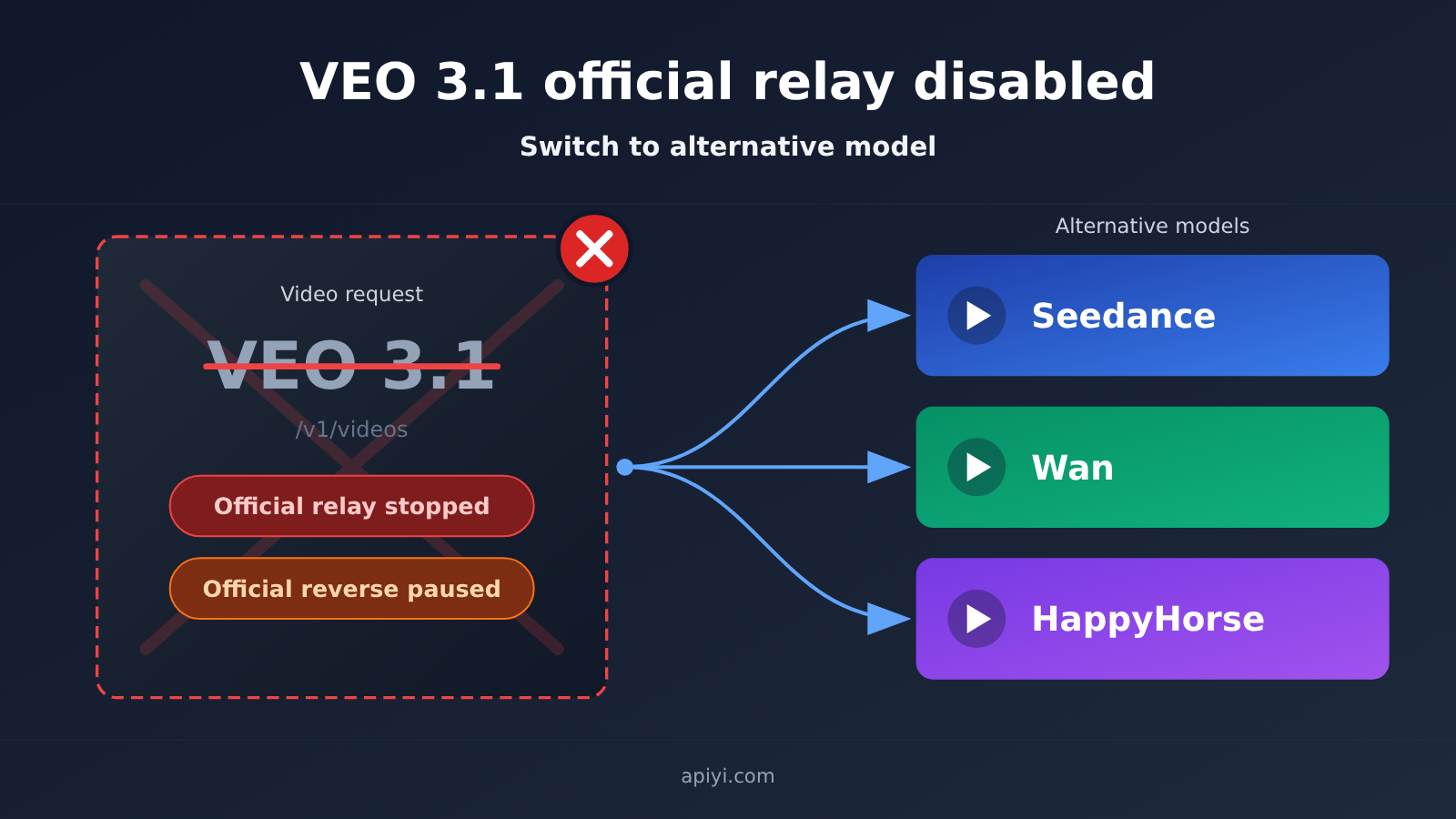
VEO 3.1 Official Transfer Retirement: Key Facts at a Glance
Let’s get the facts straight first. Everything in the table below comes from APIYI’s real-time status feed and the public pricing API as of 2026-11-10 — no extra speculation added.
| Info item | Details |
|---|---|
| Upstream change | Google stopped veo-3.1-generate-preview and veo-3.1-fast-generate-preview on 2026-10-22 |
| Source | APIYI real-time status feed, 2026-11-09 16:13 (UTC+8) |
| Official transfer status | VEO 3.1 Official transfer went offline along with the upstream; /v1/videos submissions no longer work |
| Official reverse status | Google-family official reverse has been paused since June 2026 due to Google Flow risk controls |
| Recovery time | Neither channel has a recovery time |
| Pricing check | The 2026-11-10 pricing API lists 283 models — not a single one with “veo” in the name |
| Model page | Kept for historical reference only; it doesn’t mean the model is still callable |
One thing worth calling out: the model page still loading doesn’t mean the model is still callable. The status feed explicitly says the model page is “kept for historical reference only.” So to figure out whether you can call something, go by the pricing API and the console’s model list — not by whether a doc page exists.
Status of the VEO 3.1 Official Transfer and Official Reverse Channels
Many developers used to switch between official transfer and official reverse, using one channel as a fallback for the other. This time it’s different: both channels are unavailable. Official reverse has been paused since June 2026, and official transfer went offline along with this upstream shutdown.
| Channel type | Current status | Retirement date | Reason | Recovery time available? |
|---|---|---|---|---|
| VEO 3.1 Official transfer | Offline | With upstream shutdown on 2026-10-22 | Google stopped the preview models | None |
| Google-family official reverse | Paused | Since June 2026 | Google Flow risk controls | None |
That means there’s currently no fallback path for calling Google video on APIYI. Sending more veo requests will only get you failures — and it can send your retry logic spinning, wasting queue resources and debugging time.
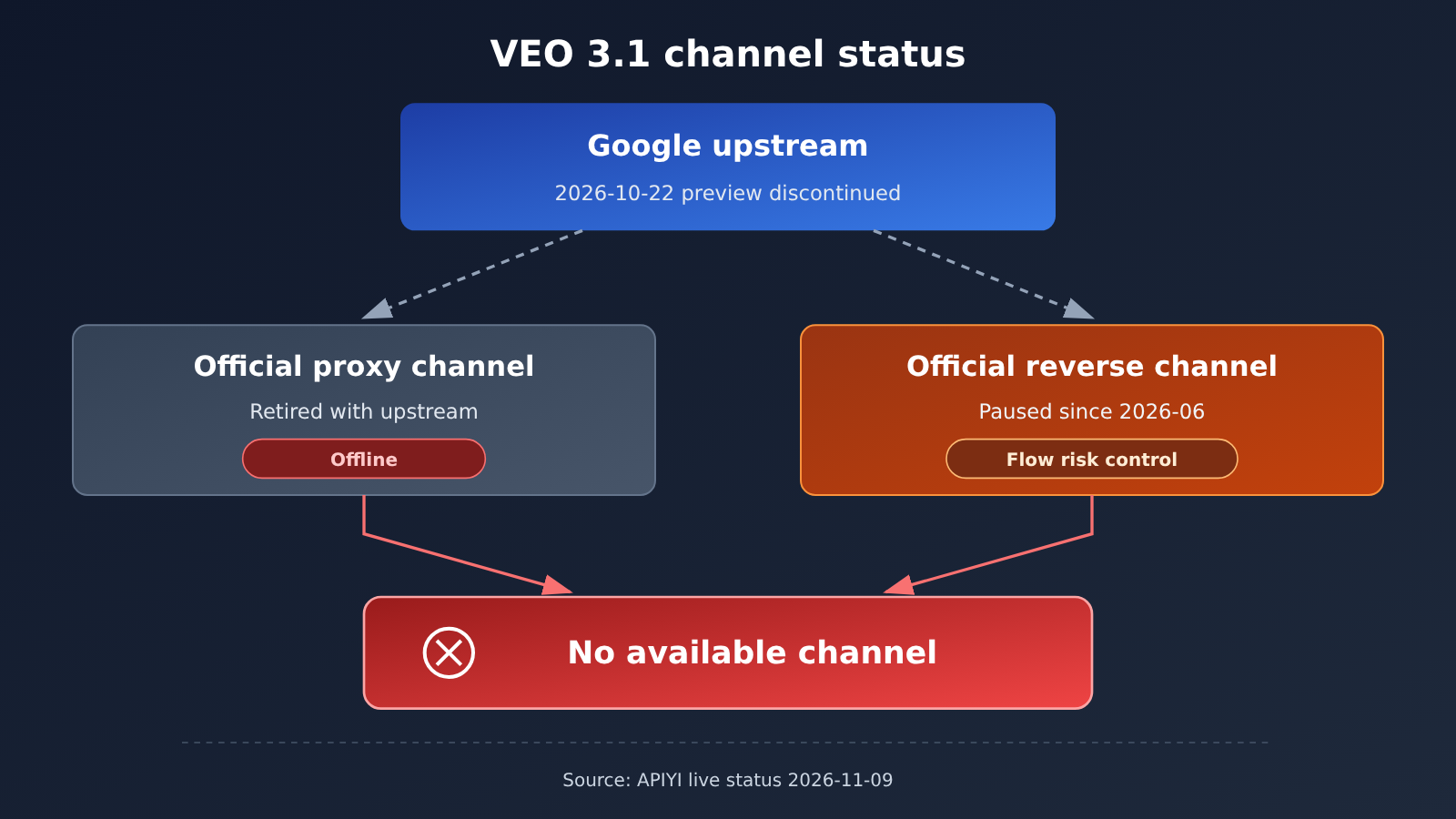
Difference Between VEO 3.1 Official Transfer Retirement and the Preview Shutdown
APIYI’s help center previously published an article titled “Veo 3.1 Preview Has Been Retired,” which covered the retirement of the preview model itself. This article is about a different layer of the problem: APIYI’s official transfer channel has been cleared out, and you shouldn’t keep any veo requests in your code.
Put simply, the old article answered “what do I do now that the preview version is retired,” while this one answers “Google video has no channel now — what should my code look like?” If you just want the background on the preview model retirement, go back to that earlier article. If your production service is still calling veo, follow the steps below.
Replacement Models After VEO 3.1 Is Discontinued: Seedance, Wan, HappyHorse
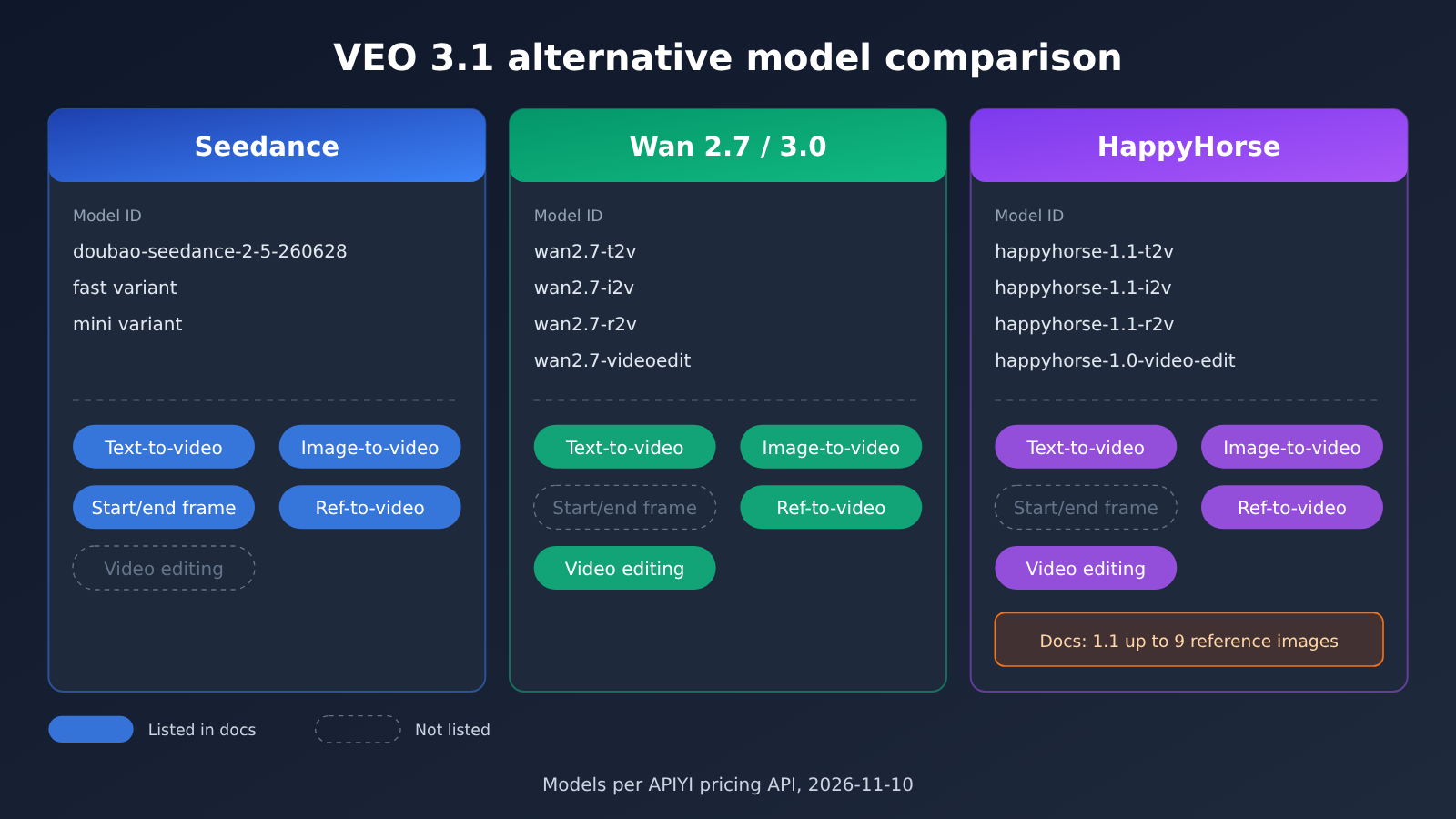
APIYI offered replacement suggestions in its update. We’ve only listed the model IDs that meet both conditions: they’re recommended in the documentation, and they match the pricing API endpoint for 2026-11-10 on that same day.
| Model Series | Available Model IDs | Documentation Notes | Available Platform |
|---|---|---|---|
| Seedance 2.0 | doubao-seedance-2-0-260128, doubao-seedance-2-0-fast-260128, doubao-seedance-2-0-mini-260615 |
Text-to-video, image-to-video, first/last frame, reference-to-video | APIYI apiyi.com |
| Seedance 2.5 | doubao-seedance-2-5-260628 |
Text-to-video, image-to-video, first/last frame, reference-to-video | APIYI |
| Wan2.7 | wan2.7-t2v, wan2.7-i2v, wan2.7-r2v, wan2.7-videoedit |
The ID distinguishes text-to-video, image-to-video, reference-to-video, and video editing | APIYI |
| Wan3.0 | wan3.0-video, wan3.0-video-prime |
Unified video model, including a prime version | APIYI |
| HappyHorse | happyhorse-1.1-t2v, happyhorse-1.1-i2v, happyhorse-1.1-r2v, happyhorse-1.0-video-edit |
The documentation states that 1.1 supports up to 9 reference images | APIYI |
There are two things worth clarifying about this table. First, the capability breakdown for Wan and HappyHorse is mainly based on the model naming, such as t2v, i2v, r2v, and videoedit. For specific parameters and input formats, refer to the documentation for each model page on APIYI. Second, the figure of up to 9 reference images for HappyHorse 1.1 comes from the documentation; this article hasn’t independently verified that number.
How to Pick a Replacement Model
If you’re moving off Veo 3.1, the most common question is “I used Veo for X — what do I use now?” Below are model directions mapped to scenarios so you can narrow things down quickly. That said, it’s still worth running a round of comparisons with your own prompts and assets before committing.
- Pure text-to-video: start with
doubao-seedance-2-5-260628,wan2.7-t2v, orhappyhorse-1.1-t2v. - Image-to-video or first/last frame: the Seedance family explicitly documents image-to-video and first/last-frame capabilities in its docs;
wan2.7-i2vandhappyhorse-1.1-i2vare also solid alternatives. - Multi-reference image generation: look at
happyhorse-1.1-r2v(docs say up to 9 reference images) andwan2.7-r2v. Seedance also supports reference-based video generation. - Editing an existing video: use
wan2.7-videoeditandhappyhorse-1.0-video-edit. - Cost- or speed-sensitive: Seedance offers fast and mini variants, which suit a draft-first, final-render-later workflow.
💡 Recommendation: These three model families differ in visual style and motion behavior, and none of them directly replaces Veo across every scenario. On APIYI apiyi.com, submit the same set of prompts to a few different models, compare the results, and then decide what goes into production. A single API key lets you switch between models, so comparison is cheap.
Grok Imagine: It’s in the Docs, but Not in the Public Price List
The same post also mentions Grok Imagine video, noting that you need to enable the GrokOfficial group first. But as of the public price list API on 2026-11-10, there’s no model whose name contains “imagine.”
So this article doesn’t list it alongside the three model families above as something you can call “today.” If you want to try Grok Imagine, first check the model list in the console to see whether it’s visible to your account — whether you can actually call it is up to the console. Until that’s confirmed, I wouldn’t recommend putting it in your production code as the default model.
How to Move VEO 3.1 Requests Over to Seedance, Wan, or HappyHorse
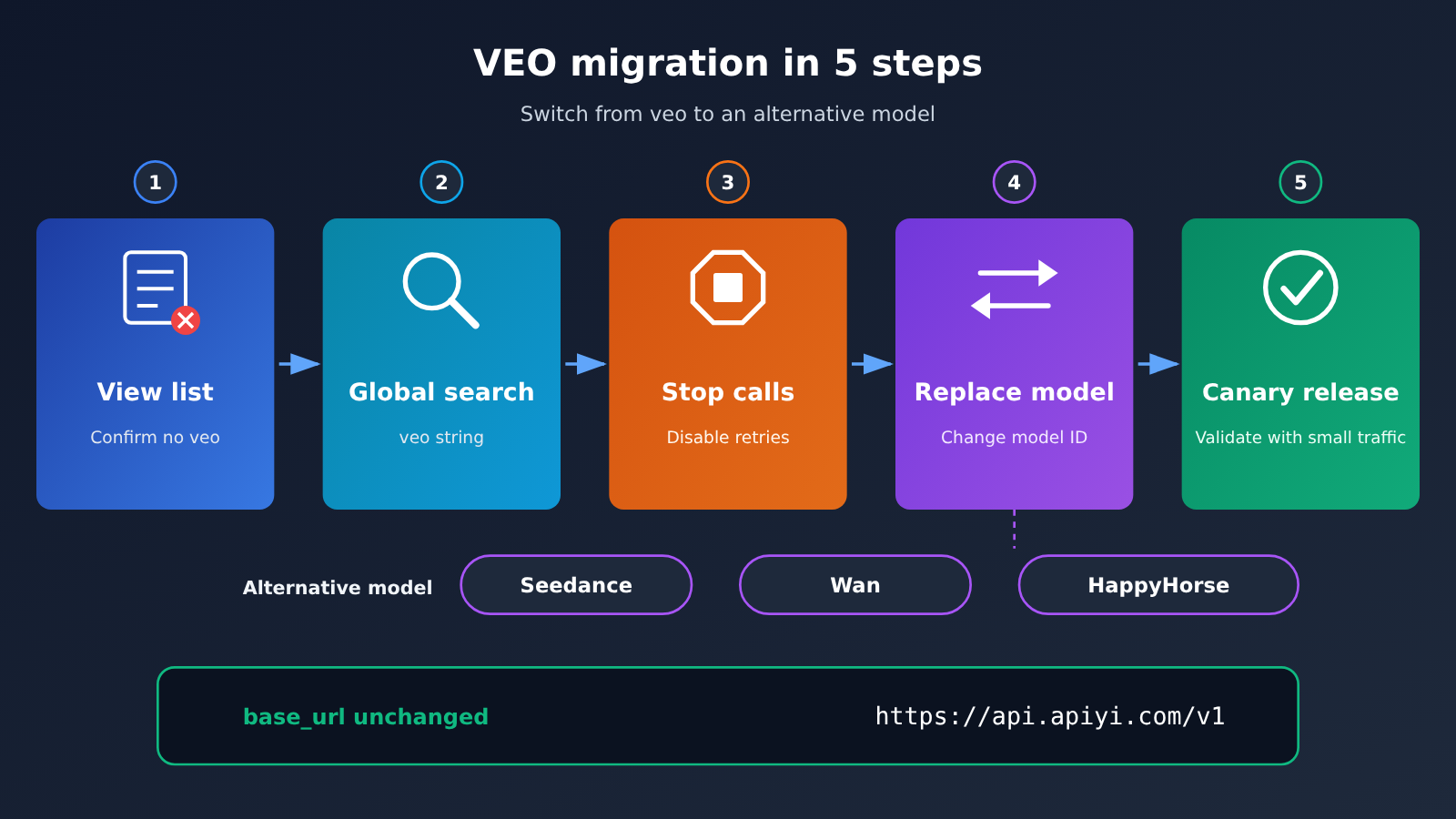
The bulk of the migration work is finding every veo call site and swapping out the model. Here are the steps in order — you can use them directly as a troubleshooting checklist.
- Confirm veo is no longer in the model list: Log in to the APIYI apiyi.com console, open the model list, and verify there are no veo-related models. This step rules out the false assumption that “it still works on my account.”
- Search globally for the veo string: Search your codebase, config center, and environment variables for strings like
veo-3.1-generate-previewandveo-3.1-fast-generate-preview, and list every call site. - Stop the old calls first: Remove veo-related jobs from your queues, scheduled tasks, and retry logic so failed requests don’t keep retrying.
- Replace model with a concrete ID: Pick a model from the table in the previous section — for example, change model to
doubao-seedance-2-5-260628orwan2.7-t2v. - Adjust parameters against the docs: Different models have different requirements for duration, resolution, number of reference images, and so on. Go through the model notes in the APIYI docs item by item.
- Validate with a small traffic slice before going live: Run a handful of tasks to verify the results and callback flow, then switch over all traffic.
Before and After: What Changes When Migrating from VEO 3.1
At the integration level, base_url stays https://api.apiyi.com/v1 and authentication stays the same. What changes is the model field and any model-related parameters.
| What changes | Before (VEO 3.1) | After (replacement model) | Notes |
|---|---|---|---|
| base_url | https://api.apiyi.com/v1 |
Unchanged | Same APIYI integration |
| API Key | Existing key | Unchanged | One key calls multiple models |
| model | veo-3.1-generate-preview, etc. |
doubao-seedance-2-5-260628, wan2.7-t2v, happyhorse-1.1-t2v, etc. |
Must be changed to a concrete ID that exists in the price list |
| Request parameters | Veo-specific params | Adjust per the target model’s docs | Duration, size, and reference image rules differ |
| Retries and fallback | Official-forward / official-reverse backup | Redundancy across multiple replacement models | No fallback path for Google video right now |
A practical approach is to put video model IDs in a config item rather than hardcoding them in business logic. That way, if upstream changes again, you can switch by editing config — no need to ship a new release.
🚀 Quick start: If you’re already using APIYI’s API, migration usually just means swapping the model and adjusting parameters. Submit a few Seedance or Wan tasks with your free trial credits on APIYI apiyi.com, confirm the output looks right, and then update your production config.
Impact Analysis of the VEO 3.1 Official Relay Shutdown
Impact on Developers
- Requests will fail outright: veo submissions to
/v1/videosare no longer available. Continuing to call them will only produce error logs and futile retries. - Fallback strategies stop working: the old logic of “switch to the official reverse route when the official relay fails” no longer holds—both paths are unavailable.
- You’ll need to re-evaluate visual output: Seedance, Wan, and HappyHorse differ from Veo in style and motion performance, so prompts may need adjustment.
- Parameters need to be adapted per model: models vary in how many reference images they accept, whether they support first/last frames, and what editing capabilities they offer. You can’t just reuse Veo’s parameter structure.
Impact on Video Generation Solution Selection
This change is a reminder that relying on a single video model is very risky. Once the upstream stops offering a model, the channel goes offline with it—and there’s no guarantee it’ll come back. Building multi-model switching into your video generation architecture is safer than betting on one model.
Looking at what’s available, APIYI’s current catalog includes three series—Seedance, Wan, and HappyHorse—that cover the main scenarios: text-to-video, image-to-video, reference-to-video, and video editing. For most projects that previously used Veo for text-to-video or image-to-video, you can find a workable alternative in one of these three categories.
FAQ
Q1: What exactly does “VEO 3.1 official proxy discontinued” mean?
It means APIYI’s VEO 3.1 Official proxy channel went offline along with Google’s upstream service, so veo submissions through `/v1/videos` are no longer available. Google stopped `veo-3.1-generate-preview` and `veo-3.1-fast-generate-preview` on 2026-10-22, and the official proxy channel shut down right after.
Q2: Can I still use the reverse-engineered channel? Are there any other Google video options?
No. The Google reverse-engineered channel has been suspended since June 2026 due to Google Flow risk controls, and now the official proxy is gone too. At the moment there’s no working channel for Google video on APIYI — neither line has a recovery date.
Q3: When will VEO access be restored?
There’s no restoration timeline right now, and this article doesn’t promise one. We recommend migrating to an alternative model; for future channel status, keep an eye on the live updates in the APIYI documentation center.
Q4: How can I confirm that veo models in my account really are unavailable?
Just log in to the APIYI apiyi.com console and check the model list. The public pricing endpoint on 2026-11-10 listed 283 models, and none of the names contained veo. The model pages may still open, but they’re kept only as historical reference — that doesn’t mean you can call them.
Q5: How do I quickly switch to Seedance, Wan, or HappyHorse via the API?
Keep `base_url` as `https://api.apiyi.com/v1`, reuse your existing API key, and change `model` to the specific model ID — for example `doubao-seedance-2-5-260628`, `wan2.7-i2v`, or `happyhorse-1.1-r2v` — then adjust the parameters per the docs. New users can claim free testing credits at APIYI apiyi.com and run a few tasks first for comparison.
Q6: Can Grok Imagine video serve as a direct replacement?
Not recommended as a default for now. The APIYI updates mention Grok Imagine video and note that you need to enable the GrokOfficial group first, but the public pricing list on 2026-11-10 has no models with “imagine” in the name. Whether you can call it depends on the console model list — confirm it’s visible before considering integration.
VEO 3.1 Official Proxy Retirement: Key Takeaways
- The official proxy is gone: VEO 3.1 Official went offline along with the upstream Google service, so veo submissions through
/v1/videosare no longer available. - The official reverse channel is paused too: Google’s reverse-engineered official channel has been suspended since June 2026 due to risk controls, so there’s currently no route for Google video at all.
- No restoration timeline: Neither channel has given a recovery date — migrate as soon as you can instead of waiting.
- Replacement IDs are clear: 13 models across Seedance, Wan2.7, Wan3.0, and HappyHorse can be matched in the price list.
- Grok Imagine needs confirmation: It’s mentioned in the docs, but it isn’t in the public price list — defer to the console.
- Migration only touches
model: The base_url and Key stay the same; just confirm the model in the APIYI console and swap it in.
Summary
The core facts about VEO 3.1’s official proxy retirement:
- What happened: Google stopped the Veo 3.1 preview model on 2026-10-22, APIYI’s official proxy went offline with it, the official reverse channel had already been paused back in June 2026, and there’s currently no channel for Google video.
- The code side: All veo requests should stop, and the related retry and fallback logic should be cleaned up.
- The replacement side: Switch to specific Seedance, Wan, and HappyHorse model IDs that actually exist in the pricing endpoint; for Grok Imagine, defer to the console.
My suggestion: track down every veo call site today, and make the video model ID a configurable option so you have room to switch when upstream changes again. On APIYI (apiyi.com), compare a few replacement models with the same set of prompts and pick the one that fits your use case best.
📚 References
- APIYI Live Updates: VEO 3.1 Official Channel Offline: Channel status and alternative model notes
- Link:
docs.apiyi.com/live/2026-11/veo-3-1-official-offline.md - Note: All channel statuses, shutdown dates, and alternative model IDs in this article are based on this source
Author: APIYI Technical Team
Technical discussion: Feel free to reach out to us through the APIYI website homepage. For channel status changes, keep an eye on the Live Updates section of the APIYI Documentation Center


