

Summary: This article walks through what needs to change in the request body, size parameters, reference images, legacy fields, and response parsing when migrating from Tencent Cloud TokenHub’s Hy-Image 3.0 (hy-image-v3) to Tencent Hunyuan Hy-Image 3.5 Preview, and lays out acceptance steps you can check off one by one.
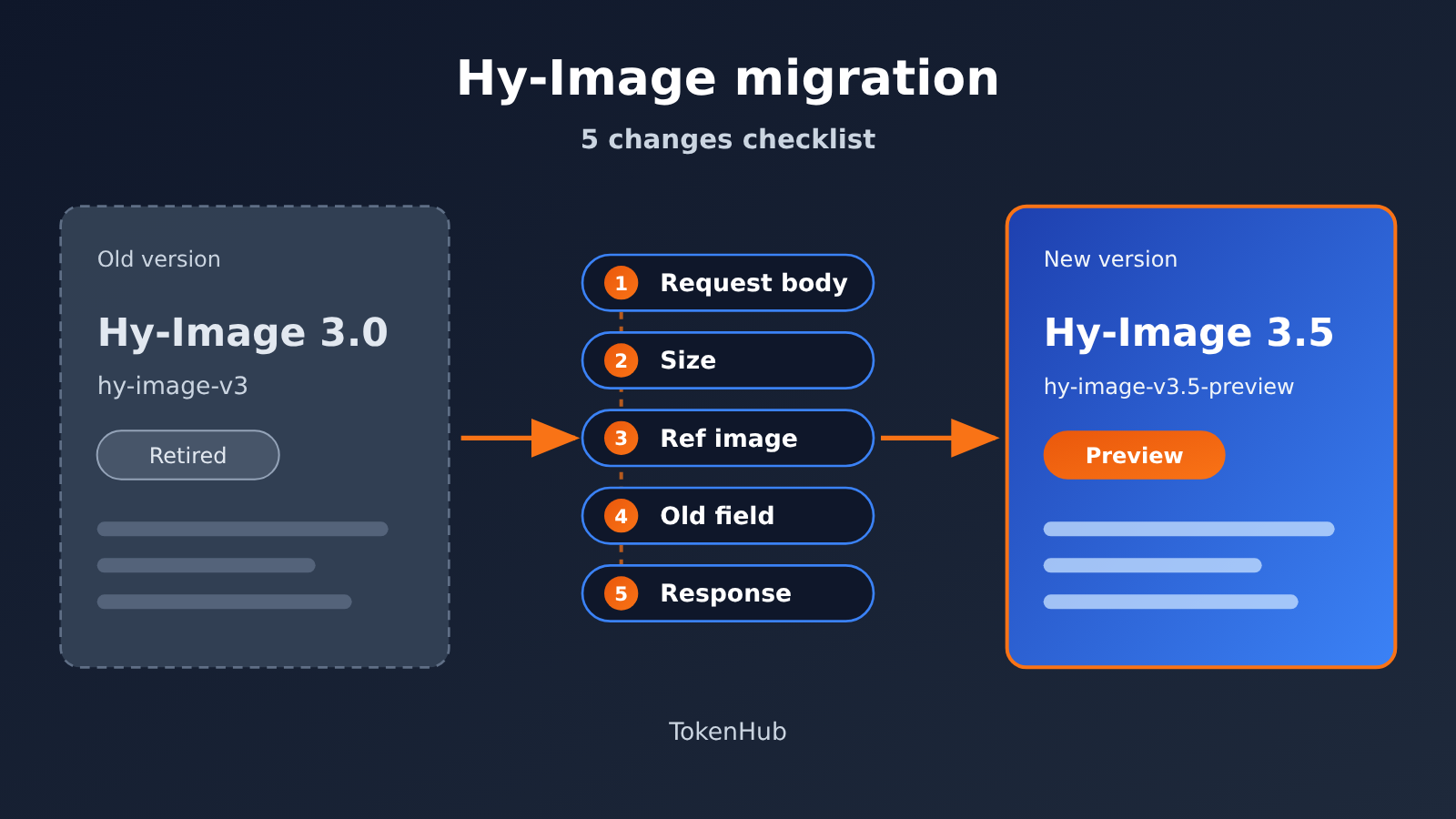
The bottom line first: hy-image-v3 was officially retired from TokenHub on November 12, 2026, at 23:59:59 (Beijing time), and the officially recommended migration target is hy-image-v3.5-preview. On the native TokenHub API, the migration involves five changes. First, the endpoint path moves from v3-generation to v35-generation. Second, the top-level prompt and images get rewritten as content elements of the same user message inside messages. Third, size validation is relaxed to 256–8192 per side with a total area of no more than 16,777,216 pixels. Fourth, the reference image limit goes from 3 images at 10 MB each to 20 images combined at 20 MB each. Fifth, the image in the response moves from data[n].url to choices[0].delta.image.url.
If all you want is to get your old JSON client running again as fast as possible, you can also switch to the compatible API offered by APIYI at apiyi.com. That keeps the top-level structure of model, prompt, images, and size intact — you only need to swap the address, key, and model value. That said, the compatibility layer only supports single-turn generation, so businesses that need to pass conversation history back and forth should still integrate the native TokenHub API. The facts below are based on the official documentation verified on November 25, 2026; the code is an example assembled from the docs, not a test result.
Hunyuan Hy-Image 3.5 Preview Migration Knowledge Map
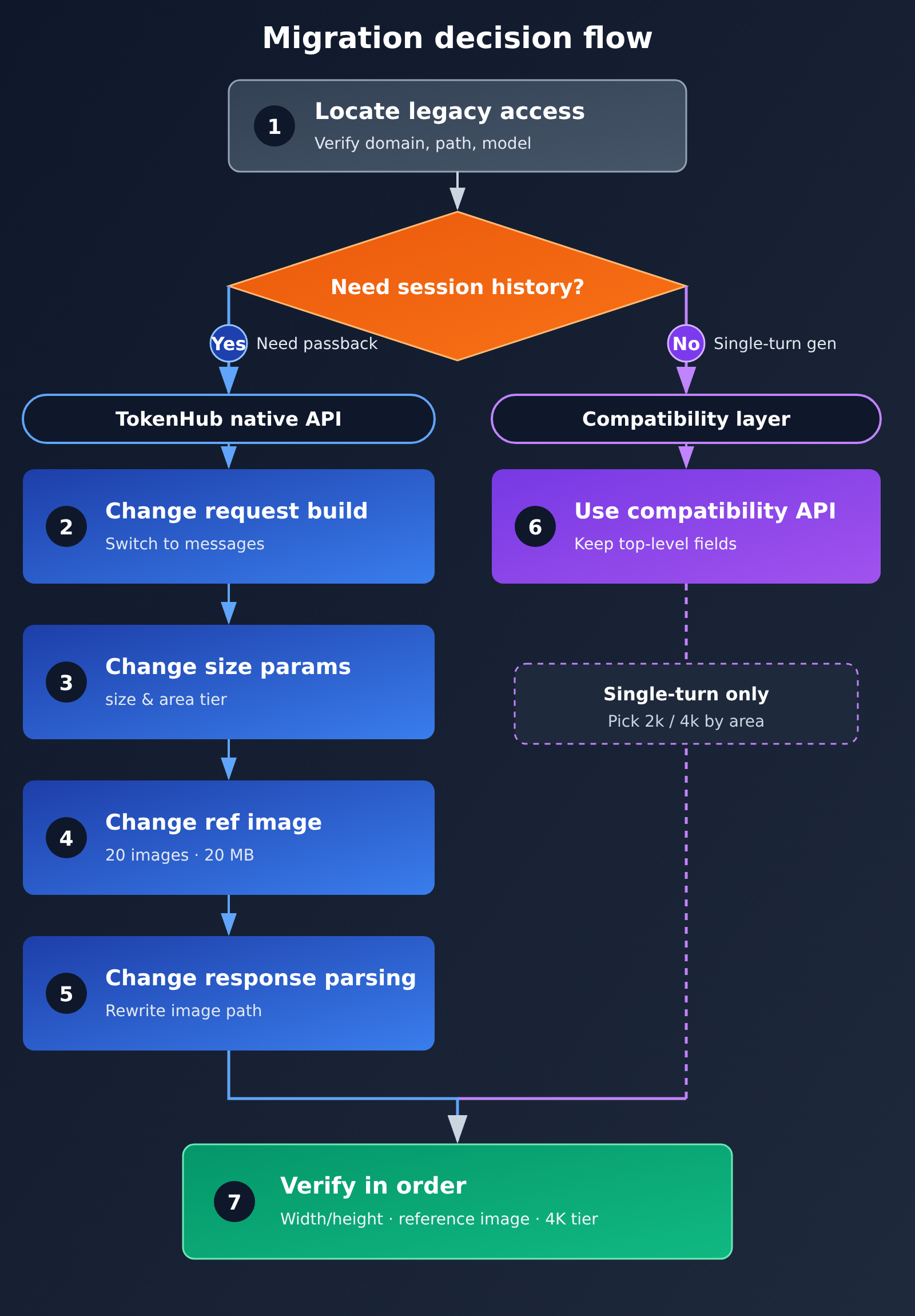
The diagram above summarizes the migration path. Every migration starts with Section 1, locating the old integration, and then splits into two routes based on whether you need multi-turn revisions. Workloads that need session history should use the TokenHub native API and complete the four changes in Sections 2 through 5 in order. Workloads that only need single-turn image generation can use the compatibility layer in Section 6. Both routes converge at Section 7, where you validate in a fixed order.
Hy-Image 3.5 Preview Migration Index
- Find the legacy integration: Confirm which model and endpoint are being called in production. This determines which protocol you’ll use to rebuild the request.
- Change request construction: Rewrite the old top-level fields into the
messagesstructure, and decide how to handle legacy fields such asreviseandseed. - Change size parameters: Keep using valid legacy sizes, or switch to area tiers or the 4K spec. First make sure the request can be sent; only then worry about canvas size.
- Change reference images: Recheck the count, file size, and input area threshold. The canvas aspect ratio determined in Section 3 comes into play here.
- Change response parsing: Adjust the image extraction path, success conditions, and error code handling. Once you can read the result, you can move on to validation.
- Compatibility layer integration (consult as needed): A shortcut for legacy JSON clients. It runs on a parallel track to Sections 2–5.
- Validate in order: Use three request types to check result fields, reference images, and 4K billing in sequence.
Key Concepts
| Term | Brief explanation |
|---|---|
| TokenHub | Tencent Cloud’s Large Language Model hosting and invocation platform. Hunyuan Image Generation is invoked on a pay-as-you-go basis through its HTTP API. |
messages |
The input structure of the 3.5 Preview native API. Text and reference images are passed in as content elements of a user message. |
generate_max_pixels |
Output area tier parameter. Instead of specifying concrete width and height, it limits only the total pixel count of the generated image. |
resize_max_pixels |
Reference image preprocessing threshold. Reference images larger than this area are scaled down proportionally before entering the model. |
assembled_history |
Assembled history in native API responses. For multi-turn editing, it must be reassembled verbatim into the next request. |
| data URI | An image embedded as data:image/png;base64,..., independent of a public URL. |
1 Locating the old integration: confirming which Hunyuan Hy-Image 3.0 model to migrate
1.1 Which model ID does each retirement map to?
Hunyuan image generation on TokenHub has been through two model retirements. Before you migrate, confirm which one your config actually references — the two model strings differ by a single .0, so fuzzy matching will easily miss it.
- September 15, 2026, 00:00 (Beijing time): during the vision model billing switch,
hy-image-v3.0andhy-image-litestopped accepting new tasks, and the official guidance at the time mapped both to the token-billedhy-image-v3. - November 12, 2026, 23:59:59 (Beijing time):
hy-image-v3was officially retired, with the announcement recommending migration tohy-image-v3.5-preview. Both the China site’s call overview and the international site’s model catalog list this retirement date. - November 25, 2026: APIYI listed the 2K and 4K tiers of 3.5 Preview; the model ID, request structure, and billing follow that channel’s integration docs.
These announcements apply only to TokenHub-hosted invocations. The public weights and inference code for HunyuanImage-3.0 base and Instruct editions are still distributed through Tencent’s official repository, so self-hosted inference services aren’t affected by this retirement.
1.2 Check three things: domain, path, and model
Your audit needs to cover production configs, scheduled jobs, and fallback configs — fallbacks rarely fire, which makes them the easiest to overlook. There are three criteria: whether the domain is tokenhub.tencentmaas.com, whether the path is /v1/wand/hunyuan-image/v3-generation, and whether model is hy-image-v3. Match -v3.0 and -v3 as full strings, not by prefix.
For hy-image-v3.0, which stopped receiving tasks back in September, check your historical deployment records first to see how it was integrated, then rebuild the request directly against the current endpoint’s protocol — there’s no need to transition through hy-image-v3 first. The legacy request examples below all use the November-retired hy-image-v3 as their basis.
2 Request Construction Changes: The messages Structure of Hy-Image 3.5 Preview
2.1 Field-by-Field Comparison of the Old and New Requests
The old interface kept the text and reference images in separate top-level fields — prompt (capped at 8,192 characters) and images:
{
  "model": "hy-image-v3",
  "prompt": "保留杯身图案,把背景换成浅灰色",
  "images": ["https://example.com/cup.png"],
  "size": "1024x1024"
}
The 3.5 Preview endpoint is POST https://tokenhub.tencentmaas.com/v1/wand/hunyuan-image/v35-generation. Before you call it, you’ll need to enable pay-as-you-go billing for the new model under the online inference vision models in the TokenHub console, then authenticate with a TokenHub API Key as a Bearer token. The text and each reference image become content elements of the same user message — for pure text-to-image, you send only the text element:
{
  "model": "hy-image-v3.5-preview",
  "size": "1024x1024",
  "messages": [
    {
      "role": "user",
      "content": [
        {"type": "text", "text": "保留杯身图案,把背景换成浅灰色"},
        {"type": "image_url", "image_url": {"url": "https://example.com/cup.png"}}
      ]
    }
  ]
}
The native endpoint accepts up to 100k tokens of input. The server treats the last user message in messages (by ordering) as the instruction for the current turn. In the example above, swap the reference image URL for one the server can actually download.
Here’s an adapter function that turns an old request body into the new one — you can drop it straight into your existing wrapper layer:
def old_to_native(old: dict) -> dict:
    """Convert a legacy hy-image-v3 request body into a native hy-image-v3.5-preview request body"""
    content = [{"type": "text", "text": old["prompt"]}]
    for url in old.get("images", []):
        content.append({"type": "image_url", "image_url": {"url": url}})
    new = {
        "model": "hy-image-v3.5-preview",
        "messages": [{"role": "user", "content": content}],
    }
    if old.get("size"):          # a valid legacy size can be inherited directly
        new["size"] = old["size"]
    if old.get("seed"):          # a positive integer seed within the old range can be reused
        new["seed"] = old["seed"]
    return new
2.2 Where the Old Fields Go
| Legacy field/location | How 3.5 Preview handles it | Migration advice |
|---|---|---|
Top-level prompt |
Becomes a text element in content |
Migrate the text as-is |
Top-level images |
Becomes image_url elements in content |
One element per image |
revise / revised_prompt |
Removed from the public parameters; prompt rewriting is now handled internally by the model | Change your logs to record the request body, the model, and the request ID |
seed |
Upper bound extended from 4,294,967,295 to the signed 64-bit non-negative range; random when you pass 0 or omit it | Reuse the old seed during acceptance testing so comparisons stay easy |
footnote |
Still supported, up to 16 characters, displayed in the bottom-right corner | Pass it through unchanged |
(new) use_search_tool |
Object type containing a boolean value field, disabled by default |
Keep the default when the source material comes from the prompt and reference images |
Response data[n].url |
Moved to choices[0].delta.image.url |
See Section 5 |
A fixed seed is one of the preconditions for reproducing the same result with the same version and the same inputs. During migration acceptance testing, it’s a good idea to fix the seed, size, reference image, and instruction together. That way, if the output changes, you can tell whether the cause was a version upgrade or a change to the input parameters.
3 Change the Size Parameter: Hy-Image 3.5 Preview’s Canvas Rules
3.1 Comparing the Old and New Size Ranges
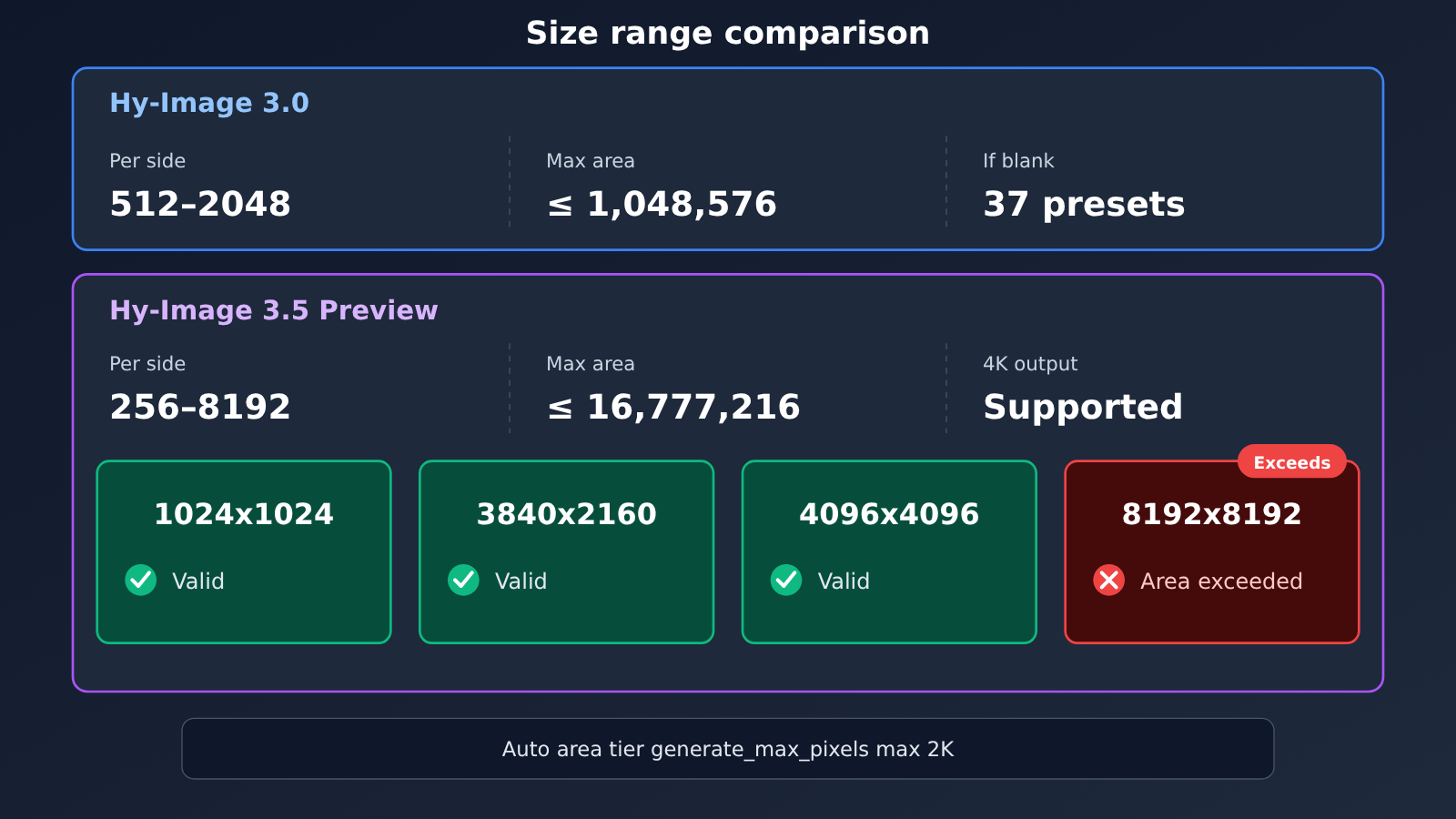
Both versions write the explicit size in widthxheight format — the only change is the value range:
| Item | Hy-Image 3.0 | Hy-Image 3.5 Preview |
|---|---|---|
| Per-side range | 512–2048 | 256–8192 |
| Area limit | 1,048,576 pixels | 16,777,216 pixels |
| Empty behavior | Picks from 37 presets | Chooses width/height based on the prompt, defaulting to the 1.5K area tier |
| Automatic area tier | None | generate_max_pixels: 1,048,576 / 2,359,296 / 4,194,304 |
| 4K output | Not supported | Explicit size can be set to 4096x4096, 3840x2160, etc. |
The new range fully covers the old one, so valid sizes already passed explicitly in old calls carry over directly.
3.2 Three Ways to Handle Size
- Keep the original canvas: If an old request only said something like “landscape 16:9” but your business logic depends on specific pixels, pass an explicit value like
1280x720to pin the canvas. - Let the model decide the canvas: When both
sizeandgenerate_max_pixelsare omitted, the model picks width/height from the prompt. When you pass onlygenerate_max_pixels, the FAQ says the default ratio is 1:1. The parameter table in the docs says “the area parameter only takes effect whensizeis omitted,” but the FAQ on the same page says that when both fields are passed together, the image is generated by combining ratio and area — the two statements aren’t fully consistent. The safe approach: to fix the canvas, fill in onlysize; to use automatic area, fill in onlygenerate_max_pixels. - Deliver 4K or custom widescreen: Setting
size: "4096x4096"alone outputs a 4K square image, and for 16:9 you can use3840x2160. Both side lengths can go up to 8192 in either direction, but you must validate the area at the same time — for example, 8192×8192 exceeds the limit. Whengenerate_max_pixelsautomatically picks a tier, it only goes up to 2K.
4K refers to the pixel spec of the delivered file; at acceptance you can confirm it by reading the actual width and height of the final image.
4 Changing the Reference Image: Input Constraints for Hy-Image 3.5 Preview
4.1 Count, Size, and Format
| Constraint | Hy-Image 3.0 (images) |
Hy-Image 3.5 Preview (messages) |
|---|---|---|
| Number of images | 0–3 | No more than 20 in total |
| Size per image | No more than 10 MB | No more than 20 MB |
| Format | PNG, JPEG, JPG | PNG, JPEG, JPG |
| Input method | Public HTTP(S) direct link or Base64 data URI | Same as above |
| What happens when exceeded | — | Truncate by turn, from earliest to latest |
When you convert an image with a .jpg extension to a data URI, set the media type to image/jpeg. If the total number of images accumulated across multiple turns exceeds the limit, the server truncates starting from the earliest turns. If the reference image determines the layout, it’s a good idea to use a canvas with the same aspect ratio as the reference image, and to specify in the prompt which parts need to be preserved—for example, text, logos, or packaging.
4.2 Distinguishing Three Parameters Related to “Size”
The new resize_max_pixels defaults to 1,048,576 pixels. Reference images whose area exceeds this threshold are scaled down proportionally before entering the model. The three parameters each control a different thing: the 20 MB per-image limit restricts file size, resize_max_pixels controls the preprocessing area of the input image, and size determines the output canvas.
If a task depends on small text in the reference image, you’ll need to use the original file’s pixel dimensions and the input area threshold to estimate how much detail the model actually sees. After a high-resolution original is scaled down, small text may become hard to read.
5 Updating Response Parsing: Result Fields and Error Codes in Hy-Image 3.5 Preview
5.1 Getting the Image Path and Determining Success
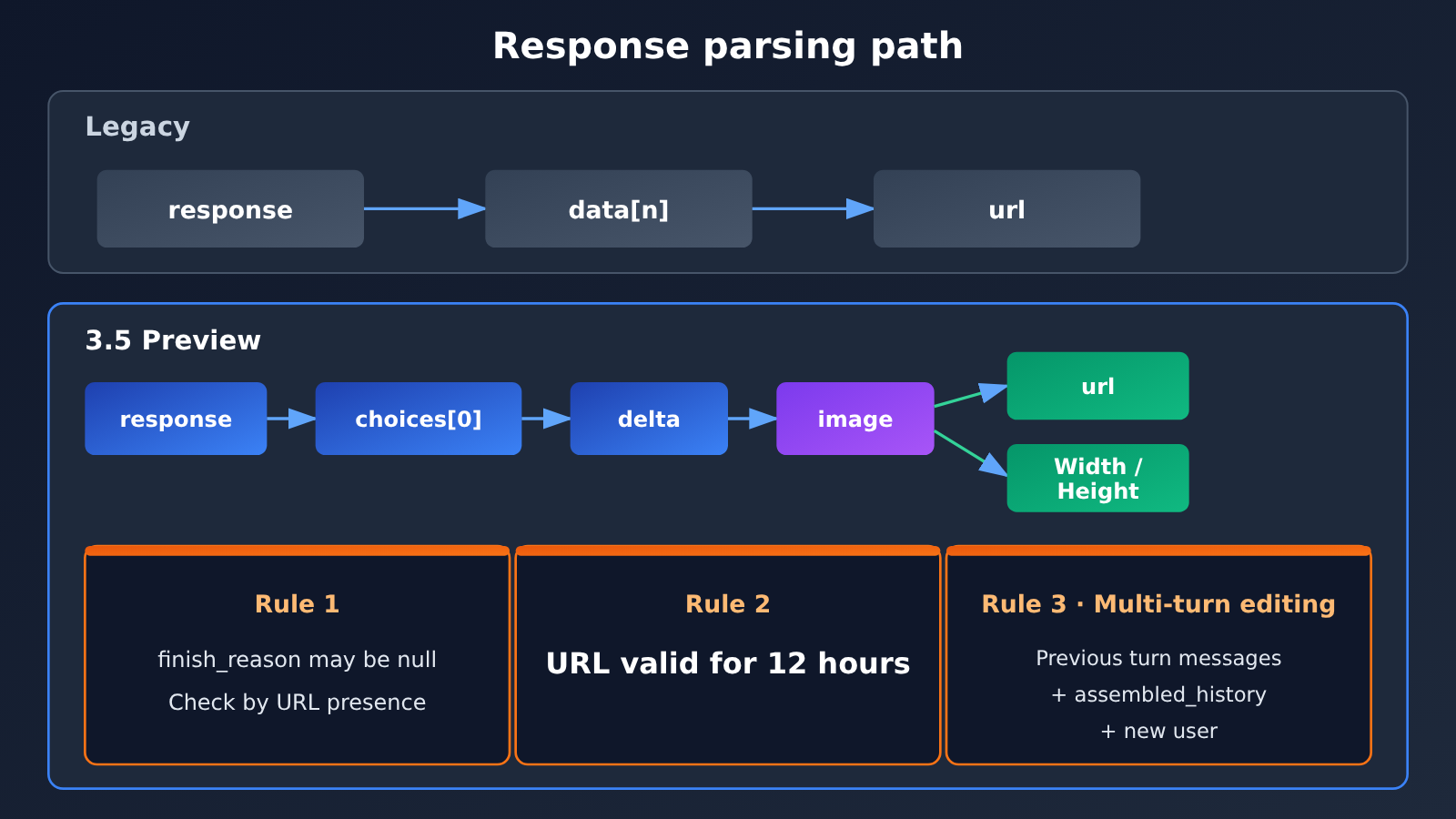
Old clients fetched the image from data[n].url; the new version fetches it from choices[0].delta.image.url, and the image width and height live in the same image object. The gateway processes the SSE stream internally and returns the result synchronously once generation finishes. So even though the response object is a type name with a chunk suffix, the client still only needs to send one HTTP request to the custom path and read a single final response. If you’re using a general-purpose SDK, first check whether it lets you customize the request path and whether it can read the image object.
A few other details can easily trip you up:
- On success,
finish_reasonmay benull; treat the presence of the final image URL as the success condition. - The
modelin the response may change with upstream releases, so routing logic should rely on the model specified in the request. - Both the old result URL and the two new URLs are valid for only 12 hours by default. For authenticated URLs, download them using a method that supports signed links. After downloading, write your own stored file URL into the asset record so review and publishing stages can keep accessing it.
5.2 Multi-Turn Editing and Error Codes
When making successive edits, you need to concatenate the previous turn’s messages, the assembled_history from the response, and the new turn’s user message in order. Tool image URLs in the history must be kept as-is. session is used for scheduling and caching within the session.
The native API error codes mean the following: 400 means the request structure or dimensions are invalid; 401 means you should check the API key and Bearer header; 422 means content moderation failed; 429 means rate limiting was triggered. On pricing, take one 1024×1024 text-to-image image on the China site as an example: 3.0’s reference price is 0.20 yuan, the 3.5 Preview 1K tier is 0.15 yuan—25% cheaper per image—and the 3.5 Preview 4K tier is 0.20 yuan. When checking your bill, you can use tokenhub_usage.total_tokens and the request identifier.
6 Compatibility Layer Integration: Calling Hy-Image 3.5 Preview from Legacy JSON Clients
6.1 Minimal Example
APIYI’s compatibility endpoint is POST /v1/images/generations. The top-level structure is still model, prompt, optional images, and size. The legacy request body from Section 2.1 can keep working—you just need to swap the URL, key, and model value:
import requests

BASE_URL = "https://api.apiyi.com/v1"
resp = requests.post(
    f"{BASE_URL}/images/generations",
    headers={"Authorization": "Bearer YOUR_API_KEY"},
    json={
        "model": "hy-image-v3.5-preview-2k",
        "prompt": "保留杯身图案,把背景换成浅灰色",
        "images": ["https://example.com/cup.png"],
        "size": "1024x1024",
        "response_format": "url",
    },
    timeout=240,
)
resp.raise_for_status()
print(resp.json()["data"][0]["url"])
View the full implementation code (area-based tier selection + size validation + Base64 write to disk)
import base64
import requests

BASE_URL = "https://api.apiyi.com/v1"
API_KEY = "YOUR_API_KEY"

TIERS = [  # (model value, area cap)
    ("hy-image-v3.5-preview-2k", 4_194_304),
    ("hy-image-v3.5-preview-4k", 16_777_216),
]

def parse_size(size: str) -> tuple[int, int]:
    w, h = (int(x) for x in size.lower().split("x"))
    if not (256 <= w <= 8192 and 256 <= h <= 8192):
        raise ValueError(f"每边须在 256-8192 之间: {size}")
    return w, h

def pick_model(size: str) -> str:
    w, h = parse_size(size)
    for model, limit in TIERS:
        if w * h <= limit:
            return model
    raise ValueError(f"面积超出上限: {size}")

def generate(prompt: str, size: str, images=None, as_url=False, out="out.png"):
    model = pick_model(size)
    body = {"model": model, "prompt": prompt, "size": size}
    if images:
        body["images"] = images          # 1-20 images, URL or data URI
    if as_url:
        body["response_format"] = "url"
    is_4k = model.endswith("-4k")
    timeout = 360 if (is_4k and not as_url) else 240
    resp = requests.post(
        f"{BASE_URL}/images/generations",
        headers={"Authorization": f"Bearer {API_KEY}"},
        json=body,
        timeout=timeout,
    )
    if resp.status_code == 400:
        # Could be invalid_size or content_safety_violation
        raise RuntimeError(f"400: {resp.text[:300]}")
    resp.raise_for_status()
    item = resp.json()["data"][0]
    if as_url:
        return item["url"]
    with open(out, "wb") as f:
        f.write(base64.b64decode(item["b64_json"]))
    return out

if __name__ == "__main__":
    print(generate("保留杯身图案,把背景换成浅灰色", "2560x1440",
                   images=["https://example.com/cup.png"], as_url=True))
Quick-start tip: Before you migrate, you can request test credits on APIYI apiyi.com, then call both the
-2kand-4ktiers with the same legacy request body to confirm the response fields and generated image dimensions—and only then decide whether to switch to native integration.
6.2 Choosing Between the Two Model Tiers
| Model | Range per side | Max area | Default size | Default price | Available platform |
|---|---|---|---|---|---|
hy-image-v3.5-preview-2k |
256–8192 | 4,194,304 | 2048×2048 | $0.022 per request | APIYI apiyi.com |
hy-image-v3.5-preview-4k |
256–8192 | 16,777,216 | 4096×4096 | $0.030 per request | APIYI apiyi.com |
For example, 2560×1440 has an area of 3,686,400, which falls within the -2k range; while -2k paired with 4096x4096 returns a 400 invalid_size. Both models can handle 1024×1024 requests, but each is billed at its own tier, so when migrating in bulk, it’s best to first determine the model based on the target area, then assemble the request. Billing verification should be based on the deduction records in the platform’s backend — the usage field in the response is just a compatibility field.
6.3 Delivery Formats and Compatibility Boundaries
The compatible interface returns data[0].b64_json by default; when you explicitly pass response_format: "url", it returns data[0].url instead. The images field supports 1–20 images, each no larger than 20 MB, and in addition to the native interface’s formats, it also supports WebP. The singular image field and multipart uploads still work, but for JSON requests we recommend using images.
Each request always generates exactly one image, even if an older SDK automatically includes n=2. When choosing Base64 delivery, pay attention to the response size: according to the FAQ, a 4K sample is about 17.6–26.4 MB after encoding, so we recommend setting the client timeout to at least 240 seconds for 4K, and 360 seconds for 4K in Base64 mode. When content moderation fails, it returns HTTP 400 and content_safety_violation, so you’ll need to combine the channel, HTTP status code, and business error code to determine the cause of failure.
7 Hy-Image 3.5 Preview Migration FAQ
Q1: My old code uses hy-image-v3.0. Should I migrate it the same way as described in this article?
Yes, but skip the intermediate `hy-image-v3` model. First confirm how it was integrated at the time by checking historical deployment records, then rebuild the request using the protocol for the current 3.5 Preview endpoint.
Q2: Can I just change the model value and leave the path alone?
No, not with the native API, because both the path and the request structure have changed: the path needs to be `v35-generation`, and the request body needs to use `messages`. If you want to keep the old top-level structure, you can switch to the compatible API at APIYI apiyi.com and only replace the address, API key, and model value.
Q3: Can the compatible API handle multiple rounds of revisions?
No. The compatibility layer only supports single-turn generation from text plus a reference image. To send back session history such as `assembled_history`, you need the native TokenHub API.
Q4: How can I tell whether 4K actually took effect?
Read the actual width and height of the final image file. If you’re using the compatibility layer, also check the backend billing records to confirm that the request was billed at the `-4k` tier. In the APIYI apiyi.com backend, you can view billing records by request.
8 Validate Hy-Image 3.5 Preview’s Three Request Types in Order
Run the acceptance checks in this order: result fields → reference image → 4K and billing. That way, issues ruled out in one step won’t skew the assessment in the next.
- Single-turn request with an explicit size: Reuse the valid sizes from the old version. For example, if a product card needs a square image, lock it to 1024×1024, keep the seed and prompt fixed, and check whether the new image retrieval path can read the URL and whether the generated image is 1024×1024.
- Edit request with the same reference image: Send one request with a public direct link and one with a data URI, then confirm that the server can download the reference image and that the output aspect ratio is as expected. For pages that rely on revision history, also append an edit instruction on the same canvas and verify that the previous round’s
messagesandassembled_historyare passed through as-is. - Standalone 4K sample: Send a
4096x4096or3840x2160request, read the file’s width and height, and compare them against the billing tier. When going through the compatibility layer, also check whether the timeout setting and response size in Base64 mode stay within the gateway limits.
For every acceptance run, log the request parameters, image retrieval location, and file dimensions, and make sure the authorization, input, and output stages can all be tied together by the same request identifier. That way, if an error occurs, you can directly tell whether the problem is in request parameter construction, file download, or response parsing. Only after all three request types pass should you switch over the production configuration, scheduled tasks, and rollback configuration. If you need to compare multiple channels in parallel, you can use the compatibility layer address as a backup entry point and manage keys and billing centrally through APIYI apiyi.com.
References
- Tencent Cloud deprecation announcement:
hy-image-v3deprecation date and recommended replacement models- Link:
cloud.tencent.com/announce/detail/2524
- Link:
- TokenHub Hy image generation invocation guide: old and new API paths, sizes, reference images, output parameters, and error codes
- Link:
cloud.tencent.com/document/product/1823/135745
- Link:
- Tencent Cloud legacy vision model deprecation migration guide: mapping between
hy-image-v3.0andhy-image-lite- Link:
cloud.tencent.com/document/product/1823/135600
- Link:
- TokenHub China site model pricing: reference pricing for 3.0 and 3.5 Preview
- Link:
cloud.tencent.com/document/product/1823/130055
- Link:
- APIYI Hunyuan image generation FAQ: compatibility layer size tiers, timeout settings, and error responses
- Link:
docs.apiyi.com/api-capabilities/hunyuan-image/faq
- Link:
Author: APIYI Technical Team
Technical discussion: Feel free to reach us through the APIYI official website homepage. For integration details, refer to the official documentation center.


