

Summary: This article explains how to integrate MAGI-2 using Sand’s native HTTP contract, and how to use Python and TypeScript to complete the full workflow: submit a task, get a task ID, query by task ID, and download the video.
Bottom line: MAGI-2 video generation is asynchronous. When you submit, POST https://api.sand.ai/v2/generations returns HTTP 202 and a string task ID. After that, poll GET /v2/generations/{id} until the status becomes succeeded. Finally, take the time-limited HTTPS link from output.videoUrl and download the video. Whether the integration works depends on three conditions: the organization has created an API key, the organization has been approved to use magi-2, and the organization has an available balance. The code in this article is based on Sand’s public documentation. The resource package has only been statically validated; this article has no live invocation records and does not provide runtime screenshots. As of 2026-11-25 (Beijing time), MAGI-2 is not listed in APIYI’s public model catalog at apiyi.com, so all code in this article connects directly to Sand.
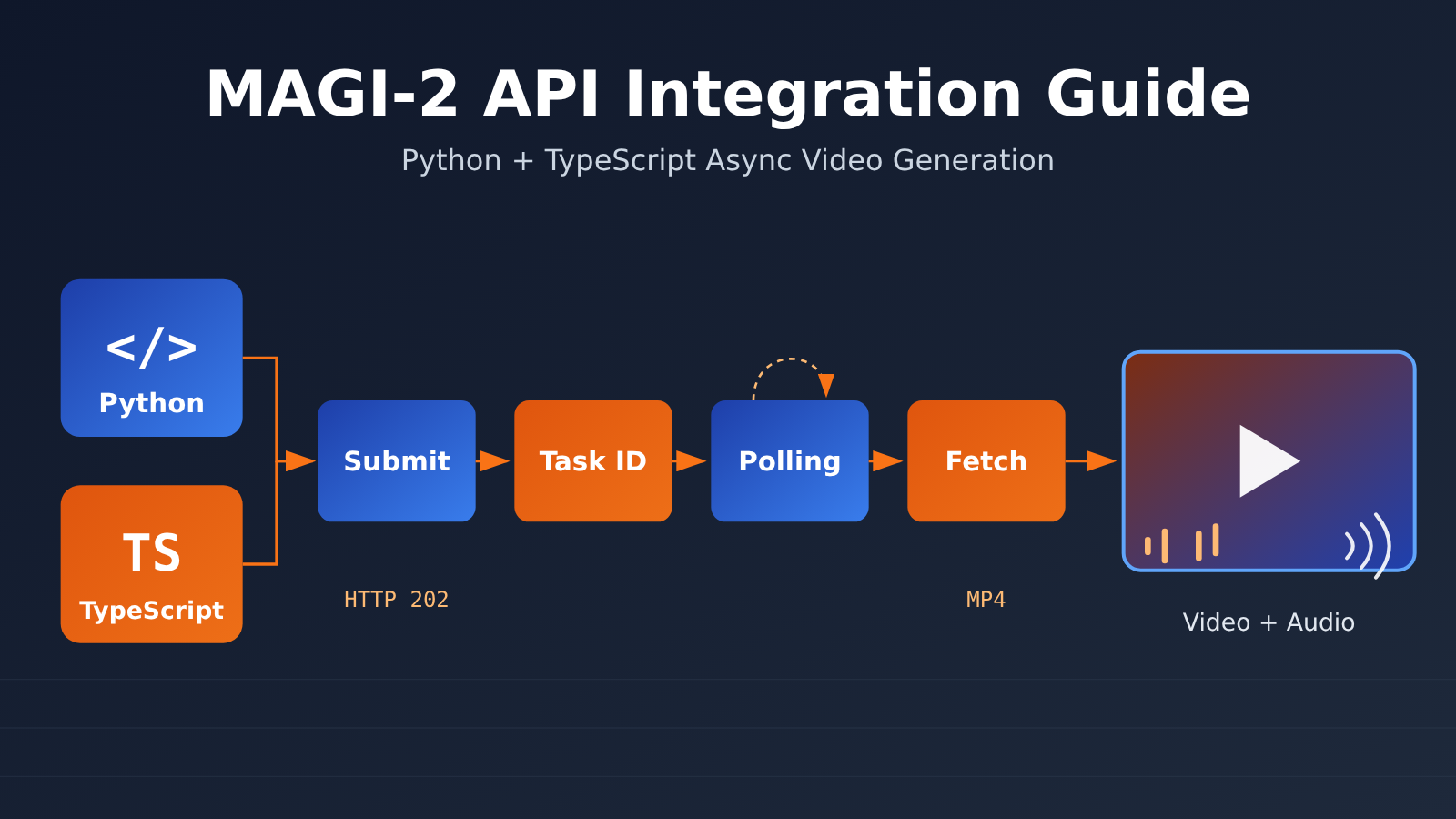
MAGI-2 API Integration Knowledge Map
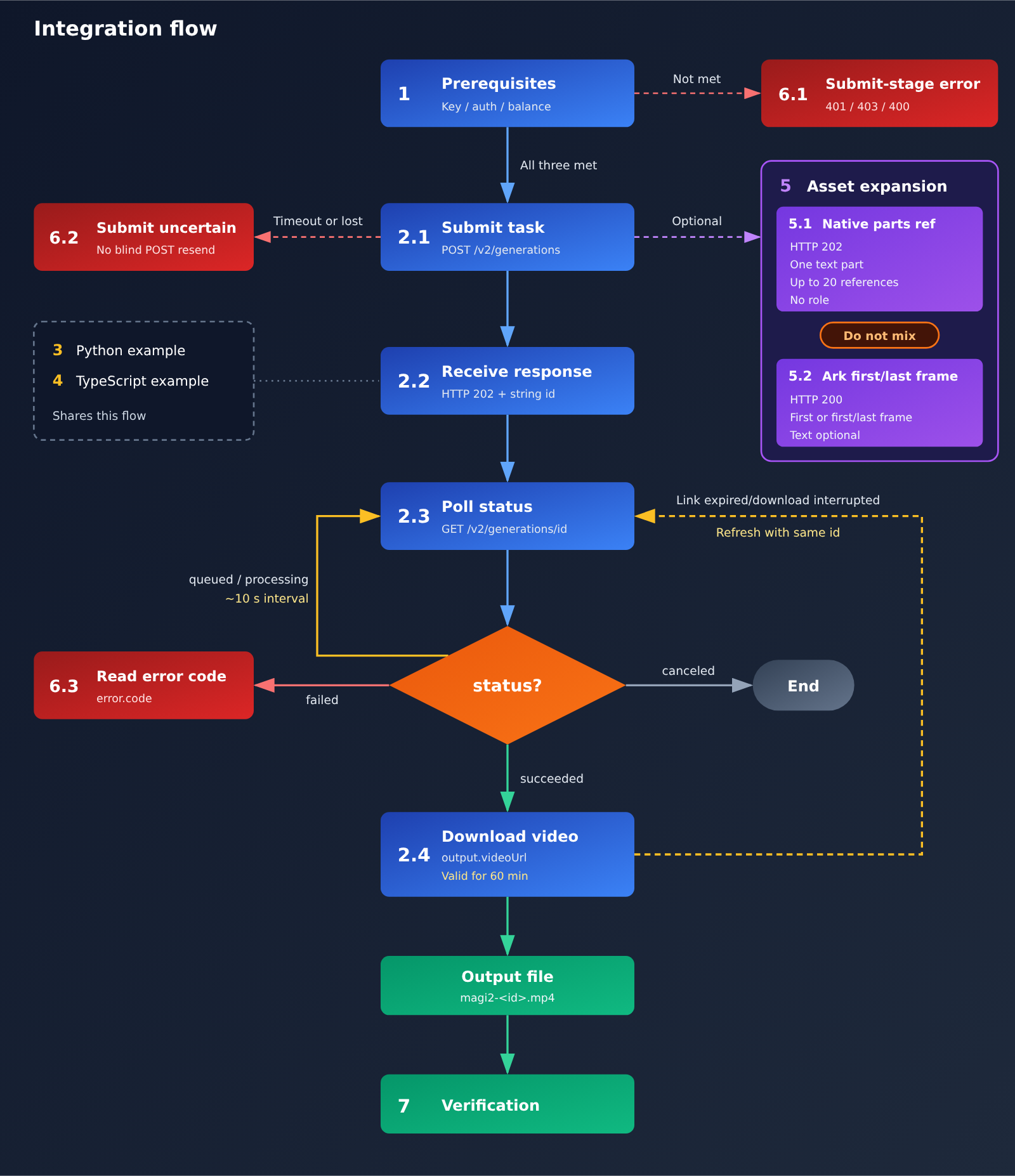
Diagram notes: The main flow has just four steps — submit, receive, poll, and download — which map to Chapter 2. Chapters 3 and 4 implement that same trunk in two languages. Chapter 5 is an optional asset-extension branch, where native reference assets and Ark first/last frames are two separate entry points. Chapter 6 covers where each stage’s failures lead; the core principle is that once you have the task ID, every recovery action revolves around that ID.
MAGI-2 Tutorial Index
I recommend reading in numbered order. Chapter 1 confirms whether you can make calls at all. Chapter 2 explains the protocol and is the shared foundation for both code samples. Chapters 3 and 4 give Python and TypeScript implementations respectively—pick one. Chapter 5 builds on text-only generation to add reference assets and first/last frames, so check it when you need to. Chapter 6 maps each kind of failure to a specific stage. Chapter 7 shows how to validate the result. By the end, you should be able to take a video task from submission all the way to a file on disk, and resume from the task ID if the process is interrupted at any point.
To Know: MAGI-2 Integration Terms
| Term | Brief explanation |
|---|---|
| Organization | The account entity in the Sand console. API keys, model authorizations, balance, and rate-limit quotas all belong to the organization |
parts |
The input array for the native API. It contains one text segment and can optionally include reference items such as images, videos, and audio |
| Task ID | A positive int64 decimal string returned after a successful submission. It’s the only credential for querying, downloading, and resuming a task |
| Signed URL | A temporary HTTPS address returned in output.videoUrl. You don’t need an API key to download from it, and it’s valid for 60 minutes |
| Idempotency | Sending the same request again produces the effect only once. Neither submission endpoint for MAGI-2 can be assumed to be idempotent |
| Ark-compatible endpoint | Another request format provided by Sand. It uses content[] and a frame role, and is used for first-frame or first/last-frame generation |
1 MAGI-2 API Access Prerequisites and Account Boundaries
1.1 Three Known Access Routes for MAGI-2
Currently, there are two public MAGI-2 integration contracts, and we also need to note one channel that is “not yet available.” This article’s main path uses Sand’s native HTTP because it’s the model provider’s own interface, with the most complete field and status definitions.
| Route | Authentication | Submission | Status |
|---|---|---|---|
| Sand native HTTP | Authorization: Bearer <key> |
POST https://api.sand.ai/v2/generations |
Main path for this article; public docs available |
| Higgsfield | Authorization: Key <KEY_ID:KEY_SECRET> |
POST https://api.higgsfield.ai/sand/magi-2/text-to-video |
Separate contract; fields are prompt, aspect_ratio, generate_audio |
| APIYI apiyi.com | Platform unified key | OpenAI-compatible interface | As of 2026-11-25, the model catalog does not list MAGI-2 |
Higgsfield uses its own console, prepaid quota, and keys, and offers text-to-video, image-to-video, and multi-reference modes. After submission, it returns a request_id; you query status via /requests/{request_id}/status, and once complete, read video.url. This field set is completely different from Sand — you can’t just change the domain in the two code samples in this article and call Higgsfield; you need to implement it separately according to its own reference docs.
1.2 Sand Organization, Key, Authorization, and Balance
On the API Keys page in the Sand Open Platform console, create and copy the full key, then set SAND_API_KEY in a backend environment variable. Don’t send the key down to the browser — the frontend should only display the task ID and progress. Note that creating a key only means the organization holds credentials; whether it can call magi-2 also depends on whether the organization has enabled this model.
The public pricing page lists 1080p at $0.08 per second and also states that top-ups are currently not supported. You can use this unit price for an estimate (just an example calculation, without any discounts): a 5-second 1080p video costs about $0.40. Whether you can actually submit depends on the quota shown on the organization side and the server response.
1.3 What You Can Check Locally
“Whether the key is configured” can be determined locally — the sample code checks the environment variable at startup. “Whether you’re authorized” and “whether the balance is sufficient” can only be reported by the server, corresponding to 403 permission_denied and 400 insufficient_credits respectively. If you want to confirm whether MAGI-2 will later be listed on the aggregation platform, you can check the latest catalog in the APIYI model list at docs.apiyi.com/models; before it’s listed, please continue using the direct Sand connection.
2 MAGI-2 Video Generation Request Contract
2.1 Submit: POST /v2/generations
The request body is JSON. The required fields are model, parts, duration, and aspectRatio. In the example, resolution and the audio toggle are also explicitly specified to lock down the configuration.
| Field | Type & Values | Description |
|---|---|---|
model |
"magi-2" |
Flagship model ID |
parts |
Array | Must contain exactly one {"type":"text","text":"…"}; the text must be non-empty and at most 15,000 Unicode code points |
duration |
Integer seconds | The officially published flagship spec is 4–30 seconds |
aspectRatio |
String, e.g. "16:9" |
The flagship spec supports six aspect ratios |
resolution |
"1080p" |
Explicitly set to avoid spec drift |
generateAudio |
Boolean | Enabled by default; the example explicitly sets it to true |
enhancePrompt |
Optional | Controls whether prompt enhancement is enabled |
seed |
Optional | Explicitly sets the random seed for configuration traceability |
The application side should save the original request body. When you’re later investigating “why the same prompt produces different visuals,” seed, enhancePrompt, and the spec fields are all essential evidence.
2.2 Receiving: HTTP 202 and String Task IDs
HTTP 202 only means the request has been accepted—the task still has to be queued, run, and reviewed afterward. The id in the response JSON is a positive int64 task number in string form, and the response headers also include a Location. Persist this string exactly as-is. In TypeScript especially, don’t convert it to a number—otherwise integers above 2^53 will lose precision.
Once the front end gets the task number, it can display “Submitted” and let the user close the page. From then on, the backend is responsible for tracking progress. This step is also the key to the whole design: get the task number first, and every subsequent action recovers from that task number.
2.3 Querying: GET /v2/generations/{id} and Rate Limiting
Queries must use the key from the same organization. A successful query request returns HTTP 200, and whether the task is done depends on the business field status:
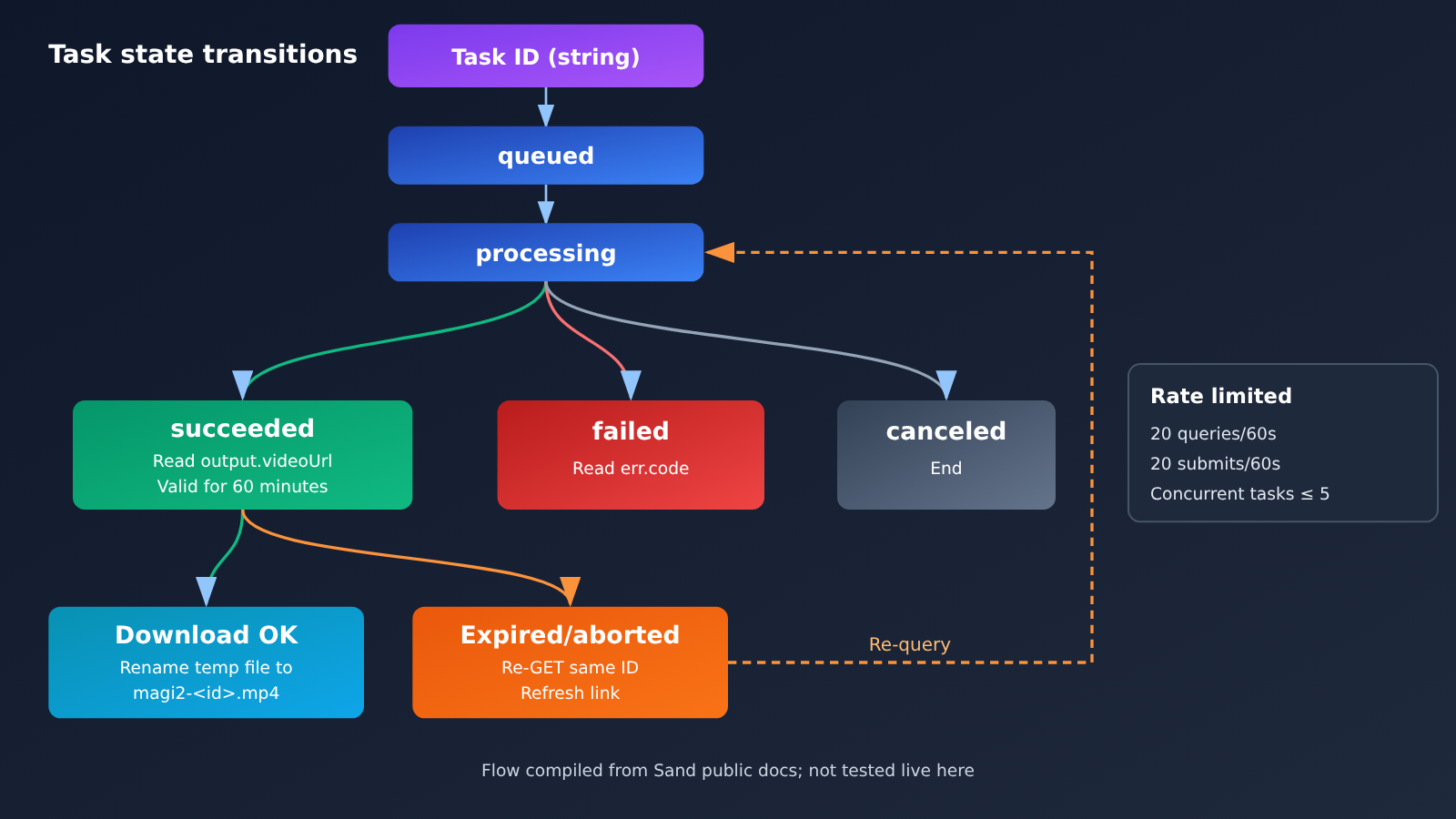
queued,processing: keep waiting; for a single task, poll about once every 10 seconds.succeeded: proceed to the download step.failed: readerror.codeto determine the cause.canceled: the task is finished; no need to query again.
The organization’s default rate limits are: submissions and queries each capped at 20 per 60 seconds, with at most 5 tasks running concurrently. When you have multiple tasks, stagger their polling so they share the organization’s query quota. For example, 5 tasks each polled every 20 seconds and offset 4 seconds apart add up to roughly 15 queries per minute—within the limit. Switching to a different key within the same organization doesn’t give you extra quota.
2.4 Download: Signed Links with an Expiration Time
After the task succeeds, read output.videoUrl and just send a GET request to that HTTPS link. Download requests don’t carry an API key. The link is valid for 60 minutes, and the exact expiration time is in output.urlExpiresAt. Once the link expires, query the same task ID again to get a new one. Also, a successful task may later return an empty URL because of access policies, so the app should record that case as a separate state.
When writing the file, first write to a temporary file in the same directory, then rename it to the target filename after the download finishes. That way you avoid leaving a half-written file behind. Keep signed links internal only; regular logs just need the task ID and status.
3 MAGI-2 Python Integration Example
The Python example below uses only the standard library, and Python 3.10 or later is recommended. Run without arguments, it submits a 5-second, 16:9, 1080p video task with audio; run with a previously saved task ID, it skips submission and goes straight to polling and downloading. This is an example from the resource pack that has passed static review — no live calls were made for this article.
import json
import os
import re
import shutil
import sys
import time
from pathlib import Path
from tempfile import TemporaryDirectory
from urllib.error import HTTPError
from urllib.parse import urlsplit
from urllib.request import Request, urlopen

GENERATIONS = "https://api.sand.ai/v2/generations"
KEY = os.environ.get("SAND_API_KEY")

def sand_json(url, payload=None):
    data = None if payload is None else json.dumps(payload).encode("utf-8")
    request = Request(url, data=data)
    # Do not forward the auth header across redirects
    request.add_unredirected_header("Authorization", f"Bearer {KEY}")
    if payload is not None:
        request.add_header("Content-Type", "application/json")
    try:
        with urlopen(request, timeout=30) as response:
            return response.status, json.load(response)
    except HTTPError as error:
        try:
            reply = json.load(error)
        except (ValueError, UnicodeError):
            reply = {}
        recovery_id = (reply.get("details") or {}).get("generation_id")
        hint = f";用任务 ID {recovery_id} 恢复查询" if recovery_id else ""
        raise RuntimeError(
            f"Sand HTTP {error.code}: {reply.get('code', 'unknown')}{hint}"
        ) from None

def main():
    if not KEY:
        raise SystemExit("服务端需配置 SAND_API_KEY")
    if len(sys.argv) > 1:
        task_id = sys.argv[1]          # Resume from a saved task ID
    else:
        status_code, created = sand_json(GENERATIONS, {
            "model": "magi-2",
            "parts": [{"type": "text", "text": "雨后的庭院,镜头缓慢推近水滴,保留雨声。"}],
            "duration": 5,
            "aspectRatio": "16:9",
            "resolution": "1080p",
            "generateAudio": True,
        })
        if status_code != 202:
            raise RuntimeError(f"意外的提交响应 HTTP {status_code}")
        task_id = created.get("id")
    if not isinstance(task_id, str) or not re.fullmatch(r"[1-9][0-9]{0,18}", task_id):
        raise ValueError("任务 ID 应是正 int64 的十进制字符串")
    if int(task_id) > 2**63 - 1:
        raise ValueError("任务 ID 超出 int64 范围")
    print(f"任务 ID {task_id}", flush=True)

    deadline = time.monotonic() + 900   # Local wait cap: 15 minutes
    while time.monotonic() < deadline:
        status_code, task = sand_json(f"{GENERATIONS}/{task_id}")
        if status_code != 200:
            raise RuntimeError(f"意外的查询响应 HTTP {status_code}")
        status = task["status"]
        if status in ("queued", "processing"):
            time.sleep(10)
            continue
        if status != "succeeded":
            raise RuntimeError(f"任务 {status}: {(task.get('error') or {}).get('code', '')}")
        url = (task.get("output") or {}).get("videoUrl")
        if not url or urlsplit(url).scheme != "https":
            raise RuntimeError("当前结果没有可下载的 HTTPS 地址")
        output = Path(f"magi2-{task_id}.mp4")
        with TemporaryDirectory(prefix=".magi2-", dir=".") as directory:
            temporary = Path(directory) / "video.part"
            with urlopen(url, timeout=60) as source, temporary.open("wb") as target:
                shutil.copyfileobj(source, target)
            temporary.replace(output)
        print(output)
        return
    raise TimeoutError(f"等待超过示例上限,可用任务 ID {task_id} 恢复查询")

if __name__ == "__main__":
    main()
The launch command is python3 magi2.py [已保存的任务ID], where the square brackets indicate an optional argument. Three details in the code are worth calling out: the auth header is added with add_unredirected_header, so it won’t be carried along to other domains on a redirect; if an error response includes details.generation_id, the code tells you to resume with that ID instead of resubmitting; and once the 15-minute local wait cap is exceeded, the program exits, but the server-side task keeps processing.
4 MAGI-2 TypeScript Integration Example
The TypeScript version implements the same Sand HTTP contract. Save the code as magi2.mts and run it directly with Node.js 22.18 or later using its type-stripping feature—no extra SDK installation needed. Sand’s docs don’t provide an official TypeScript SDK either, so the example below uses only native fetch.
import { mkdtemp, rename, rm, writeFile } from "node:fs/promises";
import { setTimeout as delay } from "node:timers/promises";

type CreateInput = {
  model: "magi-2";
  parts: { type: "text"; text: string }[];
  duration: number;
  aspectRatio: string;
  resolution: "1080p";
  generateAudio: boolean;
};

type SandReply = {
  id?: string;
  status?: string;
  code?: string;
  details?: { generation_id?: string };
  error?: { code?: string } | null;
  output?: { videoUrl?: string | null } | null;
};

const generations = "https://api.sand.ai/v2/generations";
const key = process.env.SAND_API_KEY;
if (!key) throw new Error("服务端需配置 SAND_API_KEY");

async function sandJson(url: string, payload?: CreateInput) {
  const headers = new Headers({ Authorization: `Bearer ${key}` });
  if (payload) headers.set("Content-Type", "application/json");
  const response = await fetch(url, {
    method: payload ? "POST" : "GET",
    headers,
    body: payload ? JSON.stringify(payload) : undefined,
    signal: AbortSignal.timeout(30_000),
    redirect: "error",
  });
  const reply: SandReply = await response.json().catch(() => ({}));
  if (!response.ok) {
    const id = reply.details?.generation_id;
    const hint = id ? `;用任务 ID ${id} 恢复查询` : "";
    throw new Error(`Sand HTTP ${response.status}: ${reply.code ?? "unknown"}${hint}`);
  }
  return { statusCode: response.status, reply };
}

let id: string | undefined = process.argv[2];
if (id === undefined) {
  const created = await sandJson(generations, {
    model: "magi-2",
    parts: [{ type: "text", text: "雨后的庭院,镜头缓慢推近水滴,保留雨声。" }],
    duration: 5,
    aspectRatio: "16:9",
    resolution: "1080p",
    generateAudio: true,
  });
  if (created.statusCode !== 202) {
    throw new Error(`意外的提交响应 HTTP ${created.statusCode}`);
  }
  id = created.reply.id;
}
if (typeof id !== "string" || !/^[1-9][0-9]{0,18}$/.test(id)) {
  throw new Error("任务 ID 应是正 int64 的十进制字符串");
}
if (BigInt(id) > 9_223_372_036_854_775_807n) {
  throw new Error("任务 ID 超出 int64 范围");
}
console.log(`任务 ID ${id}`);

async function waitAndDownload(taskId: string) {
  const deadline = performance.now() + 900_000;
  while (performance.now() < deadline) {
    const { statusCode, reply: task } = await sandJson(`${generations}/${taskId}`);
    if (statusCode !== 200) throw new Error(`意外的查询响应 HTTP ${statusCode}`);
    if (task.status === "queued" || task.status === "processing") {
      await delay(10_000);
      continue;
    }
    if (task.status !== "succeeded") {
      throw new Error(`任务 ${task.status}: ${task.error?.code ?? ""}`);
    }
    const url = task.output?.videoUrl;
    if (!url || new URL(url).protocol !== "https:") {
      throw new Error("当前结果没有可下载的 HTTPS 地址");
    }
    const video = await fetch(url, { signal: AbortSignal.timeout(60_000) });
    if (!video.ok) throw new Error(`视频下载 HTTP ${video.status}`);
    const output = `magi2-${taskId}.mp4`;
    const directory = await mkdtemp(".magi2-");
    try {
      await writeFile(`${directory}/video.part`, Buffer.from(await video.arrayBuffer()));
      await rename(`${directory}/video.part`, output);
    } finally {
      await rm(directory, { recursive: true, force: true });
    }
    console.log(output);
    return;
  }
  throw new Error(`等待超过示例上限,可用任务 ID ${taskId} 恢复查询`);
}

await waitAndDownload(id);
The run command is node magi2.mts [已保存的任务ID]. The task ID stays a string throughout, and the range check is done with BigInt; redirect: "error" prevents requests carrying auth headers from being redirected elsewhere. A 5-second video can be read into memory all at once; for long videos or batch jobs, it’s better to switch to file-stream writes.
💡 Workflow tip: Video prompts usually need repeated iteration. Text-heavy work like storyboard breakdown and prompt rewriting can be handled by a general-purpose Large Language Model — for example, calling Claude, GPT, or other models through APIYI apiyi.com’s OpenAI-compatible interface, then dropping the finalized text into MAGI-2’s
parts. That keeps the two call chains’ responsibilities clean and independent.
5 MAGI-2 Material Expansion and First/Last Frame Entry Points
5.1 Native parts reference assets
Building on a plain-text request, keep that single text item and append reference items to parts; the query and download flow doesn’t need to change.
- Public HTTPS images:
{"type":"reference_image","image":{"url":"https://…"}}. - Your own files: first upload via
POST /v1/assetsusing the multipartfilefield, then pass the asset ID as a string inimage.assetId. - Videos and audio: use
reference_videowithvideo, andreference_audiowithaudio, respectively. - Within a single asset object,
assetIdandurlare mutually exclusive — only one can be filled.
Each request can contain at most 10 images, 5 videos, and 5 audio clips, for a total of 20 reference items. Reference videos and audio also each have total duration limits. Asset IDs returned by the upload API are numeric int64 values, so TypeScript needs to be careful about preserving precision when parsing JSON. Login-gated share pages, local file paths, and ordinary web links can’t be used directly as assets — you need to convert them to sources the docs support first. Uploaded assets belong to the organization, so before reusing one, make sure the current task is under the same organization.
5.2 Ark-compatible first/last frame
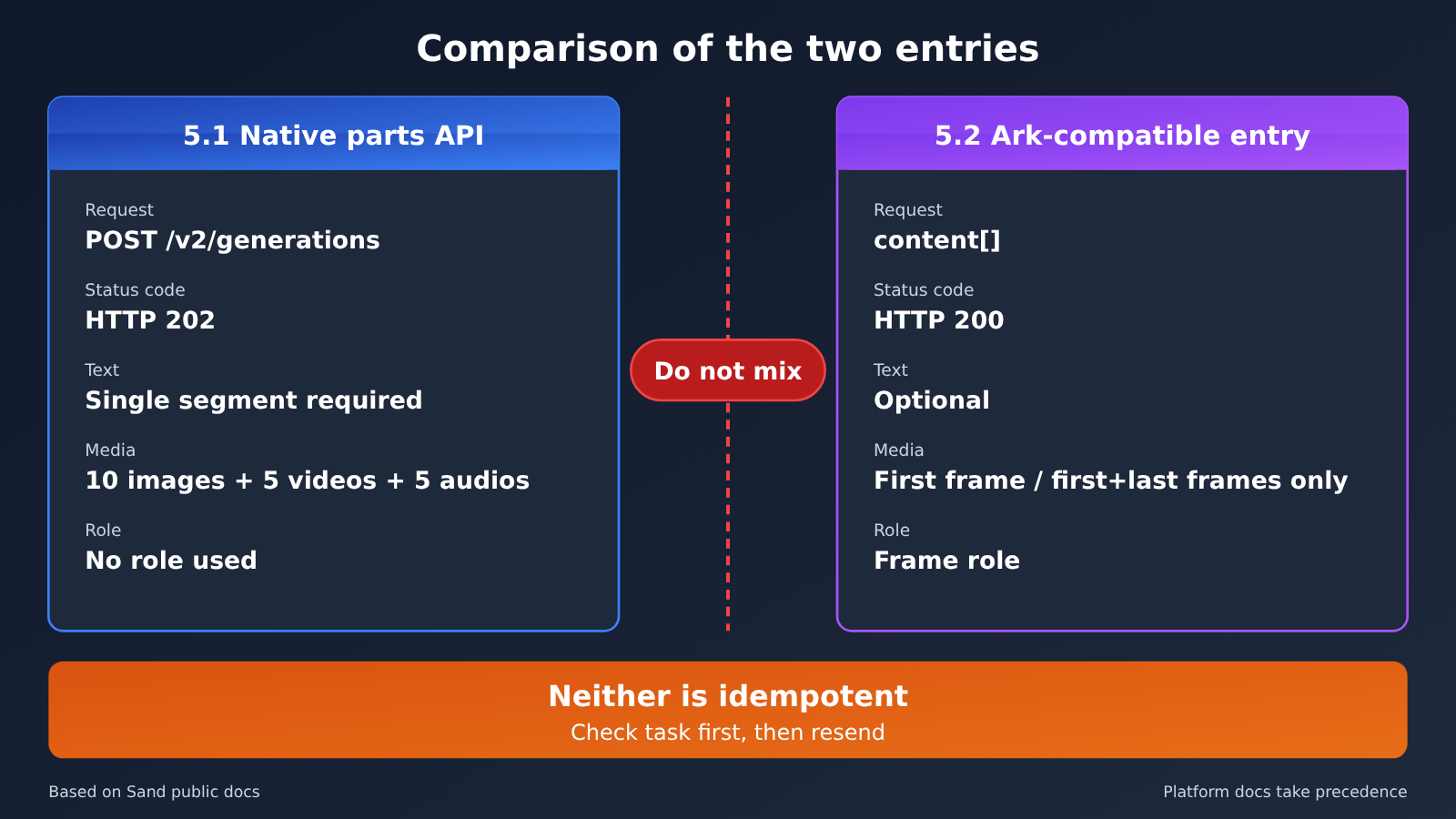
If you need a “freeze on the first frame” or “wrap up on the last image” effect, use Sand’s Ark-compatible endpoint. That’s a different request format, expressed with content[] and frame roles; the exact endpoint path and fields are subject to Sand’s Ark docs, and I won’t speculate here. Here’s how the two entry points differ:
| Comparison | Native parts API | Ark-compatible endpoint |
|---|---|---|
| Successful submission status code | HTTP 202 | HTTP 200 |
| Text | Required, exactly one segment | Optional |
| Asset capability | General reference, up to 20 (images, videos, audio) | Only first frame, or first frame plus last frame |
| Frame role | No role |
First/last frame specified via frame role |
| Can they be mixed? | Can’t put first/last frames into parts |
Can’t mix in general reference assets |
| Idempotency | Can’t be assumed | Can’t be assumed |
Neither entry point can be assumed idempotent — resubmitting may create an extra per-call billed task. So no matter which one you use, the “uncertain submission” handling principles in Chapter 6 apply just the same. If your product needs to support both modes, it’s a good idea to mark which entry point each task used in your local records, and implement status parsing separately too.
6 MAGI-2 Troubleshooting and Task Recovery
6.1 Categorize Errors by Stage
When troubleshooting, first determine whether the problem is in access, submission, generation, or download, and then look up the specific error code. For every call, we recommend logging the task ID, HTTP status, business error code, and stage.
| Stage | Symptom | What to do |
|---|---|---|
| Access/submission | 401 | Check that the credentials are complete and belong to the correct organization |
| Submission | 403 permission_denied |
Confirm that the organization is approved to use magi-2 |
| Submission | 400 invalid_parameter |
Fix the request body according to the returned field path |
| Submission | 400 insufficient_credits |
Check the organization’s balance |
| Submission | Timeout, lost response, 5xx | Don’t just resend the POST; if details.generation_id is available, use it to resume polling first |
| Polling | Network interruption, 429, 500, 503 | Retry with the documented backoff |
| Generation | status: failed |
Read error.code |
| Download | Interruption or expired signature | Retry the same result; if the signature has expired, refresh the link with the same ID |
6.2 Handling Uncertain Submissions
If the network drops before your local process receives the task ID, the client only sees a connection failure and can’t tell whether the server has already created the task. Resending the POST right away may create an extra billable task. A safer approach is to assign your own ID to each local business request and have a single worker process claim that record before creating the task. Once you have the task ID—whether it came from a normal response or an error response—switch to the polling flow.
For polling backoff, the documentation example uses 10, 20, and 40 seconds with random jitter, capped at 60 seconds. For clarity, both sample code snippets exit immediately on a polling error and leave recovery to the caller. In an automated queue, you can restrict automatic retries to polling and let the management logic that owns the task record decide whether to resubmit.
6.3 A Single Record That Connects the Three Stages
We recommend creating a local record for each video task: before submission, log the project, input summary, client language, creation time, and budget; after a successful submission, associate the task ID; store generation status and file delivery status separately. This lets the UI show intermediate states like “Video generated, retrieving file,” and if the download times out, you can resume the download directly instead of regenerating the video just because the file transfer failed. When multiple language services share the same queue, standardize on string task IDs and a single status mapping, and keep the raw upstream status in the logs.
🎯 Integration tip: If your system also handles text model calls (for example, chat models accessed through APIYI at apiyi.com) alongside MAGI-2 video tasks, use the same “task record + stage marker” log structure for both. When troubleshooting, you’ll be able to match prompt generation and video generation in the same table.
7 MAGI-2 Integration Acceptance Checklist
You can work through the following items in order; each one has a clear pass/fail check:
- Local check: When
SAND_API_KEYis not set, the program should immediately error out and exit. - Authorization and balance: If the first submission returns 403 or
insufficient_credits, it’s an account-side issue, and you don’t need to change any code. - Submission: You receive HTTP 202, the terminal prints the task ID as a plain numeric string, and it has already been written to your persistent storage.
- Resume: Manually interrupt the program while it’s polling, then rerun it with
python3 magi2.py <task ID>ornode magi2.mts <task ID>. It should continue waiting on the same task instead of creating a new one. - Download: The current directory contains
magi2-<task ID>.mp4, with no leftover.magi2-temporary directory. - Refresh after expiry: Rerun the same ID after more than 60 minutes; the program should be able to fetch a new link and complete the download.
If all six items pass, your integration covers all four paths in the Sand contract: submission, polling, download, and resume. Note that the code in this article has only passed static acceptance testing. Whether the final video is successfully produced—and how good it looks—depends on your organization’s authorization and balance. If MAGI-2 is later listed on APIYI apiyi.com, re-adapt using the model name and fields in the platform documentation as the source of truth.
References
- Sand Quick Start: console, production domain, and authentication methods
- Link:
platform.sand.ai/docs/get-started/
- Link:
- Sand API Key Management: key creation and organization ownership
- Link:
platform.sand.ai/docs/api-keys/
- Link:
- Sand Models and Pricing: MAGI-2 specs and 1080p unit price
- Link:
platform.sand.ai/docs/model-pricing/
- Link:
- Sand Create Job / Get Job: submission fields, HTTP 202, status, and signed links
- Link:
platform.sand.ai/docs/create-generation/,platform.sand.ai/docs/get-generation/
- Link:
- Sand Native API and Asset Limits / Ark Compatibility Contract: parts reference entries and first/last-frame entry points
- Link:
platform.sand.ai/docs/api-reference/,platform.sand.ai/docs/ark-generations/
- Link:
- Sand Error Table and Rate-Limiting Rules: error codes, backoff, and concurrency limits
- Link:
platform.sand.ai/docs/errors/,platform.sand.ai/docs/limits/
- Link:
- Higgsfield MAGI-2 Text-to-Video API: a separate third-party integration contract
- Link:
open.higgsfield.ai/models/sand/magi-2/text-to-video/api-reference
- Link:
- Running TypeScript in Node.js: type-stripping runtime approach
- Link:
nodejs.org/api/typescript.html
- Link:
- APIYI Model List: view currently available models
- Link:
docs.apiyi.com/models
- Link:
Author: APIYI Technical Team
Technical Discussion: Feel free to contact us through the APIYI apiyi.com homepage. For more integration documentation, see the docs.apiyi.com documentation center.


