

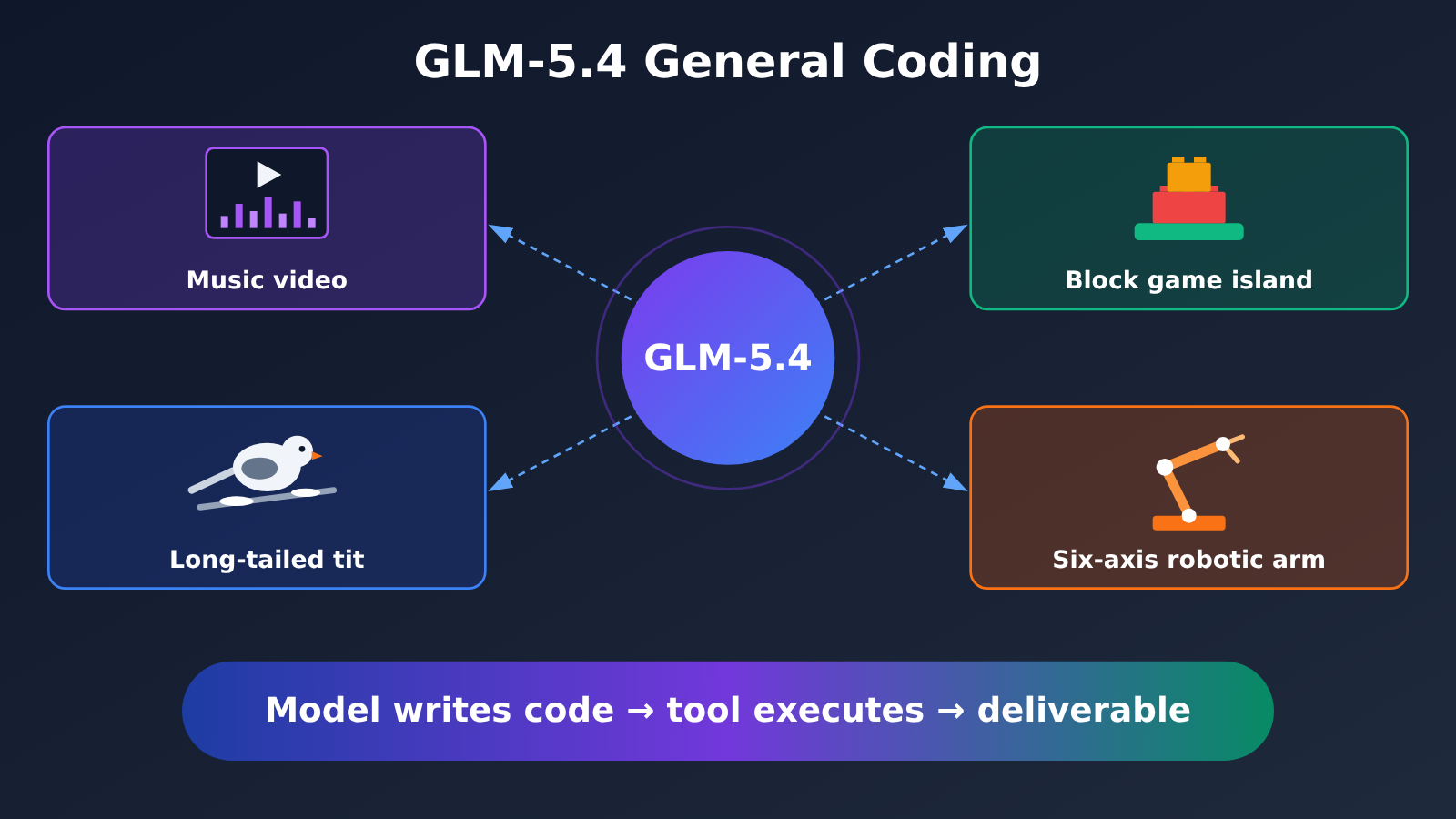
Short answer: GLM-5.4’s general-purpose coding treats writing code and driving software as the means to get creative work done. The model itself only emits text — and that text can be code, parameters, build instructions, or an analysis of a scene. What actually produces the video, the game, and the 3D model is external software: browsers, renderers, FreeCAD, Blender, music models, and so on. Looking at the four official examples, its capabilities already cover four kinds of output: “code-driven procedural visuals,” “interactive game prototypes,” “procedural 3D assets,” and “engineering modeling plus motion visualization.” That said, a demo only proves so much — being able to build something and see the result doesn’t mean it’s reliable in an engineering sense.
What you’ll learn from this article:
- GLM-5.4’s input/output specs, and how the “model plans, tools execute” division of labor works
- What each of the four cases — the Hello world music short film, the BRICKWILD game, the long-tailed tit birdwatching scene, and the six-axis robotic arm — actually proves, and what it doesn’t
- How to vet any general-purpose coding task with three questions: input, process, delivery
- A runnable GLM-5.4 multimodal invocation snippet, plus a complete “generate, screenshot, review” loop example
Index: The sections below open with a To Know table that explains a few key concepts, then a quick impact overview by audience. The “Objective facts” section walks through the official examples and benchmark claims one by one; the “Analysis and judgment” section discusses the limits of those examples and how you’d reproduce them. After that come quick-start code snippets, and finally an FAQ covering common questions about model selection and usage.
GLM-5.4 Generalized Coding: Concepts to Know
| Concept | Brief explanation |
|---|---|
| Generalized Coding | Zhipu’s term for treating programming and calling software as the way to achieve a creative goal — not limited to writing business code |
| Tool calling | The model outputs structured instructions that an external program executes, such as opening a browser, running a script, or calling modeling software |
| Procedural generation | Generating imagery or models directly from code and mathematical descriptions, without relying on external images, textures, or ready-made 3D assets |
| GLSL shader | A small program that runs on the GPU and controls the color, lighting, and surface feel of a 3D object |
| FreeCAD | Open-source parametric CAD software; its output is engineering geometry whose dimensions and structure can still be modified |
| Blender | Open-source 3D creation software, often used for keyframe animation, materials, camera work, and rendering |
| ZCode | Zhipu’s Agent development environment with built-in browser automation; once authorized, it can also operate desktop applications |
| Visual replication | Recreating a scene or interaction in code from a reference image or reference video |
| Long-horizon task | A complex task that requires multiple rounds of planning, execution, and checking to complete |
GLM-5.4 Generalized Coding Impact at a Glance
- Developers: GLM-5.4 can take in images, video, files, and text, so you can feed screenshot feedback into the code generation loop. Front-end work, mini-games, and visualizations—tasks where you can actually see the result—are much easier to close the loop on. If you want to compare it side by side with other models in the same project, you can switch between them through APIYI at apiyi.com using a single OpenAI-compatible interface.
- Content creators: Programmatic video is a good fit for iterating on subtitles, color schemes, and segment durations, because every change lands back in the source code and timeline—no need to regenerate assets from scratch.
- Game and 3D enthusiasts: The barrier to small playable prototypes and procedural 3D scenes is lower now, but art quality and gameplay depth still depend on human judgment.
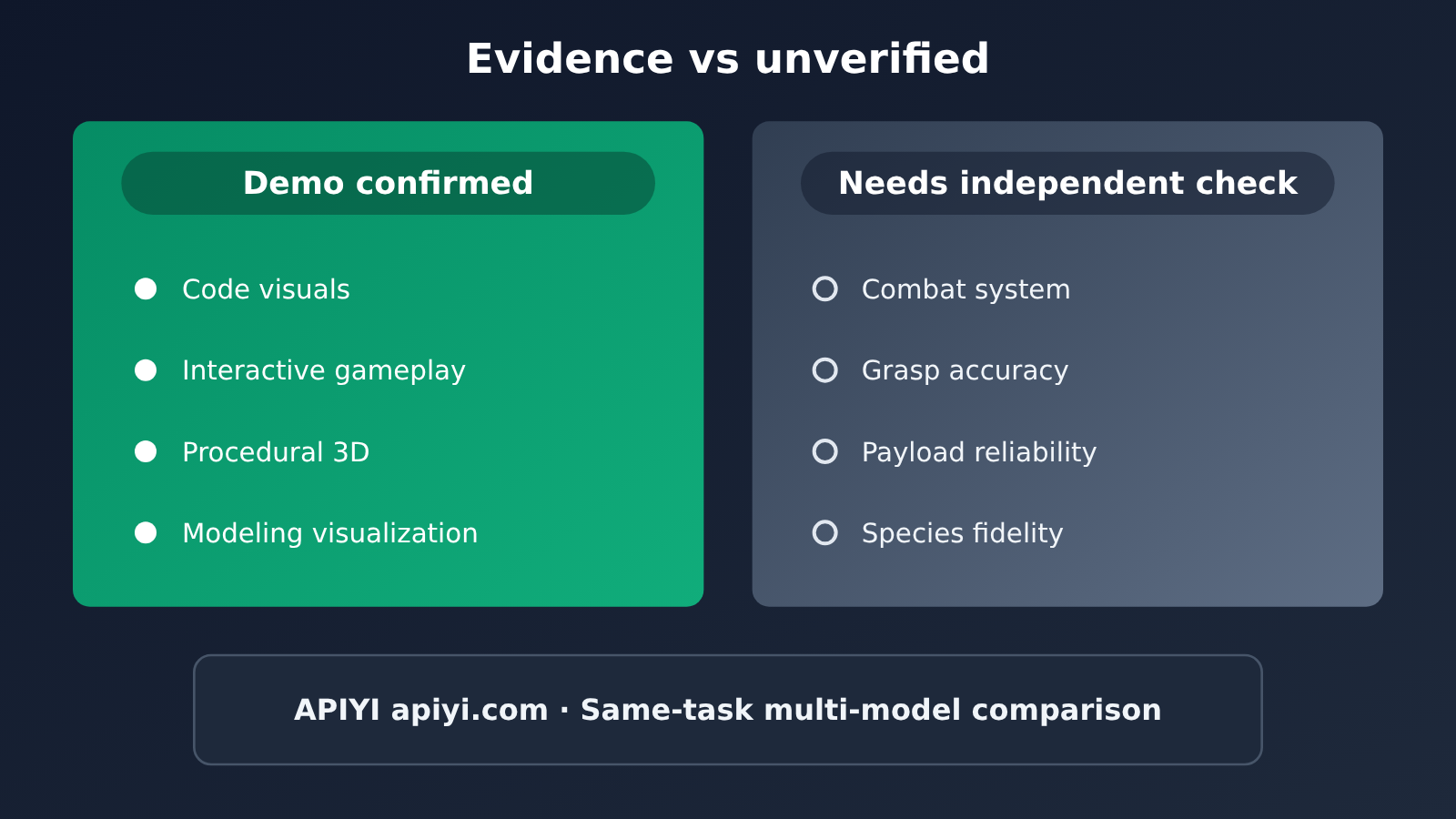
- Engineers: Combining FreeCAD with Blender lets you express design intent quickly. Grasping precision, payload, and reliability weren’t validated in the demo, so they need a separate professional review.
The Objective Facts About GLM-5.4’s Generalized Coding
GLM-5.4’s Input/Output Specs and How It Works
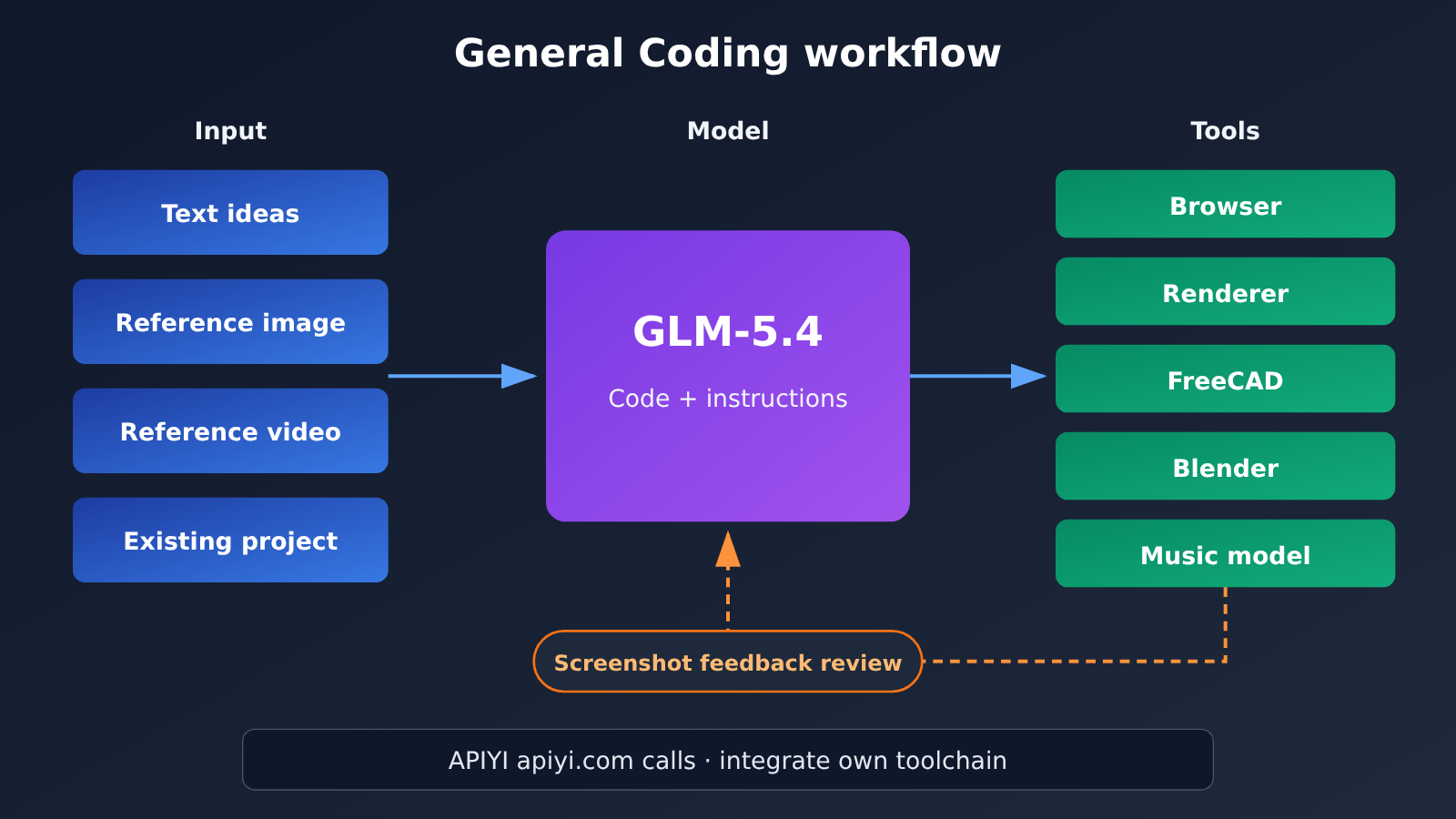
According to Zhipu’s developer documentation, GLM-5.4 accepts images, video, files, and text, and its output type is text. In environments that support tool calling, that text might be code, parameters, build instructions, or an analysis of what’s visible on screen. The video, game, or 3D model only actually gets generated once the external tool carries out the corresponding action.
Vision gives the model one more source of feedback. After execution, it can check screenshots, render output, or live frames to judge whether the result matches the reference target. The tools ZCode’s docs actually list include: a built-in browser for visiting pages, clicking, adjusting the viewport, and taking screenshots, plus — once authorized — control over visible desktop applications. Rendering and simulation are handled separately by the frontend, the engine, and the specialized software; the output comes out of their toolchains.
Video case: the music short film “Hello world”
Zhipu’s self-narrated music short film “Hello world” was made by creator Mike Luan using GLM-5.4. According to the vendor, the production process covered ideation, music arrangement, motion design, and frame rendering. Every frame was drawn in real time by front-end code — no external image assets were used.
For the music, GLM-5.4 planned things out chapter by chapter and shot by shot, then called a third-party music generation model, and refined the music prompt over several rounds to finish it. In other words, the visuals and the audio came from different stages of production: GLM-5.4 handled the orchestration and the code writing, and didn’t output audio or video files directly.
Game case: the BRICKWILD brick island
Z.ai’s English release blog lists what the model can get involved in during game production: character movement, physics, maps, combat systems, and art assets. The embedded demo game is called BRICKWILD, and it shows a brick-style island. The interface prompts you to use WASD to move, space to jump or double jump, and drag the mouse to rotate the camera, while also displaying a minimap and a gold brick counter.
During the demo playback, the gold brick count goes from 0/12 to 3/12, which shows that the interaction and the game state are wired together. Note that the combat system falls within the capabilities the blog lists — but all the demo footage can actually confirm is the observable gameplay and interface feedback. Creator Lou’s first-day post also mentioned this little game, with the final launch pad as the goal.
Separately, the ZCode official site shows a Gomoku development workbench example on its own, with the task split into board rendering, interaction and win/loss detection, heuristic computer moves, and mobile adaptation. That’s a different artifact from BRICKWILD, and each should be understood according to its own page.
3D Case Study: Long-tailed Tit and 6-Axis Robotic Arm
Creator “夜神不说话”‘s interactive macro birdwatching case uses pure mathematical geometry plus a custom GLSL shader to generate a Long-tailed Tit. Zhipu explains that this case doesn’t use any external 3D models or textures. In the demo, you can see fuzz, breathing, head-tilting, and nictitating membrane movements. The on-screen title is “Long-tailed Tit”, the bird perches on a snowy branch, and the viewing angle can switch from front to back, with a number of adjustable parameters alongside controlling the effect.
Another case is the 6-axis robotic arm. GLM-5.4 first completes the mechanical modeling through FreeCAD, then invokes Blender for motion and visualization, and finally synthesizes audio, demonstrating the robotic arm simulating the grabbing of a logo.
Comparison of Four GLM-5.4 General Coding Cases
| Case | Input from Creator | Main Execution Tools | Final Deliverable | Scope Demonstrable in Demo |
|---|---|---|---|---|
| Hello world Short Film | Creativity, chapter, and shot requirements | Frontend code rendering, third-party music model | Playable music short film | Code-drawn visuals, model-orchestrated music workflow |
| BRICKWILD Game | Gameplay and scene settings | Browser and frontend game code | Interactive web game | Movement, jumping, camera, minimap, counter linkage |
| Long-tailed Tit Birdwatching | Species morphology and interaction requirements | Geometry code, GLSL shader | Real-time 3D interactive scene | Procedural morphology, materials, and motion performance |
| 6-Axis Robotic Arm | Mechanical structure and motion intent | FreeCAD, Blender, audio synthesis | Engineering model and demo video | Engineering modeling and motion visualization |
The Official GLM-5.4 Internal Benchmark Claim
The vendor uses these 4 curated cases to show the breadth of what the model can do, and also released an internal benchmark covering 200 real-world coding scenarios, claiming that GLM-5.4 stands out on visual coding, visual replication, and long-horizon tasks. That benchmark was run by the vendor itself, so the exact samples and comparison methodology should be taken from the official release.
Analysis and Assessment of GLM-5.4 Broad Coding
Demos and benchmarks answer different questions
A demo answers “how do you build something like this,” while an internal benchmark answers “how does it perform on a particular sample set.” The two can’t substitute for each other. If you want to reproduce the results, the safest starting point is small assets, a project you can reopen, and clearly defined completion criteria. From there, check three things separately: whether the image references were actually followed, whether the tools had the right permissions, and whether the final artifact meets the agreed spec.
The value of GLM-5.4 Broad Coding lies in “editable artifacts”
In our view, the most valuable part of these cases isn’t the finished footage itself — it’s that most of the artifacts exist as source code or editable projects. For procedural video, changing subtitles just means changing parameters; for a game, changing speed and levels just means changing config; for a CAD project, you can keep adjusting dimensions. Compared with generating a video outright, this approach has a clear edge in scenarios that require repeated revision.
The two 3D tasks also define “delivery” differently. The table below summarizes our acceptance recommendations based on the cases:
| Task type | Artifacts worth keeping | Key checks | What still needs separate verification |
|---|---|---|---|
| Birdwatching interactive scene | Runnable project, camera trajectory, material and animation states | Front, side, close-up, and interactive performance | Form, feathers, and motion naturalness compared against real species |
| Mechanical demo | Editable CAD project, rendering project, motion preview | Dimension units, part correspondences, whether it reopens | Grasp precision, payload, engineering reliability, and mass-production capability |
| Procedural video | Frame source code, timeline, music prompt records | Composition, subtitles, and pacing at specified timestamps | Audio-visual sync, third-party asset licensing |
| Game prototype | Game assets, run instructions, test records | Landing, repeated input, counting, restart, window size | Balance, performance, and long-term gameplay depth |
How different audiences should approach GLM-5.4 Broad Coding
For developers, the visual feedback loop is the most practically useful part. Whether a camera occludes the character, whether a map marker tracks the right object, whether interactive text is legible — problems like these are hard to spot by reading code, but jump out the moment you look at a screenshot. For creators, you can start with just a single line of creative direction and let the model propose a design direction, but important constraints still need to be spelled out clearly as you iterate.
Our prediction is that the first things Broad Coding lands in the near term will be web motion effects, data visualization, and small game prototypes — tasks where “the rendering environment is ready-made and feedback is easy to screenshot.” As for engineering and manufacturing scenarios, that still needs to be validated by more real projects down the line.
GLM-5.4 General Coding Quick Start
Check Your GLM-5.4 Task with the “Three Questions”
Before you start, use the three questions below to spell out the task clearly. If you already have a reference image and an engineering spec on hand, say up front which elements must be kept and which are allowed to change, then ask the model to check each item against the run results or screenshots.
| Three Questions | What to spell out | Example |
|---|---|---|
| What are the input materials? | Reference image, reference video, constraints, existing project | A reference image of a block-built island, WASD controls, collect 12 gold bricks |
| Which tools get invoked along the way? | Browser, renderer, modeling software, audio model | A Three.js web page, with browser screenshots used for acceptance checks |
| What’s the final deliverable? | Source files, run steps, observable behavior | A single HTML file plus test records |
GLM-5.4 Minimal Multimodal Invocation Example
The following code sends a reference image and a requirement to the model in one request, then asks it to output runnable web code. Use the model name exactly as it appears in the platform’s model list.
import openai

client = openai.OpenAI(
    api_key="YOUR_API_KEY",
    base_url="https://api.apiyi.com/v1"  # APIYI OpenAI-compatible endpoint
)

response = client.chat.completions.create(
    model="glm-5.4",  # Use the actual name from the platform model list
    messages=[{
        "role": "user",
        "content": [
            {"type": "text", "text": "参考这张图,用单个 HTML + Canvas 实现一段 10 秒的标题动画,不使用外部图片。只输出代码。"},
            {"type": "image_url", "image_url": {"url": "https://example.com/reference.png"}}
        ]
    }]
)
print(response.choices[0].message.content)
View the full implementation code: generation → screenshot → visual review loop
import base64
import re
import openai
from playwright.sync_api import sync_playwright

client = openai.OpenAI(
    api_key="YOUR_API_KEY",
    base_url="https://api.apiyi.com/v1"  # Use the APIYI unified endpoint
)
MODEL = "glm-5.4"  # Use the actual name from the platform model list

def extract_html(text: str) -> str:
    """Extract the HTML code block from the model's reply"""
    match = re.search(r"```html\s*(.*?)```", text, re.S)
    return match.group(1) if match else text

def screenshot(html_path: str, png_path: str, wait_ms: int = 3000):
    """Open the page in a headless browser, wait the specified time, then take a screenshot"""
    with sync_playwright() as p:
        browser = p.chromium.launch()
        page = browser.new_page(viewport={"width": 1280, "height": 720})
        page.goto(f"file://{html_path}")
        page.wait_for_timeout(wait_ms)
        page.screenshot(path=png_path)
        browser.close()

def to_data_url(png_path: str) -> str:
    with open(png_path, "rb") as f:
        return "data:image/png;base64," + base64.b64encode(f.read()).decode()

requirement = (
    "用单个 HTML + Canvas 实现一个积木风格小场景:一个方块角色、"
    "WASD 移动、空格跳跃,右上角显示金砖计数 0/12。"
    "不使用外部图片。用 ```html 代码块输出。"
)

messages = [{"role": "user", "content": requirement}]
html_path = "/tmp/demo.html"

for round_id in range(3):  # Up to 3 iterations
    reply = client.chat.completions.create(model=MODEL, messages=messages)
    code = extract_html(reply.choices[0].message.content)
    with open(html_path, "w", encoding="utf-8") as f:
        f.write(code)

    png = f"/tmp/round_{round_id}.png"
    screenshot(html_path, png)

    review = client.chat.completions.create(
        model=MODEL,
        messages=[{
            "role": "user",
            "content": [
                {"type": "text", "text": f"需求:{requirement}\n请对照截图逐项检查是否满足。全部满足只回复 PASS,否则列出问题。"},
                {"type": "image_url", "image_url": {"url": to_data_url(png)}}
            ]
        }]
    ).choices[0].message.content

    print(f"第 {round_id + 1} 轮复核:{review}")
    if review.strip().startswith("PASS"):
        break
    messages += [
        {"role": "assistant", "content": reply.choices[0].message.content},
        {"role": "user", "content": f"截图复核发现问题:{review}\n请修复后输出完整代码。"}
    ]
🚀 Quick start: We recommend claiming a free trial quota at APIYI apiyi.com first, then running a small scene with the closed-loop script above. Keep the code, screenshots, and review results from each round, so you can reuse them directly when modifying the same artifact later.
This script is just a minimal way to reproduce the issue. In a real project, agent environments like ZCode already come with built-in operations such as browser clicks, viewport resizing, and screenshots, so they can handle more complex interaction testing. If you’re building a game prototype, I’d suggest shipping a small scene that can complete the core loop first, then verifying each item one by one: character landing, repeated input, whether gold bricks get double-counted, restart behavior, and how things perform at different window sizes.
GLM-5.4 Generalized Coding FAQ
Q1: Can GLM-5.4 directly output video or 3D model files?
No. According to the official specs, GLM-5.4 outputs text. Video, games, and 3D models come from the code or instructions it generates, which are then executed by tools like browsers, renderers, FreeCAD, or Blender.
Q2: How is generalized coding different from ordinary AI code generation?
Ordinary code generation aims at the code itself. Generalized coding aims at the finished result — code is just the means. It also works with visual input, checking the outcome against a screenshot or render, then iterating further.
Q3: Does the BRICKWILD demo include a combat system?
Combat is listed in the capabilities the blog covers. What the demo footage actually shows is movement, jumping, camera rotation, a minimap, and the gold brick counter updating from 0/12 to 3/12.
Q4: What scenarios suit GLM-5.4 generalized coding best?
– **Programmatic video**: title animations and explainer clips that need repeated tweaks to subtitles, color schemes, and duration
– **Web mini-game prototypes**: fast validation of controls and the core gameplay loop
– **3D interactive displays**: rotatable, parameter-adjustable showcases of products or biological forms
– **Design intent visualization**: expressing mechanical structure and motion through CAD plus rendering
Q5: How can I quickly test GLM-5.4 through the API?
1. Go to APIYI apiyi.com, sign up, and grab an API key
2. Confirm the available model name in the model list
3. Set `base_url` in this article’s code to `https://api.apiyi.com/v1` and run it directly
The same key also lets you call OpenAI, Claude, Gemini, and other models, which makes side-by-side comparison on the same task easy.
Q6: Can the robotic arm case be used for real manufacturing?
Not directly. The demo evidence stops at engineering modeling and motion visualization. Physical grasping accuracy, payload, engineering reliability, and mass-production capability all need professional review against real-world conditions.
Q7: Can GLM-5.4 deliver a finished piece from a single sentence of an idea?
The model can propose a design direction for you, but important constraints are best spelled out during iteration. The more concrete your reference material and the clearer your completion criteria, the easier the result is to accept. On APIYI apiyi.com you can try several rounds of prompts with a small budget, which keeps costs manageable.
Q8: What are the known limitations of GLM-5.4?
It depends on external tools for permissions and execution environment. Operating desktop programs inside ZCode requires prior authorization. The official evaluations come from the vendor internally, so third-party independent results are still worth watching for. Subjective dimensions like art quality and fidelity to real species still need human judgment.
Looking at these four cases together, the point of GLM-5.4 generalized coding is that it turns creative intent into something software can keep working with: a timeline you can edit, a game project you can restart, a CAD project you can open. To check whether it fits your task, pick a small scenario, connect to the model through APIYI apiyi.com, write your requirements using the “three questions,” and then compare screenshots round by round.
References
-
Zhipu GLM-5.4 Model Specifications: input/output types and general coding details
- Link:
docs.bigmodel.cn/cn/guide/models/glm-5.4 - Description: official model capabilities and API specifications
- Link:
-
Zhipu Chinese Release and Case Studies: four examples plus internal evaluation
- Link:
zhipuai.cn/zh/research/164 - Description: video, 3D birdwatching, and robotic arm cases, along with a 200-scenario evaluation
- Link:
-
Z.ai English Release Blog: BRICKWILD game case
- Link:
z.ai/blog/glm-5.4 - Description: the scope of game-making capabilities and a demo
- Link:
-
ZCode Documentation: browser automation, desktop control, and Agent workflows
- Link:
zcode.z.ai/cn/docs/browser-use - Description: real-world tool capabilities of the visual feedback loop
- Link:
-
FreeCAD and Blender Official Documentation: engineering modeling and 3D rendering
- Link:
freecad.org,docs.blender.org/manual/en/latest - Description: the toolchain involved in the robotic arm case
- Link:
Author: APIYI Technical Team
Technical Discussion: If you’d like a multi-model comparison testing plan, feel free to visit APIYI apiyi.com and get in touch. For more integration docs, see docs.apiyi.com


