

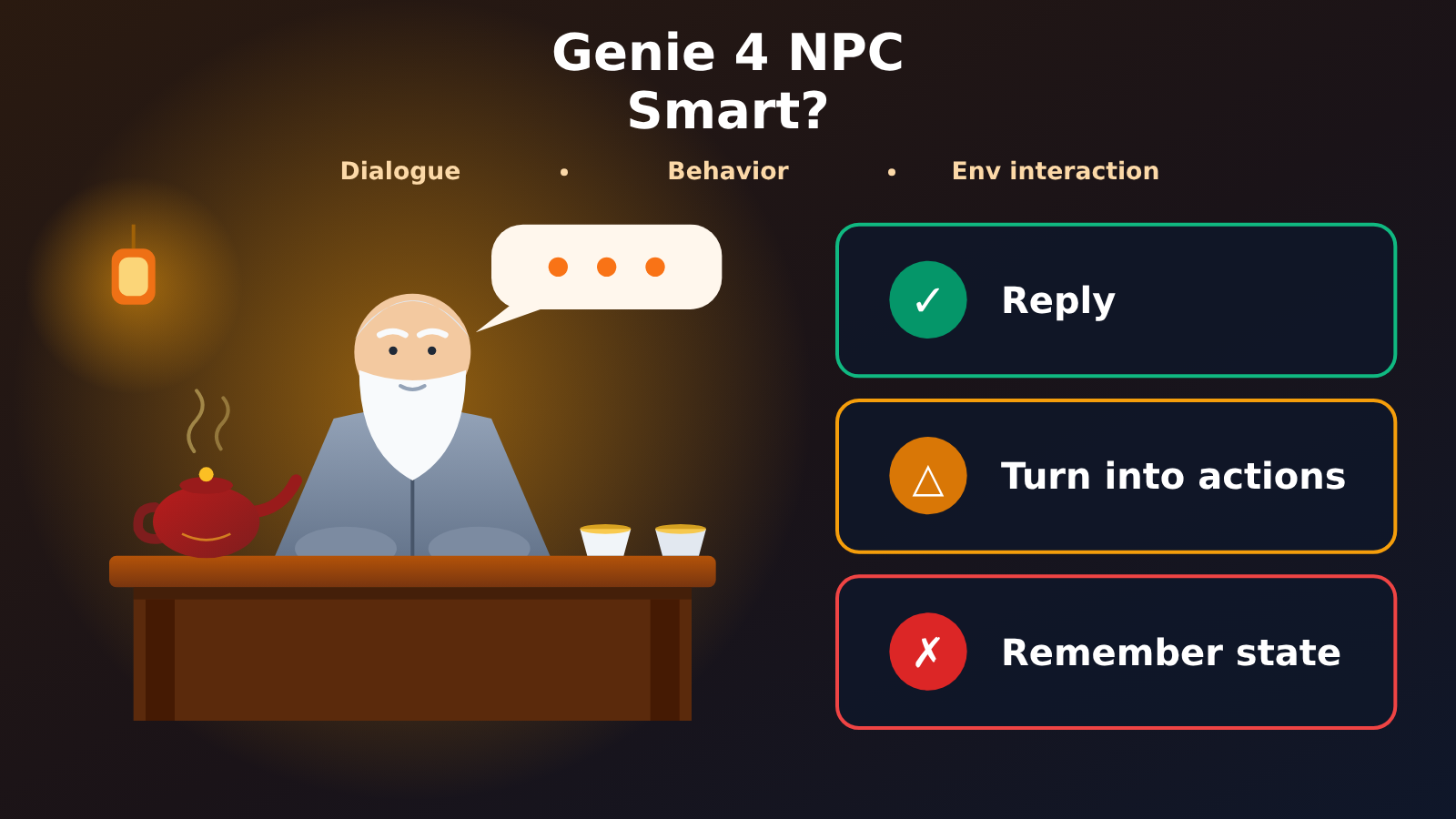
Short answer: the NPCs Genie 4 generates can hear live text, reply in context, and make short-range reactions—but getting the words right doesn’t mean getting things done, and it certainly doesn’t mean remembering anything. In one short continuous shot, Genie 4’s characters can give on-topic answers to whatever the player just typed in—for example, a tea master first recommends Wuyi rock tea, then, when asked again, says the tea comes from the Wuyi Mountains. It can also make a character turn its head, open its mouth, or track a target based on off-screen instructions. But when it comes to handing over a bowl, eating noodles, hitting an enemy, or holding a first-person perspective—steps that require object state and action attribution to be correct at the same time—the public recordings show repeated breakdowns. Judging by the design of the developer docs, it has no cross-session memory, and it isn’t an agent that can act on its own.
What you’ll learn from this article:
- Genie 4’s three current entry points, their launch dates, and each one’s input method.
- Across 7 public recordings, how far the NPC’s dialogue, actions, and environmental interaction each got—and where each one broke down.
- Why “the NPC is smart” needs to be split into four observation dimensions—semantics, voice, visuals, and state—before you can judge it.
- A set of steps and a recording method for testing NPCs yourself in Project Genie or AI Studio.
Index: The To Know table below first explains concepts like world models and evidence levels, then lays out the impact by audience. The “Objective Facts” section covers entry points and operation, creator testing, official demos, and technical limitations in order, noting the source and evidence level for each item. The “Analysis and Judgment” section evaluates dialogue, behavior, and environmental interaction separately, and provides a test checklist and prompt-drafting code. The FAQ at the end answers a few commonly confused questions.
Key Concepts to Know About Genie 4 NPCs
| Concept | Brief explanation |
|---|---|
| World Model | A model that generates interactive visuals and sound in real time based on text, images, and actions — Genie 4 belongs to this category |
| NPC (as defined in this article) | A character rendered by the model inside the generated world, which players can observe or steer through text — not a scripted character pre-written into a game engine |
| Project Genie | Google’s consumer-facing browser playtest entry point, where you can create scenes and select Genie 4 |
| Google AI Studio canvas | The developer-facing entry point, where you drive Genie 4 with a keyboard plus real-time text input |
| Gemini Interactions API | The interface developers use to call Genie 4; both input and session duration come with explicit limits |
| Experience Builder | A product assistant inside Project Genie that talks through the scene with you at creation time and, while you explore, can call Gemini to observe the visuals, suggest the next step, or trigger events |
| In-experience text input | Typing into the input bar while the experience is running, which shapes the next stretch of actions and dialogue — the most verifiable input method in this article’s case study |
| Rolling time window | The scene is generated continuously in time windows, so earlier content gradually drops out of the generation basis |
| Embodied agent (e.g., SIMA 2) | A separately trained AI that takes in visuals and outputs keyboard and mouse actions — a different thing entirely from an NPC generated inside the scene |
| Evidence tier | This article separates official demos, early third-party hands-on trials, and first-hand creator testing; the three differ in credibility and in what they can be applied to |
Genie 4 NPC Impact at a Glance
| Audience | Practical Impact |
|---|---|
| Everyday users | You can chat back and forth with characters in a scene and direct a character to do one thing, but replaying the same scene may give different outcomes — don’t count on characters remembering your previous run |
| Content creators | Well-suited to shooting short, single-character dialogue narrative clips; multi-step actions and object interactions require multiple retries and footage selection |
| Game and interaction developers | The interface has a per-interaction time limit and can’t be resumed, so it’s currently closer to a prototyping and creative preview tool than a drop-in replacement for an NPC system |
| Researchers | Public recordings can provide evidence for “semantic continuation,” but multi-agent interaction is listed by Google itself as a research challenge, so the related conclusions need independent verification |
The Objective Facts: Genie 4 NPC’s Access, Hands-On Tests, and Official Demos
Genie 4 NPC: Three Entry Points and Availability Dates
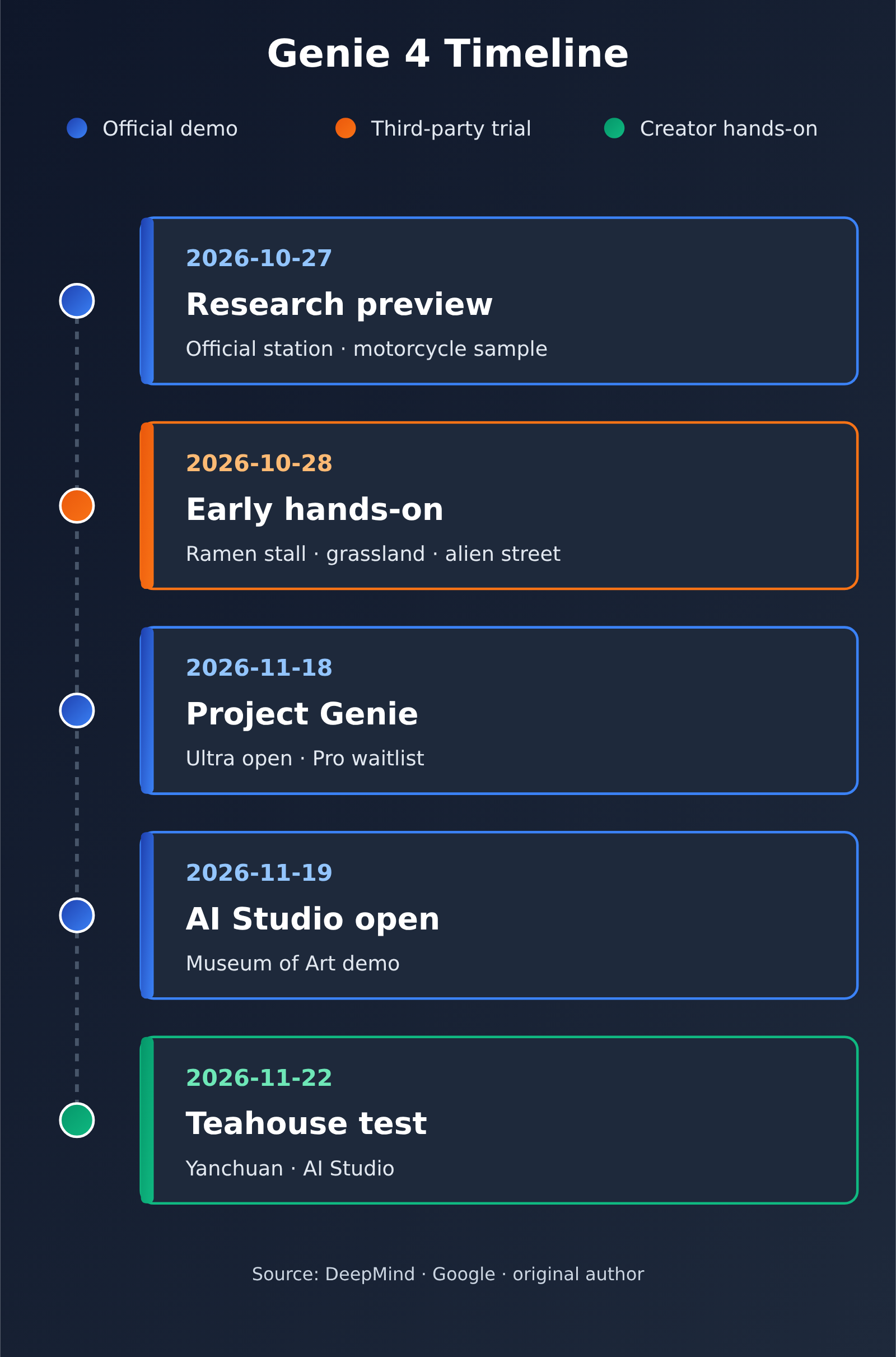
Google DeepMind announced an invite-only research preview of Genie 4 on October 27, 2026. Both the official short film and the early hands-on footage that Peter Yang released the next day belong to this stage. On November 18, Project Genie began rolling out Genie 4 to eligible Google AI Ultra subscribers, while Pro users could join the waitlist. On November 19, Google separately opened Google AI Studio and the Gemini Interactions API to developers.
| Entry Point | Availability Date | Audience | Verifiable Inputs | Relevant Examples in This Article |
|---|---|---|---|---|
| Research preview | 2026-10-27 | Invited users | In-game text, keyboard | Official station and motorcycle samples; Peter Yang’s early hands-on |
| Project Genie | 2026-11-18 | Eligible Ultra subscribers; Pro users can join the waitlist | Keyboard movement and steering, in-game text; some customized experiences may request microphone access | Product help and prompt guide |
| AI Studio / Gemini Interactions API | 2026-11-19 | Developers | Text, initial image, keyboard or viewpoint actions; does not receive live microphone or camera streams | Yanchuan Teahouse hands-on test; Museum of Art app |
The model card lists text, images, and real-time actions as inputs, with synchronized video and audio as outputs. Its architecture is based on Gemini Omni Flash, with Gemini involved in reasoning and real-time guidance. The research preview also describes a guidance workflow: Gemini 3.8 Flash observes the generated frames, breaks down goals, then checks progress against later frames and adjusts. This is a scene-level planning description.
How to Test Genie 4 NPCs in Project Genie and AI Studio
According to the product help and the official prompting guide, the basic workflow for testing characters in Project Genie is as follows:
- Open the creation entry point, fill in the scene description, select Genie 4 as the model, and enter the experience after creating it.
- First decide whether the perspective is first-person or third-person, and state it explicitly in the description.
- Keep one speaker in frame at all times, describe their voice in advance, or provide a short line of dialogue in quotes.
- After entering the experience, use the keyboard to move or turn; in experiences that support prompting, type directly into the input field to influence the next action and dialogue.
- Within the session, request only one action at a time. Don’t cram multiple actions into a single input.
The Genie 4 canvas in AI Studio also uses keyboard controls plus real-time text input. The developer documentation also lays out a few hard limits: completed interactions cannot be continued; scenes are generated through a rolling time window, and visual stability may decline after 60 to 90 seconds; the API has a hard cap of 120 seconds per call.
Creator Test: Two Q&A Turns Connect in a Chinese Teahouse
On November 22, 2026, Yanchuan selected Genie 4 in AI Studio, placed himself on one side of a wooden table, and arranged for a white-bearded tea master in a gray robe to sit opposite him. The setup specified that the character speaks only Chinese, with a teapot and two small cups on the table. The author never pressed the movement keys. At about 2.5 seconds, he asked in quotes in the input field for that day’s recommendation, and at about 11 seconds, he followed up by asking where the recommended tea was produced.
According to the author’s notes, after each of the two inputs, a human voice was heard about two seconds later. The tea master first recommended Wuyi rock tea, then answered that its origin was Wuyi Mountain, and added a sentence describing the tea’s flavor, while the camera stayed in first person throughout. The second question used a pronoun to refer back to the first answer and did not repeat the tea name, so this short recording provides evidence that the two rounds of generated answers still centered on the same cup of tea. It’s worth noting that “two seconds” is only the data from this sample; in the same batch of tests, the author also encountered slower generation and responses.
Creator Hands-On: Camera Perspective and Action Attribution Drift in an English Teahouse
The same creator started another session in English, again set to first person and facing a white-bearded tea master. Around the 3-second mark, they asked the recommended question and then stayed still. The creator noted that midway through the conversation, the camera slid behind their own shoulder, the back of the player’s head appeared in frame when it shouldn’t have, and the player avatar even reached out and picked up a cup on its own.
The breakdown here is in camera perspective and action attribution: the character’s replies can stay on topic, but the player avatar may perform actions in the same stretch of footage without any key press. In the Chinese session, first person stayed stable; in the English session, both the setup and the outcome changed. Together, the two sessions support the idea that “similar scenes can show different degrees of cross-talk,” but they can’t prove on their own that language caused the drift.
Third-Party Early Hands-On: Ramen Stall, Grassland, and Alien Street
On October 28, 2026, Peter Yang released an early hands-on video of Genie 4 plus Gemini, described in the video as early access. Starting at 04:00, he enters a 1980s Tokyo ramen stall on a rainy night, where the owner first greets customers by voice. Yang then gives an in-game prompt—”hand over a bowl of ramen and let the player eat it”—and the owner delivers the usual polite lines for serving food, but the frame stacks the two bowls on top of each other, and the eating action isn’t fully shown. The video notes that he used a sponsor’s tool to dictate and transcribe the prompt.
In the grassland scene at 07:54 in the same video, Yang uses text from a jeep perspective to tell a lion to track an antelope, and the visuals carry through the tracking action. Later, a large herd of animals runs past; the lion moves through the herd and no longer shows a hunting target. The alien street scene at 09:32 builds enemy characters through patrols and synthesized chants, but after the player issues an attack command, there’s no recognizable hit or change in enemy state in the frame.
Custom app demo: Step inside the Mona Lisa and ask the subject’s name
On November 19, Jason Stephen demonstrated the Museum of Art app in AI Studio. At about 00:07, click Step inside below the artwork; at about 00:09, a “Hold T to speak” prompt and microphone icon appear; at about 00:11, a transcription asking for the subject’s name appears; at about 00:13, the subject’s reply subtitle identifies her as Lisa Gherardini.
In replies to the original post, the author explained that other parts of the app also use Gemini Live, with Genie 4 handling world exploration. This combination conveys the overall experience of the custom app, but it’s impossible to tell from the interface which component handles the transcription and replies for voice input. This also lines up with the developer documentation’s statement that “the Genie 4 interface does not accept live microphone streams.”
Official demo: Crowd at a train station and two people on a bridge
The research preview screen recording from October 27 is set in a rural Japanese train station in the 1980s. From about 00:00 to 00:05, an instruction appears character by character in the input field: have the station attendant remind passengers, then announce the next train information; at about 00:06, the viewpoint moves past him and turns toward the train and passengers; from about 00:09 to 00:16, the crowd continues walking along the platform; from about 00:18 to 00:23, an instruction is entered for an older woman carrying luggage to arrive, but the final frames still focus mainly on the train and the original crowd. The official notes state that the demo sequence was shortened.
The motorcycle clip from the same day shows a couple riding across a bridge on the outskirts of Hong Kong. From about 00:03 to 00:07, the operator enters prompts for the man to look back and the woman to ask whether the two can make it in time; the female passenger then leans toward the driver and makes a speaking motion, while the two are still moving. After about 00:12, the operator adds another background event, and the shot shifts to a side-rear view and then to a view from behind.
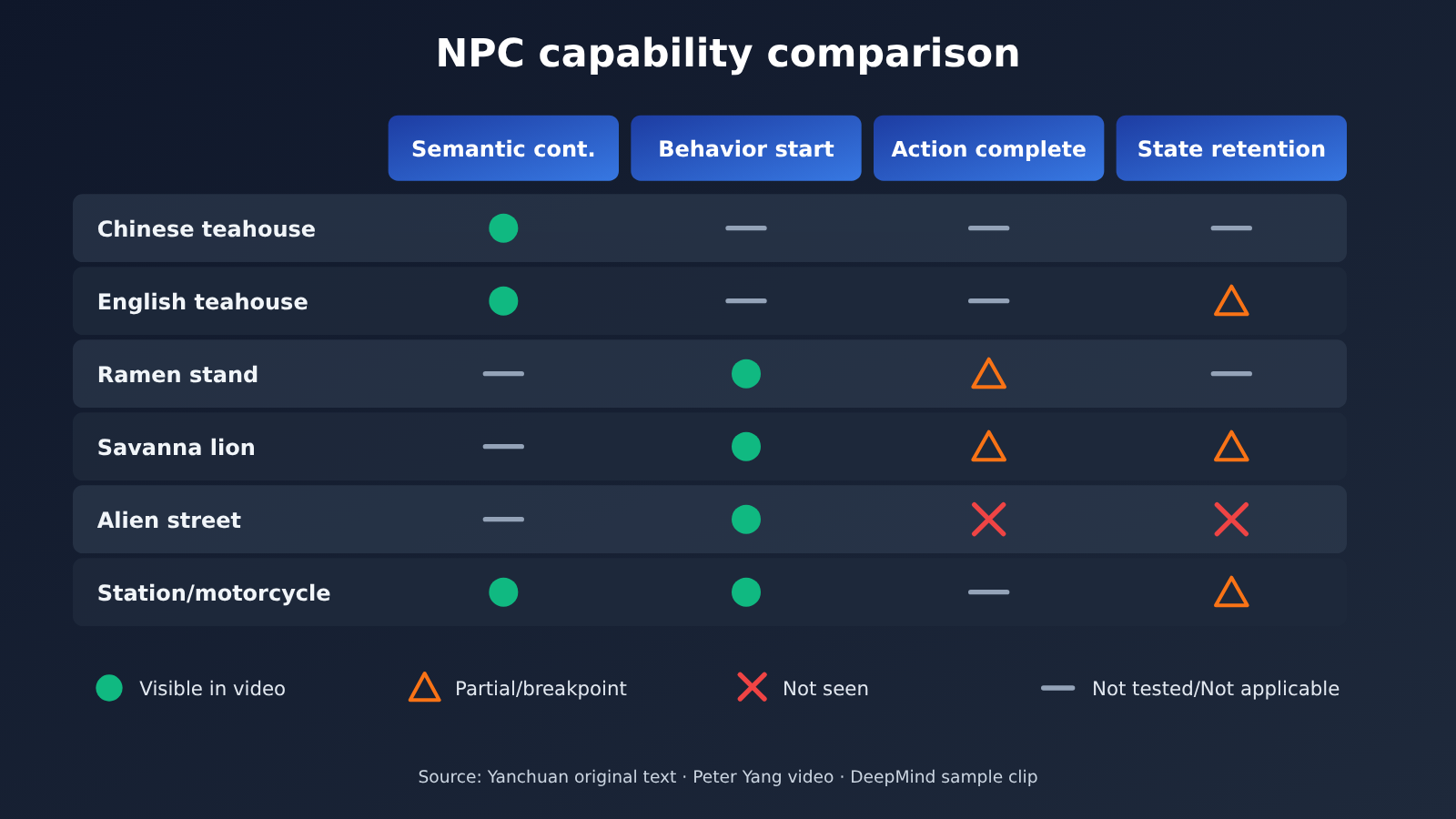
| Case | Entry point and date | Evidence level | Dialogue | Behavioral response | Environmental interaction and state |
|---|---|---|---|---|---|
| Chinese teahouse | AI Studio, 11-22 | Firsthand creator test | Two rounds of Q&A connect semantically | No action requested | First-person perspective remains stable |
| English teahouse | AI Studio, 11-22 | Firsthand creator test | Replies stay on topic (per author’s notes) | Player avatar picks up a cup on its own | Camera drifts behind the shoulder |
| Tokyo ramen stall | Early access, 10-28 | Third-party early trial | Greets proactively; polite phrases are correct | Noodle-eating motion is incomplete | Two bowls overlap |
| Grassland lion | Early access, 10-28 | Third-party early trial | N/A | Tracking starts successfully, then loses the target | Moves through the herd |
| Alien street | Early access, 10-28 | Third-party early trial | Patrol chant | No visible hit feedback | No visible change in enemy status |
| Mona Lisa | AI Studio app, 11-19 | Custom app demo | One round in which it gives its own name | Not tested | Cannot determine which component handles the voice |
| Station and motorcycle | Research preview, 10-27 | Official demo (shortened) | Two-person conversation is initiated by off-screen instructions | Station attendant and passengers act on instructions | Newly added character is not prominent at the end |
Analysis: Where Do Genie 4 NPCs’ Intelligence Boundaries Lie?
Genie 4 NPC Dialogue Capability: What’s Credible Is “Responding in the Moment”
“A character is speaking” covers at least three different situations. The ramen-stall owner’s opening greeting shows that the character can come up with scene-appropriate lines on its own, but it doesn’t correspond to any player question. The motorcycle sample shows that an off-screen instruction can “direct” the character to speak. In the teahouse case, the player gives two new inputs: the first question doesn’t specify a tea name, and the second doesn’t repeat the tea name, yet the replies still line up. Among the public materials available so far, the teahouse case provides the most direct support for “input and reply being interconnected within the same short scene segment.”
When evaluating this, it’s best to check audio, visuals, and semantics separately: whether the voice timbre fits the character falls under acoustic performance; whether lip-sync and motion look natural falls under visual performance; whether the answer content is relevant falls under semantic performance. All three can be checked independently in the source material, and strong performance in one doesn’t mean the other two meet the bar.
Genie 4 NPC Behavior: Easy to Start, Hard to Finish
A lion tracking an antelope, an inspector reminding passengers, a female passenger turning to speak — all of these show that a single text instruction can kick off a behavior that fits the scene. The problems show up in the second half of the behavior: the lion loses its target after running into the herd, and at the ramen stall the serving line is right but the bowl and hand motions don’t keep up. That tells us “saying the right line,” “putting objects in the right place,” and “hands completing the use action” are three separate things, and the model may only nail one or two of them.
This lines up with the official prompt guide’s advice to “request only one action at a time within a session.” Our read is that in the current version, splitting multi-step tasks into single-step inputs can raise the visible success rate of each step — but that still needs more testing under consistent criteria to confirm.
Genie 4 NPC Environment Interaction: Consequences and State Are the Biggest Gaps
The attack command on the alien street produced no determinable consequence, and in the English teahouse the player avatar picked up a cup on its own. Both problems point to the same gap: environmental state and action attribution aren’t stable enough. For games, “do something and it leaves a result behind” is the precondition for any rule to hold, and the public footage so far can’t support that.
Add the technical limits on top: the interface caps out at 120 seconds per session, interactions can’t be resumed, and the rolling time window gradually fades out earlier content. Google Labs also notes that replaying the same experience may produce different results. So coherence within a single performance only proves behavior inside that one stretch of footage. To show that an NPC can remember a name, an item, or a promise across sessions, you’d need separate evidence — and the public materials don’t have any yet.
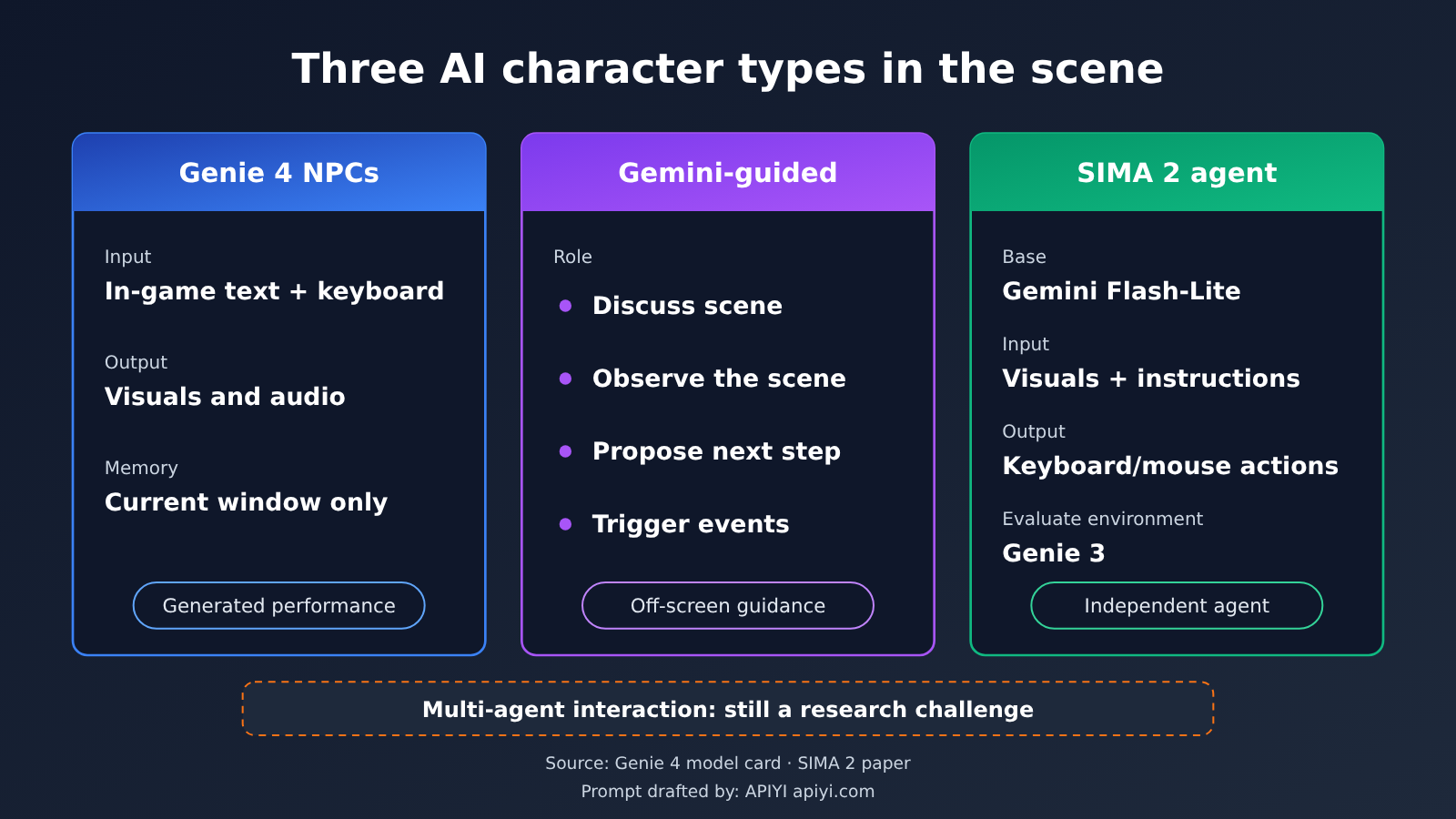
Genie 4 NPCs Aren’t Standalone Agents
The tea master on screen, the Experience Builder that handles setup and prompts, and the Gemini working behind the scenes on staging all carry different visible responsibilities. The only one that’s actually trained separately and can act autonomously inside a generated world is SIMA 2: built on Gemini Flash-Lite, it takes in visuals and instructions and outputs executable keyboard and mouse actions, and its public experiments evaluate its manipulation skills inside environments generated by Genie 3. Genie 4’s model page, meanwhile, lists “complex interactions among users, multiple independent agents, and a shared environment” as a research challenge. So at this stage, it’s more accurate to think of Genie 4’s NPCs as “generated performance driven by in-scene text.”
Practical Tips: Testing Genie 4 NPCs with Standardized Prompts and a Log Table
If you want conclusions you can reproduce, the key is controlling variables: same scene, same viewpoint, same line of dialogue, and only one condition changed. The log table below is what you fill in for each run.
| Check item | How to judge | Common failure points | Supporting method |
|---|---|---|---|
| Semantic continuity | Make the second question refer back with a pronoun — does the answer still point to the same subject? | Answering something unrelated, changing the topic | Write both rounds of questions in advance |
| Action initiation | After the instruction, does the target character start the corresponding action? | The action is performed by a different character | Give only one action at a time |
| Action completion | Are the object position and hand movements correct? | Stacking bowls, action truncated | Record the screen, then check frame by frame |
| Viewpoint and ownership | Is first person maintained, does the player avatar act on its own? | The camera slides behind the shoulder | Don’t press any keys the whole time as a control group |
| State retention | Does the following footage keep the previous step’s result? | Target lost, no hit feedback | Keep observation within 60 seconds |
| Prompt drafting | Does it meet the five requirements in the prompting guide? | Multiple speakers, multiple actions | Batch-generate with a text model, e.g. APIYI apiyi.com |
Genie 4 itself has to run inside Project Genie or AI Studio. Prep work like scene descriptions and test questions can be handed off to a general-purpose text model to draft in bulk, then pasted into Genie 4’s creation entry point. The example below uses an OpenAI-compatible interface to call a text model and generate a standardized scene description that follows the prompting guide. It only generates the prompt — it doesn’t call Genie 4.
import openai

client = openai.OpenAI(
    api_key="YOUR_API_KEY",
    base_url="https://api.apiyi.com/v1"
)

rule = ("把用户的场景改写为 Genie 4 提示词:明确第一或第三人称;"
        "画面内只保留一位说话人并描述音色;给出一句带引号的开场台词;"
        "再列出两条局内问题,第二条必须用代词承接第一条。")
resp = client.chat.completions.create(
    model="gemini-2.5-flash",  # Check the console's model list for the exact name
    messages=[{"role": "system", "content": rule},
              {"role": "user", "content": "中国老茶馆,白胡子茶师,只说中文"}]
)
print(resp.choices[0].message.content)
View the full code: batch-generate control-group prompts and output a log table
import csv
import openai

client = openai.OpenAI(
    api_key="YOUR_API_KEY",
    base_url="https://api.apiyi.com/v1"
)

RULE = (
    "You are the Genie 4 scene prompt assistant. Output JSON with the fields scene, opening_line, "
    "q1, q2. Requirements: state the point of view inside scene; keep a single speaker in frame and "
    "describe their vocal timbre; opening_line is one short line of dialogue in quotation marks; "
    "q1 and q2 are in-scene questions, and q2 must follow on from q1 using a pronoun; "
    "never ask for multiple actions inside a single question."
)

# Controlled variables: same scene, only the language or point of view changes
VARIANTS = [
    {"id": "A", "scene": "Old Chinese teahouse, a gray-robed, white-bearded tea master, a teapot and two small cups on the table, speaks only Chinese, first person"},
    {"id": "B", "scene": "Old Chinese teahouse, a gray-robed, white-bearded tea master, a teapot and two small cups on the table, speaks only English, first person"},
    {"id": "C", "scene": "Old Chinese teahouse, a gray-robed, white-bearded tea master, a teapot and two small cups on the table, speaks only Chinese, third person"},
]

CHECKS = ["Semantic continuity", "Action initiation", "Action completion", "Point of view and attribution", "State persistence"]


def draft_prompt(scene: str, model: str = "gemini-2.5-flash") -> str:
    """Call a text model to draft a Genie 4 scene prompt (without invoking Genie 4 itself)"""
    resp = client.chat.completions.create(
        model=model,
        messages=[
            {"role": "system", "content": RULE},
            {"role": "user", "content": scene},
        ],
        response_format={"type": "json_object"},
    )
    return resp.choices[0].message.content


def main():
    with open("genie4_npc_test.csv", "w", newline="", encoding="utf-8") as f:
        writer = csv.writer(f)
        writer.writerow(["Group", "Prompt JSON"] + CHECKS + ["Notes"])
        for v in VARIANTS:
            try:
                prompt_json = draft_prompt(v["scene"])
            except Exception as e:
                prompt_json = f"Error: {e}"
            # Leave the checklist items blank and fill them in by hand after testing in Project Genie / AI Studio
            writer.writerow([v["id"], prompt_json] + [""] * len(CHECKS) + [""])
    print("genie4_npc_test.csv has been generated — fill in each item after live testing")


if __name__ == "__main__":
    main()
🚀 Quick-start tip: Drafting prompts and organizing test records are general-purpose text tasks. With APIYI apiyi.com, you can switch between Gemini, Claude, GPT, and other models using a single API key, then compare which phrasing better matches the Genie 4 prompt guidelines. New users get free trial credits, which makes it easy to validate on a small scale first.
Genie 4 NPC Testing FAQ
Q1: Can Genie 4 NPCs remember what I said in my last session?
There’s no evidence for that right now. The developer docs state that completed interactions can’t be resumed, and Google Labs also notes that replaying the same experience can produce different results. The teahouse case only shows that two rounds of Q&A can connect within a single short recording.
Q2: Can I talk to the NPC out loud instead of typing?
The Genie 4 interface doesn’t accept a real-time microphone stream. Some custom experiences in Project Genie may request microphone permission, and the Museum of Art app also demonstrated a voice flow, but the author notes that the app also used Gemini Live. In this article’s cases, the verifiable player input method is still in-game text.
Q3: Why does the NPC get the dialogue right but the action wrong?
Dialogue, object positions, and hand movements are independent generation results. In the ramen stall case, the pleasantries were right, but the bowls ended up stacked on top of each other. Try asking for just one action at a time and check the results frame by frame.
Q4: Can Genie 4 NPCs be used in a production game?
The interface caps a single run at 120 seconds, visual stability may degrade after 60 to 90 seconds, and environment state and attack consequences are also unreliable. At this stage it’s better suited to prototype walkthroughs, narrative shorts, and interaction concept validation.
Q5: Can APIYI call Genie 4 directly?
This article hasn’t verified APIYI access to Genie 4, so check the platform’s announcements. The current entry points for Genie 4 are Project Genie, AI Studio, and the Gemini Interactions API. Text work around testing — drafting prompts, organizing results — can be done through APIYI’s OpenAI-compatible endpoint at apiyi.com.
Q6: How do you tell whether a demo actually shows an NPC is “intelligent”?
First, establish the evidence level: is it an officially shortened demo, an early-access trial, or a creator’s first-hand test? Then check four things separately — semantic continuity, behavior initiation, action completion, and state persistence. Don’t assume the other three are equally solid just because one of them looks good.
Think of today’s Genie 4 NPCs as improv actors who are great at picking up the scene on the spot, but whose props and memory can’t keep up. Shooting a one-on-one conversation or previewing the atmosphere of a scene already shows clear value; gameplay that needs causality, consequences, and long-term state will have to wait for later versions to provide new evidence. If you’re planning to run your own controlled comparison, you can start by drafting a batch of standardized scene prompts through APIYI at apiyi.com, then record each session one by one in Project Genie or AI Studio.
References
- Genie 4 Research Preview: DeepMind’s official announcement, with station and motorcycle sample clips
- Link:
deepmind.google/blog/genie-4-a-new-generation-of-world-simulation/
- Link:
- Project Genie availability announcement: Ultra subscriber access and Pro waitlist details
- Link:
blog.google/innovation-and-ai/models-and-research/google-deepmind/genie-4-now-available-project-genie/
- Link:
- Gemini API developer entry announcement: AI Studio and the Gemini Interactions API
- Link:
blog.google/innovation-and-ai/technology/developers-tools/genie-4-in-gemini-api/
- Link:
- Genie 4 model card and prompt guide: inputs and outputs, plus character prompt recommendations
- Link:
deepmind.google/models/model-cards/genie-4/,deepmind.google/models/genie/prompt-guide/
- Link:
- Developer documentation limitations: maximum duration, continuation, and input boundaries
- Link:
aistudio.google.com/docs/genie
- Link:
- Project Genie product help: how to operate it, microphone permissions, and differences when replaying
- Link:
support.google.com/labs/answer/16875695
- Link:
- Yanchuan Teahouse hands-on test: first-hand notes from two sessions, one in Chinese and one in English
- Link:
x.com/yanchuanlab/article/2124414024985325858
- Link:
- Peter Yang’s early gameplay video: ramen stall, grassland, alien street
- Link:
youtube.com/watch?v=kxCrhwHvA_4
- Link:
- Jason Stephen Museum of Art demo
- Link:
x.com/jastephx/status/2123481417279816159
- Link:
- SIMA 2 technical paper: the embodied agent foundation and evaluation environments
- Link:
arxiv.org/html/2512.04797v1
- Link:
Author: APIYI Technical Team
Technical discussion: You’re welcome to visit the APIYI homepage at apiyi.com to get in touch with us; more API documentation is available in the docs.apiyi.com documentation center.


