

Author’s note: People have been talking about Gemini 4 Oxygen lately. This article judges whether Gemini 4 can be invoked using only two catalogs: Google AI Studio’s public model list and the model IDs already available on APIYI. It lists three names you can put in the model field, along with their respective prices, groups, and request paths.
There’s been a lot of talk about Gemini 4 Oxygen recently, and plenty of developers want to know whether they can put that name straight into the API today. The test is simple: an ID is only usable if it appears in Google’s public model list and also in APIYI’s model master list. By that standard, there are three Gemini 4 models you can call today: gemini-4-carbon, gemini-4-argon, and gemini-4-hydrogen.
This isn’t another rumor roundup. We don’t debate whether Oxygen exists; we only check the two catalogs. As of 2026-11-16, Google AI Studio’s Gemini 4 model list has only three cards. APIYI’s master list, checked at 09:39 (UTC+8) the same day, also has only these three IDs.
The key takeaway: By the end of this article, you’ll know what role each of the three Gemini 4 IDs plays, what it costs, whether it has a half-price group, which path requests take, and how to pick one directly based on your task type.
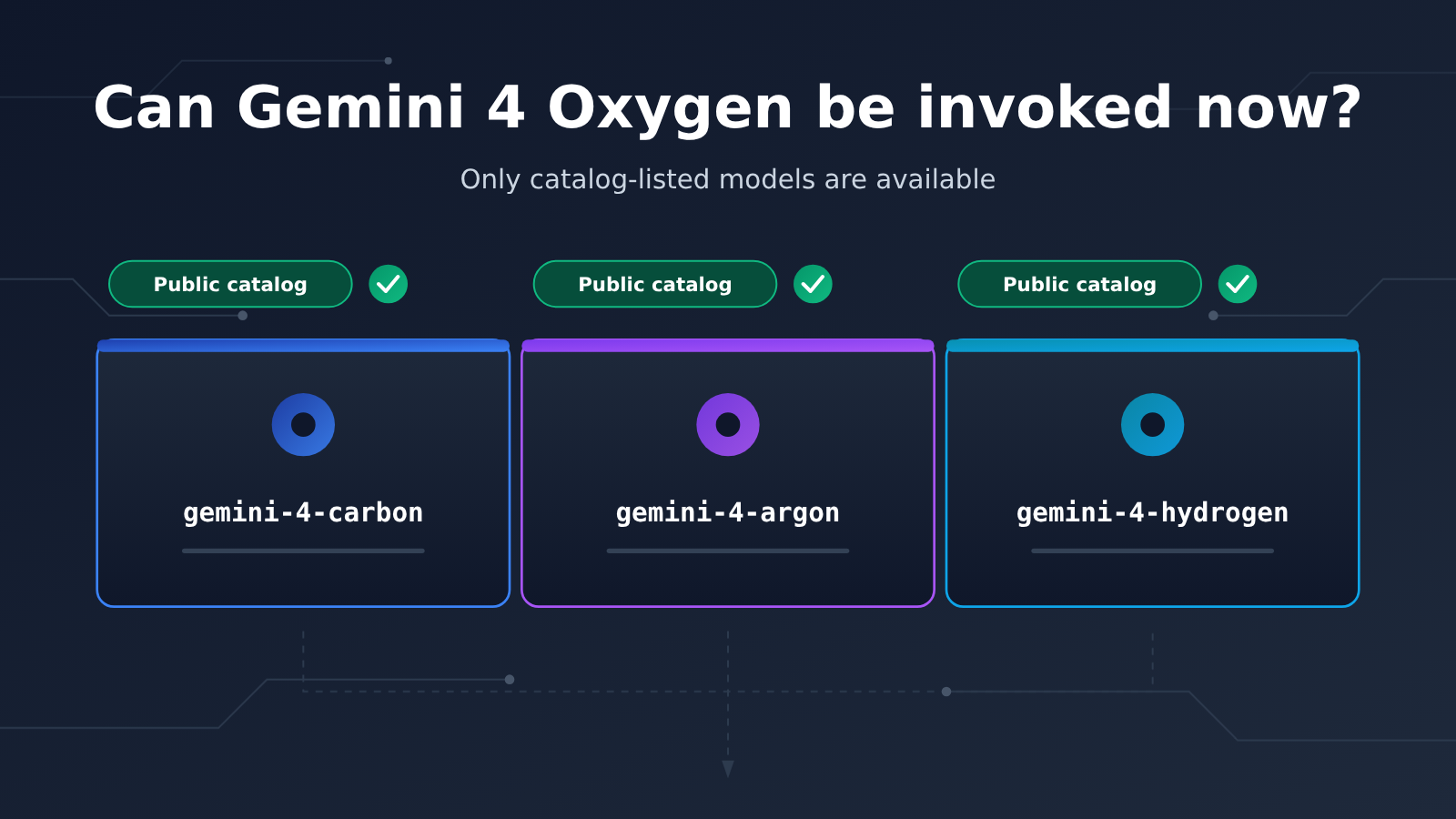
Gemini 4 Key Info at a Glance
Let’s start with the bottom line. The table below sums up the key facts about Gemini 4’s current availability. Everything here comes from Google’s official pages and APIYI’s documentation, with data as of 2026-11-16.
| Item | Details |
|---|---|
| Publisher | Google (Gemini model series) |
| Gemini 4 in Google’s public list | gemini-4-carbon, gemini-4-argon, gemini-4-hydrogen — 3 in total |
| Official blog timeline | Argon available to everyone 2026-10-13; Carbon available 2026-11-10; Hydrogen released 2026-11-12 |
| Gemini 4 in APIYI’s master list | The same 3 IDs |
| Names not to put into the model field | gemini-4-oxygen: not in Google’s list or APIYI’s master list |
| Data date | 2026-11-16 09:39 (UTC+8) |
Why Gemini 4 Only Goes by the Catalog
An API call only recognizes strings. If the name in the model field isn’t in the platform’s model list, the request won’t quietly fall back to a similar model — it’ll just throw an error. So to figure out whether Gemini 4 is usable, check whether the ID exists in the catalog. Social media buzz doesn’t count.
As for Oxygen: the third-party site OmniaKey said on 2026-11-16 that none of the Google pages it checked confirmed Oxygen. Keep in mind this is a third-party claim, not a Google announcement. This article won’t list parameters, pricing, or context for Oxygen — just one reminder: it shouldn’t be showing up in your model field right now.
The Official Positioning of Gemini 4’s Three IDs
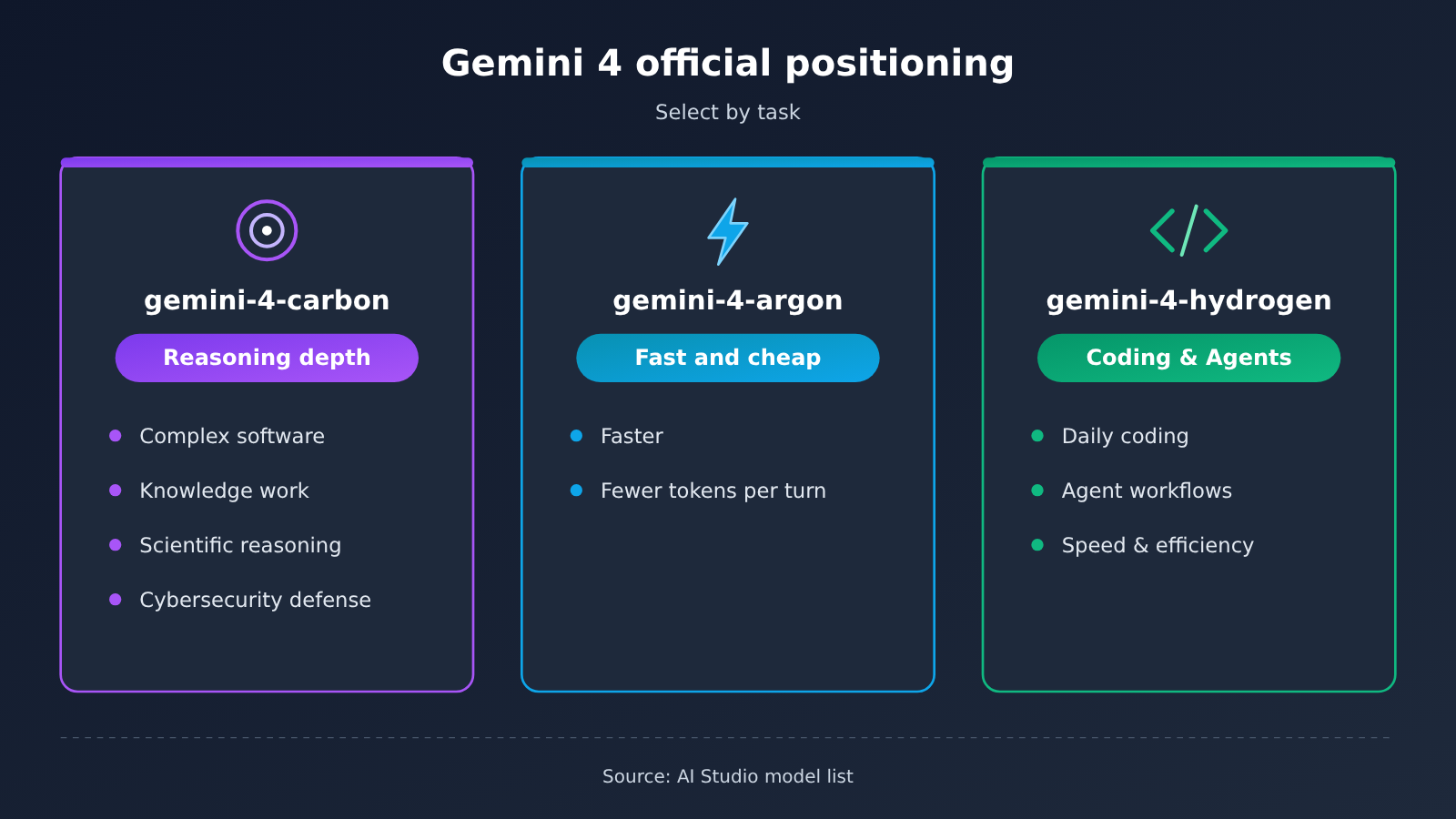
Google AI Studio’s model list gives each of the three cards a one-line positioning statement. The table below reflects the original intent; these are official descriptions, not benchmark conclusions.
| Model ID | Official positioning (Google model list) | Context window | Max output (Google model card) |
|---|---|---|---|
| gemini-4-carbon | Strongest reasoning, aimed at complex software, knowledge work, scientific reasoning, and cybersecurity defense | 1M | 64K / 1M |
| gemini-4-argon | Faster than Carbon, uses fewer tokens per turn | 1M | 64K / 1M |
| gemini-4-hydrogen | Everyday coding and agents, with an emphasis on speed and efficiency | 1M | Long output up to 1M |
The official blog’s descriptions of all three match the list. The Hydrogen launch post (2026-11-12) says it’s aimed at agent workflows and covers users across tiers. Carbon’s availability announcement went out on 2026-11-10. Argon’s post for everyone went out on 2026-10-13. These are the company’s own statements about product positioning, not a ranking of performance on specific tasks.
The three aren’t a simple strongest-to-weakest lineup. Carbon focuses on depth of reasoning; Argon focuses on being faster and using fewer tokens per turn; Hydrogen focuses on speed and efficiency for everyday coding and agent scenarios. Choose based on what your task needs, not on who’s “the strongest.”
Gemini 4 Pricing and Groups on APIYI
The table below shows APIYI’s pricing and groups, in USD per 1M tokens. Carbon and Argon come from their respective model pages, while Hydrogen comes from the 2026-11-16 master table, since its model page is currently a 404.
| Model ID | Input | Output | Cache read | Group | Data source |
|---|---|---|---|---|---|
| gemini-4-carbon | $2 | $10 | $0.1 | Default, SVIP | Model page |
| gemini-4-argon | $2 | $10 | $0.1 | Model page: Default, SVIP, Gemini_Reverse 0.5×; master table: Default, SVIP | Model page + master table |
| gemini-4-hydrogen | $1.5 | $7.5 | $0.075 | Default, SVIP | Master table (model page 404) |
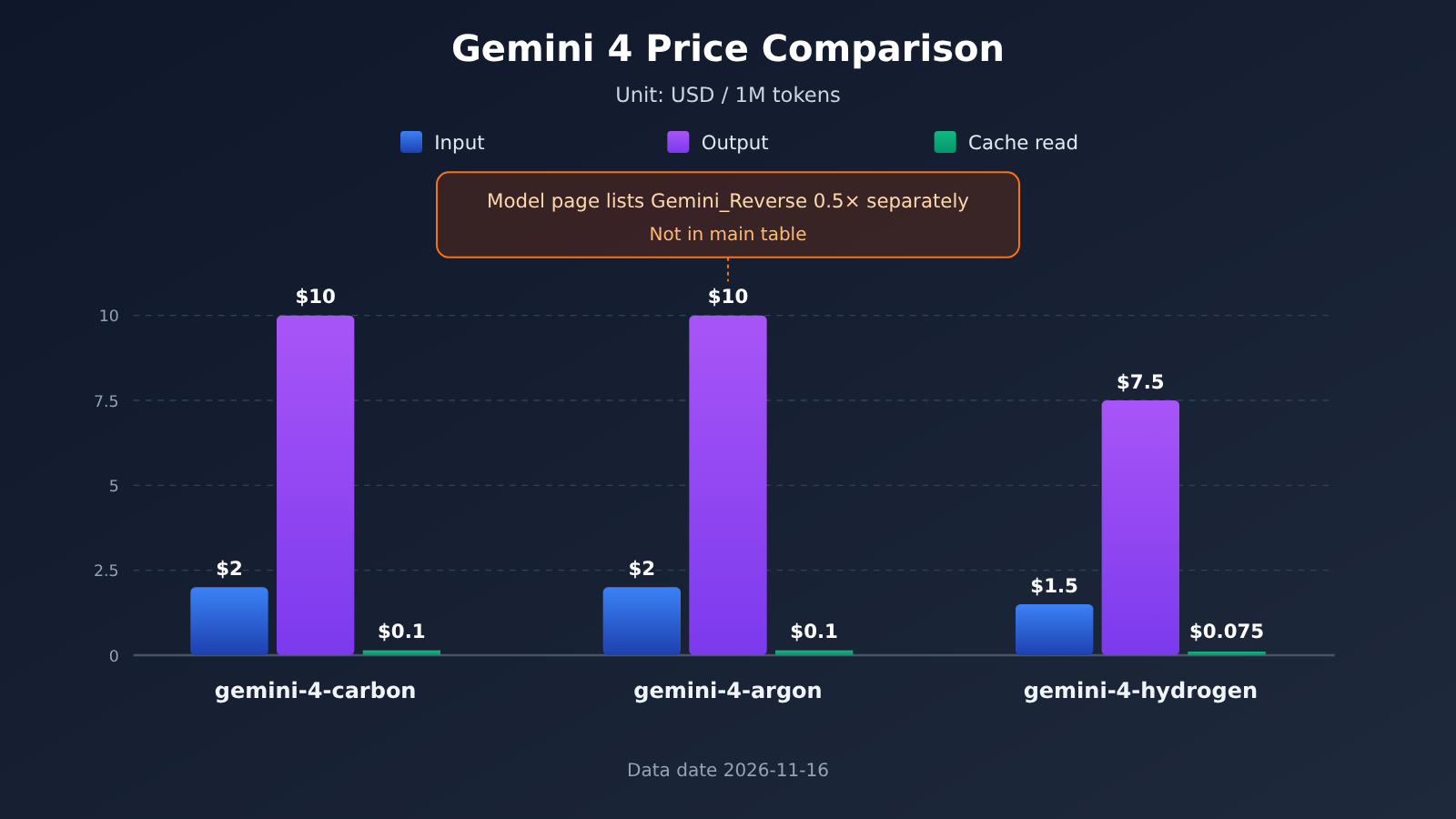
📊 Data note: The chart above and the pricing table are compiled from APIYI apiyi.com’s model pages and master table as of 2026-11-16. Actual billing is based on what’s shown in the console.
gemini-4-oxygen isn’t available yet, but we’ll list this model as soon as possible; model names and pricing are subject to the platform’s model list.
Gemini 4 Carbon vs Argon: same price, different positioning and groupings
Carbon and Argon are listed at exactly the same price on APIYI: $2 input, $10 output, $0.1 cached read. The real differences come down to two things: first, official positioning — Carbon leans toward reasoning depth, while Argon leans toward speed and fewer tokens per turn; second, groupings — only the Argon model page lists an extra row for Gemini_Reverse 0.5×.
That row is worth a closer look. In the 2026-11-16 master table, Argon’s grouping column shows only Default and SVIP, with no Gemini_Reverse. The model page and the master table disagree, so this article reports both as they are. Whether your token can actually use that grouping depends on which groupings are selectable for your token in the console. Separately, Carbon and Hydrogen only have Default and SVIP, so the 0.5× grouping doesn’t apply to them.
Gemini 4 Hydrogen: priced in the master table, 404 on the model page
Hydrogen has the lowest list price of the three: $1.5 input, $7.5 output, $0.075 cached read, and again only Default and SVIP groupings. Its individual model page currently returns a 404, so there are no documented numbers from APIYI for context window or max output — this article won’t speculate. Google’s model card lists 1M context with long output up to 1M, for what it’s worth.
Gemini 4 Max Output: Both Numbers Preserved
Google and APIYI describe the same parameter slightly differently. Putting them side by side helps avoid misreading.
| Item | Google AI Studio model card | APIYI model page |
|---|---|---|
| Carbon context / max output | 1M / 64K / 1M | 1,048,576 / 65,536 |
| Argon context / max output | 1M / 64K / 1M | 1,048,576 / 65,536 |
| Hydrogen context / max output | 1M / long output up to 1M | Model page 404, no numbers available |
| Carbon dates | Blog availability announcement 2026-11-10 | Vendor release date 2026-11-10, launch 2026-11-11 |
| Argon dates | Blog general availability 2026-10-13 | Vendor release date 2026-09-30, launch 2026-10-14 |
65,536 is the exact form of 64K, while “64K / 1M” is the original wording on Google’s card; both are retained. Argon’s two dates use different definitions: one is the time the blog announced general availability, and the other is the vendor release date recorded on the APIYI model page. Both dates can be valid at the same time. The Carbon model page also states that it outputs text only, with a knowledge cutoff of 2026-03. The page also includes a long-form test, which is part of the original document content, not a result tested by the author of this article.
Gemini 4 Quick Start: How to Choose Among the Three IDs
You can choose based on task type—there’s no need to first figure out which one is “the strongest”:
- High-volume everyday tasks: use
gemini-4-hydrogen. It’s officially positioned for everyday coding and agent work, with an emphasis on speed and efficiency, and it has the lowest per-unit price of the three on APIYI. - When you need stronger reasoning: use
gemini-4-carbon. Complex software, knowledge work, scientific reasoning, and cyber defense are exactly the scenarios it’s officially positioned for. - If you want to use Argon’s half-price group: first check the console to see whether Gemini_Reverse actually appears in the token’s group options. If it doesn’t, billing falls under Default or SVIP, and the listed price is the same as Carbon.
Gemini 4 request paths
When integrating, set base_url to https://api.apiyi.com/v1, then pick one of two paths:
- OpenAI-compatible path:
/v1/chat/completions. Putgemini-4-hydrogen,gemini-4-carbon, orgemini-4-argonin the model field of the request body. The messages format is the same as calling any other OpenAI-compatible model. - Gemini native path:
/v1beta/models/{model}:generateContent. Replace{model}with one of the three IDs above, and structure the request body in Gemini’s native format.
Carbon’s model page explicitly lists two endpoints, chat and gemini—there’s no responses endpoint. So don’t use the Responses API when calling Carbon. For Argon and Hydrogen endpoint support, check the model page and what the console shows.
| Model ID | Recommended tasks | Group note | Request path |
|---|---|---|---|
| gemini-4-hydrogen | Everyday coding, agent work, batch tasks | Default, SVIP | chat/completions or generateContent; check the console |
| gemini-4-carbon | Complex reasoning, knowledge work | Default, SVIP | chat/completions or generateContent; no responses |
| gemini-4-argon | Need faster responses and fewer tokens per turn | First check whether the token has Gemini_Reverse 0.5× | chat/completions or generateContent; check the model page |
Getting started: register at APIYI apiyi.com and create a token, confirm the group in the token settings, then fill in base_url and model and send a short request to verify connectivity. If you’re migrating from another model, you usually only need to change the model field.
🚀 Official recommendation: Start with the free trial credit for new users, run Hydrogen and Carbon on APIYI apiyi.com with the same prompt, compare output length and billing details, and then decide on your main model. A single API key lets you switch between the three Gemini 4 IDs.
Impact of Gemini 4’s Availability Status
Impact on developers
- Follow the catalog for configuration: In production configs, copy model names from the platform’s model list, not from news articles or social posts. A wrong name will throw an error; it won’t be automatically replaced with a similar model.
- Cost estimates have one more variable: Carbon and Argon are the same price, while Hydrogen has a lower unit price. Argon’s 0.5× group appears only on its model page and isn’t listed in the master table, so base your estimates on the groups actually available to your token.
- Set max output according to the platform’s numbers: When calling Carbon or Argon on APIYI, set the
max_tokenslimit based on the 65,536 shown on the model page — don’t just assume 1M.
Impact on model selection
Gemini 4’s three IDs currently have fairly clear roles: one for reasoning depth, one for speed and token efficiency, and one for everyday agents and efficiency. All three have 1M context (according to Google’s model card), so the key to choosing is task type and unit price — context length isn’t the differentiator. For most teams, a common approach is to use Hydrogen for high-volume everyday requests and hand deep reasoning tasks to Carbon.
FAQ
Q1: Which Gemini 4 models are available for invocation right now?
As of 2026-11-16, both Google AI Studio’s public list and APIYI’s master table show three: gemini-4-carbon, gemini-4-argon, and gemini-4-hydrogen. Names outside the catalog shouldn’t be written into the model field.
Q2: Can gemini-4-oxygen be used in the API?
No. Neither Google’s model list nor APIYI’s master table has this ID. Third-party OmniaKey also said that the Google pages it checked did not confirm Oxygen, but that’s not a Google announcement.
Q3: Gemini 4 Carbon and Argon are the same price — which should I choose?
Both list input at $2, output at $10, and cache reads at $0.1. Choose Carbon when you need reasoning depth; choose Argon when speed and token usage per turn matter more. If you want to use the Gemini_Reverse 0.5× group listed on Argon’s model page, first check the APIYI console at apiyi.com to confirm whether your token has that option.
Q4: What is Gemini 4 Hydrogen’s context length on APIYI?
Hydrogen’s model page is currently 404, and APIYI doesn’t yet have documented numbers for context or max output. Google’s model card says 1M context and long output up to 1M. For billing, refer to the master table: input $1.5, output $7.5, cache reads $0.075. For updates, keep an eye on APIYI’s model list at apiyi.com.
Q5: Can Gemini 4 Carbon use the Responses API?
No. Carbon’s model page lists only two endpoints: chat and gemini. Use `/v1/chat/completions` or `/v1beta/models/{model}:generateContent`.
Q6: Can the 0.5× group be used with Gemini 4 Carbon or Hydrogen?
No. The Gemini_Reverse 0.5× group appears only on Argon’s model page. Carbon and Hydrogen only have the Default and SVIP groups.
Gemini 4 Key Takeaways
- Only three names are on the available list: carbon, argon, and hydrogen — it only counts as available if it’s in the catalog
- Don’t enter Oxygen: neither the Google list nor the APIYI master list has this ID
- Carbon and Argon cost the same: $2 / $10 / $0.1 — the difference is in their official positioning and groups
- 0.5× only appears on the Argon model page: it isn’t listed in the group column of the master list, so go by the console token
- Hydrogen has the lowest unit price: $1.5 / $7.5 / $0.075; its model page currently returns a 404
- Max output depends on the platform: Google’s card says 64K / 1M, while the APIYI model page says 65,536
- How to get started: create a token on APIYI apiyi.com and set base_url to
https://api.apiyi.com/v1
Summary
Here are the key points about Gemini 4’s current status:
- Go by the catalog: Today, the three IDs you can call are gemini-4-carbon, gemini-4-argon, and gemini-4-hydrogen. gemini-4-oxygen isn’t in any catalog.
- Choose by task: Use Hydrogen for high-volume everyday tasks, Carbon when you need stronger reasoning, and Argon for scenarios where speed and token consumption per turn matter more.
- Verify groups against your token: Argon’s Gemini_Reverse 0.5× only appears on the model page, so check the console before you start estimating costs.
I’d suggest running each of the three IDs with a small amount of traffic first, then putting your main model into your production config. You can compare them through APIYI apiyi.com with a single API key; new users can start with free test credits to validate.
📚 References
-
Google AI Studio model list: the official positioning, context window, and max output for the three Gemini 4 model cards
- Link:
aistudio.google.com/docs/models - Note: the primary source for figuring out which IDs have been made public
- Link:
-
Google Blog · Gemini 4 Hydrogen / Carbon / Argon release and availability announcements: the positioning descriptions from all three official posts
- Link:
blog.google/innovation-and-ai/models-and-research/gemini-models/ - Note: Hydrogen 2026-11-12, Carbon 2026-11-10, Argon 2026-10-13
- Link:
-
APIYI model master table and individual model pages: pricing, groups, endpoints, and dates
- Link:
docs.apiyi.com/models.md(individual model pages live in the same directory:/models/gemini-4-carbon.md,/models/gemini-4-argon.md) - Note: data date 2026-11-16 09:39 (UTC+8); the Hydrogen model page is currently a 404
- Link:
Author: APIYI Technical Team
Technical discussion: Feel free to reach us through the APIYI website homepage. For more models and integration guides, check out the docs.apiyi.com documentation center.


