

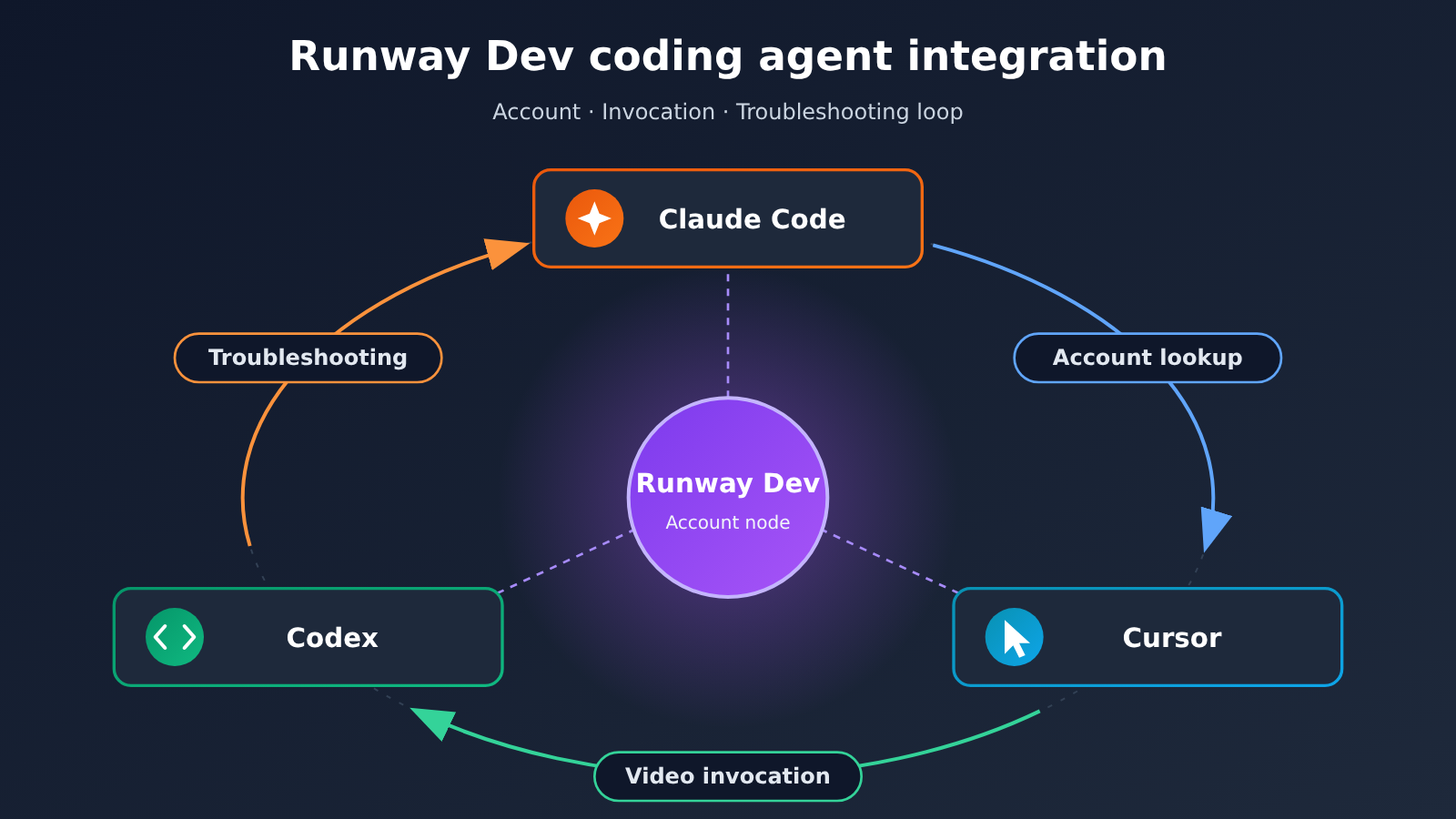
The core of Runway’s integration with Codex, Claude Code, and Cursor is letting coding agents, within the same session, know account status, write video invocation code, and check why something failed. Runway officially released the Runway Dev developer plugin on 2026-11-02. The plugin bundles the Runway Dev MCP account connection with API development skills, so agents can read projects, available models, pricing and limits, and credits balance. They can also view error details when a task fails, along with the Model Router’s model-selection rationale. According to the official description, account queries, video invocation, and troubleshooting now form a closed loop. Our take: it improves the efficiency and visibility of “developer integration,” not the aesthetic quality of the videos themselves. Those are two separate things.
Here’s what you’ll learn:
- Which three coding agents the Runway Dev plugin supports, and the exact release and documentation update dates;
- What account information agents can read through the plugin, and which developer capabilities they can invoke;
- The first-time setup flow, and how the plugin handles API keys;
- How account queries, video invocation, and troubleshooting connect, and what practical value they bring to batch video pipelines;
- What this update can’t do, and which follow-up developments are worth watching.
Index: Part 1, “To Know,” explains terms such as MCP, Model Router, and Recipes; Part 2, “Impact at a Glance,” summarizes what this update means for different audiences; the “Objective Facts” section organizes, in order, release information, account query capabilities, video invocation capabilities, troubleshooting capabilities, the setup flow, and official use cases; the “Analysis and Judgment” section discusses how the three pieces connect, their value for pipelines, and the limits to watch out for. To be clear, this article is a feature report based on official materials; we did not actually install the plugin, invoke models, or measure video quality.
What to Know: Concepts Behind Runway’s Coding Agent Integration
The table below covers only the concepts you need to understand this story that aren’t common knowledge.
| Concept | Brief explanation |
|---|---|
| Coding agent (Coding Agent) | An AI programming assistant that can read and write project code and perform operations. In this article, it refers to Codex, Claude Code, and Cursor |
| MCP | Model Context Protocol, a protocol that lets AI agents connect to external tools and data sources. The plugin uses it to connect agents to a Runway Dev account |
| Runway Dev | Runway’s developer platform and account system, which hosts projects, model access, billing, and more |
| Developer skills (Skills) | Packaged development knowledge for agents. Here, it refers to integration methods based on Runway’s official SDK, used to guide agents in writing invocation code |
| credits | The billing unit used in a Runway account; agents can check the balance |
| Model Router | Runway’s model routing capability, which automatically selects models based on conditions. The plugin can show why it chose a model |
| Character (real-time character) | A real-time character capability provided by Runway; agents can help create it |
| Recipes | Prebuilt processing pipelines offered by Runway that you can reuse directly |
| Workflows | Workflows built by teams that can be published as API endpoints for code to call directly |
Quick Impact Overview: Runway’s Integration with Codex, Claude Code, and Cursor
Different groups get very different things out of this update. Below, we list only the parts we have evidence for.
| Audience | Main impact |
|---|---|
| App developers integrating video capabilities | Before writing code, the agent can first check the models, pricing, and limits available to the project, reducing switching between docs, the console, and the editor |
| Engineering teams running batch video pipelines | When a task fails, they can view error details and model-selection reasons in the agent session, shortening the debugging path |
| Teams that already have Workflows set up | Workflows published as API endpoints can be wired directly into code by the agent, making internal reuse smoother |
| Managers concerned about account security | First use requires logging in to a Runway Dev account; the official docs say the plugin doesn’t store API keys |
| Content creators hoping for “one-click great videos” | Limited impact. The plugin improves the development integration workflow; it doesn’t directly determine the aesthetic quality of videos |
The Facts: What Runway Released for Codex, Claude Code, and Cursor
This section is based on Runway’s official press release and developer integration guide, verified on 2026-11-17.
Release Date and Coverage of the 3 Coding Agents
Runway officially announced the news on 2026-11-02 under the headline “Runway Dev is in Claude Code, Codex and Cursor,” announcing that its dev plugin supports these 3 coding agents. Official press release URL: runway.com/news/developers/runway-dev-plugins-for-coding-agents.
The accompanying official integration guide, “Build with your coding agent,” was first published on 2026-09-17 and updated on 2026-11-02, the day the plugin launched. URL: dev.runway.com/learn/build-with-your-coding-agent. Looking at the timeline, the guide for building Runway apps through coding agents already existed about a month and a half before the plugin — this release simply packaged those capabilities into an installable plugin.
The Runway plugin’s account query capabilities
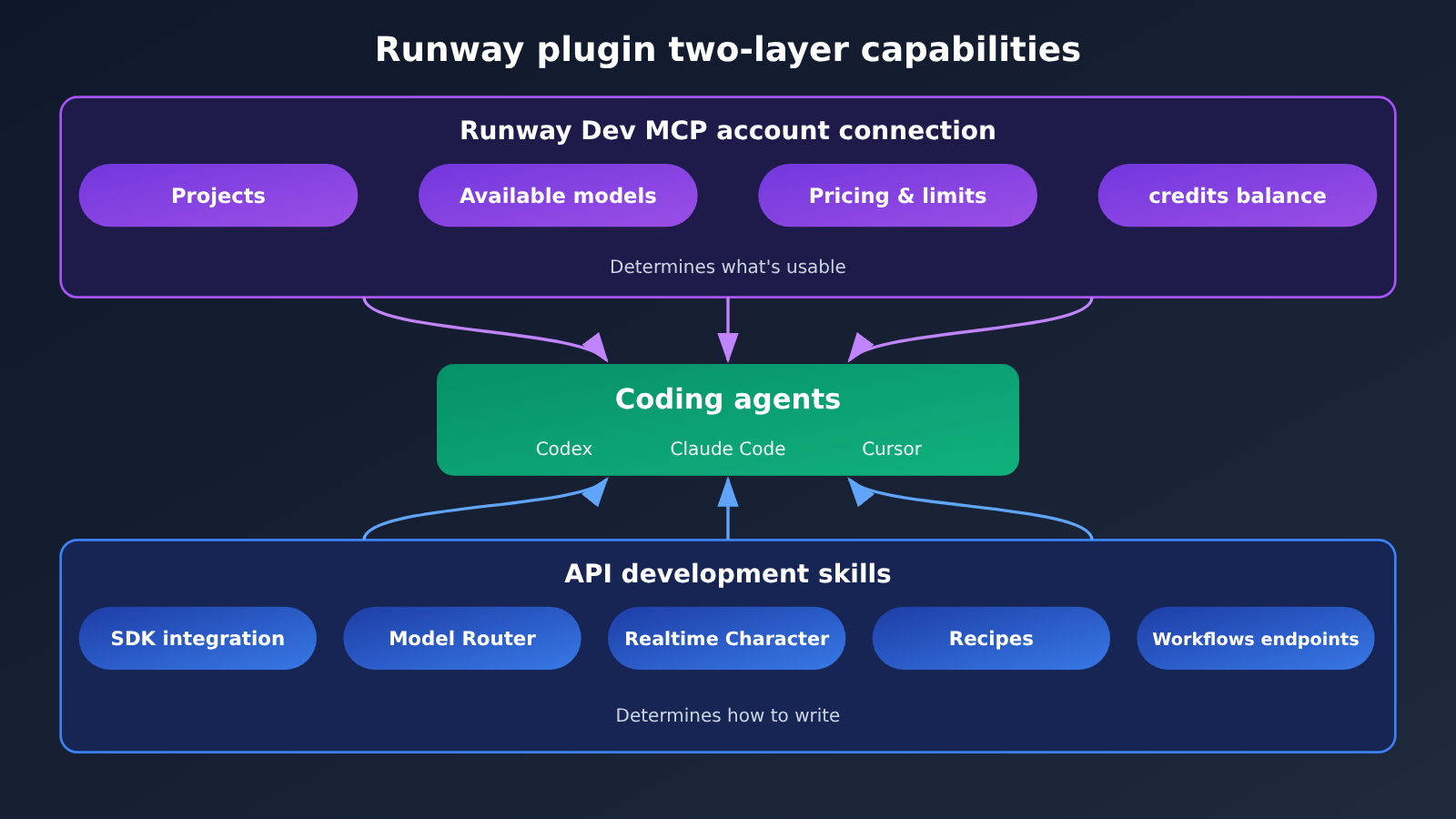
The plugin is installed as a combination of two parts: a Runway Dev MCP account connection and an API development skill. The account connection side gives the agent “account awareness” — here’s exactly what it can read.
| Information it can read | Description |
|---|---|
| Projects | The list of projects under the account |
| Project’s available models | Which models a given project can invoke |
| Model pricing and limits | The billing rules and usage limits for each model |
| credits balance | The remaining balance on the current account |
What this means is that before writing any invocation code, the agent can already confirm “which models this project can use, how much they’ll cost, and how much balance is left” — no need for the developer to manually check the console and then relay that back to the agent.
The Runway plugin’s video invocation and building capabilities
The development skill side determines how the agent writes. According to the official description, the agent builds integrations following the official SDK skill rather than guessing at the interface from general knowledge. The things it can build include:
- Model Router: create routers that select models based on conditions;
- Realtime Character: create realtime characters;
- Recipes: leverage the official prebuilt pipelines;
- Workflows: connect workflows that a team has published as API endpoints.
Workflows deserve a special mention. When someone on the team has built a workflow and published it as an API endpoint, the agent can wire it straight into the application code. That way, the person designing the workflow and the person developing the application can be two different people.
Runway Plugin Failure Troubleshooting
When a task fails, the plugin lets the agent view two kinds of information: error details and why Model Router chose the model it did.
The second is especially important in routing scenarios. With Model Router, which model ultimately executes a request—and why it was selected—is often the first question when troubleshooting unexpected results. By exposing model-selection reasons to the agent, the official setup means that when you debug, you don’t just see “what error was reported”; you also see “what routing decision was made.”
Runway Coding Agent Integration Flow and API Key Boundaries
The official integration guide describes a process that breaks down into three steps:
- Connect an account in the editor: On first use, users need to sign in to a Runway Dev account.
- Set credentials for a specific project: Configure the credentials required for API calls for a particular project.
- Describe what you want to build: Tell the agent in natural language what to implement.
The docs explicitly state that the plugin does not store API keys. The account connection lets the agent know the account status, while the credentials used for actual calls at runtime are configured separately for each project. The guide treats “account connection in the editor” and “API credentials in the project” as two distinct steps, which maps directly to this design.
Three Use Cases Runway Officially Lists
The examples the company gives include:
- Catalog product videos: generating videos in bulk for a product catalog;
- An upscale button inside internal tools: adding a video upscaling entry point to an internal system;
- Asset localization workflows: building a pipeline around localizing assets.
All three share one thing in common: they’re engineering tasks that “embed video capabilities into an existing system,” not one-off creative work.
Analysis: How Account Queries, Video Invocation, and Troubleshooting Fit Together Once Runway Brings In a Coding Agent
What follows is our own reading and assessment, built on the official facts above. We haven’t installed or tested anything ourselves — anything about results or trends is inference.
The Key to Tying It All Together: Giving Runway’s Coding Agent a Closed-Loop Context
In the past, integrating video APIs with AI coding assistants typically ran into three breakpoints: the agent doesn’t know which models are available in the account; when it writes invocation code, it relies on general knowledge that may be outdated; and when a task fails, the error message sits in the console while the code sits in the editor, so the agent can’t see the full picture.
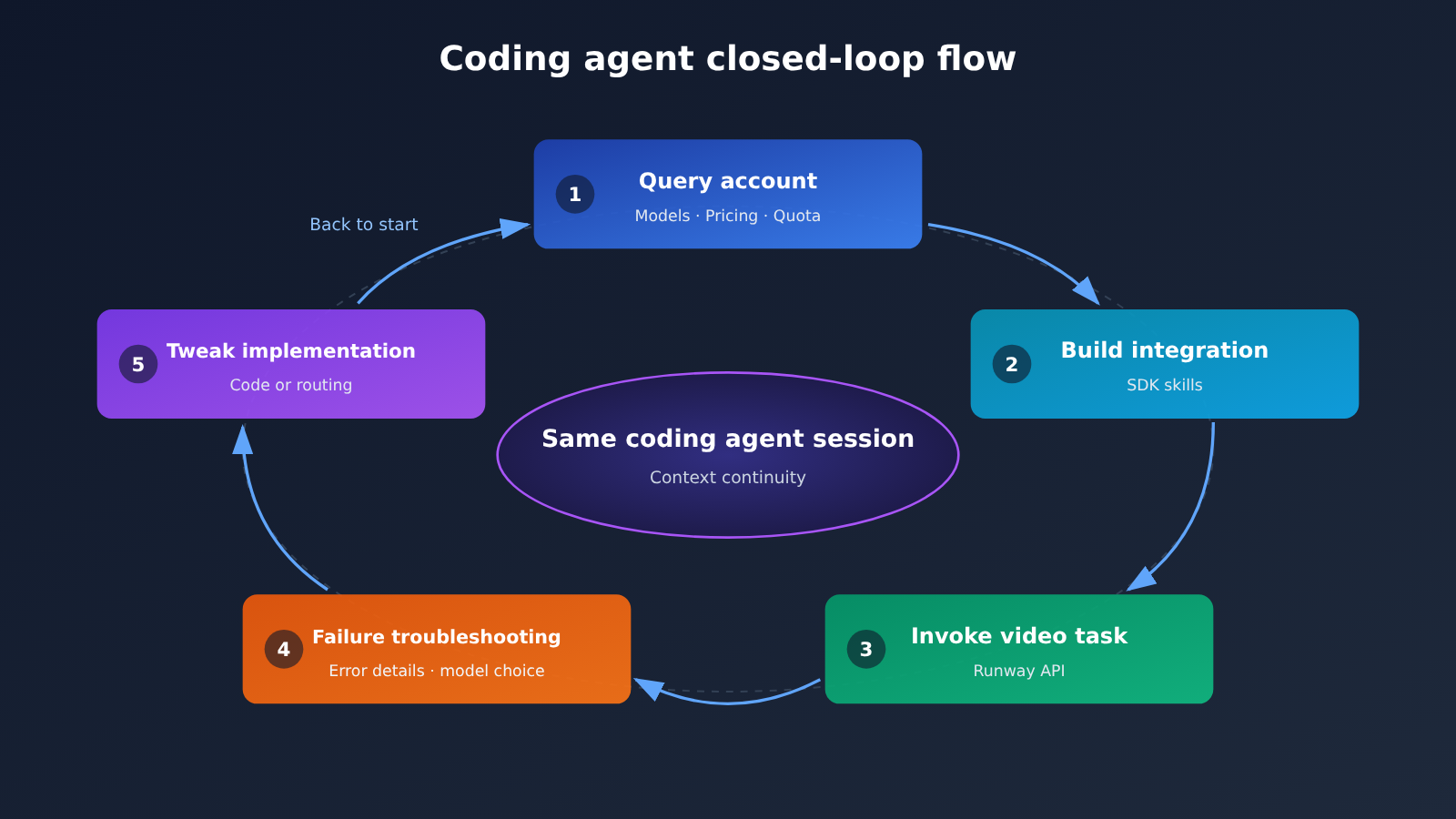
This plugin combination maps neatly onto those three breakpoints. Account queries answer “what can I use, and how much will it cost,” the SDK skill answers “how do I write this correctly,” and error details plus model-selection reasons answer “why did it fail.” Put all three in the same session, and the agent can form a loop of query → build → invoke → troubleshoot → adjust. We think that’s more meaningful than strengthening any one of them in isolation.
What Runway Account Awareness Brings to Batch Video Pipelines
For batch scenarios like catalog product videos and asset localization, account awareness mainly pays off in foresight during development. Before writing code, the agent can already see model pricing, limits, and credits balance, so developers can assess feasibility earlier — for instance, whether the chosen model falls within the project’s permissions and roughly how much quota a batch job will consume.
The value of failure troubleshooting only becomes apparent at scale. A single failed invocation can just be checked by hand; but when sporadic failures show up in a batch pipeline, how quickly you can pinpoint “is this a parameter issue, a limit issue, or did routing pick an unsuitable model” determines your rerun cost. Visibility into model-selection reasons is a genuine observability improvement for teams using Model Router. Official sources haven’t published quantified efficiency data, and we haven’t run our own benchmarks either, so we won’t attach any percentage estimate to time or cost savings.
Capability Boundaries of the Runway Coding Agent Plugin
This update is easy to misread as “AI can make a great video for you in one click.” It’s important to separate two types of issues.
| Dimension | What the plugin directly improves | What the plugin doesn’t directly solve |
|---|---|---|
| Development efficiency | Querying account information, writing integrations per the SDK, connecting to Workflows | The design quality of the business logic itself |
| Cost visibility | Viewing pricing, limits, and credits during development | How much cost is actually saved (no official data provided) |
| Troubleshooting | Error details, reasons for Model Router’s model selection | Automatically fixing every failure |
| Video results | —— | Visual aesthetics, shot quality, style consistency |
| Security | The plugin doesn’t store API keys; credentials are configured per project | Internal team permissions and key management practices |
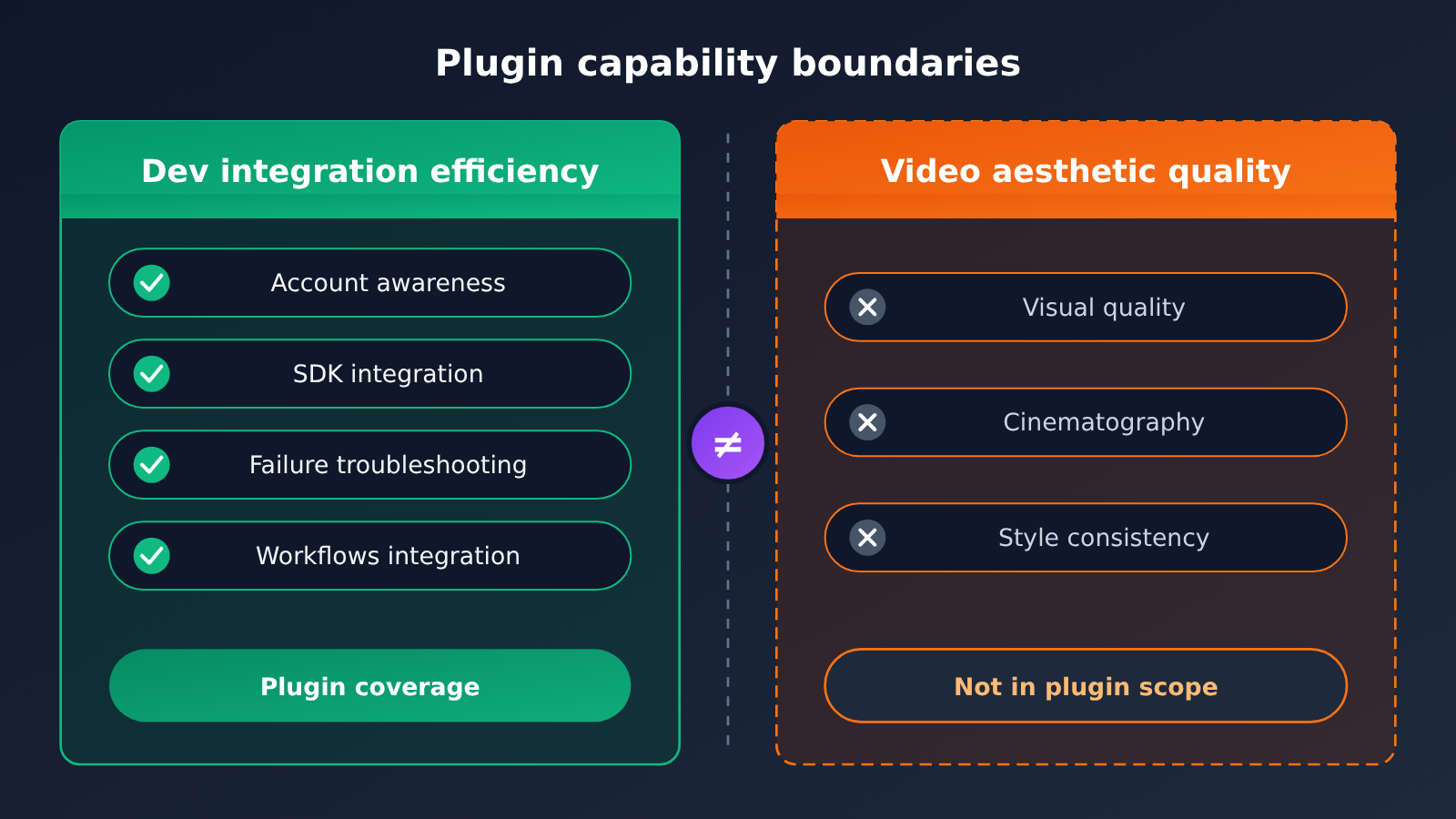
Whether a video looks good depends on model capability, prompt design, asset quality, and human review—the plugin doesn’t change any of these factors. What it really reduces is the friction of integrating video capabilities into a product. For teams, the reasonable expectation is “smoother integration and troubleshooting,” not “automatically higher output quality.”
Questions Worth Watching After Runway’s Integration with Codex, Claude Code, and Cursor
Here are a few areas we think are worth keeping an eye on. All of them are speculative and haven’t been officially confirmed yet:
- Will the experience be consistent across all three agents? The official approach covers Codex, Claude Code, and Cursor with a single plugin, but agents differ in how they handle tool calls and context management. Whether the actual experience is consistent will depend on developer feedback.
- Granularity of troubleshooting information: How specific can error details get? Can they actually support agents in fixing issues on their own, rather than just displaying information?
- Control over account read permissions: In team scenarios, which project and pricing information can agents access? Is there support for finer-grained permission controls?
- Expansion of the Workflows ecosystem: If teams publish more and more Workflows, the division of labor between “workflow design” and “application development” may become clearer.
From a broader perspective, this launch represents a trend: generative media platforms are starting to push “accounts, docs, and troubleshooting” into the coding agents where developers already work, instead of waiting for developers to come to the console. The closer tools are to where the code lives, the lower the barrier to integration.
“To do a good job, one must first sharpen one’s tools.” — The Analects, Wei Ling Gong


