

Author’s note: This article explains the persistent-agent architecture behind openJiuwen Hyper-Agent, helping workflow builders decide whether the approach is a good fit for their teams.
The Huawei-backed open-source agent community openJiuwen has released the Hyper-Agent swarm architecture, taking agents beyond one-off chat sessions and into real work groups as “persistent digital employees”. On November 5, 2026, Pandaily reported on a community article published by IT Home, stating that these capabilities are available in openJiuwen WorkSwarm and that the code is open-sourced on GitHub under the name JiuwenSwarm.
This isn’t just another question-answering bot added to a group chat. The real change is a reversal of the relationship between agents and sessions: a session is no longer a container for an agent, but a resource the system can allocate.
Key takeaway: This article brings the individual features together into an architectural view, helping you understand what openJiuwen Hyper-Agent changes and what your team should verify before adopting it.
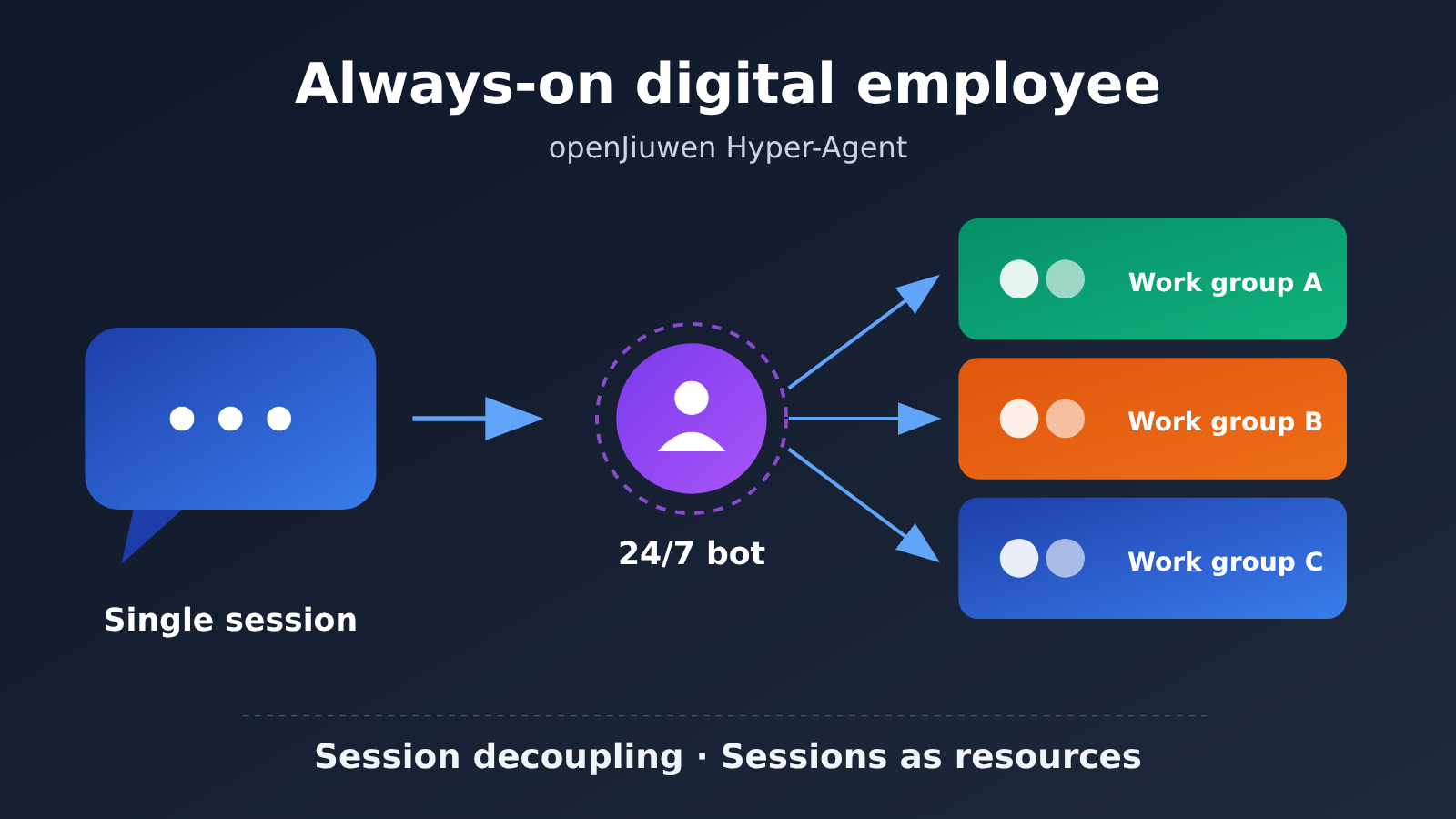
openJiuwen Hyper-Agent at a Glance
| Item | Details |
|---|---|
| Released by | openJiuwen open-source agent community (backed by Huawei) |
| Report date | November 5, 2026 |
| Core architecture | Hyper-Agent swarm architecture, built around Persistent Agents |
| Product | openJiuwen WorkSwarm, with open-source code named JiuwenSwarm |
| Collaboration interfaces | Instant messaging apps, a web interface, and native SwarmEngine group chats |
| Mentioned workplace apps | Feishu, DingTalk, and others |
| Third-party agents that can be mixed in | Codex, Claude Code, and others |
It’s worth noting that the facts in this article are based on a secondary report of a community article. The report doesn’t disclose the underlying model list, deployment requirements, license, or production readiness. You’ll need to check the GitHub repository and official documentation to verify those details.
How openJiuwen Hyper-Agent Turns Sessions into Resources
Most agent applications follow a “one session, one agent” model: a user opens a conversation, and the agent gets to work. Its identity, context, and task progress are all tied to that conversation. Switch to another group or window, and collaboration often has to start over.
Hyper-Agent takes the opposite approach. A Persistent Agent has its own identity and state, so it can continue receiving work. Sessions become underlying resources that the system allocates and schedules concurrently, with context restored when work resumes. According to the community, this design builds on earlier Persistent Session work, allowing one agent to track multiple tasks across multiple third-party group chats at once.
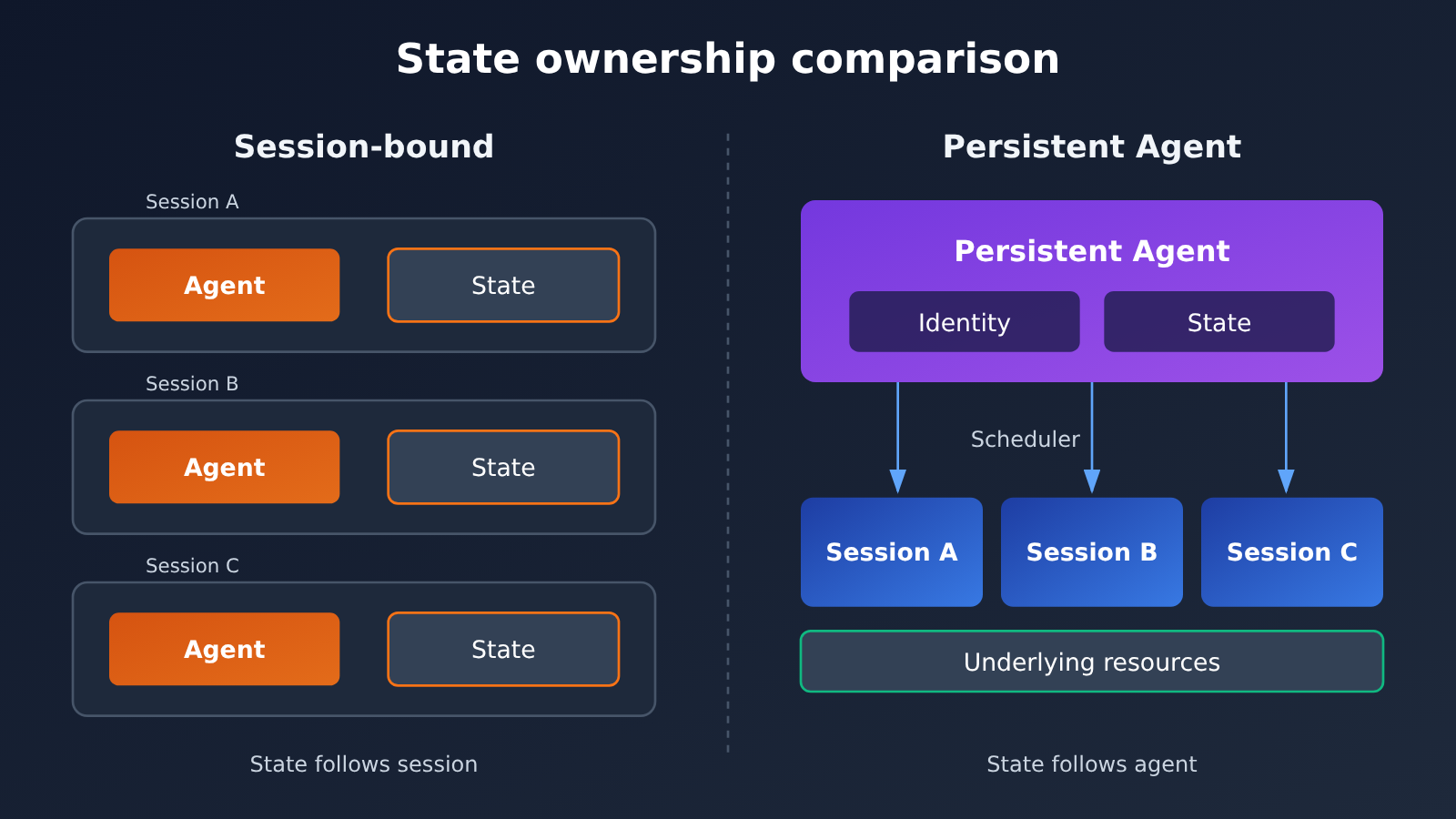
Illustration: On the left, state belongs to the session. On the right, it belongs to the agent. If you want to compare context overhead using your own business conversations, you can run a small-scale experiment through APIYI apiyi.com’s unified interface.
| Comparison | One session, one agent | openJiuwen Hyper-Agent |
|---|---|---|
| Identity | Tied to the current session | The agent has its own identity |
| State | Mainly stored in the session context | Maintained by the agent itself |
| Role of sessions | Work containers | Underlying resources scheduled by the system |
| Multitasking | Usually requires multiple independent sessions | One agent tracks tasks across multiple group chats |
| Delivery | Usually returned in the original session | Can accept a task in one channel and deliver it in another |
5 Key Components of the openJiuwen Hyper-Agent Architecture
Based on the available reporting, the system can be understood as five layers: access, orchestration, identity management, collaboration, and observability. The table below groups the components by architectural responsibility; it isn’t an official classification.
| Component | Main responsibility | Architectural role |
|---|---|---|
| Gateway | Connects instant messaging apps and the web interface | Provides a unified entry point for external channels |
| AgentServer | Orchestrates agents and work sessions | Makes sessions schedulable resources |
| Employee Center | Creates agents from expert templates or from scratch | Defines digital employees’ identities and capabilities |
| SwarmEngine Group Chat | Brings together users, agents, experts, and expert teams | Supports larger-scale collaboration among multiple participants |
| Activity Dashboard | Displays activity, token usage, and recent response times | Provides basic operational observability |
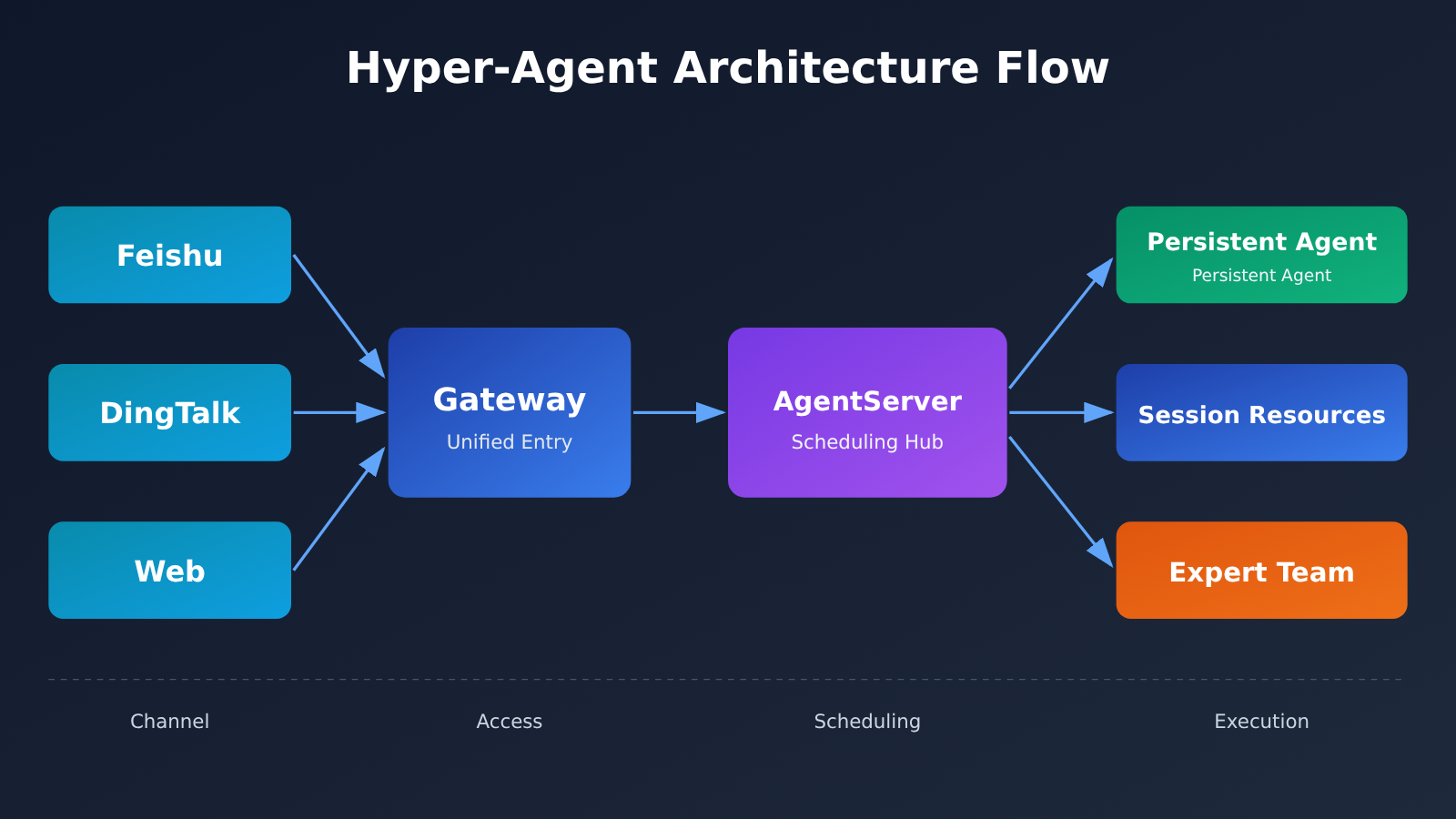
The Hyper-Agent Employee Center and Context Handoffs
In the Employee Center, users can configure responsibilities, working styles, delivery requirements, skills, connectors, knowledge sources, and even a dedicated email address. This expands prompt configuration into something like a job description, defining both the agent’s capabilities and its external identity.
Long-running work will inevitably run up against context window limits. WorkSwarm handles this by switching to a new window as the current one approaches its limit, carrying over a handoff summary with the goal, progress, and next steps. When it needs details, it retrieves them from archived history. This lets work continue without cramming the entire history into the current window.
Hyper-Agent Passive and Adaptive Modes
Deciding when an agent should speak in a work group chat is an unavoidable question for an always-on agent. WorkSwarm offers two response modes, which differ mainly in how predictable they are.
| Response Mode | Trigger | Best For | Main Consideration |
|---|---|---|---|
| Passive mode | Responds only when mentioned | Business-critical group chats, trial runs | Predictable behavior, but less proactive |
| Adaptive mode | Decides whether to ignore, respond, or intervene based on its role and the conversation | Project follow-ups, on-duty roles | Judgment accuracy and potential disruption need to be tested |
The report doesn’t explain exactly how adaptive mode makes decisions or how accurate it is. Teams can try a simplified experiment to get a feel for the challenges involved. The code below is just our demonstration, not WorkSwarm’s implementation:
import openai

client = openai.OpenAI(
    api_key="YOUR_API_KEY",
    base_url="https://api.apiyi.com/v1"
)

message = "接口今天下午还没联调通,明天的发布可能有风险。"
response = client.chat.completions.create(
    model="gpt-4o-mini",
    messages=[
        {"role": "system", "content": "你是项目助理。只输出 ignore、respond 或 intervene。"},
        {"role": "user", "content": message}
    ]
)
print(response.choices[0].message.content)
View the simplified handoff summary experiment
import json
import openai

client = openai.OpenAI(
    api_key="YOUR_API_KEY",
    base_url="https://api.apiyi.com/v1"
)

def create_handoff_summary(history: list[str], model: str = "gpt-4o-mini") -> dict:
    """Summarize work records into goals, progress, and next steps to simulate a context handoff."""
    prompt = (
        "请根据工作记录输出 JSON,字段为 goals、progress、next_steps。"
        "不要输出 JSON 以外的内容。\n\n" + "\n".join(history)
    )
    response = client.chat.completions.create(
        model=model,
        messages=[{"role": "user", "content": prompt}],
        response_format={"type": "json_object"}
    )
    return json.loads(response.choices[0].message.content)

records = [
    "产品经理:周五前完成客户周报。",
    "智能体:已汇总销售数据,等待客服数据。",
    "客服主管:今天下班前提供工单统计。"
]
print(create_handoff_summary(records))
Experiment tip: You can get free test credits through APIYI at apiyi.com, then compare how different models handle anonymized group chat samples. This tests the decision logic; it doesn’t mean WorkSwarm already supports this API.
Cross-Group and Local Collaboration with openJiuwen Hyper-Agent
The same agent can work across workplace apps such as Feishu and DingTalk—for example, receiving a request in one channel and delivering the result in another. Cross-group sharing isn’t allowed by default: users must check the source group, recipient, and content before granting one-time or permanent permission. They can also revoke permission later.
Team members can also run WorkSwarm on their own devices. Agents on cloud servers and personal computers can collaborate in the same group, using locally authorized files and tools. The cloud keeps agents online continuously, while local devices provide access to data and tools in each person’s environment.
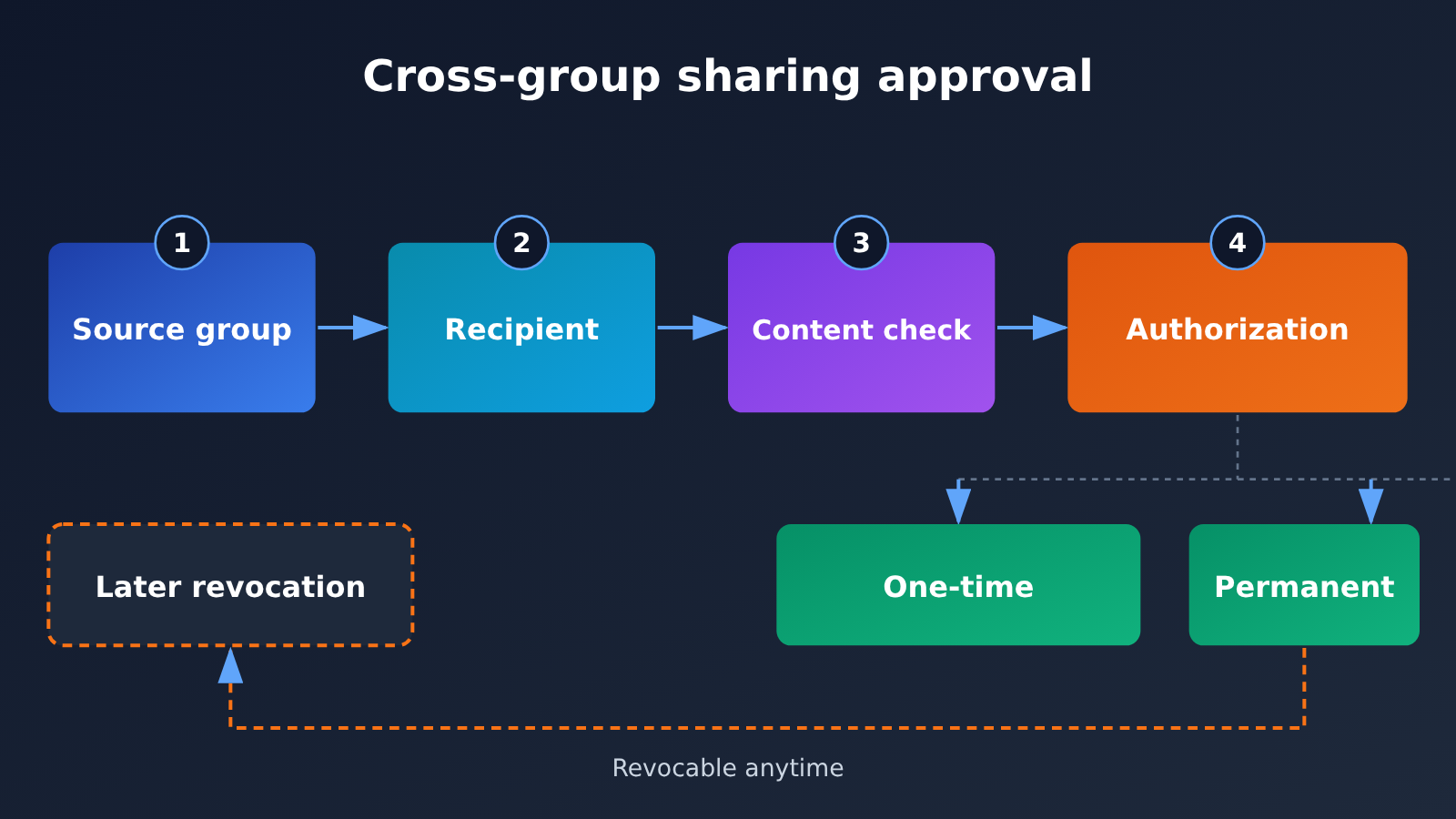
For larger tasks, a SwarmEngine group chat can bring users, Persistent Agents, individual experts, and expert teams into the same space. An expert team has a lead who receives tasks, reports progress, and coordinates delivery, while team members work in the background. Experts can also come from third-party agents such as Codex and Claude Code and work alongside custom-built digital employees.
The Impact of openJiuwen Hyper-Agent
Impact on Developers and Workflow Builders
- A shift in design focus: From designing one-off conversations to designing agent identities, states, permissions, and handoff mechanisms.
- Greater operational demands: Persistent agents need to be monitored, audited, and managed like online services.
- Broader integration boundaries: IM, knowledge bases, email, and local tools may all become part of the same task workflow.
Impact on Team Collaboration
- Agents become collaborators, not just tools: They can follow tasks over time rather than simply respond to a single question.
- Governance comes earlier: Teams need to agree in advance on who can share data, when agents can speak, and who’s accountable for results.
- Mixed orchestration becomes a key consideration: How custom-built employees and third-party agents divide the work affects delivery quality and accountability.
Key Questions for Teams Evaluating Hyper-Agent
| Evaluation Area | Questions to Answer | Recommended Approach |
|---|---|---|
| Cross-group permissions | Who approves permanent authorization, and what happens to shared content after authorization is revoked? | Use one-time authorization by default and manage sensitive groups separately |
| Control over interruptions | Can adaptive mode be restricted by group, time period, or role? | Start with passive mode, then enable adaptive mode on a limited basis |
| Token usage | Can dashboard data be exported by agent or task, and can alerts be configured? | Establish a baseline during the pilot and set budget thresholds |
| Local devices | How are authorization scope, audit logs, and offline status managed? | Use least privilege and avoid granting access to the entire working directory |
| Project maturity | Are the license, deployment requirements, and production suitability clear? | Read the repository documentation, then test in an isolated environment |
openJiuwen Hyper-Agent FAQ
Q1: What is openJiuwen Hyper-Agent?
It’s a swarm architecture released by the openJiuwen community. Its core idea is to give each Persistent Agent an independent identity and state, allowing it to join work groups as an always-on digital employee while treating conversations as resources to be scheduled.
Q2: How is Hyper-Agent different from a typical group chat bot?
Typical group chat bots work around individual triggers and replies. Hyper-Agent decouples agent identity from conversations, allowing agents to follow multiple tasks across groups and support context handoffs, cross-channel delivery, and collaboration among teams of experts.
Q3: Is openJiuwen WorkSwarm available now?
According to reports, the relevant code has been open-sourced on GitHub under the name JiuwenSwarm. The reports don’t specify the license, deployment requirements, or production maturity, so it’s best to check the repository and official documentation directly.
Q4: Can WorkSwarm connect to APIYI?
The available information doesn’t specify which underlying models WorkSwarm supports or whether custom or OpenAI-compatible endpoints can be configured, so compatibility can’t be confirmed. Until that’s verified, you can use APIYI apiyi.com independently to test model-driven steps such as handoff summaries and decisions about when to respond.
Q5: How can I estimate model invocation costs for always-on agents?
Reports mention that the activity dashboard displays token usage, but they don’t provide actual consumption figures. Try running a real workflow and track invocations separately for standby, replies, and handoffs. If you want to compare token usage across models first, APIYI apiyi.com offers a unified interface and pay-as-you-go pricing, making it easier to set up comparison tests.
Q6: What’s still unknown about openJiuwen Hyper-Agent?
The main unknowns include underlying model support, custom endpoints, deployment requirements, licensing, production maturity, token costs, and how adaptive mode makes decisions and how accurate those decisions are. Personal and cluster computing resource coordination, active learning, and fault recovery, which the community has mentioned, are also future work.
openJiuwen Hyper-Agent: Key Takeaways
- Core architecture: Agents retain their identity and state, while sessions become schedulable resources.
- Core components: Gateway handles incoming connections; AgentServer schedules agents and sessions.
- Long-running operation: Handoff summaries support context switching, while archived history can be retrieved on demand.
- Response strategies: Passive mode offers more control; adaptive mode is more proactive but needs validation.
- Permissions: Sharing across groups requires approval. Authorization can be one-time or permanent, and it can be revoked.
- Hybrid collaboration: Cloud services, local devices, expert teams, and third-party agents can all join the same collaboration space.
- Validation path: First verify the project documentation, then use APIYI apiyi.com to test the model components.
Conclusion: Architectural Lessons from openJiuwen Hyper-Agent
What makes openJiuwen Hyper-Agent worth watching isn’t just that it brings agents into Feishu or DingTalk. It’s that it puts the idea of “turning sessions from containers into resources” into practice in its system design:
- Persistent identity: A Persistent Agent no longer loses continuity when an individual session ends.
- Scheduling takes center stage: AgentServer coordinates agents and multiple work sessions.
- Governance determines real-world adoption: Permission approvals, controls over when agents speak, and usage monitoring determine whether the system can work for real teams.
If your work depends on collaboration across multiple groups, long-term follow-up, and delivery across channels, this approach is worth exploring further. If your workflows involve sensitive data or strict compliance requirements, start with an isolated pilot using passive mode and least-privilege access. For the model decision-making components, you can use APIYI apiyi.com to compare multiple models through the same interface and gather data for future technology decisions.
📚 References
- Pandaily – openJiuwen’s Hyper-Agent Swarm Puts Persistent AI Agents Into Work Chats as Digital Employees: The primary source for this article’s facts
- Link:
pandaily.com/openjiuwen-hyper-agent-swarm-architecture-persistent-agents-workswarm-digital-employees - Notes: Covers the Hyper-Agent architecture, WorkSwarm features, and the community’s future plans. It’s a secondary report based on a community submission.
Author: APIYI Technical Team
Technical discussions: Contact us through the APIYI homepage. For more resources, visit the docs.apiyi.com documentation center.


