

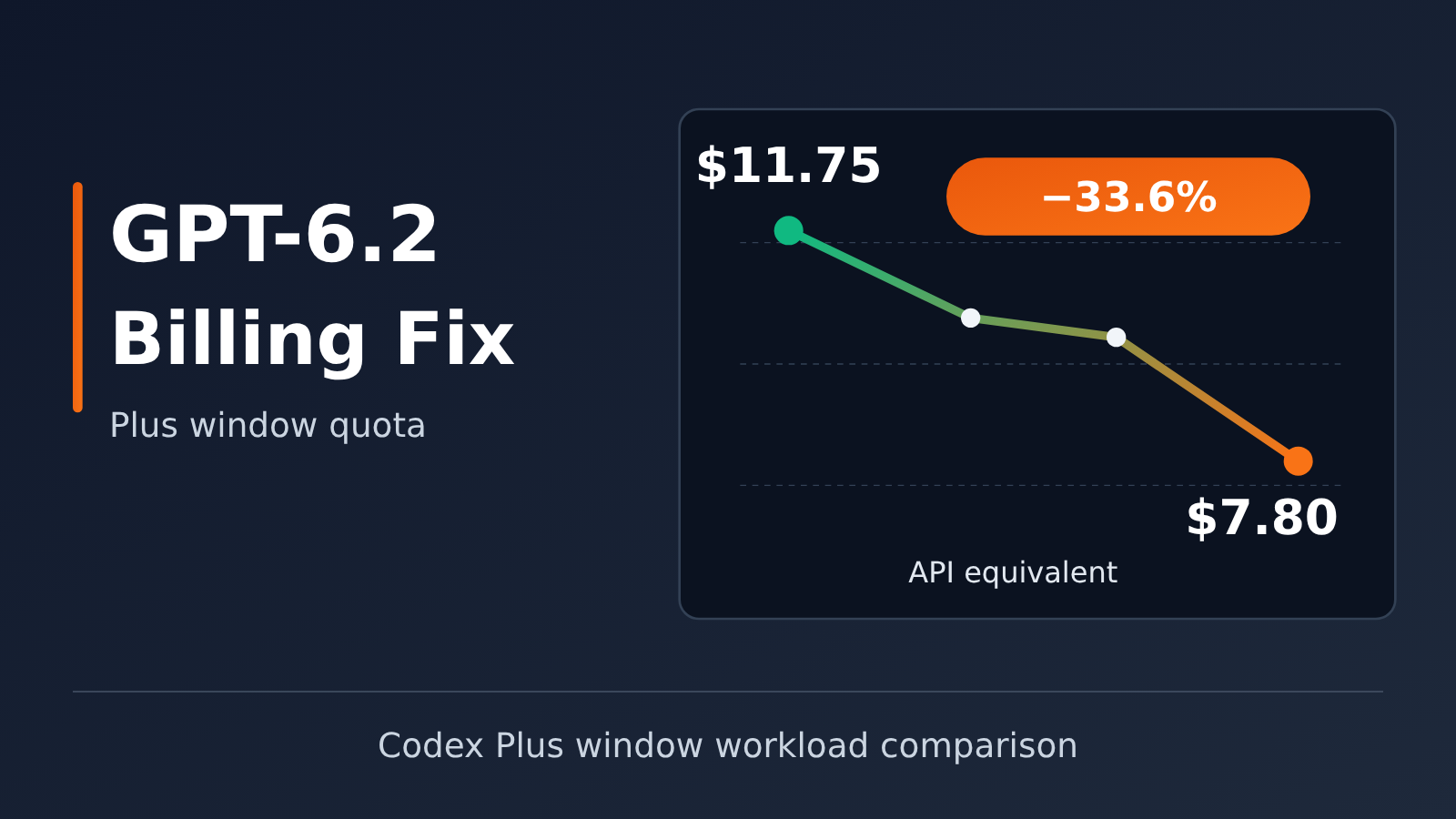
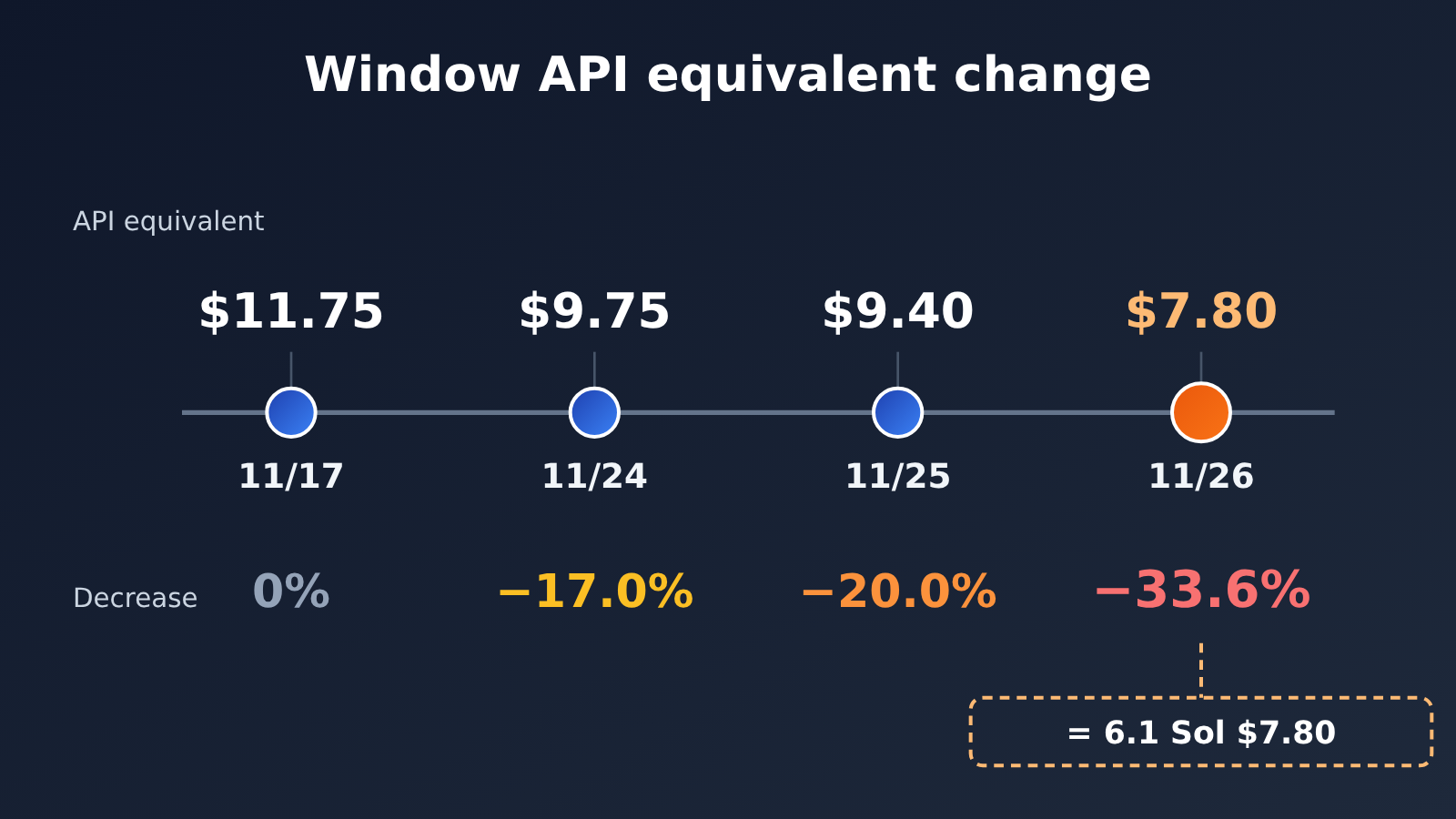
Looking at one user’s back-to-back measurements: after the GPT-6.2 billing fix, the amount of work a single Codex Plus usage window can handle dropped by roughly a third. Priced at API list rates, that figure fell from $11.75 on 11/17 to $7.80 on 11/26 — a 33.6% decrease. That lands exactly at the $7.80 we saw back in the GPT-6.1 Sol era. The official public note cites a smaller change: compared with last week, Sol hits the cap about 25% faster, and Astra about 40% faster. Keep in mind that “dollars” here are an API-equivalent measure — they don’t mean your subscription got charged more.
What you’ll take away from this post:
- The readings from four measurements on 11/17, 11/24, 11/25, and 11/26, plus the drop relative to the starting point each time.
- The difference between three measures — “API equivalent,” “account quota,” and “actual API charge” — and which number you can actually use for money math.
- What “hits the limit faster,” “error discount correction,” and “one reset, no retroactive top-up” mean in the official note.
- Why the size of the Astra-tier fix can’t be computed from this dataset yet.
- How to convert your own token usage into the same API-equivalent measure with a few dozen lines of code, so you can re-test it yourself.
Index: We’ll start with a concept table and an impact summary to align terminology. The “Objective facts” section walks through the original thread’s measurement setup, the day-by-day readings, the official note, and the limits of the Astra data. The “Analysis and judgment” section covers the difference between the three measures, the gap between the official 25% and the measured 33.6%, and how Plus users can re-plan their windows. After that comes a runnable self-test snippet, and finally the FAQ.
Concepts to Know Before the GPT-6.2 Billing Fix
| Concept | Quick explanation |
|---|---|
| Codex | OpenAI’s coding agent product; ChatGPT subscribers can use it within their usage limits |
| Plus usage window | The usage cap a subscription account gets per time window — the “5-hour window” in the title refers to this. Check OpenAI’s Help Center for the exact rules |
| Sol / Astra | Names of two tiers in the GPT-6.x series; per the official notes, the two differ in how much their limits changed |
| API equivalent (Dollar equivalent) | Converting the tokens actually consumed in a window into dollars using public API list prices — a way to measure “how much work a window can hold” |
| Account quota | The used percentage and reset time shown on the usage dashboard — the true state of your subscription limit |
| Actual API charges | The amount billed per token for API calls; unrelated to the subscription |
| Codex credits | The credit unit inside the Codex system for usage beyond your subscription allowance; see the official Codex pricing page for rates |
| 272k context | The context ceiling the original poster deliberately held to during measurement, to avoid interference from long-context pricing |
| Reset | The official system zeroing out an account’s usage window once, so the user starts again from a full allowance |
GPT-6.2 Billing Fix: Impact at a Glance
- Codex Plus subscribers: The monthly fee stays the same, but a single window runs less work. By this set of measurements, that’s roughly 20% to 34% less than before the fix. A refactor you used to finish in one window may now take two.
- Developers who run Codex heavily: You’ll hit the ceiling more often and spend more time waiting on resets. You’ll need to re-estimate the cost of a mixed “subscription window + credits + API” workflow.
- Teams calling the API directly: This fix targets usage conversion on the subscription side; per-token API list prices are outside the scope of this note. Billing logic on the API side is unchanged.
The Objective Facts Behind the GPT-6.2 Billing Fix
How the Original Poster Measured Codex Plus Windows
The original poster has long been publishing “allowance tables” for various models on r/codex. This time, the measurement conditions were: a Plus account, always starting with a fresh context, keeping the context under 272k, and then converting the work completed within a usage window into a dollar equivalent based on API list prices.
Original updated table: reddit.com/r/codex/comments/1xhhrxs/allowance_table_update_for_gpt_competitors_and/
The author explicitly states that this dollar figure is not a subscription charge, not an official cash budget, and not the result of measuring a Pro account. It only answers one question: with the same account and settings, how much work priced at API rates can fit into a single window.
Daily readings: four figures before and after the GPT-6.2 fix
| Date | API-equivalent within the window | Change vs. 11/17 baseline | Notes |
|---|---|---|---|
| 11/17 | $11.75 | — | Starting baseline |
| 11/24 | $9.75 | −17.0% | Reading from the daily notes |
| 11/25 | $9.40 | −20.0% | Re-test value; the summary table treats it as the intermediate stage |
| 11/26 | $7.80 | −33.6% | Same as the 6.1 Sol equivalent measured by the same author |
Two details in this table are worth noting. First, 11/24 and 11/25 are only one day apart, yet their readings differ by $0.35. The author’s summary table uses the 11/25 re-test value as the intermediate stage, so when citing it, you should write −20.0%, not −17.0%. Second, the $7.80 on 11/26 is exactly the same as the GPT-6.1 Sol equivalent the author measured earlier. In other words, in terms of “how much work can be done per window,” 6.2 is back to the 6.1 Sol level. The reference material does not label the tier of this series row by row; based on how it is compared side by side with 6.1 Sol, we infer that this is a Sol-tier reading.
Official Public Statement on GPT-6.2 Usage
The public statement on r/codex titled “Tibo’s update on the GPT 6.2 usage” mainly covers three points:
- Magnitude: Compared with last week, Astra hits the limit about 40% faster, and Sol about 25% faster.
- Cause: There was an erroneous discount before, and it has now been corrected.
- Compensation: A one-time quota reset will be made, with no retroactive adjustment for prior usage.
Original statement: reddit.com/r/codex/comments/1y5q43m/tibos_update_on_the_gpt_62_usage/
For how to view the usage dashboard and the reset rules, you can refer to OpenAI Help Center’s usage explanation: help.openai.com/en/articles/20001625-understanding-chatgpt-and-codex-usage-limits
Why Astra’s Fix Ratio Can’t Be Calculated
| Data | Value | Can it be used to calculate this fix ratio? |
|---|---|---|
| 6.2 Astra before the fix, same-settings baseline | Not provided by the author | — |
| 6.2 Astra after the fix | About $5.83 | Only a single post-fix data point |
| GPT-6 Astra | $10 | No, it’s a cross-generation comparison |
Comparing $5.83 with $10 leads to the conclusion that Astra is “more than 40% lower,” which looks like it lines up exactly with the official 40%. But these two numbers come from different generations of the model, and the model’s own token efficiency and pricing may have changed. Therefore, this set of data cannot be used to calculate the change ratio for Astra in this GPT-6.2 billing fix. For Astra, the only figure currently available to cite is the official “hits the limit about 40% faster.”
Analyzing the GPT-6.2 Billing Fix
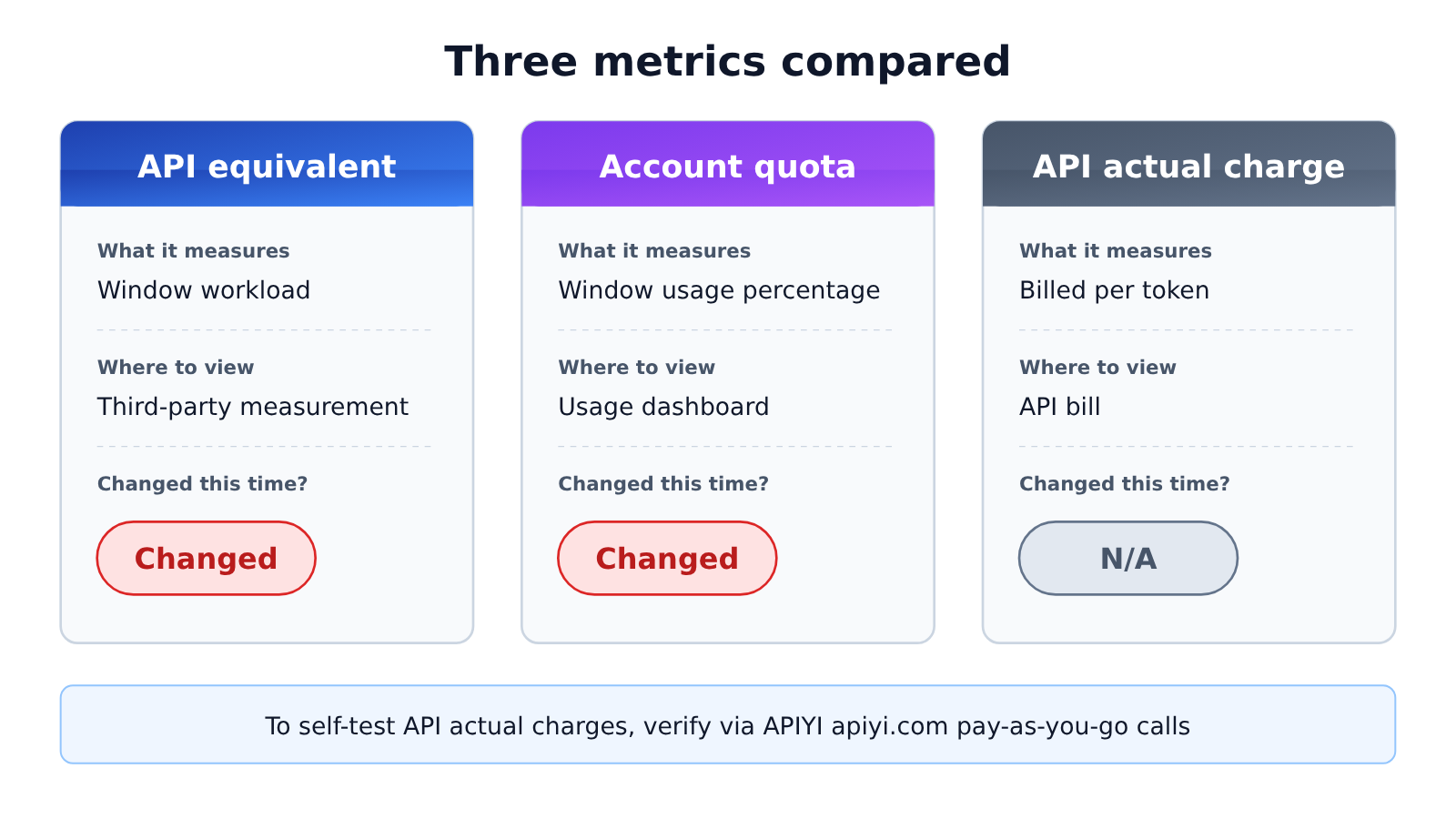
Three Metrics: API Equivalent, Account Quota, Actual API Billing
When people discuss “how much quota was lost,” the most common confusion is comparing these three numbers side by side. The table below helps you tell them apart:
| Metric | What it measures | Where to look | Did this fix change it? |
|---|---|---|---|
| API equivalent | How much list-price work fits in one window | Third-party measurements, e.g. the original post’s quota table | Changed: Sol series −33.6% |
| Account quota | Window usage percentage, reset time | ChatGPT / Codex usage panel | Changed: the same work now consumes a higher percentage |
| Actual API billing | Real per-token charges | API bill; see the API pricing page for list prices | Not covered by this explanation |
Here’s how to think about it: the subscription fee is fixed; what the fix changes is “how much compute the same subscription can buy.” The API equivalent translates this change into familiar dollar terms. If you read it as “I got overcharged $3.95,” you’re misunderstanding it. The real money-counting scenario comes when you decide to move the work that exceeds your window over to credits or the API—that’s when you need to look at the Codex pricing page (developers.openai.com/codex/pricing) and the API pricing page (developers.openai.com/api/docs/pricing).
Official 25% vs. Measured 33.6%: Why Don’t They Match?
The following is an estimate, not a confirmed fact. If “hitting the limit 25% faster” means the same window quota gets consumed 1.25 times faster, then the amount of work one window can handle is about 1 ÷ 1.25 = 80% of what it used to be, i.e., 20% less. That lines up exactly with the −20.0% from the 11/25 re-measurement.
But the 11/26 reading dropped to −33.6%, which exceeds the officially stated magnitude. There are a few possible reasons: measurement error (single account, small sample), a different mix of tasks, further adjustments made afterward, or the “25% faster” figure itself being based on a different statistical basis. The reference material doesn’t explain it, so at this point there’s no way to tell which number is closer to the long-term stable value. The safer approach: treat the official magnitude as a lower-bound reference and your own measurement as a risk upper bound, and leave some budget margin between the two.
By the same calculation, Astra’s “40% faster” works out to roughly 28.6% less work per window (1 ÷ 1.4). This number is only converted from the official magnitude and has no corresponding measured result.
How Codex Plus Users Can Re-plan Their 5-Hour Windows
The fix is already in effect, and there’s no retroactive compensation, so after a reset you should plan around the new consumption rate. In practice, here’s what you can do:
- Check the panel before starting a big task: Before kicking off a large-scale refactor, confirm the remaining percentage on the usage panel and the next reset time, and don’t start long tasks at the tail end of a window.
- Control your context: The original post deliberately kept context under 272k, which shows that long context noticeably affects consumption. Splitting sessions is usually more quota-efficient than one giant session.
- Route tasks by type: Exploratory, conversational work goes in the subscription window; batch, scriptable tasks (bulk test generation, code review pipelines) go to the API, billed by token, where costs are easier to predict.
- Re-measure it yourself: Other people’s measurements are only a reference. Use the code below to log token usage and equivalent costs for your common tasks, and within a week you’ll have a conversion factor that fits you.
Quick Start: Checking GPT-6.2 Parity Yourself with the API
The idea behind API parity is simple: record the input tokens, cache hits, and output tokens for each call, then multiply each by its own unit price. The code below calls the model through the OpenAI-compatible endpoint and reads the usage field to do the conversion. Grab the unit prices from the API pricing page — the ones here are just placeholders.
import openai

client = openai.OpenAI(
    api_key="YOUR_API_KEY",
    base_url="https://api.apiyi.com/v1"  # APIYI OpenAI-compatible endpoint
)

resp = client.chat.completions.create(
    model="gpt-6.2",  # use the exact name shown in APIYI's model list
    messages=[{"role": "user", "content": "重构这个函数并补充单元测试:..."}]
)
u = resp.usage
PRICE_IN, PRICE_OUT = 0.0, 0.0  # USD per million tokens; fill in from the official pricing page
cost = (u.prompt_tokens * PRICE_IN + u.completion_tokens * PRICE_OUT) / 1e6
print(f"输入 {u.prompt_tokens},输出 {u.completion_tokens},等值 ${cost:.4f}")
See the full implementation: accumulating API parity cost per window
import time
import openai
from dataclasses import dataclass, field

# USD price per million tokens; fill in from developers.openai.com/api/docs/pricing
PRICES = {
    "input": 0.0,
    "cached_input": 0.0,
    "output": 0.0,
}
WINDOW_SECONDS = 5 * 60 * 60  # mirrors Plus's 5-hour window
CONTEXT_LIMIT = 272_000       # set per the original post; warn to split the session if exceeded

client = openai.OpenAI(
    api_key="YOUR_API_KEY",
    base_url="https://api.apiyi.com/v1"
)

@dataclass
class WindowMeter:
    start: float = field(default_factory=time.time)
    total_usd: float = 0.0
    calls: int = 0

    def reset_if_expired(self):
        if time.time() - self.start > WINDOW_SECONDS:
            print(f"窗口结束:{self.calls} 次调用,等值 ${self.total_usd:.2f}")
            self.start, self.total_usd, self.calls = time.time(), 0.0, 0

    def add(self, usage):
        cached = 0
        details = getattr(usage, "prompt_tokens_details", None)
        if details is not None:
            cached = getattr(details, "cached_tokens", 0) or 0
        fresh = usage.prompt_tokens - cached
        usd = (fresh * PRICES["input"]
               + cached * PRICES["cached_input"]
               + usage.completion_tokens * PRICES["output"]) / 1e6
        self.total_usd += usd
        self.calls += 1
        if usage.prompt_tokens > CONTEXT_LIMIT:
            print("提示:上下文超过 272k,等值不再与原帖口径可比")
        return usd

meter = WindowMeter()

def run(prompt: str, model: str = "gpt-6.2") -> str:
    meter.reset_if_expired()
    resp = client.chat.completions.create(
        model=model,
        messages=[{"role": "user", "content": prompt}],
    )
    usd = meter.add(resp.usage)
    print(f"本次 ${usd:.4f}|窗口累计 ${meter.total_usd:.2f}")
    return resp.choices[0].message.content

if __name__ == "__main__":
    run("为下面的 Python 模块写 pytest 用例:...")
Tip: If you want to check how much the same batch of tasks would actually cost under API billing outside the subscription window, you can sign up at APIYI apiyi.com and run one round on the free trial credit given to new users. It’s a single key, an OpenAI-compatible endpoint, and switching models is as easy as changing the
modelfield.
Here’s how the cost characteristics of different execution modes compare, so you can decide which work stays inside the Codex Plus window:
| Execution method | Metering method | Impact of this fix | Suitable tasks | Available platforms |
|---|---|---|---|---|
| Codex Plus subscription window | Window percentage | Per-window workload decreases | Interactive coding, exploration | ChatGPT / Codex |
| Codex credits | credits units | Refer to the official Codex pricing page | Temporary top-up after the window runs out | OpenAI official |
| API pay-as-you-go invocation | Charged per token | Not covered in this explanation | Batch, scripted, pipelines | Official API, APIYI apiyi.com |
GPT-6.2 Billing Fix FAQ
Q1: What exactly did the GPT-6.2 billing fix change?
According to the public explanation, there was previously an incorrect discount that caused subscription usage to be undercounted. After the fix, Sol hits its cap about 25% faster, and Astra about 40% faster. The official team provided a one-time quota reset and won’t retroactively adjust for prior situations.
Q2: My quota dropped from $11.75 to $7.80—does that mean I was overcharged by $3.95?
No. This is an API-equivalent metric. It measures how much work, priced at API rates, fits into one window—not a subscription charge, and not an official cash budget. Your subscription fee stays the same; what changes is how much work each window can complete.
Q3: Should I cite −17%, −20%, or −33.6%?
It depends on which stage you’re describing. The daily note from 11/24 was −17.0%, but the intermediate stage in the summary table uses the −20.0% from the 11/25 retest; the latest reading after the fix is −33.6% from 11/26. When citing, note the date and clarify that this is a single-account measurement.
Q4: Are Pro users also losing a third?
There’s no evidence for that right now. The original post explicitly states this is not a Pro measurement result. For Pro, you can only go by the official 25% and 40% figures per tier, or do your own before-and-after comparison in the usage dashboard.
Q5: If my window isn’t enough, how do I top up compute at low cost?
You can move batch, scriptable tasks over to pay-as-you-go API invocation. Use the code in this article to log token usage, and you can calculate costs precisely. Through APIYI apiyi.com, you can call multiple models with a single key, making it easy to compare which combination offers the best value.
Q6: What are the limitations of this set of measurements?
The sample comes from a single Plus account; task composition affects the readings; Astra lacks a pre-fix baseline under the same setup; and the gap between the official 25% and the measured 33.6% is currently unexplained. Treat this data as a trend reference, not a precise conversion factor. If you want to verify it yourself, you can run the same set of tasks with free credits on APIYI apiyi.com as a comparison.
If you only want to remember one takeaway: after the GPT-6.2 fix, the “real value” of a Codex Plus window has roughly fallen back to the 6.1 Sol level, and the previous shortfall won’t be compensated. What’s worth watching next is whether future measurements stabilize at the official 25% or remain around the user-measured one-third. Until the picture is clear, the practical approach is to keep interactive work in subscription windows, hand batch tasks to the token-billed API, and calibrate your budget against real invoices through APIYI apiyi.com.
References
- Original thread’s allowance update table: Day-by-day API-equivalent measurements for Plus accounts
- Link:
reddit.com/r/codex/comments/1xhhrxs/allowance_table_update_for_gpt_competitors_and/
- Link:
- GPT-6.2 usage public statement: correction of the erroneous discount, a single reset, no backfill
- Link:
reddit.com/r/codex/comments/1y5q43m/tibos_update_on_the_gpt_62_usage/
- Link:
- OpenAI Help Center: ChatGPT and Codex usage limits: the usage panel and reset rules
- Link:
help.openai.com/en/articles/20001625-understanding-chatgpt-and-codex-usage-limits
- Link:
- Codex pricing: notes on credits
- Link:
developers.openai.com/codex/pricing
- Link:
- OpenAI API pricing: pricing listed per token
- Link:
developers.openai.com/api/docs/pricing
- Link:
Author: APIYI Technical Team
Technical discussion: Reach us via the APIYI apiyi.com homepage — for more integration material, visit the docs.apiyi.com documentation center.


