
Author’s note: The 1.8 million figure in Anthropic’s report is the number of APKs scanned, not the number of leaked apps. This article lays out the real risk of client-side keys and gives you three things you can do today.
In the abuse threat report Anthropic published in September 2026, one case got a lot of mobile developers worried. An operator used a pipeline of 10 cloud servers to bulk-download and decompile 1.8 million Android APKs, specifically hunting for hardcoded keys. Once the news spread, claims like “1.8 million apps leaked AI keys” started making the rounds.
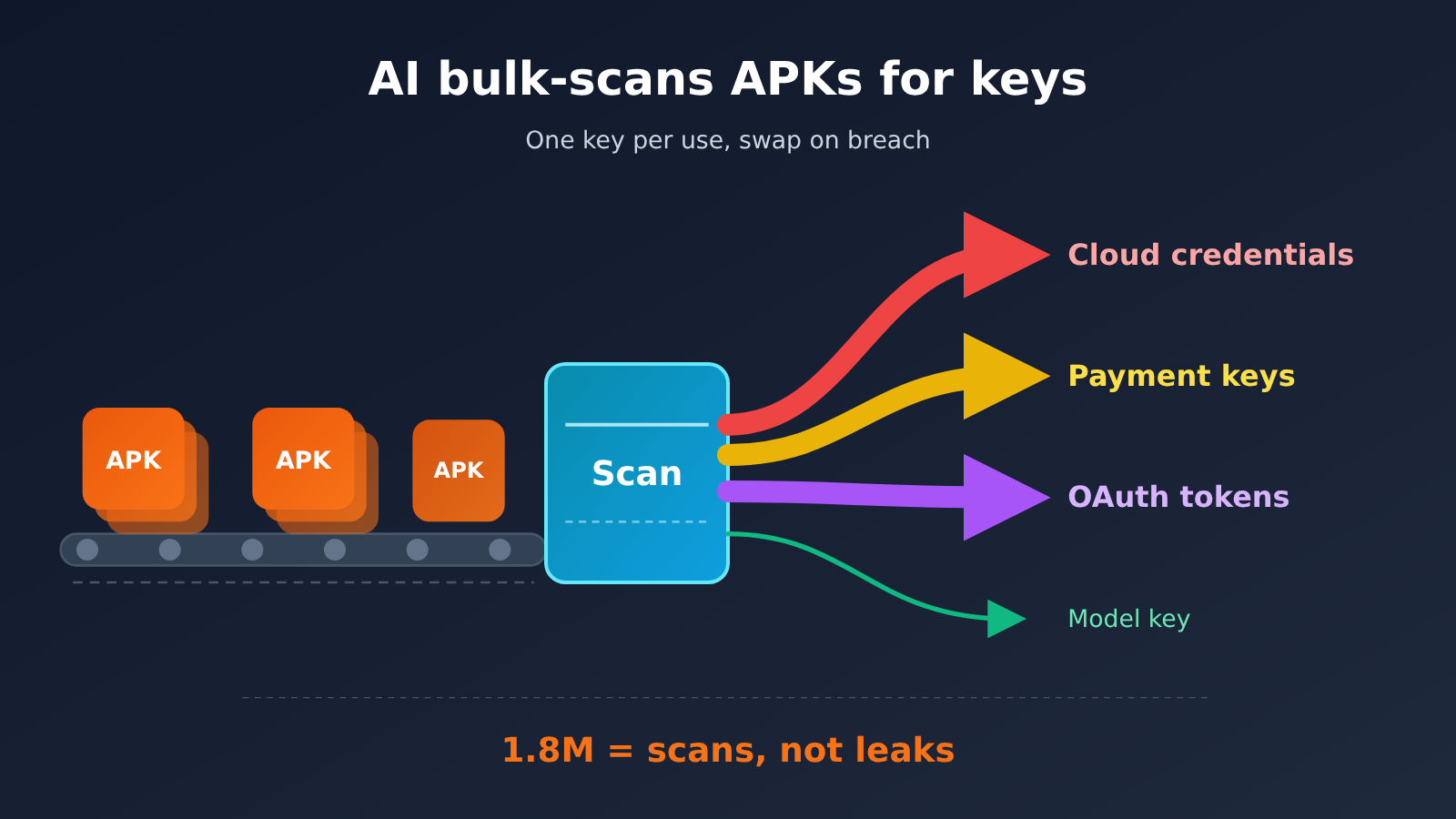
Let’s get the numbers straight first. The 1.8 million is the number of distinct APKs that pipeline downloaded, decompiled, and scanned. It’s not the number of leaked apps, and it’s certainly not 1.8 million AI keys. Anthropic didn’t disclose how many of those apps actually hit, nor how many credentials were still valid when verified. Several third-party security outlets were also explicit in their coverage: this is scan volume, not leak volume.
But that’s no reason to breathe easy either. The scan volume tells you one thing: attackers have turned “dig through install packages looking for keys” into an industrial process. If your app is on a store shelf, it’s on the default scan list. This article is for developers who’ve stuffed AI features into apps, mini programs, and desktop clients, and for the technical leads who have to sign off on the “key management” line item. It covers what to worry about, what not to worry about, and three things you can start doing today.
AI Sifts Through 1.8 Million APKs for Keys: Key Takeaways from the Report
First, let’s look at what this case in the Anthropic report actually says. The case ID is GTG-50014, and the report covers activity blocked between December 2025 and August 2026.
| Point | What the report says | What it means for developers |
|---|---|---|
| 1.8 million | Number of distinct Android APKs downloaded from multiple app store sources | This is scanning scale, not the number of hits or leaks |
| Pipeline | 10 AWS EC2 nodes download and decompile apps, then use open-source key-scanning tools to find hardcoded keys | They get scanned as soon as they’re published, so relying on “hiding it well” isn’t realistic |
| Real-time distribution | Verified results are pushed in real time to a Telegram group organized by more than 100 source types | The window between a leak and its exploitation can be very short |
| Another pipeline | Harvests GitHub organization email addresses and supplies stolen GitHub personal access tokens | Code repositories and install packages are the same kind of risk surface |
| Final use | The two pipelines provided initial access credentials for most of the intrusions confirmed for this actor | One leaked credential can become the starting point for an entire intrusion |
Key Details of the 1.8 Million APK Scanning Case
Elsewhere, the report also says attackers systematically search for credentials, tokens, and API keys in public container registries, code repositories, mobile apps, websites, and other places, and explicitly describes this kind of scanning as industrial-scale. In other words, APKs are just one entry point; anything “delivered to users” or “publicly downloadable” is in scope.
Regarding the same campaign, the third-party security research organization CSA gave a rough order-of-magnitude reference in a September 12, 2026 briefing: in about 34 hours, it extracted more than 2,100 sets of Azure AD tokens from more than 40 enterprise tenants. This is a third-party account, not an original conclusion from the Anthropic report, but it illustrates one thing: once initial credentials are obtained, lateral movement happens on an hourly timescale.
AI App Key Leaks: Two Contrasting Datasets — What to Fear and What Not to Fear
Looking only at the number 1.8 million, it’s easy to jump to one of two extreme conclusions: either “every AI key has leaked” or “it’s just scanning.” Put the two datasets below side by side, and your judgment will be much more accurate.
| Study | Sample | Key finding | Notes |
|---|---|---|---|
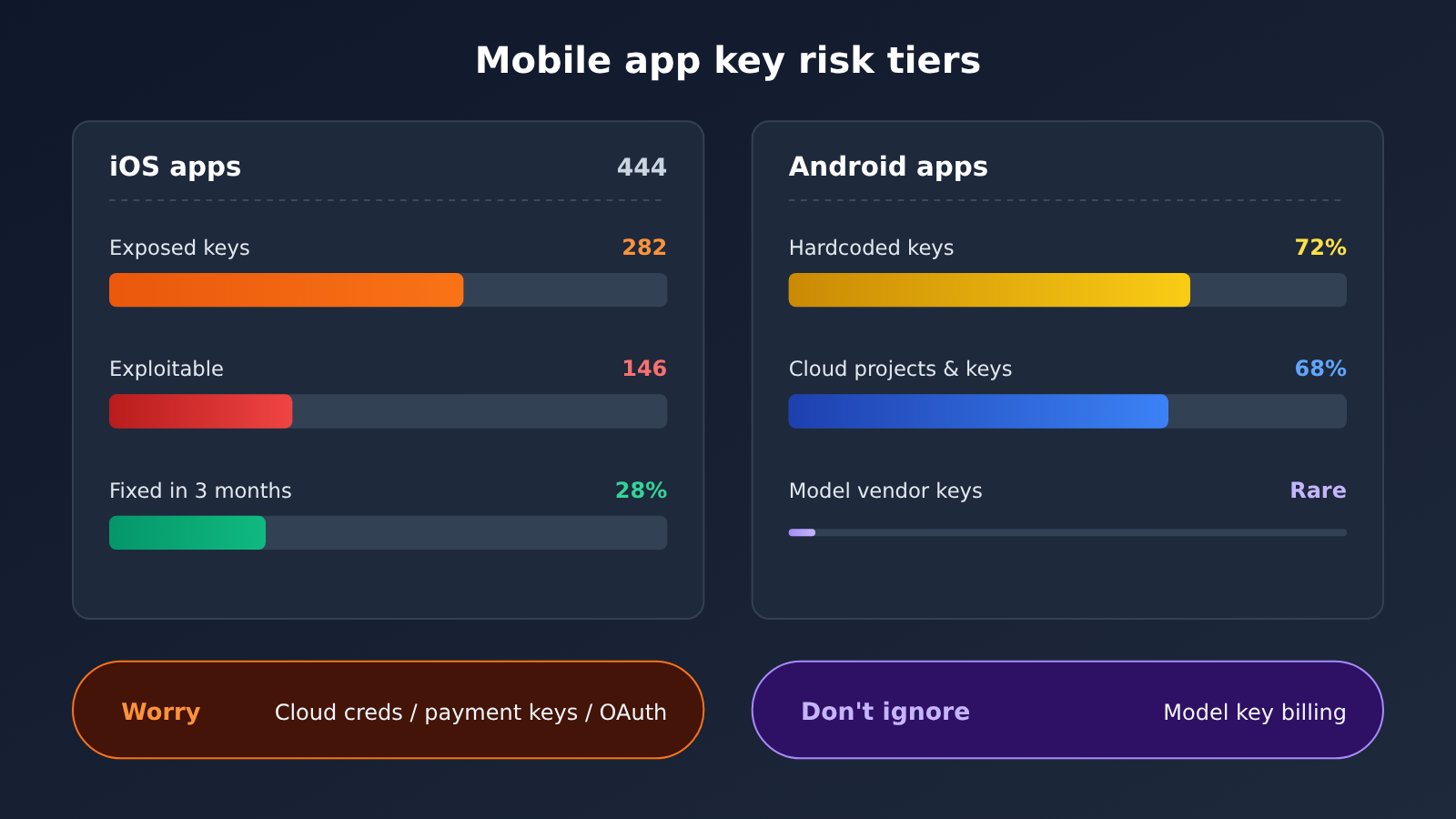
| iOS LLM app study (LLMKeyLens, 2026) | 444 iOS apps confirmed to have LLM features | 282 (64%) exposed LLM credentials or backend access methods in traffic; 146 of them were directly exploitable | Three months after researchers notified developers, only 28% had clearly fixed the issue |
| Cybernews report (2026-01-28) | 1.8 million Android AI apps on Google Play | 72% contained at least one hardcoded key; 68% of hardcoded keys were Google Cloud project identifiers and API keys | Very few keys pointed directly to Large Language Model vendors, and most were low risk |
Note that the second report also happens to use “1.8 million,” but it’s Cybernews’s early-year analysis of Google Play apps. That’s a different thing from the 1.8 million APKs attackers scanned in the Anthropic report—don’t conflate the two when citing them.
What the Comparative Data Tells Us About Key Risk
Put the two datasets together, and a fairly clear conclusion emerges. What’s actually being harvested at scale is mainly cloud credentials, payment keys, and OAuth tokens—the report ranks Stripe’s live secret key as the highest risk level. Once attackers get their hands on this kind of credential, they can read data, move money, and get into enterprise tenants. The damage far exceeds a single model invocation.
Model key leaks aren’t as frequent, but that doesn’t mean they’re “no big deal.” Cybernews notes that the leaked keys they typically see can only submit new requests and can’t access conversation history, so from a data security standpoint the risk is low. But from a financial standpoint, every token someone else runs with your key ends up on your bill. The 64% exposure rate and the fact that only 28% had been fixed after three months in the iOS study are a reminder: the problem isn’t that it’s technically hard—it’s that people don’t take it seriously.
Keep API Keys Out of the Client: The First Thing to Get Right
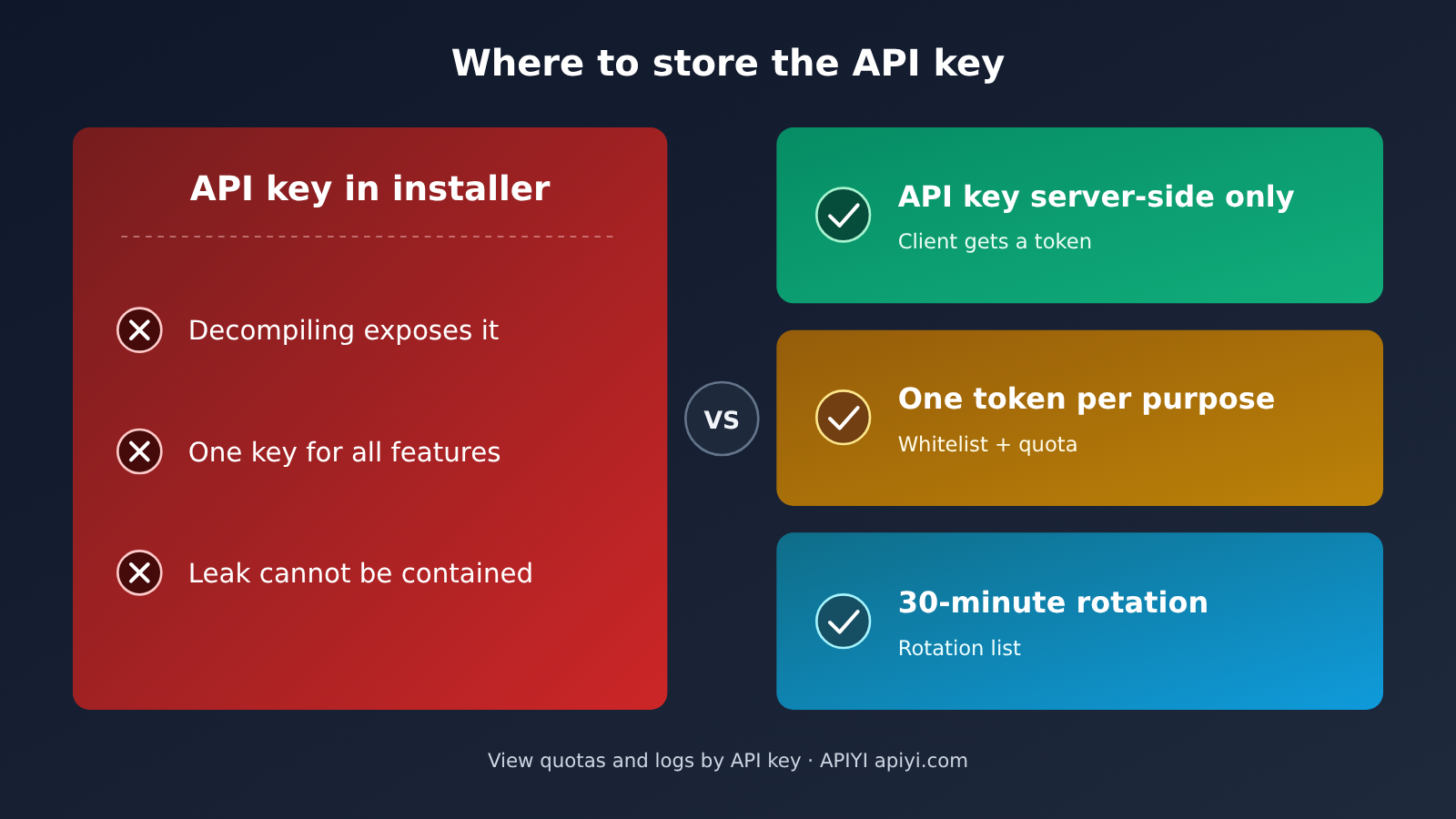
Let’s start with the conclusion: the client should only hold a non-sensitive session token, and every model invocation should go through your own backend or gateway. There should never be a string starting with sk- anywhere in your app bundle — and no combination of endpoint URLs and parameters that could be used to swap out a key, either.
Lots of teams try to “obfuscate the key” or “tuck it into a native .so library,” but against industrial-grade reverse engineering that buys you essentially nothing. It’s only a matter of time before someone scans it out, and those scan results get distributed in real time. There’s really only one correct architecture: the client talks to your backend carrying its own login state, and the backend talks to the model carrying the key.
The Minimal Server-Side Call
When your server uses an OpenAI-compatible SDK, all you need is to read the key from an environment variable and point the base URL at your unified gateway. Two lines of configuration do the job:
- Read the key:
api_key=os.environ["APIYI_API_KEY"] - Point to the gateway:
base_url="https://api.apiyi.com/v1"
After that, just call client.chat.completions.create(model=..., messages=...) as usual, swapping the model ID for one you’ve confirmed is available in the APIYI console. The point here isn’t which SDK you pick — it’s that the key lives only in the server process’s environment variables or a secrets management service, and never ships with the installer.
The Full Client-to-Server Path
A minimal viable path looks like this:
- The client calls your own endpoint, say
/api/ai/chat, with only the session token it got after the user logged in. - The server validates the session token, applies per-user rate limiting (requests per minute per user, for example), and rejects unauthenticated requests.
- The server uses the key from its environment variables and forwards the request to the model with
base_urlset tohttps://api.apiyi.com/v1. - The server returns only the model’s output to the client — no keys, no upstream addresses, no billing details.
That way, even if someone tears your APK apart from top to bottom, all they get is a session token that expires and is bound to a specific user identity.
🚀 Quick-start tip: If your backend needs to work with OpenAI, Claude, Gemini, and other providers at the same time, you can route everything through a single OpenAI-compatible interface via APIYI at apiyi.com. Your server maintains just one set of configs, and new users get free test credits to validate the whole path.
One Token per Purpose: The Second Rule of API Key Management
Once the key lives on the server, step two is making sure a single key doesn’t do everything. One token per purpose, each with its own quota cap, model allowlist, and expiration — that way, when something goes wrong, the blast radius stays contained, and a glance at the logs tells you which feature broke.
APIYI tokens let you set a dedicated quota, expiration time, allowed models, and group for each individual key. Consumption, remaining quota, and call logs are all viewable per token, independently of the others, and the console entry point is api.apiyi.com/token. When you create one, you can either leave the model allowlist unset (all site models available) or open up only specific models. A key used by a frontend feature should only be allowed the one model it actually needs.
| Token purpose | Naming example | Model allowlist | Suggested quota and expiration |
|---|---|---|---|
| App production chat | app-prod-2026-11 |
Only the single model that feature uses | Monthly quota cap, quarterly expiry |
| Internal testing | app-staging |
A small number of models under evaluation | Small quota, short expiry |
| Batch processing jobs | batch-summary |
Only the batch model | Daily limit, disable once the job finishes |
| Individual developer debugging | dev-zhangsan |
As needed | Tiny quota, auto-expires |
Token Management API and Quota Units
If you have a lot of tokens, maintaining them by hand is error-prone. APIYI’s token management API supports programmatic creation, querying, disabling, and deletion of keys, with triple constraints on quota, models, and expiration — plus per-key daily limits that automatically reset the next day. Note that remain_quota is denominated in quota units, where 500,000 corresponds to $1.00 — don’t treat it as dollars when you’re writing scripts.
The token management API requires a personal access token, which starts with nap_. This key itself can’t call models, but it can mint keys that do, which actually makes it more privileged: set an IP allowlist, store it in a secrets manager, and never commit it to a code repo. Don’t forget the other pipeline the Anthropic report harvested: GitHub personal access tokens.
As for pricing, refer to APIYI’s model price table for input, output, and cached-read unit prices (the data referenced at the time of writing is dated 2026-11-25). When you set a quota cap on a token, just work backward from those three unit prices for your chosen model and your estimated call volume.
💰 Cost control tip: Another benefit of one token per purpose is that bills become separable. Looking at consumption by token in the apiyi.com console lets you pinpoint which feature is burning money, and makes it easier to quickly assess the damage if a leak happens.
Change on Incident: A 30-Minute API Key Rotation Checklist
The third thing is to write the rotation process ahead of time, instead of improvising on the day things go wrong. The checklist below is meant to be executed in order — under normal circumstances, the switch can be completed within 30 minutes, not counting the observation period afterward.
| Step | Action | Checkpoint |
|---|---|---|
| 1 | Create a new key in the console, name it clearly by purpose (e.g. app-prod-2026-11), set a quota cap, model whitelist, and expiry date |
New key permissions no broader than the old key |
| 2 | Point the server config at the new key, first canary a small slice of traffic | Watch the logs for 5 minutes for 401 and abnormal 429 |
| 3 | Disable the old key first — don’t delete it right away | Keep it for 24 hours and watch for errors from anything you missed |
| 4 | Check the old key’s call logs | Whether there were calls from IPs outside yours or at times outside yours during the leak window, and whether quota consumption spiked |
| 5 | Add two monitors | Per-key daily consumption cap, per-key call-volume spike alert |
| 6 | Add it to the release checklist | Keys no longer live in the code repo — inject them via environment variables or a secret service |
Execution details of the rotation checklist
Step 3, “disable first, delete later,” is the one most often skipped. Deleting outright is cleaner, but if some cron job or older service version is still using the old key, you’ll get a pile of errors in the middle of the night with no easy way to pinpoint the cause; with the key disabled, the errors cluster together, making them much easier to track down.
The log review in step 4 determines the nature of the incident. If it’s just a routine rotation, clean logs mean you’re done. If you find unfamiliar IPs or calls at unusual times, treat it as a real leak: trace back where the key leaked out from — an installer package, a repo, or some log file — and plug the source, otherwise the new key will soon meet the same fate.
🎯 Technical Tip: It’s best to rehearse the rotation process once during normal times. Create a test token on APIYI apiyi.com and walk through the checklist end to end, confirming that logs, alerts, and config injection all work — that way, when a real incident hits, you won’t be scrambling.
FAQ
Q1: When AI scanned 1.8 million APKs looking for keys, does that mean 1.8 million apps leaked theirs?
No. The 1.8 million figure is the number of distinct Android APKs that the attackers’ pipeline downloaded, decompiled, and scanned. Anthropic didn’t disclose how many apps turned out to be hits or how many credentials were actually valid, and third-party write-ups are explicit that this is a scan count, not a leak count.
Q2: How likely is it that my model key gets swept up?
From what we can see in the data, the bulk harvesting concentrated on cloud credentials, payment keys, and OAuth tokens; in Cybernews’s tally, keys pointing directly at Large Language Model providers were a very small share. That said, the iOS research found that 64% of LLM apps exposed credentials or a backend access path — so this kind of problem isn’t rare, and when it does leak, you’re the one footing the bill.
Q3: Can I just obfuscate or encrypt the key and ship it inside the app package?
Not advisable. The client still has to send requests with the plaintext key eventually, and the decryption logic ships in the package too. Against industrial-scale decompilation and traffic analysis, that only adds a little cost — it won’t stop bulk scanning. The right approach is to keep the key server-side only and hand the client nothing but a session ticket.
Q4: Does the same apply to mini programs and desktop clients?
Yes. Any code that gets distributed to users’ devices is the same class of risk surface as an APK. The Anthropic report notes that attackers dig through mobile apps, websites, code repositories, and container registries — mini program bundles and desktop installers are squarely in scope too.
Q5: What’s a quick way to split tokens by feature?
In the token page of the APIYI console, create a new key for each feature and set its quota, expiry date, and allowed models. If you have a lot of them, you can create them programmatically through the token management API. On the server, use `https://api.apiyi.com/v1` as the `base_url` for everything — switching tokens then means changing an environment variable, not the code. New users can sign up at apiyi.com and use the free trial quota to get things working first.
Q6: If I find out a key leaked, what’s step one?
Create a new token with no more permissions than the old key, switch the server over to it, then disable the old key immediately — and after that, work through the checklist: check logs, add monitoring. If you’re using APIYI’s separate-token setup, you can view call logs for each key individually, which makes it much faster to spot anomalous calls during the exposure window.
Q7: What are the limits of this approach?
Server-side forwarding adds one extra network hop, and you have to maintain per-user rate limiting yourself. The finer you split tokens, the higher the management overhead, so pair it with the token management API for automation. And it only solves for “keys don’t leak, and leaks can be contained” — it doesn’t replace auditing other sensitive material such as cloud credentials and payment keys.
AI Scraping APKs for Keys: Key Takeaways
- Get the numbers right: 1.8 million is the number of APKs scanned — not the number of apps that leaked, and definitely not the number of AI keys
- Scanning is now industrialized: publish an app and it gets scanned; results are distributed in real time, so hiding keys behind obfuscation doesn’t stand a chance
- Guard cloud and payments first: cloud credentials, payment keys, and OAuth tokens are the main targets of bulk harvesting
- Don’t overlook model keys: they don’t leak as often, but the bill for stolen usage lands entirely on you
- Keys never live in the client: the client only carries a session ticket; every model invocation goes through the server or a unified gateway
- One token per purpose: each with a quota cap, model whitelist, and expiry, with logs tracked per key
- Rehearse rotation in advance: get the 30-minute checklist working in peacetime — you can run through it once with an APIYI test token
Summary
Of the 1.8 million APKs in Anthropic’s report, what’s truly worth worrying about isn’t “how much leaked” — it’s that “scanning has become an assembly line.” Combining the two sets of comparative data from iOS and Android, cloud credentials, payment keys, and OAuth tokens are the main targets of bulk harvesting. Model keys may account for a smaller share, but the billing risk after a leak is very real.
For teams shipping AI features inside client apps, there are three things you can do today:
- Keep keys out of the client: all model invocations go through the server, and no keys appear anywhere in the install package.
- One token per purpose: set a quota cap, model whitelist, and expiry, and watch logs per key.
- A 30-minute rotation checklist: create new, roll out gradually, disable the old, check logs, add monitoring, and write it into the release checklist.
If you’re connecting multiple models to your server, we recommend routing everything through APIYI apiyi.com with tokens split by purpose — and using the free quota to run the whole “server-side invocation plus token rotation” chain end to end first.
📚 References
-
Anthropic Threat Intelligence Report: September 2026 report on adversarial AI abuse, including the GTG-50014 case
- Link:
anthropic.com/threat-intelligence-report-september-2026 - Notes: original wording of the 1.8 million APK scanning pipeline
- Link:
-
BleepingComputer article (2026-09-11): news coverage of the same case
- Link:
bleepingcomputer.com/news/security/hackers-abused-claude-to-extract-secrets-from-18m-android-apps - Notes: additional detail on the pipeline’s scale and the operators’ background
- Link:
-
Cybernews report (2026-01-28): analysis of hardcoded keys in Android AI apps
- Link:
cybernews.com/security/android-ai-apps-leaking-google-secrets - Notes: the 72% and 68% figures, plus the assessment of model key risk
- Link:
-
APIYI token and group documentation: token quotas, model allowlists, group configuration
- Link:
docs.apiyi.com/faq/token-and-groups - Notes: the basis for the one-token-per-purpose setup
- Link:
-
APIYI token management API: programmatic creation, disabling, and deletion of tokens
- Link:
docs.apiyi.com/api-capabilities/token-management - Notes: bulk management and an explanation of the
remain_quotaquota unit
- Link:
Author: APIYI Technical Team
Technical discussion: Feel free to reach us through the APIYI apiyi.com homepage; more token and security configuration resources are available at the docs.apiyi.com documentation center


