

Summary: When the Gemini API returns a 503, you can route the request to a backup model. The catch is that the backup model must already be validated against the same task contract — it has to accept the original request’s image input and return JSON that passes schema validation. And all of it has to happen inside the same deadline.
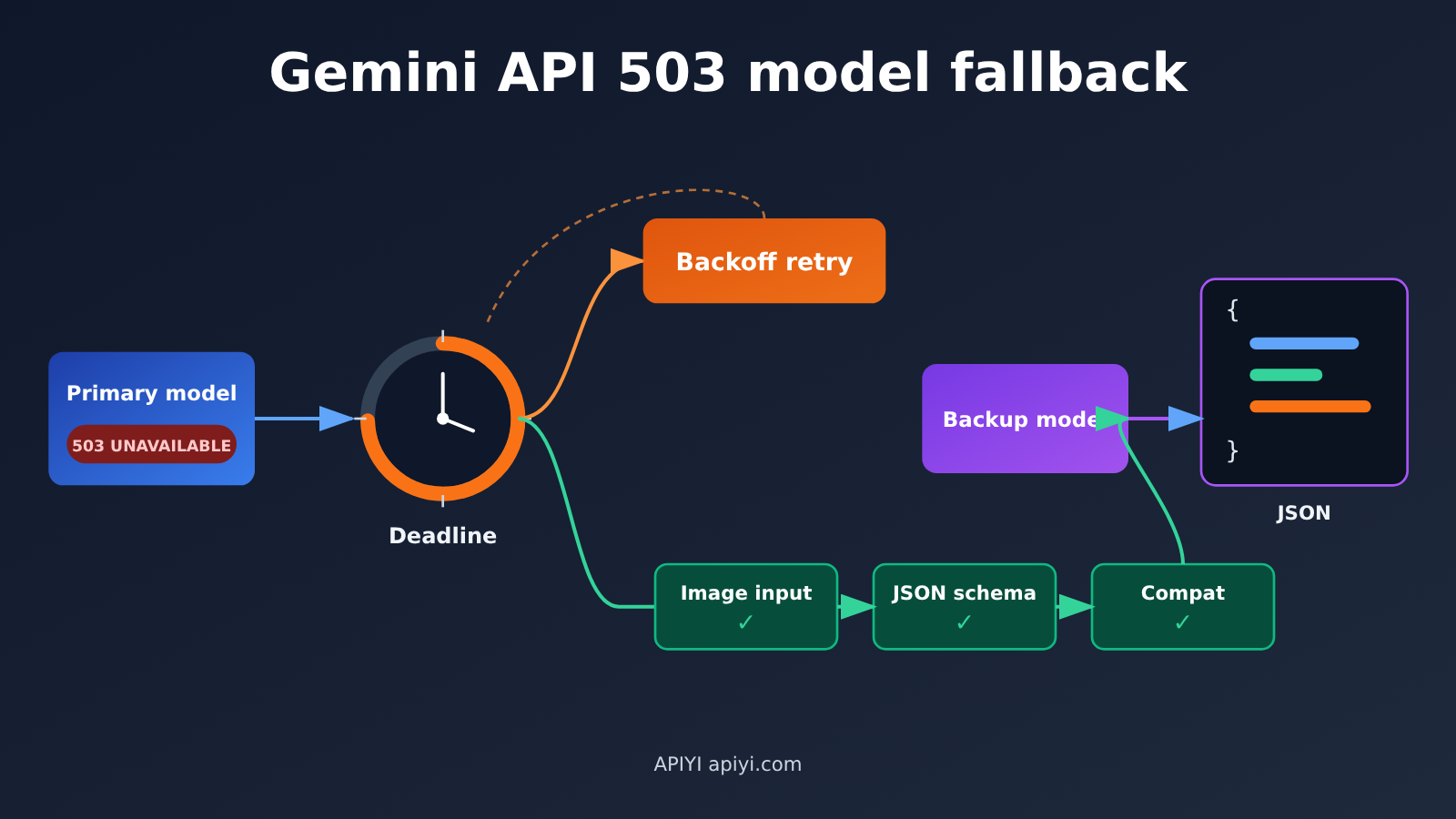
Bottom line first: When you’re dealing with a Gemini API 503, don’t rush to swap out the model name. Work through these steps instead.
- Confirm this is a safely replayable
503 UNAVAILABLE, not a 429, 400, or 403. - From the total duration the user will tolerate, set aside time for the fallback call and for wrapping up. The primary path only gets to do jittered backoff retries within what’s left of the budget.
- When the primary path runs out of budget, move only the requests that are allowed to fall back — and that have already passed validation — over to the backup model. Validation covers: whether image or PDF input is accepted, whether the structured JSON matches the schema, whether the semantics of key fields are correct, and whether token limits and parameter values are compatible.
- If there’s no qualified backup model, or several candidates fail at the same time, return “temporarily unavailable” to the frontend within the budget. Don’t wait forever.
Knowledge Map: Gemini API 503 Model Fallback Flow
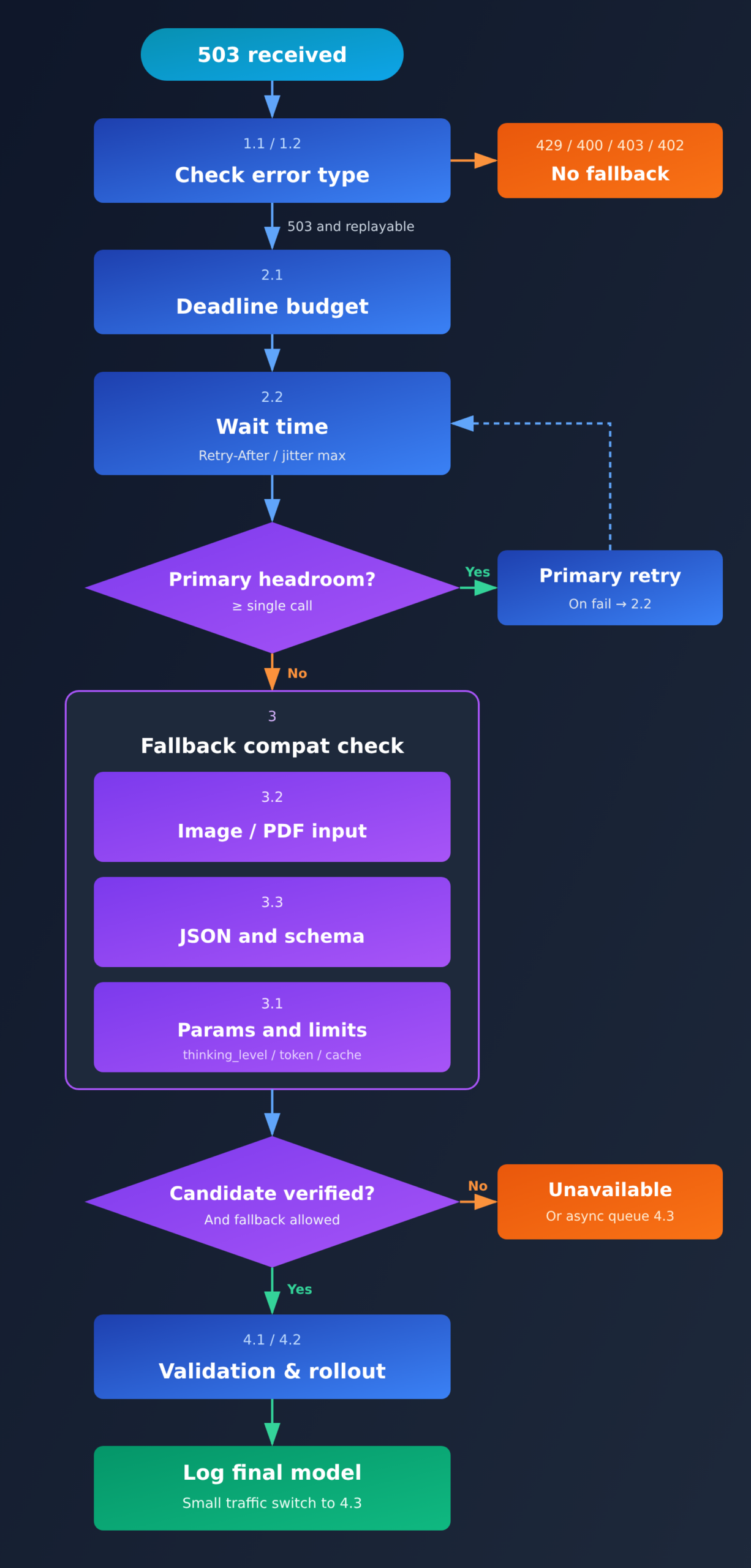
Caption: The main line is “detect → budget → compatibility → rollout”. Only when it’s confirmed to be a 503 and the request can be replayed do we enter the budget step; only when the budget is insufficient and the candidate model passes all three checks—images, JSON, and parameters—do we actually switch. If any condition isn’t met, we go straight to the “temporarily unavailable” or “async queue” exit.
Index: Section 1 answers “is this a 503?” and scopes everything that follows. Section 2 lays out the time budget and retry rules, which determine when to abandon the primary path. Section 3 covers the pre-switch compatibility checks and is the focus of this article. Section 4 turns the check results into runnable code, validation samples, and rollout rules. Section 5 is a reference you can consult as needed, to replace old patterns with new ones.
To Know
| Term | Brief explanation |
|---|---|
UNAVAILABLE |
The error.status corresponding to 503 in Gemini’s native error body, indicating the service may be temporarily overloaded or down |
| Backoff and jitter | Waiting an increasing amount of time before each retry, with a random value picked within the interval to keep many clients from retrying all at once |
Retry-After |
An HTTP response header that tells the client how long to wait, in seconds or as an HTTP date |
| Structured output | Having the model return data according to a specified JSON schema so programs can parse it directly |
| thought signatures | Signatures from earlier model turns in Gemini multi-turn conversations that must be passed back verbatim; this needs special handling when switching models |
1. How to Decide Whether a Gemini API 503 Warrants Model Downgrade
1.1 What a Gemini API 503 Error Body Looks Like
On the GenerateContent route of the Google Gemini Developer API, This model is currently experiencing high demand maps to HTTP 503. In the JSON, error.code is the integer 503, error.status is UNAVAILABLE, and there’s an optional error.details that provides context. Google’s advice for a 503 is: check the official status page, retry after a short wait, or temporarily switch to a different model.
Keep in mind that a single 503 response only tells you “this route is temporarily unavailable right now.” It doesn’t say how far the outage reaches, and it doesn’t give any recovery time. So a 503 is a good basis for deciding “back off first,” but not for deciding “switch permanently.”
Before you start troubleshooting, confirm the host, API version, and method your client is actually calling. Native GenerateContent lives at /v1beta/models/{model}:generateContent on generativelanguage.googleapis.com. The Interactions interface, also part of the Developer API, uses the string error code service_unavailable, and some errors in the SSE stream arrive as event_type: error events. If you’re calling through APIYI apiyi.com’s OpenAI-compatible interface, the response may be wrapped in a compatibility-layer JSON envelope. In that case, parse the object you actually receive on the caller side first, capture the upstream trace information, then classify it using Google’s fields.
1.2 Telling a Gemini API 503 Apart from 429, 400, and 403
Many “downgrade goes wrong” cases come down to lumping different error types together. The table below maps HTTP numeric codes, together with the error body, to the direction you should take:
| HTTP code | Typical status | Common meaning | Enter model downgrade? |
|---|---|---|---|
| 503 | UNAVAILABLE |
Service temporarily overloaded or down | Yes — back off first, switch only if the budget runs out |
| 429 | RESOURCE_EXHAUSTED |
Hit a requests-per-minute, tokens-per-minute, requests-per-day, or spend limit | Check the actual quota for your project and model first |
| 402 | RESOURCE_EXHAUSTED |
Prepaid credit exhausted | No — handle the billing issue |
| 400 | Depends on details | Malformed request | No — fix the request |
| 403 | Depends on details | Insufficient entitlement or permission | No — check permissions |
Both 429 and 402 can carry the RESOURCE_EXHAUSTED status, so you have to look at the HTTP numeric code first. Gemini API quotas are calculated per project, and multiple keys under the same project share that quota. The idea of adding more keys to absorb 503s simply doesn’t hold up.
2. Controlling Gemini API 503 Retries with a Deadline
2.1 A 20-Second Budget Example for Gemini API 503
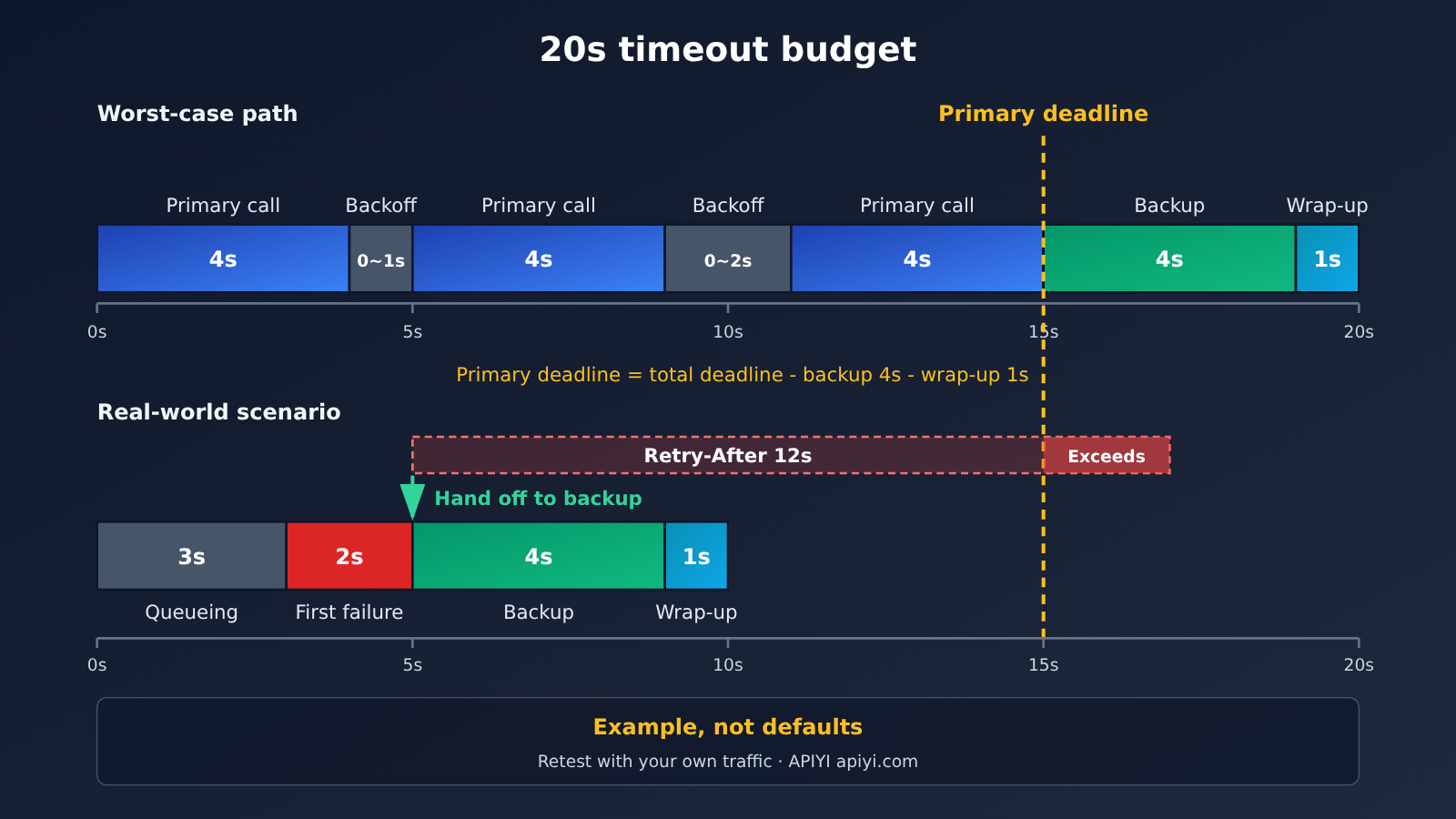
Google recommends exponential backoff with random jitter and a maximum attempt count for retryable transient errors. In practice, a more workable engineering approach is to set a single absolute deadline: waiting, sending the request, and receiving the complete response all come out of that same budget. Start with the total duration the user can tolerate, subtract queueing time, wrap-up time, and the time the fallback model needs — whatever’s left is the budget available for the primary path.
The example below is an application-layer calculation, not an official default. It applies to lightweight synchronous requests that you’ve already evaluated and that can finish within this limit:
| Budget item | Setting | Max duration |
|---|---|---|
| Primary model invocation | First attempt + 2 retries, at most 4 seconds each | 12 seconds |
| Backoff before 1st retry | Uniform sample from 0–1 second | 1 second |
| Backoff before 2nd retry | Uniform sample from 0–2 seconds | 2 seconds |
| Fallback model invocation | 1 attempt, at most 4 seconds | 4 seconds |
| Response wrap-up | Fixed reserve | 1 second |
| Total | — | 20 seconds |
Queueing time draws on those same 20 seconds, too — the longer you wait in line, the fewer attempts the primary path gets. Production parameters should be based on your service’s latency targets, time to first useful content, and full output duration. Don’t just copy these numbers.
2.2 Retry-After and Jitter Values for Gemini API 503
Whenever you hit a safely replayable 503 UNAVAILABLE, first sample a local wait time within the current backoff window. If the response includes a valid Retry-After, read it according to its encoding: if it’s a number of seconds, use that directly; if it’s an HTTP date, convert it to a wait time in seconds. The actual wait on the primary path is the larger of the locally sampled value and the value suggested by the response.
Let’s look at the same example: the request had already been queued for 3 seconds before entering the primary path, and the first call failed after 2 seconds, leaving 15 seconds in the total budget. After setting aside 5 seconds for fallback and wrap-up, the primary path has 10 seconds left.
- If the first 503 includes
Retry-After: 12, the wait time already exceeds the remaining primary-path budget, so there’s no point in waiting longer. The remaining time should go to a fallback model that isn’t affected by the same scope and has already been validated. - If there’s no such hint and the jitter sample is 0.6 seconds, the primary path can still accommodate a next call of up to 4 seconds, so you can keep retrying.
2.3 When to Stop Automatic Retries for Gemini API 503
Stop automatic retries on the primary path if any of the following occurs:
- After subtracting the wait time, the remaining primary-path budget is shorter than one valid call.
- The attempt count is exhausted, or the request has been canceled.
- The status code has changed to a client error that needs to be fixed.
- Part of the SSE output has already been delivered to the frontend, or a tool action with side effects has already been executed. In that case, use the interrupted-recovery flow and first check the business records to confirm whether the tool has already run.
There’s also a less obvious trap: retries stacking on top of each other. Google’s troubleshooting guide notes that the official Python SDK’s default policy for transient errors is up to four retries, with an initial interval of about 1 second and a maximum delay of 60 seconds (depending on the version and configuration you actually deployed). Suppose the outer business code also retries three times, and each inner call hits the upper limit—then a single request can generate up to 15 attempts. The OpenAI Python SDK also has built-in retries. So only one layer should own retries; disable retries in the other layers or fold them into the same budget, and record every attempt in a single trace.
3. Fallback Model Compatibility Checks Before Degrading Gemini API 503
This section is the heart of the article. Finding a model that returns 200 in the catalog doesn’t mean it can pick up your original request. You should build your candidate list by task—for example, one group for structured document extraction, another for image generation—and verify each group separately.
3.1 Checking Fallback Model Specs and Parameters for Gemini API 503
Start with Google’s model page and the models.get docs to verify the candidate’s actual ID, supportedGenerationMethods, and input/output token limits. A 200 from models.list only tells you the metadata route responded and the key exists. Google explicitly states that this endpoint doesn’t check project-level eligibility or billing status. Whether your project actually has inference permission has to be judged from real invocation records in an authorized environment.
Take two models from the official specs as an example; the differences look like this:
| Check | gemini-4-hydrogen |
gemini-3.8-flash |
What to do when degrading |
|---|---|---|---|
| PDF input | Listed as supported | Listed as supported | Still needs sample validation |
| Structured output | Listed as supported | Listed as supported | Validate with the same schema |
| Function calling | Listed as supported | Listed as supported | Check arguments and duplicate submissions |
| Token limits | Input, thinking, and output share a 1,048,576 window | Input 1,048,576, output 65,536, counted separately | Filter out tasks that exceed the candidate’s output cap |
thinking_level |
Supports xhigh |
low, medium, high |
Filter out xhigh, or preset a compatible value for queues that can degrade |
| Context caching | Only implicit caching supported | Refer to official specs | Requests relying on explicit caching must remove cached_content |
| Available platforms | Google official, APIYI apiyi.com (use the ID actually listed in the console) | Same as left | Validate with the actual ID |
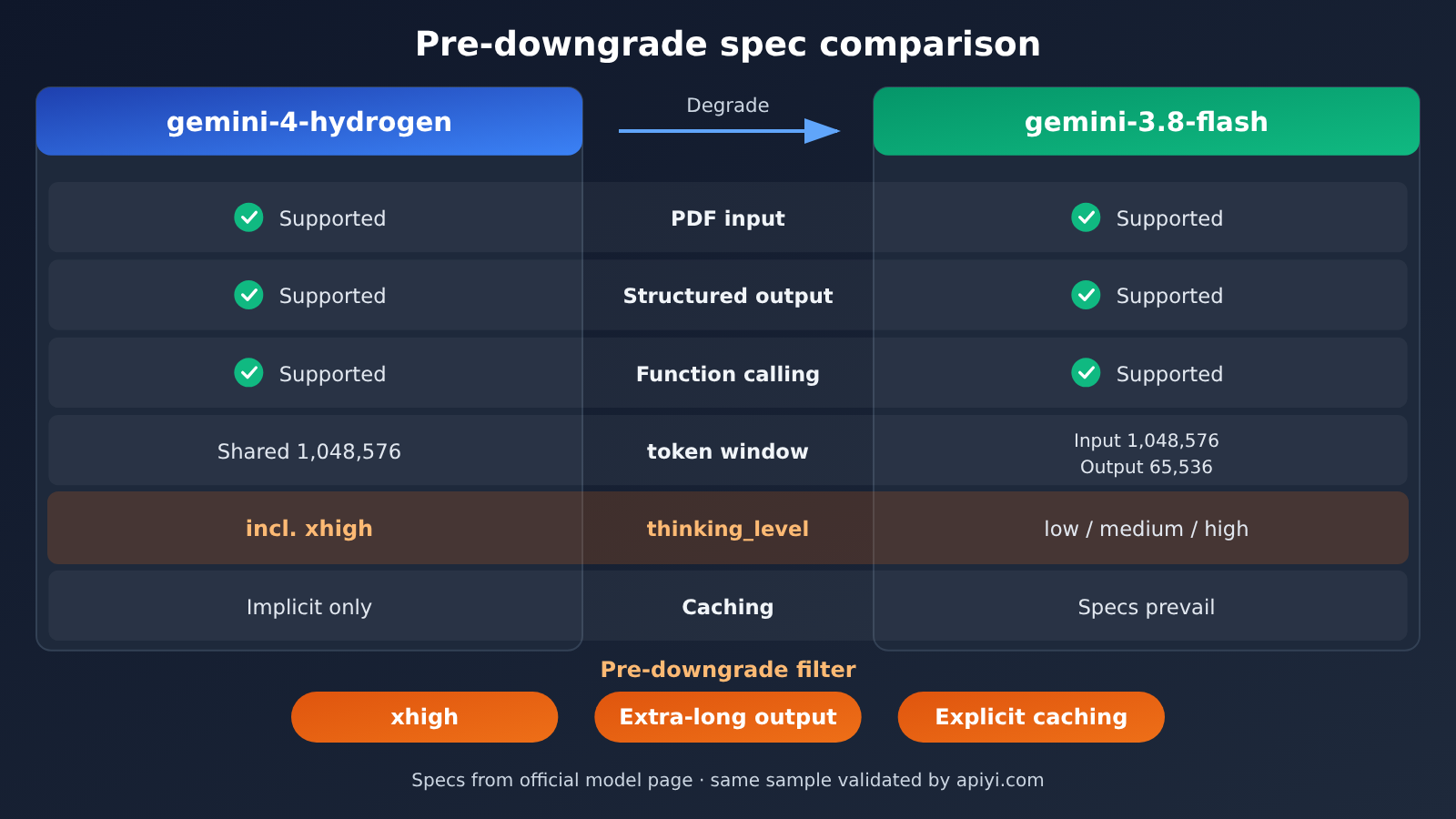
Here’s an example: when you emergency-shift Hydrogen requests over to 3.8 Flash, filter out tasks that carry xhigh in the switch config, along with tasks whose output might exceed 65,536 tokens. Going the other direction, if a request relies on explicit caching, remove cached_content per the migration guide, put the needed context back into the input, and recalculate the context length and cost.
3.2 Checking image input when Gemini API returns 503 and falls back to a backup model
Image input is the easiest thing to overlook during a fallback. What the primary model can accept as an image isn’t necessarily what the backup model can accept in the same way. And even when both can accept it, how many tokens the image converts into—and whether that pushes you past the context window—may differ. Go through these items one by one:
- Does the capability exist? Check the model page to confirm whether the candidate supports image input. Verify PDF and audio separately—don’t assume image support just because PDF is supported.
- Is the input method consistent? The native API and the OpenAI-compatible API use different structures for passing images. When calling through the APIYI compatible endpoint, treat the actual response as the source of truth—confirm the model really read the image rather than silently dropping it.
- Is the length still within the limit? Image plus text plus expected output all needs to fit within the candidate’s token limit.
- Is the semantics equivalent? Use the same image to check recognition of key fields—amounts, dates, table cells—rather than just eyeballing the format.
If the task itself is image generation, pick candidates with image output capability, and keep a separate list from text-extraction tasks.
3.3 Checking JSON output and schema when Gemini API returns 503 and falls back to a backup model
Structured JSON is the contract that downstream programs parse directly. A backup model emitting text that “looks like JSON” does not mean it passes acceptance. I suggest checking at three layers:
- Can it be parsed? Does the result parse cleanly with
json.loads, or is it wrapped in Markdown code fences or explanatory text? - Does it match the schema? Are required fields, types, and enum values consistent with the same JSON schema the primary model uses?
- Are field semantics correct? Do the field values actually correspond to the input content—for example, did it put the “tax-inclusive amount” into the “tax-exclusive amount” field?
For the native API, you can pass the schema according to Google’s structured output documentation. Whether the compatible API supports the corresponding structured parameters, and to what extent, depends on actual call results. The safest approach is: regardless of what the upstream claims to support, have the client run a local validation against the schema—if it fails, declare this fallback attempt a failure and don’t hand bad data to downstream systems.
4. Acceptance and Rollout for Gemini API 503 Model Fallback
4.1 Acceptance Samples for Gemini API 503 Fallback Models
Your acceptance samples should cover at least three categories: common inputs, boundary-length inputs, and one complete tool interaction. For each one, check the response schema, the meaning of key fields, tool parameters, whether the request is submitted twice, and the time to first valid content and to the full response.
Multi-turn sessions need their own acceptance pass. Google’s migration guide requires that for generateContent sessions maintained by the client, the previous model turns and thought signatures must be sent back as-is. Before switching between models, validate multi-turn tasks against the same task contract, and plan ahead for a session starting point you can rebuild, so the context won’t break after the switch.
4.2 Python Example: Handling Gemini API 503 with Fallback
The example below relies only on client-side schema validation and doesn’t assume the compatible endpoint supports any specific structured-output parameters. SDK built-in retries are turned off with max_retries=0, so this single layer handles all deadline-driven retries.
import json, random, time
from email.utils import parsedate_to_datetime
import openai
from jsonschema import validate  # pip install jsonschema

client = openai.OpenAI(
    api_key="YOUR_API_KEY",
    base_url="https://api.apiyi.com/v1",  # APIYI OpenAI-compatible endpoint
    max_retries=0,                         # Disable SDK built-in retries; keep a single layer
)

PRIMARY, FALLBACK = "gemini-4-hydrogen", "gemini-3.8-flash"  # Use the actual IDs shown in the console
SCHEMA = {
    "type": "object",
    "required": ["invoice_no", "amount", "date"],
    "properties": {
        "invoice_no": {"type": "string"},
        "amount": {"type": "number"},
        "date": {"type": "string"},
    },
}
View the complete deadline-retry and fallback code
import json, random, time
from email.utils import parsedate_to_datetime
import openai
from jsonschema import validate, ValidationError

client = openai.OpenAI(
    api_key="YOUR_API_KEY",
    base_url="https://api.apiyi.com/v1",  # Call everything through APIYI
    max_retries=0,
)

PRIMARY, FALLBACK = "gemini-4-hydrogen", "gemini-3.8-flash"
PER_CALL, FALLBACK_RESERVE, FINISH_RESERVE = 4.0, 4.0, 1.0
SCHEMA = {
    "type": "object",
    "required": ["invoice_no", "amount", "date"],
    "properties": {
        "invoice_no": {"type": "string"},
        "amount": {"type": "number"},
        "date": {"type": "string"},
    },
}

def parse_retry_after(value):
    """Retry-After may be a number of seconds or an HTTP date"""
    if not value:
        return 0.0
    try:
        return max(0.0, float(value))
    except ValueError:
        try:
            return max(0.0, parsedate_to_datetime(value).timestamp() - time.time())
        except Exception:
            return 0.0

def run_once(model, image_data_url, timeout):
    resp = client.chat.completions.create(
        model=model,
        timeout=timeout,
        messages=[{
            "role": "user",
            "content": [
                {"type": "text", "text": "提取发票号、金额、日期,只输出 JSON 对象。"},
                {"type": "image_url", "image_url": {"url": image_data_url}},
            ],
        }],
    )
    text = resp.choices[0].message.content.strip()
    text = text.removeprefix("```json").removeprefix("```").removesuffix("```").strip()
    data = json.loads(text)          # Layer 1: can it be parsed?
    validate(data, SCHEMA)           # Layer 2: does it match the schema?
    return data                      # Layer 3 semantic checks are left to business rules

def extract(image_data_url, budget=20.0, allow_fallback=True):
    deadline = time.monotonic() + budget
    primary_deadline = deadline - FALLBACK_RESERVE - FINISH_RESERVE
    hint = 0.0
    for attempt in range(3):                       # Initial call + 2 retries
        if attempt > 0:
            wait = max(random.uniform(0, 2 ** (attempt - 1)), hint)
            if time.monotonic() + wait + PER_CALL > primary_deadline:
                break
            time.sleep(wait)
        if time.monotonic() + PER_CALL > primary_deadline:
            break
        try:
            return run_once(PRIMARY, image_data_url, PER_CALL), PRIMARY
        except openai.APIStatusError as e:
            if e.status_code != 503:
                raise                              # 429/400/403 etc. do not trigger a fallback
            hint = parse_retry_after(e.response.headers.get("retry-after"))
    if allow_fallback and time.monotonic() + PER_CALL + FINISH_RESERVE <= deadline:
        try:
            return run_once(FALLBACK, image_data_url, PER_CALL), FALLBACK
        except (openai.APIStatusError, json.JSONDecodeError, ValidationError):
            pass                                   # Give up if the fallback fails
    raise RuntimeError("暂不可用,请稍后重试")
🚀 Quick start: the code above can run as-is once you point
base_urlat APIYI apiyi.com. The same API key lets you call the primary model and the fallback model separately, so you can validate them side by side with the same image samples and the same schema. A new user’s free trial quota is enough to get through one round of acceptance samples.
The second value returned by the function is the model that was actually used, so be sure to log it. The example only retries on 503. Whether to retry a timeout depends on whether the request is idempotent — don’t apply this logic to requests that involve tool calls with side effects.
4.3 Ramping up, monitoring, and switching back after a Gemini API 503 fallback
For interactive requests, you can shift qualifying traffic over early based on the share of first attempts that returned 503, measured locally and grouped by model, project, and method — you don’t have to wait for every request to fail once first. When a status page or the logs show that several compatible candidates are failing at the same time, the front end should bow out within its budget rather than bouncing back and forth between failing models. Tasks that can tolerate asynchronous processing should go into a queue with expiry and task de-duplication. The official Batch API also targets non-urgent batch GenerateContent requests.
Track four metrics separately: first-attempt success rate, retry recovery rate, business pass rate after switching, and P95 total time. With those four numbers you can see how much output the extra attempts bought you and how much time they cost. Once the primary model recovers, shift a small slice of traffic back first and watch it, then ramp up gradually. For errors that keep recurring, pull together the UTC time range, model, API version and method, frequency, sanitized error body, and request tracking ID, and submit them through the Send feedback channel in Google AI Studio.
💡 Choosing a fallback: which candidate to pick depends on whether your task involves images, whether it needs a high thinking level, and whether the output is very long. We recommend running both the primary and fallback paths on real samples through APIYI apiyi.com, recording pass rate and latency, and then writing those numbers into your switching configuration.
5. Replacing Outdated Practices for Gemini API 503 Fallback
If your team is still running early 503-handling code or model chains, you can replace each item using the table below:
| Old approach | Problem | New approach |
|---|---|---|
Comment says “start at 2 seconds”, but the code uses 2 ** 0 |
The first round actually waits 1 second, and after the last failure you wait one extra time | Count against an absolute deadline, and track initial requests and retries separately |
max_retries=5 stacked on top of the SDK’s built-in retries |
Attempt counts multiply | Keep only one layer of retries and log each attempt |
Hardcoded fallback to gemini-2.5-flash |
It’s been removed from the AI Studio selector, and the official announcement states that from December 1, 2026, API requests are routed and billed to gemini-3.5-flash-lite |
Choose candidates based on the current catalog and project capabilities |
gemini-2.5-flash-image-preview, gemini-3-pro-preview |
The vendor’s shutdown dates are January 15, 2026 and March 9, 2026, respectively | Use verified catalog IDs |
“Changing only model is all it takes for compatibility” |
Ignores differences in image input, schema, parameters, and limits | Check and validate per Section 3 |
| Hardcoding peak failure rates, judging impact scope by the number of keys | Empirical numbers can’t be reused, and quotas are calculated per project | Go by routing, project quotas, and recent initial-request error metrics |
Also, statements like “the platform handles all 503s” should be removed. When you call through the APIYI compatible endpoint, rely on the response actually received on the caller side and on the observable trace fields, and treat Google’s native fields as upstream diagnostic evidence.
Acceptance Testing
Once the changes are in place, you’ll want a reproducible way to confirm they actually work. In a test environment, force the primary model to return 503 and construct the following scenarios:
- Two kinds of 503 responses: one with
Retry-Afterand one without; - An image that needs to be recognized;
- A case where the output deliberately omits a required field.
Then confirm four things: total elapsed time stays within budget; the logs show every attempt and the model that was ultimately used; the JSON with missing fields gets stopped by schema validation and never reaches downstream; and 429, 400, and 403 don’t accidentally fall into the fallback branch. Only when all four hold is this Gemini API 503 model fallback flow ready to ship.
References
- Google GenerateContent Error Reference: field descriptions for error bodies such as 503, 429, and 402
- Link:
aistudio.google.com/docs/api-errors?generate-content=true
- Link:
- Google Troubleshooting Guide · Retry Strategy: exponential backoff, jitter, and SDK default behavior
- Link:
aistudio.google.com/docs/troubleshooting#retry-strategy
- Link:
- Google Models API:
models.get/models.listand capability fields- Link:
aistudio.google.com/api-reference/models
- Link:
- Google Structured Output Docs: how to use JSON schema
- Link:
aistudio.google.com/docs/structured-output
- Link:
- Gemini 4 Hydrogen Migration Guide: cache removal and thought signature requirements
- Link:
aistudio.google.com/docs/whats-new-gemini-4-hydrogen
- Link:
- Google Deprecation and Routing Change List: retired models and routing changes
- Link:
aistudio.google.com/docs/deprecations
- Link:
- RFC 9110: definitions of
Retry-Afterand idempotency- Link:
rfc-editor.org/rfc/rfc9110.html
- Link:
Author: APIYI Technical Team
Technical discussion: Want to talk through multi-model fallback and acceptance testing approaches? Reach out to us through the APIYI apiyi.com homepage, and you’ll find more integration guidance in the docs.apiyi.com documentation center.


