

Summary: When a long response from Gemini 4 Argon or Carbon stops midway, first determine which limit was hit. Then, depending on the interface type and finish state, either continue with a continuation token or raise the budget and resend.
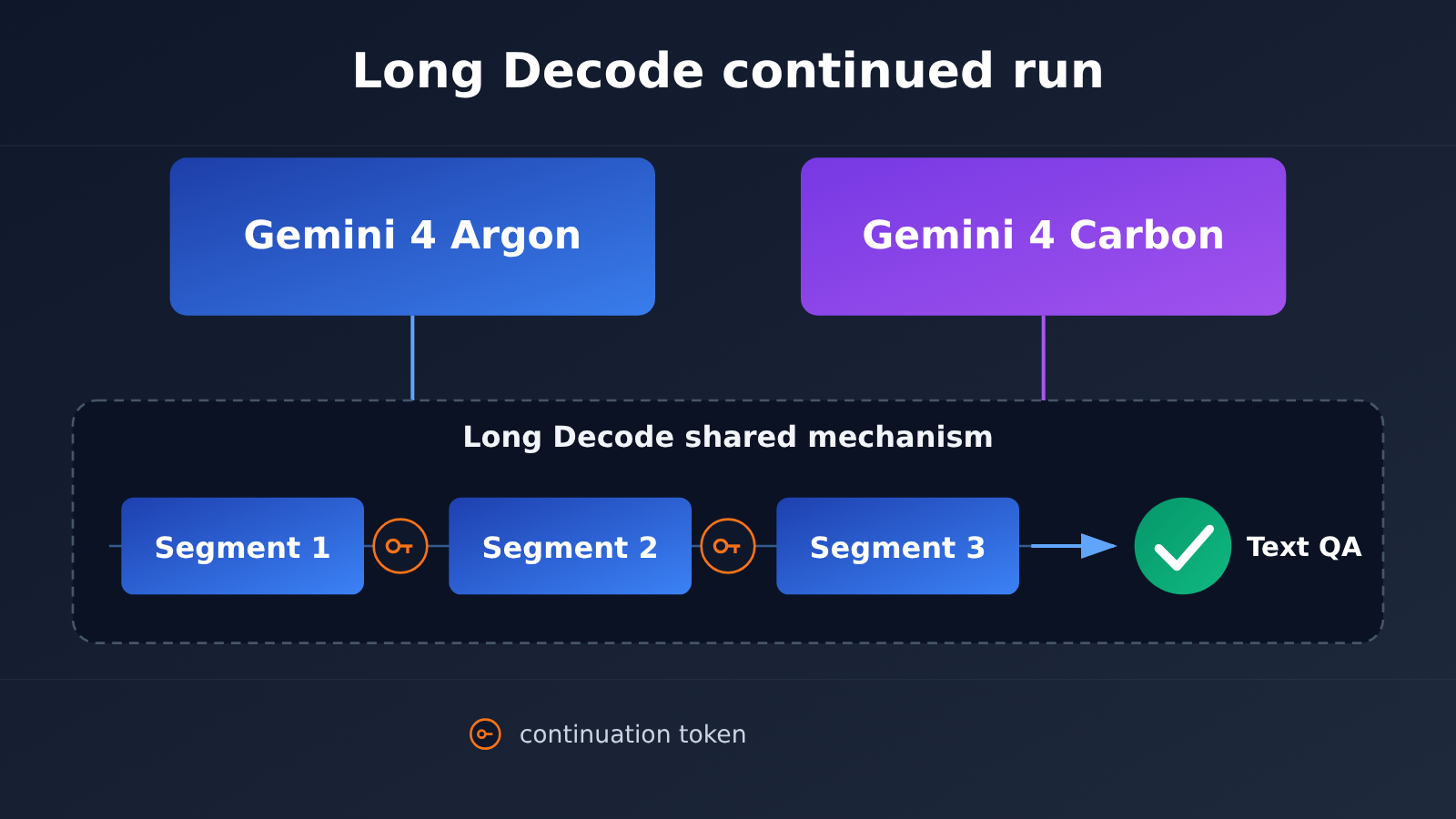
Bottom line first: Gemini 4 Argon and Gemini 4 Carbon use the same Long Decode mechanism, so the continuation rules are identical. Switching models doesn’t require changing the flow. There are three cases when a long response stops:
- A single segment hits its cap while the overall budget still has room: GenerateContent returns
CONTINUATION, and Interactions returnsrequires_continuation. In this case, include the latest continuation token and resend the same request. - The total output budget is exhausted: GenerateContent returns
MAX_TOKENS, and Interactions returnsincomplete. Here you must raise the budget above the amount already consumed before continuing. Continuing directly with the original budget returns 400. - The unified window is nearly full: continuation tokens won’t help; you can only reduce the per-call input at the application layer.
Whichever path you take, a successful HTTP response only means the request was processed—not that the response body is complete. Only when GenerateContent finishes normally, or Interactions reaches completed, do you move on to body verification.
The facts below were verified on November 25, 2026, Beijing time, against the Google Gemini Developer API documentation and a public developer question. The code in this article is an illustrative example organized around the documented fields; this article does not include hands-on testing of the two models.
Knowledge Map: Gemini 4 Argon vs Carbon Long Decode Continuation Paths
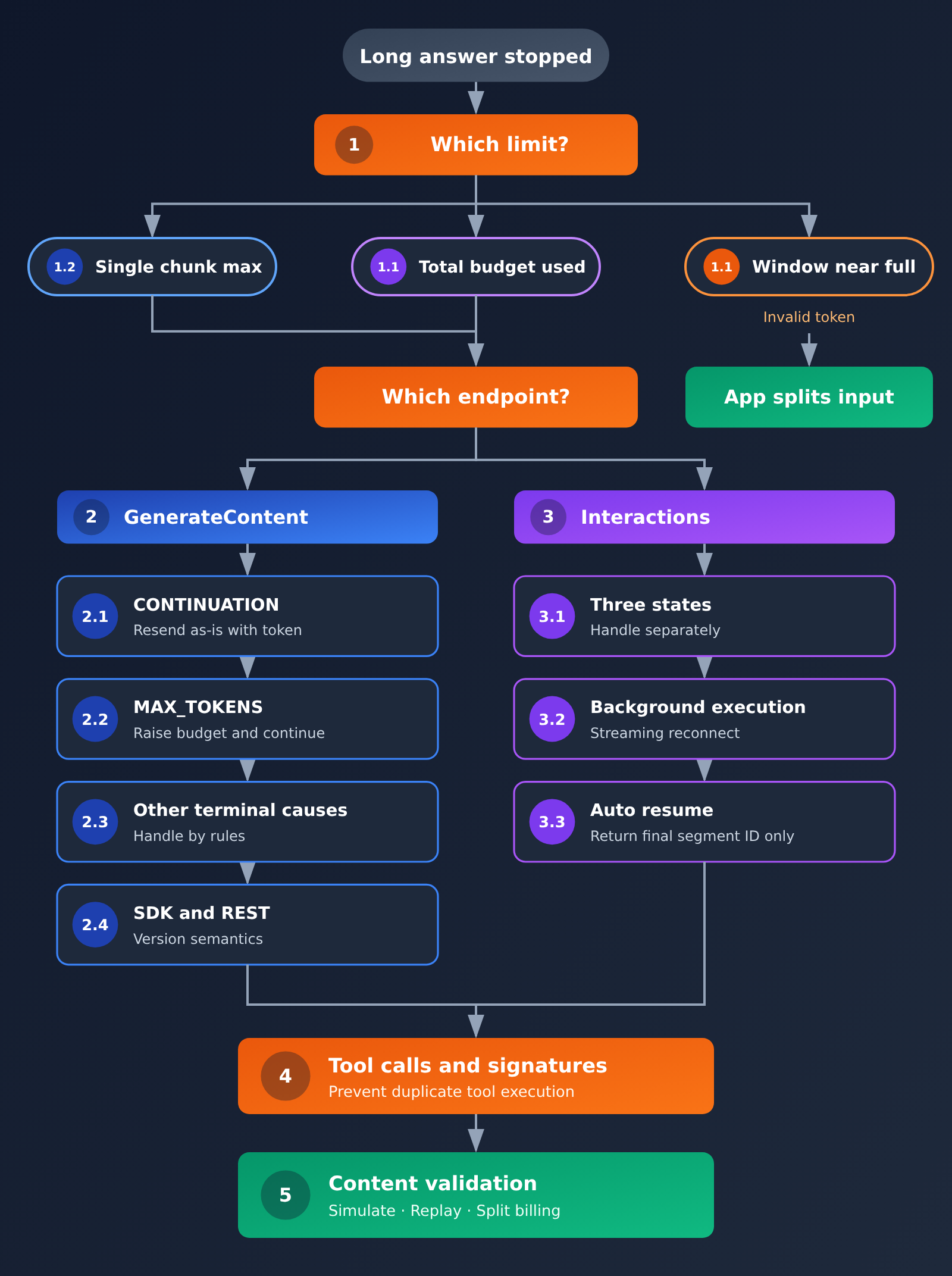
Figure caption: The whole map starts from “the long answer stopped.” The first decision is which kind of limit you hit: when the unified window is nearly full, you go straight back to application-layer input splitting; the other two cases are then routed by API. The left column is GenerateContent, driven by finishReason; the right column is Interactions, driven by resource state. Both columns end at the tool-and-signature checks in Section 4, then move on to body acceptance in Section 5.
Index:
- Section 1: Establish the criteria first. If you can’t tell “per-segment cap” from “total budget,” every later branch will go the wrong way.
- Sections 2 and 3: The continuation approaches for the two APIs. They’re parallel — if you only use one of the APIs, just read the matching section.
- Section 4: The boundary between tool calls and retries. Anyone using function calling should read this.
- Section 5: A verification method that doesn’t depend on a real long answer. Once you’ve read it, you can confirm locally that your stitching logic is sound.
To Know: Long Decode terminology
| Term | Plain explanation |
|---|---|
| Logical generation | One complete answer task, possibly assembled from several round trips |
| Unified context | The window shared by each logical generation; input, thinking, body text, and tool content all take up space in it |
| Total output budget | The max_output_tokens in the request, which caps thinking plus output combined |
| Per-segment cap | The maximum number of tokens a single round trip can return, which depends on how you call the model |
| Continuation token | A credential returned by the server that preserves the generation state up to that segment, used to continue into the next segment |
| Thinking signature | A credential bound to the message and tool-backfill chain, unrelated to length continuation |
1 First, Determine Which Long Decode Limit Gemini 4 Argon / Carbon Is Hitting
1.1 The Unified Window and Total Output Budget in Long Decode
According to Google’s Long Decode documentation, each logical generation uses one unified context of up to 1,048,576 tokens. Input, thinking, the response body, and tool-related content all compete for space inside this window. The max_output_tokens value in a request isn’t just the length of the response body—it caps thinking plus output combined.
This directly affects how you estimate the budget. To estimate how much room the response body can use, first subtract the input for this request from the window, then leave headroom for thinking and tool calls. For complex tasks, you also need to leave space for the final response and structured closing markers. If you simply put “how long I want the response to be” into the output budget, the model may use up the entire budget during thinking and never produce a single word of response text.
The thinking level only changes how fast the budget gets consumed. Both the documentation and public examples show that even when the thinking level is set low, you can still get results where “there’s only thinking, and the response body is empty.” Section 4 covers this case in detail.
Also, if the input itself is already close to the window limit, adding more tokens won’t expand the available space in the unified window. In that case, you should first estimate the remaining budget, then reduce the size of a single input at the application layer—for example, by splitting it into sections and submitting them separately.
1.2 Long Decode Per-Segment Limits: 32,768 and 65,536
Beyond the total budget, each round trip has its own limit. When you use direct non-streaming REST with either model, each segment maxes out at 32,768 tokens. Over streaming or SDK paths, treat the per-segment limit as 65,536 tokens.
Google’s guide lists three ways to explicitly enable long output:
- Upgrade to the latest Google GenAI SDK;
- Set a total output budget greater than 65,536;
- Have the application handle multi-segment continuation itself.
Team docs often show several numbers at once, and they don’t mean the same thing. When recording them, it’s best to include the conditions:
| Number | Meaning | Condition you must include when recording |
|---|---|---|
| 64K | Standard output limit in the model catalog | Which API, and whether the long-output budget is enabled |
| 1M (1,048,576) | Unified window that can span segments | Includes input, thinking, body, and tool content |
| 32,768 | Value the Models API may report; also the per-segment limit for direct non-streaming REST | Request method is direct non-streaming |
| 65,536 | Per-segment limit for streaming or SDK paths | Request method is streaming or SDK |
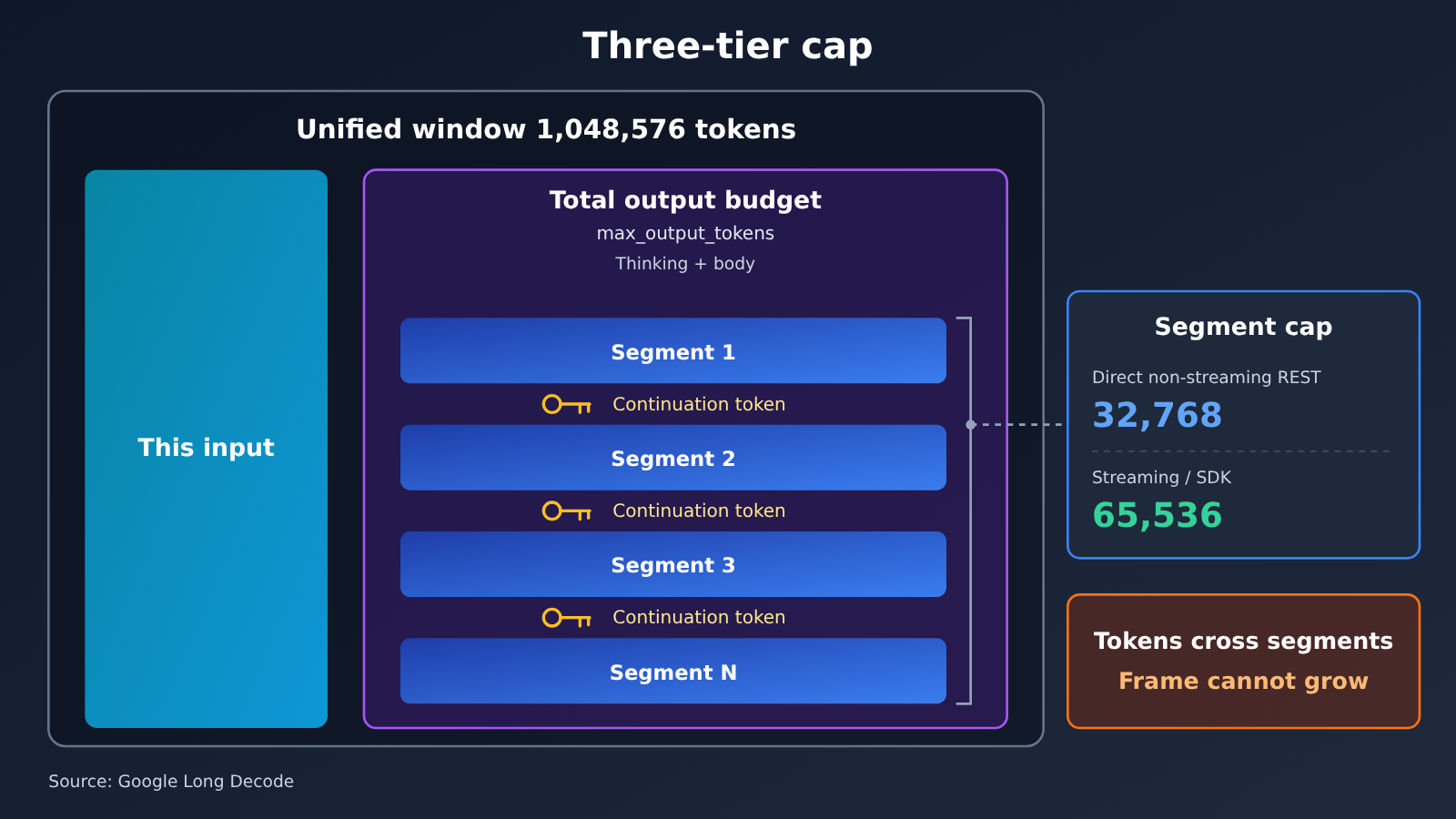
Note beside the figure: The three layers of limits, from outside in, are window, budget, and segment. Continuation tokens are only responsible for crossing the “segment” layer. If the budget is insufficient, raise the budget; if the window is insufficient, shrink the input.
1.3 Differences Between Gemini 4 Argon and Carbon on Continuation
When it comes to continuation, the differences between the two models aren’t enough to change the conclusion. gemini-4-argon and gemini-4-carbon share the same Long Decode mechanism — the per-segment limit, budget rules, and recovery entry points are all identical in the docs. After switching to Carbon, you still have to pick the execution mode yourself and set the budget; the state machine doesn’t need any changes. Inference speed, cost, and model selection are separate topics, so we won’t get into them here.
2 Continuation for GenerateContent’s Long Decode: Two Recovery Branches
2.1 finishReason is CONTINUATION: a single segment hits the ceiling
When using generateContent or streamGenerateContent, you need to read finishReason and continuationToken from the candidate. CONTINUATION means this segment has hit the ceiling, but there’s still budget left overall.
The request for the next segment should keep the following unchanged: the same model, plus the original request’s contents, system instructions, tools, generation config, and total output budget. On top of that, add just one thing: the latest continuation token. The token stores the generation state up to that segment, and the application itself collects and concatenates the already-generated portion of the answer.
The original contents must stay as-is—don’t stuff the output from previous segments back in. Parameter spelling differs by language:
- REST sends the top-level field
continuationToken; - Python SDK uses
continuation_tokenin the config; - If you want the application to control the loop, you can set
automatic_continuation=False.
2.2 finishReason is MAX_TOKENS: total budget exhausted
MAX_TOKENS means this round’s total output budget is used up. According to the current official guide, a continuation token may still be returned in this case, and there are two ways to handle it:
| Approach | Operation | Cost and caveats |
|---|---|---|
| Continue after raising the budget | Keep the other parameters unchanged, raise maxOutputTokens above the amount already consumed, then carry the token |
Continuing directly with the original budget returns 400 |
| Resend the whole request after raising the budget | Raise the budget, don’t carry the old token, generate from scratch | Both rounds may incur usage |
2.3 Interruptions, Other Finish Reasons, and Four-Dimensional Logging
Network interruption: If you never receive the final event, keep the temporary state of the fragments you’ve received so far. What you do next depends on whether you already have a valid checkpoint in hand.
Other finish reasons: Whether it’s a normal stop, a safety restriction, or something else, handle it according to the actual finish reason and your business acceptance rules. Don’t just treat everything as “safe to resume.”
Logging: In production code, it’s a good idea to log along four dimensions: candidate index, segment number, whether a token exists, and the finish reason. This keeps you from mistaking “got an HTTP success” for “the body text is already complete.”
Below is a Python sketch of a manual loop. The field names come from Google’s docs — check the exact attribute paths against the SDK version you’ve pinned.
from google import genai
from google.genai import types

client = genai.Client()
MODEL = "gemini-4-argon"          # the flow is the same when you switch to "gemini-4-carbon"
contents = build_original_contents()  # original input, never modified throughout
budget = 262_144                  # total output budget: thinking + body text combined

segments, token, seg_no = [], None, 0
while True:
    cfg = types.GenerateContentConfig(
        system_instruction=SYSTEM_PROMPT,
        tools=TOOLS,
        max_output_tokens=budget,
        automatic_continuation=False,   # the application drives the loop itself
        continuation_token=token,
    )
    resp = client.models.generate_content(model=MODEL, contents=contents, config=cfg)
    cand = resp.candidates[0]
    reason = getattr(cand.finish_reason, "name", str(cand.finish_reason))
    token = getattr(cand, "continuation_token", None)

    # collect only user-visible body text; handle thinking parts separately
    text = "".join(p.text for p in cand.content.parts if p.text and not getattr(p, "thought", False))
    segments.append((seg_no, text))
    log(candidate=0, stage=seg_no, has_token=bool(token), finish_reason=reason)
    seg_no += 1

    if reason == "CONTINUATION" and token:
        continue
    if reason == "MAX_TOKENS" and token:
        budget = consumed_output_tokens(resp) + EXTRA   # the new budget must exceed what's already been consumed
        continue
    break   # STOP or any other finish reason: hand off to business acceptance

answer = "".join(t for _, t in sorted(segments))
You’ll need to implement consumed_output_tokens according to the usage fields of the SDK you’re using. For an explanation of the cumulative accounting, see Section 5.2.
2.4 SDK versions and REST semantics differences for GenerateContent auto-continuation
GenerateContent auto-continuation has its own set of minimum versions, which differ from the versions for Interactions in Section 3. Don’t mix them up:
| Language | Minimum version for GenerateContent auto-continuation | Minimum version for Interactions client-side continuation |
|---|---|---|
| Python | 2.30.1 | 2.34.0 |
| JavaScript | 2.29.1 | 2.32.0 |
| Go | 1.74.0 | 1.77.0 |
| Java | 1.77.0 | 1.80.0 |
| .NET | 1.26.0 | 1.28.0 |
| Kotlin | 1.6.0 | Not listed |
First confirm the version actually loaded from the lockfile or release notes, then write the parameters using the spelling for that language.
Google’s documentation has two inconsistent descriptions for direct non-streaming REST:
- The “Default limits” section explicitly states that if the first segment for Carbon or Argon exceeds 32,768 and there is no continuation token, a 400 is returned;
- However, the “Manual loop” section shows a direct non-streaming example that sets 262,144 on the first request.
So for an actionable approach, we recommend using the consistent SDK auto-continuation or streaming REST. This discrepancy can also help explain occasional 400 errors in production.
3 Interactions Long Decode continuation: state and background execution
3.1 Using resource status to decide the next step for Interactions
Interactions doesn’t read finishReason. It reads resource status. Tool requests and length-based interruptions come through different entry points, so you should handle them separately in the state machine:
| Status | Meaning | Next step |
|---|---|---|
requires_continuation |
A single segment hit its limit and needs to be continued | Submit the previous segment’s id as previous_interaction_id, along with continuation_token, the original model, and the original generation configuration |
incomplete |
Budget-related interruption | Check tokens and usage, continue with a higher max_output_tokens, or resubmit after increasing the budget |
requires_action |
The model is asking to call a tool | Run the tools the app allows, then submit the results with that round’s ID |
queued / in_progress |
Queued in the background or currently running | Keep polling |
completed |
Generation has finished | Consume the model_output steps in order, then move on to content validation |
The dispatch function below only demonstrates status checks. For the actual call methods, follow the SDK you’re using:
def dispatch(interaction):
    s = interaction.status
    if s == "requires_action":
        return run_allowed_tools_once(interaction)      # tool entry point, see Section 4
    if s == "requires_continuation":
        return continue_with(interaction.id, interaction.continuation_token)
    if s == "incomplete":
        return raise_budget_then_continue(interaction)
    if s in ("queued", "in_progress"):
        return poll_later(interaction.id)
    if s == "completed":
        return accept_body(interaction)                 # proceed to content validation
    return fail_with_log(interaction)
If foreground calls need to be stateless, the guide allows setting store: false. In that case, the manual loop uses the original input together with the continuation token, and doesn’t rely on the previous segment’s stored ID to locate the input. For stateful calls, save the previous segment’s ID. Spell out both paths clearly, and the same state machine can cover both “server-side storage” and “app-side retention”.
3.2 Background Execution and Streaming Reconnection
Background execution: Long-running tasks can be handed off to the server — set background: true and save the interaction ID. Background execution requires store: true, can run for up to 24 hours, and in the meantime you just poll queued and in_progress.
Streaming reconnection: For streaming interactions, you need to save both the interaction ID and the ID of each event. After a disconnect, reconnect with the most recent event_id as the last_event_id, read through the server’s replay, and only then determine the terminal state.
SDK foreground stream across segments: Lifecycle events show up in every segment. If the previous segment reports that continuation is still needed, the parser should keep using the same body buffer — don’t clear it. Google notes that later increments may arrive at checkpoints of roughly five thousand tokens, and having no body output between two checkpoints is completely normal.
Stream interruption exception: If the stream drops after you’ve received increments but before a new checkpoint arrives, the SDK may throw ContinuationInterruptedError. This is by design, to prevent automatic replay from duplicating the body text. Once you catch this exception, go back to Section 2.3’s “decide the next step by checkpoint.”
3.3 IDs and Timeout Boundaries in Automatic Interactions Continuation
When the SDK handles continuation automatically, the create call merges the text, steps, and usage across segments, but it returns the ID of the last segment. Earlier segments are stored separately, so if you later use that ID to call the query endpoint, you’ll only get the last segment back.
A common pitfall: the frontend hands only the final ID to the backend, and the backend later queries it expecting the whole document — but gets only the tail end. There are two correct approaches: capture the merged result when you consume the create call, or persist each segment yourself in the application. Continuing the next round of conversation with the final ID is unaffected — the continuation relationship is still preserved.
There are also two timeout values. The client library’s HTTP timeout applies to each segment, while the create call’s overall timeout parameter applies to the entire chain; in automatic mode, both take effect independently.
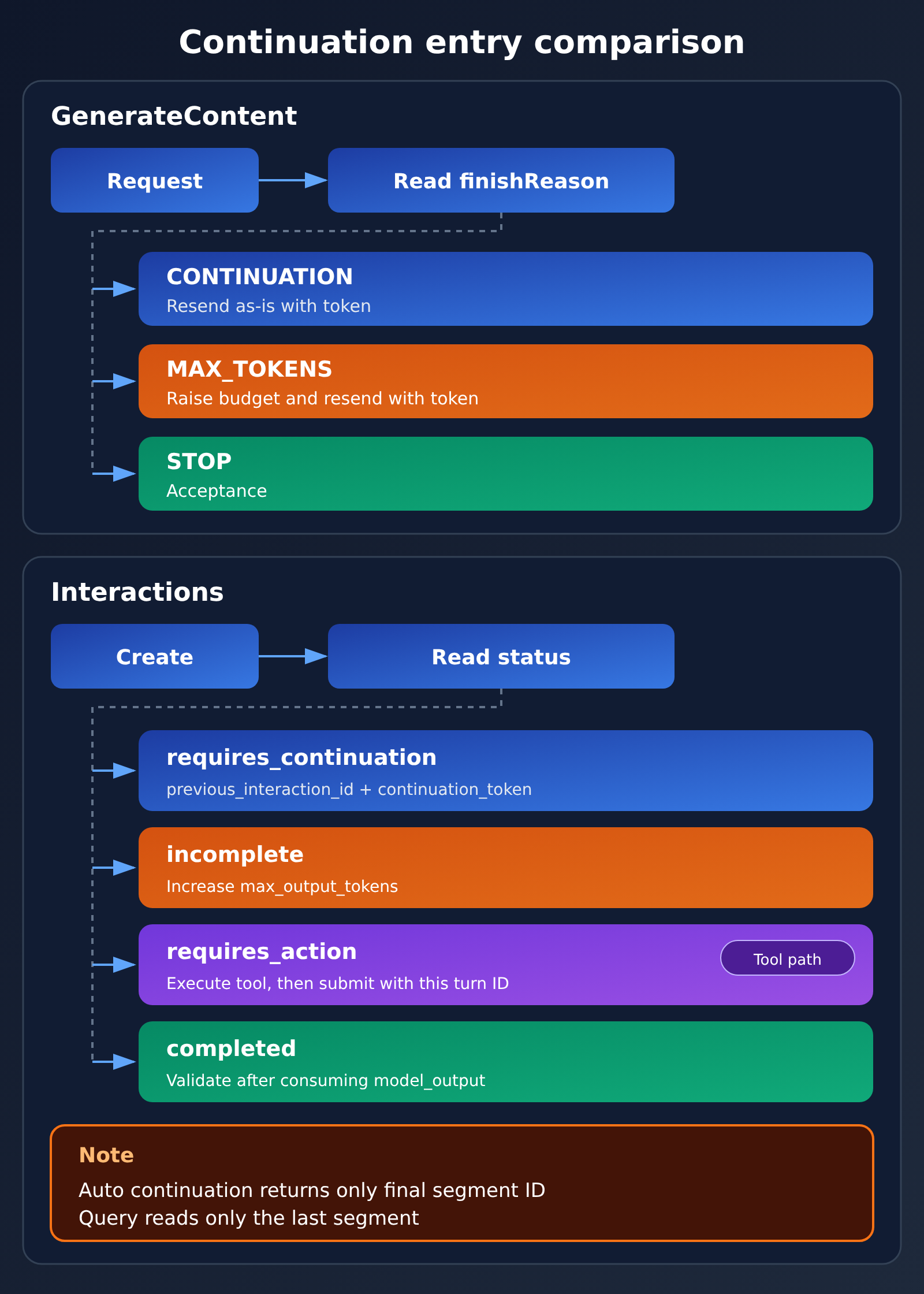
Note beside the figure: the recovery actions for the two interfaces map one-to-one; the difference is which field you read and which ID you submit. Interactions has one extra tool entry point, requires_action, which is a different path from length-based continuation — they can’t be merged into the same branch.
4 Tool Calling, Thinking Signatures, and Argon’s thought-only case
There’s a named question over on the Google developer forum. The person asking describes this: when Argon sent back a fully signed tool history, it still produced a MAX_TOKENS with only thinking and no body text — even with thinkingLevel=low set.
The reply explained it as two factors stacking up: the output budget was low, and thinking ate into that budget. The reply also confirmed that this finish reason can be recovered through “continuation token + larger budget.” Worth noting: this observation came from an older v1alpha generateContent call, where the original author had set the cap at 8,192 tokens. It illustrates the symptom of “empty body text when a small budget runs out.” If you want to describe the state of the newer API, you should cite the current corresponding continuation docs point by point.
This case yields three engineering constraints:
- Signatures and tokens each handle their own job: thinking signatures belong to the message and tool backfill chain, while continuation tokens handle length state. Keep the original tool call with a valid signature intact — don’t rewrite it on a continuation run.
- Tools execute only once: track “whether this tool call has already run” as its own record. When the app retries or continues, check that record first so an action like a charge or a database write doesn’t get executed twice.
- Completion results only count body text: the UI treats user-visible body text as the completion result. Show thinking summaries separately, or use them only for status logging.
5 Long Decode Continuation Acceptance: Testing Stitching Logic with Simulated Responses
5.1 Three Response Simulations and Replay Checks
Here’s a made-up example to explain the acceptance method: a document summary with a citation list. Treat the same input, same model, and same output structure as the job ID, and simulate three responses on the client:
- Reasoning only, eventually cut off when the budget runs out: The UI should show “To be continued,” not “Complete” or “Blank.”
- Multiple body segments, each carrying a new continuation token: Check that the segments are stitched together in order with no misalignment.
- Normal completion: Check that the table of contents, body, and citation section are all present, and that the JSON or markup format passes the downstream validation rules.
Then pick any segment and replay it once to confirm the app records it only once. A straightforward approach is to use the job ID plus the segment number as the idempotency key.
5.2 Long Decode Usage Accounting
When you integrate model invocation, record the following separately: first-segment input, reasoning and body usage for each segment, cumulative billed usage, finish status, and reconnect count.
In long decoding, the cumulative prompt_token_count double-counts the existing context on every segment. So when deciding whether to compress the input, use the observed input value from the first segment, or the initial_prompt_token_count provided by the SDK. The merged usage is only for cost tracking. Recording “initial size” and “cumulative billing” separately explains why billing statistics can exceed the logical context.
Once you’ve done these three simulations, one replay, and one usage reconciliation, you can tell whether your Argon or Carbon integration can correctly continue when a long response hits the output limit, whether it stitches only once, and whether it delivers the complete body.
References
- Google Interactions Long Decode: Status table, background execution, streaming, and client continuation
- Link:
ai.google.dev/gemini-api/docs/long-decode
- Link:
- GenerateContent Long Decode: Default limits, manual loops, recovery after budget exhaustion, usage metrics
- Link:
ai.google.dev/gemini-api/docs/generate-content/long-decode
- Link:
- Gemini Thinking: Thinking levels and budgets
- Link:
ai.google.dev/gemini-api/docs/thinking
- Link:
- Gemini Thought Signatures: Signatures and the tool backfill chain
- Link:
ai.google.dev/gemini-api/docs/generate-content/thought-signatures
- Link:
- Argon Developer Public Q&A: The thought-only
MAX_TOKENScase- Link:
discuss.ai.google.dev/t/gemini-4-argon-thought-only-max-tokens-with-preserved-signatures-including-thinkinglevel-low/198148
- Link:


