

Author’s note: When the Gemini App doesn’t show Gemini 4 Argon, use 3 entry points to gather evidence separately and decide whether your current Gemini API service should switch to Carbon.
Bottom line up front: As of Beijing time 2026-11-25, the fact that the Gemini App doesn’t show Gemini 4 Argon does not mean your current API has to switch to Carbon. The official API deprecation page lists both gemini-4-argon and gemini-4-carbon as having no announced retirement date yet, and Argon has no recommended replacement entry; the model catalog still lists both IDs. If your project can still resolve gemini-4-argon and the generated results meet your current product requirements, you can keep running on the configuration you’ve already validated.
Whether to migrate depends on three conditions: what model your project actually reads, the officially announced retirement date, and your team’s own acceptance conclusion. A change in the App menu should be recorded as a product experience event — not treated as a trigger to automatically switch models.
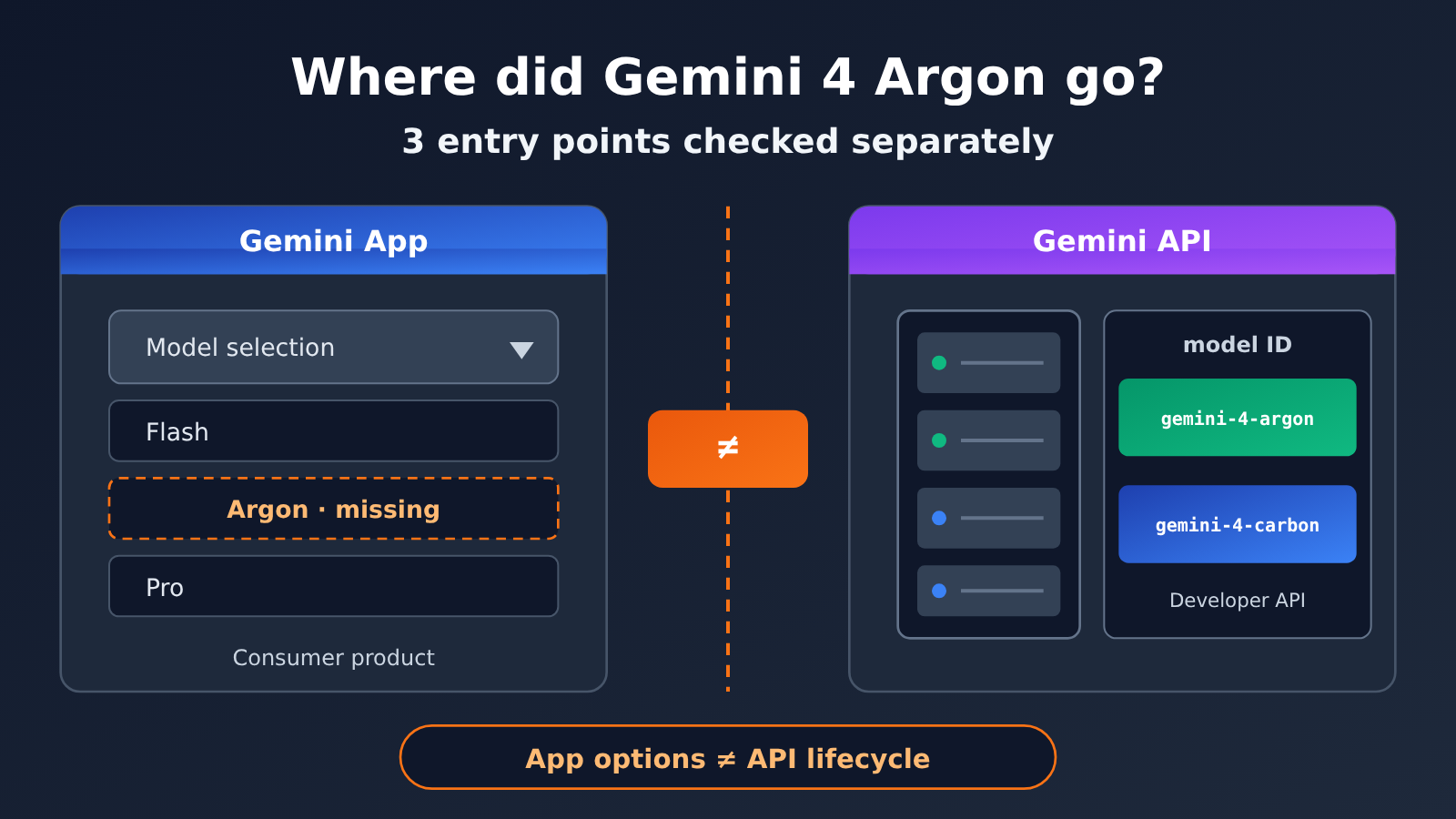
Knowledge Map: Three Lines of Evidence for Investigating Gemini 4 Argon
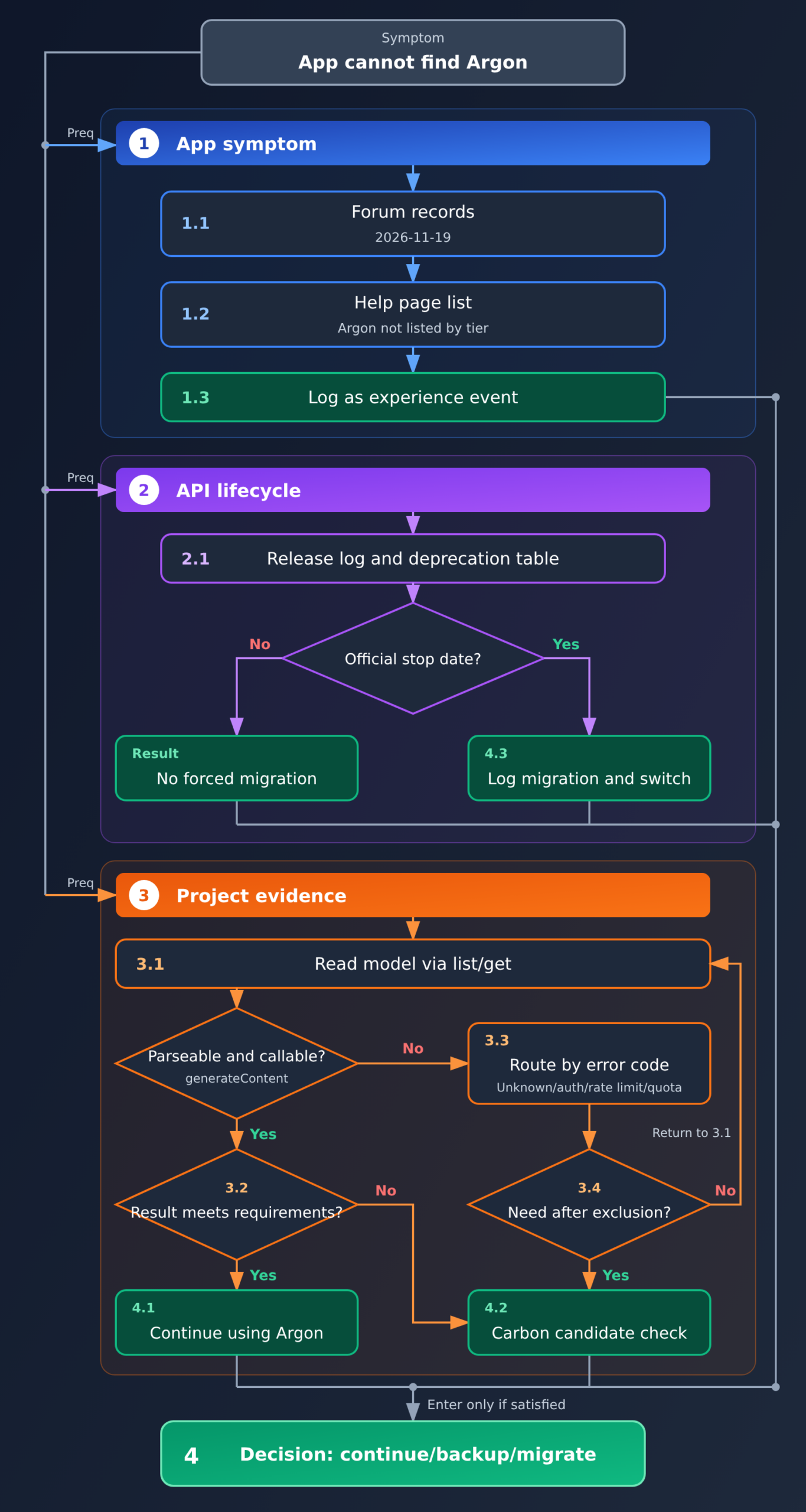
Figure caption: This diagram starts from “Argon is not visible in the App” and splits into three independent lines of evidence. Line 1 confirms the App symptom, and its conclusion stops at a product experience event. Line 2 looks at the official lifecycle; only when a stop date appears does it move into migration planning. Line 3 checks whether the project can resolve the model, how it is invoked, and what the generated result looks like; only after ruling out configuration, permission, and quota issues and still having a business need does it move into Carbon candidate acceptance. The three lines finally converge in the decision covered in Section 4.
Index: In what order to read this Argon troubleshooting guide
| No. | Section | What it provides for later sections | Expected outcome |
|---|---|---|---|
| 1 | What the App symptoms can confirm | Defines the scope of evidence for menu changes | Don’t mistake interface changes for a service failure |
| 2 | Official facts about the API lifecycle | Gives the basis for whether “migration is required” | Know that officially, no switch is currently required |
| 3 | Gathering evidence from your current project | Provides code and error-triage methods | Obtain project-level evidence you can act on |
| 4 | Whether to switch to Carbon | Summarizes the evidence from sections 1–3 | Make a decision to continue, keep a fallback, or migrate |
Sections 1 and 2 can be consulted as needed. Section 3 is the hands-on part, and section 4 depends on the results of the first three sections.
To Know: Terminology you need to understand the Gemini 4 Argon lifecycle
| Term | Concise explanation |
|---|---|
| Model selector | The dropdown in the Gemini App that lets consumers choose a model; the options vary with the subscription plan and remaining quota |
| Model ID | The model parameter passed in an API call, for example gemini-4-argon; the resource name is usually written as models/gemini-4-argon |
| Deprecation table / shutdown date | The page in the Gemini API docs that records model lifecycles; the shutdown date is when the model stops being served |
supportedGenerationMethods |
A field in the model metadata listing the invocation methods the model supports, such as generateContent |
nextPageToken / pageToken |
Pagination markers for the model list API; the former is returned in the response, and the latter is passed in when requesting the next page |
| Project-level quota | Gemini API usage quotas are calculated per Google Cloud project, not per individual API key |
1 Argon Is Missing from the Gemini App: What Can App Observations Confirm?
1.1 The Public Record of Gemini 4 Argon Disappearing
What you can verify from official sources: On November 19, 2026, there was a public thread on the Google AI Developers Forum where multiple users reported that Argon—the option they had been using in the App dropdown—was no longer visible. Some mentioned that their existing creative workflows had been affected. These reports show that the issue is real, but they describe the menus and experiences visible in each user’s own account. When citing this, keep the date and the product scope—the “Gemini App selector”—intact.
Some users also talked about their impressions of writing style and depth. These are personal experiences. They can explain why people are asking, but they aren’t suitable as conclusions about model capabilities.
1.2 Model Lists on the Gemini Apps Help Page
The first-party reference comes from the desktop Help page for Google Gemini Apps. The page explains that available models vary by subscription plan and remaining quota, with separate columns for Chat and Tasks. At the time of verification, the public options in the Chat column for individual users were as follows.
| Subscription plan | Public options in the Chat column (verification date 2026-11-25) | Argon listed separately? |
|---|---|---|
| Free | Auto | No |
| Plus | Auto, Hydrogen | No |
| Pro | Auto, Hydrogen, Neon | No |
| Ultra | Auto, Hydrogen, Neon, Carbon | No |
The Help page also states that the Auto option routes based on prompt content between Hydrogen and a lightweight model. So you can put it this way: the current list on the official App Help page is consistent with what forum users observed. That said, the options each account actually sees still depend on its own entry point.
1.3 Fields to Spell Out When Recording App Symptoms
If your team needs to log this in an incident record, it’s worth capturing all of the following so you can review it later:
- Account plan: Free, Plus, Pro, or Ultra;
- Device: desktop or mobile;
- Entry point: Chat or Tasks;
- Session: new conversation or existing conversation;
- Verification time: exact date, ideally including time zone.
A screenshot of a product page can only prove the state of the interface at the time and on the plan shown in the screenshot. Upgrading a plan, refreshing the page, or starting a new chat only changes that account’s interface; it won’t affect your API project.
2 Gemini 4 Argon API Lifecycle: Official Facts and Entry-Point Boundaries
2.1 Official Lifecycle of Argon and Carbon
Conclusions about the server-side API need independent evidence — you have to check the Gemini API docs, not the App.
| Item | gemini-4-argon |
gemini-4-carbon |
|---|---|---|
| Official release date (release notes / deprecation table) | 2026-10-13 | 2026-11-10 |
| Service end date | Deprecation page says not yet announced | Deprecation page says not yet announced |
| Recommended replacement model | No entry | — |
| Model catalog | Still listed | Still listed |
| Available entry points | Official model page states it’s usable via the Gemini API and Google AI Studio | Has an official API guide |
Everything above reflects the official documentation as of the verification date. From this we can infer that there’s currently no official basis for asking Argon users to migrate to Carbon. That inference will change as the docs get updated, so record it together with the verification date.
2.2 Credentials and Management Boundaries of the Three Entry Points
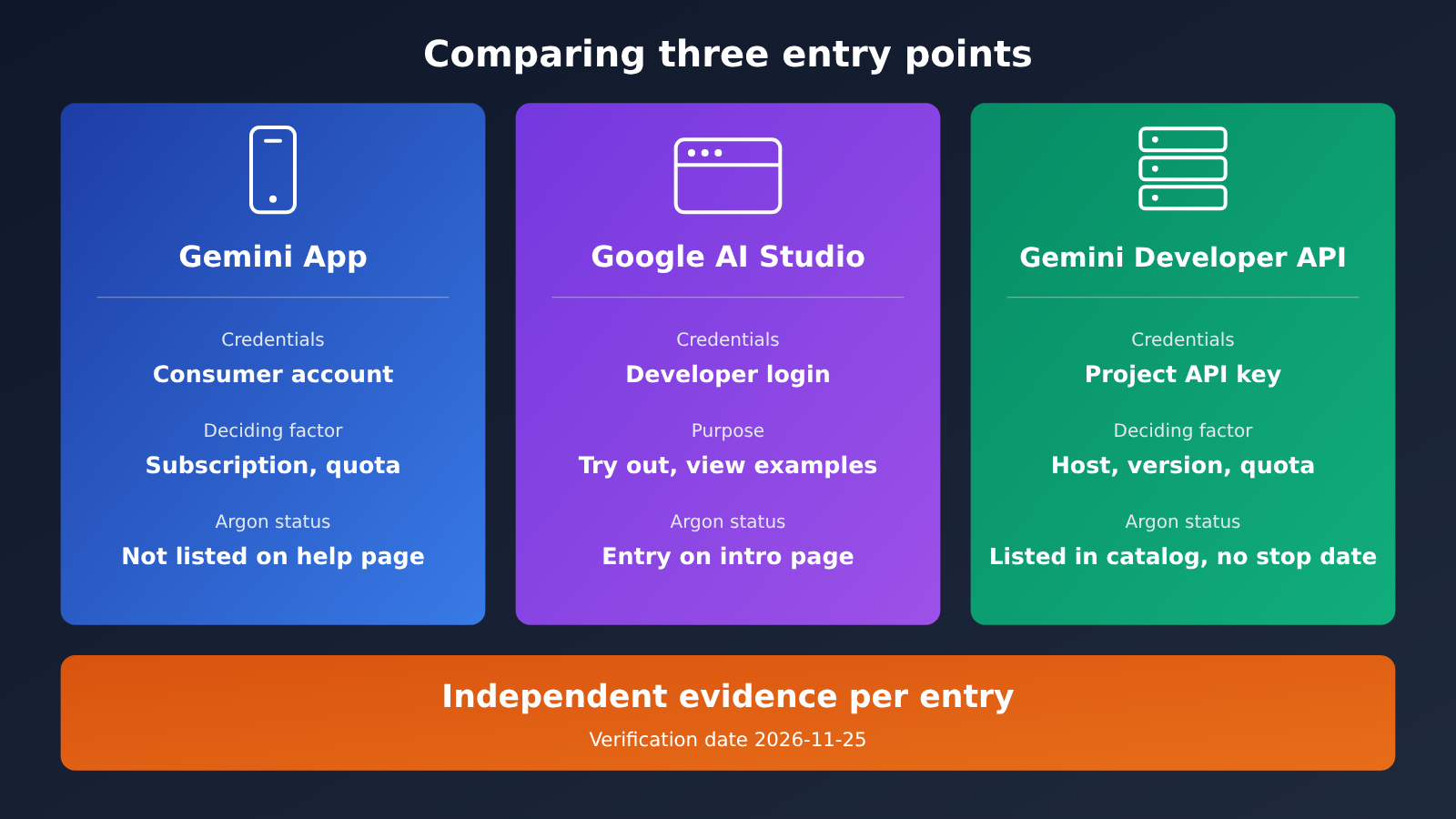
Argon’s visibility involves three entry points, each with different credentials and management:
- Gemini App: consumer accounts and subscription plans determine the options — this reflects the product experience.
- Google AI Studio: the model guide page offers a try-it entry point and gives engineering teams a model parameter example — a third visibility signal.
- Gemini Developer API: the first-party host, protocol version, and project credentials configured in the system determine whether calls go through. What you’re really verifying is whether the project can see the model and whether it supports the method you’re using.
Checking the App help and the API model guide on the same day explains why “you can open Argon from a developer page” and “you can’t pick Argon in the consumer App” are simultaneously true. The former is built for developer invocations; the latter shows options based on consumer plans.
3 Verifying Against the Current Project: Is Gemini 4 Argon Still Callable?
The code in this section is an executable verification design for properly authorized development and troubleshooting. All requests should use the team’s existing controlled credentials and stay within their normal permission scope.
3.1 Reading Argon Model Metadata via REST
Start by recording four pieces of information: the Google first-party address being called, the API version, the request type, and the model ID — and confirm that the deployment configuration traces back to the project actually in use. There are two official REST endpoints: list all models, and read a single model.
# List models (default 50 per page, pageSize max 1000)
curl -s "https://generativelanguage.googleapis.com/v1beta/models?pageSize=1000" \
  -H "x-goog-api-key: ${GEMINI_API_KEY}"

# Read single model details
curl -s "https://generativelanguage.googleapis.com/v1beta/models/gemini-4-argon" \
  -H "x-goog-api-key: ${GEMINI_API_KEY}"
Don’t use the App’s display name for production parameters. Resource names typically carry a models/ prefix, and generation calls use only the model portion. Fields worth saving from the response include the version, input and output limits, and supportedGenerationMethods. For generation services, make sure generateContent appears in that list.
3.2 Paging Through Results: Don’t Mistake “Not on Page 1” for “Argon Is Missing”
The list endpoint returns 50 models per page by default, and the official maximum is 1000 per page. If the response includes a nextPageToken, pass it as the pageToken for the next request while keeping all other parameters the same. The script below reads through every page and outputs a redacted collection record.
import os
import json
import datetime
import requests

BASE = "https://generativelanguage.googleapis.com/v1beta"
TARGETS = {"models/gemini-4-argon", "models/gemini-4-carbon"}
headers = {"x-goog-api-key": os.environ["GEMINI_API_KEY"]}  # Read the key only from the credentials system, never write it to logs

def list_all_models():
    models, token, pages = [], None, 0
    while True:
        params = {"pageSize": 1000}
        if token:
            params["pageToken"] = token
        r = requests.get(f"{BASE}/models", headers=headers, params=params, timeout=30)
        r.raise_for_status()
        data = r.json()
        models.extend(data.get("models", []))
        pages += 1
        token = data.get("nextPageToken")
        if not token:
            return models, pages

models, pages = list_all_models()
record = {
    "checked_at": datetime.datetime.now(datetime.timezone.utc).isoformat(),
    "project": "svc-writer-prod",   # Internal logical name; don't write the real project identifier
    "pages_read": pages,
    "all_pages_read": True,
    "targets": {},
}
for m in models:
    if m["name"] in TARGETS:
        record["targets"][m["name"]] = {
            "version": m.get("version"),
            "methods": m.get("supportedGenerationMethods", []),
            "has_generateContent": "generateContent" in m.get("supportedGenerationMethods", []),
        }

# Single-item detail: record the exact resource and version
detail = requests.get(f"{BASE}/models/gemini-4-argon", headers=headers, timeout=30)
record["argon_get_status"] = detail.status_code
print(json.dumps(record, ensure_ascii=False, indent=2))
If you’re using the official Python SDK, you can follow the official example to iterate over client.models.list() and then filter the methods by m.supported_actions. A good habit: use the list first to spot environment differences, then use the single-item detail to record the exact resource and version. That keeps you from being misled by SDK display names or default page sizes.
3.3 Route by Error Code When Argon Calls Fail
Being able to read the model metadata only means that the request can resolve that model. Whether the generation path is healthy also depends on region, billing, project quotas, and the method used. If the service uses the Interactions API, the official error reference provides a more granular breakdown of error types:
| Upstream error code | Problem indicated | Primary party to investigate | Handling approach |
|---|---|---|---|
model_not_found |
Model resolution failed | Developer | Check the host, API version, model ID spelling, and project used |
permission_denied |
Caller or project lacks eligibility | Project manager | Check project eligibility, billing, and configuration |
rate_limit_exceeded (429) |
Short-window rate limit exceeded | Developer / Ops | Back off and retry, check concurrency |
quota_exceeded (429) |
Quota exhausted, such as daily quota | Project manager | Review project quota records and usage tier |
The last two both return HTTP 429. If logs only store the status code, short-window rate limiting and daily quota exhaustion can easily be mistaken for the same failure. It’s a good idea to record the upstream error code, endpoint, and request time together, then use those to set fallback conditions. Check the exact error wording against the version of the endpoint you’re using.
3.4 Quotas Are Calculated per Project: Swapping Keys Won’t Bypass the Quota
The official docs explicitly state that Gemini usage limits are calculated per project, not per individual API key. Retrying with another key from the same project only verifies whether the credentials themselves have a problem; it doesn’t change the project-level quota accounting. When you hit quota-type errors, the project manager should review the quota records for that project rather than repeatedly troubleshooting at the key level.
4 Whether to Switch to Carbon: An Evidence-Based Gemini 4 Argon Decision
4.1 Example Decisions for Three Project Types
These examples are built from reference material to illustrate the decision path; they don’t represent actual measured results.
| Example Project | Evidence Collected | Action |
|---|---|---|
| Project A | Can resolve gemini-4-argon, and generation results match expectations |
Note App menu changes; keep using the verified API configuration |
| Project B | Model shows up in the catalog, but quota-type errors come back | Start with that project’s quota records to narrow it down; don’t touch the model choice yet |
| Project C | Plans to use Carbon as a fallback | Verify project availability, pricing schedule, and representative output formats first, then let the team sign off on rollout scope |
4.2 Carbon Candidate Acceptance Checklist
Carbon is only a valid action once host, version, permission, and quota issues have been ruled out and there’s a genuine business need. For evaluation, the project team should keep a minimal acceptance record:
- Pick a plain-text synthetic prompt that doesn’t write to any external system, and record the actual endpoint, model ID, status code, and whether a normal response body came back.
- Use similar samples to compare Argon and Carbon on output structure, tool-call ordering, format constraints, system instruction following, and typical latency.
- Pass criteria include: whether fields can be extracted correctly, whether content matches the source material accurately, whether anything gets truncated, and whether the tool permission scope matches expectations.
- If the prompt and format configuration are tied to the model, also compare request parameter names, ownership of existing session state, and output format.
- Keep a configuration switch that’s easy to roll back. Confirm the API is reachable first, then business interface compatibility, and only then think about cost and traffic plans.
Readings from the App menu should never be wired into any automatic switching logic.
4.3 When a Retirement Date for Argon Appears in the Future
If Google later adds a retirement date for Argon on its deprecation page, write that date and the official replacement model into the migration log, schedule the switch based on the acceptance results from 4.2, and keep saving evidence records. At that point the migration has a clear official basis, regardless of whether the App menu shows Argon.
A check you can use as-is: save a timestamped record containing the model list from reading all pages, the status code from a single gemini-4-argon read, whether generateContent exists, and the output from one synthetic sample — plus the retirement-date status shown on the official deprecation page that day. If all four check out, Gemini App not finding Gemini 4 Argon is just a consumer interface change, and existing API services don’t need to switch to Carbon.
References
-
Google AI Developers Forum: a public thread where users report Argon disappearing from the App
- Link:
discuss.ai.google.dev/t/missing-gemini-4-argon-in-the-gemini-app-please-dont-trade-depth-for-speed/202469 - Notes: documents the phenomenon observed on 2026-11-19
- Link:
-
Google Gemini Apps model help page: models available in the App by subscription plan
- Link:
support.google.com/gemini/answer/18648722 - Notes: first-party reference for the App options
- Link:
-
Gemini API release notes and deprecation schedule: model release dates and shutdown dates
- Link:
ai.google.dev/gemini-api/docs/changelog,ai.google.dev/gemini-api/docs/deprecations - Notes: the basis for determining whether migration is required
- Link:
-
Gemini API model catalog and Models API reference: model list, details, and pagination parameters
- Link:
ai.google.dev/gemini-api/docs/models,ai.google.dev/api/models - Notes: interface documentation for project evidence gathering
- Link:
-
Official guides for Argon and Carbon: model parameter examples and the AI Studio entry point
- Link:
ai.google.dev/gemini-api/docs/whats-new-gemini-4-argon,ai.google.dev/gemini-api/docs/whats-new-gemini-4-carbon - Notes: cross-reference the parameters during migration assessment
- Link:
-
Gemini rate limits and error codes: project-level limits and Interactions error types
- Link:
ai.google.dev/gemini-api/docs/rate-limits,ai.google.dev/gemini-api/docs/api-errors - Notes: the basis for error triage and fallback conditions
- Link:
Author: APIYI Technical Team


