
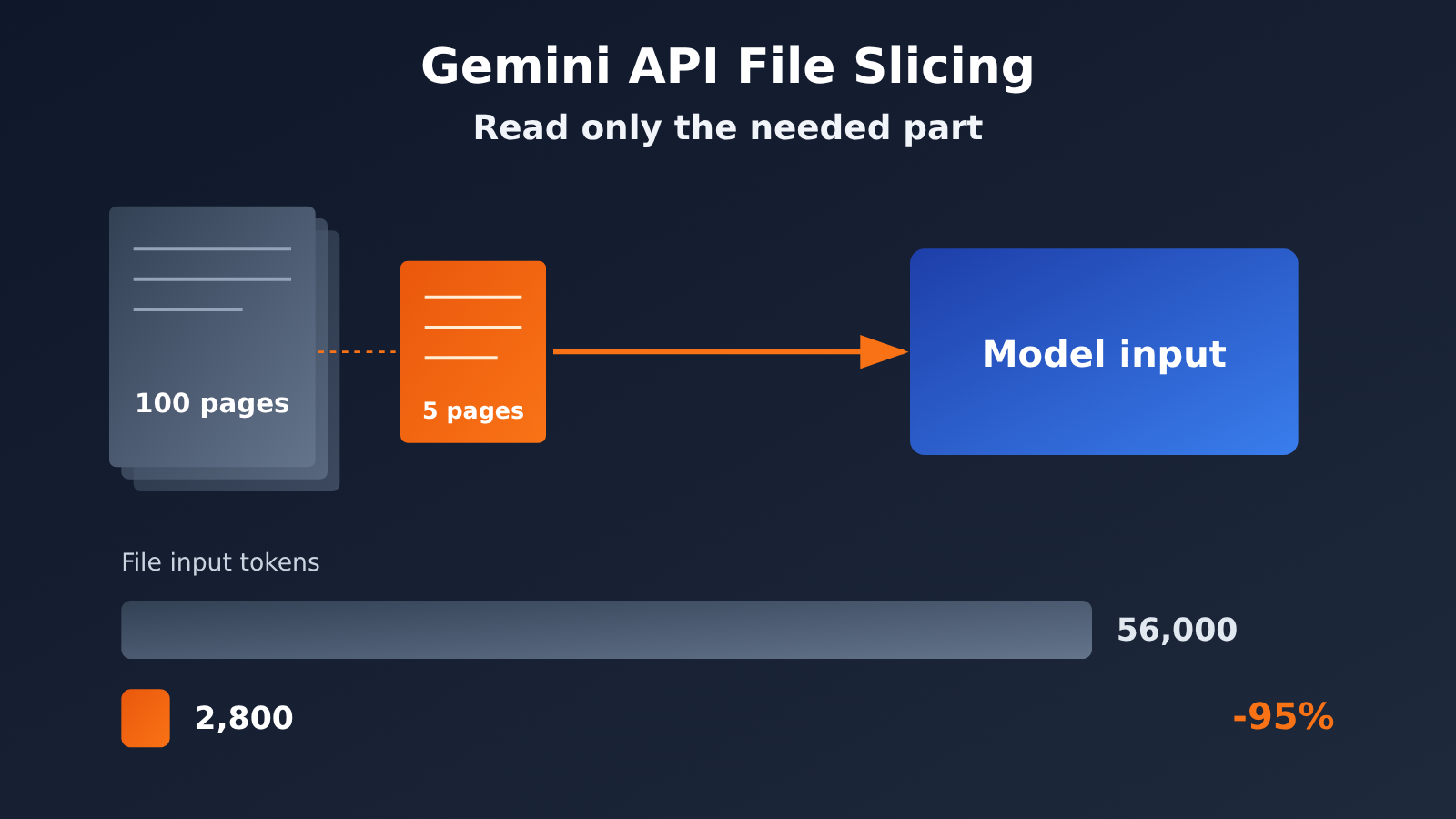
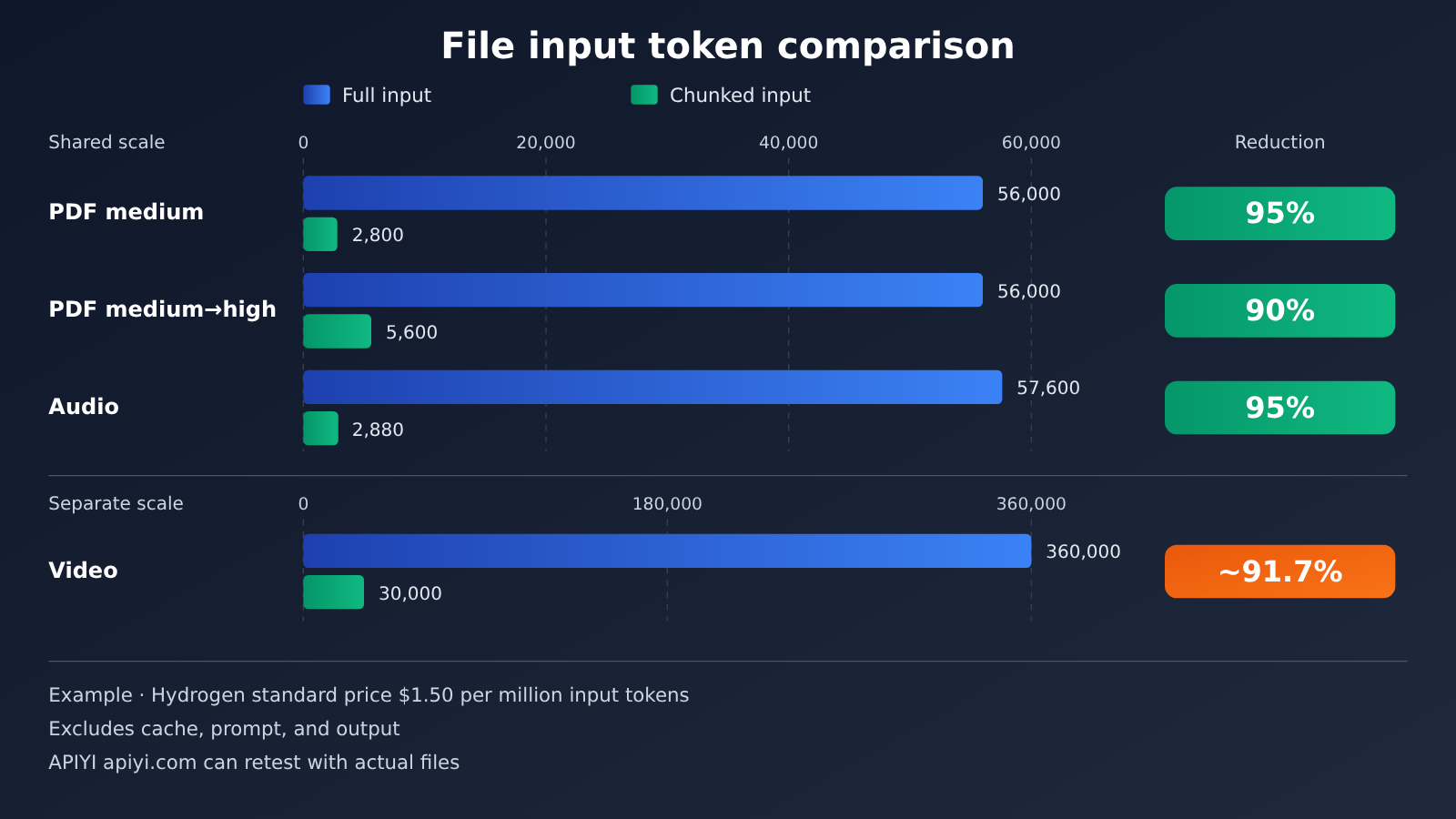
Short answer: savings depend on how much you don’t read. Based on the Token units Google officially publishes: when you read only 5 pages of a 100-page PDF, file input Tokens drop by roughly 95%; trimming a 60-minute video to 5 minutes cuts them by about 91.7%; trimming 30 minutes of audio to 90 seconds cuts them by 95%. These figures cover only the “file input” line item. Prompt, output, and thinking Tokens don’t scale down proportionally with slicing, so the drop in the total bill is usually smaller than the drop in file input. If you do a full-document locating pass before a close read, you also need to add both rounds of input together for the comparison.
What will you learn from this article?
- When File Slicing launched, which models it supports, and how billing works server-side
- The Token unit for each of the four file types: PDF, spreadsheets, video, and audio
- A cost comparison table you can recalculate line by line, plus how to estimate project-level budgets
- When a two-pass “locate first, then read closely” workflow actually saves money
- How to run an A/B test on the same file and get savings figures you can verify
Index: First, the To Know table explains terms like slicing, content layer, and page image; then an impact overview explains what this update means for developers and budget owners. The “Objective facts” section brings together the official changelog, billing rules, units for each format, the estimated cost table, and partner test figures. The “Analysis and judgment” section covers the denominator issue, the break-even point for two-pass reading, the budget weighting method, a self-test script, and FAQs.
Concepts to Know Before File Slicing
| Concept | Brief explanation |
|---|---|
| File Slicing | The server extracts a portion of a file by page number, worksheet, cell range, or audio/video time range, and sends only that portion to the model |
| Content layer | The same file can be sent to the model in different forms, such as a PDF page image (page_image) or extracted text (page_text), or a spreadsheet’s cell values, formulas, or rendered image |
| Page image | The document page is rendered as an image and then encoded. Tokens are counted per page, with low, medium, and high resolution tiers |
| File URI | The reference address obtained after uploading a file to the Files API. The same URI can be used across multiple calls |
| Interactions API | Gemini’s interactive invocation interface. Slicing requests with the processing option are initiated here, and usage is recorded in the response |
usage.total_input_tokens |
Total input tokens for a single call, including the file and prompt |
usage.input_tokens_by_modality |
Input usage broken down by modality, such as image, audio, and text |
models.count_tokens |
The official pre-request token estimation endpoint |
| Implicit caching | Automatically hits the cache when input is repeated, and bills at the lower cached-input rate |
agentic video mode |
A processing mode where the model navigates the video itself and loads frames and transcripts on demand. Its metering components differ from static mode |
Gemini API File Slicing: Impact at a Glance
- Developers doing document Q&A, contract review, and report analysis: when you already know which pages or which cells the answer lives in, you can specify the range right in the request, and file input cost drops linearly with page count.
- Developers working with long audio and video: for tasks like meeting recordings or course videos where you only care about one segment, you can crop by time range instead of handing the entire piece of material to the model every time.
- Teams building agents and function calling: function results can carry slicing options too, and files returned by tools still feed into downstream reasoning, so they need to be folded into your budget as well.
- Anyone owning the cost budget: slicing saves on file input, not on the whole bill. Estimate separately for “targeted tasks” and “full-text summarization tasks,” then combine them with weights.
Gemini API File Slicing: The Objective Facts
File Slicing Launch Timeline and Supported Models
| Item | Details |
|---|---|
| Changelog | November 18, 2026 — the Gemini API changelog lists multimodal file processing and slicing |
| Announcement post | November 23, 2026 — Rohan Doshi and Ben Caine of Google DeepMind published a dedicated write-up |
| Slicing dimensions | Page numbers, worksheets, cell ranges, audio/video time ranges, content layers |
| Supported models | The write-up explicitly covers all Gemini 4 models; the document processing guide lists the document options as applying to Gemini 3, Gemini 4, and later models |
| Pricing example model | This article uses gemini-4-hydrogen throughout to avoid cross-model attribution |
How File Slicing Is Metered
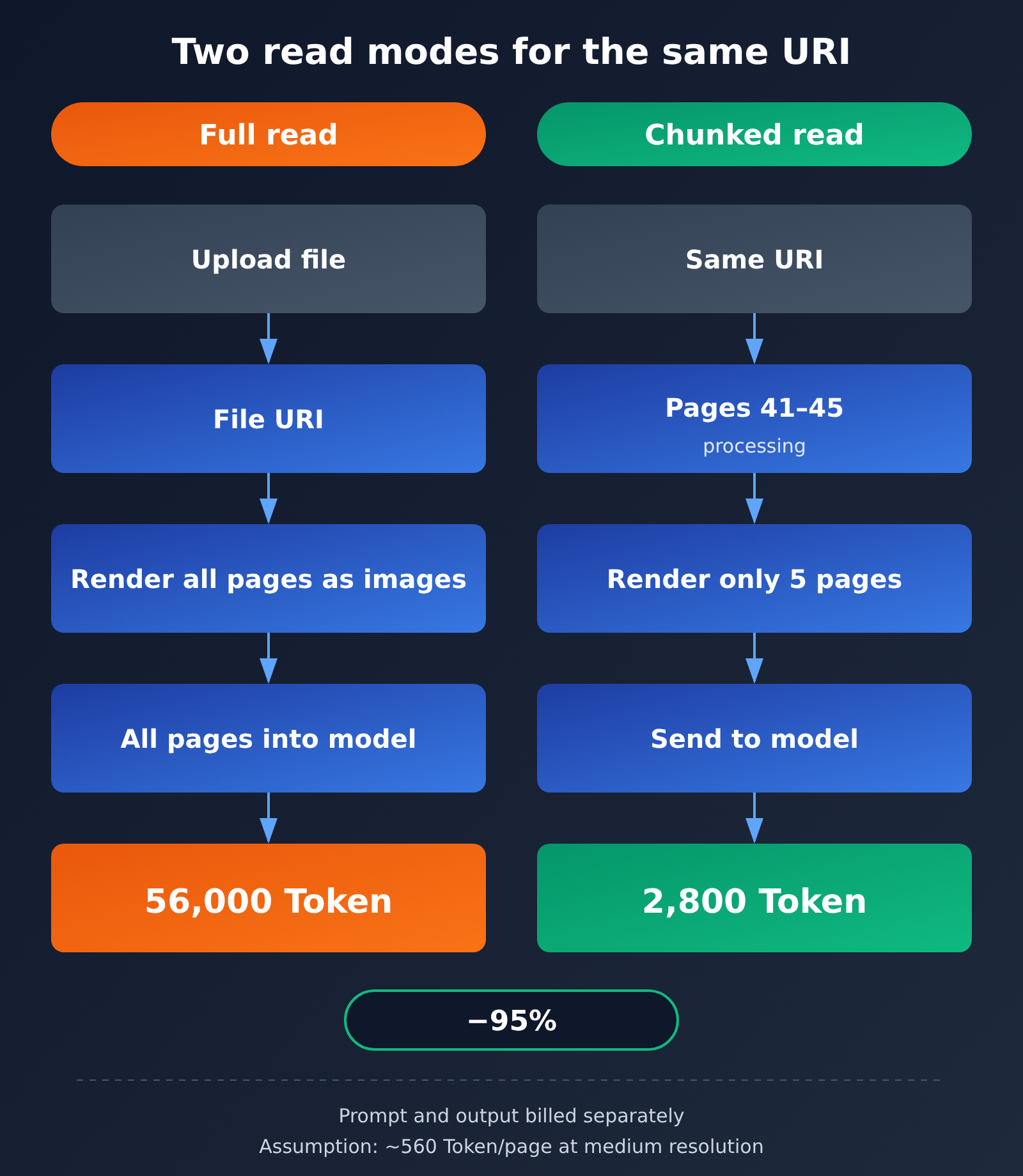
A single slicing call has three parts: a file reference, explicit processing options, and the prompt text. On the server side, the service first pulls the pages or media segments according to the options, then renders, extracts, or samples them, and finally encodes the result into input the model can read. Google’s billing commitment is limited to the slices actually fed into the model and the content layer you select — pages and time ranges that aren’t selected aren’t billed.
Metadata such as page counts and worksheet names is passed to the model along with the input, so the next turn can keep narrowing things down. Total input tokens also include this turn’s prompt, while output and thinking tokens are billed at the output rate. Slicing options can be written either in the user input or in a function result, and file content carried by a function result likewise takes part in subsequent reasoning.
The whole original file can be uploaded just once and then read multiple times through the same URI. Uploads still have to meet the format limits: up to 50 MB per document file, up to 1,000 pages for PDFs, up to 2,000 pages or slides for Office or OpenDocument documents and presentations, and up to 50,000 cells per worksheet in spreadsheets. The Files API keeps uploads for 48 hours by default, and you can delete them earlier. Reusing a URI saves the bandwidth of re-uploading, but whether the inference input hits the cache depends on the usage reported for each response and on that model’s caching pricing.
Token Units for File Slicing Across Formats
| Format and content layer | Official reference unit | Notes |
|---|---|---|
| PDF/document page image, low resolution | About 280 tokens/page | Reference value for Gemini 4 and Gemini 3 |
| PDF/document page image, medium resolution | About 560 tokens/page | The default content layer after processing options are set is page_image |
| PDF/document page image, high resolution | About 1,120 tokens/page | Commonly used for close reading of charts and scanned documents |
PDF/document page_text |
Varies with the length of extracted text | Counted as text when explicitly selected |
| Tables | Varies with content | Cell values, formulas, and rendered images can be provided separately; long strings, formula complexity, and rendering settings all affect usage |
| Static video, low resolution at 1 FPS | About 100 tokens/second | The default content layer is sampled frames plus audio |
| Static video, high resolution | About 300 tokens/second | The visual layer is affected by both frame rate and resolution |
| Standalone audio | 32 tokens/second (1,920 tokens/minute) | Timestamped transcripts are counted as text tokens |
The figures in the table come from the individual format guides. The general media reference table has its own set of per-second or per-frame reference amounts; actual cost is based on the usage returned by the request. In addition, when processing options are omitted entirely for a PDF, embedded text is extracted along with page images. The embedded text does not add extra tokens, and page images are recorded under the image modality in usage. To isolate the effect of “page count changes,” the full-document and sliced requests must be set to the same content layer.
Estimated File Slicing Costs from Official Unit Pricing
The examples below are hypothetical, calculated from the Gemini Developer API public standard paid pricing checked on November 24, 2026. gemini-4-hydrogen costs 1.50 USD per million input tokens, and 7.50 USD per million output tokens (including thinking); gemini-4-neon lists at 3.00 and 15.00 USD for the same tiers. The costs in the table cover file input only, assume no cache hits, and exclude prompts and output.
| Assumed content and read settings | Full-file input | Sliced-file input | File input reduction | Hydrogen file input cost |
|---|---|---|---|---|
| 100-page PDF, 5 pages read, all medium-resolution page images | 56,000 | 2,800 | 95% | 0.084 → 0.0042 USD |
| Same PDF, whole book at medium resolution, 5-page slice switched to high resolution | 56,000 | 5,600 | 90% | 0.084 → 0.0084 USD |
| 60-minute video, 5 minutes read, static low resolution at 1 FPS, visuals plus audio track | 360,000 | 30,000 | ~91.7% | 0.54 → 0.045 USD |
| 30-minute standalone audio, 90 seconds read | 57,600 | 2,880 | 95% | 0.0864 → 0.00432 USD |
The recomputation formula is file input tokens × per-million input price ÷ 1,000,000, and the reduction ratio is 1 − sliced input ÷ full input. The first row uses 5 × 560; the second row changes both scope and resolution, with the high tier at roughly 1,120 per page, which moves the reduction from 95% to 90%; the video row uses 3,600 × 100 and 300 × 100; the audio row uses 1,800 × 32 and 90 × 32. Both the files and the costs are hypothetical, meant to illustrate the order of magnitude.
File Slicing Numbers in Partner Tests
Google’s announcement relayed results from two partners. In LiteLLM’s test, slicing cut the prompt input for one PDF by 67% and for one workbook by 33%. Vercel compared “skimming a single page of extracted text” against “rendering the entire PDF,” and the former used roughly one-fourteenth of what the latter did.
These three numbers weren’t measured under the same conditions. Vercel’s ratio folds in two different kinds of variance — processing scope and content layer — while the two LiteLLM figures each come from a single file. Neither should be taken directly as a general savings rate.
Analysis and Assessment of Gemini API File Slicing
How Much You Save Depends on the Denominator
“A 95% reduction in file input” and “this call is 95% cheaper” are two different quantities. The first denominator covers only file tokens; the second also includes the prompt, output, and thinking. Suppose a PDF Q&A call uses 56,000 file input tokens, and the prompt plus answer together account for 30% of the original bill — after slicing, the drop in total cost will be well below 95%. The higher the share of fixed overhead, the smaller the overall savings from slicing.
So for “long file, short question, short answer” tasks, the gains from slicing come closest to the numbers in the table; for “small file, long reasoning” tasks, where the bill is mostly thinking and output, slicing barely changes the total price.
🎯 Technical recommendation: Before you evaluate, tally the input, output, and thinking tokens of a batch of real requests separately, and see what share of total cost file input accounts for. When you call Gemini and other models through APIYI (apiyi.com), you can compare usage and billing across different models under the same account, which makes it easy to work out that share.
The Break-Even Point for Two-Pass Reading
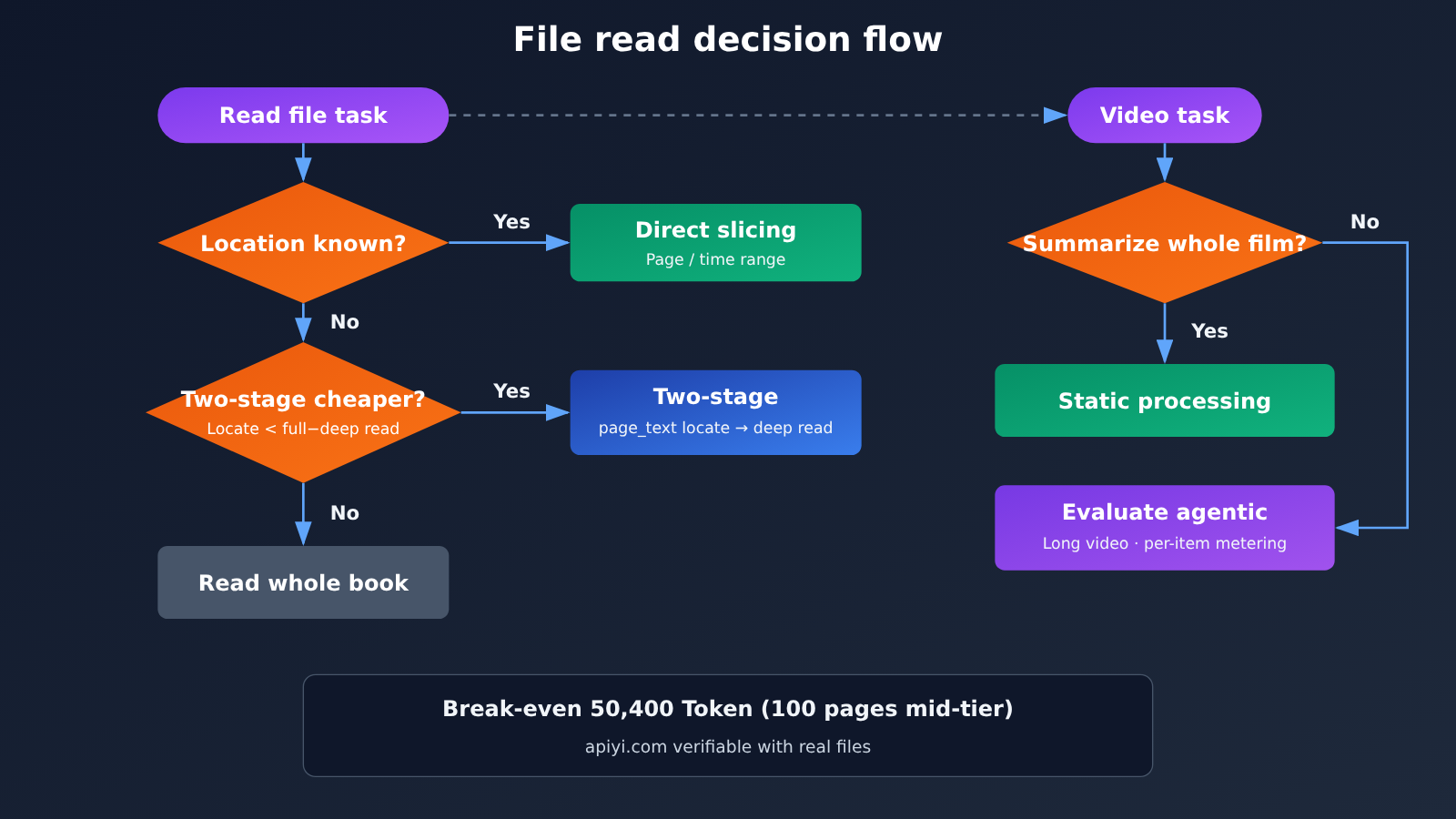
A common pattern in Google’s examples: first extract text from the whole document as a “locating” pass, then do a high-resolution close read of the target pages. Using the same 100-page, mid-tier baseline of 56,000 tokens, suppose the locating pass consumes 8,000 file input tokens and a close read of five pages at the high tier takes about 5,600 — 13,600 in total, a file input reduction of roughly 75.7%.
The break-even point can be calculated directly. Ignoring differences in prompts, output, tool calls, and caching, the two-pass approach is cheaper than reading the whole document only when the locating pass’s file input is less than 56,000 − 5,600 = 50,400. In real engineering there are three more things worth noting:
- If the results of the locating pass (table of contents, index) can be reused, the cost can be amortized across multiple subsequent targeted tasks.
- For tasks where the location is already known — for example, “read the signature block on page 3” — specify the range directly in a structured field and skip the locating pass.
- Two passes add an extra round trip; the latency and the first pass’s output tokens both have to be counted.
How to Estimate a File Slicing Project Budget
To scale a single example up to a full project, you first need to spell out exactly what the calls are made of. Suppose 1,000 independent requests all work against the same 100-page baseline, use the standard uncached input price for the same model, and each only cares about 5 pages: reading the whole document costs about $84 in file input fees, targeted reading costs about $4.2, and the difference is roughly $79.8. If only half the requests can pre-locate their 5 pages, while the other half still need to summarize the entire document, the cost comes to about 42 + 2.1 = $44.1.
Service tiers also change the dollar figures. The Hydrogen standard tier publishes an implicit cache input price of $0.075 per million tokens, while the batch tier charges $0.75 per million for regular input. Any portion the logs show as a cache hit should be billed at the cache price, not uniformly at $1.50. During multi-turn targeting, the historical context may also carry over into the next turn along with the interaction state; the same URI only means it references the same uploaded file — it doesn’t guarantee a cache hit.
| Budget item | Data to record | Pricing basis |
|---|---|---|
| File input (uncached) | Read range, content layer, and resolution per request | Model standard input price |
| File input (cache hit) | Cache usage reported in the response | Implicit cache input price |
| Prompt and historical context | usage.total_input_tokens minus the file portion |
Standard input price |
| Output and thinking | Output tokens, total_thought_tokens |
Output price |
| Tool-loaded content | total_tool_use_tokens (agentic video, etc.) |
Based on docs and response usage |
| Task distribution | Share of targeted tasks vs. full-text tasks | Weighted sum by share |
💰 Cost optimization: Budget-sensitive teams can split “targeted tasks” and “full-text tasks” into two separate pipelines and price each one independently. APIYI apiyi.com bills by usage, and a single API key lets you call Gemini, Claude, OpenAI, and other models — making it easy to run the same batch of tasks across different models and compare unit prices.
How to Cross-Check File Slicing Yourself
The most reliable numbers come from your own files. Here’s the comparison method: use the same file URI, same model, same prompt, same resolution, content layer, and frame rate, run two separate interactions, and explicitly specify the two ranges—”whole file” and “target segment.” For each run, record the original file’s page count or duration in seconds, the requested range, invocation date, model identifier and service tier, plus usage.total_input_tokens and usage.input_tokens_by_modality.
The slicing parameter processing is part of Gemini’s native Interactions calls. For requests that include slicing, the usage record in the generated response serves as the evidence; models.count_tokens is useful for pre-request estimation when the supported request format allows it. The code below has two parts: first, get a Gemini call working through the OpenAI-compatible interface and read the usage; then use a small utility to turn the comparison data into savings ratios and costs.
import openai

client = openai.OpenAI(
    api_key="YOUR_API_KEY",
    base_url="https://api.apiyi.com/v1"  # APIYI OpenAI-compatible endpoint
)

resp = client.chat.completions.create(
    model="gemini-4-hydrogen",
    messages=[{"role": "user", "content": "用一句话说明什么是文件切片。"}]
)
print(resp.choices[0].message.content)
print("输入 Token:", resp.usage.prompt_tokens)
print("输出 Token:", resp.usage.completion_tokens)
View the full comparison log and cost calculation code
import openai
from dataclasses import dataclass, asdict
from datetime import date

PRICE_PER_M = {  # Standard-tier prices checked on 2026-11-24; USD per million tokens
    "gemini-4-hydrogen": {"input": 1.50, "output": 7.50},
    "gemini-4-neon": {"input": 3.00, "output": 15.00},
}

client = openai.OpenAI(
    api_key="YOUR_API_KEY",
    base_url="https://api.apiyi.com/v1"  # Unified access to multiple models
)


@dataclass
class SliceRun:
    label: str              # e.g., "full" or "pages_41_45"
    model: str
    file_units: float       # Number of pages or seconds in the original file
    requested_range: str    # Description of the requested range
    total_input_tokens: int
    file_input_tokens: int  # Taken from the file modality in input_tokens_by_modality
    output_tokens: int = 0
    thought_tokens: int = 0
    cached_tokens: int = 0
    run_date: str = str(date.today())


def file_cost(tokens: int, model: str) -> float:
    return tokens * PRICE_PER_M[model]["input"] / 1_000_000


def compare(full: SliceRun, sliced: SliceRun) -> dict:
    a, b = full.file_input_tokens, sliced.file_input_tokens
    return {
        "A_minus_B": a - b,
        "file_input_reduction": round((a - b) / a, 4) if a else None,
        "file_cost_full": round(file_cost(a, full.model), 6),
        "file_cost_sliced": round(file_cost(b, sliced.model), 6),
        "total_input_full": full.total_input_tokens,
        "total_input_sliced": sliced.total_input_tokens,
        "note": "缓存、输出、思考需分别核算,不计入本比例",
    }


def two_stage_break_even(full_tokens: int, read_tokens: int) -> int:
    """The two-stage approach is cheaper than reading the whole file only when the file input for the locating round is below this value."""
    return full_tokens - read_tokens


if __name__ == "__main__":
    # Demo with the hypothetical example from the article; in real use, replace it with usage data from the response
    full = SliceRun("full", "gemini-4-hydrogen", 100, "1-100",
                    total_input_tokens=56_200, file_input_tokens=56_000)
    sliced = SliceRun("pages_41_45", "gemini-4-hydrogen", 100, "41-45",
                      total_input_tokens=3_000, file_input_tokens=2_800)
    print(asdict(sliced))
    print(compare(full, sliced))
    print("两段式盈亏线:", two_stage_break_even(56_000, 5_600))
🚀 Quick start: Sign up at APIYI apiyi.com to get free trial credits — then use the script above to get invocation and usage logging working first. Whether requests with the
processingslicing field can be passed through the compatible endpoint should be confirmed against the Gemini integration notes in the APIYI docs center; until that’s confirmed, you can use the official native endpoint to run the comparison.
Don’t mix agentic video mode into your static slicing math
Video agentic mode is metered differently: the thinking generated by video navigation counts toward total_thought_tokens, while frames, audio tracks, and transcripts loaded on demand count toward total_tool_use_tokens. Google’s “save up to ~88% on long videos” figure refers to agentic processing versus static processing — not to the result of explicit slicing. The docs also note that for short videos, or when you need to summarize most of the content, the extra navigation can actually increase latency and usage.
So when you’re working out a static budget for explicit trimming, use the dataset from “same static settings, only the time range changes.” You need to capture the full input, the visible answer, and the thinking usage together — that’s the only way to explain why “reading a few fewer pages” and “the whole call costing the same percentage less” aren’t the same thing.
File Slicing FAQs
Q1: Will File Slicing cut my entire bill by 95%?
No. The 95% figure is the reduction in file input when you take 5 pages from a 100-page document and all are mid-resolution page images. Prompts, output, and thinking do not shrink with slicing; the overall reduction depends on how much of your original bill came from file input.
Q2: Is it still worth raising resolution after slicing?
In most cases, yes. A whole mid-tier book is 56,000 tokens, while 5 high-tier pages are about 5,600 tokens, so the reduction is still 90%. When you’re closely reading charts or scanned documents, using the budget saved by slicing to raise resolution usually works better than reading the whole book at low resolution.
Q3: If I read the same file URI multiple times, will it automatically use the cache?
Not necessarily. The same URI only means it references the same uploaded file; what you save is the bandwidth of uploading it again. Whether the cache is hit depends on the usage record for each response; the cached portion is billed at the cache price.
Q4: How can I verify at low cost how much slicing can save in my business?
Pick a few real files and run a “whole section vs. target section” comparison using the method in this article, changing only the range and leaving all other settings unchanged. Through APIYI apiyi.com, you can claim free test credits and use the same API key to compare Gemini and other models side by side on the same tasks for total cost.
Q5: Is estimating tokens by cell count accurate for tables?
Not accurate enough. Even for the same area, input volume can differ because of long strings, formula complexity, and rendering options. Cell count is only a physical measure of selection size; cost estimates should be based on the token difference you actually observe.
Q6: Can I use LiteLLM’s and Vercel’s numbers directly for budgeting?
Not recommended. LiteLLM’s 67% and 33% are each test results from a single file, while Vercel’s one-fourteenth also includes both scope and content-level differences. They can indicate direction, but your budget should be based on your own comparison data. If you need to retest across multiple models, you can quickly switch through APIYI apiyi.com’s unified interface.
File Slicing refines the granularity of “pay for what you read” from the whole file down to pages, cells, and seconds. For long-file tasks where the problem location is clear, this update can directly lower file input costs; for tasks that require whole-document summarization or are mainly reasoning-based, the benefit is limited. The final savings should be answered by your own files and usage records.
Reference Materials
- Gemini API Changelog (2026-11-18): Launch record for multimodal file processing and slicing
- Link:
aistudio.google.com/docs/changelog
- Link:
- Google Developer Blog — File Slicing Feature (2026-11-23): Feature overview, two-stage example, and partner testing
- Link:
blog.google/innovation-and-ai/technology/developers-tools/file-slicing-controls
- Link:
- Gemini Document Processing Guide: Page options, worksheet options, billing details, and limits
- Link:
aistudio.google.com/docs/document-processing
- Link:
- Gemini Video Understanding and Audio Guide: Video content layers, processing modes, and audio billing
- Link:
aistudio.google.com/docs/video-understanding
- Link:
- Gemini Token Guide and Pricing Page:
count_tokens, usage breakdown, and service tier pricing for each model- Link:
aistudio.google.com/docs/tokens,aistudio.google.com/docs/pricing
- Link:
Author: APIYI Technical Team
Technical Discussion: Feel free to reach out to us on the APIYI apiyi.com homepage. For more integration resources, visit the docs.apiyi.com documentation center.


