

Author’s note: DeepSeek V4.1 Pro doesn’t have a model card, a price, or an invocation name right now. This article lays out the currently callable alternatives, per-task costs, and a migration checklist across three tiers: text flagship, cheap multimodal, and cheaper fast model.
First, the release status: as of 2026-11-24, DeepSeek V4.1 Pro has not been released, and there’s no callable API for it. The name shows up exactly once in DeepSeek’s official docs — in the release note dated 2026-09-10. The routing plan was later withdrawn, and to this day the official side hasn’t published its model card, pricing, or API invocation name. Teams with production workloads are better off laying out the currently callable models in three tiers than continuing to wait, then matching each task to the right one.
This isn’t a “please ship it already” post, and it doesn’t predict a release date. Every fact here is tagged with its source category: official self-report, third-party compilation, community or media observation, or unknown.
The core value: after reading this, you’ll know the real status of V4.1 Pro and be able to pick an alternative from the three tiers — text flagship, cheap multimodal, and cheaper fast model. The article also includes a migration checklist and acceptance criteria.
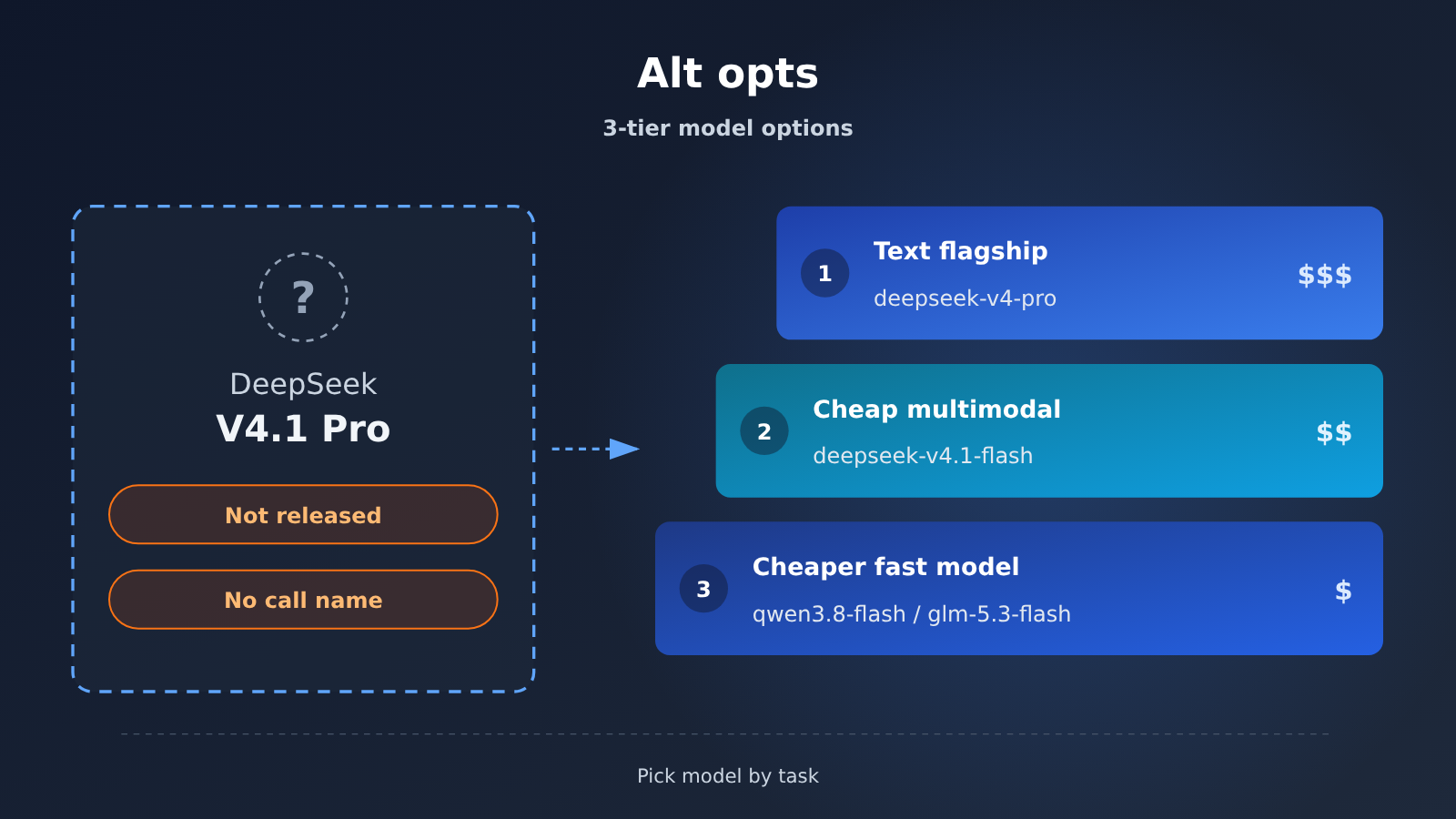
DeepSeek V4.1 Pro release status: what’s confirmed and where it comes from
A lot of people think V4.1 Pro is already “half-launched” because a September changelog entry mentioned it. The table below separates facts you can verify from their sources, so you can tell what’s usable as evidence and what’s just rumor.
| Fact | Details | Source type |
|---|---|---|
| Only official mention | The 2026-09-10 release notes stated that, starting at 04:00 UTC on September 14, requests sent to deepseek-v4-pro would be routed to V4.1 Flash and billed at Flash pricing until V4.1 Pro is released |
Official statement |
| Routing plan withdrawn | After developers objected to production environments being silently swapped, the same changelog was changed to say that deepseek-v4-pro would continue to be served after September 14, with billing unchanged |
Official statement |
| Current official pricing page | Checked on 2026-11-13, it lists only two chat models: deepseek-flash (DeepSeek-V4.1-Flash-1017) and deepseek-v4-pro (DeepSeek-V4-Pro-0813) |
Official statement |
| Latest model entry | The newest model entry in the changelog is still Flash 1017 from 2026-10-17 | Official statement |
| Specs and endpoint | No pricing, context limit, output cap, modality details, or endpoint, so it can’t be called | Third-party compilation (OrcaRouter, 2026-11-23) |
| Canary testing | Chinese media reported that around September 28, canary accounts were testing it, and “DeepSeek V4.1 Pro / Early access” appeared in the selector; there’s been no new information since | Media report, unconfirmed by official sources |
| Release date | No official information whatsoever | Unknown |
The only rows in this table that really count as evidence are the first four. Canary screenshots and the occasional test name that shows up in a repo don’t count as a release: without a model card and pricing, and without an invocation name, your code can’t point to it.
Why DeepSeek V4.1 Pro still hasn’t arrived
From public information, the direct reason it hasn’t arrived is that the official side has never given a timeline. The “until V4.1 Pro is released” line in the September note was only a condition, and later even the routing arrangement was withdrawn. In other words, that line was a billing transition arrangement, not a launch announcement. The official side hasn’t added anything since, so any claim that it’s “launching next week” has no source to back it up.
For production systems, the takeaway is simple: don’t put V4.1 Pro on your roadmap. Get your tasks running reliably on the existing models first, and wait until the official model card and pricing are actually out before deciding whether to switch.
DeepSeek V4.1 Pro Alternatives: Three Tiers You Can Call Right Now
The alternatives split into two main lines. If you need pure text reasoning, go with the text flagship deepseek-v4-pro; if you want something cheap that also handles vision, go with deepseek-v4.1-flash. Beyond those two lines, cheaper fast models like qwen3.8-flash and glm-5.3-flash can fill in.
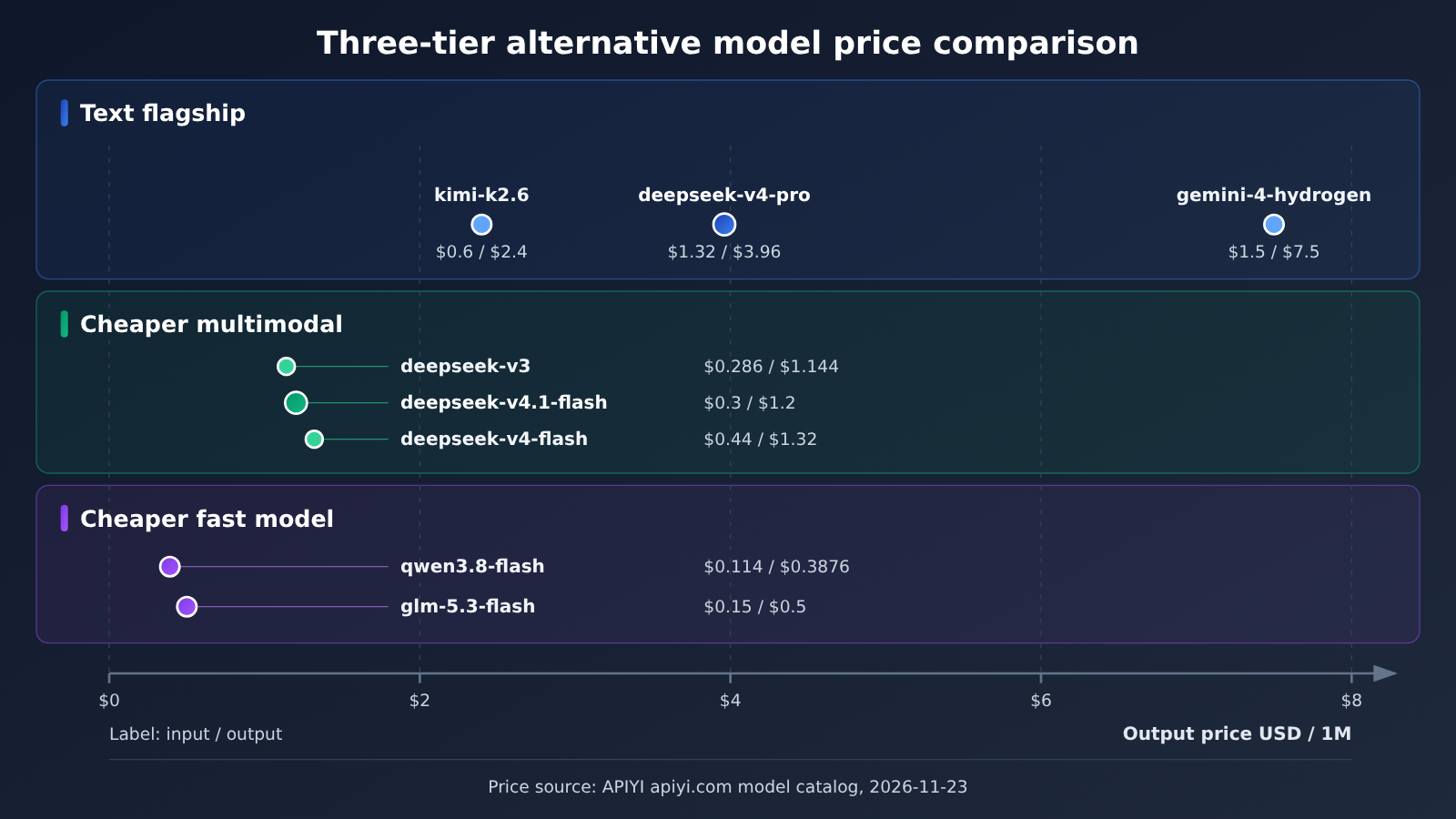
The prices in the table below come from the APIYI apiyi.com model master list (data updated 2026-11-23 10:23 UTC+8, in USD / 1M tokens). Where a spec lines up with an official model card, it’s listed; where it can’t be found, it’s marked “unknown.”
| Tier | Model (call name) | Input | Output | Cache read | Known specs |
|---|---|---|---|---|---|
| Text flagship | deepseek-v4-pro |
$1.32 | $3.96 | $0.043996 | 1.6T total parameters / 49B active, 1M context window, max output 384K, text only (official model card) |
| Text flagship (cross-vendor reference) | kimi-k2.6 |
$0.6 | $2.4 | $0.101053 | Unknown; refer to the platform’s model list |
| Text flagship (cross-vendor reference) | gemini-4-hydrogen |
$1.5 | $7.5 | $0.075 | Unknown; refer to the platform’s model list |
| Cheap multimodal | deepseek-v4.1-flash |
$0.3 | $1.2 | $0.006 | 552B total parameters, 8B activated during prefill / 16B during decode, 1M context window, native vision, MIT-licensed open weights (official model card) |
| Cheap multimodal (older version) | deepseek-v4-flash |
$0.44 | $1.32 | $0.01408 | Unknown; refer to the platform’s model list |
| Cheap text (older version) | deepseek-v3 |
$0.286 | $1.144 | $0.0715 | Unknown; refer to the platform’s model list |
| Cheaper fast model | qwen3.8-flash |
$0.114 | $0.3876 | $0.01425 | Unknown; refer to the platform’s model list |
| Cheaper fast model | glm-5.3-flash |
$0.15 | $0.5 | $0.03 | Unknown; refer to the platform’s model list |
DeepSeek’s Official Pricing and Peak/Off-Peak Windows
If you’re calling DeepSeek directly, you also need to watch peak/off-peak pricing. Here’s the official pricing (USD / 1M tokens): V4 Pro peak is $1.32 input, $3.96 output, $0.022 cache hit, and off-peak halves that to $0.66 / $1.98; V4.1 Flash is $0.30 / $1.20 at peak and $0.15 / $0.60 off-peak. Peak hours are Monday through Friday, UTC 01:00-04:00 and 06:00-10:00.
Comparing the two, the platform master list’s input and output prices match the official peak prices, while cache-read prices differ. Whether the platform distinguishes peak from off-peak, and how it bills, is governed by the platform’s model list. If batch jobs can be shifted off-peak, calling DeepSeek directly leaves clear room for cost savings; for real-time workloads, the peak/off-peak spread doesn’t mean much.
DeepSeek V4.1 Pro Replacement Cost: Priced Out per Typical Task
Looking at the per-million-token price alone isn’t very intuitive, so here’s what it works out to for one typical task. Say the task is a medium-sized code review or a summary of a long document: 20,000 input tokens, 2,000 output tokens, no cache hits counted.
| Model | Cost per run (USD) | Per 1,000 runs (USD) | Relative to deepseek-v4-pro |
|---|---|---|---|
gemini-4-hydrogen |
~0.0450 | ~45.00 | ~1.31x |
deepseek-v4-pro |
~0.0343 | ~34.32 | baseline |
kimi-k2.6 |
~0.0168 | ~16.80 | ~49% |
deepseek-v4-flash |
~0.0114 | ~11.44 | ~33% |
deepseek-v4.1-flash |
~0.0084 | ~8.40 | ~24% |
deepseek-v3 |
~0.0080 | ~8.01 | ~23% |
glm-5.3-flash |
~0.0040 | ~4.00 | ~12% |
qwen3.8-flash |
~0.0031 | ~3.06 | ~9% |
The math is simple: input tokens × input unit price ÷ 1,000,000, plus output tokens × output unit price ÷ 1,000,000. For deepseek-v4-pro, that’s 20,000 × 1.32 ÷ 1M ≈ 0.0264, plus 2,000 × 3.96 ÷ 1M ≈ 0.0079, for a total of about 0.0343.
Two takeaways are worth remembering. First, within the DeepSeek family, deepseek-v4.1-flash runs at roughly a quarter of the flagship’s cost per task — and throws in vision capabilities on top. Second, if your system prompt is long and highly repetitive, cache-read pricing drives a big gap: deepseek-v4.1-flash‘s cache read is just $0.006.
💰 Cost tip: Plug your own real request logs into the formula above — that’s far more useful than any leaderboard. The model directory on APIYI apiyi.com puts all these models on one price sheet, so a single key lets you run the same batch of samples through each one and see the actual cost per task for yourself.
How to Switch DeepSeek V4.1 Pro Replacement Models with OpenAI-Compatible APIs
All of these models can be called through OpenAI-compatible interfaces, and switching between them basically comes down to changing two parameters. Here’s the minimal change checklist:
- Install the dependency:
pip install openai - Client base URL:
base_url="https://api.apiyi.com/v1" - API key:
api_key="YOUR_API_KEY"— read it from an environment variable rather than hardcoding it in your code - Text flagship:
model="deepseek-v4-pro" - Cheaper multimodal option:
model="deepseek-v4.1-flash"— pass images asimage_urlcontent blocks insidemessages, following the OpenAI format - Cheaper, faster models:
model="qwen3.8-flash"ormodel="glm-5.3-flash" - Same call method as always:
client.chat.completions.create(model=..., messages=..., max_tokens=...)
I’d recommend pulling model out into a config setting instead of hardcoding it in your business logic. That way, if V4.1 Pro ever actually shows up, you change one line of config and rerun your regression tests.
🚀 Quick start: Once you register at APIYI apiyi.com, you can get free trial credits. Grab 20 to 50 real samples first, run them through
deepseek-v4-pro,deepseek-v4.1-flash, and one fast model, and within half an hour you’ll see the quality differences between each tier.
DeepSeek V4.1 Pro scenario recommendations: choosing by task type
When choosing a model, look at the task first and the model second. Below are primary and alternate choices for common production tasks.
| Task type | Primary choice | Alternate | Why |
|---|---|---|---|
| Complex code generation, cross-file refactoring | deepseek-v4-pro |
kimi-k2.6 |
Requires high reasoning density; the flagship tier’s 49B active parameters are more reliable |
| Very long document analysis, long report generation | deepseek-v4-pro |
deepseek-v4.1-flash |
Both have 1M context; when output is especially long, V4 Pro has a clear 384K output cap |
| Screenshot understanding, charts, receipt recognition | deepseek-v4.1-flash |
Use whichever vision-capable model is listed on the platform | V4 Pro is text-only and can’t handle images |
| Customer support Q&A, answering after RAG retrieval | deepseek-v4.1-flash |
glm-5.3-flash |
Context comes from retrieval, and the reasoning depth requirement is moderate |
| Classification, tagging, field extraction | qwen3.8-flash |
glm-5.3-flash |
Short outputs and high call volume make the lowest unit-price tier more cost-effective |
| Local or private deployment needed | deepseek-v4.1-flash open weights |
— | MIT license, weights published on Hugging Face and ModelScope, with GGUF builds available |
When to choose the text flagship deepseek-v4-pro
- Tasks already running on
deepseek-v4-pro: After the September routing plan was withdrawn, its billing and behavior haven’t changed, so no migration is needed. - Tasks sensitive to accuracy and with low call volume: For example, code review and contract analysis. Spending a few extra cents per call buys you less manual rework.
When to choose deepseek-v4.1-flash or a cheaper, faster model
- Tasks that need image understanding:
deepseek-v4.1-flashis currently DeepSeek’s only available model with native vision. - High-concurrency, short-output tasks:
qwen3.8-flashcosts less than one-tenth of the flagship per call, making it suitable for rough screening first, then escalating hard cases to the flagship.
DeepSeek V4.1 Pro Migration Checklist
The most common cause of migration problems isn’t picking the wrong model—it’s failing to align the parameter details. Go through the checklist below item by item:
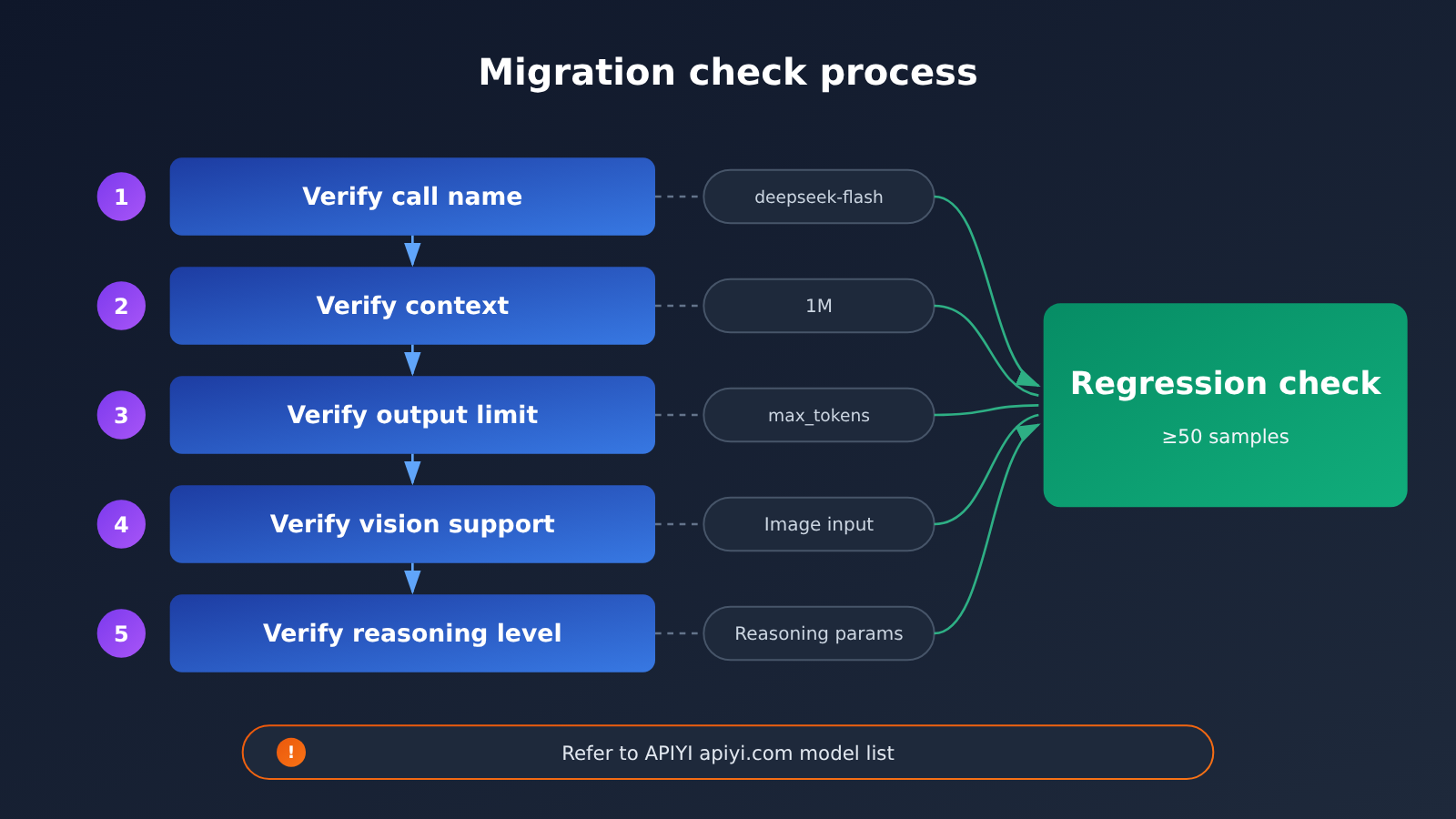
- Invocation name: When calling DeepSeek directly, the invocation name for V4.1 Flash is
deepseek-flash; the official API does not acceptdeepseek-v4.1-flash. On the platform, you usedeepseek-v4.1-flash. When you switch channels, you must change the name—otherwise you’ll get a model-not-found error. - Context: Both
deepseek-v4-proanddeepseek-v4.1-flashhave a 1M context window. Before switching to the fast model, confirm its context length can hold your longest request. The reference material doesn’t include context data for these two fast models. - Output limit: V4 Pro’s maximum output is 384K (official model card). The output limit for V4.1 Flash isn’t available in the reference material for this article, so for long-output tasks, be sure to stress-test first and set
max_tokensto an explicit value. - Vision support: Switching from V4 Pro to V4.1 Flash adds image input; going the other way, from Flash back to V4 Pro, requests with images will fail, so you need to block them at the routing layer first.
- Thinking level: Whether each model requires manually enabling thinking or reasoning mode, and how to specify the parameters, isn’t covered in the reference material for this article and is unknown. Check each model’s documentation; don’t assume old and new models behave the same by default.
- Pricing and model availability: Before launch, confirm the invocation name and the day’s pricing in the APIYI apiyi.com model list. The platform doesn’t have a
deepseek-v4.1-proentry; using that name will throw an error.
Actionable acceptance criteria
- Prepare a regression set of at least 50 real samples, covering the longest inputs, requests with images, and requests that require structured output.
- The JSON parsing success rate for structured output should be no lower than the original model’s.
- Business metrics (accuracy, human ratings) should be no lower than the original model’s, or the drop should be within a threshold you agreed on in advance.
- Record token usage for each sample, calculate the per-request cost using the formula above, and confirm the savings meet expectations.
- Gradual rollout: first route 5% to 10% of traffic and observe for a full business cycle, then switch all traffic over.
DeepSeek V4.1 Pro Decision Guide: Wait or Switch Now
Waiting costs you time; switching costs you one regression test. The table below helps you figure out which situation you’re in.
| Your situation | Recommendation | Why |
|---|---|---|
You’re already using deepseek-v4-pro and you’re happy with the results |
No need to wait, no need to switch | Existing models stay available as usual, and pricing doesn’t change |
| You need vision capabilities | Switch straight to deepseek-v4.1-flash |
V4.1 Pro’s modalities are an unknown; Flash already has native vision |
| Cost pressure is high and your tasks are simple | Move straight to the fast model tier | Per-call cost can drop to roughly a tenth of the flagship |
| The flagship isn’t good enough and you’re pinning your hopes on a stronger model | Wait, but evaluate flagships from other vendors in the meantime | V4.1 Pro has no specs, so there’s no way to confirm it would solve your problem |
| Your schedule depends on V4.1 Pro shipping | Take it off the schedule right away | There’s no official date whatsoever |
There’s only one case where waiting is worth it: the current flagship clearly fails on your regression set, and you have to stay within the DeepSeek family — because of compliance or self-hosting requirements, for example. Even then, you should get your workload running on the existing models first. Don’t let your launch plan get stuck on a model that doesn’t even have an invocation name yet.
💡 Choosing a tier: Which tier you pick mostly comes down to the task itself. We recommend running a side-by-side test of all three tiers on the same batch of samples through APIYI apiyi.com; the platform exposes a unified OpenAI-compatible interface, so switching only means changing the
modelparameter — comparing and rolling back is easy.
Frequently Asked Questions (FAQ)
Q1: Has DeepSeek V4.1 Pro actually been released?
No. That name appeared only once in the official release notes on 2026-09-10, and the routing plan was withdrawn afterward. As of now, it has no model card, pricing, or API invocation name. The official pricing page only has two rows: `deepseek-flash` and `deepseek-v4-pro`.
Q2: Is the “V4 Pro routes to V4.1 Flash” line from the September note still in effect?
No. The same changelog has been updated to say that `deepseek-v4-pro` will continue to be offered after September 14, with billing unchanged. When you call `deepseek-v4-pro` now, you’re using V4 Pro itself (DeepSeek-V4-Pro-0813).
Q3: People online say someone saw V4.1 Pro in canary testing—is that credible?
This was a media report of canary account testing around September 28. There’s been no new information since, and the official side hasn’t confirmed it, so treat it as a community observation. Even if the canary report is true, it doesn’t mean an API invocation name has been made publicly available—production systems can’t depend on it.
Q4: Are deepseek-v4.1-flash and deepseek-flash the same model?
On DeepSeek’s official platform, `deepseek-flash` maps to version DeepSeek-V4.1-Flash-1017, and the official API doesn’t accept the `deepseek-v4.1-flash` spelling. When calling through APIYI apiyi.com, you use `deepseek-v4.1-flash`. This is the easiest place to trip up when migrating across channels—be sure to rename it per channel.
Q5: What’s the fastest way to compare the three tiers on my task?
1. Sign up at APIYI apiyi.com and get an API key and free test credits
2. Set `base_url` to `https://api.apiyi.com/v1`
3. Run `deepseek-v4-pro`, `deepseek-v4.1-flash`, and `qwen3.8-flash` on the same batch of samples, and record quality and token usage
Q6: What known limitations do these alternatives have?
– `deepseek-v4-pro` is a text-only model, can’t handle images, and has the highest unit price among the three tiers.
– The output limit for `deepseek-v4.1-flash` wasn’t found in the reference materials for this article, so you’ll need to stress-test long-output tasks yourself.
– The context window, vision support, and reasoning-tier parameters for the fast model tier are all unknown—confirm each one before launch.
DeepSeek V4.1 Pro Key Takeaways
- Release status: V4.1 Pro appeared only once in a September 10 note and still can’t be called.
- No reliable information: There’s no model card, pricing, context window, output limit, or invocation name.
- Text flagship:
deepseek-v4-prois available as usual, with a 1M context window and a max output of 384K. - Affordable multimodal model:
deepseek-v4.1-flashcosts about a quarter as much per call as the flagship, and it has native vision. - Even cheaper fast models:
qwen3.8-flashandglm-5.3-flashwork well for short-output tasks like classification and extraction. - Migration checklist: Check five items one by one—invocation name, context window, output limit, vision, and reasoning tier—then run your regression set for acceptance.
Summary
Key takeaways for choosing a DeepSeek V4.1 Pro alternative:
- Don’t wait for a model that has no invocation name: It has no release date and shouldn’t be on your roadmap.
- Pick by tier: For text reasoning, look at
deepseek-v4-pro; for image understanding and cost control, look atdeepseek-v4.1-flash; for high-frequency simple tasks, look at the fast model tier. - Migration depends on checklists and samples: Differences in invocation names are the most likely to cause problems. Validate against the quality of real samples and per-call cost.
Start by making model a configurable option, and stabilize your business on existing models. Once V4.1 Pro actually publishes a model card and pricing, use the same regression set to assess whether to switch. For side-by-side comparisons, you can call these three tiers with a single key through APIYI apiyi.com and calculate costs using the formula in this article.
📚 References
-
DeepSeek Official API Documentation: changelog, pricing page, and peak/off-peak period details
- Link:
api-docs.deepseek.com - Note: source for the 2026-09-10 release notes and 2026-11-13 pricing page
- Link:
-
DeepSeek Hugging Face Model Cards: specs for V4 Pro and V4.1 Flash
- Link:
huggingface.co/deepseek-ai - Note: official details on parameter count, context window, output limits, modalities, and open-source license
- Link:
-
OrcaRouter Third-Party Summary (2026-11-23): status roundup for V4.1 Pro
- Note: this is a third-party summary; the parts involving canary testing are media reports and have not been officially confirmed
Author: APIYI Technical Team
Technical Discussion: Feel free to contact us through the APIYI homepage. For more models and integration instructions, visit the docs.apiyi.com documentation center.


