

Author’s note: This walks through installing Lean 4, setting up a Mathlib project, using a fixed prompt to make Claude output compilable proofs, feeding compilation errors back for another attempt, and getting a math proof that passes lake build — one step at a time.
You know a bit of math, and you know how to prove a proposition on paper, but the moment you try to write it in a form a machine can verify, Lean 4’s syntax, Mathlib’s lemma names, and the type system’s quirks all gang up on you. This article lays out a division-of-labor workflow where “Claude drafts the proof, the Lean compiler judges whether it’s right”, taking you from zero to your first Lean 4 math proof that compiles.
This isn’t a “AI proves everything for you” puff piece. The model only writes candidate code; the Lean compiler is the one that decides right from wrong. Until the model’s output compiles, it counts as nothing more than a draft.
Core takeaways: After reading this, you’ll have five things: two ways to install Lean, a project with Mathlib set up, a fixed prompt you can copy directly, a retry loop with limits and a stop-loss condition, and fixes for three common error types. At the end there’s a token cost estimate for one task and the acceptance criteria.
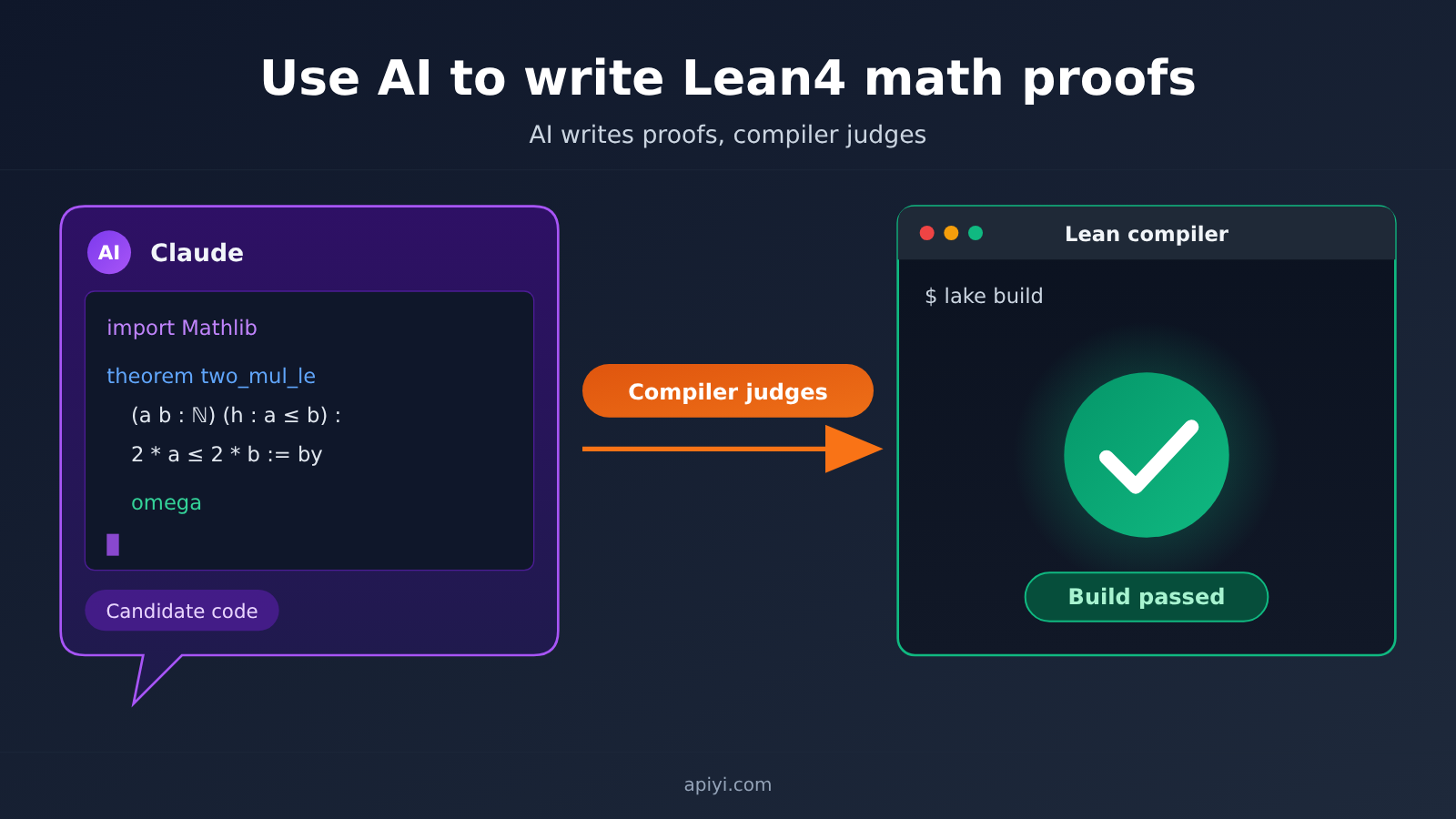
Key points for using AI to write Lean 4 math proofs
Let’s get the division of labor straight first. In this whole workflow there’s only one judge: the Lean compiler. Claude is a fallible assistant that can still read error messages.
| Point | Explanation | Why it matters |
|---|---|---|
| The compiler is the only judge | A proof only counts if lake build passes with no errors and no sorry |
Keeps you from mistaking the model’s “looks right” for verified |
| Fixed prompt | Require Lean 4 code only, no explanation, no omitted imports | Output can be pasted straight into the compiler, less manual cleanup |
| Feed errors back verbatim | Don’t rewrite or summarize compile errors — paste them in full | The model can make precise fixes based on the error location |
| Retries have a cap | 5 rounds max; stop immediately when any stop-loss condition triggers | Keeps costs predictable and stops the model from spinning in place |
| Never change the statement | You hard-code the theorem name and type signature; the model only fills in the proof | Prevents the model from “secretly swapping the problem” and passing anyway |
What the model can and can’t do in Lean 4 math proofs
The model is good at formalizing “already-known math, already-existing lemmas”: textbook-level propositions like summation formulas, simple inequalities, divisibility properties. It can usually guess whether to reach for induction, simp, or ring, and it can adjust lemma names based on error messages. This part is the most painful for beginners, so handing it to the model is the best deal you’ll get.
What the model is bad at — and shouldn’t take on — is the part that needs new mathematical ideas. For research-level conjectures or propositions that require inventing new theorems, the model can’t offer a reliable route, and repeated retries just burn tokens. On top of that, the model may quietly modify your proposition so that a weaker statement compiles, which is why you must write and check the statement yourself.
One more boundary: this method is for learning formalization and verifying your own math work. It doesn’t apply to any use that gets around homework or exam requirements. The value of a formal proof is that you understand why every step holds.
Installing Lean 4: Choosing Between Two Paths
The path recommended on Lean’s official installation page (the original docs) is VS Code plus the official Lean 4 extension — the extension walks you through the rest of the installation. If you’re comfortable with the command line, or you’re running things on a server, you can go with a manual install: use elan to manage Lean versions and lake to manage projects.
| Path | Who it’s for | What you need to do | Acceptance criteria |
|---|---|---|---|
| VS Code + Lean 4 extension | Beginners, writing proofs locally | Install VS Code, install the extension, follow the prompts | After opening a .lean file, the Lean info panel appears on the right |
| Manual elan + lake | Command-line users, servers, automation scripts | Install git, curl, elan, then create a project with lake | lean --version and lake --version produce output in the terminal |
Path 1: Install the Lean 4 extension in VS Code (recommended)
- Install VS Code, open the extensions panel, search for
Lean 4, and install the official extension. Check: the extension shows as installed in the list, with no error prompts. - Complete the remaining installation by following the guide the extension pops up (the extension handles pulling the Lean toolchain). Check: the guided flow finishes without stopping on a failure page.
- Create a new file ending in
.leanand write a random line like#eval 1 + 1. Check: the info panel on the right of the editor shows the result2, which means Lean is working.
Path 2: Install elan and lake manually (macOS example)
- Confirm you already have git and curl — the official manual installation page (the original docs) states these are Lean’s prerequisites. Check: both
git --versionandcurl --versionprint version numbers. - If you don’t have Homebrew, you can install it with the command given on the official page:
/bin/bash -c "$(curl -fsSL https://raw.githubusercontent.com/Homebrew/install/HEAD/install.sh)". Check:brew --versionproduces output. - Install elan:
curl https://elan.lean-lang.org/elan-init.sh -sSf | sh, and choose1to accept the default when prompted. Check: the install script finishes with no errors. - Make the current terminal recognize the new commands:
source $HOME/.elan/env. Check:elan --version,lean --version, andlake --versionall print version numbers.
Create a Lean 4 Project with Mathlib
Mathlib is the math library maintained by the Lean community. It covers concepts like sums, real numbers, and group theory. Without Mathlib, most proofs a model writes will fail because it can’t find the lemmas, so you need to include it from the start.
- Create the project:
lake +leanprover-community/mathlib4:lean-toolchain new MyMathlibProject math. The first run has to wait for Mathlib to download; how long that takes depends on your network. Check: aMyMathlibProjectfolder appears in the current directory. - Enter the directory and build:
cd MyMathlibProject, thenlake build. Check: the command finishes and noerrortext appears. - Open it in VS Code: run
code .in the project directory, or use File > Open Folder in VS Code and select the project. When prompted, choose Trust authors. Check: open a.leanfile in the project; the info panel loads normally and stops spinning forever. - Create a new proof file, such as
OddSum.lean, and put it in the project’s source directory. Check: after writingimport Mathlibon the first line of the file, the info panel shows no red errors.
If you only want to check a single file, you can compile it from the project root with lake env lean filename.lean; if you want to verify the whole project, use lake build. Either one works for the retry loop below—the key is to get the complete compiler output.
Writing Lean 4 Proofs with Claude: A Fixed Prompt Template
The prompt has to do one thing: make the model’s output compile without modification. That means it must forbid explanatory prose, forbid omitting imports, forbid sorry, and lock down the theorem statement. You can copy the following directly—just replace what’s inside the curly braces:
You are a Lean 4 and Mathlib formalization assistant. Complete the proof for the theorem below.
Rules:
1. Output only Lean 4 code—no explanations, no Markdown markup, no code fences.
2. The first line must be import Mathlib; don’t omit any imports.
3. The theorem name and type signature must match exactly what I provide; not a single character may change.
4. Don’t use sorry, admit, or axiom, and don’t add new assumptions.
5. If I include compilation errors, modify only the proof section based on those errors, and output the complete new file.
Theorem statement:
{paste the theorem line you wrote here, ending with := by}
Compilation errors from the previous round (leave blank for the first round):
Example Proposition: The Sum of the First n Odd Numbers Equals n Squared
Let’s walk through the workflow with this proposition. Here’s one workable Lean 4 / Mathlib formulation—it’s only a starting template for the model; you have to compile it yourself for it to count:
import Mathlibtheorem sum_first_odds (n : Nat) : (Finset.range n).sum (fun i => 2 * i + 1) = n ^ 2 := byinduction n with| zero => simp| succ k ih => rw [Finset.sum_range_succ, ih]; ring
The idea is induction on n: when n is 0, both sides are 0, which simp handles. In the induction step, use Finset.sum_range_succ to peel off the last term; after substituting the induction hypothesis, the goal becomes k ^ 2 + (2 * k + 1) = (k + 1) ^ 2, and ring finishes the algebraic simplification. Write these lines into a file and compile it. The proof only counts as valid once the info panel shows No goals and the terminal reports no errors.
Calling Claude via API to Write Lean 4 Proofs
You can run the whole flow by copy-pasting in a GUI, but retry loops are better off automated with a script. Here are the key parameters you need to set when calling Claude — plug them into any OpenAI-compatible SDK or HTTP client.
- OpenAI-compatible mode: set
base_urltohttps://api.apiyi.com/v1, use the request path/v1/chat/completions, setmodeltoclaude-opus-5-5, and put the prompt in the user message. - Anthropic native mode: set the Base URL to the root domain
https://api.apiyi.com— the SDK appends/v1/messageson its own. If you mistakenly use the address that already includes/v1, the path gets duplicated and you’ll get a 404. - Don’t pass
temperature,top_p, ortop_k: per Anthropic’s official migration guide (as written in the docs), starting with API version 2026-10-21 these three parameters are removed from the Messages API, and passing any value returns a 400. - Leave plenty of headroom in
max_tokens: it’s a hard cap on thinking plus body text combined. Set it too low and the code gets truncated, which shows up as a syntax error at compile time.
| Parameter | Recommended setting | Why (per Anthropic’s official migration guide) |
|---|---|---|
model |
claude-opus-5-5 |
The model ID is fixed to this value |
thinking |
Omit it, or use {"type":"adaptive"} |
You can’t pass disabled, and you can’t use enabled with budget_tokens |
output_config.effort |
medium on the first round, switch to high once you’re stuck |
Options are low / medium / high / xhigh / max; default is medium |
max_tokens |
A few thousand to around ten thousand is recommended | Thinking tokens count toward the cap and are billed as output |
| Sampling parameters | Never pass them | Passing them to the new API version returns a 400 outright |
| End-of-prompt prefill | Don’t prefill assistant content | The official docs say it isn’t supported |
🚀 Quick-start tip: For your first run through the flow, we recommend signing up at APIYI apiyi.com and calling
claude-opus-5-5with the free trial credit for new users. A single API key lets you use both the OpenAI-compatible format and the Anthropic native format, so you can try out your prompt by hand first and then hook it up to a script.
Two more details are worth keeping in mind. thinking.display defaults to omitted, so the thinking block in the response may come back empty — that’s normal, and you only need to read the Lean code from the body text. Prompt Cache billing only applies in the native format; it counts as a hit only when usage.cache_read_input_tokens in the response is greater than 0. In a retry loop the fixed prompt portion repeats a lot, so sticking with the native format is the easier way to save money.
Compilation Retry Loop for Lean4 Proofs
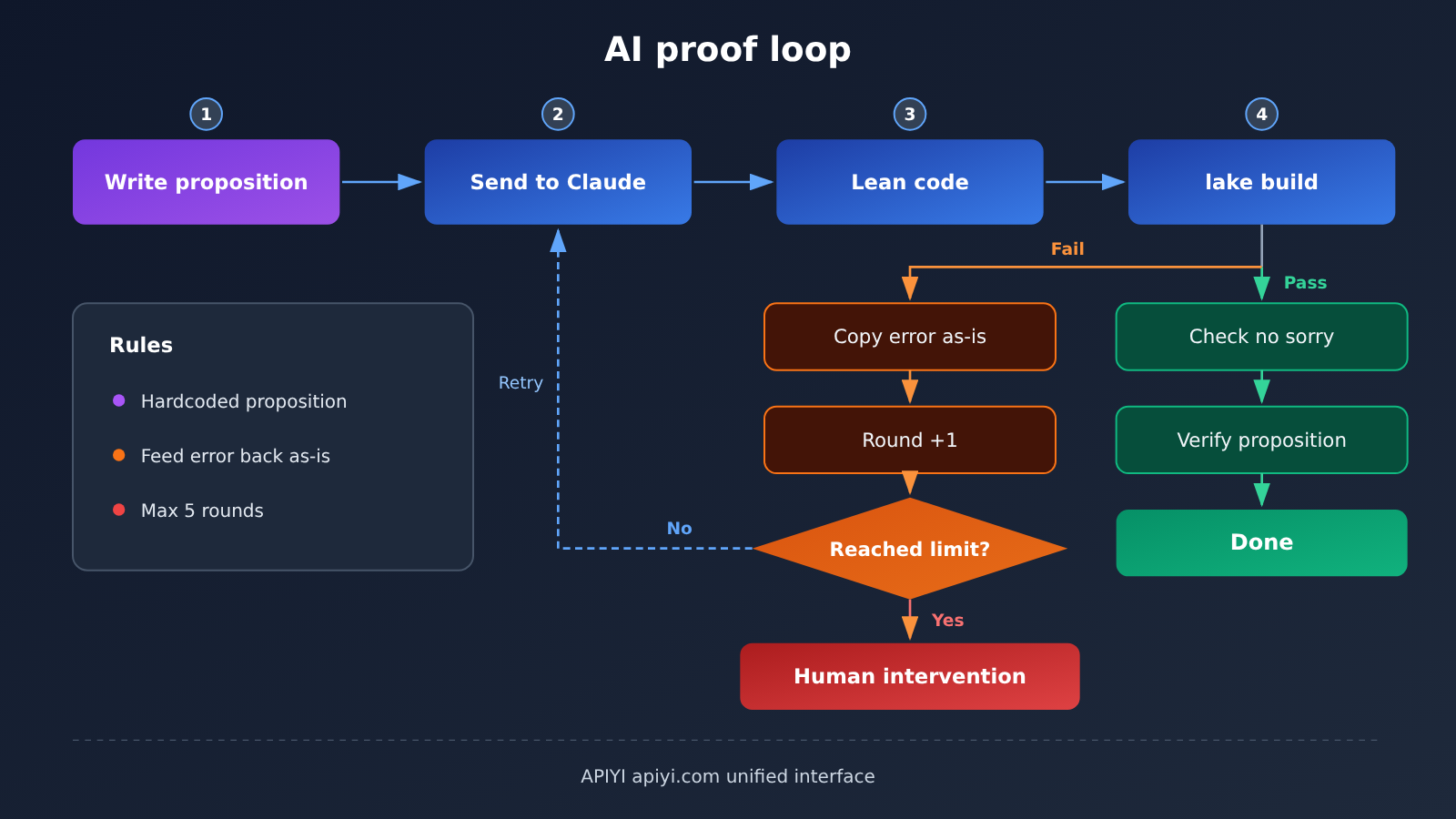
The principle of the retry loop is simple: feed errors back verbatim, cap the number of rounds, and stop immediately when a stop-loss condition triggers. Don’t summarize the error yourself and paraphrase it to the model—Lean errors carry line numbers, goal states, and expected types, and that information is more precise than any paraphrase.
- Round 1: Send the fixed prompt and write the entire returned content into the proof file. Acceptance check: The first line of the file is
import Mathlib, with no explanatory text. - Compile: Run
lake env lean 文件名.leanorlake build, and save the complete output. Acceptance check: You have the full terminal output, not just a single truncated line. - Evaluate: If there are no errors and no
declaration uses 'sorry'warning, move on to final acceptance; otherwise, paste the complete output into the “previous round compilation error” slot in the prompt and go to the next round. - Cap: At most 5 rounds. If it still fails at round 3, raise
output_config.efforttohighand try again. - Stop-loss conditions—stop immediately if any one is met: the same error appears for 2 consecutive rounds; the model changes the theorem name or type signature;
sorry,admit, oraxiomappears in the output; cumulative tokens exceed the budget you set.
Stopping doesn’t mean failure. At that point, a more effective approach is to manually split the proposition into several small lemmas, run each lemma through the loop separately, then combine them in the main theorem.
Three Common Lean4 Errors and How to Fix Them
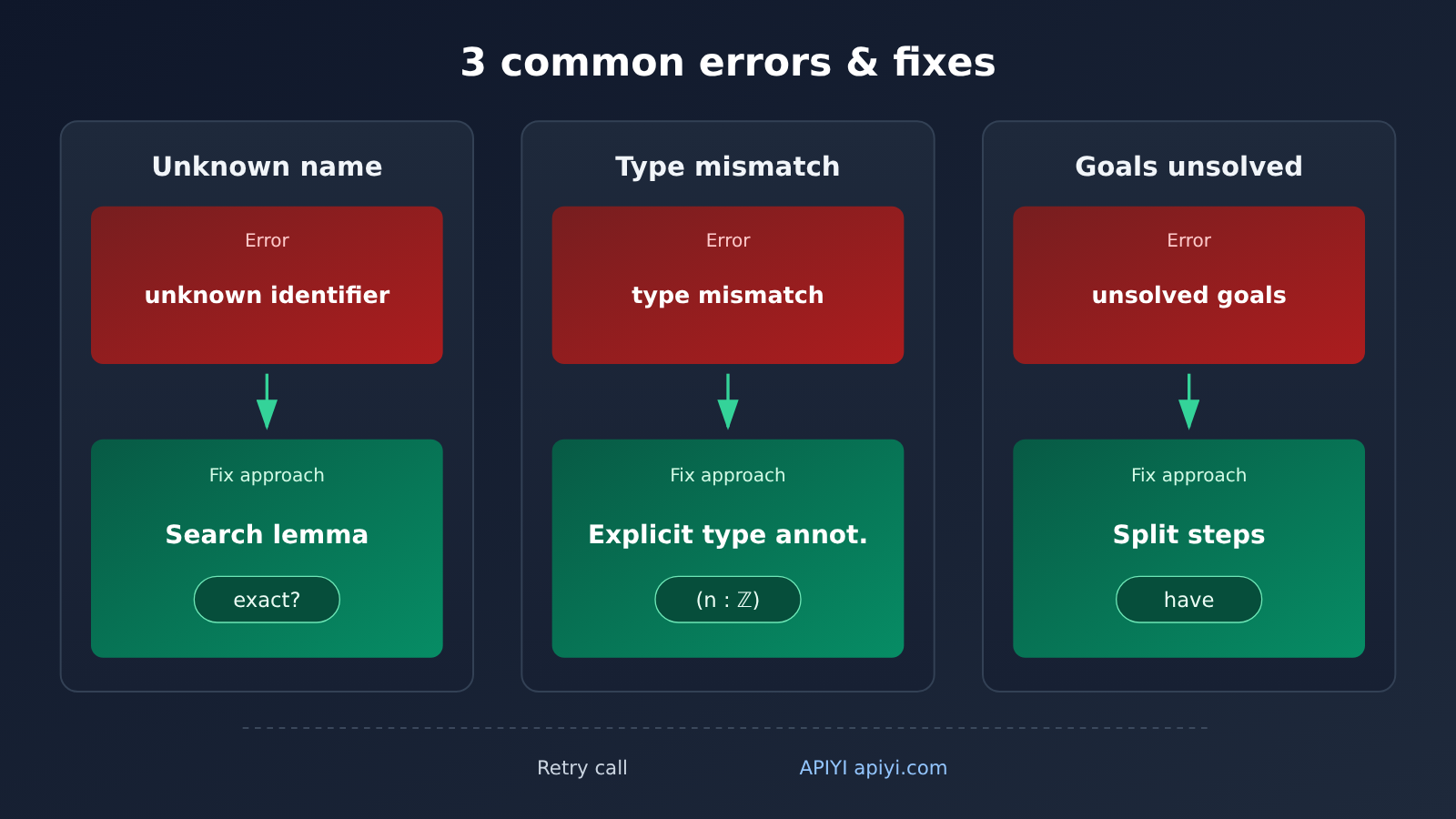
| Error type | Typical error message | Common cause | Fix |
|---|---|---|---|
| Name not found | unknown identifier, unknown constant |
The model made up or misremembered a Mathlib lemma name; a version rename | Use exact? or apply? in the file to let Lean search for candidate lemmas, then feed the result and the error back together |
| Type mismatch | type mismatch |
Mixing natural numbers with integers or reals; Nat subtraction truncation | Explicitly annotate types in the proposition; when necessary, move the proposition to integers or reals (you decide this step—don’t hand it to the model) |
| Unsolved goals | unsolved goals, simp made no progress, linarith failed |
The tactic is too coarse, jumping too far in one step | Have the model use have to break out intermediate steps, and close each step separately with simp, ring, omega, etc. |
There’s a trap hidden in the second type of error: changing the number domain changes the proposition itself. For example, n - 1 in natural numbers equals 0 when n is 0; after switching to integers, the meaning changes. Any modification that affects the proposition statement must be confirmed by you—this is also why the fixed prompt says “signatures must not be changed.”
Final acceptance criteria for a Lean4 proof
Getting it to compile is only the first hurdle. All four of the following need to hold before you can call a proof trustworthy:
lake buildfinishes with no errors and nodeclaration uses 'sorry'warnings.- Add a line at the end of the file —
#print axioms sum_first_odds(swap in your theorem’s name). The output should contain only standard axioms likepropext,Classical.choice,Quot.sound; nosorryAxand no unfamiliar custom axioms. - Compare the theorem statement word for word against what you originally wrote, and confirm the model didn’t add hypotheses or weaken the conclusion.
- You can restate the main steps of the proof in natural language. The compiler doesn’t check this one, but it’s what decides whether you actually learned anything.
Token and cost estimates for writing Lean4 proofs with AI
The following is an estimate based on assumed conditions — it doesn’t represent any actual bill. Prices come from the APIYI model list (data updated 2026-11-23, in USD per million tokens): claude-opus-5-5 input $4, output $20, cache read $0.2; Opus 5.5 has a 1M context window and a max output of 128,000.
| Scenario (assumption) | Input tokens | Output tokens (including thinking) | Estimated cost |
|---|---|---|---|
| Passes on the 1st round | ~1,500 | ~3,000 | ~$0.07 |
| Passes in 3 rounds | ~7,000 (cumulative) | ~9,000 (cumulative) | ~$0.21 |
| 5 rounds, hits the cap | ~15,000 (cumulative) | ~15,000 (cumulative) | ~$0.36 |
Reference: claude-fable-5-2, 5 rounds |
~15,000 | ~15,000 | ~$0.72 |
As you can see, the cost comes mostly from the output side, since thinking tokens are billed as output. The three most effective ways to keep costs down: use the default effort on the first round, cap retries at 5 rounds, and use native format so the fixed prompt hits the cache. You can check these prices and model names any time in the model list on apiyi.com — whatever’s on the page is the latest data.
💰 Cost tip: A single task on a textbook-level proposition usually lands somewhere between a few cents and a few tens of cents. If you’re formalizing a batch of exercises, first run a handful of problems on APIYI to get the average number of rounds, then budget as “average rounds × cost per round.”
When you shouldn’t use a model
- Research-level conjectures or open problems: the model has no reliable proof route, and retrying just burns tokens.
- Propositions that require inventing new theorems or definitions: that part is the mathematics itself — the model can only help formalize a line of reasoning you’ve already worked out.
- When you haven’t pinned down the proposition statement yet: get the statement and the proof idea clear on paper first, then let the model formalize it.
FAQ
Q1: What does it mean to write Lean4 math proofs with AI?
It means having a Large Language Model generate a proof draft in the form of Lean 4 code, which the Lean compiler then checks. The model does the “writing,” the compiler does the “judging” — output that fails to compile doesn’t count as a proof.
Q2: If the model says the proof is done, can I just trust it?
No. The model’s conclusion is just a statement; only the compiler’s result is trustworthy. Work through the four acceptance criteria above one by one, especially `#print axioms` and the statement comparison.
Q3: What’s the difference between the VS Code extension and a manual elan install?
Functionally, they both end up as the same Lean toolchain. The VS Code extension is the official recommendation because it comes with a guided setup and suits beginners; a manual install suits command-line users, servers, and automation scripts — and it’s more convenient when you script the retry loop.
Q4: What scenarios are best suited for writing Lean4 proofs with AI?
– Formalizing classic propositions from textbook exercises and lecture notes, as a way to learn Lean.
– Adding a machine-verifiable proof to your own math notes.
– Getting familiar with Mathlib’s naming conventions and everyday tactics.
Q5: How do I quickly call Claude through the API to run this workflow?
1. Sign up at APIYI apiyi.com to get an API key and free trial quota.
2. For the OpenAI-compatible format, use `https://api.apiyi.com/v1`; for the native format, use the root domain `https://api.apiyi.com`.
3. Set `model` to `claude-opus-5-5`, don’t pass `temperature`, and use the fixed prompt from this article.
Q6: Why do I get a 400 error when I pass temperature?
Per Anthropic’s official migration guide, starting with API version 2026-10-21, `temperature`, `top_p`, and `top_k` have been removed from the Messages API — passing any value returns a 400. Just delete those parameters.
Q7: What if five rounds of retries still don’t get it through?
First check whether you’ve hit a stop-loss condition. Then manually split the proposition into a few smaller lemmas and run the loop on each. If it’s still stuck after splitting, that’s a sign this part needs real mathematical insight — you shouldn’t keep handing it to the model.
Q8: What are the known limitations of writing Lean4 proofs with AI?
– The model may invent lemma names, or keep using old names after Mathlib renames.
– The model may weaken the statement to get it to compile, so manual comparison is required.
– Cost rises with each round, and thinking tokens are billed as output; check the current rate on apiyi.com before setting a budget.
Key Takeaways for Writing Lean4 Mathematical Proofs with AI
- The only judge: A proof is valid only when it compiles, has no
sorry, and the axioms are clean. - Two installation paths: The VS Code Lean 4 extension is the easiest; elan plus lake works well for scripts.
- Project with Mathlib: Create the project with
lake ... new project-name math, and expect a download wait the first time. - Fixed prompt: Code only, no explanations, don’t skip imports, don’t change signatures.
- Bounded retries: Feed errors back verbatim, up to 5 rounds; stop when the same error repeats.
- Getting started: Call
claude-opus-5-5through APIYI with one Key, without passing sampling parameters.
Summary
The core points for writing Lean4 mathematical proofs with AI:
- Clear division of labor: Claude writes candidate proofs, the Lean compiler judges correctness, and you handle the proposition statement and final acceptance.
- Fixed process: Install Lean, create a Mathlib project, lock down the prompt, feed errors back verbatim — every step has a visible acceptance criterion.
- Clear boundaries: Textbook-level propositions are good candidates for the model to formalize; research-level conjectures and problems that require new theorems aren’t things you should expect from the model.
I’d suggest first running one full loop with the odd-sum example from this article, then swapping in your own proposition. For model invocation, I recommend going through APIYI at apiyi.com — the same Key supports both compatible and native formats, so it’s easy to switch between manual debugging and script automation.
📚 Reference Materials
-
Lean Official Installation Page: The recommended VS Code + Lean 4 extension installation path
- Link:
lean-lang.org/install - Note: First choice for beginners; the extension walks you through the rest of the installation
- Link:
-
Lean Official Manual Installation Page: Installation methods for elan and lake from the command line
- Link:
lean-lang.org/install/manual - Note: Includes notes on git and curl dependencies, plus the elan installation commands
- Link:
-
Anthropic Official Migration Guide (Opus 5.5): Model IDs, thinking, effort, and parameter changes
- Link:
docs.anthropic.com - Note: Explains why sampling parameters like temperature can no longer be passed
- Link:
Author: APIYI Technical Team
Technical Discussion: Feel free to contact us through the APIYI official website homepage; for more integration instructions, see the APIYI Documentation Center


