
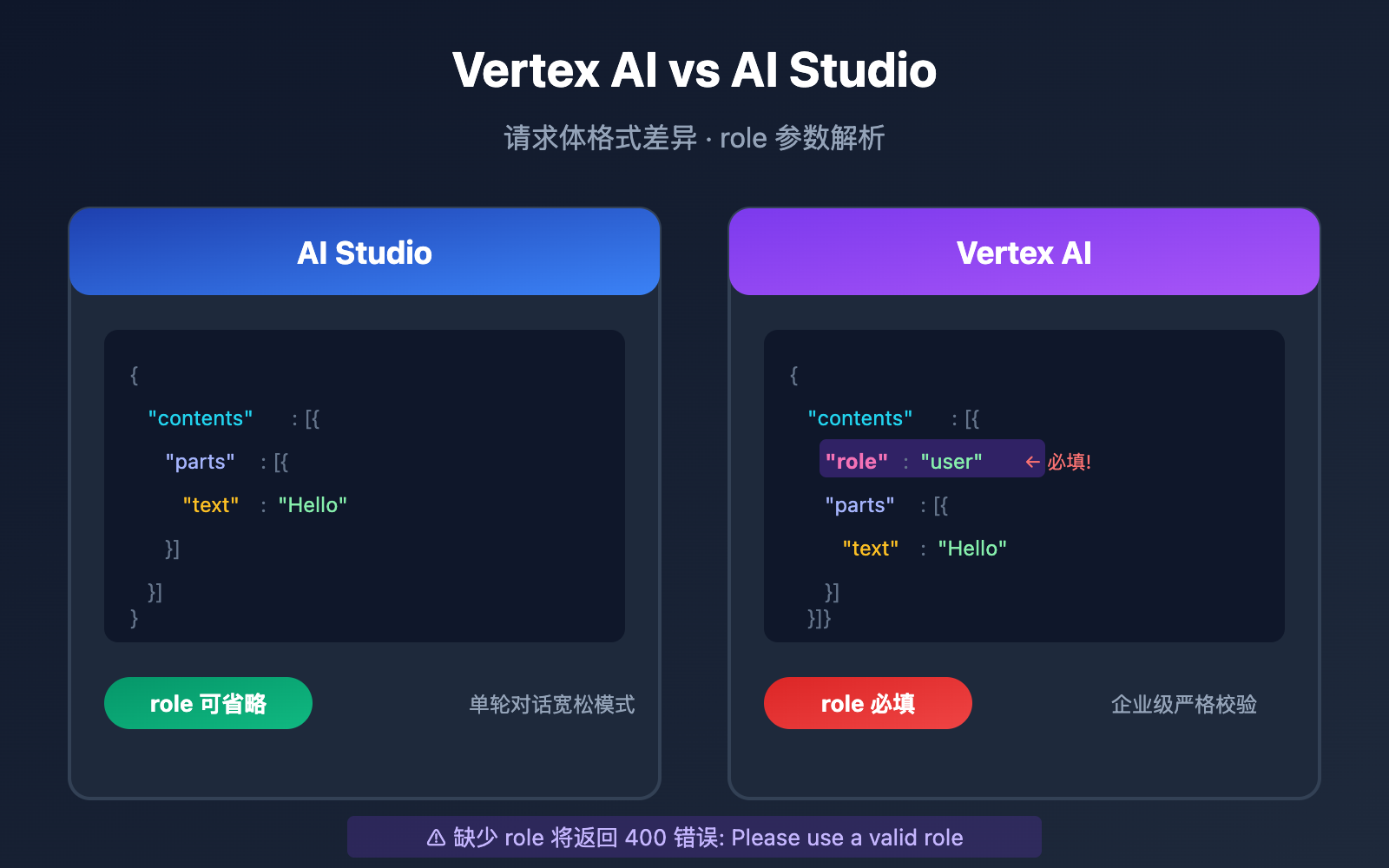
在使用 Google Gemini API 时,从 AI Studio 迁移到 Vertex AI 是许多开发者的必经之路。然而,一个看似简单的 role 参数差异,却让无数开发者栽了跟头:
[&{Please use a valid role: user, model. (request id: xxx) 400 }]
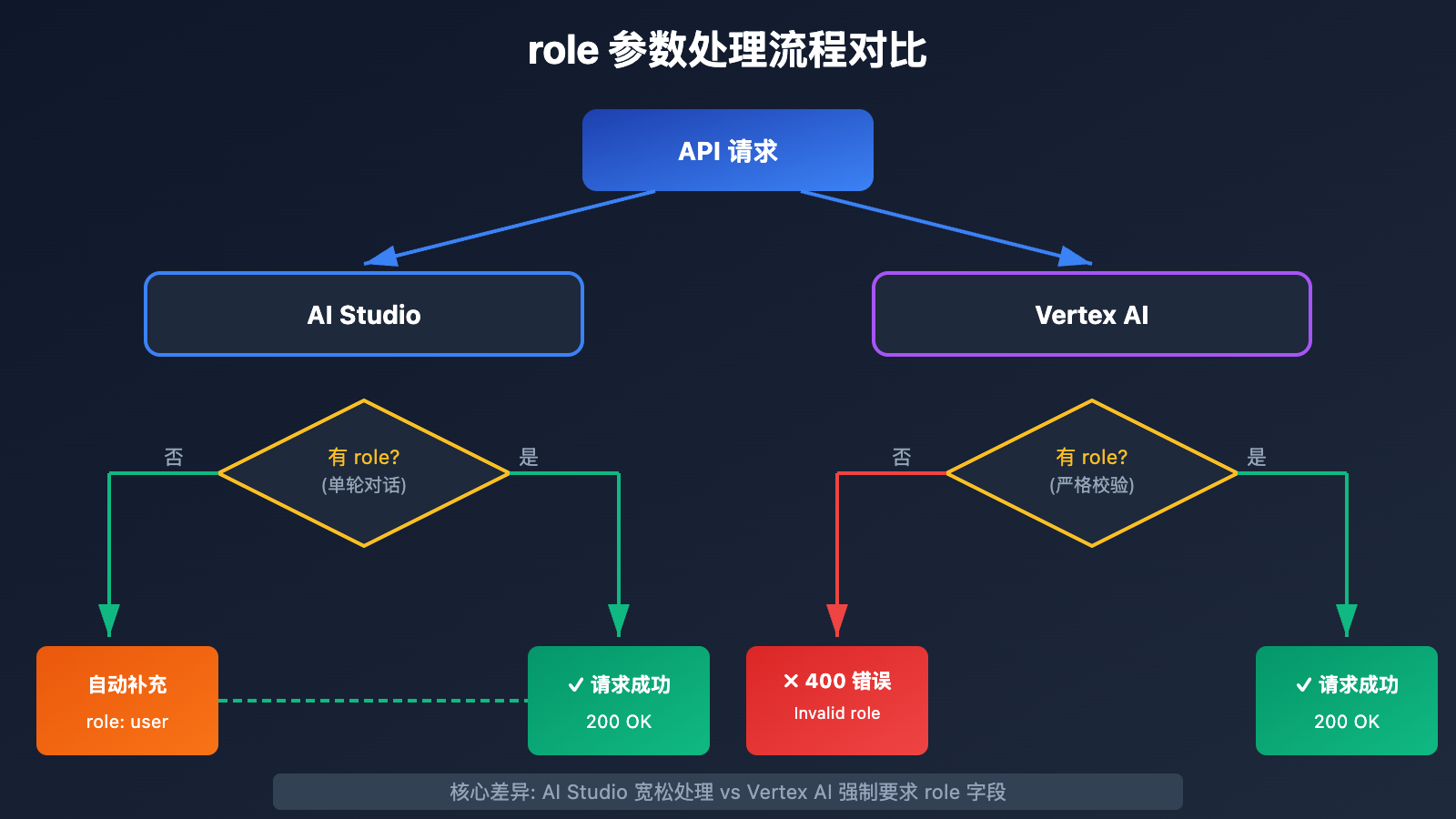
这个 400 错误的根本原因是:Vertex AI 强制要求 contents 数组中的每个对象必须包含 role 字段,而 AI Studio 在单轮对话中可以省略。
本文将深入剖析 Vertex AI 和 AI Studio 的请求体格式差异,提供 3 种场景的完整解决方案。
Vertex AI 和 AI Studio 的核心差异概览
在解决 400 错误之前,我们需要先理解两个平台的本质区别。
平台定位差异
| 对比维度 | AI Studio (Google AI) | Vertex AI |
|---|---|---|
| 目标用户 | 开发者快速原型验证 | 企业级生产部署 |
| 认证方式 | API Key | Service Account / OAuth |
| 速率限制 | 基础限制,不可商用 | 生产级限制,支持商用 |
| role 字段 | 单轮对话可省略 | 强制必填 |
| 端点格式 | generativelanguage.googleapis.com | {region}-aiplatform.googleapis.com |
| 可用平台 | API易 apiyi.com, 官方 API | API易 apiyi.com, Google Cloud |
为什么会出现 role 400 错误
Vertex AI 作为企业级平台,对请求格式的校验更为严格。当你的请求体中缺少 role 字段时,Vertex AI 会立即返回:
{
  "error": {
    "code": 400,
    "message": "Please use a valid role: user, model.",
    "status": "INVALID_ARGUMENT"
  }
}
🎯 技术建议: 在从 AI Studio 迁移到 Vertex AI 时,我们建议通过 API易 apiyi.com 平台进行接口调用测试。该平台提供统一的 API 接口格式,自动处理不同平台的参数差异,有助于快速验证技术方案的可行性。
Vertex AI 请求体格式详解
正确的 Vertex AI 请求格式
Vertex AI 的 Gemini API 请求体必须遵循以下结构:
{
  "contents": [
    {
      "role": "user",
      "parts": [
        {
          "text": "解释一下什么是大语言模型"
        }
      ]
    }
  ],
  "generationConfig": {
    "temperature": 0.7,
    "maxOutputTokens": 2048
  }
}
role 参数的有效值
Vertex AI 只接受两个 role 值:
| role 值 | 含义 | 使用场景 |
|---|---|---|
user |
用户输入 | 发送给模型的问题或指令 |
model |
模型响应 | 多轮对话中的历史回复 |
错误示例 vs 正确示例
❌ 错误:缺少 role 字段 (AI Studio 风格)
{
  "contents": [
    {
      "parts": [
        {
          "text": "Hello, how are you?"
        }
      ]
    }
  ]
}
✅ 正确:包含 role 字段 (Vertex AI 风格)
{
  "contents": [
    {
      "role": "user",
      "parts": [
        {
          "text": "Hello, how are you?"
        }
      ]
    }
  ]
}
AI Studio 请求体格式详解
AI Studio 的宽松模式
AI Studio (Google AI) 对请求格式的要求相对宽松,在单轮对话场景下可以省略 role 字段:
{
  "contents": [
    {
      "parts": [
        {
          "text": "What is machine learning?"
        }
      ]
    }
  ]
}
两个平台的请求体对比
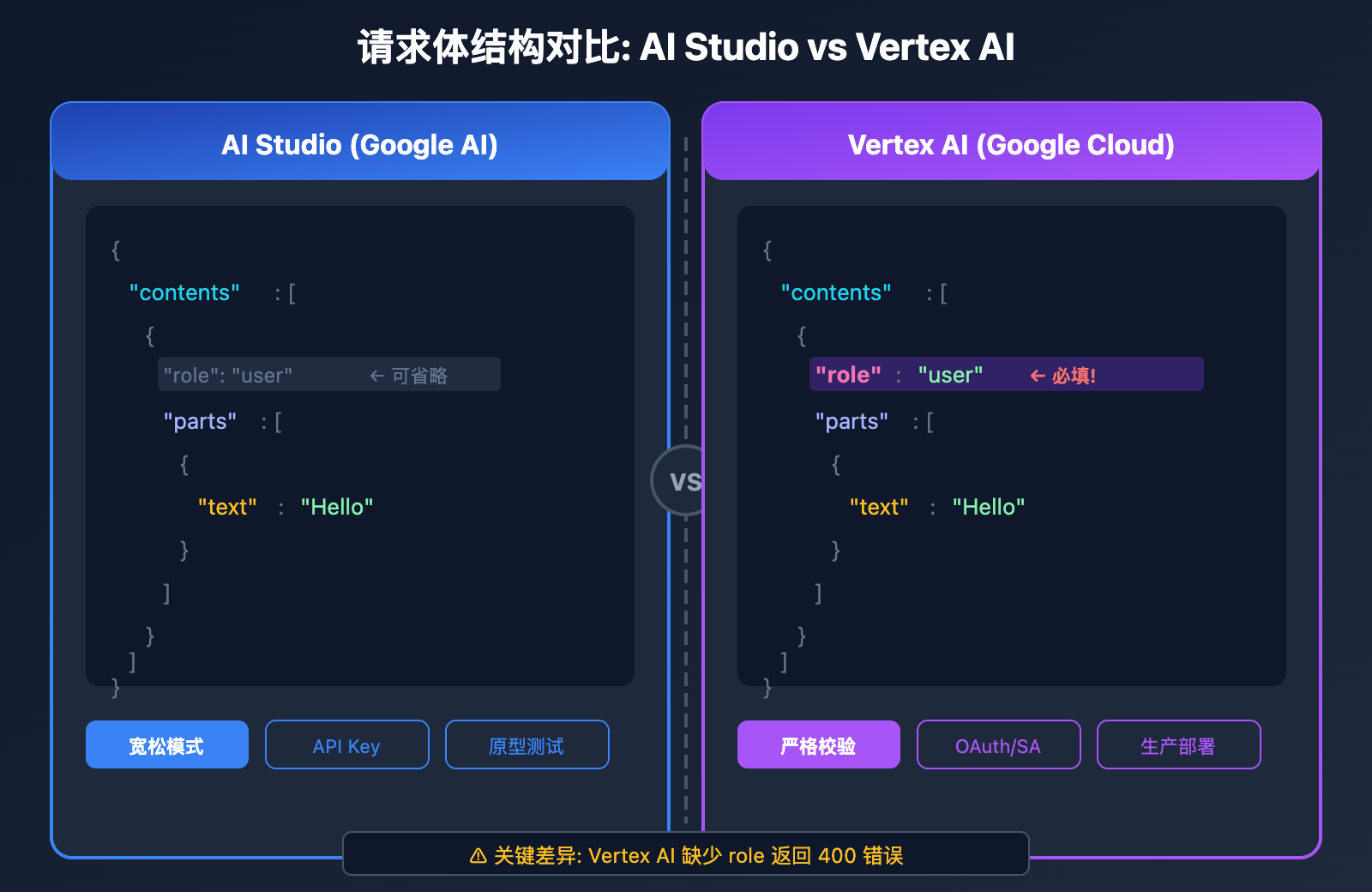
| 字段 | AI Studio | Vertex AI |
|---|---|---|
contents |
必填 | 必填 |
contents[].role |
可选 (单轮) | 必填 |
contents[].parts |
必填 | 必填 |
contents[].parts[].text |
必填 | 必填 |
systemInstruction |
支持 | 支持 |
generationConfig |
可选 | 可选 |
多轮对话场景
在多轮对话中,两个平台的格式趋于一致,都需要明确指定 role:
{
  "contents": [
    {
      "role": "user",
      "parts": [{"text": "你好,请介绍一下自己"}]
    },
    {
      "role": "model",
      "parts": [{"text": "你好!我是 Gemini,由 Google 开发的 AI 助手..."}]
    },
    {
      "role": "user",
      "parts": [{"text": "你能做什么?"}]
    }
  ]
}
3 种场景的完整解决方案
场景 1:Python SDK 调用 Vertex AI
使用 Google 官方 Python SDK 时,确保正确传递 role 参数:
from google import genai
from google.genai.types import Content, Part

# 初始化客户端
client = genai.Client(
    vertexai=True,
    project="your-project-id",
    location="us-central1"
)

# 正确的请求格式 - 必须包含 role
contents = [
    Content(
        role="user",
        parts=[Part(text="什么是 Vertex AI?")]
    )
]

response = client.models.generate_content(
    model="gemini-2.0-flash",
    contents=contents
)

print(response.text)
场景 2:REST API 直接调用
使用 curl 或 HTTP 客户端直接调用 Vertex AI REST API:
curl -X POST \
  -H "Authorization: Bearer $(gcloud auth print-access-token)" \
  -H "Content-Type: application/json" \
  "https://us-central1-aiplatform.googleapis.com/v1/projects/YOUR_PROJECT/locations/us-central1/publishers/google/models/gemini-2.0-flash:generateContent" \
  -d '{
    "contents": [
      {
        "role": "user",
        "parts": [
          {"text": "解释量子计算的基本原理"}
        ]
      }
    ],
    "generationConfig": {
      "temperature": 0.7,
      "maxOutputTokens": 1024
    }
  }'
💡 快速开始: 推荐使用 API易 apiyi.com 平台快速搭建原型。该平台提供开箱即用的 API 接口,统一处理 Vertex AI 和 AI Studio 的格式差异,无需复杂配置,5 分钟即可完成集成。
场景 3:OpenAI 兼容格式调用
如果你的代码基于 OpenAI SDK,可以使用兼容格式:
import openai

client = openai.OpenAI(
    api_key="YOUR_API_KEY",
    base_url="https://api.apiyi.com/v1"  # 使用 API易 统一接口
)

# OpenAI 兼容格式自动处理 role
response = client.chat.completions.create(
    model="gemini-2.0-flash",
    messages=[
        {"role": "user", "content": "什么是神经网络?"}
    ]
)

print(response.choices[0].message.content)
Vertex AI Express Mode 的特殊情况
什么是 Vertex AI Express Mode
Vertex AI Express Mode 是一个介于 AI Studio 和标准 Vertex AI 之间的选项:
| 特性 | AI Studio | Vertex AI Express | Vertex AI Standard |
|---|---|---|---|
| 认证方式 | API Key | API Key | Service Account |
| 速率限制 | 基础 | 生产级 | 生产级 |
| 商用许可 | 否 | 是 | 是 |
| role 要求 | 可选 | 必填 | 必填 |
| 端点 | generativelanguage | aiplatform | aiplatform |
Express Mode 的 role 要求
即使 Express Mode 使用 API Key 认证(与 AI Studio 相同),它仍然继承了 Vertex AI 的严格格式要求,role 字段必填。
# Express Mode 示例 - role 必填
import requests

url = "https://us-central1-aiplatform.googleapis.com/v1/projects/YOUR_PROJECT/locations/us-central1/publishers/google/models/gemini-2.0-flash:generateContent"

headers = {
    "Content-Type": "application/json",
    "X-Goog-Api-Key": "YOUR_API_KEY"
}

data = {
    "contents": [
        {
            "role": "user",  # 必须包含!
            "parts": [{"text": "Hello World"}]
        }
    ]
}

response = requests.post(url, headers=headers, json=data)
常见错误排查指南
错误 1:Please use a valid role: user, model
原因: contents 数组中的对象缺少 role 字段
解决方案:
{
  "contents": [
    {
+     "role": "user",
      "parts": [{"text": "..."}]
    }
  ]
}
错误 2:Invalid role value
原因: role 字段使用了无效值(如 "system"、"assistant")
解决方案: Vertex AI 只接受 user 和 model,不接受 system 或 assistant
{
  "contents": [
    {
-     "role": "assistant",
+     "role": "model",
      "parts": [{"text": "..."}]
    }
  ]
}
错误 3:System instructions 位置错误
原因: 将 system prompt 放在 contents 中而非 systemInstruction 字段
解决方案:
{
  "systemInstruction": {
    "parts": [{"text": "你是一个专业的技术顾问"}]
  },
  "contents": [
    {
      "role": "user",
      "parts": [{"text": "帮我解释一下 API 是什么"}]
    }
  ]
}
💰 成本优化: 对于需要频繁测试 API 格式的项目,可以考虑通过 API易 apiyi.com 平台调用 API。该平台提供灵活的计费方式和更优惠的价格,适合中小团队和个人开发者进行开发调试。
迁移检查清单
从 AI Studio 迁移到 Vertex AI 时,使用以下清单确保请求格式正确:
必须修改的项目
| 检查项 | AI Studio 写法 | Vertex AI 写法 |
|---|---|---|
| role 字段 | 可省略 | 必须添加 "role": "user" |
| 端点 URL | generativelanguage.googleapis.com | {region}-aiplatform.googleapis.com |
| 认证方式 | x-goog-api-key |
Authorization: Bearer |
| 模型路径 | models/gemini-pro | publishers/google/models/gemini-pro |
代码迁移示例
迁移前 (AI Studio):
import google.generativeai as genai

genai.configure(api_key="YOUR_API_KEY")
model = genai.GenerativeModel('gemini-pro')
response = model.generate_content("Hello")
迁移后 (Vertex AI):
from google import genai
from google.genai.types import Content, Part

client = genai.Client(vertexai=True, project="your-project", location="us-central1")

contents = [
    Content(role="user", parts=[Part(text="Hello")])  # role 必填
]

response = client.models.generate_content(
    model="gemini-2.0-flash",
    contents=contents
)
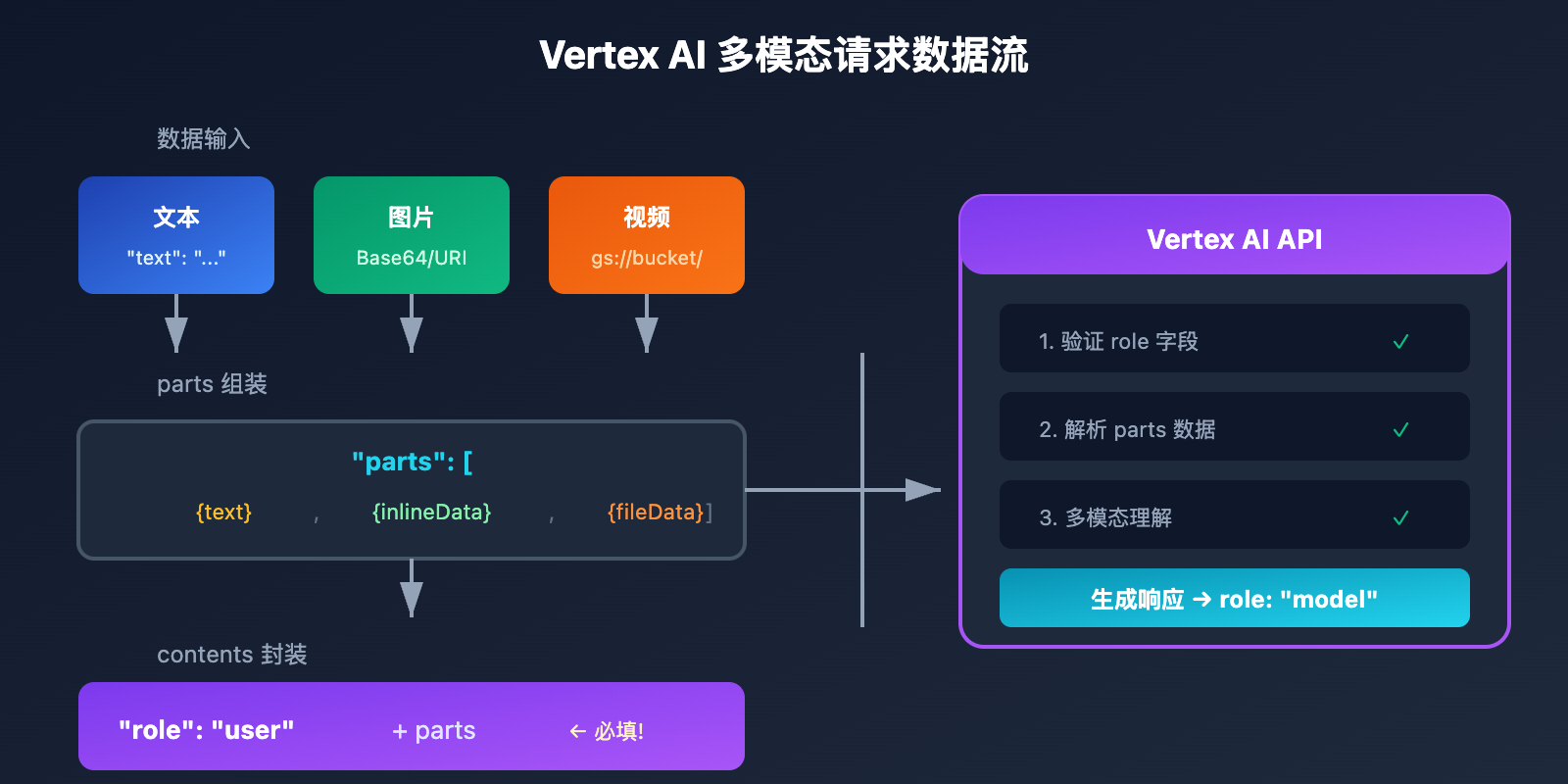
多模态请求的 role 处理
图片 + 文本请求
发送包含图片的多模态请求时,同样需要指定 role:
{
  "contents": [
    {
      "role": "user",
      "parts": [
        {"text": "描述这张图片的内容"},
        {
          "inlineData": {
            "mimeType": "image/jpeg",
            "data": "BASE64_ENCODED_IMAGE"
          }
        }
      ]
    }
  ]
}
使用 Cloud Storage 文件
{
  "contents": [
    {
      "role": "user",
      "parts": [
        {"text": "分析这个视频的主要内容"},
        {
          "fileData": {
            "mimeType": "video/mp4",
            "fileUri": "gs://your-bucket/video.mp4"
          }
        }
      ]
    }
  ]
}
常见问题解答 FAQ
Q1: 为什么 AI Studio 可以省略 role,Vertex AI 不行?
AI Studio 设计为快速原型验证工具,对格式要求较为宽松。而 Vertex AI 作为企业级生产平台,需要严格的请求格式以确保系统稳定性和可维护性。通过 API易 apiyi.com 平台可以获取免费测试额度,快速验证不同平台的格式要求。
Q2: Vertex AI 支持 system role 吗?
不支持。Vertex AI 的 role 只接受 user 和 model 两个值。系统指令需要使用单独的 systemInstruction 字段:
{
  "systemInstruction": {
    "parts": [{"text": "你的系统提示词"}]
  },
  "contents": [...]
}
Q3: OpenAI 格式的 assistant 如何映射?
在 OpenAI 格式中的 assistant role 对应 Vertex AI 的 model role。如果你使用 API易 apiyi.com 的统一接口,这种映射会自动处理。
Q4: 如何快速测试请求格式是否正确?
推荐使用以下方法快速验证:
- 使用 API易平台测试: 提供请求格式校验和错误提示
- 使用 Google Cloud Console: Vertex AI Studio 提供可视化测试界面
- 本地 Mock 测试: 先用 AI Studio 验证逻辑,再修改格式迁移到 Vertex AI
Q5: Vertex AI Express Mode 和标准模式的格式一样吗?
是的,两者的请求体格式完全相同,都要求必须包含 role 字段。主要区别在于认证方式(API Key vs Service Account)。
总结
Vertex AI 和 AI Studio 的请求体格式差异主要体现在 role 字段的强制性要求上:
| 平台 | role 要求 | 有效值 |
|---|---|---|
| AI Studio | 单轮可选,多轮必填 | user, model |
| Vertex AI | 始终必填 | user, model |
| Vertex AI Express | 始终必填 | user, model |
解决 400 错误的核心步骤:
- 确保每个 contents 对象都包含
"role": "user"或"role": "model" - 系统指令使用
systemInstruction字段而非 role - 将 OpenAI 格式的
assistant映射为model
推荐通过 API易 apiyi.com 快速验证效果,该平台自动处理不同 API 格式的兼容性问题,让你专注于业务逻辑开发。
延伸阅读:
- Vertex AI 官方文档: cloud.google.com/vertex-ai/docs
- Gemini API 参考: ai.google.dev/api
- 迁移指南: cloud.google.com/vertex-ai/generative-ai/docs/migrate/migrate-google-ai
📝 作者: APIYI 技术团队 | 专注 AI 大模型 API 集成与优化
🔗 技术交流: 访问 API易 apiyi.com 获取更多技术资源和开发支持


