

Author’s note: This article walks through the official API entry point, model ID, invocation method, and launch pricing window for Gemini 4 Carbon, so developers can finish their integration evaluation before the discount ends on November 30.
7 Terms to Know Before You Integrate
| Term | Meaning | Role in Gemini 4 Carbon integration |
|---|---|---|
| API | The interface that lets applications call a model’s capabilities | Developers use Carbon through the paid tier of the Gemini API |
| Model ID | The identifier that specifies which model a request uses | Carbon’s stable model ID is gemini-4-carbon |
| Interactions API | Google’s interface for interactions between models and agents | Officially recommended for new projects |
| SDK | A software toolkit that helps developers call the API | Official Python and JavaScript SDKs are available |
| Token | The unit of text or multimodal data a model processes and bills by | Input, output, and thinking are all billed by token |
| Thinking level | A parameter that controls how much reasoning effort the model spends | Set thinking_level to low, medium, or high |
| Cache reads | Reusing cached input, billed under separate rules | Carbon supports implicit caching, and cached input costs far less than regular input |
On November 10, 2026, Google published “Gemini 4 Carbon is now available,” announcing that Gemini 4 Carbon is now open to paid Gemini API developers. Before that, ever since the model was first announced on October 28, it had only been available to a vetted group of cybersecurity defenders.
This isn’t just another rehash of the launch news. This article focuses on the four things developers actually care about: where to call Gemini 4 Carbon, what to put in the model ID field, how to write the code, and when the launch pricing window ends.
Key takeaway: After reading this, you’ll be able to integrate the Gemini 4 Carbon API in 5 steps, and you’ll know how to tell apart three separate things: paid API access, consumer subscription access, and the real cost of your tasks.
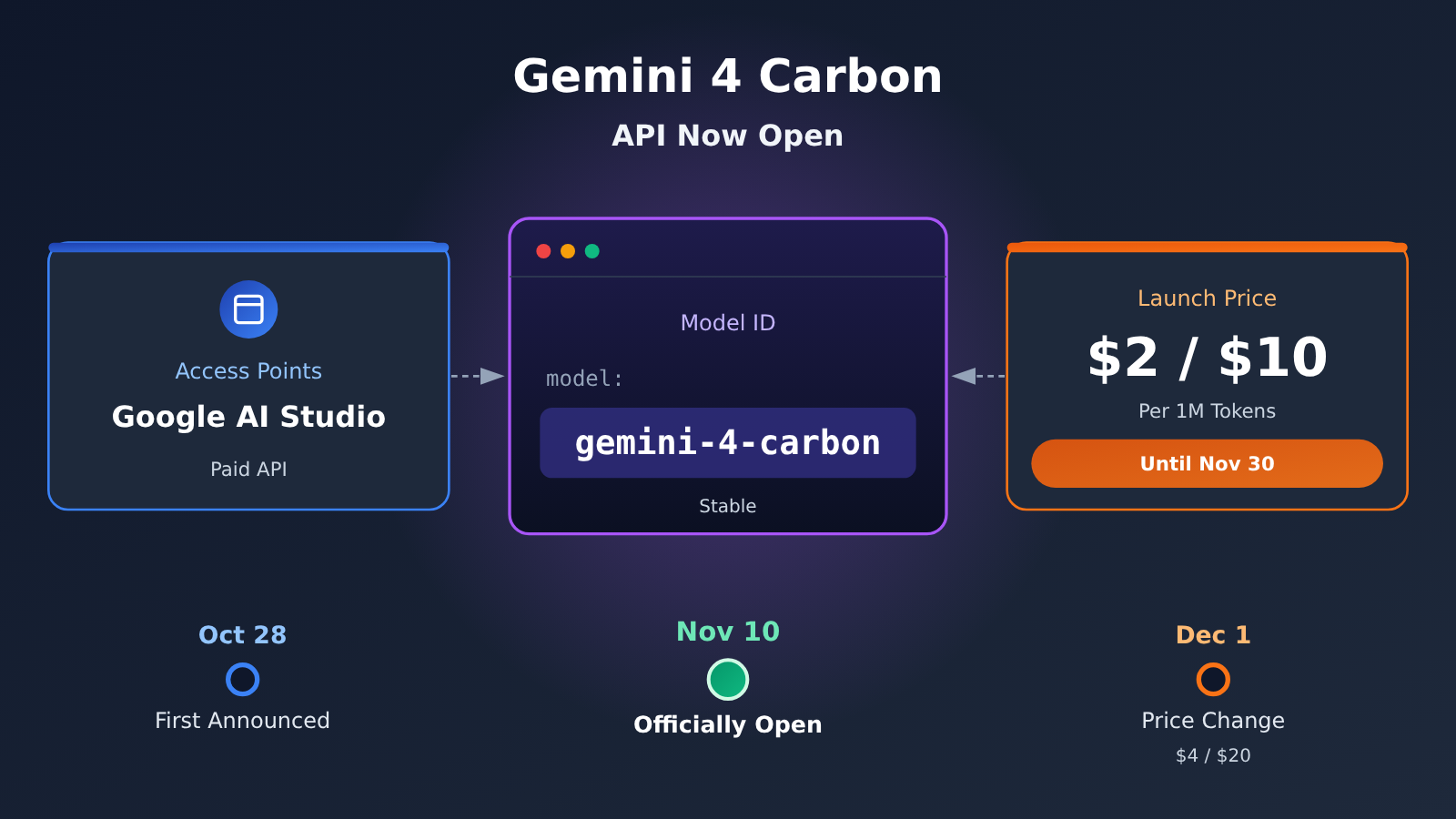
Gemini 4 Carbon Is Now Generally Available — Developers Can Call It Directly
Gemini 4 Carbon is built by Google DeepMind on top of Gemini 4 Argon. It’s positioned as a flagship reasoning model for hard reasoning problems, complex software engineering, long-horizon agent workflows, scientific research, and cyber defense. What makes it distinctive is its ability to burn through more thinking tokens — exploring hypotheses, planning, executing, verifying, and fixing across complex tasks.
The November 10 public launch spans multiple channels. Developers can use it through the paid tier of the Gemini API, Google AI Studio, and Android Studio. Enterprises get access via Gemini for business. Consumers need a Google AI Ultra subscription to use it in the Gemini App, Google Antigravity, and Google Search AI Mode. For most developers, the change that matters is simple: if you have a paid API plan, you can call Carbon directly.
Key Points for Integrating Gemini 4 Carbon
| Item | Details | What it means for developers |
|---|---|---|
| Stable model ID | gemini-4-carbon |
Drop it straight into your SDK or REST request |
| Official entry point | Google AI Studio + the API Keys page | Get a key, try the Playground |
| Recommended interface | Interactions API; GenerateContent is still supported | Prefer Interactions for new projects |
| Context | 1,048,576 tokens, shared between input and output | Plan your budget for long documents and long tasks |
| Launch pricing | $2 / $10 per million input / output tokens until November 30 | Doubles to $4 / $20 starting December 1 |
| Free tier | No free API tier | Cloud Billing is required |
How Carbon and Argon Divide the Work
Worth noting: Carbon isn’t meant to replace Argon across the board. Google has been explicit that Gemini 4 Argon remains the right choice for most software engineering and knowledge work, while Carbon fits tasks that need deeper reasoning, longer execution, and more elaborate verification.
So when you plan your integration, a sensible split is to put Carbon on the “hard” jobs — architecture design, complex code audits, root-cause hunting across subsystems — and leave routine code generation and batch processing to faster, lighter models. That’s also the division of labor Google recommends for the /swarm multi-agent preview in Antigravity.
Where Do You Access the Gemini 4 Carbon API?
The official way to get Gemini 4 Carbon access runs through Google AI Studio. The whole process breaks down into 5 steps, and each one maps to a specific page or setting:
- Open Google AI Studio: Sign in to AI Studio with your Google account.
- Create an API key: Go to the API Keys page and create a new key for Carbon calls.
- Enable a paid tier: Set up Google Cloud Billing and add a payment method. Carbon has no free API tier, so you can’t skip this step.
- Select Gemini 4 Carbon: Pick
gemini-4-carbondirectly in the Playground to try it out, or enter that model ID in your SDK. - Start making calls: Send requests using the Python SDK, the JavaScript SDK, or the REST API.
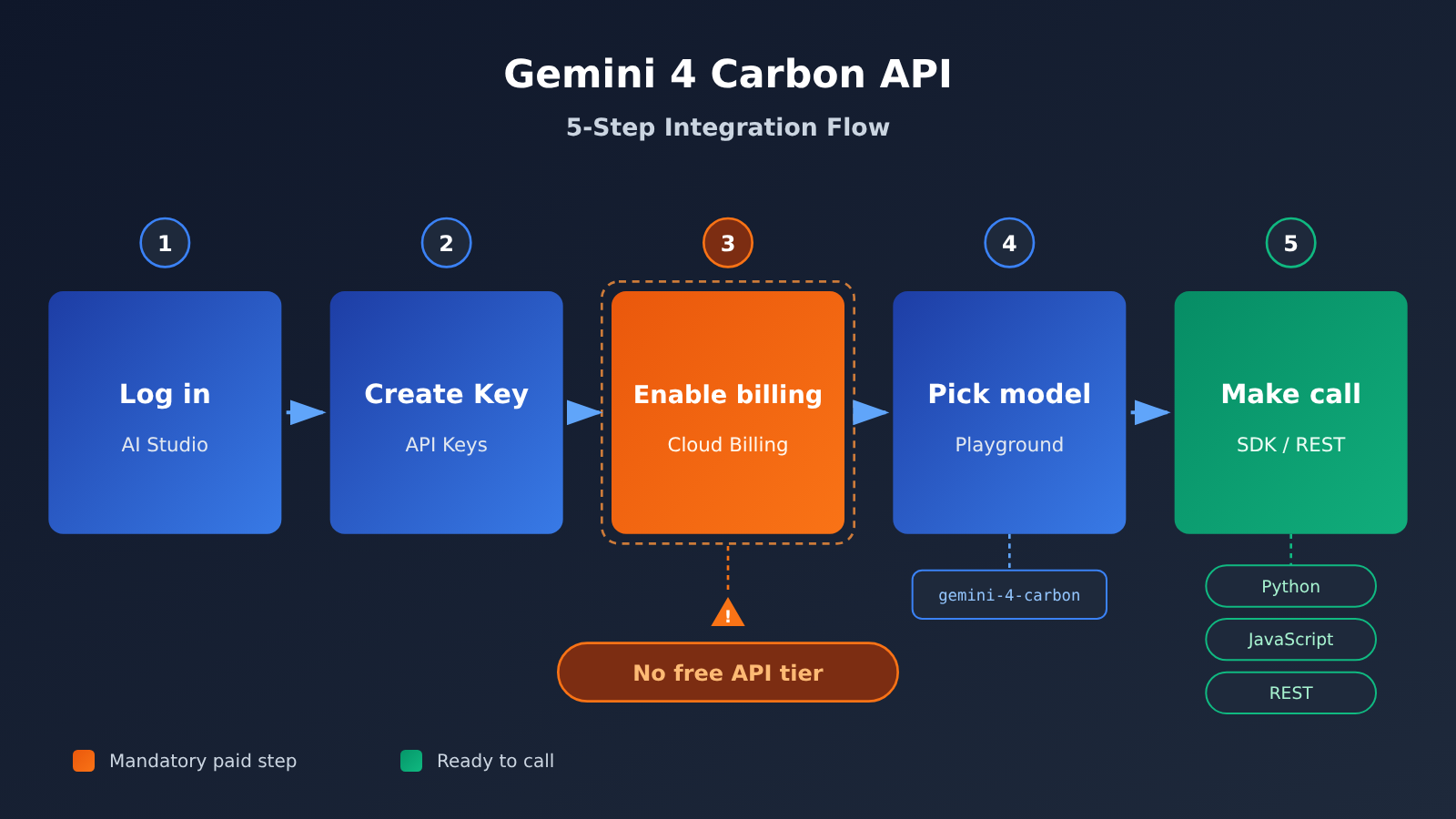
API Access vs. Subscription Access for Gemini 4 Carbon
A lot of the discussion among developers on Hacker News and Reddit mixes up “Can I use Carbon in the Gemini App?” with “Can I call Carbon through the API?” They’re actually two completely separate paths. The table below breaks down the requirements for each channel.
| Channel | Audience | Carbon Availability | Requirements |
|---|---|---|---|
| Gemini API paid tier | Developers | Can call gemini-4-carbon |
Link Cloud Billing; no Ultra subscription needed |
| AI Studio Playground | Developers | Can select it directly to try | Carbon has no free API tier |
| Gemini App / AI Mode / Antigravity | Consumers | Available with an Ultra subscription | Google AI Ultra ($99.99/month in the US); AI Pro doesn’t include Carbon |
| Gemini for business | Enterprises | Available | Depends on your enterprise account policy |
| Research application program | Researchers | Free for 6 months through Antigravity | Must pass an eligibility review; rolling access in batches |
| Fairwind Program | Cybersecurity defenders | Specialized gemini-4-carbon-cyber-permissive version |
Requires approval |
| APIYI (apiyi.com) | Multi-model developers | Depends on the platform’s model list | Check the console to confirm it’s live before integrating |
The short version: developers don’t need to buy Ultra to call Carbon through the API; only consumers using Carbon in the App need Ultra. Also, the Google Cloud Developer Credits that come with Google AI subscriptions (for example, $10 per month with AI Pro) are a benefit of the Cloud developer program. They aren’t the same as a free token quota for Carbon, so check whether they can be applied based on the service, region, and account conditions.
How to Call Gemini 4 Carbon via API: Quick Start
Officially Recommended: A Minimal Interactions API Example (Python)
Google currently recommends the Interactions API for new projects. It handles model invocation, tool orchestration, multi-turn interactions, and Agent workflows in one place, and the traditional GenerateContent API is still supported. The Python code below is reformatted from the official Interactions example. The version in the original supplementary material had been pasted onto a single line, so it couldn’t be run as-is.
from google import genai

client = genai.Client()
interaction = client.interactions.create(
    model="gemini-4-carbon",
    input="Write a Three.js script that renders a 3D scene."
)
print(interaction.output_text)
Before running it, execute pip install google-genai and set the key you created in AI Studio as the GEMINI_API_KEY environment variable. genai.Client() reads it automatically. Note that we only fixed the formatting here and haven’t actually run this model invocation, so please check the official documentation for the latest syntax.
REST API Call Example
If it’s not convenient to bring an SDK into your project, you can call the official REST endpoint directly at https://generativelanguage.googleapis.com/v1beta/interactions, passing your API key in the x-goog-api-key request header:
curl "https://generativelanguage.googleapis.com/v1beta/interactions" \
  -H "x-goog-api-key: $GEMINI_API_KEY" \
  -H "Content-Type: application/json" \
  -X POST \
  -d '{
    "model": "gemini-4-carbon",
    "input": "Hello"
  }'
For JavaScript projects, use the @google/genai package. The call is the same, client.interactions.create(), and the model ID and input fields mean the same thing as they do in Python.
Setting the Thinking Level for Gemini 4 Carbon: thinking_level
Carbon offers a thinking_level parameter with three possible values: low, medium, and high. The public gemini-4-carbon model defaults to MEDIUM. For the exact field location of this parameter in the request body, check the official “What’s new in Gemini 4 Carbon” documentation. Here’s what each level is typically good for:
- low: Lightweight tasks like classification, summarization, and metadata extraction;
- medium: General coding, tool calling, document Q&A, and video understanding;
- high: Multi-file software engineering, architecture design, formal proofs, and vulnerability discovery.
One thing to watch out for when migrating old code: thinking_budget isn’t supported on Carbon, and passing it will return an HTTP 400 error. The MINIMAL thinking level isn’t available either.
Calling Through an OpenAI-Compatible Interface (Availability Depends on Platform Rollout)
If your project is already built on the OpenAI SDK and you want a single key to manage models from multiple providers, an OpenAI-compatible aggregation interface is another option. The example below only shows the syntax — whether gemini-4-carbon is actually available, and what the real model name is, depends on the platform’s model list:
import openai

client = openai.OpenAI(
    api_key="YOUR_API_KEY",
    base_url="https://api.apiyi.com/v1"  # APIYI OpenAI-compatible interface
)

response = client.chat.completions.create(
    model="gemini-4-carbon",  # example name only; subject to the platform's model list
    messages=[{"role": "user", "content": "用三句话解释什么是长周期 Agent。"}]
)
print(response.choices[0].message.content)
View the full implementation (with model fallback)
import openai
from typing import Optional, List

def call_model(
    prompt: str,
    models: List[str],
    system_prompt: Optional[str] = None,
    max_tokens: int = 4096
) -> str:
    """
    Try multiple models in order and return as soon as the first one succeeds.
    Handy for smooth fallback right after a new model launches.
    """
    client = openai.OpenAI(
        api_key="YOUR_API_KEY",
        base_url="https://api.apiyi.com/v1"
    )

    messages = []
    if system_prompt:
        messages.append({"role": "system", "content": system_prompt})
    messages.append({"role": "user", "content": prompt})

    last_error = None
    for model in models:
        try:
            response = client.chat.completions.create(
                model=model,
                messages=messages,
                max_tokens=max_tokens
            )
            return f"[{model}] " + response.choices[0].message.content
        except Exception as e:
            last_error = e
            continue
    return f"Error: {last_error}"

# Usage example: model names are subject to the platform's model list
result = call_model(
    prompt="审查这段架构设计中的单点故障风险。",
    models=["gemini-4-carbon", "gemini-4-argon"],
    system_prompt="你是一名资深后端架构师,回答要具体、可执行。"
)
print(result)
🚀 Quick-start tip: If you need to compare Carbon, Argon, and models from other vendors side by side, APIYI (apiyi.com) lets you switch between them with one key and a single OpenAI-compatible interface, and new users get free trial credits. For the exact launch timing and model name of Gemini 4 Carbon, check what’s published in the platform console.
What the Gemini 4 Carbon API Supports
According to the Carbon model documentation in Google AI Studio and the official model card, Carbon is a reasoning model that takes multimodal input and produces text output, and it comes with a complete toolchain for Agent development. The table below summarizes the specs you’ll use most often when integrating it.
| Spec | Gemini 4 Carbon | Integration Tip |
|---|---|---|
| Input modalities | Text, image, audio, video, PDF | Multi-page documents and media can be passed in directly |
| Output modalities | Text | Doesn’t generate images or audio directly |
| Unified context | 1,048,576 tokens | Input, thinking, function calls, and output all share the same quota |
| Default synchronous output limit | 65,536 tokens | 32,768 per segment in non-streaming mode, 65,536 per segment in streaming mode |
| Long Decode | Can extend to the remaining quota after input is deducted | Requires a continuation token or background execution |
| Developer capabilities | Thinking, Function Calling, Code Execution, Computer Use, File Search, Google Search Grounding, Structured Outputs | Well suited for building long-running Agents |
| Knowledge cutoff | March 2026 | For time-sensitive content, pair it with Grounding |
Parameter Compatibility Limits in Gemini 4 Carbon
Carbon handles some common sampling parameters differently from older models, which makes it easy to get tripped up when you migrate existing code. According to the Google Cloud developer guide: temperature, top_p, and top_k are ignored; frequency_penalty and presence_penalty aren’t supported; and setting candidate_count above 1 returns an error.
As for caching, Carbon doesn’t support explicit Context Caching, but it does support automatic implicit caching. When the prompt prefix shared between requests reaches 4,096 tokens or more, a cache hit becomes possible. In practice, put the system prompt, tool declarations, and fixed reference documents at the very start of the request and keep them unchanged, then place the user input that changes with each call at the end. That improves your cache hit rate.
Gemini 4 Carbon launch pricing window and the December 1 price change
Two dates matter for Gemini 4 Carbon pricing: the launch price applies through November 30, 2026, and starting December 1, 2026, both input and output prices double. All figures below are from the official Google AI Studio API pricing page, in USD per million tokens, and reflect Google’s official service pricing.
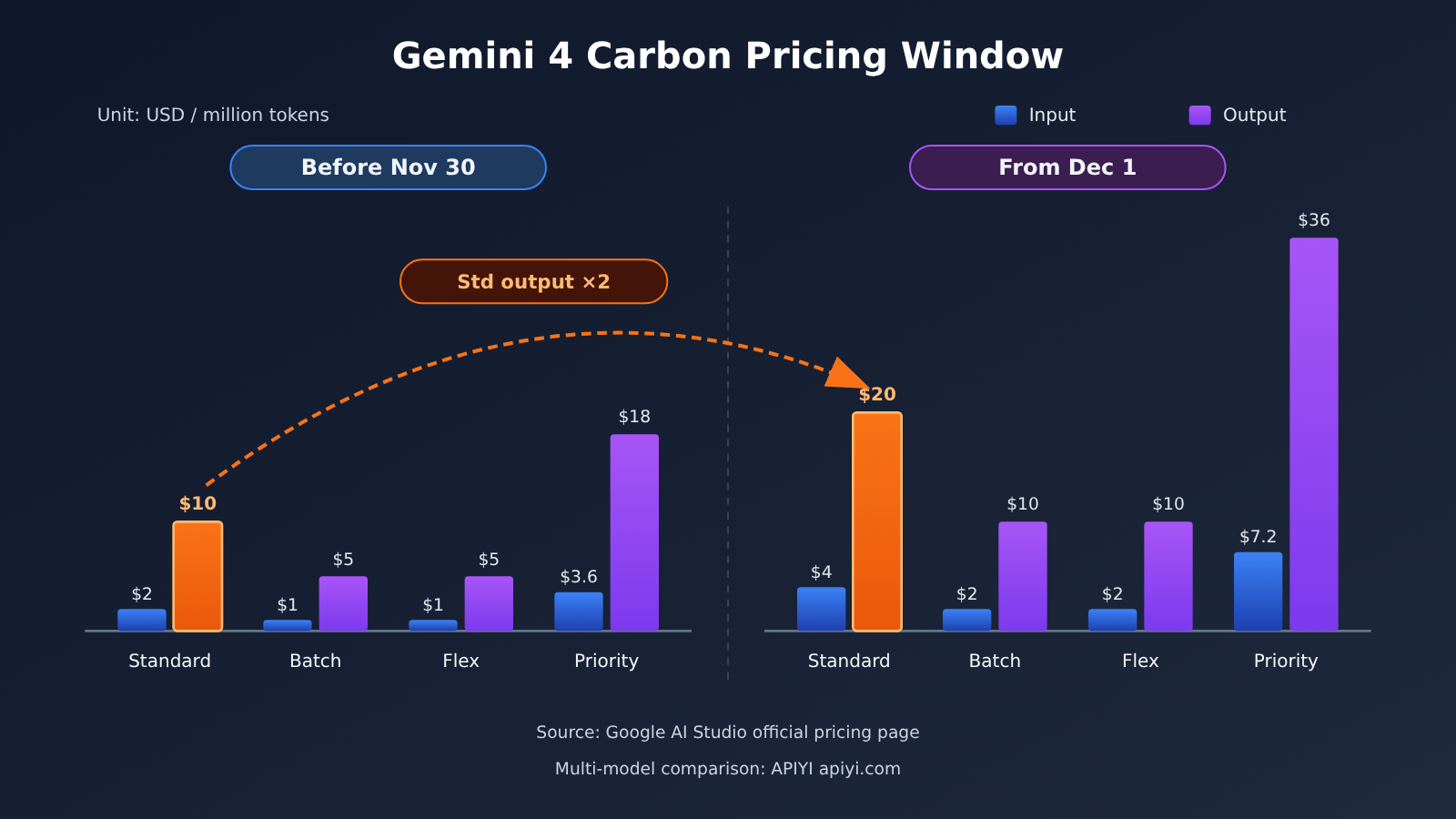
| Billing mode | Line item | Before November 30 | From December 1 |
|---|---|---|---|
| Standard | Input / Output / Cached input | $2.00 / $10.00 / $0.10 | $4.00 / $20.00 / $0.20 |
| Batch | Input / Output / Cached input | $1.00 / $5.00 / $0.05 | $2.00 / $10.00 / $0.10 |
| Flex | Input / Output / Cached input | $1.00 / $5.00 / $0.05 | $2.00 / $10.00 / $0.10 |
| Priority | Input / Output / Cached input | $3.60 / $18.00 / $0.18 | $7.20 / $36.00 / $0.36 |
As you can see, cached input costs 95% less than regular input. Batch and Flex run at half the Standard rate, which suits offline work that isn’t latency-sensitive; Priority costs more and fits production workloads that care about latency and reliability.
How a real Gemini 4 Carbon bill actually adds up
Unit price is just the starting point — three other factors shape what Carbon actually costs you:
- Thinking tokens are billed as output. Reasoning the model produces at the medium or high setting is charged at the output rate, so you can’t estimate a bill from the length of the final answer the user sees.
- Grounding adds overhead. When you use Grounding, internal tool system instructions and function declarations are billable too. Google Search Grounding includes 5,000 free requests per month, shared with Gemini 3 and newer models; beyond that it’s $14 per 1,000 requests, and a single user request can trigger several searches.
- Cache hit rate. The portion of input that hits the implicit cache is billed at the cached rate, so well-structured prompts noticeably cut the cost of long contexts.
Here’s a hypothetical estimate: a request with 20,000 input tokens and 8,000 tokens of thinking plus final output, ignoring caching and tool calls. At launch Standard pricing that’s roughly 0.02 × $2 + 0.008 × $10 = $0.12; the same usage after December 1 comes to about $0.24. The more thinking tokens you use, the bigger the output side’s share of the bill.
Third-party data backs this up. Using the $4 / $20 standard rates, Artificial Analysis measured Carbon’s average cost per evaluation task on its Intelligence Index v5.0.1 at roughly $7.19 for Low, $6.59 for Medium, and $7.76 for High. Medium coming in cheaper than Low shows the setting-to-cost relationship isn’t linear — and these are averages across a mixed evaluation set, not the price of a single ordinary request.
💰 Cost tip: before you go live, run a small batch of real tasks at the low, medium, and high settings, record the ratio of thinking tokens to output tokens, and then pick your default. If your project uses several models at once, the unified billing dashboard at APIYI apiyi.com makes it easy to compare actual consumption across them.
What to Know Before Integrating Gemini 4 Carbon
Before you write this into production code, it’s worth checking each of these constraints:
- There’s no free API tier: You can try Carbon in the AI Studio Playground, but Carbon itself doesn’t offer a free API tier. You’ll need a paid account to make calls.
- An Ultra subscription isn’t required for the API: Developers don’t need to buy Google AI Ultra. Conversely, an Ultra subscription can’t stand in for API billing.
- Response latency is on the high side: The model card warns that the high-reasoning tiers may produce slow responses and timeouts. Artificial Analysis measured Carbon High’s time to first answer token at around 67.54 seconds, so it’s not a good drop-in replacement for a real-time chat model.
- Hallucinations can still happen: Google acknowledges that Carbon can still hallucinate, and its prompt injection defenses still need improvement. For critical workloads, keep a verification step in place.
- The cybersecurity capabilities have a barrier to entry: The vulnerability discovery results Google published reflect specialized performance when used through the Fairwind Program. They don’t mean the same capability is openly available through the standard API with no conditions.
- Pricing is a snapshot in time: The pricing and access details in this article are based on information as of November 11, 2026. Please check the official pages for the latest.
FAQ
Q1: What’s the API model ID for Gemini 4 Carbon?
The stable model ID is `gemini-4-carbon`. Just drop it into your Python SDK, JavaScript SDK, or REST requests. The cybersecurity-focused variant, `gemini-4-carbon-cyber-permissive`, defaults to the HIGH tier and requires approval through the Fairwind Program before you can access it.
Q2: How do I choose between Gemini 4 Carbon and Gemini 4 Argon?
Argon is still Google’s recommended pick for most software engineering and knowledge work tasks. Carbon shines in deep reasoning, long-horizon execution, and complex verification. A practical approach is to split the work: use Argon for everyday tasks, and save Carbon for architecture design, complex audits, and root-cause investigations.
Q3: When does the Gemini 4 Carbon launch pricing end?
The launch pricing is valid through November 30, 2026. Standard pricing is $2 / $10 per million input / output tokens. Starting December 1, 2026, it goes up to $4 / $20, and Batch, Flex, Priority, and cached input prices double as well.
Q4: What are the best use cases for Gemini 4 Carbon?
– **Multi-file software engineering**: cross-module migrations, architecture refactoring, and complex code audits;
– **Long-horizon agent workflows**: tasks that require planning, tool calling, execution, and self-verification;
– **Multimodal document analysis**: professional materials that mix PDFs, drawings, images, and video;
– **Background deep analysis**: batch jobs where latency doesn’t matter but result quality does.
Q5: How can I quickly test Gemini 4 Carbon’s API performance?
The most direct way is to follow the 5-step process in this article: enable a paid tier in Google AI Studio, then make your calls. If you’d rather compare several models with a single key, head to APIYI at apiyi.com, register an account, and claim your free testing credits. Check the console’s model list to see whether Gemini 4 Carbon is live, then switch your base_url to `https://api.apiyi.com/v1` to verify.
Q6: I’m already subscribed to Google AI Pro. Can I use Carbon?
Not on the consumer side. As of November 11, 2026, the model access included with AI Pro is mainly Gemini 4 Argon, and Carbon requires Google AI Ultra. The API is a separate path, though. Even without any subscription, you can call `gemini-4-carbon` once you enable a paid tier for the Gemini API.
Q7: Why is my actual Carbon bill higher than my estimate based on the unit price?
The main reason is that thinking tokens are billed at the output rate, and at higher tiers the reasoning process can be far longer than the final answer. Grounding is also billed for tool instructions and search counts. We recommend logging input, output, and cached tokens separately in your call logs so you can estimate costs from the real ratios. When you need to compare actual consumption across models, the unified usage stats on APIYI (apiyi.com) can serve as a handy reference.
Q8: What are the known limitations of Gemini 4 Carbon?
The limitations disclosed in the model card include: it can still hallucinate, high reasoning tiers burn through a lot of tokens, you may see slower responses and timeouts, its knowledge cutoff is March 2026, and its prompt injection defenses still need improvement. At the API level, it doesn’t support `thinking_budget`, explicit Context Caching, or multi-candidate output.
Gemini 4 Carbon Key Takeaways
- Now generally available: Starting November 10, 2026, paid Gemini API developers can call Carbon directly.
- Model ID: The stable ID is
gemini-4-carbon, and Google recommends using the Interactions API to connect. - Where to start: Create a key in Google AI Studio, link Cloud Billing, and you’re ready to go.
- Pricing window: Through November 30, it’s $2 / $10. From December 1, it’s $4 / $20 (per million tokens).
- Access difference: API calls don’t require Ultra. You only need an Ultra subscription to use Carbon inside the app.
- Cost driver: Thinking tokens count toward output, so your actual bill depends on the tier, tool calls, and caching.
- Multi-model comparison: You can test through the unified interface at APIYI (apiyi.com). Check the platform’s announcements to see whether Carbon is available.
Summary
Here are the key points about Gemini 4 Carbon’s API launch:
- Clear entry point: Google AI Studio → API Keys → Cloud Billing → select
gemini-4-carbon→ make your call. Five steps and you’re connected. - Interface priority: Use the Interactions API for new projects. GenerateContent is still supported, but when migrating, keep in mind that parameters like
thinking_budgetare no longer available. - Pricing milestone: November 30 marks the end of the launch pricing window, and prices double across the board from December 1. When you estimate your budget, count thinking tokens as part of your output cost.
If you plan to finish your evaluation within the launch window, start by running a batch of real tasks on the medium tier and recording the token breakdown before you settle on a production configuration. If you need to compare several models side by side, we recommend testing through APIYI (apiyi.com). Check the platform’s model list to see whether Gemini 4 Carbon is available.
📚 References
- Gemini 4 Carbon Official Launch Announcement: Google Official Blog
- Link:
blog.google/innovation-and-ai/models-and-research/gemini-models/gemini-4-carbon-now-available -
Description: Official launch date, access by channel, and pricing changes
-
Gemini 4 Carbon API Model Documentation: Google AI Studio
- Link:
aistudio.google.com/docs/models/gemini-4-carbon -
Description: Model ID, input/output modalities, context, and tool capabilities
-
What’s new in Gemini 4 Carbon: Google AI Studio Integration Guide
- Link:
aistudio.google.com/docs/whats-new-gemini-4-carbon -
Description: Interactions API examples and the thinking_level parameter
-
Gemini API Pricing: Google AI for Developers
- Link:
ai.google.dev/gemini-api/docs/pricing -
Description: Standard, Batch, Flex, Priority, and caching prices
-
Gemini 4 Carbon Developer Guide: Google Cloud
- Link:
docs.cloud.google.cn/gemini-enterprise-agent-platform/models/guides/gemini-4-carbon -
Description: Parameter limits, Long Decode, and implicit caching rules
-
Gemini 4 Carbon Model Card: Google DeepMind
- Link:
deepmind.google/models/model-cards/gemini-4-carbon -
Description: Technical specs, knowledge cutoff date, and known limitations
-
Gemini 4 Carbon Independent Model Analysis: Artificial Analysis
- Link:
artificialanalysis.ai/models/gemini-4-carbon - Description: Per-task cost and latency data across different thinking levels
Author: APIYI Technical Team
Tech Support: Get in touch with us via the APIYI website homepage. For more integration resources, visit the docs.apiyi.com documentation center.


