

Author’s note: This article breaks down the features, authorization requirements, boundaries, and subscription pricing of the Doubao Xiaodou public beta. It also estimates—under clearly stated assumptions—the model costs of building a similar assistant yourself with APIs, to help you decide whether to buy off-the-shelf or build your own.
Doubao’s personal AI assistant “Xiaodou” entered public beta on November 24, 2026, with subscription prices ranging from 68 yuan to 500 yuan per month. Here’s the conclusion up front: What Xiaodou sells is a ready-made execution chain, not a model. It bundles memory, scheduled triggers, cross-app authorization, and actions taken on your behalf into one package; the subscription fee buys the entire chain of “getting things done for you.”
On that reading, the difference between the 68-yuan tier and the 500-yuan tier probably isn’t “how smart it is” but how much it can get done for you. That said, the official materials haven’t disclosed the specific quotas or capability differences for each tier, so this article won’t fill in those blanks.
This isn’t an article that pits subscription prices directly against token prices. Subscription prices and model prices aren’t the same kind of thing. No matter how cheap your model costs get when you build it yourself, they won’t get you Xiaodou’s phone calls on your behalf, in-platform ordering, or cross-app authorization. Below, we’ll run the numbers for both paths separately.
The key takeaway: By the end of this article, you’ll know what Doubao Xiaodou can do, which authorizations you need to grant, where its boundaries are, and—if you build the same thing yourself—which three engineering components you’d need to add and roughly how much you’d spend on models each month.
What Is the Doubao Xiaodou Public Beta: Core Info at a Glance
Xiaodou is a standalone app — not a new entry point bolted onto the Doubao app. It uses conversational interaction to help you handle everyday tasks, all within the scope of your explicit instructions and authorization. You can download it by searching “Xiaodou” in both the Apple and Android app stores. The App Store page shows the iOS version went live on November 23, 2026, and the developer is Beijing Chuntian Zhiyun Technology Co., Ltd. — the same company behind Doubao.
The public beta is invite-only, so you’ll need an invite code to try it. New users get a certain amount of free quota, and you can earn more by inviting friends. Spots are limited in the early beta period. Subscription tiers are subject to the App Store page, as shown below:
| Xiaodou Plan | Monthly Auto-Renewal | Annual Auto-Renewal | Are Tier Differences Disclosed? |
|---|---|---|---|
| Free Plan | Free | — | Not detailed by official |
| Standard Plan | ¥68 | ¥688 | Not detailed by official |
| Enhanced Plan | ¥200 | ¥2048 | Not detailed by official |
| Advanced Plan | ¥500 | ¥5088 | Not detailed by official |
One thing worth flagging: these are all product subscription prices, not model invocation prices. The information officially released this time covers only the standalone app, invite codes, and subscription tiers — there’s no mention of a public API or any third-party invocation method. Whether it’ll open up later is anyone’s guess; there’s no basis for that right now, so this article won’t speculate.
Doubao Xiaodou vs Building Your Own AI Assistant: The Core Differences
Xiaodou’s Six Feature Categories and Where Authorization Comes From
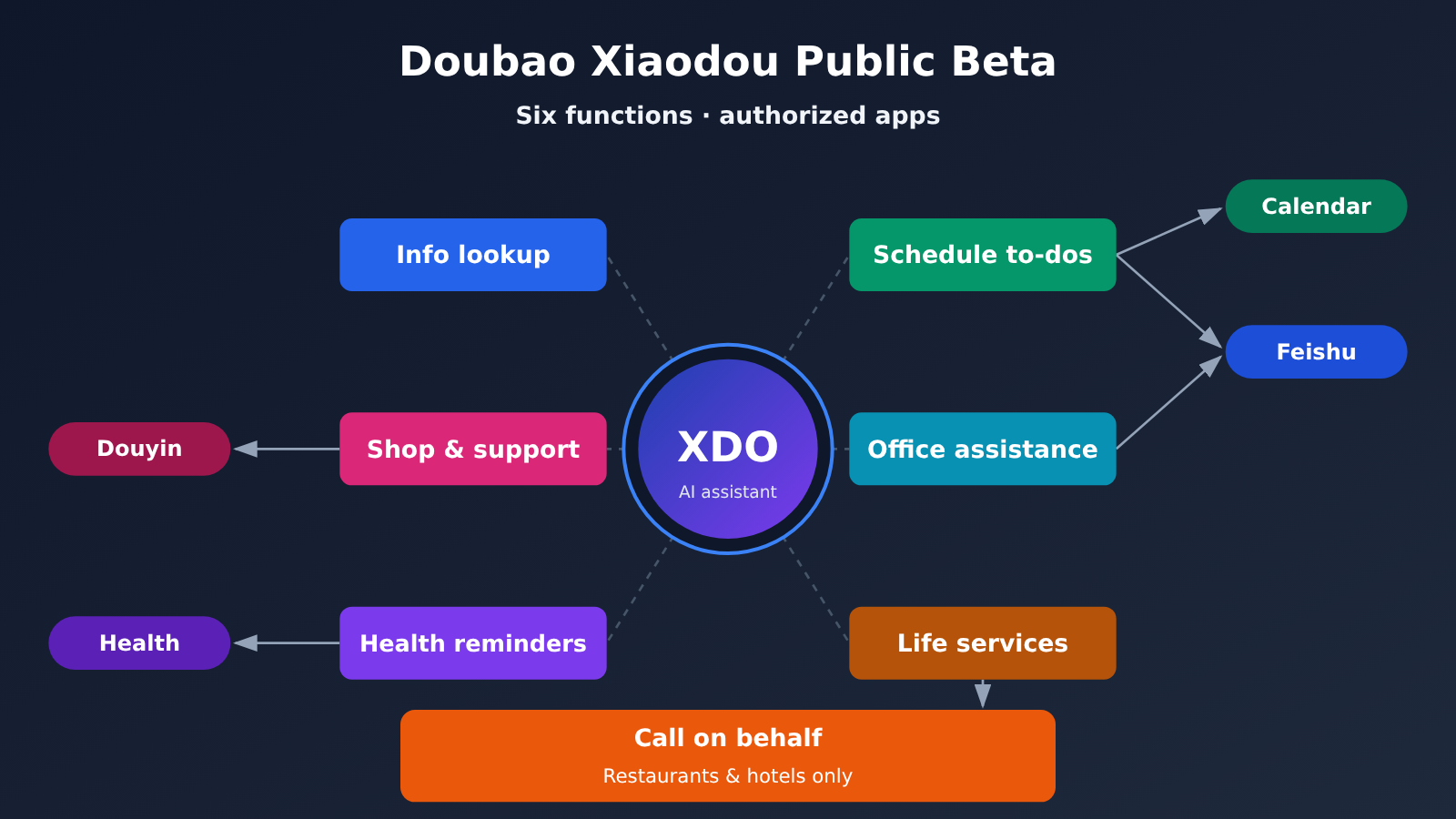
The six officially announced feature categories are: information lookup, schedules and to-dos, everyday services, shopping and after-sales, health reminders, and office assistance. What really sets it apart from an ordinary chatbot is “proactive service plus memory”: once you authorize it to connect with apps like Douyin, Feishu, your calendar, and health apps, Xiaodou can proactively pull together health information, alert you when a product’s price drops, when a group-buy voucher is about to expire, or when your schedule has a conflict — and suggest what to do about it.
You can also set a timed reminder or a monitoring task with a single sentence, then edit or pause it later on the “Tasks” page. That “Tasks” page matters a lot — it shows Xiaodou has a manageable set of task states running internally, rather than just one-off replies.
| Feature category | Typical actions in the official description | Related authorization (grouped by description; the official docs don’t map them one-to-one) |
|---|---|---|
| Information lookup | Conversational queries about everyday information | Depends on the specific question |
| Schedules and to-dos | Set a timed reminder in one sentence; flag schedule conflicts and suggest fixes | Calendar, Feishu |
| Everyday services | Make calls on your behalf to ask about seating, meal costs, parking fees | Phone capability (limited to everyday-service scenarios) |
| Shopping and after-sales | Price-drop alerts, group-buy voucher expiration reminders, place orders after confirmation | Douyin |
| Health reminders | Proactively summarize health information; break down long-term goals | Health |
| Office assistance | Send materials at an agreed time | Feishu |
The four scenarios in Xiaodou’s official demo video
All of these come from the official demo video and are meant to illustrate the design intent — they don’t guarantee every user will get the same results.
- Cat food restocking: Xiaodou remembers when the bag was last opened, estimates how much is left based on daily usage, and proactively asks whether you want to restock. Once you confirm, it places the order and sets a reminder for next month’s restock.
- Send the materials before 4 PM: You tell it, “send the final version of the materials before 4 PM today.” Xiaodou first sends a reminder notification, then sends the materials on time.
- Calling a restaurant for you: Xiaodou phones the restaurant to ask whether they have a table for four, and how much the meal and parking will cost.
- Breaking down long-term goals: It turns goals like “lose 8 kg in 3 months” into daily calorie logging and step-count reminders.
These scenarios share one thing: the hard part isn’t “understanding the sentence” — it’s remembering state, firing at the right moment, and calling other companies’ apps to actually get the job done. That’s exactly where building it yourself costs the most effort.
Where Xiaodou’s capabilities end
Calls made on your behalf currently only cover everyday service scenarios like restaurants, hotels, and local stores, and don’t support international or personal calls. Doubao says Xiaodou’s capabilities and experience will gradually open up and eventually ship in the main Doubao app. Among similar products, Meta launched Muse in September 2026 with the same emphasis on remembering personal preferences and continuously following up on long-term goals; users can access it through a standalone app or WhatsApp — which shows that “a proactive assistant with memory” is a direction multiple vendors are already pursuing.
Put the two paths side by side and the differences look like this:
| Dimension | Doubao Xiaodou | Building it yourself with APIs |
|---|---|---|
| Billing | Subscription, monthly or yearly | Per-token billing, plus server and maintenance costs |
| Cross-app authorization | Douyin, Feishu, Calendar, Health | Only systems with open APIs |
| Calls on your behalf | Supported for everyday service scenarios | Basically impossible to build |
| In-platform ordering | Can order after confirmation in the demo | Basically impossible to build |
| Workflow customization | Edit or pause on the “Tasks” page | Fully custom, can connect to internal systems |
| Model choice | Not disclosed | Your pick, switchable per task |
| Barrier to entry | Requires an invite code | Requires development and ops skills |
Building Your Own Doubao Xiaodou-Style Assistant: Three Building Blocks You Can’t Skip
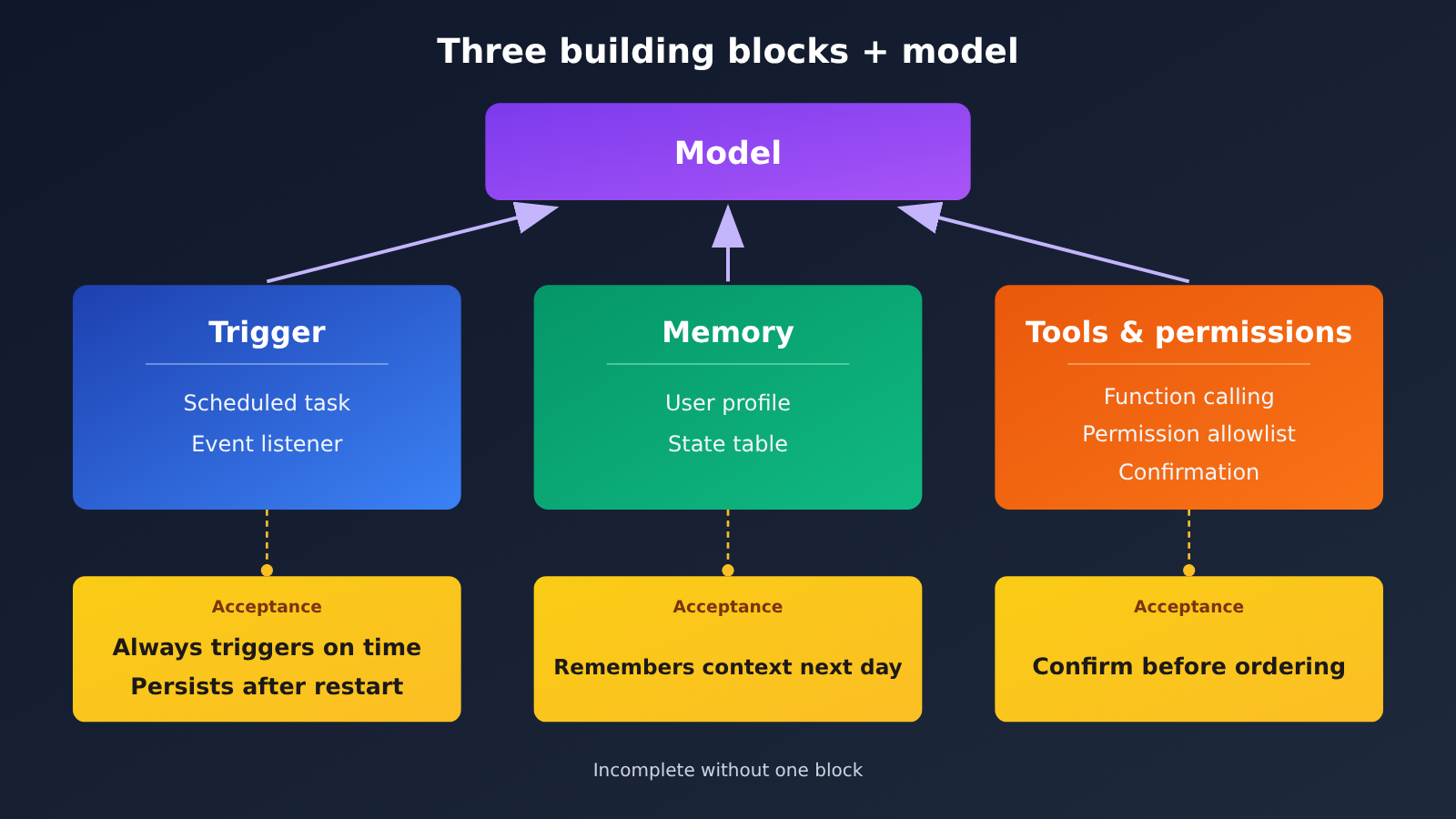
If your goal is internal company automation, or a small tool for a vertical use case, there’s still real value in building it yourself. But the model is only one piece — miss any one of the three blocks below, and all you’ve got is a chatbot.
Trigger: Scheduled Tasks and Event Listeners
Xiaodou can “send the materials before 4 PM” because of a trigger mechanism, not because the model remembers the time on its own. When you build it yourself, time-based needs go to scheduled tasks (cron, or delayed tasks in a task queue), and event-based needs go to event listeners — webhooks, message subscriptions, or polling. The model’s only job is to parse “send it before 4 PM today” into a structured trigger time and action; the actual execution is handled by the scheduler.
Acceptance criteria: a reminder you set still fires on time after the service restarts, and the same task never runs twice.
Memory: Store User Profiles and State Tables Separately
Memory needs to be split into two things. The user profile holds long-term preferences — cat food brand, daily amount, favorite restaurants. The state table holds in-progress tasks — “cat food opened, day 12,” “weight-loss plan, week 3.” The profile gets injected as context on every request; the state table is read and written by your program. Don’t make the model “recall” state from conversation history.
Acceptance criteria: ask the same reminder question the next day and the assistant still picks up the previous day’s context; users can view and edit their own profile.
Tools and Authorization: Function Calling, Allowlists, Second Confirmation
Action-oriented capabilities are implemented through function calling: define “check calendar,” “send message,” and “create order” as tools, and let the model decide which one to call and what arguments to pass. The tool layer needs a permission allowlist, exposing only the tools and data scopes the user has authorized. Anything that charges money, places an order, or sends messages externally must first pop a confirmation and execute only after the user agrees — the same design as in the Xiaodou demo where “the order is completed after the user confirms.”
| Building block | Implementation | Acceptance criteria |
|---|---|---|
| Trigger | Scheduled tasks, delayed queues, event listeners | Fires on time after restart, no duplicate execution |
| Memory | User profile (preferences) + state table (progress) | Still picks up context the next day |
| Tools and authorization | Function calling + permission allowlist | Unauthorized tools are always rejected |
| Second confirmation | Intercept before charging, ordering, or external messaging | A confirmation always appears before ordering |
How to Choose Models When Building Your Own Xiaodou-Style Assistant
Once the three building blocks are in place, the model actually turns out to be the easiest piece to swap out. A practical approach is tiered routing: high-frequency, lightweight tasks like reminder parsing and intent classification go to cheaper-tier models; task planning and multi-step tool calling go to strong models; and only complex reasoning pulls in the most expensive tier.
APIYI apiyi.com offers an OpenAI-compatible interface. To integrate, you just initialize the client as OpenAI(api_key="YOUR_API_KEY", base_url="https://api.apiyi.com/v1"). After that, switching between the cheap tier and strong models only requires changing the model field — for example, use deepseek-v4.1-flash for lightweight tasks and claude-sonnet-5-5 for planning tasks.
Function calling goes through the same endpoint: pass the tools parameter when calling chat.completions.create, declaring tools like create_reminder, send_message, and place_order. The request still goes to https://api.apiyi.com/v1/chat/completions, and after the model returns tool_calls, your program first checks them against an allowlist, then performs a second confirmation, and only then actually executes them.
🎯 Technical tip: During the prototyping stage, it’s worth running two or three models through the same codebase, comparing their tool-calling accuracy and per-call cost, and then deciding on the routing rules. With APIYI apiyi.com, one key lets you switch between models from multiple providers, saving you the hassle of registering and integrating each one separately.
How Do Xiaodou Subscription Prices Compare With the Cost of Running Models Yourself?
Let’s put the assumptions up front. All numbers below are based on this set:
- Each request with memory is counted as 8,000 input tokens + 1,000 output tokens (profile and state injection makes input on the larger side);
- 20 requests a day, 30 days a month, so 600 requests in total;
- We convert 1 USD at 7.1 CNY;
- No cache discounts — everything is priced at standard input rates.
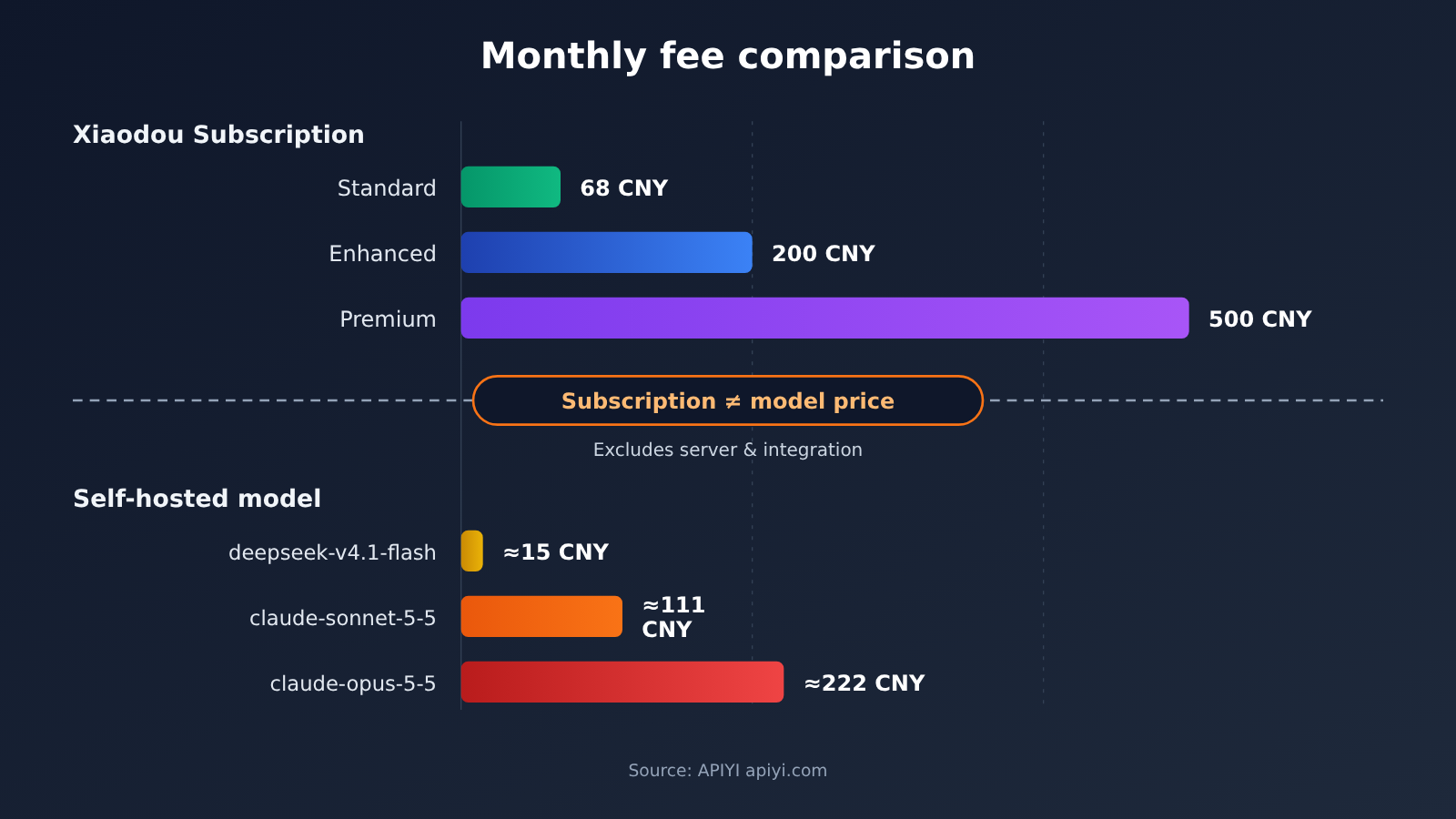
The table below lists prices in USD per million tokens, with data read on 2026-11-25. Models and prices follow the model list on the APIYI platform:
| Model | Input | Output | Cache read | Per request | ~600/month |
|---|---|---|---|---|---|
claude-opus-5-5 |
4 | 20 | 0.2 | ¥0.37 | ¥222 |
claude-sonnet-5-5 |
2 | 10 | 0.1 | ¥0.18 | ¥111 |
gpt-6.2-sol |
2 | 10 | 0.1 | ¥0.18 | ~¥111 |
gemini-4-carbon |
2 | 10 | 0.1 | ¥0.18 | ~¥111 |
gemini-4-hydrogen |
1.5 | 7.5 | 0.075 | ¥0.14 | ~¥83 |
qwen4-max |
1.5 | 4.5 | 0.075 | ¥0.12 | ~¥70 |
hy4 |
0.85 | 2.55 | 0.045 | ¥0.066 | ~¥40 |
deepseek-v4.1-flash |
0.3 | 1.2 | 0.006 | ¥0.026 | ¥15 |
Take claude-sonnet-5-5 as an example: per request it’s 0.016 + 0.010 = 0.026 USD, so 600 requests come to about 15.6 USD, or roughly ¥111. The gpt-6.2-sol price applies to the 0–272,000 input token range; beyond that, input is billed at 3. Our assumptions never push us past that threshold.
This is only the model cost. It doesn’t cover servers, scheduled jobs, authorization integration, failed retries, or manual upkeep. Also, anything you re-inject every time — a user profile, say — gets much cheaper when it hits the cache and is billed at the cache-read rate. That’s exactly what a memory-based assistant should optimize first.
💰 Cost optimization: Tiered routing plus caching is the most direct way to cut costs. On APIYI apiyi.com you can get the whole flow working on a cheap tier first, then switch the critical steps over to a stronger model and watch how your overall bill changes.
Scenario Recommendations: Buy Doubao Xiaodou or Build Your Own
When to just use Xiaodou
- Mostly handling everyday tasks: Booking restaurants, asking about store details, reminders when group-buy vouchers expire — these rely on making calls on your behalf and platform authorization, which you basically can’t replicate by building your own.
- You already use Douyin, Feishu, Calendar, and Health: Once authorization is connected, it just works, saving you all the integration work.
- You don’t want to maintain any service: A subscription model means you don’t have to think about servers, scheduling, or troubleshooting.
When to build your own with APIs
- Internal company automation: You need to hook into internal tickets, databases, and approval systems — things Xiaodou can’t reach.
- Building a vertical mini-tool or side product: You need your own brand, your own data, and a billable user system.
- Strict requirements on data location and workflow: You need full control over authorization scope, logs, and confirmation steps.
Decision Advice: Doubao Xiaodou vs. Building Your Own
You can boil the decision down to three questions. First, does your core task depend on making calls on your behalf, placing orders inside platforms, or cross-app authorization? If yes, just use Xiaodou — building your own can’t solve that. Second, do the systems you need to connect to have open APIs? Internal systems and your own databases all have APIs, so building your own has room to work. Third, do you have someone to maintain the three pieces — scheduling, memory, and permissions? If not, no matter how cheap the model is, it won’t get off the ground.
One misconception to avoid: seeing that deepseek-v4.1-flash costs about 15 yuan a month, you might think 15 yuan can replace the 68-yuan subscription. The two deliver different things — the 15 yuan for self-building only covers model invocation; you have to fill in the execution chain yourself.
💡 Selection tip: If you decide to build your own, start with one specific scenario (say, “send materials on schedule”) to get the three building blocks working, then expand from there. Through APIYI apiyi.com, you can use the same codebase to compare multiple models and pick the combo with the right balance of cost and accuracy.
Frequently Asked Questions (FAQ)
Q1: What is Doubao Xiaodou?
Xiaodou is Doubao’s personal AI assistant, shipped as a standalone app, and it entered invite-only public beta on November 24, 2026. Within the scope of user authorization, it connects to apps like Douyin, Feishu, Calendar, and Health, covering six categories of functions: information lookup, schedules and to-dos, life services, shopping and after-sales support, health reminders, and office assistance.
Q2: How is Xiaodou different from an ordinary chatbot?
An ordinary chatbot only answers questions. Xiaodou emphasizes proactive service and memory: it can trigger reminders on time, remember restock status, and place orders or make calls on the user’s behalf after confirmation. The difference lies in the execution chain, not in single-turn conversational ability.
Q3: What’s the difference between the three Xiaodou subscription tiers?
The App Store lists three tiers — Standard, Plus, and Premium — at 68, 200, and 500 CNY per month on auto-renew, and 688, 2048, and 5088 CNY per year on auto-renew, plus a free plan. The official documentation hasn’t yet disclosed the specific quotas and capability differences for each tier.
Q4: Can Xiaodou’s phone-call feature reach anyone?
No. Currently it only covers life-service scenarios such as restaurants, hotels, and stores, and it doesn’t support overseas calls or personal calls. The company says the capability will gradually open up and will also roll out in the main Doubao app.
Q5: Does Xiaodou have an open API? If I build a similar assistant myself, how do I call models?
None of the information officially released this time mentions a public API. If you’re building your own, you can call multiple models through the OpenAI-compatible interface from the APIYI API proxy service at apiyi.com — set `base_url` to `https://api.apiyi.com/v1`, change the `model` field to switch models, and new users get free testing credits.
Q6: Roughly how much does it cost per month to build one myself?
Assuming 8,000 input tokens plus 1,000 output tokens per call, 600 calls per month, and 7.1 CNY per USD: `claude-sonnet-5-5` comes to about 111 CNY, `claude-opus-5-5` about 222 CNY, and `deepseek-v4.1-flash` about 15 CNY. That’s just the model cost — it doesn’t include servers, integration, or maintenance.
Q7: Which Xiaodou capabilities can’t I replicate on my own?
Placing calls on your behalf, ordering directly inside third-party platforms, and cross-app authorization for apps like Douyin Health — these depend on platform partnerships that individual developers usually can’t get. Building your own is better suited to integrating with systems that expose open interfaces.
Doubao Xiaodou vs. Building It Yourself: Key Takeaways
- Xiaodou is really selling the execution chain: memory, triggers, authorization, and errands bundled together — the subscription price isn’t the model price.
- Public beta bar: invite code required, standalone app, iOS version goes live November 23.
- Clear boundaries: calls made on your behalf are limited to everyday life services — no overseas or personal calls.
- Three building blocks for DIY: triggers, memory, and tools plus authorization; always confirm twice before any charge or outbound message.
- Model cost range: roughly 15 to 222 yuan per month under the same assumptions, engineering costs excluded.
- How to get started: the DIY route can use APIYI’s OpenAI-compatible endpoint — one key to switch between multiple models.
Summary
The key points from the Doubao Xiaodou public beta:
- Product form: standalone app, invite-only, six categories of features, with proactive service powered by authorized connections to Douyin, Feishu, Calendar, and Health.
- Pricing and boundaries: three monthly tiers at 68, 200, and 500 yuan; the official material doesn’t spell out what separates the tiers; calls made on your behalf are limited to everyday life service scenarios.
- The DIY math: model costs run about 15 to 222 yuan per month, but you’ll need to build the three pieces yourself — triggers, memory, and tool authorization — and platform-level capabilities are out of reach.
Handing life admin to Xiaodou while building internal systems and vertical products yourself is the steadier division of labor right now. If you want to try it hands-on, start by running a single scenario on free credits through APIYI (apiyi.com), then decide on model routing and scale.
📚 References
-
China National Radio (CNR): Xiaodou public beta, six feature categories, proactive service, official demo scenarios, and coverage of capability boundaries
- Link:
cnr.cn - Notes: Published on 2026-11-24, covering demo cases and the boundaries of making calls on users’ behalf
- Link:
-
Chao News, Kuai Technology, Phoenix Technology: Standalone app positioning, App Store listing information, and subscription tiers
- Link:
fengniao.ifeng.com - Notes: Reported on the same day, 2026-11-24; subscription prices are taken from the App Store page
- Link:
-
APIYI model and pricing list: Unit prices used for the cost estimates in this article
- Link:
docs.apiyi.com/models - Notes: Accessed on 2026-11-25; models and prices are subject to the platform listing
- Link:
Author: APIYI Technical Team
Technical inquiries: Feel free to contact us through the APIYI website homepage. More integration resources are available at the docs.apiyi.com documentation center.


