

Author’s note: Before you see GLM-5.5 and think about switching coding models, run this 3-step check first: does the official model card include this name, can the model ID in your request actually be sent, and does the public pricing include this row? If those three don’t line up, keep using the already available glm-5.3.
The name GLM-5.5 has been making the rounds among developers lately. A lot of people see a new version number and start preparing to move their coding workflow over to it. But whether a model name is usable doesn’t depend on how much buzz it’s getting. It comes down to three things: whether it’s in the official model card, whether a request can be sent with its model ID, and whether it has a row in the pricing table.
This isn’t about judging whether GLM-5.5 will be released. This article only gathers the public records available as of 2026-11-19, and lays out a verification process you can follow for any new model name in the future. If you can’t find it, that only means there’s no public record as of today. It doesn’t mean the model will never appear.
The key takeaway: After reading this, you’ll be able to determine whether a model name is callable in 3 steps and about ten minutes. And when all three places don’t match, you’ll know which already available coding model to use today so you can keep working, instead of waiting around for a name that doesn’t even have an ID yet.
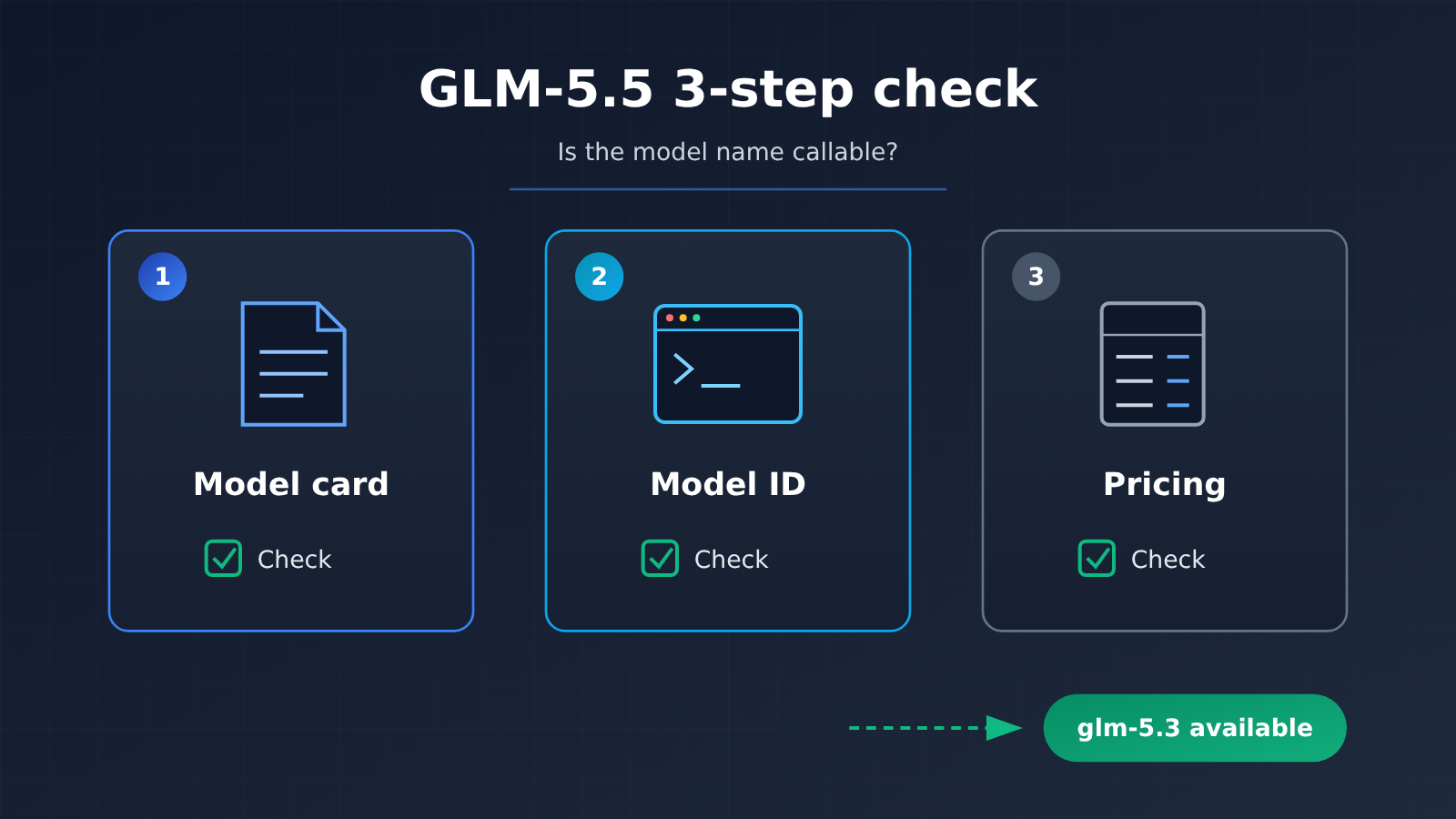
The 3 Core Checks for Verifying GLM-5.5
To figure out whether a model name is actually callable, you need to look at three public records — all three, no shortcuts. The table below lays out what to check at each point and what counts as a pass:
| Checkpoint | Where to Look | Pass Criteria | GLM-5.5 Result as of 2026-11-19 |
|---|---|---|---|
| Model card | Vendor’s official model overview, release notes | A standalone entry with this name appears on the page | Not present |
| Model ID | An actual API request you send | The request succeeds, and the returned model ID matches what you requested | No usable ID |
| Pricing | Platform’s public price list or pricing endpoint | A price row for this name in the price list | Not present |
A Closer Look at the GLM-5.5 Public Record
Here’s what the official channels showed as of 2026-11-19: the Z.ai model overview page lists only GLM-5.3 as the flagship, plus GLM-5.3-Flash and GLM-5.3-FlashX — no GLM-5.5. The newest model entry in Z.ai’s release notes stops at GLM-5.3-Flash on 2026-08-26, preceded by GLM-5.3 on 2026-08-18; there’s no 5.5 anywhere in the pages we crawled. The Zhipu open platform’s model overview also has just those three models in the GLM-5.3 series.
As a second source, a verification article published by Ofox on November 16 examined Z.ai, BigModel, and its own model catalog, and concluded there’s no GLM 5.5 release entry, model ID, or price. Another third-party page dated 2026-11-01 also noted that nothing had been officially announced, but that’s an earlier snapshot — when forming your judgment, go by the November 16 verification and today’s official pages. Third-party sources are reference material only: always mark their dates clearly, and don’t treat them as the final word.
| Source Type | Source | Record Date | Does GLM-5.5 Appear? |
|---|---|---|---|
| Official | Z.ai model overview | Checked 2026-11-19 | No — flagship is GLM-5.3 |
| Official | Z.ai release notes | Checked 2026-11-19 | No — latest entry is GLM-5.3-Flash (08-26) |
| Official | Zhipu open platform model overview | Checked 2026-11-19 | No |
| Second source | Ofox verification article | 2026-11-16 | No — no entry, ID, or price |
| Early snapshot | A third-party page | 2026-11-01 | No — historical reference only |
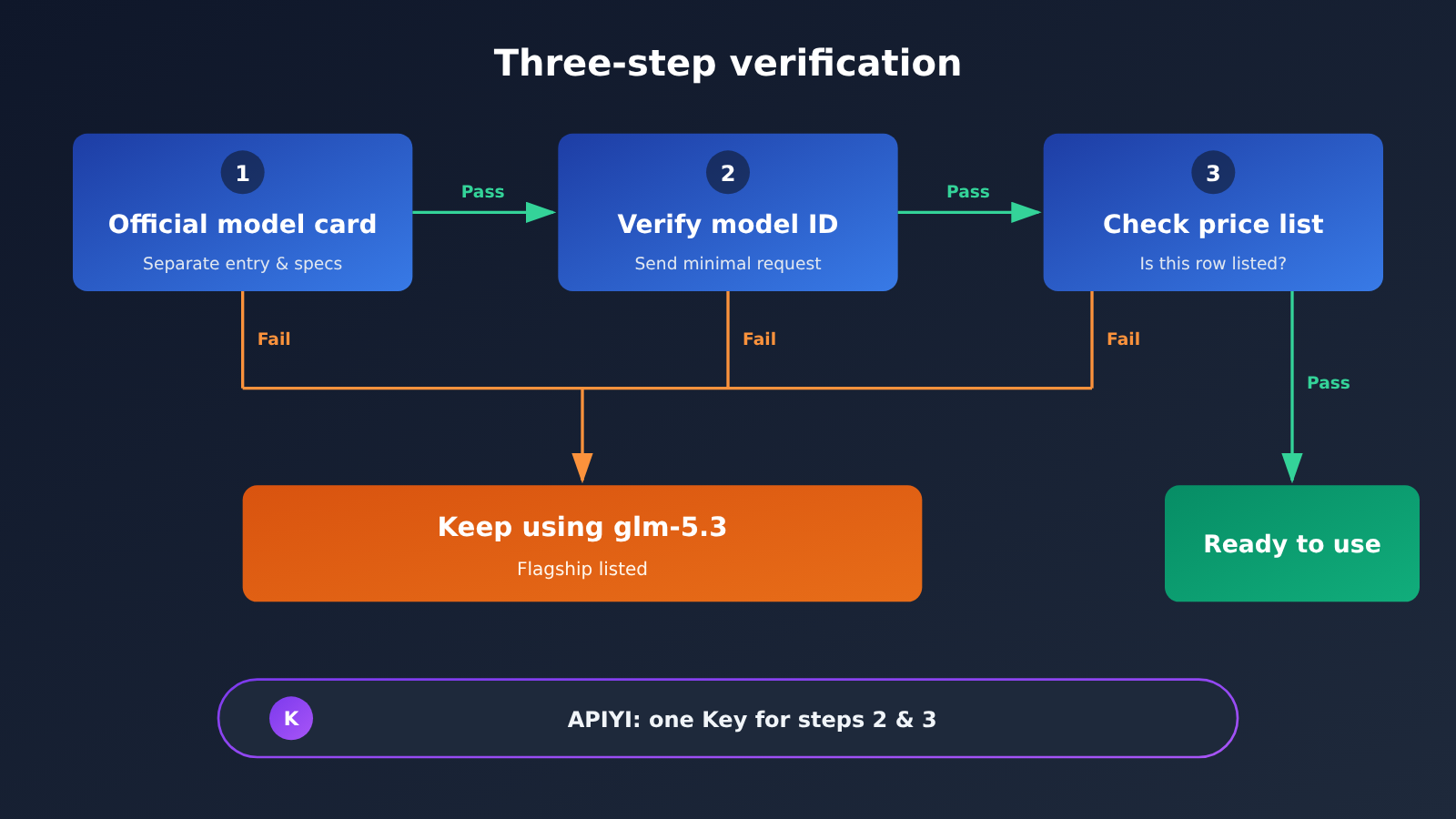
GLM-5.5 Verification in Three Steps: How to Do It and What Counts as Passing
Do these three steps in order, and each one comes with a clear pass criterion. If any step fails, there’s no point waiting for the rest.
Step 1: Check whether the official model card lists GLM-5.5
Open the vendor’s official model overview page and release log, then search the page for the full model name. Some rumors use different spellings like “GLM 5.5”, “GLM5.5”, or “glm-5.5”, so it’s worth trying each variant. At the same time, check the date on the latest entry in the release log to judge whether you’re looking at the current version of the page.
Pass criterion: The model card contains a standalone entry with that name, along with specs such as context length and max output. Appearing only in a press release, on social media, or in a third-party article does not count as a pass.
Step 2: Send a request using the model ID
Having a model card isn’t enough — you also need to confirm that the name has a corresponding model ID you can actually call. The most direct way is to send a minimal request through an OpenAI-compatible API. On APIYI, every model is called through the same endpoint, https://api.apiyi.com/v1, so you can just swap the model parameter to the ID you want to verify — no separate registration per vendor required.
Pass criterion: The request returns successfully, and the model field in the response body matches the ID you requested. If the request errors out, or the returned ID doesn’t match what you sent, that’s a fail. The exact error text depends on what’s actually returned; different platforms may word it differently.
Step 3: Check whether the price list has a row for it
Any model you can call must have a published price. APIYI’s public model index is at docs.apiyi.com/models.md, and the pricing API is at api.apiyi.com/api/pricing — you can search for the model name directly in either one. On 2026-11-19, the Zhipu section of the index contained neither glm-5.5 nor glm-5.4, and the pricing API didn’t list those two names either.
Pass criterion: The price list has a row for this model, listing input and output prices. A name without a listed price can’t be used to estimate cost even if it occasionally responds to calls, so it’s not advisable to put it into a production environment.
When GLM-5.5 Doesn’t Line Up: How to Switch to glm-5.3
After checking all three places, GLM-5.5 doesn’t match anywhere — not the model card, not the model ID, not the pricing. At this point, the more practical move is to keep using the same-series flagship that’s already listed, glm-5.3, rather than putting your workflow on hold to wait for a name that doesn’t even have an ID yet.
glm-5.3 Specs at a Glance
The following comes from the APIYI model details page (verified 2026-11-19):
| Item | glm-5.3 |
|---|---|
| Model ID | glm-5.3 |
| Vendor release date | 2026-08-14 |
| Platform launch date | 2026-09-08 |
| Context length | 1 million tokens |
| Max output | 128K tokens |
| Input modality | Text |
| Supported endpoints | chat, messages |
| Thinking mode | Enabled by default |
| Group multipliers | ClaudeCode 0.95x; Default, SVIP 1x |
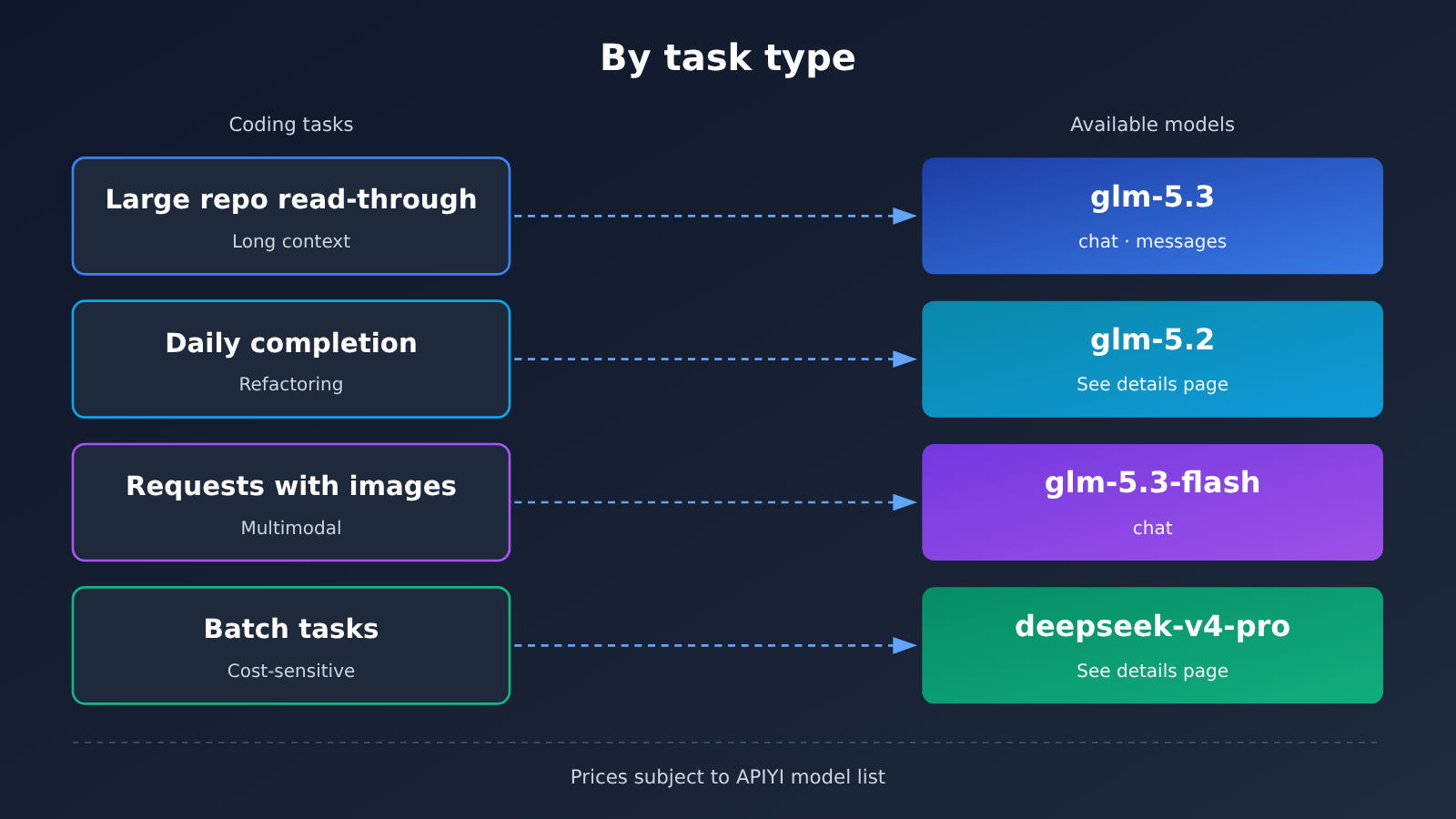
There are two details to watch for when using it. First, thinking mode is on by default, and the reasoning process consumes output tokens, so don’t set max_tokens too tight. Second, glm-5.3 takes text input only — if your task needs image input, the multimodal model in the same series is glm-5.3-flash, but it only supports the chat endpoint. glm-5.3-flash is a member of the 5.3 series, and it’s a completely different thing from the rumored 5.5 — don’t conflate the two.
Minimal example
Point base_url at APIYI, set the model to glm-5.3, and you’re up and running in a dozen lines:
import openai

client = openai.OpenAI(
    api_key="YOUR_API_KEY",
    base_url="https://api.apiyi.com/v1"  # APIYI unified endpoint
)

response = client.chat.completions.create(
    model="glm-5.3",
    messages=[{"role": "user", "content": "用 Python 写一个读取 CSV 并按列求和的函数"}],
    max_tokens=4000
)
print(response.model)  # Acceptance check: the returned model ID
print(response.choices[0].message.content)
View the full code: probe the model ID first, fall back to glm-5.3 if unavailable
import openai
from typing import Optional

client = openai.OpenAI(
    api_key="YOUR_API_KEY",
    base_url="https://api.apiyi.com/v1"
)

def probe_model(model_id: str) -> Optional[str]:
    """
    Second verification step: send one minimal request,
    return the model ID from the actual response; return None if the request fails.
    """
    try:
        resp = client.chat.completions.create(
            model=model_id,
            messages=[{"role": "user", "content": "ping"}],
            max_tokens=16
        )
        return resp.model
    except Exception as e:
        print(f"[{model_id}] Request failed: {e}")
        return None

def pick_model(candidate: str, fallback: str = "glm-5.3") -> str:
    """Fall back to a listed model when the candidate model fails verification."""
    returned = probe_model(candidate)
    if returned and returned.startswith(candidate):
        print(f"[{candidate}] Verification passed, returned ID: {returned}")
        return candidate
    print(f"[{candidate}] Verification failed, switching to {fallback}")
    return fallback

def code_assist(prompt: str, model: str) -> str:
    resp = client.chat.completions.create(
        model=model,
        messages=[
            {"role": "system", "content": "你是一名严谨的软件工程师,输出可运行的代码。"},
            {"role": "user", "content": prompt}
        ],
        max_tokens=8000  # glm-5.3 has thinking enabled by default, so leave enough room for output
    )
    return resp.choices[0].message.content

if __name__ == "__main__":
    model = pick_model("glm-5.5")
    print(code_assist("为下面的函数补充单元测试:def add(a, b): return a + b", model))
🚀 Getting started tip: Once you sign up through APIYI at apiyi.com you get free trial credits. The same API key can both run the model ID probe above and call
glm-5.3directly for your everyday coding tasks — switching models just means changing themodelparameter.
Beyond GLM-5.5: Listed Pricing for Coding-Oriented Models
The table below lists the published prices (USD per million tokens) for a few of the more commonly used coding models that are already available in the APIYI model catalog. It’s a plain factual listing, not a ranking. Different models are good at different things — which one suits you is something you’ll have to test against your own codebase.
| Model ID | Input | Cache read | Output | Endpoint | Available platform |
|---|---|---|---|---|---|
glm-5.3 |
1.4 | 0.259 | 4.396 | chat, messages | APIYI |
glm-5.3-flash |
0.15 | 0.03 | 0.5 | chat | APIYI |
glm-5.2 |
1.142 | 0.2284 | 3.997 | See details page | APIYI |
deepseek-v4-pro |
1.32 | 0.043996 | 3.96 | See details page | APIYI |
claude-sonnet-5-5 |
2 | 0.1 | 10 | See details page | APIYI |
Model IDs and prices are subject to the platform’s model list. GLM-5.5 isn’t listed yet, but we’ll have it up as soon as we can. In the meantime, the invocation entry point is https://api.apiyi.com/v1, and your existing workflows can hand off to glm-5.3 directly.
GLM-5.5 Verification: Common Pitfalls and Troubleshooting
When you’re actually verifying this, the following situations are the easiest to misjudge. Use this table to check them one by one:
| Symptom | Possible cause | What to do |
|---|---|---|
| A third-party article lists GLM-5.5 specs | Rumor or speculation, not an official model card | Go back to the official overview page and release log to confirm |
The model returned by the request doesn’t match the request |
The platform applied an alias mapping or fallback | Go by the returned ID and treat it as a failed check |
You find glm-5.3-flash and think it’s the new version |
A multimodal model in the same series | Check the detail page—it belongs to the 5.3 series |
| A name shows up in the price list but there’s no price | A preview or placeholder entry | Wait until a price appears before using it in production |
| Conclusions from different sources conflict | Different snapshot dates | Go by the official page with the latest date |
FAQ
Q1: Does GLM-5.5 actually exist?
As of 2026-11-19, none of the Z.ai model overview, Z.ai release log, or Zhipu Open Platform model overview includes a model card, model ID, or price for GLM-5.5. This is the public record as of that day; it doesn’t prove the vendor isn’t working on it internally, and it doesn’t mean it won’t be released later.
Q2: What’s the relationship between GLM-5.5 and glm-5.3-flash?
None. `glm-5.3-flash` is a multimodal model in the GLM-5.3 series, recorded in the official release log on 2026-08-26, and it only supports the chat endpoint. It isn’t 5.5, nor is it a preview of 5.5, so don’t mix them up just because the name looks new during verification.
Q3: If third-party claims conflict with the official page, which should I trust?
Trust the official page, and pay attention to the date. This article uses Ofox’s November 16 check as a secondary source; the November 1 third-party page counts only as an early snapshot. Every source should be labeled with its verification date—the newer the date and the closer to official, the more reference value it has.
Q4: While waiting for GLM-5.5, what should I use for coding tasks?
I’d keep using the already-listed flagship of the same series, `glm-5.3`: 1M context window, 128K max output, and support for both the chat and messages endpoints. It’s well suited to reading large repositories, refactoring, and generating tests. When you need image input, you can use `glm-5.3-flash`.
Q5: How do I quickly complete step two, model ID verification, through the API?
Register at APIYI apiyi.com to get an API key and free trial quota, set `base_url` to `https://api.apiyi.com/v1`, and send one minimal request with the `probe_model` function from the complete code in this article. Then check whether the returned `model` field matches the request.
Q6: How can I find out as soon as GLM-5.5 is listed?
Repeat the three steps in this article: a new entry appears in the official release log, a new row appears in the platform’s model list, and the ID returned by a minimal request matches the name. All three need to line up for it to be truly available. On the platform side, you can periodically check APIYI apiyi.com’s model list and pricing API.
Q7: What usage limits should I watch out for with glm-5.3?
Thinking mode is on by default and consumes extra output tokens, so leave enough headroom in `max_tokens`. The input modality is text-only, so switch models for image-related needs. Group multipliers also differ—ClaudeCode is 0.95x, while Default and SVIP are 1x—so confirm your group before billing.
GLM-5.5 Verification: Key Takeaways
- All three must line up: model card, model ID, and listed price. Only when all three match can you call it “available.”
- Today’s record: as of 2026-11-19, none of the three official pages has a GLM-5.5 entry.
- Always date your sources: Ofox’s November 16 check is a second source, not the final word.
- No record doesn’t mean no release: it only means there’s no public record as of today.
- Don’t mix up model names:
glm-5.3-flashis a multimodal member of the 5.3 family. - Today’s substitute: keep using the already-listed
glm-5.3— just change themodelparameter. - One entry point for verification: a single API key handles both probing and calling, and the price is whatever the model list says.
Summary
When you’re facing a new name like GLM-5.5, it comes down to three steps:
- Check the model card: does the official overview page or release notes have a standalone entry for that name?
- Send a request: fire one minimal request using the model ID and see whether the returned ID matches.
- Check the price: does the platform’s price list have a line item for it?
If any one of the three doesn’t line up, don’t let your workflow sit around waiting. glm-5.3 is already listed, with clear specifications, endpoint, and pricing, so it can take on your everyday coding tasks right away. We recommend using APIYI at apiyi.com to handle both verification and switching with the same key — once a new model goes live, a single parameter change keeps you current.
📚 References
-
Z.ai Model Overview: official docs verified on 2026-11-19
- Link:
docs.z.ai/guides/overview/overview - Note: the flagship is GLM-5.3, alongside GLM-5.3-Flash and GLM-5.3-FlashX
- Link:
-
Z.ai Release Notes: official docs verified on 2026-11-19
- Link:
docs.z.ai/release-notes/new-released - Note: the latest model entry is GLM-5.3-Flash on 2026-08-26
- Link:
-
Zhipu Open Platform Model Overview: official docs verified on 2026-11-19
- Link:
docs.bigmodel.cn/cn/guide/start/model-overview - Note: lists three models in the GLM-5.3 series
- Link:
-
Ofox GLM 5.5 Verification Article: a second source dated November 16
- Link:
ofox.ai/blog/glm-5-5-release-api-availability - Note: checked Z.ai, BigModel, and its own catalog — none of them has a GLM 5.5 entry, model ID, or pricing
- Link:
-
APIYI glm-5.3 Model Details: specs, endpoints, and listed pricing
- Link:
docs.apiyi.com/models/glm-5-3.md - Note: covers context window, max output, group multipliers, and more
- Link:
Author: APIYI Technical Team
Technical discussion: If you hit any problems while verifying or switching models, feel free to get in touch through the APIYI homepage.


