

Author’s note: As of 2026-11-11, Qwen4-Max is open for preview on Alibaba’s Token Plan, with the model ID qwen4-max-preview. The pay-as-you-go API doesn’t have this ID yet. This article covers where you can use it right now, what you can call through the pay-as-you-go API, and the common mistakes people make during the preview.
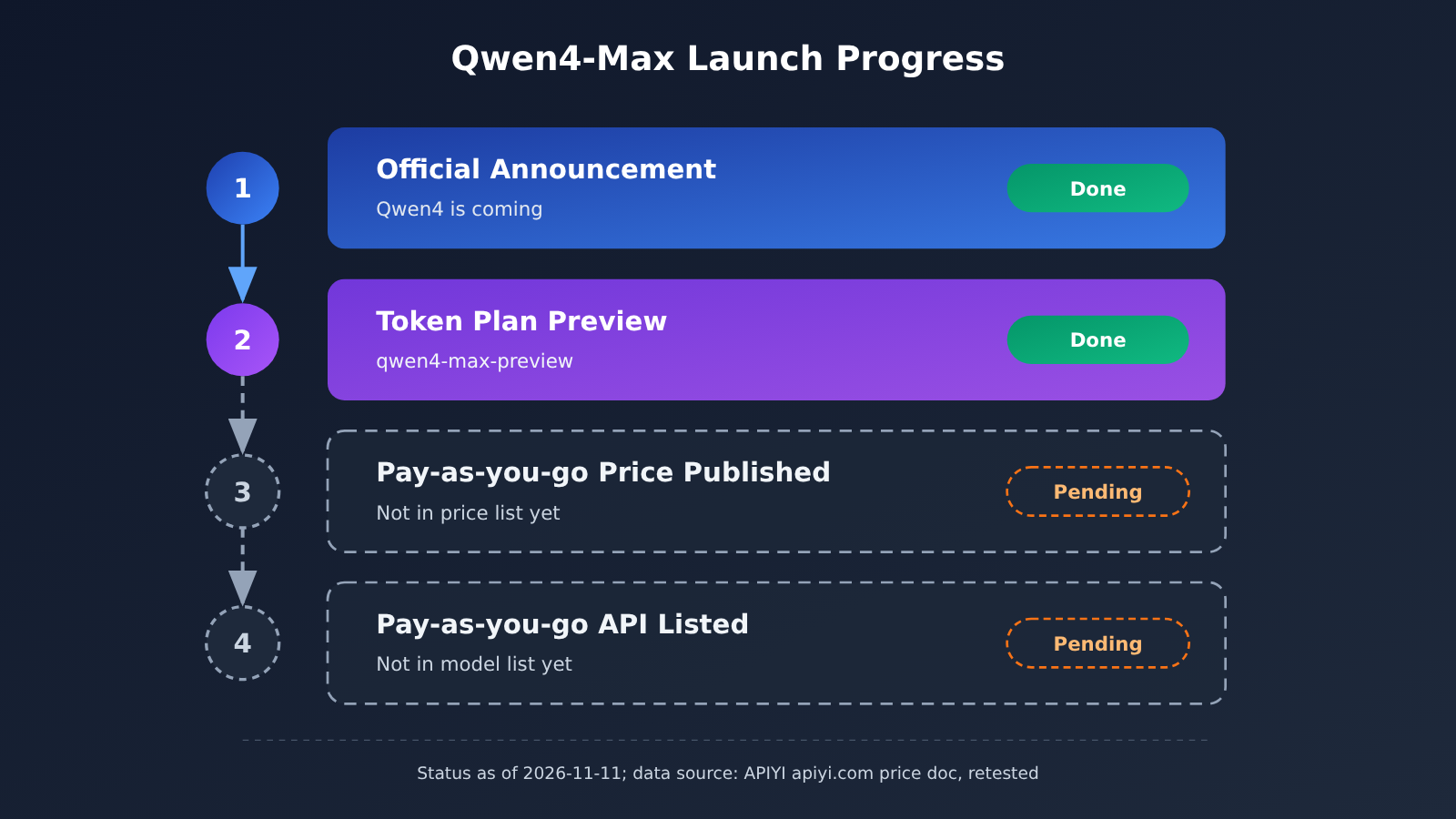
On 2026-11-11, the official Alibaba Qwen account posted that Qwen4 is coming, and Qwen4-Max is now open for preview on Alibaba’s Token Plan. Many developers saw the news and immediately swapped the new model ID into their pay-as-you-go key setup. The requests failed. The problem wasn’t their code: the pay-as-you-go API simply hasn’t listed the model yet.
This isn’t a rumor. The preview is confirmed by the official Alibaba post. But “the preview is open” and “you can call it pay-as-you-go” are two different things, and the official post says nothing about pay-as-you-go pricing, benchmark scores, or open-source weights.
What you’ll get out of this: in 3 minutes, you’ll know what’s confirmed about the Qwen4-Max preview, which claims are still secondhand, and which is the newest Qwen model you can use on the pay-as-you-go API right now, along with its price.
Qwen4-Max Preview Is Live: Key Facts at a Glance
The official post is short. It confirms only a handful of details, and what it leaves out matters just as much. The table below lists only what has a source behind it, and secondhand claims are marked separately.
| Item | Details | Source type |
|---|---|---|
| Release date | 2026-11-11 | Official post |
| Publisher | Alibaba Qwen (Alibaba_Qwen) | Official post |
| Core announcement | “Qwen4 is coming,” Qwen4-Max enters preview | Official post |
| Preview channel | Alibaba Token Plan | Official post |
| Apps with early access | QwenWork, Qoder, Qwen App, QwenStudio | Official post |
| Preview model ID | qwen4-max-preview |
Confirmed by reference materials |
Alias qwen4.0-max-preview |
Mentioned in secondhand docs | Hearsay, unconfirmed |
| Preview ends 2026-11-25 24:00 (UTC+8) | Mentioned in secondhand docs | Hearsay, unconfirmed |
| Pay-as-you-go pricing / official benchmarks / open weights | None mentioned in the official post | Not available yet |
Qwen4-Max Preview: Model ID and Unconfirmed Claims
The only preview model ID we can confirm right now is qwen4-max-preview. Some secondhand docs online also mention an alias, qwen4.0-max-preview, and say the preview runs through 2026-11-25 24:00 (UTC+8). Neither claim appears in the official post, so treat both as hearsay at best. Hardcoding that alias in your code, or scheduling work around that end date, is risky.
Here’s what we’d suggest: use qwen4-max-preview as the model ID everywhere, and wait for a later official announcement before relying on any end date from secondhand docs.
4 Things the Qwen4-Max Official Post Doesn’t Say
If you’re making a technical selection, these four items are still blank:
- Pay-as-you-go pricing: The post gives no prices for input, output, or cache reads, so you can’t estimate costs on pay-as-you-go channels.
- Official benchmarks: No benchmark results have been published. Any comparison numbers floating around online aren’t self-reported by the vendor.
- Open weights: The post doesn’t say whether the model will be open-sourced, so private deployment is off the table for now.
- Preview end date: The official post doesn’t state one. The dates circulating online are just hearsay.
💡 Selection tip: Until pricing and benchmarks are published, it’s not a good idea to build long-term production plans around Qwen4-Max. A better move is to get your pipeline working first with the qwen3.8 series already available on APIYI (apiyi.com). Once the new model is listed, you’ll only need to change a single
modelparameter.
Why the Pay-As-You-Go API Doesn’t Have a Qwen4-Max ID Yet
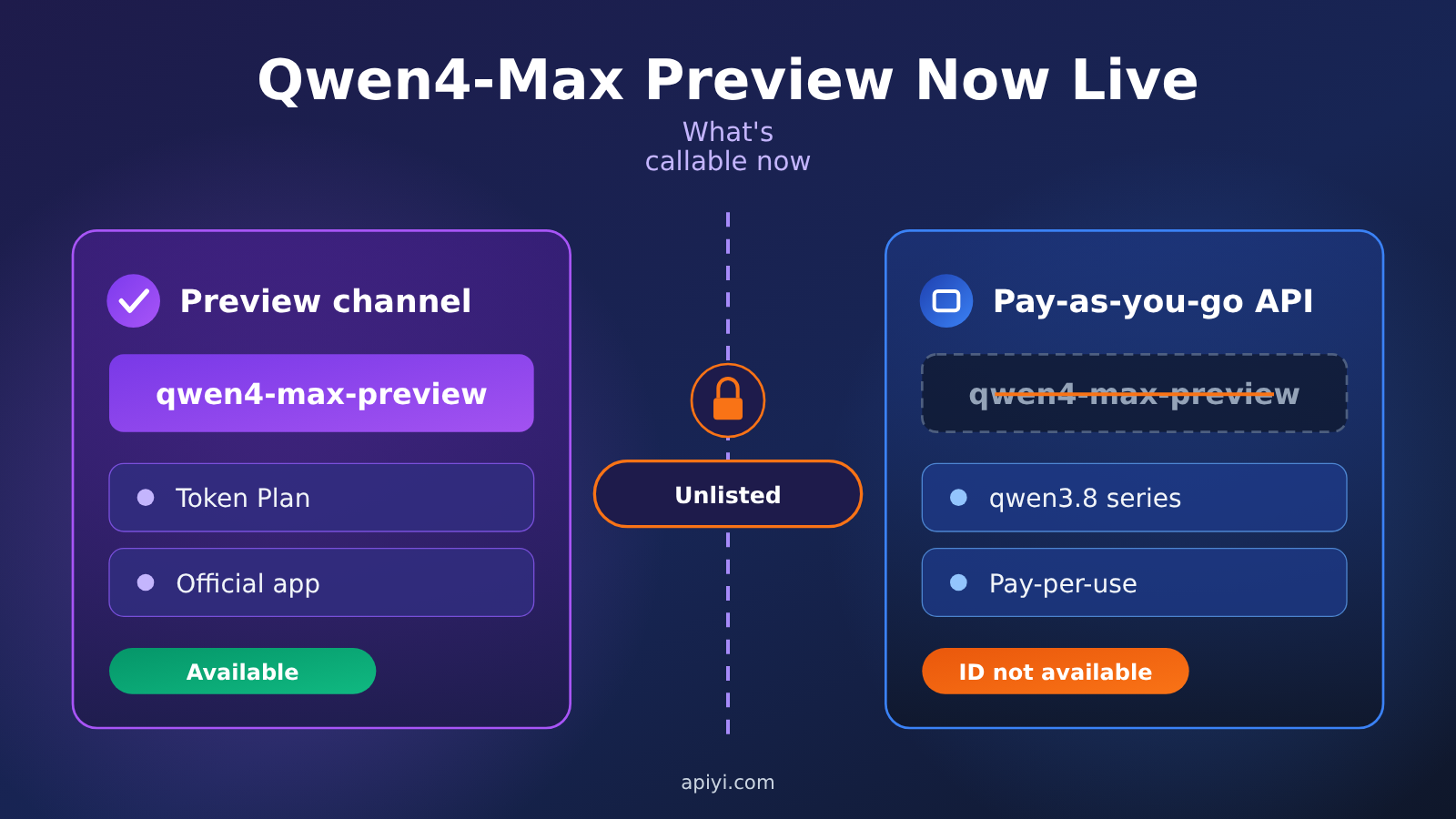
During a preview phase, a model is usually only available through the vendor’s own channels. In this case, that means Alibaba’s Token Plan and a few official apps. Pay-as-you-go API endpoints only get the model after the vendor publishes official pricing and opens up the corresponding access method. So for now, the pay-as-you-go key you have in hand can’t call qwen4-max-preview.
On 2026-11-11, APIYI re-checked its pricing endpoint and master model list against the docs, and neither one includes a qwen4 series. That’s different from what our earlier draft said (“Qwen4 hasn’t been released yet”). The preview is now open; the pay-as-you-go endpoint just doesn’t have this ID yet.
| Comparison | Qwen4-Max Preview Channels | Pay-As-You-Go API (Current) |
|---|---|---|
| Available models | qwen4-max-preview |
Latest is the qwen3.8 series |
| Access method | Alibaba Token Plan, QwenWork, Qoder, Qwen App, QwenStudio | OpenAI-compatible endpoint, one key to switch between models |
| Billing | Follows Token Plan rules | Priced by input, output, and cache reads |
| Price transparency | Pay-as-you-go unit price not announced | Price list available |
| Best for | Trying it out, exploring the capability ceiling | Production development, cost accounting, batch calls |
The Latest Qwen Available on Pay-as-You-Go: qwen3.8 Pricing and Setup
If you want to call Qwen on pay-as-you-go billing, the newest generation you can use right now is qwen3.8. qwen3.7 is still on the price list, but it’s not the current generation, so I wouldn’t pick it for new projects.
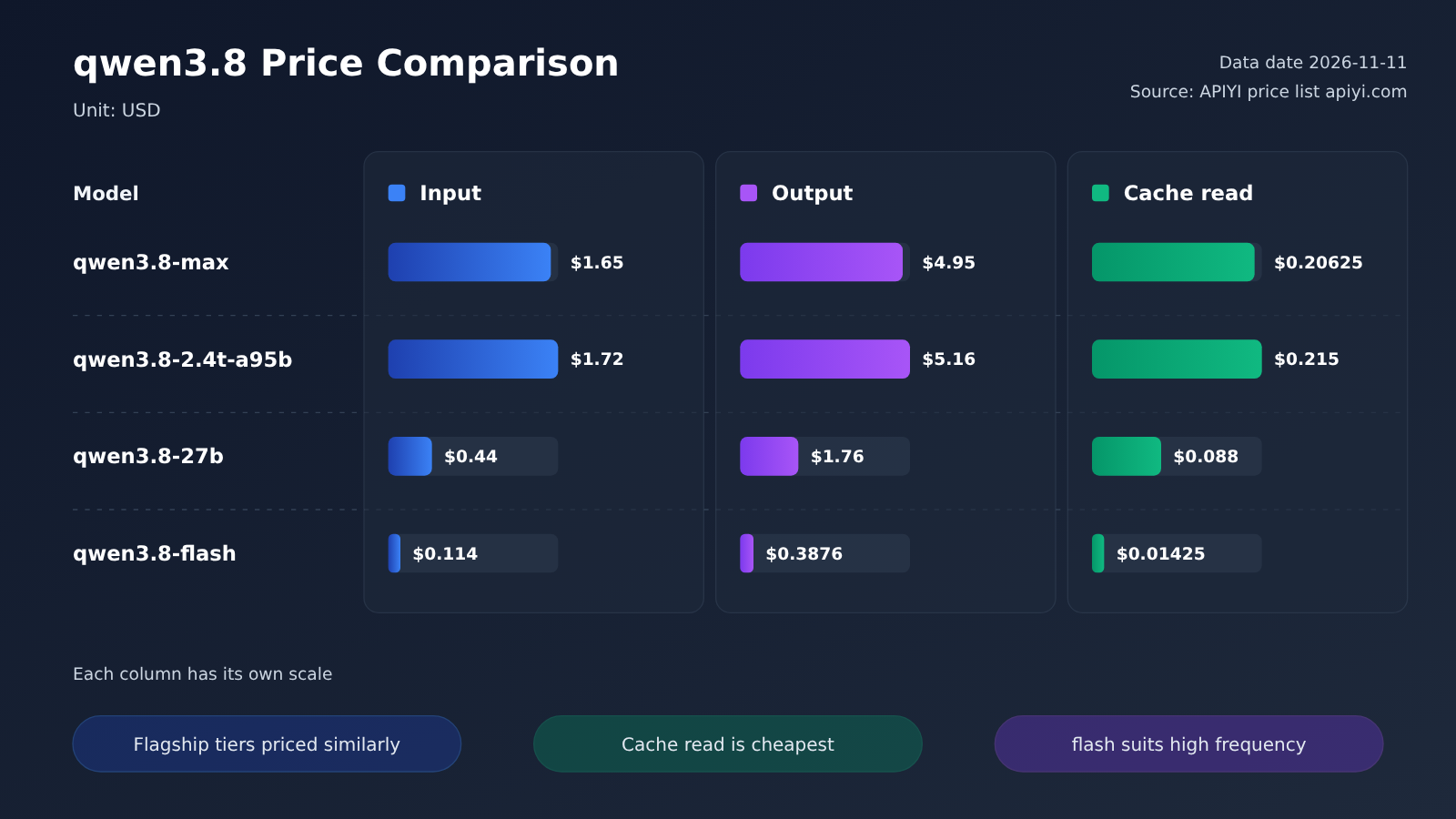
The table below shows the list prices for the qwen3.8 series from the APIYI price list as of 2026-11-11. For units, check the notes on the pricing page at docs.apiyi.com/models.
| Model ID | Input | Output | Cache Read | Suggested Use |
|---|---|---|---|---|
qwen3.8-max |
$1.65 | $4.95 | $0.20625 | Flagship tier, complex reasoning and coding |
qwen3.8-2.4t-a95b |
$1.72 | $5.16 | $0.215 | Large-parameter MoE tier |
qwen3.8-27b |
$0.44 | $1.76 | $0.088 | Mid-sized, best value |
qwen3.8-flash |
$0.114 | $0.3876 | $0.01425 | Lightweight, high-frequency and batch tasks |
Data as of: 2026-11-11.
Looking at the pricing structure, the input price of qwen3.8-flash is less than a tenth of qwen3.8-max, which makes it a good fit for high-frequency tasks like classification, extraction, and rewriting. qwen3.8-max and qwen3.8-2.4t-a95b are priced close together, so it’s worth comparing them on your actual task before you choose. Cache reads are noticeably cheaper than regular input, so if your app has a long system prompt or a lot of fixed context, caching should be one of the first things you look at.
Key Points for Pay-as-You-Go Access to qwen3.8-max
Using qwen3.8-max as an example, here’s what to confirm before you connect. The setup is the same as for any other OpenAI-compatible model:
- base_url:
https://api.apiyi.com/v1 - model parameter:
qwen3.8-max. For lightweight tasks, swap inqwen3.8-flash. - Supported endpoints: chat and messages, so both OpenAI-style and Messages-style clients work
- Available groups:
ClaudeCode,Default, andSVIP. Your key needs to belong to one of these three groups. - Room to switch later: make the model name a config option, so once Qwen4-Max goes live you can just change the config instead of the code
🚀 Quick Start: If you want to get your Qwen pipeline built before Qwen4-Max goes live, sign up at APIYI (apiyi.com) and use the free trial credits for new users to call
qwen3.8-maxandqwen3.8-flash. Compare output quality and cost across the two tiers, then decide which one to use in production.
Qwen4-Max Preview Period: Pay-As-You-Go Error Reference
The most common mistake during the preview period is plugging the preview ID straight into a pay-as-you-go request. The table below covers the typical cases. Exact error messages depend on what’s actually returned.
| What you wrote | Symptom | Cause | Suggested fix |
|---|---|---|---|
model set to qwen4-max-preview |
An error saying the model doesn’t exist or no channel is available | qwen4 isn’t in the pay-as-you-go pricing list or the master model list yet | Switch to qwen3.8-max for now and wait for the launch notice |
model set to qwen4.0-max-preview |
Same as above | That alias is just a paraphrase, and it doesn’t exist on the pay-as-you-go API either | Don’t use aliases you haven’t confirmed |
model set to something in the qwen3.7 series, assuming it’s the latest |
Calls work, but it’s not the current generation | qwen3.7 is still on the pricing list | For new projects, move to the qwen3.8 series |
| Your key’s group isn’t on the supported list | The model may be unavailable | qwen3.8-max supports the ClaudeCode, Default, and SVIP groups |
Check your group in the console and switch if needed |
| Endpoint doesn’t match the client style | Request format errors | qwen3.8-max endpoints are chat and messages |
Pick the endpoint that matches your client type |
🎯 Troubleshooting tip: When you hit a “model doesn’t exist” error, first search for the model ID in the APIYI master model list at docs.apiyi.com/models. Any model that isn’t on that list can’t be called through the pay-as-you-go API. Switching to a model that’s already listed usually fixes it.
Impact of the Qwen4-Max Preview on Developers
What This Means for Developers
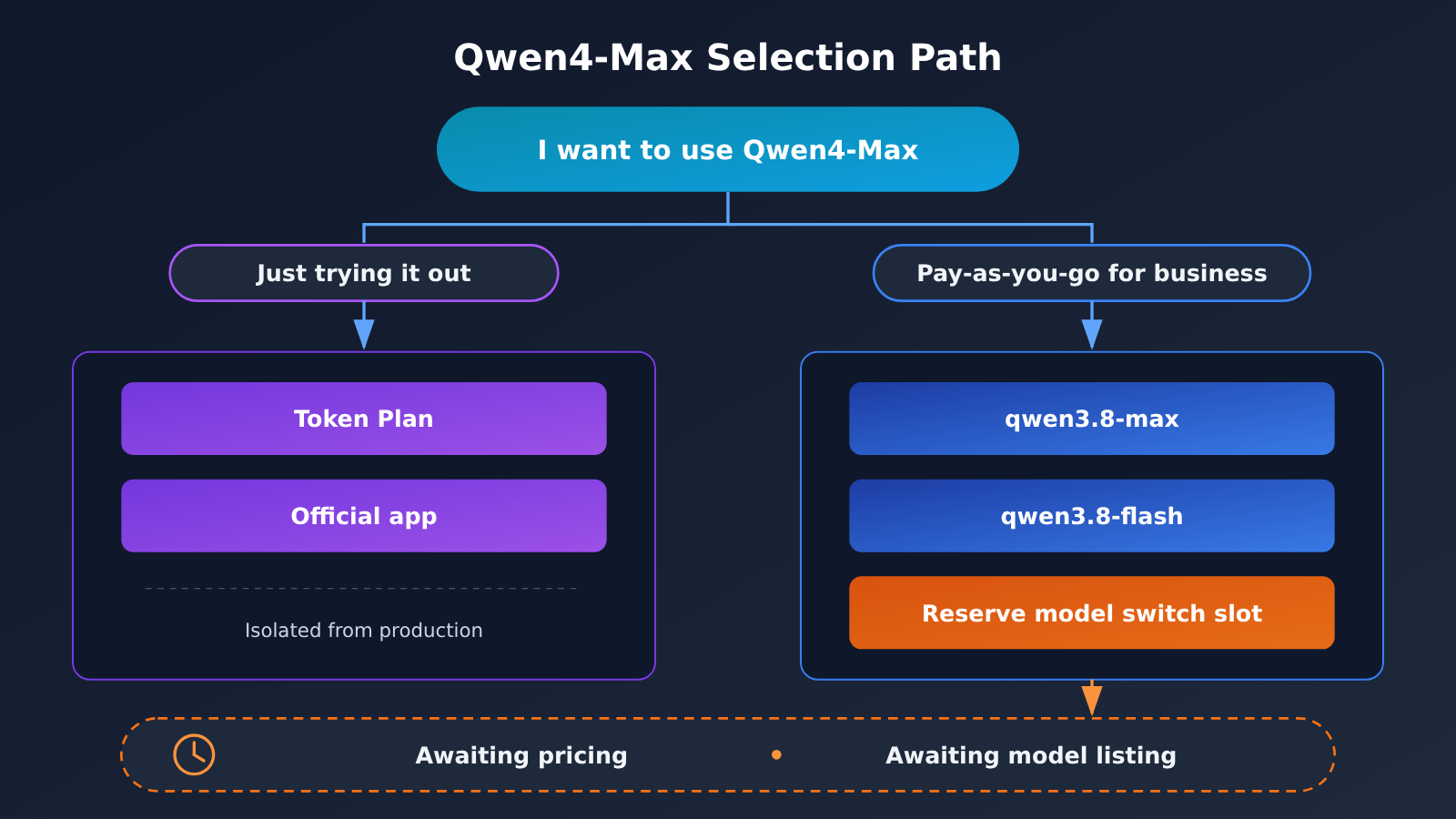
- Keep experimentation and production separate: If you want to try out Qwen4-Max, use Token Plan or an official app like QwenStudio. Keep your production workloads on qwen3.8 through the pay-as-you-go API. The two tracks won’t affect each other.
- Costs can’t be estimated yet: Pay-as-you-go pricing hasn’t been published, so any cost estimate for Qwen4-Max has nothing to stand on. For now, build your budget around qwen3.8 pricing.
- Hold onto a baseline for evaluation: Official benchmark results haven’t been released. Run your own business samples against qwen3.8 to build a baseline, then compare directly once Qwen4-Max goes live. There’s no need to lean on leaderboards of unknown origin floating around online.
- Decouple your code early: Put the model name, endpoint, and group in a config file, so you only need to change the config when the new model becomes available.
What This Means for Your Selection Timeline
The Qwen4 preview shows that Qwen has entered a new generation of iteration, but there’s still a gap between preview and pay-as-you-go availability: pricing, API access, and stability all have to come first. For pay-as-you-go users, two things are worth watching: the official announcement of pay-as-you-go pricing, and a qwen4 model showing up in the price list. Until then, qwen3.8 remains the safe choice for production.
Frequently Asked Questions (FAQ)
Q1: What’s the model ID for the Qwen4-Max preview?
It’s `qwen4-max-preview`. You may see `qwen4.0-max-preview` in secondhand docs, but it doesn’t appear in the original official post. It’s a paraphrase, so don’t use it in your code.
Q2: Can I call Qwen4-Max through the pay-as-you-go API right now?
Not yet. As of 2026-11-11, the preview is only available through Alibaba’s Token Plan and official apps such as QwenWork, Qoder, the Qwen app, and QwenStudio. When we re-tested APIYI’s docs that same day, qwen4 didn’t show up in either the pricing endpoint or the master model list.
Q3: When does the Qwen4-Max preview end?
The official post doesn’t give an end date. The 2026-11-25 24:00 (UTC+8) date circulating online comes from secondhand docs and is just hearsay. For scheduling, wait for the official announcement.
Q4: What’s the latest Qwen model I can call on a pay-as-you-go basis?
The qwen3.8 series, which includes `qwen3.8-max`, `qwen3.8-2.4t-a95b`, `qwen3.8-27b`, and `qwen3.8-flash`. qwen3.7 is still on the pricing table, but it’s no longer the current generation.
Q5: How can I get a Qwen pipeline running on the pay-as-you-go API first?
1. Sign up for an account at APIYI (apiyi.com) and claim the free test credits for new users.
2. Set base_url to `https://api.apiyi.com/v1`, and set model to `qwen3.8-max` or `qwen3.8-flash`.
3. Make sure your key’s group is one of `ClaudeCode`, `Default`, or `SVIP`.
The same key also works for OpenAI, Claude, Gemini, and other models, which makes side-by-side comparisons easy.
Q6: What’s still uncertain about Qwen4-Max?
There’s no official word on pay-as-you-go pricing, benchmark scores, open-source weights, or the preview end date. Any related numbers you see online are for reference only until the official announcement, so don’t use them directly for cost or performance estimates.
Qwen4-Max Preview Key Takeaways
- Preview is open: As of 2026-11-11, Qwen4-Max is available in preview on Alibaba’s Token Plan
- Preview ID:
qwen4-max-preview. The aliasqwen4.0-max-previewis just a paraphrase, not an official ID - Where to try it: QwenWork, Qoder, the Qwen app, and QwenStudio all offer early access
- Still unknown: Pay-as-you-go pricing, official benchmark scores, open-source weights, and the preview end date haven’t been announced
- Not callable pay-as-you-go yet: When we rechecked the pricing page and the model list in the docs on 2026-11-11, neither showed any qwen4 model
- What to use now: For pay-as-you-go Qwen calls, pick the qwen3.8 series, not qwen3.7
- Get ready early: Make
modela config setting, so once the new model goes live you only need to change one parameter
Summary
The key points on the Qwen4-Max preview:
- Preview is open: The model ID is
qwen4-max-preview, and you can only use it through Alibaba’s Token Plan and official apps. - Pay-as-you-go isn’t live yet: Pay-as-you-go pricing hasn’t been announced, and the pay-as-you-go API doesn’t have this ID, so calling it directly will return an error.
- qwen3.8 is the current choice:
qwen3.8-maxcosts $1.65 for input, $4.95 for output, and $0.20625 for cache reads (as of 2026-11-11). For lightweight tasks, you can useqwen3.8-flash.
If you just want to try it out, use the preview channels. If you need it in production, build your pipeline on qwen3.8 first. I’d recommend getting qwen3.8 running through APIYI’s OpenAI-compatible interface. Once qwen4 shows up in the model list, you’ll only need to change a single model parameter.
📚 References
- Alibaba Qwen official post: “Qwen4 is coming” — Qwen4-Max preview announcement (2026-11-11)
- Link:
x.com/Alibaba_Qwen/status/2120335993643684315 -
Notes: Confirms the preview channels and which apps let you try it early. It doesn’t include pay-as-you-go pricing, benchmark scores, open-weight availability, or an end date for the preview.
-
APIYI model and pricing docs: Full model list and pay-as-you-go pricing
- Link:
docs.apiyi.com/models - Notes: Re-checked on 2026-11-11. It covers pricing, endpoints, and group info for the qwen3.8 series, but there’s no qwen4 yet.
Author: APIYI Technical Team
Technical discussion: Once Qwen4-Max goes live on the pay-as-you-go API, we’ll update the full model list. If you run into integration questions, feel free to reach out to us on the APIYI website homepage.


